If you have a Joomla website, you already know what it means. Actually finding developers who understand Joomla is like trying to find a needle in a haystack. The whole extension ecosystem feels like it’s from 2015. And when you want to change something simple, you’re either finding your way through documentation for PHP experts or paying someone $150/hour to do what should take 5 minutes.
And here is the deal: Joomla to WordPress migration does not have to be the nightmare that people tell it is. Thousands of businesses have already converted, and most now wish they had done so earlier. This guide outlines everything you should know in order to successfully migrate from Joomla to WordPress—the actual costs, the real timeline, and mistakes you must avoid.
Why Smart Businesses Are Leaving Joomla Behind
Let’s be honest—Joomla was awesome, like in 2008. But it’s 2026 now, and the web has undergone significant changes.WordPress development servicesnot only kept up; it revolutionized everything we ever knew about a WordPress content management system. Joomla, in contrast, has been steadily losing market share for several years.
The Developer Shortage Problem
Post a job for a Joomla developer. You might receive three applications, and two have done nothing with Joomla since Joomla 2.5. Now do the same job post for WordPress. Within a week, you will have fifty qualified applications.
This is not only due to hiring costs (although Joomla developers cost on average 40-60% more than a WordPress developer). It’s about what-ifs when your one Joomla expert disappears or you need something built quickly and can’t find a body to get it done. The problem is easily solved permanently by migrating Joomla to WordPress, which grants you access to the largest developer community in the world.
Extension Hell and Security Nightmares
Did Joomla extensions ever used to be exciting for you? Now they’re mostly neglected, badly documented, or haven’t been updated in years. Finding a well-maintained extension that does precisely what you need feels as rare as winning the lottery.
There are more than 60,000 plugins listed in the WordPress repository. Need a booking system? You’ve got twenty solid options. Want to add membership features? Even the WordPress membership plugins have entire companies behind them, from dedicated support teams to updates.
And let’s talk about security. Joomla itself is not necessarily less secure than WordPress, but the extension ecosystem tells a different story. When did your Joomla extensions receive security updates for the last time? Security concerns are often cited as the main motivator for Joomla to WordPress migration—not because WordPress is necessarily more secure, but because the ecosystem is actively maintained.
The Cost Reality Check
So while your Joomla site may not have licensing fees, let’s do a little math on the true cost:
Premium extensions: $500-$2,000/year
Developer rates: $100-$200 per hour (and difficult to come by)
Hosting optimized for Joomla: $50-$200/month
Time taken for training new team members: 2-3 weeks versus 2-3 days for WordPress.
Opportunity cost: Weeks instead of days to implement features
Taking everything into account, that means on average companies spend 50-70% more to run their Joomla site compared to WordPress. That’s not even taking into account the opportunity cost of delayed features and ongoing headaches of finding qualified help.
Your content team deserves better.
Be honest: how many people on your content team can author articles in Joomla confidently without calling tech support? The backend interface hasn’t significantly evolved for years, and new editors require tons of training just to grasp categories vs. sections, menu items vs. modules, or the difference between unpublished and trashed.
WordPress? This thing requires an intern for twenty minutes. That’s not an exaggeration. Their interface is intuitive enough that (with very little training needed) most people can run out and start publishing content right away.
The Migration Process (Without the Technical Jargon)
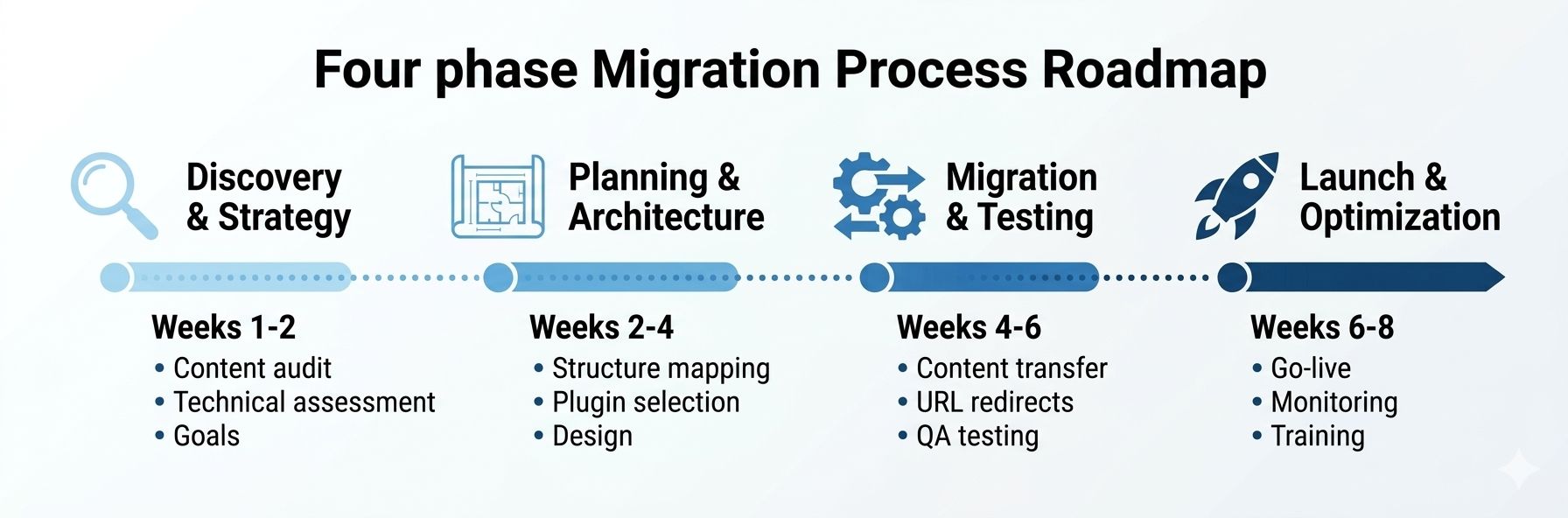
Every Joomla to WordPress migration is unique, but the process follows a proven pattern. Here’s how it actually works when done right.
Knowing exactly what you’re dealing with is necessary before moving anything. This involves comprehending your whole content ecosystem, not just counting articles. Content Inventory: What is the total number of media files, users, categories, and articles? How do you organize your content? Are there complicated relationships between articles that must be maintained? The majority of Joomla websites have changed over time, and you would be shocked at the amount of legacy content that has accumulated. Custom Functionality Audit: This is the interesting part. That personalized addition that was constructed five years ago? We must figure out its true function and locate a WordPress counterpart. It’s a popular plugin at times. Custom development is used occasionally. Sometimes you’ll find that business procedures have changed to the point where you no longer even need them.
What’s Actually Important to Keep: Not everything has to transfer over. Here’s your opportunity to do some spring cleaning. That part of the site that’s stuck since 2019? That menu hierarchy that was intuitive in the early days but stumps us all today? An effective Joomla to WordPress migration involves deliberate content pruning and restructuring.
Phase 2: Planning the WordPress Structure
Joomla’s section-category–article organization doesn’t map cleanly into WordPress’s more straightforward category-tag-post structure, and that isn’t a bad thing. WordPress takes a more clever and manageable approach to this.
Content architecture translation: Now experience plays its significant role. Some Joomla sections may become WordPress categories, and some will become custom post types. Whatever works for your content strategy. Categories could remain categories or become tags. The objective is not to replicate Joomla in WordPress—it is to create something better.
Functionality Mapping: For each of the Joomla plugins you depend on, there’s usually a better implementation available in WordPress. Contact forms? We use the five best WordPress plugins that are easier to use and better supported. Events management? In WordPress, there are advanced event plugins with much more functionality. photo galleries? Media management is much better in WordPress than it was in Joomla.
Design Decisions: Are you maintaining your existing design, revamping it, or beginning from scratch? allows most businesses to get a new look. Theme options in WordPress are way more than Joomla templates.
Phase 3: The Actual Migration
This is where the technical know-how differentiates good migrations from disasters.
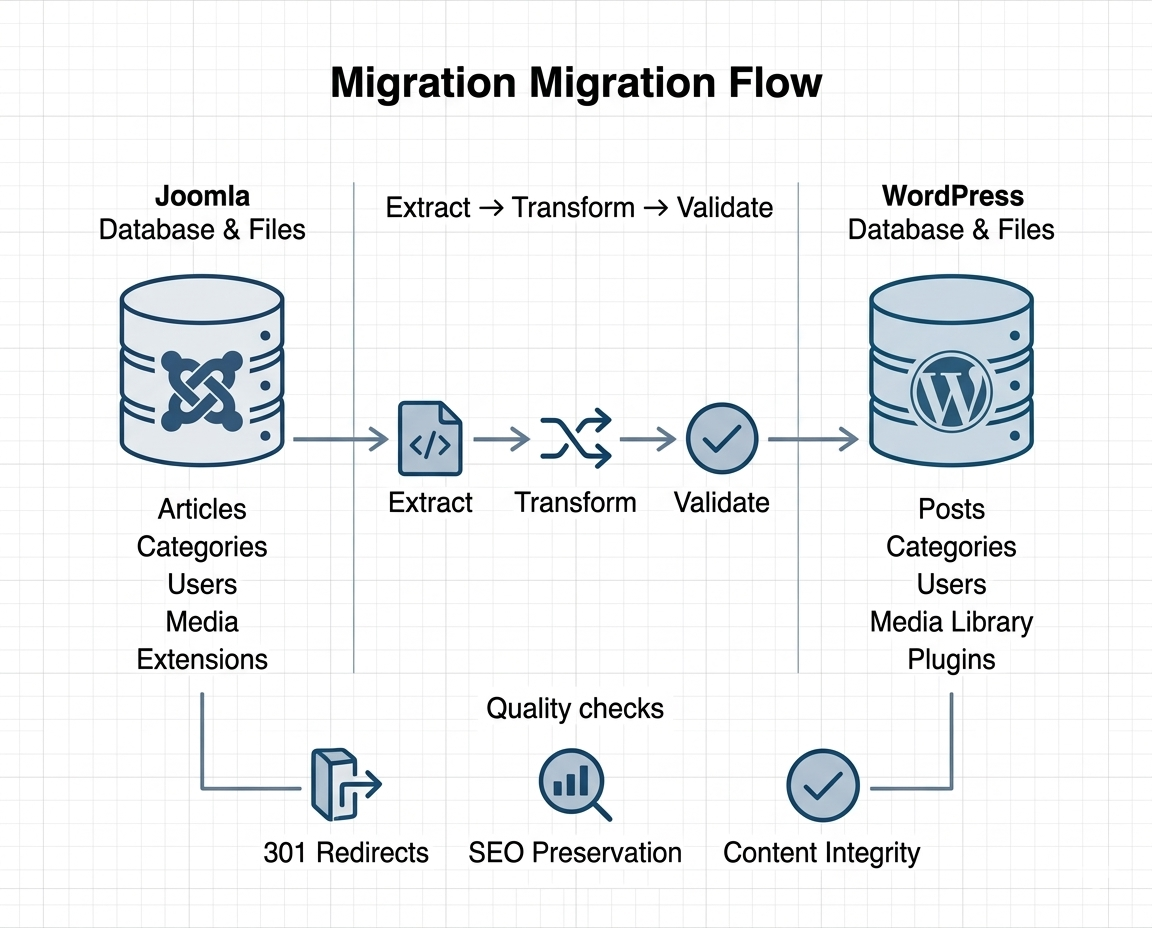
Content Migration: State-of-the-art migration tools can take care of the hard parts of moving articles, categories, users, and media. But automated tools aren’t perfect. They could overlook interconnected categories, interfere with internal links, or ignore special formatting. Professional migration has quality checks at every step to identify such issues.
URL Preservation and Redirects: Each URL on your Joomla site should properly redirect to its corresponding WordPress website. This is not optional — it’s essential for SEO. Having broken redirects lead to a downfall of your search rankings would eliminate the purpose of migration entirely.
Testing Everything: Before they go live, you are testing on a staging area. Does each form function? Are all of the pictures showing? Do user logins work properly? Does the search function properly? Are any of the links broken? It’s normal for this process to take longer than most people realize. Hurrying here leads to issues down the road.
Phase 4: Launch and Beyond
The Switchover: Once you’re sure everything is working, it’s time to flip the switch. This could involve updating DNS records (the address that points a domain name or subdomain to an IP), nameservers, redirecting your old server to the new one, etc. If you do it correctly, visitors won’t notice a thing—other than your website suddenly loading much faster and looking a lot better.
Monitoring: The first week post-launch should be closely monitored. Look for abnormal bounce rates in analytics. Check server logs for 404 pages. Set up form submissions monitoring to ensure all is delivered. Most problems that evade testing manifest immediately.
Training for the Team: Your content team is going to need a WordPress primer (which, actually, isn’t as hard as you might think). These few hours of training represent 90% of what they need to use on a daily basis. In contrast to Joomla, the documentation surrounding WordPress is deep, up-to-date, and useful.
The Challenges Nobody Warns You About (And How to Handle Them)
Complex Content Structures
Nested categories and sections can be a little funny in Joomla, particularly on older sites. If there are multiple menu layouts, articles might belong to more than one category, which is not a relationship that exists on the database.
The answer is not to try and reproduce this complexity in WordPress. It’s getting the original intention and then cleaning up. And where Joomla has made it more or less a requirement, WordPress’s more flexible structure makes it unnecessary.
Custom Extensions and Modifications
This is where from Joomla to WordPress migration starts getting complicated. If custom functionality was built five years ago, the original developers have likely moved on. You could have undocumented code, extensions with no source files, OR changes people don’t remember making.
Good migration teams take a planned approach to this. Record what each element is or does, decide if it’s still necessary, search out WordPress alternatives, and rebuild custom pieces as needed. This can lead you to find more straightforward solutions, which are built-in with WordPress.
Preserving SEO Rankings
You’ve spent years building search rankings. Losing them during migration would be devastating. This requires meticulous attention to the following:
URL mapping (every old URL redirects correctly)
Meta data transfer (titles, descriptions, keywords)
Structured data preservation
Internal linking structure
XML sitemap updates
Search console notifications
Using professional Joomla to WordPress migration services ensures that SEO authority is maintained through strategic redirects and proper content transfer.
Joomla uses user groups and access levels instead of roles and capabilities. Migrating user accounts is not just a copying of database tables – we are mapping Joomla’s permission structure to WordPress’s capabilities system.
The good news? In fact, the permission system of WordPress is much more intuitive and easier to manage. When migrating, many businesses streamline their user management, resulting in clearer roles and better security.
Professional migration typically runs $5,000 to $30,000, depending on the following:
Site complexity (number of articles, extensions, customizations)
Content volume (thousands vs. tens of thousands of pages)
Custom functionality requiring rebuild
Design refresh vs. keeping existing design
Timeline urgency (rushed projects cost more)
A typical small business site (500-1,000 articles, a few custom features) falls in the $8,000-$15,000 range. Enterprise sites with complex requirements can go higher.
The Ongoing Savings
But here’s what you save annually after migrating:
Development Costs: WordPress developers charge $75–$125/hour vs. Joomla’s $125–$200/hour. That’s 40-60% off every feature and fix.
Extension Costs: Average $50–200 for premium WordPress plugins vs. $100–400 for for extensions for Joomla. Also, there are plenty of free alternatives to WordPress that are actually quite good.
Training and Onboarding: New hires are productive in days, not weeks. That’s hundreds of hours per year saved.”
Opportunity Cost: Joomla features that took weeks to develop take days for the WordPress. The faster you iterate, the more chance you have to grow.
The ROI Timeline
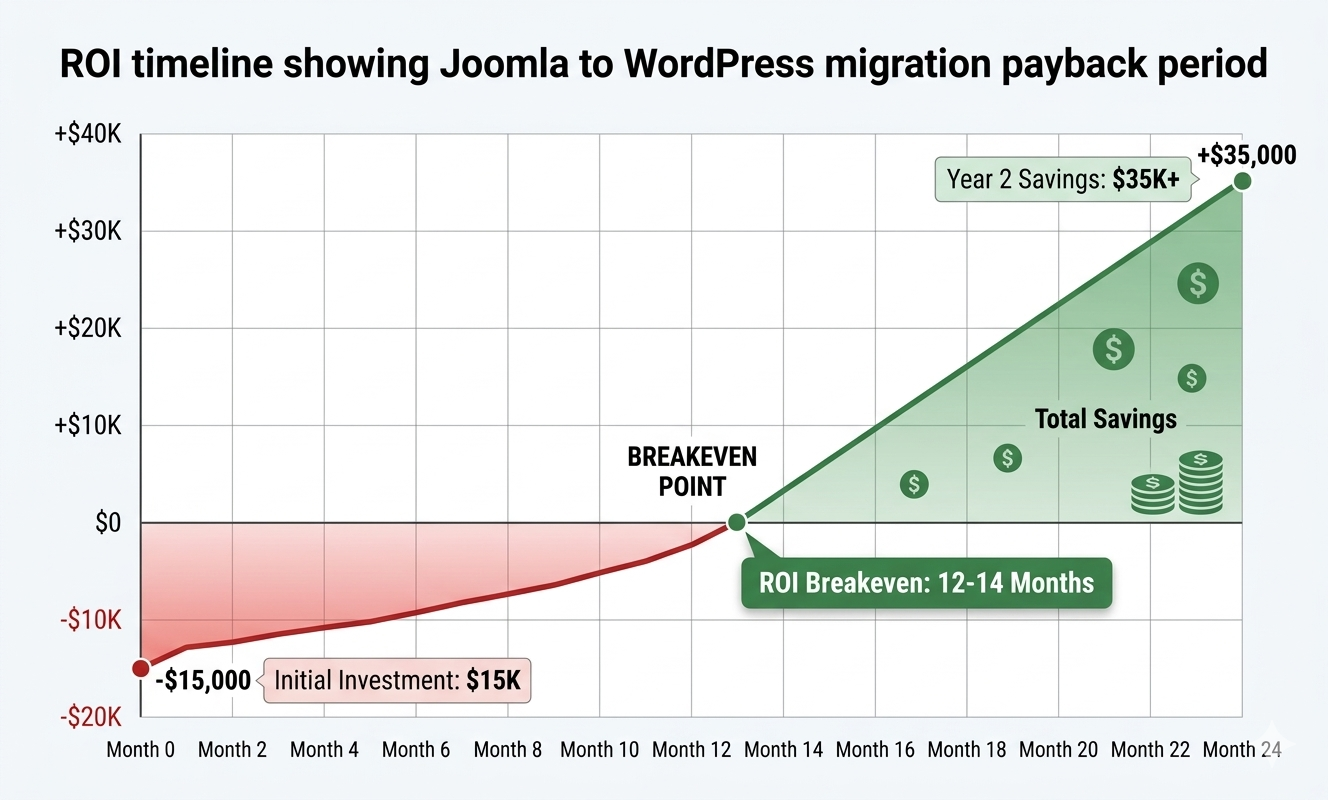
Most Joomla to WordPress migration pay for themselves in 12-18 months. Beyond then, it’s all savings and efficiency gains. For businesses cutting out $20,000+ each year on Joomla maintenance and development, the payback is in many cases around 6-9 months.
But ROI isn’t just financial. It’s about having an autonomous content team. It’s about rolling out new features quickly. It’s about being able to sleep well knowing that your site has active security support and a vibrant ecosystem.
Finding the Right Migration Partner (This Actually Matters)
Not all migration services are equal. Here’s what separates good from great:
Experience That Actually Counts
Find teams that have repeated this dozens of times. Migration is where lack of experience leads to costly mistakes—broken SEO, lost content, and missing functionality transfer. Ask specific questions: How many Joomla migrations have you done? Can you show examples? What has been the most complicated migration you’ve worked on?
The Process They Follow
The best migration partners we work with have a defined process—documented. They don’t wing it. They need to detail exactly how they will approach content transfer, URL preservation, functionality mapping, and testing. If anybody tells you that “just move everything over quickly,” run.
Post-Migration Support
The job doesn’t stop at launch. You’ll have questions. You could find edge cases that require some attention. Your team needs training. Post-launch support is equally important, not only the technical migration.
The experience reported by organizations that had done Joomla-to-WordPress migration is more or less similar.
Simplifying Content Publishing. Teams thus publish more content and need to update existing pages more often while working more independently. The gulf between “I have an idea” and “It’s live” shrinks.
Feature Development Boosted: Functionality that could take custom Joomla development time to implement may be a simple configuration of a plugin on WordPress. Things that took weeks are happening in days.
Need a developer to do a project for you? You’ll have qualified candidates immediately. Contrast that with the weeks I spent searching for Joomla expertise.
Maintenance Stress Decreases: Security updates? There’s a real, working notification system. Plugin updates? They happen smoothly. Something breaks? Help is readily available.
The difference isn’t subtle. That’s the difference between battling your CMS and it working for you.
Getting Started: Your Next Steps
If you’re serious about Joomla to WordPress migration, here’s what makes sense:
Evaluate Your Existing Setup: Create a list of everything your Joomla site does. All extensions, all custom features, and all content types. The first step in successfully managing what you have is knowing what it is.
Define Your Goals: What do you seek to accomplish? Reduced costs? Better user experience? Easier content management? More design flexibility? By using clearly defined goals, it should lead to better decisions made throughout the migration process.
Take Expert Opinion: Before making any decision, consult with migration experts. A good consultation will set out pitfalls and prospects that you haven’t considered. Many agencies will provide a free initial assessment.
Plan Your Timing: Migration isn’t a project to rush, but equally, you shouldn’t wait forever. The more time you give it, the more content is created and the harder migration becomes. If it were your business, you would know that 2-3 month timelines work very well for planning, executing, and refining.
Prepare Your Team: Give your content team a heads up. So get them excited for the improvements they’ll make. In the planning stage, their feedback ensures the new WordPress site meets their needs better than Joomla ever could.
The Bottom Line on Joomla to WordPress Migration
You were well served by Joomla, but if you’re reading this, you already know it’s time for something better. Although WordPress isn’t flawless, it is constantly evolving, has a large user base, and becomes more user-friendly each year. When managed by qualified experts, the migration process is simple, and the advantages begin right away.
Failure results in increased expenses, more difficult development, and irate content teams every month. The companies that moved two years ago are too busy reaping the benefits of quicker development, cheaper expenses, and contemporary content management to look back.
It’s not really a question of whether to move. The question is whether to move now or continue delaying it while the problems increase.
Free Migration Assessment: We will analyze your current Joomla setup and return with a comprehensive migration roadmap that contains a timeline and cost estimates.
Established Migration Methodology—We’ve successfully migrated 200+ times: we know what works.
SEO Protection: Ensure coverage to preserve search rankings through data migration and content transfer.
Comprehensive Service Methodology for Your Migration: We take care of all aspects of your migration from initial planning to post-launch support.
Team Training as Standard: We’ll ensure your team is ramped up on how to make the best use of WordPress from day one.
Most Joomla to WordPress migration projects are completed within 4-8 weeks, depending on site complexity. A small business site with 500-1,000 pages typically takes 4-6 weeks, while larger enterprise sites with custom functionality may need 8-12 weeks. This includes planning, content transfer, testing, and launch—not just the technical migration itself.
No, if done correctly. Professional Joomla to WordPress migration includes comprehensive 301 redirects mapping every Joomla URL to its WordPress equivalent, preserving all metadata, structured data, and internal links. We monitor rankings throughout the process and guarantee SEO protection. Most sites actually see ranking improvements post-migration due to WordPress's better performance.
Custom functionality gets rebuilt using WordPress plugins or custom development during Joomla-to-WordPress migration. We analyze each extension, find WordPress equivalents, and recreate custom features when needed. Often, we discover better, more maintainable solutions in WordPress that actually improve functionality. Nothing gets left behind—everything important transfers over in some form.
Typical Joomla to WordPress migration projects range from $5,000 to $30,000 depending on complexity, content volume, and custom requirements. Small business sites average $8,000-$15,000, while enterprise migrations run $20,000-$30,000+. Most businesses achieve ROI within 12-18 months through reduced development costs, cheaper hosting, and improved team productivity.
While DIY Joomla to WordPress migration is possible using automated tools, it rarely preserves SEO properly, often breaks custom functionality, and typically misses critical details like proper redirects and content relationships. Professional migration ensures zero data loss, complete SEO preservation, and smooth functionality transfer—critical factors that directly impact your business success.