


 WooCommerce Solutions
 Solutions for WordPress
Discover More Reads
Symfony vs Laravel for Enterprise Applications: Which One Fits?
Read More
Build custom when your project needs complex logic, unique features, strict security, high traffic, or deep system integrations. If plugins can’t meet those needs without hacks, custom PHP gives you more control, speed, and room to grow.
That is the short answer. This guide on custom PHP development vs. WordPress helps you decide with confidence. You will see clear warning signs, real cost trade-offs, and a simple checklist.
Get a free PHP project review →
Both options build websites. But they solve different problems.
WordPress is a ready-made content system. Custom PHP is code written around your exact needs. Here is how they compare.
| Factor | WordPress | Custom PHP |
|---|---|---|
| Launch speed | Fast, thanks to themes and plugins | Slower, built from scratch |
| Upfront cost | Lower | Higher |
| Custom features | Plugins or added code | Built to your spec |
| Performance at scale | Can slow down with many plugins | Tuned for your workload |
| Security surface | Large, due to plugins and themes | Smaller, because you control the code |
| Best for | Blogs, company sites, small shops | Portals, SaaS, marketplaces, complex apps |
Pick by need, not by trend. A simple site does not need a custom build. A complex product should not live on plugins.
WordPress is a strong tool. It earns its place for good reasons.
If you need a blog, a company site, or a small store, WordPress gets you live fast. Our guide to WordPress vs. custom development: pros and cons in 2025 covers this in more detail.
Custom PHP development means writing an app for your exact needs. Developers usually use a PHP framework such as Laravel or Symfony. A framework gives you structure, security tools, and tested code. You still get a tailored result.
You own the logic, the data model, and the user flow. You pay for no unused features. You face no plugin conflicts.
Here is what you gain:
The trade-off is cost and time. You need skilled developers and a clear plan. So custom PHP suits projects where the app is the business.
New to PHP? Start with our beginner’s guide to web development using PHP.
WordPress is not the answer to every project. Here are seven signs that it may hold you back.
Pricing rules, approval chains, and multi-step workflows strain plugins. Custom code handles them cleanly. It also keeps them easy to test.
Customer portals, booking engines, dashboards, and SaaS tools are apps, not pages. WordPress was built for content. Apps need a different base.
Ten plugins for one feature is a red flag. Each plugin adds updates, conflicts, and risk. Many teams also pay yearly license fees.
Heavy traffic exposes weak spots. With custom code, you can tune queries, caching, and servers for your exact traffic.
Finance, health, and legal projects face tight rules. A custom build lets you control access, logs, and data storage. You also avoid the risk of abandoned plugins.
ERP, CRM, payment, and API links work best with clean custom code. Plugins often cover only part of the need.
Growth brings new features and more users. A custom setup grows with you. So you avoid a costly rebuild later.
If two or three of these signs fit your project, take custom PHP seriously.
Examples make the choice easier. These are common, simple cases.
Notice the pattern. The more your site behaves like software, the more custom PHP development makes sense. The more it behaves like a magazine, the more WordPress makes sense.
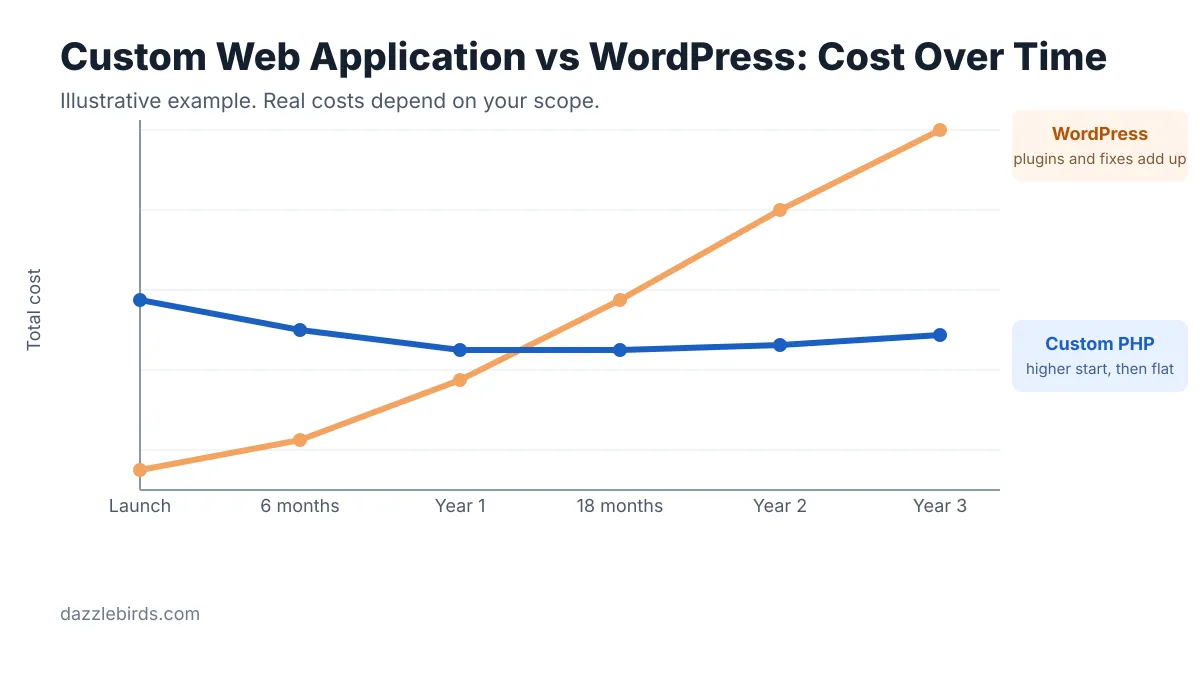
Let’s talk money. Plugins save cash early. But they can cost more later.
In short, compare the total cost over three years, not just the launch bill.
Cost is only part of the story. Speed, safety, and upkeep matter too.
Performance. A WordPress page often loads code from many plugins. Each one adds weight. Custom PHP loads only what the page needs. As a result, pages load faster and servers work less.
Security. Attackers often target popular plugins and themes. If one plugin has a flaw, your whole site can suffer. With custom code, the attack surface is smaller. You also decide how data is stored, checked, and logged.
Maintenance. WordPress needs frequent updates. Skip them, and risk grows. Custom apps need updates too. However, you control the schedule. Your team can test each change before it goes live.
Good habits matter in both cases. Use backups, tests, and code reviews. No platform stays safe without them.
Laravel is one of the most popular PHP frameworks for custom builds. Here is how it compares with WordPress.
Choosing between WordPress and Laravel comes down to one question. Is the core of your product content or logic? Content points to WordPress. Logic points to Laravel.
Not sure which framework to pick? Read our comparison of Symfony vs. Laravel [ADD LINK: post #11 URL, not found in sitemap] or see Laravel vs. CodeIgniter.
You can also mix both. Run WordPress for marketing pages and Laravel for the app. Then link them with single sign-on or an API.
Many teams delay custom work because of a few myths. Let’s clear them up.
Myth 1: Custom always costs too much. It costs more at the start. But it can save money when you stop paying for plugins and fixes.
Myth 2: Custom takes forever. Not if you plan well. You can ship a small first version in phases and grow from there.
Myth 3: You lose easy content editing. You do not have to. You can add a simple admin panel or keep WordPress for the content side.
Myth 4: WordPress cannot grow. It can, with the right setup. But once you fight the platform daily, it is time to rethink.
Do not overbuild. Stay on WordPress if these points describe you:
An honest agency will tell you this up front. At Dazzlebirds, we build WordPress and WooCommerce stores as well as custom PHP apps. So we have no reason to push one over the other.
Answer yes or no to each question.
Zero or one yes: stay with WordPress. Two or three yes: ask for a technical review. Four or more yes: choose custom PHP.
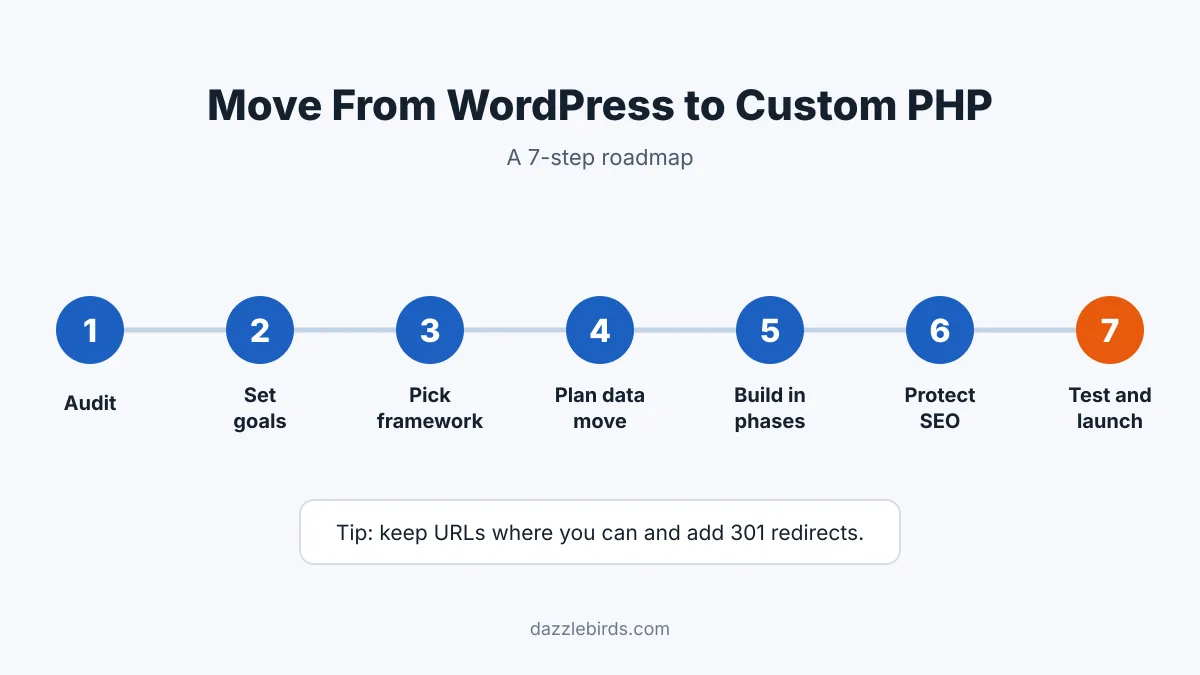
Ready to switch? Follow these steps.
Need a team to handle it? Our PHP framework development services cover planning, building, and launching.
WordPress is great for content. Custom PHP is great for complex products. The best choice depends on your logic, traffic, security needs, and growth plans.
This is not a one-way street. Many teams start on WordPress and move to custom PHP as they grow. That is a normal path. The key is to spot the signs early, before plugins and workarounds slow your team down.
So review the warning signs and run the checklist. Write down your goals first, since clear goals make every later choice easier. Then match your needs to the right tool. If you are weighing custom PHP development vs WordPress for a live project, our team can review your needs and suggest a clear path.


