There are some significant challenges in managing a Sitecore website: annual licensing costs of over $100,000, demanding infrastructure requirements, and specialized developers. With organizations looking for more adaptable and cost-efficient solutions, Sitecore-to-WordPress migration has emerged as a strategic initiative in businesses across the globe.
This guide will take you through the entire process of Sitecore to WordPress migration, from learning the advantages of both platforms all the way to executing a seamless transition without affecting your SEO and at a fraction of the cost while boosting your digital prowess.
Why Businesses Choose Sitecore to WordPress Migration
The Cost Factor
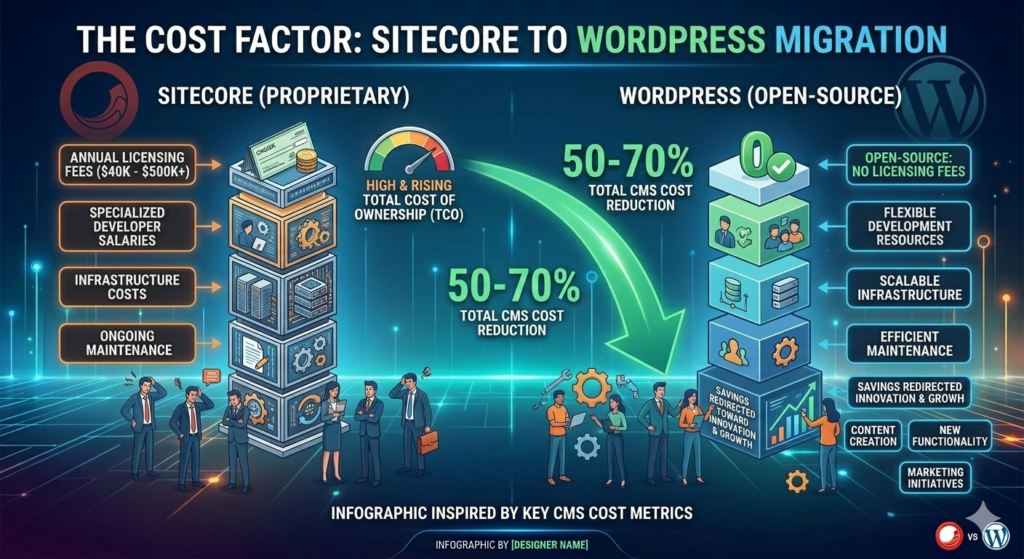
Cost reduction is the initial motivator to migrate from Sitecore to WordPress. Depending on your configuration, Sitecore licensing fees can cost anywhere from $40,000 to over $500,000 a year. Now factor in infrastructure costs, specialized developer salaries, and ongoing maintenance, and the total cost of ownership grows unmanageable for most organizations.
WordPress is open-source, virtually abolishing the licensing fees. Such organizations generally pay 50-70% less for their CMS post-migration to WordPress and invest those cost savings into innovation and growth.
Simplified Content Management
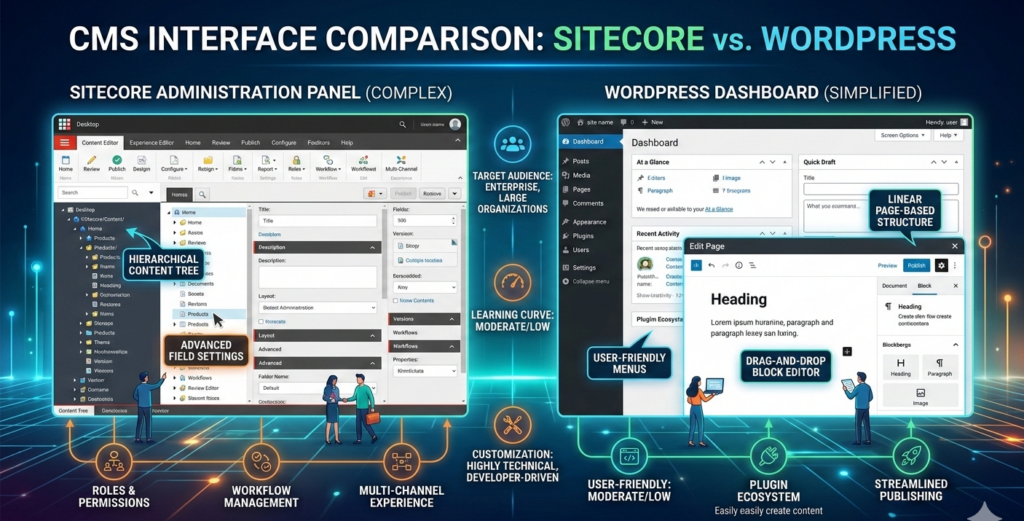
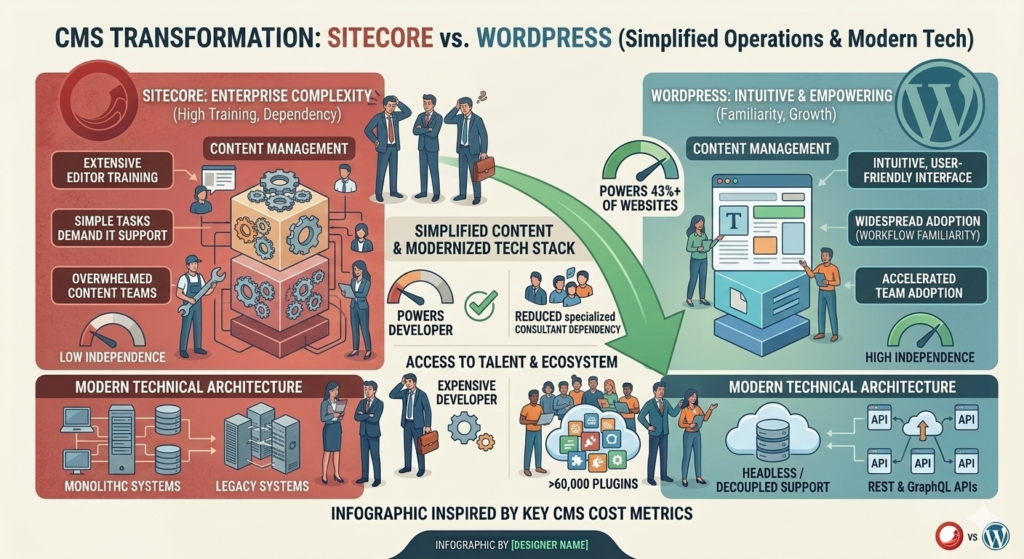
The enterprise-grade complexity of Sitecore is often too much for content teams. It requires a lot of training for editors, and IT support is required for elementary tasks. A Sitecore to WordPress migration revolutionizes content operations, offering a simple interface that enables teams to work independently.
WordPress now powers over 43% of all websites worldwide, and this popularity means that content creators are already familiar with its workflows. By virtue of this familiarity, the adoption happens fast with minimum training overhead post-Sitecore-to-WordPress migration.
Access to Talent and Ecosystem
Finding skilled Sitecore developers can be expensive and difficult. Popular WordPress — lots of developers, low-cost to build internal teams or partner with agencies. Thousands of themes and over 60,000 plugins within the WordPress ecosystem allow for cost-efficient, quick plug-and-drop development.
So when you plan your Sitecore to WordPress migration, keep in mind how this larger talent pool and ecosystem also minimizes future dependency on costly specialized consultants.
Modern Technical Architecture
A combination of its support for headless/decoupled architectures, REST API and GraphQL APIs, and integration with contemporary JavaScript frameworks, WordPress has undergone significant evolution. Businesses looking to migrate from Sitecore to WordPress can simplify and modernize their technology stack.
The Sitecore to WordPress Migration Process
Proper planning is the first step in any successful Sitecore to WordPress migration:
Content audit: This means cataloging all the content assets, custom post types, taxonomies, media libraries, and user-generated content. During your Sitecore to WordPress migration, determining how much content you have and its pyramid structure is crucial for mapping to WordPress equivalents.
Technical Assessment: Review custom Sitecore functionality, third-party integrations, personalization rules, and workflow processes. This provides a roadmap of what feature equivalents need to be created in WordPress improvements that can be made during migration.
Business Objectives Alignment: Establish success metrics, including cost savings targets, timeline assumptions, expected functionalities, and performance criteria for your Sitecore-to-WordPress migration.
Phase 2: Architecture Planning
Content Structure Mapping: The Sitecore templates need to be translated into WordPress custom post types, fields into WordPress custom fields, and taxonomies need mapping onto the WordPress categories and tags. Mapping: Mapping what content will go where is necessary to make sure your Sitecore to WordPress migration retains the relationship between all of your content, as well as its hierarchy.
Analyze application features—understand core functionality you cannot live without vs. what can be left behind or implemented in a better WordPress way (plugin / custom dev WP API vs. workflow redesign).
Integration Design — Plan for connections to CRM systems, marketing automation platforms, e-commerce solutions, and analytics tools that will still work after the Sitecore to WordPress migration.
Phase 3: Migration Execution
Set Up a Development Environment: Set up development, staging, and production environments (with version control and testing frameworks) to ensure the Sitecore to WordPress migration process is controlled.
Content Migration: Automate content transfers, ensuring all metadata, relationships, media assets, and URL structures are maintained. This technical stage of your Sitecore to WordPress migration usually includes:
Extracting content from Sitecore databases or APIs
Transforming data to WordPress-compatible formats
Validating content integrity and completeness
Handling special cases like embedded media and internal links
Implement functionality: Create or configure WordPress features to be able to accomplish site core functionalities like custom post types, advanced custom fields, user roles, and workflow processes.
Quality Assurance: Before your Sitecore to WordPress migration is completed, perform thorough tests ranging from functional validation, content verification, and performance testing to security assessment and SEO checks.
Phase 4: Launch and Optimization
Decision: Migrate Sitecore to WordPress efficiently and seamlessly with techniques such as parallel running, phased rollout, or cutover.
Post-Launch Vigilance: You can expect substantial monitoring of all performance metrics, error logs, user behavior, and any changes to your search rankings that come once the migration is live.
Continuous Optimization: Constant improvement based on practical application, such as feature enhancements, content workflow improvements, and performance tuning.
Overcoming Sitecore to WordPress Migration Challenges
Preserving Complex Content Structures
This is because Sitecore’s flexible template system does not always translate easily into WordPress’s architecture. This can be incredibly complicated, and experienced teams during a Sitecore-to-WordPress migration will implement WP’s custom post types, advanced custom fields, and WP taxonomies to achieve complex structures without compromising data integrity.
Maintaining SEO Value
SEO preservation is critical during any Sitecore-to-WordPress migration. Professional services maintain search rankings through:
Comprehensive URL mapping and 301 redirects
Preservation of metadata and structured data
Internal linking structure maintenance
XML sitemap generation
Pre- and post-migration ranking monitoring
Replacing Features for Personalization
Although Sitecore has an advanced personalization engine, WordPress provides strong alternatives with plugins like OptinMonster and If-So Dynamic Content. Your migration from Sitecore to WordPress gives you the chance to assess whether modern marketing platforms yield better results or whether custom personalization yields a return on investment.
Handling Multisite Complexity
Multiple-site organizations have additional Sitecore to WordPress migration hurdles. In a simple multisite/multilingual situation, installs with plugins that work as WPML combine the advantages of complex scenarios while keeping centralized control.
The Business Case for Sitecore to WordPress Migration
Direct Financial Impact
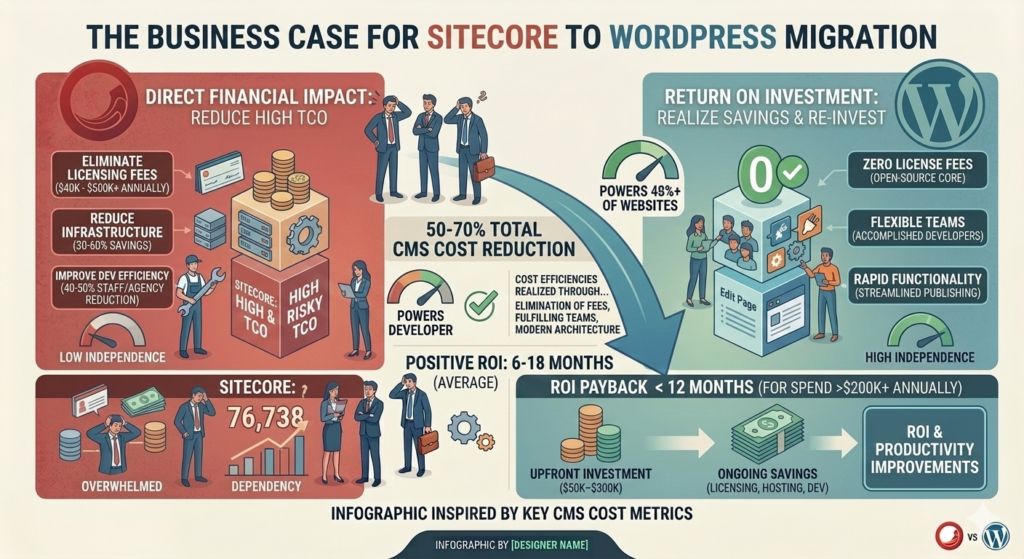
Immediate Cost Reduction: Compared to Sitecore, which requires annual licensing fees (and can range from $40,000 to $500,000+ annually), you will realize $0 in licensing fees on the first day of your migration from Sitecore to WordPress.
Reduced Infrastructure: WordPress has a lightweight infrastructure, which saves 30 – 60% in hosting costs as compared to Sitecore’s heavy server requirements.
Development Efficiency: Rapid development cycles and the availability of WordPress skills cut internal staffing costs and agency rates by an average of 40-50%.
Investment Return
After migrating from Sitecore to WordPress, the majority of businesses see a positive return on investment (ROI) within 6 to 18 months when taking into account:
Migration investment up front ($50,000–300,000, depending on complexity)
continuous cost reductions (development, hosting, and licensing)
Time-to-market reduction and increased productivity
A Sitecore to WordPress migration offers a compelling return on investment for businesses spending more than $200,000 a year on Sitecore, with payback frequently occurring in less than a year.
Advantages for Operations
A successful Sitecore to WordPress migration offers benefits beyond financial savings.
50–70% decrease in the overall cost of owning a CMS
40–60% quicker campaign deployment and content publication
30–50% decrease in IT support requests
Enhanced content team contentment
Quicker time to market for digital projects
Choosing Your Sitecore to WordPress Migration Partner
Essential Capabilities
Look for migration service providers with:
Evidence of Success: Background on past work involving Sitecore-to-WordPress migrations, including case studies and references from former clients.
Technical Depth: Solid Sitecore architecture knowledge and the capability to build a WordPress backend that extracts all content properly.
Methodology Excellence: Successful enterprise migrations have perfected end-to-end project management, risk mitigation, and change management capabilities.
Critical Questions
Here’s what to ask when you’re evaluating Sitecore to WordPress migration partners:
How many successful Sitecore to WordPress migrations?
What is your general migration timeline and approach?
How to maintain SEO equity with a zero loss of ranking?
What kind of post-launch support and optimization offerings can you cater to?
Do you have case studies on similar complexity or industry migrations?
Post-Migration Success
Immediate Priorities
Once your Sitecore to WordPress migration is done:
Team Training: Get content teams, admins, and developers up to speed in taking advantage of WordPress as soon as possible.
Documentation: Make sure to keep documentation of custom functionalities, integrations, and workflows.
Performance Tracking: Define baseline figures and relevant monitoring for the tasks with scope for optimization.
Long-Term Value Maximization
Content Strategy Evolution: The ease of managing content on WordPress allows many organizations to pursue much bigger content strategies.
Feature Expansion: Invest in feature development to drive business results; pricing savings from Sitecore can now be allocated toward advanced personalization, e-commerce, or marketing automation.
Continuous Optimization: Regular performance optimization with caching frameworks, CDNs, and code optimization ensures a speedy, consistent experience.
Getting Started with Your Sitecore to WordPress Migration
If you’re ready to explore Sitecore to WordPress migration, follow these steps:
Assessing Current State: Obtaining a detailed list of existing Sitecore usage, costs, pain points, and must-haves can help clarify migration goals.
Define success metrics: what does success look like, including time, cost, and functionality?
Evaluate Capabilities: Decide if your team is able to plan and perform the Sitecore to WordPress migration internally or if using outside expertise will lead you to success faster.
Engage Experts: Seek assistance from specialized migration service providers to comprehend the strategy, timeframe, and investment required.
Gain Priority: Create a thorough business case with current costs, migration costs, estimated reductions, and benefits.
Conclusion: Your Path to WordPress Success
Migrating from Sitecore to WordPress is a non-backtrackable decision that influences your tech stack, team processes, and digital capabilities for years. Challenges do exist, but experienced migration partners make it manageable and the benefits certain.
For many organizations facing the escalating costs and complexities of Sitecore, WordPress represents an appealing alternative that streamlines overhead while preserving—and often expanding—digital functionality. This is a task that needs careful planning, solid execution with the help of expert handovers, and dedication towards post-migration optimization.
The question is not whether your Sitecore to WordPress migration can technically happen (it can). So, does migration make sense for your organization based on its needs, growth strategy, and digital direction?
Ready to Start Your Sitecore to WordPress Migration?
We work on Sitecore to WordPress migration projects and help organizations save costs as well as improve their digital capabilities (among other things). We offer:
Detailed Roadmap: A free migration assessment is a detailed study of your environment and the feasibility of migrating.
Battle-tested Process: A proven approach honed through numerous successful enterprise migrations
Full-Service Delivery: Providing end-to-end delivery with the least operational disruption
Long-Term Collaboration: post-launch support, optimization, and strategic counsel.
Get in touch with us now for your free Sitecore to WordPress migration consultation and experience the difference in cost-effective digital operations ability.
FAQs
Organizations typically reduce CMS costs by 50-70% after migration. Sitecore licensing alone costs $40,000-$500,000+ annually, while WordPress eliminates licensing fees entirely. Infrastructure and development costs decrease significantly, with most companies achieving positive ROI within 6-18 months of completing their migration.
The timeline varies by complexity and content volume. Most migrations are complete within 3-6 months, including planning, execution, and quality assurance phases. Larger enterprises with complex customizations may require 6-12 months. Your migration partner can provide specific estimates after assessing your environment during the discovery phase.
No, if executed properly. Professional migration services preserve SEO through comprehensive URL mapping, 301 redirects, metadata preservation, and structured data maintenance. Pre and post-migration ranking monitoring confirms zero ranking loss, protecting your organic traffic and search visibility throughout the entire transition process.
Absolutely. WordPress custom post types, advanced custom fields, and custom taxonomies effectively recreate complex Sitecore templates and structures. Experienced migration teams ensure data integrity throughout the mapping process, preserving all content relationships, hierarchies, and metadata without losing critical information.
Post-launch support includes team training, performance monitoring, documentation maintenance, and ongoing optimization. We establish baseline metrics, identify improvement opportunities, and provide strategic guidance for feature development. This ensures your team maximizes WordPress benefits while maintaining site performance and reliability.