Honestly, when I initially heard that the WordPress 6.9 release was coming out during a real-life event over on stage way back in December, I figured it would be some massive marketing stunt. But now that I’ve spent the last month testing WordPress 6.9 on my own sites, I have completely reversed my thinking.
WordPress 6.9 went live on December 2, 2025, at the annual State of the Word San Francisco announcement, and it is a different kettle of fish. For WordPress 6.9, the development team took a daring stance: they decided not to include the usual default theme to concentrate instead single-mindedly on solving actual collaboration problems that have been troubling site owners for an age.
This WordPress 6.9 review is going to give you a quick rundown of what did (or didn’t) actually change in December 2025, the new WordPress 6.9 features that might (or might not) matter as we head into 2026, and whether or not this update is worth your time.
What’s New in WordPress 6.9?
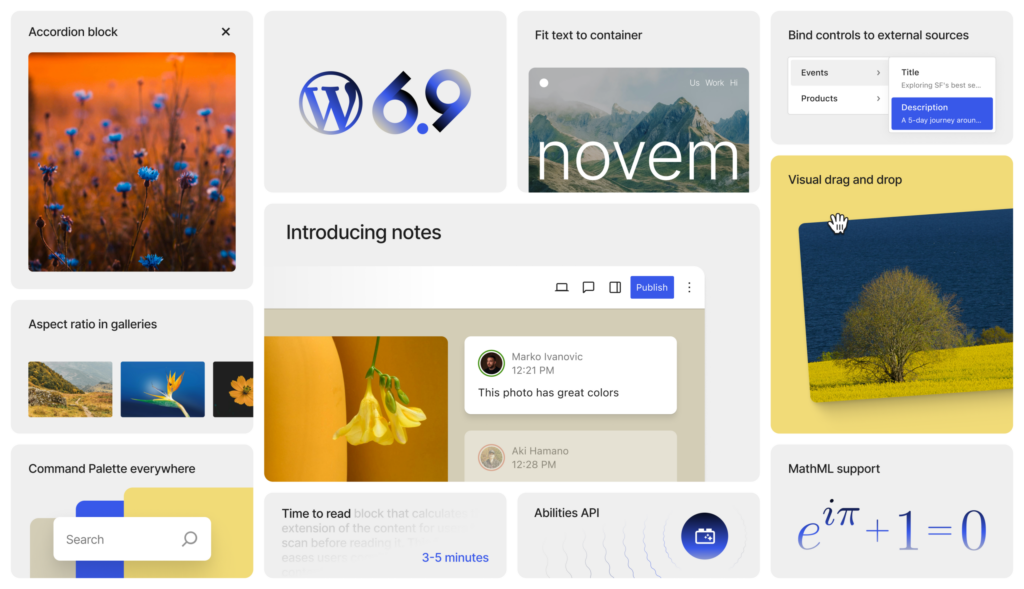
This marks the beginning of Phase 3, focusing on moving collaboration to a top priority. WordPress 6.9 focuses primarily on three key enhancements: real-time collaboration capabilities directly within the editor, performance improvements to make sites measurably faster, and additional blocks that reduce your reliance on third-party plugins.
WordPress 6.9 Features: Notes Change Everything
The notes on WordPress 6.9 are, like, everything it promised to be. I was sent a draft article by my writer a few weeks ago. Instead of the tedious rhythm of downloading a post, marking it up in Word, and emailing back something vague—I could click on the paragraph that needed reworking and leave a comment right there in WordPress 6.9.
My writer received an email alert immediately. She answered my note with a question. I answered. She made the changes. Marked it resolved. The whole conversation was being had in WordPress 6.9, and we both knew what they were talking about.
This WordPress 6.9 feature is massive for agencies. No more video calls just to point out what needs approval to clients. For editorial teams, offer accurate feedback without composing novellas in email. Now that I’ve been using this feature for a bit over a month, I just can’t see life before.
Hide/Show Toggle: Smart Content Management
This WordPress 6.9 thing deals with a problem I’ve fought for five years. For clients, I produce holiday pieces every October. Black Friday banners. Christmas promotions. New Year messaging. But to add them to live sites in October is nonsense.”
WordPress 6.9 has a nice feature: once you add any block to your editor, there will be a switch that allows the block to be hidden for visitors while being visible on the page at the same time, which is very useful! I tried this WordPress 6.9 function pretty hard in December. Added a promotional banner for a client’s homepage. Clicked “Hide on Frontend.” In my editor, I see the banner; at work, it’s clearly visible, but not to the visitors. WordPress 6.9 outright removes the code from pages when they get published, too.
When does the sale start? One click. Toggle it back on. No copying and pasting, no last-minute panic. I’m doing this with WordPress 6.9 for A/B testing layouts.
New WordPress 6.9 Features: Six Blocks That Matter
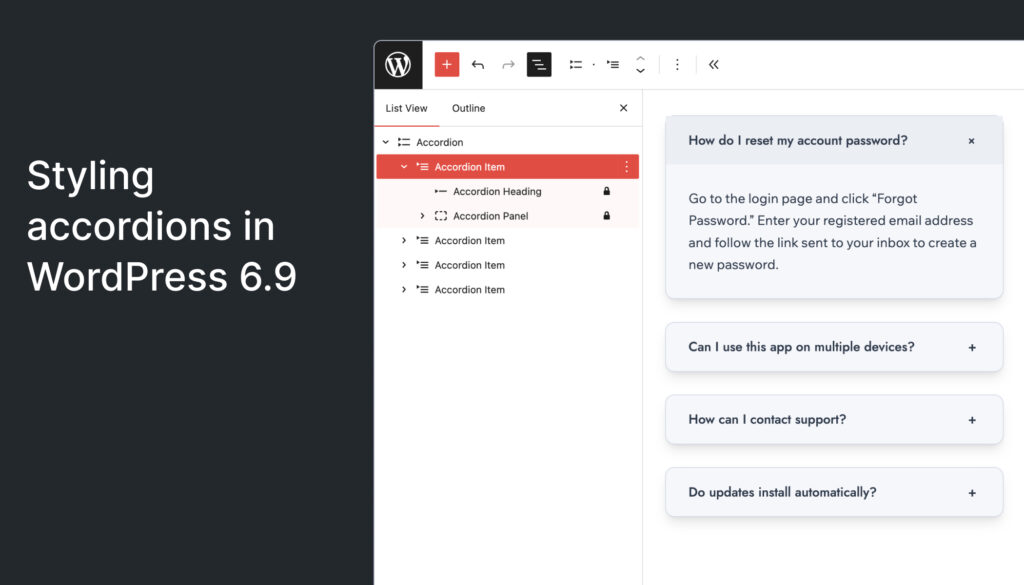
WordPress 6.9 sees the introduction of six new blocks that genuinely fill some gaps. My first experiment was with the Accordion block. I’ve been guilty of deploying third-party accordion plugins for years—paying licensing fees and updating them. The built-in WordPress 6.9 Accordion block would do all of those things that the plugin does, a whole lot faster, and it wouldn’t cost you a dime, either.
The math block surprised me. My client, who runs an educational site, has been fighting with LaTeX and formatting for months. She was genuinely thrilled when I showed her this WordPress 6.9 feature in early January. Beautiful rendering, no plugins necessary, and full equation support.
The Time-to-Read block is minor, but it affects the engagement. Readers like to have an idea whether they’re committing two minutes or twenty. I slapped it up across my main blog after the 6.9 WP update, and whoa, time on page went up a lot.
WordPress 6.9 Performance Improvements
I do speed tests with every fresh WordPress update: installing on 3 sites, running the test before and after, and then comparing numbers. It was a similar story when testing WordPress 6.9 on all three benchmark sites. After WordPress 6.9, my blog on Twenty Twenty-Five became 5.4% faster on Largest Contentful Paint. A classic-themed client site rose by 2.6%.
The secret behind the speed of WordPress 6.9 is clever optimization: it only loads CSS and JavaScript for the blocks you use on a page. WordPress 6.9 also shifts your scripts down to the footer, helping to display visible content sooner. Following this update to WordPress 6.9 and its various components, all of my WordPress Core Web Vitals readings are better than ever before.
Command Palette Expands in WordPress 6.9
This WordPress 6.9 functionality isn’t a flashy one, but I use it fifty times a day now. Press Cmd+K anywhere in WordPress 6.9, and you’ll have this universal search interface for everything. Creating a new post? Type “new post” and go. (And the Command Palette did exist prior to this, but it was only in the Site Editor.) WordPress 6.9 takes it and sticks it into every corner of your dashboard.
WordPress 6.9 Developer Features: The Abilities API
For the technically minded developers and site owners, WordPress 6.9 delivers something revolutionary through a whisper—the Abilities API. This base system may not seem thrilling at the start, but it’s getting WordPress ready for the AI era in a clever, non-invasive manner.
The Abilities API establishes a canonical registry where WordPress plugins, WordPress themes, and core can register their capabilities in machine-readable formats. It’s like WordPress is building a detailed map of everything it can do—via PHP, via WordPress REST API endpoints now, with AI integrations coming around the bend.
Why does this matter for you? WordPress 6.9 beta is laying the groundwork without foisting AI features on users who aren’t interested in them. The framework is there, paving the way for new features yet completely hidden away unless you’re working on back-end mashups. It’s strategic planning done right.
Developers are also getting updates to the Interactivity API, such as better fetch priority and improved client-side navigation. Major UI & Performance Upgrades. The Block Bindings API had a massive UI overhaul, which makes it extremely easy to connect block attributes to custom fields in no time; you could do this with a single click! WordPress 6.9 even introduces beta support for PHP 8.5, meaning your site will work in the latest server environments too.
This set of API improvements with WordPress 6.9 will provide agency owners and developers who oversee client sites with better tools for custom development: The Block Bindings UI alone is a huge timesaver for developing dynamic content sourced from custom fields or external sources. Though hardly any site owners will ever directly interact with the features introduced here, they are all getting improved performances and new powers developers can leverage to build even more performant sites on top of Websites 6.9.
Do You Really Need a WordPress 6.9 Review Upgrade?
I have now updated seven WordPress sites today so far—between clients, personal sites, and test sites. The WordPress 6.9 review update went smoothly for those with not so many customized sites. Heavy plugin sites needed more care.
Upgrade to WordPress 6.9 if you have content teams of any sort, need in-WordPress collaboration tools, want a better way to manage your content workflow, or are concerned about the speed of your site. Try WordPress 6.9 on a staging setup first if you run complex sites with custom code that doesn’t support downtime at all.
How to Update to WordPress 6.9 Safely
My routine when performing a WordPress 6.9 update is simple—create a backup before doing anything related to the WordPress 6.9 update. Update plugins and themes to the latest release. Go to Dashboard → Updates and simply click “Update.” When the WordPress 6.9 upgrade is finished, flush all caches. Do a thorough test of your site after the WordPress 6.9 upgrade.
WordPress 6.9 vs. WordPress 6.8
Here are the highlights of the differences between WordPress 6.8 and WordPress 6.9: Block-level notes for collaborating within your team, a show/hide toggle state in content management, a command palette in all parts of the dashboard, six new blocks such as Accordion and Math blocks, and improved email support. WordPress 6.9 is delivering around 2.8-5.8% performance uplifts over WordPress 6.8!
What’s Coming After WordPress 6.9
The WordPress group is talking about what is to come after 6.9, which should be numbered version 7.0 in late 2026. The biggest anticipated feature? Real-time collaboration—Google Docs-style editing in which more than one person works at the same time. They also want to take the WordPress 6.9 Notes feature outside of posts and pages.
My Recommendation on WordPress 6.9
I’ve used WordPress since 2010. What is the WordPress 6.9 review conclusion? It’s genuinely great. The notes feature of the WordPress 6.9 review finally addresses prompt-abusing gripes I’ve had over the years. With the Hide/Show toggle, you will no longer have to do hacky work. WordPress 6.9 performance makes every site faster, everywhere.
I will rush and upgrade all the sites I manage to WordPress 6.9. If you’re responsible for WordPress sites and have not yet done the 6.9 update on your own site, back up your site and do so today! The additions of the collaboration features alone make the WordPress 6.9 review update a no-brainer.
WordPress 6.9 isn’t ideal, but it’s actually good. In the world of software updates, that’s worth celebrating.
FAQs
Yes, WordPress 6.9 is safe to upgrade to for most sites in 2026, especially standard blogs, business sites, and content-driven websites. However, sites with heavy customization or complex plugin stacks should test the update on a staging environment first and ensure all plugins and themes are fully compatible.
The biggest new feature in WordPress 6.9 is block-level Notes, which allow real-time collaboration directly inside the WordPress editor. This feature lets teams leave comments, respond, and resolve feedback without relying on email or external tools, making it a game-changer for agencies and editorial teams.
Yes. WordPress 6.9 delivers noticeable performance improvements, including better handling of CSS and JavaScript so only the necessary assets load per page. Many sites see 2–6% improvements in Core Web Vitals, especially Largest Contentful Paint (LCP), which helps with both user experience and SEO.
In many cases, yes. WordPress 6.9 introduces six new blocks, including an Accordion block and a Math block, that can replace commonly used plugins. This reduces plugin bloat, lowers maintenance overhead, and improves site stability and speed.
Absolutely. WordPress 6.9 is especially valuable for agencies, freelancers, and content teams because of its collaboration tools, improved workflow management, and faster performance. Features like Notes, the Hide/Show block toggle, and the expanded Command Palette make daily site management far more efficient.