Let’s get straight to the point—your tools determine your output.
When a skilled developer uses the incorrect tools, they will miss performance benchmarks, waste time, and produce underperforming websites. With the correct tools, a skilled developer can create websites that rank, convert, and scale more quickly and intelligently.
This is not a comprehensive set of all WordPress tools ever made. There are hundreds of these lists available online, and the majority of them are pointless since they cover everything without explaining what matters and why.
This is different.
These are the tools that professional WordPress developers use on a daily basis to differentiate between a website that just exists and one that actually functions. This guide is exactly what you need, whether you’re a developer trying to improve your workflow or a business owner trying to figure out what your development team should be using.
No fluff. No filler. Just the tools that work.
Why Your WordPress Toolset Matters More Than You Think
Most companies think almost exclusively about the final site. They examine design, copy, and functionality. It’s rare that they ask what tools were used to build it, and that is a mistake.
The toolset your developer team uses will decide how clean the code is, how fast loading a site is, how easy it is to maintain, and how quickly problems get solved after launch. With a pro-level WordPress development company using standard tools integrated into their workflow from day one, you get not only a prettier product but also just a better-quality product.
The right tools for developers also translate to less late-night debugging, faster delivery timelines, and cleaner handoffs—along with a website that performs in real traffic scenarios. It means less money wasted by business owners to mend problems that never should have existed in the first place.
The tools highlighted in this guide span the entire development lifecycle—from local environment setup through deployment, performance, and security. Learn this stack and you’ll build WordPress properties that beat the competition on every metric that matters.
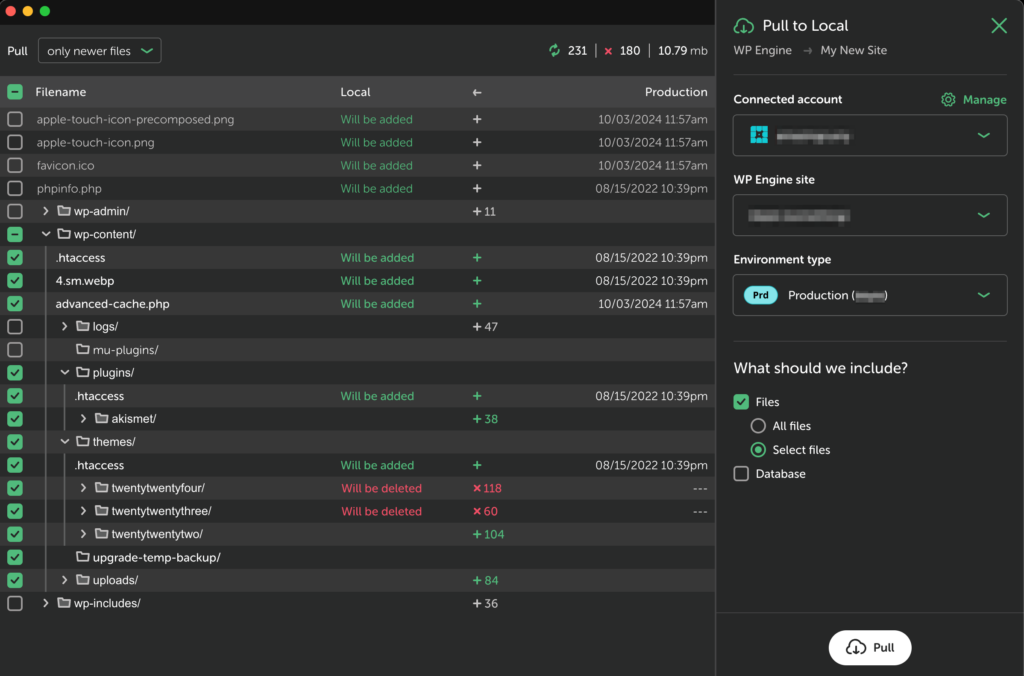
1. Local by WP Engine — Local Development Environment
Every professional WordPress project starts on a local WordPress installation. Pushing to a live site is how you get expensive and embarrassing mistakes.
Local by WP Engine is the industry-leading tool for WordPress local development. In two minutes or less, it sets up an entire, fully functional WordPress environment on your computer. No manual server configuration. No terminal commands for beginners. Just a local site ready for development — clean and fast.
What adds real usefulness to Local beyond setup speed is its one-click live link-sharing capability. Suggestion: Link a locally hosted site to review with other members of your team or clients without deploying anything. Having built-in SSL support means your local environment mirrors production conditions precisely — surface SSL-related bugs before they get to a live server.
Multi-site management through Local manages all projects neatly, and the multi-environment setup never wastes time on configuration that could cut into billable hours for any WordPress development company running multiple client projects at once.
2. Visual Studio Code — Code Editor
Visual Studio Code is more than popular — it’s dominant. According to the 2025 Stack Overflow Developer Survey of over 49,000 developers from 177 countries and territories, for the fourth consecutive year VS Code came first—used by 75.9% of developers globally. There is a reason for that.
In terms of WordPress development (specifically), VS Code with the appropriate extension stack evolved from merely a text editor to an entire WordPress development environment. All the plugins every WordPress developer must install:
PHP Intelephense—PHP intelligent code completion, error checking, and documentation on hover in the same editor. This is an essential requirement for all custom themes and plugin work.
WordPress Snippets — Ready-to-use code snippets for WordPress hooks, functions, and template tags. This can greatly speed up development when building similar WordPress-specific code patterns.
Prettier — Ensures a consistent style across your whole codebase by parsing and re-printing its own code. It’s important when you are having lots of developers working on the same project.
GitLens—Shows Git history in VS Code. See who did what, when, and why—all without switching to another Git client.
WordPress developers writing in VS Code with an appropriate stack of extensions are faster and cleaner than those who don’t.
3. WP-CLI—Command Line Interface for WordPress
If you are still controlling WordPress from the admin dashboard only, you are probably going slower than needed.
WP-CLI: The WordPress Command-Line Interface. And it enables developers to perform almost any WordPress action—updating plugins, managing users, querying the database, installing WordPress itself, importing and exporting content, and much more—without opening a browser.
When it comes to WordPress development services, taking care of numerous sites, WP-CLI is a game-changer. It can take a developer time to update plugins across twenty client sites while updating one manually via the dashboard. Instead of a GUI that obscures what is going on under the hood, you do database operations in a carefully executed controlled environment via script.
WP-CLI shines mostly through automation. Eventually, repetitive maintenance tasks turn into scheduled scripts. Deployment processes become reproducible pipelines. Manual processes that could involve human error are eliminated. Not a beginner’s tool, but any serious WordPress developer that isn’t already using WP-CLI is leaving a lot on the table in terms of efficiency.
4. Git and GitHub — Version Control
When it comes to professional WordPress development, version control is a must-have. If the development team of a project does not use Git, that is—no matter how you spin it—not a workflow preference but a dangerous risk factor.
Git keeps track of every single change made to your codebase; it provides a comprehensive history with information about who changed what and when. Errors can be undone immediately. Allows multiple developers to work on the same project without overwriting each other. Individual features are developed in separate branches and only integrated into the main codebase when they have been fully reviewed and tested.
Git adds collaboration infrastructure on top of Git. Pull requests provide an organized code review process before anything heads to production. We use issues to track bugs and feature requests in one location. Actions allow you to write automated test and deployment pipelines that run automatically every time code is pushed.
For businesses engaged in long-term development support for existing websites by hiring WordPress developers on an ad hoc basis, a Git-based workflow is essential, as it determines whether you end up with a codebase that remains manageable and auditable or one that becomes increasingly fragile and more difficult to hand off between developers.
A professional WordPress development company will implement version control as a baseline. If they don’t, then that’s a huge warning sign about the quality of their development practices.
5. Query Monitor — Performance and Debugging
There are not always obvious reasons why WordPress websites load slowly. In some cases, it’s a bloated theme. Regularly, it is a poorly performing database query executed on each page load. Sometimes it is a plugin that does unnecessary API calls. Without an appropriate diagnostic tool, identifying the true issue is simply a guessing game.
Query Monitor is the hottest WordPress debugging plugin available (and it’s free!). It lists every database query made on each page load—even which queries were slow, what caused them, and how long they took. It lays out PHP errors, hook and filter activity, HTTP API calls, and block editor performance data in a clean interface that’s laid over your actual site.
When it comes to WordPress development tools, Query Monitor is different because it runs inside the context of your actual site. It does not mimic conditions — it displays precisely what occurs on every single page under real-world conditions. For instance, a developer reviewing Query Monitor can quickly spot a badly written plugin query that is adding 400 milliseconds to the time it takes for any page to load and fix it or replace the offending plugin altogether.
Performance directly impacts SEO rankings. Google has confirmed that Core Web Vitals are ranking signals, and page-load time does impact both rankings and conversion rates. Query Monitor provides the visibility developers need to get performance right instead of assuming it.
6. Advanced Custom Fields — Content Architecture
For simple use cases, WordPress’s default content model — posts, pages, and basic metadata — is sufficient. When a business grows beyond that point and needs structured content, Advanced Custom Fields becomes a must-have.
ACF enables developers to create field groups that can be linked with any content type in WordPress. Product specifications. Profiles for team members with credentials & locations and social links. Well-organized service pages with pricing tables and lists of features. Case studies with client information, outcome metrics, and related work. The same content models as above can be built cleanly in WordPress using ACF without writing a custom database schema from scratch.
The PRO version features repeater fields, flexible content layouts, gallery fields, and relationship fields, which allow for genuinely complex content architecture. Using custom post types, paired with ACF, allows WordPress to be a full-fledged content management system rather than just a blogging platform on the enterprise scale.
It’s also one of the reasons that so few clients realize why professional WordPress development services can do a lot to satisfy content needs that they might think require a custom CMS. ACF bridges that gap; a fraction of the cost in both development time and effort.
7. WP Rocket — Performance Optimisation
A performance optimizer is a must-have tool for every WordPress developer in their stack. WP Rocket is the most all-around and developer-friendly option out there.
WP Rocket combines caching, file minification, lazy loading, database optimisation, CDN integration and preloading in one plugin with a small footprint that has an elegant and well-documented interface. For developers, it is easy enough to configure and an active team maintains it’s compatibility with other major plugins.
The difference between WP Rocket and free options is the reliability of results. After correct configuration of WP Rocket, page load times are measurably reduced on almost all WordPress sites. Core Web Vitals scores improve. PageSpeed Insights scores from Google trends the correct way.
If you’re a business evaluating WordPress development tools your team should be using, WP Rocket ranks at the top of the performance category. A site that loads in less than four seconds converts at a 50% better rate than a site that takes over four seconds to load. And the gap in that performance means direct revenue impact — and WP Rocket is one of the most reliable methods to close it.
8. Figma — Design to Development Handoff
Projects typically fail in the space between design and development. Files that developers are unable to correctly implement are handed over by designers. Design choices are interpreted differently by developers than intended. No one is completely certain why the final website differs from what the client approved.
The majority of that friction is removed by Figma. It’s a collaborative design tool that lets developers and designers work on the same file at the same time. Without requiring the designer to manually record each measurement, developers can examine precise spacing values, font sizes, color codes, and component specifications straight from the design file.
Where WordPress development services are performed by teams, not simply a single developer, Figma works as the communication layer that’s designed to retain the intention of the design throughout implementation. Due to their component nature, Figma design libraries map nicely to reusable WordPress block patterns and template parts. Figma-built design systems convert directly for consistent, maintainable WordPress themes.
When your WordPress developers are using Figma as part of their workflow, the design-to-development handoff is a structured process, not a game of series of interpreters. What is shown in the browser matches what was approved for development in a design review. These alignments save a lot of revision time and bolster the relationship with the client.
Building the Right Stack for Your Project
The tools included in this guide are not recommendations—they are the core of professional WordPress development. For your environment setup, use Local by WP Engine VS Code for coding. WP-CLI for management efficiency. Git for version control. Query Monitor for performance diagnostics. ACF for content architecture. WP Rocket for optimisation. Figma for design handoff.
Every single tool in this stack has its own principle. Collectively they form a development workflow that creates fast, maintainable, SEO-ready, and future-proof WordPress websites.
For business owners, knowing this toolset allows you to ask better questions when considering agencies and freelancers. A professional WordPress development company should know exactly what tools they use and why—and the answer should look something like you just read.
This stack is the baseline of professional practice in 2026, at least for developers. If there are any tools in this list that you’re not yet using, implementing even one or two will have a palpable impact on the quality of your output and how quickly you can produce it.
The correct tools do not supplant skill. But they amplify it — and in a competitive marketplace, that amplification is the difference between good work and great work.
At DazzleBirds, we design our WordPress development tools, processes, and our team around one thing: performance. So whether you need a complete website build, a front-end performance audit, or just someone to help with ongoing development—we come equipped with the right tools and expertise for every project.
Explore our WordPress Development Services and see how we build WordPress websites that rank higher, load faster, and convert better.
FAQs
For beginners, the most essential WordPress development tools are Local by WP Engine for setting up a local environment, Visual Studio Code for writing clean code, and Query Monitor for debugging. These three tools cover environment setup, coding, and performance diagnostics effectively for any skill level.
Not every project requires every tool. However, professional WordPress development services use this full stack because each tool solves a specific problem. Skipping tools like version control or performance monitoring creates risks that become costly to fix after launch when real traffic arrives.
The right WordPress development tools directly impact how clean, fast, and secure your final website is. Tools like WP Rocket improve load times. Query Monitor identifies slow database queries. Together they help any WordPress development company deliver websites that meet Google Core Web Vitals standards and rank competitively.
Yes. When you hire WordPress developers, asking about their toolset reveals their professionalism and workflow standards. Developers using industry-standard tools like Git, WP-CLI, and Local by WP Engine will deliver cleaner code, faster timelines, and more maintainable websites than those relying on outdated or ad-hoc workflows.
For most business websites with structured content beyond basic pages and posts, ACF is essential. Professional WordPress development services use ACF to build content models that would otherwise require a custom CMS—at a fraction of the cost and development time, without sacrificing flexibility or scalability.