The thing about running several WordPress websites is that none are simple to manage. Five locations? Controllable. Twenty locations? At that point, you become aware that you’re spending more time clicking “update” buttons than managing your company.
You already understand the pain if you’re currently managing several WordPress installations for various locations, brands, departments, or clients. After an update, site three breaks down, but site seven functions properly. That crucial security update? It must be manually deployed twenty times. Plugins that are flawless on one website can cause problems on another. And for some reason, your entire week is spent on routine upkeep rather than growth-oriented projects.
Why Smart Businesses Are Ditching the Multi-Site Chaos
Let’s paint the real picture. You manage fifteen WordPress sites. A major security update arrives on Tuesday morning. Here’s what happens next:
You log into site one. Update WordPress core. Test everything. Looks good. Move to site two. Update. Test. Refresh the cache. Check forms. All working. Site three? The update immediately breaks the contact form. Now you’re troubleshooting. An hour later you’ve solved it. Onto site four…
It’s Thursday afternoon, and you’ve updated twelve of the fifteen sites. Sites thirteen through fifteen? They’ll just have to wait a week, because you’ve got real work to do. Except now those three sites are sitting, along with security vulnerabilities. And the plugin that solved the contact form problem on site three? It collides with something on site eight, which you don’t find out until somebody complains.
This is a daily struggle for many businesses with multiple WordPress installations without proper multisite management. It’s grueling, dangerous, and entirely avoidable.
What Multisite Actually Does (In Plain English)
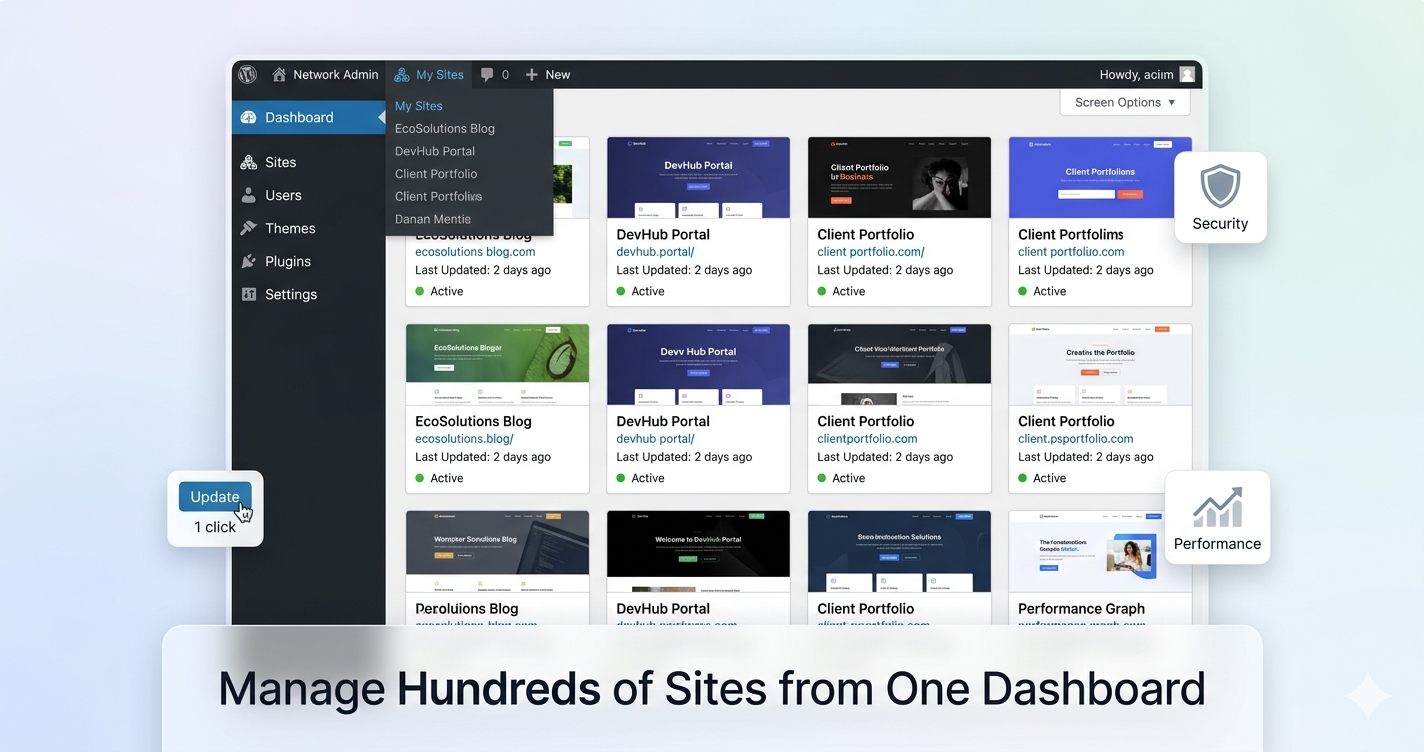
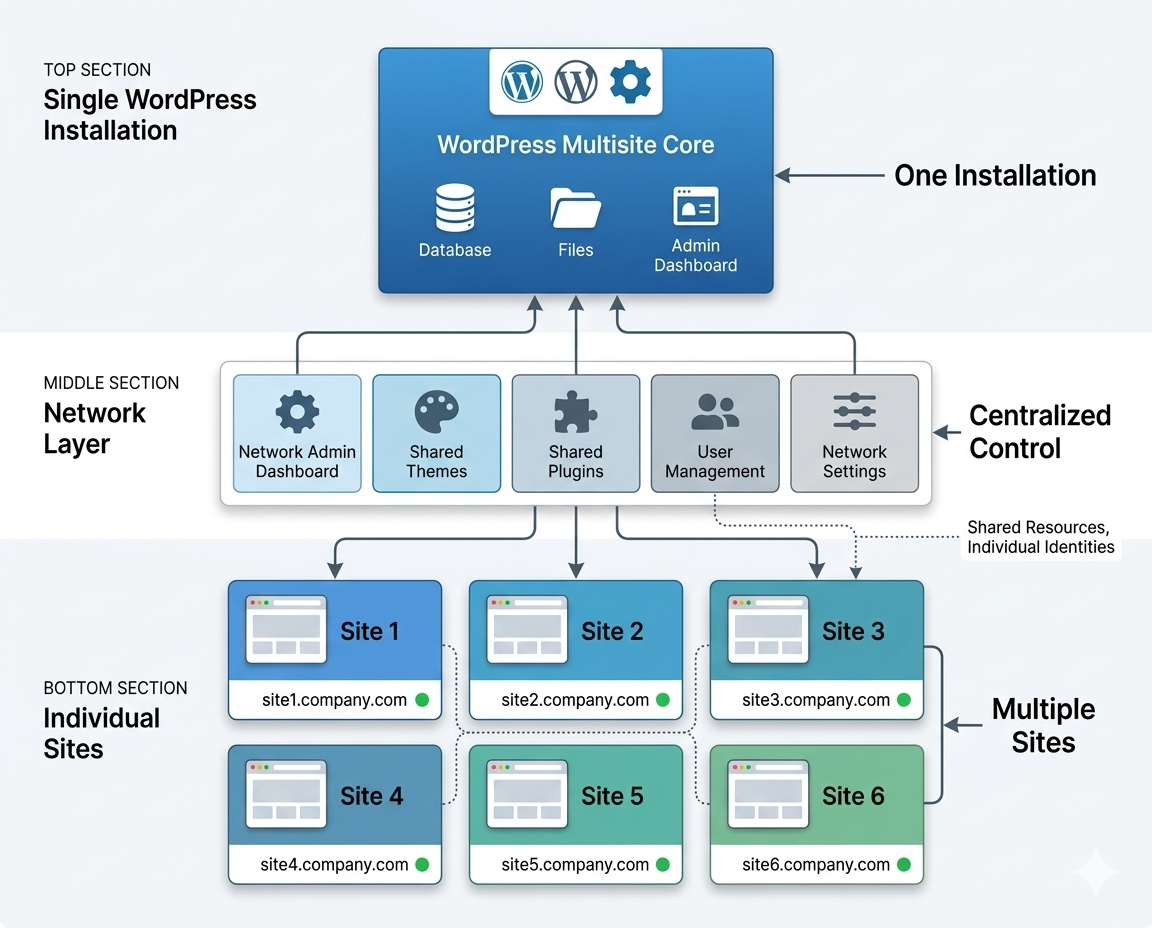
WordPress Multisite Preparation Guide connects a number of separate WordPress sites into one network that can be managed from a single dashboard. Instead of fifteen separate installations, you have one WordPress supporting fifteen sites.
It’s like this: imagine you have fifteen email accounts, and you check your email separately for each account. Multisite is similar to all these emails in a single inbox with categorized folders. Same content, massively better management.
One admin login controls everything. These updates distribute network-wide with one click. Plugins and themes are global across sites. User management happens centrally. The time savings alone typically makes professional WordPress multisite management services pay for itself within the first month.
What 99% of prospective users fail to realize, however, is that setting up multisites properly is not only its own specialized form of technical expertise, but it also needs its own infrastructure. Do it wrong, and now you’ve made a more complicated nightmare for yourself. This is precisely where professional multisite services pay for themselves.
The Hidden Costs Everyone Ignores
Until someone does the math, few businesses are aware of how much their DIY multi-site management truly costs. Then it’s shocking.
Time Sink: Updating ten sites manually costs about 3-4 hours a month. That’s literally a full work week, 36-48 hours per year—merely clicking update buttons and hoping that nothing breaks. Multiply that by fifty sites, and you’re talking months of time lost to maintenance.
The Error Tax: Heavy human errors. A misconfigured plugin across most of your network just knocked multiple sites offline at once. Total loss per hour of downtime for the average small business is over $8,000. For enterprise? Multiply that by ten.
Opportunity Cost (The Big One): When your team spends an hour updating sites, that’s an hour not spent creating content, engaging customers, or growing revenue. That’s the real killer. It’s professional multisite management that liberates your team to deliver real momentum to the business.
When Multisite Makes Perfect Sense
In all honesty, not all multi-site scenarios require WordPress Multisite. However, in some situations, it is obvious.
Multi-Location Businesses: Franchises, retail chains, restaurant groups—any business you have in more than one place. Same brand, different local content, central management. Perfect fit.
Colleges and schools: department sites, student associations, faculty pages, and admin portals. Centralized control with departmental freedom. Schools were among the first multisite users, and for good reason.
Publishers & Media Companies: News organizations with multiple publications, magazine groups, and content networks. Shared infrastructure, personal identities, centralized publishing control.
Agencies Running Client Sites: This is a tough one—multisite isn’t the right solution for all agencies. But for some models, white-label SaaS or standardized client solutions especially, it’s a game-changer.
Enterprise Departments: Big companies with sites for various departments, products, or initiatives. Keeping brands unified without sacrificing division or individualized adjustment.
If you manage three or more sites that share functionality, users, and/or branding, a multisite likely makes financial sense. The question is whether you manage it with your own internal team or some outside experts.
What You Actually Get with Professional Multisite Services
Network Setup That Doesn’t Come Back to Haunt You
The foundation you build is far more important than most people think. In the years to come, shortcuts taken during initial setup cause problems that compound.
Domain Structure Decisions: You have three overall options to choose from—subdomains (blog1.company.com), subdirectories (company.com/blog1), or domain mapping (totally different domains). Each has different implications for SEO, SSL certificate management, and user experience. Professional multisite management assesses your specific situation and implements the structure that makes sense for your goals, not merely what is easiest.
Database Architecture: Multisite uses the same database tables but with site-specific prefixes. Get this wrong and you’ll run into performance walls as your application grows. The right setup involves smart indexing and query optimization, as well as building in for anticipated growth while you still can.
Server Requirements: A multisite has different server requirements than single WordPress websites. It’s all about network-level thinking—memory allocation, PHP configurations, database connections, and caching strategies. Get this wrong, and you’ll spend the rest of your life hunting performance problems.
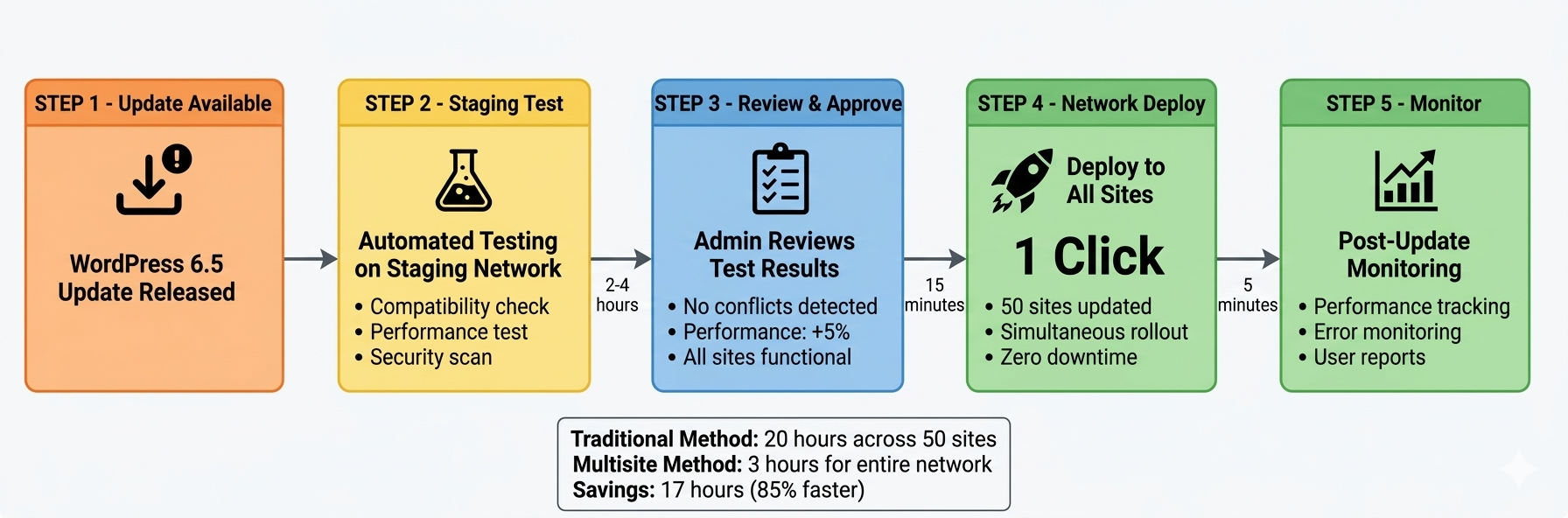
Network-wide WordPress Updates: New versions of WordPress do not go live until they are staged and tested. If there is a problem, it is caught before going to production. And if problems do bubble up, rollback is instantaneous, not leaving half your network patched and the other half open for business.
Plugin Strategy: Some plugins are activated at the network level. Others work per-site. If one update breaks functionality across twenty sites all at the same time, that dream makes for a panic moment before deployment; testing compatibility beforehand and preventing it in the first place is far preferable. License management is also done centrally — you don’t have to track half a dozen individual activation keys.
Theme Control: Activate themes network-wide for consistency or per-site flexibility. Professional multisite services create optionality without disorder. Establish brand standards but allow the customization that is needed.
Automated Testing Before Deployment: Manual testing of updates across several locations can take hours. Automation runs hundreds of scenarios in minutes and flags conflicts before they ever become an emergency.
Security That Covers the Whole Network
One security breach shouldn’t compromise your entire operation.
Network-Level Security: Firewall rules, malware scanning, brute force protection, and intrusion detection are applied at the network level, providing automatic security for all sites. Even if you launch a new site, security configurations are instant.
Site Isolation Strategies − Businesses share infrastructure, but secured network management prevents the breached site from affecting any other site. Intelligent file permissions, database access controls, and containerization mitigate potential damage.
Proactive Vulnerability Scanning — Regular security audits performed throughout all network sites help identify issues ahead of hackers. Instead, patch management occurs proactively rather than reactively after a breach.
Backup and Recovery Systems: Network-wide backup strategies secure all of the locations. Restoration by individual sites allows you to restore specific sites that do not impact the full network. This is when most businesses don’t realize how vital it is until they need it.
Performance Optimization at Scale
Multisite networks need different optimization than individual sites.
Intelligent Caching: Object caching, page caching, and database query caching—network-optimized and configured. Instead of needing to be configured on a per-site basis, optimizations apply globally.
CDN Integration: Network-level content delivery networks configured for your cloud provider guarantee worldwide performance. Just add sites, and they are automatically CDN accelerated without further configuration.
Database Optimization: Shared tables require frequent optimization. Query performance monitoring helps detect slow queries before they become problems. You scale before it hurts your performance.
Resource Management: No one site should take server resources. One site going berserk shouldn’t knock others offline. Intelligent resource allocation keeps things humming.
How Professional Multisite Management Actually Works
Current State Documentation: All sites are documented—purpose, traffic patterns, custom functionality, and odd behavior that was developed over time. Most businesses find they’re running features they didn’t remember and don’t really need anymore.
Deep-dive into the requirements: How much control do individual site admins need? What must stay centralized? What customization does one really need, versus what habit? These answers dictate every decision made at the architecture level.
Infrastructure Design: Establish hosting requirements, backup procedures, staging environments, and scaling plans. Plan for where you’re going to be in two years, rather than just where today’s pain ends.
Phase 2: Building It Right
This is the point where know-how differentiates between successful results and costly catastrophes.
Production: Plugin primary network implementation Small choices here have big consequences later in domain structures, database schemas, and file structures. When shortcuts are taken during setup, they become technical debt, and fixing them later is painful.
Migration Strategy: Sequence is everything if you are bringing existing sites into the network. Which sites migrate first? Hot or phased rollout? Run in parallel while you test? Immediate cutover? Bad decisions here add unnecessary risk.
Theme and Plugin Settings: Determine what enables network-wide or site-by-site. That’s why you have to set sensible network defaults while allowing the appropriate degree of flexibility. Get this wrong and you’re either overly restrictive or too chaotic.
Step 3: Operating Mode (Value That Commonly Lies)
Setup is just the beginning. This is also where we see ongoing professional management when businesses are achieving continual return on investment (ROI).
Preventative Maintenance: Weekly security monitoring, monthly performance reviews, and quarterly disaster restoration checkups. It’s better to find and rectify problems before they affect users than it is to be an ambulance chaser.
Safe Deployment of Updates: WordPress releases, plugin updates, or security patches—everything goes through proper testing and then is safely deployed across graphs. No more manual site-by-site work. Gone are the days of hoping one update or another won’t break anything.
Expert Diagnostic Skills: Once issues arise, each gets identified with speed — network-layer problems versus site-specific ones versus external factors. Resolving Issues and Less Downtime with Multisite Expertise
Scalability: Adding sites means professional network management makes sure your architecture scales without a hitch. However, the performance does not decay over time.
The Challenges Nobody Warns You About
WordPress Multisite Documentation allows multiple websites to run from a single WordPress installation and share themes, plugins, and users.
The Super Admin Dilemma With WordPress Multisite comes “Super Admin” access—basically god mode across your site network. This creates real problems:
Enhanced Security Threat: One breached super admin account can give access to hundreds of sites. Two-factor authentication, IP restrictions, and complete activity logs for all super admin access are provided by professional multisite services.
Reality check for the knowledge gap: Super admin is supposed to know everything about WordPress (the perfect person), and they should have specific expertise in multisite. Finding qualified people? Challenging. Retaining them? Expensive. Relying on one person? Risky.
Single Point of Failure: Your only multisite expert leaves the company, and now you’re stranded. With no single point of failure, professional services offer teams that support you.
Plugin Compatibility Headaches
Some WordPress plugins do not play nicely with multisite. Some break completely. Others create performance nightmares. A few introduce security holes.
Network Activation Confusion: Some best free wordpress plugins work on individual sites, but they have a problem when you try to network-activate. Good testing finds these disasters before they hit production.
Resource Hogs: If poorly coded, plugins that run on dozens of sites can hog server resources. It takes experience to identify and replace problematic plugins before they get annoying.
Licensing Issues: A lot of premium plugins are per-site. On a network of a hundred sites, that can become really expensive. Relies on expert services to negotiate network licenses or obtain inexpensive substitute(s).
Database Performance at Scale
Multisite networks share database tables. Databases can grow quickly as you start adding sites and content.
Query Optimization: Shared tables lead to queries scanning a huge dataset. Bad optimization causes slowdowns to all sites. Well-managed databases stay fast as they grow.
Table Bloat Management: Revisions, Trash, and Transients in WordPress. Multiply that across dozens of sites and databases, and it blew up. Regular optimization maintains performance.
Scalability Readiness: Shared hosting just doesn’t cut it eventually. A professional multisite management foresight plan outscales infrastructure before performance deteriorates.
The Real Numbers: What Multisite Management Actually Costs
Running the Math on DIY vs Professional
Let’s calculate real costs for managing twenty WordPress sites:
These aren’t made-up numbers. This mirrors real costs that businesses track when upgrading from DIY disorganization to professional network management.
Efficiency Gains Beyond Direct Savings
Quicker Site Launches: Deployments for new sites are done in hours instead of days. Network infrastructure is configured. Essential plugins are pre-installed. Content migration is streamlined.
Less Time Spent on Training: New hires now need to learn one system instead of learning fifteen different setups. Onboarding can be reduced from weeks to days.”
Centralized Intelligence: Analytics, uptime monitoring, performance metrics—all in unified dashboards. It also enables faster, better decisions through improved data.
Risk Reduction Value
Professional network management alleviates serious business risks:
Data Vulnerabilities: Hardening, applying updates on time late, and actively monitoring vulnerabilities before they get exploited. The average cost of a data breach is $4.45 million. Prevention beats recovery every time.
Compliance Requirements: Well-regulated industries (e.g., healthcare, finance, education) have arduous demands. With professional management, compliance is ensured across all sites rather than hoping individual site admins do the right thing.
Business Continuity: Automated backup, disaster recovery planning, and rapid restoration Site outages don’t turn into business crises.
Finding Multisite Management Partners Who Actually Know Their Stuff
What Expertise Actually Looks Like
Not every WordPress developer knows multisite: And not all multisite-capable developers also provide ongoing management. Here’s what distinguishes real expertise from marketing rhetoric:
Demonstrated Multisite Experience: How many multisite networks have they built and run? Can they provide examples of work comparable in scale and complexity to your own? Two hundred sites in one network proves less relevant experience than five networks of twenty sites each.
Technical Depth That Matters: Autonomy inside WordPress core is the baseline. Multisite is more complex, requiring additional expertise around network architecture, database optimization at a scale, hardening security across multiple networks, or tuning performance over shared infrastructure.
Proactive vs. Reactive Philosophy: Reactive services are fixing things after they break. In contrast, proactive services avoid issues through monitoring, testing, and maintenance. You want not partners that put out fires but those who prevent them.
What Should Actually Be Included
Before signing anything, get clarification on what WordPress multisite management services include:
Update Management Scope: Does it also include WordPress core, plugin, and theme updates? What do they use to test prior to deployment? What is the rollback procedure when an update causes problems?
Support Response Standards: What is urgent versus what is routine? What are guaranteed response times? Does the cost include support, or is it charged separately?
Performance and Uptime Monitoring: Included vs. Add-On: Who gets notified when something goes wrong? How really fast do they go back?
Backup and Recovery Information: How often are backups taken? How long are they retained? What’s the tested recovery time? (And if they have not tested recovery, they do not truly have backups.)
Questions That Reveal True Capability
How many WordPress Multisite networks do you currently manage?
What’s the largest network you’ve built, and what challenges did you overcome?
How do you handle network-wide updates that break individual sites?
What’s your approach to scaling as networks grow beyond initial size?
Can you provide references from businesses similar to ours?
Just as important as what they say is how they respond. Vague responses or marketing jargon? Continue searching. Particular instances and frank discussion of difficulties? That is encouraging.
Getting Started with Professional Network Management
Here’s how to start managing a cohesive network if you’re prepared to stop battling disparate WordPress multisite management services sites:
Identify the Sites: Write down all WordPress sites that you own/manage. Data that you may include URLs, purpose, traffic levels, custom functionality (if any), current hosting information, and any other issues. If you know where you are, it’s easier to know where you’re going.
Identify Pain Points: What is your biggest frustration with multi-site management at the moment? In which place have you been the longest? What keeps you up at night? Well-defined pain points allow prospective partners to see exactly what you need.
Assess Internal Capabilities: Be realistic about your team’s technical competency levels and available schedules. Are you versed in DIY multisite management? Or would a professional services team free your staff for higher-value work?
Talk to Experts: Before making any commitments, discuss with experienced multisite management providers. The best consultations turn you on to opportunities and challenges you might not have been thinking about. Most reputable providers will provide initial assessments for free.
Consider More Realistic Timelines: Multisite migration and setup is usually 2 – 6 weeks, plus ongoing management. Take your time and do not rush implementation. It is more important to get it right than to get it fast.
The Reality of Multisite Management in 2026
The reality is, managing individual WordPress sites made sense ten years ago when networks were small, WordPress was basic, and threats to its security also were. In 2026? You’re just burning money and putting your business at risk.
The cost for professional WordPress multisite management services is not just a luxury expense; they are an infrastructure investment that usually pays off within a few months. Well-executed multisites pay off for businesses. Those who keep DIY-ing it typically do so in the expensive but valued way that professional management costs significantly less than what they save from hiring someone.
decision, or The issue is not whether your multi-site setup needs better management. If you are currently managing three or more WordPress sites, it does. The real question is: Will you invest in proper management before they do so out of necessity, or will you wait for a security breach, performance crisis, or maintenance burden to make the choice for you?
Most companies that delay are better off regretting it. The ones that plan proactively? And they’re too busy reaping the rewards of good network management to look back.
Ready to Stop Fighting Your WordPress Network?
We offer WordPress Network Setup Guide multisite management services for businesses, ranging from small site networks to enterprise deployments with hundreds of websites. It is simple: focus on a big plan, build up a good architecture, and treat it with daily management that will stop you from acting on problems rather than solving them.
Here’s what we offer:
Free Network Assessment: We will examine your current multi-site infrastructure and offer you detailed recommendations, no obligation.
Proven Implementation Process: Our multisite methodology is perfected by managing networks of any size across all verticals.
Proactive Management Methodology: We avert the issues via monitoring, testing, and maintenance on a robust schedule—not emergency firefighting.
Transparent Pricing: a flat rate per month based on the size and complexity of the network, with no surprise bills or hidden fees
Expert Team Support: Decades of experience from WordPress core contributors and multisite experts
So, book your free network assessment today dazzlebirds WordPress development company and see how pro multisite management takes multisite confusion to smooth efficiency.
FAQs
WordPress multisite management services help businesses manage multiple websites from a single WordPress network. Instead of updating and maintaining each site separately, everything is controlled from one dashboard. These services handle updates, security, performance, backups, and monitoring, making it easier for organizations to manage many websites efficiently and safely.
WordPress multisite management services are ideal for companies that operate multiple websites under one brand or organization. Businesses with franchises, schools with departmental sites, media networks, and enterprises managing many product or regional websites benefit the most because multisite allows centralized control while keeping each site unique.
Professional WordPress multisite management services strengthen security across all sites in the network. Security measures such as firewall protection, malware scanning, automatic updates, and vulnerability monitoring are implemented at the network level. This ensures every site remains protected while reducing the risk of security breaches affecting multiple websites.
Yes, WordPress multisite management services help optimize performance across the entire network. Experts configure caching systems, content delivery networks (CDNs), and database optimization to ensure fast loading speeds. With proper infrastructure and monitoring, businesses can maintain consistent performance even when managing dozens or hundreds of websites.
Managing a multisite network without expertise can quickly become complicated and risky. Professional WordPress multisite management services provide experienced developers who handle updates, troubleshooting, scalability, and infrastructure optimization. This allows businesses to focus on growth and content while experts ensure their website network runs smoothly.