Let’s be honest — you’ve probably already Googled this.
Ten copies of the same article were returned. Tables of comparisons. Points in bullets. Conclusion: “It depends on your business needs.” You were even more confused when you closed the tab than when you first opened it.
That’s not going to happen here.
You’re making a decision that will impact how your website ranks, how many leads it generates, and how much you’ll pay to maintain it over the next three to five years.” That calls for a direct answer — not a hedge.
What this guide actually does do: It runs the numbers on cost, SEO, security, flexibility, and day-to-day management with real numbers and real context. It tells you clearly when WordPress is the right choice—most of the time—and very specific scenarios where a custom CMS is worth its price. And it does so without the “consult your developer” cop-out at the end.
If you’ve got a business to grow and a website decision to make, keep reading. This one’s going to be worth your time.
What Are We Actually Comparing?
Built in 2003, WordPress is a free and open-source content management system.Today, it powers about 43% of every website on the internet —not just personal blogs but also global brand websites, major e-commerce stores, and enterprise publications, from small to big and everything in between. That market dominance was not an accident. WordPress is mature and trusted, one of the most popular platforms on the web, used by almost 40% of websites.
A custom CMS is exactly what it sounds like: A content management system that has been designed and built from the ground up exclusively for your business. No base platform. No borrowed architecture. The developers code to your exact content model, your workflows, your integrations, and your requirements. Every feature is intentional.
Both can create functional and high-performing business websites. That’s pretty much where the resemblance ends. The cost of building, the time to launch, and the team needed to maintain them, from an SEO perspective and long-term ownership experience, are all vastly different—and well worth understanding clearly before you commit to either option.
Let’s talk money first, because it tends to clarify priorities quickly.
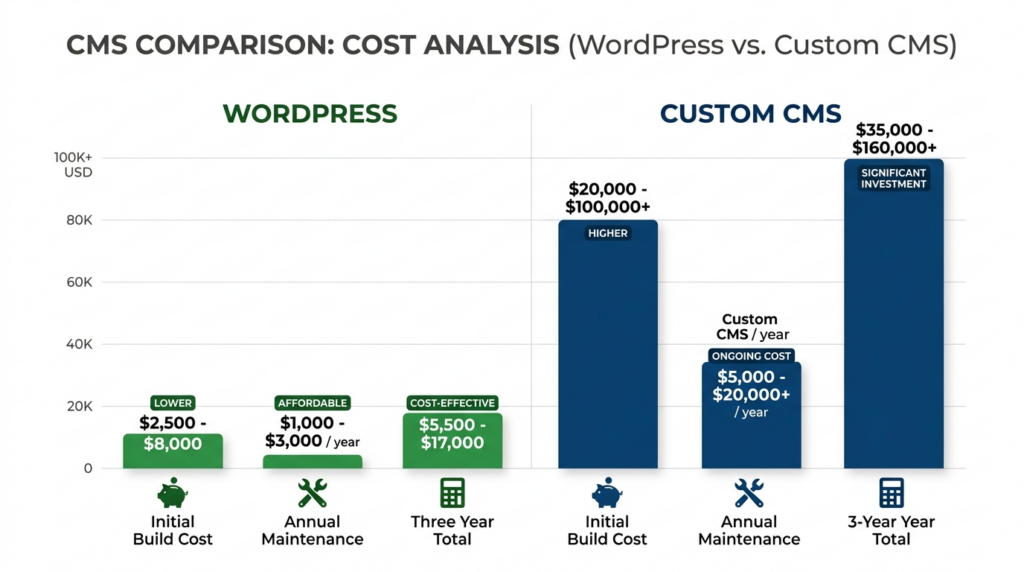
A quality business website designed by a professional WordPress development company can cost anywhere from $3,000 on the lower end to as high as around $20,000 or more depending on scope. A dedicated five-page service website is a completely different build as compared to a multi-location e-commerce site with custom checkout logic and CRM integration. However, the WordPress platform itself does not cost anything. The investment is in design, development, configuration, and optimization—and when the team is right, that investment pays off quickly.”
Maintaining an outlay remains fixed and affordable. Quality managed hosting: $30–$150/month. Premium add-ons for these, for the functionality your site really needs, include the following: $200–$600 per year. Proactive maintenance retainer: $200–$600 a month, depending on scope The average total annual cost for owning and running a WordPress site falls between $5,000 and $12,000 for most businesses, scaling upward with complexity.
Custom CMS development services is yet another money discussion entirely. The entry point for a basic custom-built system starts at about $25,000–$40,000. Complex enterprise builds with tailored content models, multi-site architecture, and custom backend integrations routinely cross the six-figure mark or well beyond. The answer is that every single feature needs to be designed, coded, tested, and deployed on its own. There’s no plugin to install. No shortcut to draw from is maintained by the community.
This comparison frequently ignores the fact that the cost difference persists after launch. Maintaining a custom CMS requires constant development. Fixing bugs is a billable hour. Project proposals and scoping are needed for new features. You can perform the update on your own on a Saturday morning; it’s not scheduled.
Professional WordPress development services provide everything that a high-performing website needs—without starving the budget that should be spent on content, campaigns, and revenue-generating activity—for most growing businesses. The savings aren’t trivial. They make the difference between a website that taxes your budget and one that pays for itself.
Flexibility and Scalability — Who Wins the Long Game?
Here’s the assumption that most people make when they walk into this conversation: custom-built must equal more flexible. That’s not always accurate.
With more than 60,000 published plugins in WordPress’s plugin ecosystem—everything from e-commerce and membership management to booking systems, CRM integration, multi-language support, form logic, user portals, and pretty much anything else a standard business website requires. And beyond plugins, custom post types and advanced field frameworks enable developers to model content architectures far more sophisticated than the simple “blog posts and pages” paradigm.
When you hire WordPress developers who really appreciate this aspect of the platform, they are able to extend WordPress significantly beyond what even the most technical would believe possible based on their assumptions about a tool for simple blogging. People who have not worked deeply inside the platform consistently underestimate its flexibility.
Where WordPress truly finds itself limited is in content architectures with no analog in any existing CMS framework. When your business creates content with relations and data models that simply cannot be mapped to any recognizable structure—not pages, nor posts, nor products, nor profiles—at this point, you can start mapping technical thinking to custom development.
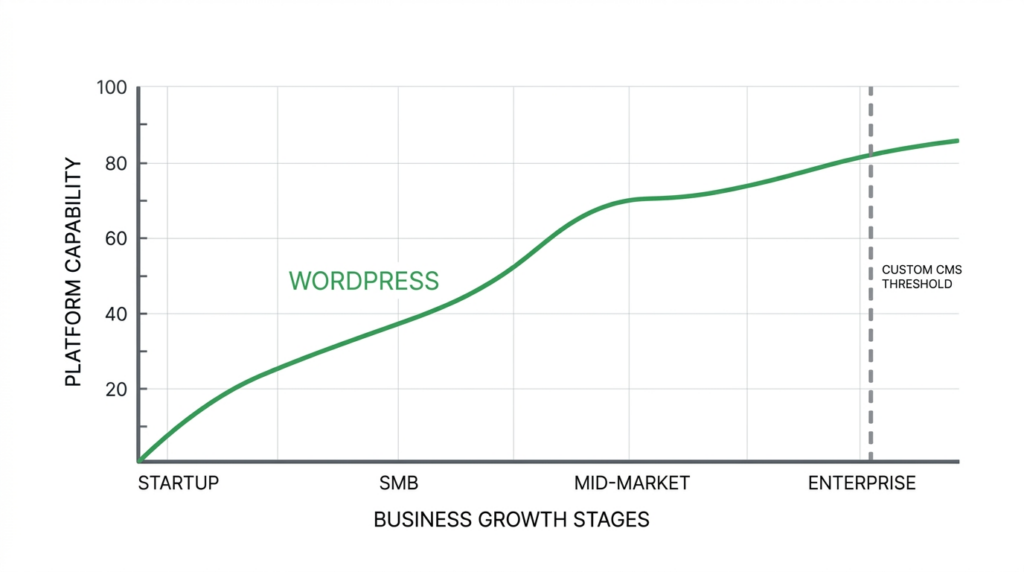
At true enterprise scale, custom CMS solutions also genuinely outperform WordPress. Millions of content pieces. Regional sub-sites with their own workflow. Heavy integration with proprietary backend systems and no public-facing API. At such a level of complexity, the value of a properly designed custom system, run by an in-house engineering team, delivers back on its costs.
For most businesses—professional services firms, scaling eCommerce brands, agencies, healthcare practices, and SaaS companies with marketing sites—that ceiling isn’t even close. Professional WordPress development services with clean code architecture and a scalable structure from the get-go will fit comfortably around your business for years without you having to pay out-of-pocket for rebuilds every time something changes.
SEO and Traffic Generation — Why This Decision Matters More Than Most Realize
Traffic and leads from website traffic aren’t even a secondary goal for most businesses. They’re the entire point. And how you build on a given platform has a direct, measurable impact on how well you’ll be able to pursue those goals.
From its earliest versions, WordPress has search-friendly code built-in. Clean URL structures. Proper semantic heading hierarchy. Fast page rendering. These aren’t things you have to go configure — they’re defaults. Add in tools such as Yoast SEO or Rank Math, and you have enterprise-level capabilities to edit meta descriptions; schema markup, XML sitemaps, which pages to serve with canonical URLs or not at all via Open Graph data; and breadcrumb navigation—everything handled without having to touch one line of code.
A WordPress development company that understands SEO will be making your site optimized technically from day one. Server-side caching. Image compression and next-gen formats. Lazy loading. Minimal render-blocking scripts. Core Web Vitals compliance. We are talking about confirmed Google ranking signals due to technical configurations, which, if you get right in a well-engineered WordPress environment, are far less complicated than trying to engineer them from the ground up inside of a custom system.
To sum up, hiring WordPress developers who know their stuff about both performance and SEO means you have a site that doesn’t just look good on launch day—it gradually earns and compounds search authority over time. For companies that are employing an inbound lead generation methodology, that effect is the asset.
Content publishing matters too. Blog posts, landing pages, pillar content, case studies, service updates — everything on your marketing team can be done in WordPress without having to wait for a developer each time. But there is competition (albeit in a deeper, strategic way) between “this content is ready” and “this content is live,” which directly impacts your frequency of publication—and that is something SEO runs on.
Custom CMS platforms can be SEO-ready, but that only happens if the development team builds it out with SEO flexibility from day one. If treated like an afterthought or a phase two item, building out proper SEO architecture is time-consuming and costly.
Security — The Honest Version of This Conversation
Security is one of the most complained-about aspects of WordPress. “It’s the biggest target.” “Hackers always go after WordPress.” The worry is not unfounded—but it’s also not the whole story.
Because of this, WordPress is one of the most targeted content management systems on the net—meaning it is an extremely valuable target for such automated attacks. Bots search for known vulnerabilities in plugins, as well as weak credentials and misconfigured servers—even a low success rate echoed across tens of millions of WordPress installations can add up fast. That threat is real.
What is also true: the vast majority of WordPress compromises are preventable negligence. Plugins that never had a fix for well-known vulnerabilities for months. Admin usernames have not changed from “admin” since the site launch. Low-cost shared hosting with no server-level isolation. No firewall. No monitoring. No backups. When those conditions are present, a breach is not surprising—it’s inevitable.
The only ones that ever make it to production are when you hire a professional WordPress development company, and they treat security as a baseline requirement. Secure socket layer configuration, hardened login protection, web application firewall setup, role-based access control lists, automated off-site backups, and a proactive update schedule should all be considered standard implementation—not optional extras—for any team doing the job right.
Custom CMS systems aren’t inherently more secure. Fewer eyes means slower fixes for security issues. A non-public-facing codebase means no community of researchers is in place to identify vulnerabilities. No bounty programs. No third-party audits unless you pay for one explicitly. Custom systems — when managed in an enterprise-grade way by dedicated security engineering teams — can certainly be made secure, but that does not happen automatically or just because they were custom-built; it comes at the expense of investment and process.
Security is not a question of platform. It’s an implementation question. And a custom CMS can be as rock-solid or as riskily open to attack (likely an oxymoron) as a WordPress site.
Ease of Use — Who Actually Runs This Thing After Launch?
Once your website is live, someone on your team owns the day-to-day. New blog posts need to go up. Service page copy needs refreshing. You just hired a new member for your team. A landing page is required for any campaign. These things happen all the time and don’t wait around for a developer each time.
WordPress’s backend has been honed for more than two decades with non-technical users in mind. An onboarding session lasting only a few hours will typically be enough for marketing teams, content writers, and operations staff to handle day-to-day updates. That independence is truly worth its weight—not just in minutes saved for developers, but also in how quickly your team can react to business events.
WordPress development companies encompass proper training and content handoff in their delivery rather than making it an afterthought. Businesses that hire WordPress developers through an experienced agency receive both the technical build and the operational setup that makes that independence possible—clear documentation, intuitive admin structures, and a team to explain what they built and why.
A custom CMS is only as usable as the admin interface your dev team decided to build. Some are clean, thoughtfully designed for non-technical users. The vast majority are functional but poorly designed, built more around how the developer needs to write code than the marketing team using it each week. And anything that can’t be solved in your team’s comfort zone is a support ticket and a billable hour.
If you want your team to be able to move quickly, publish content often, and not get bottlenecked waiting on technical dependencies each time something needs updating, that autonomy too is built into WordPress from the ground up.
Third-Party Integrations — Because Your Website Doesn’t Work Alone
However, modern business websites are not islands. They integrate with CRMs, email marketing services, payment gateways, scheduling tools, analytics suites, and customer support systems. The website is the anchor of the whole stack.
Everything else is mastered by WordPress’s integration ecosystem. Regularly maintained plugins or well-documented APIs integrate HubSpot, Salesforce, Mailchimp, Stripe, Calendly, Google Analytics 4, Zapier, and Intercom with hundreds of other standard business tools. When you hire WordPress developers familiar with the ecosystem, every integration your business depends on can be built in as part of the initial build—not as a subsequent project with its own timeline and budget.
Every integration is its own development engagement with a custom CMS. Scoped separately. Billed separately. Tested separately. Deployed separately. That means paying redundantly for something that a plugin installation and configuration session in WordPress can solve when your business runs on a common tool stack. Custom integration is sometimes unavoidable—but that’s really the exception rather than the rule for businesses that have entirely proprietary backend systems and no public API.
For the vast majority of businesses, WordPress’s power to integrate strips out the largest contributor of cost and project complexity that building a custom CMS sneaks back in.
When a Custom CMS Is Actually the Right Call
We’ve made a compelling case for WordPress in this piece—because that case is true for most businesses. But this is where the custom CMS is truly the right answer.
There is no equivalent in your content model. If your business publishes something that genuinely does not fit into a page, or post, or product, nor a custom post type with some advanced fields (some very peculiar industries need unique data relationships), then custom development should be explored seriously.
You work in a tightly controlled environment. Certain domains of health care, finance, and government have infrastructure compliance and data sovereignty requirements that may require total control over every layer in the technical stack.
You are not building a website; you are building software. If your “website” is actually a web application, with all the bells and whistles of complex user roles, dynamic data generation, real-time business logic, or proprietary workflows—then you’re building a product. No CMS, whether WordPress or otherwise, is the right starting point to that.
You’re really at an authentic enterprise scale. This will consist of tens of millions of content pieces. Global sub-sites with localized workflows—dozens of them. If you have the scale and long-term engineering budget, a custom system is probably the better long-term investment.
None of these conditions apply for most professional services firms, e-commerce businesses, agencies, healthcare practices, and SaaS companies with marketing websites. The question isn’t “WordPress or custom”—it”‘s which WordPress development company will get the build.
The Verdict — And What to Do Next
After everything we’ve covered, here’s where the analysis lands clearly.
Choose WordPress when you want a professional, well-performing site that won’t take six figures to develop. Your growth strategy relies on SEO and inbound lead generation—content will be updated frequently by your team without being held up by developer access. You want fast onboarding—you need staff who can get integrated quickly with the tools your business already runs on. You want to go from brief to live in weeks, not months.
When to choose a custom CMS: — Your content model is truly one of a kind, and none of the available platforms fit your needs. — You work in a very regulated industry, so you have customized infrastructure requirements that need to be built from scratch. — You’re developing an advanced web application rather than focusing on a business or marketing website. — If you have enough long-term budget, engineering resources, skills, and capacity to support it on an ongoing basis.
For most businesses that read this, that analysis leads through to WordPress—not in a compromise sort of way, but the right tool. It’s built right (from a service provider that understands WordPress development) and, as such, ranks in search and converts visitors into leads and integrates nicely into your tech stack and grows with your business without forcing an expensive rebuild every few years.
The deciding factor isn’t really the platform. It’s the team that builds it.
A poorly coded WordPress instance will perform worse than even the best-in-class custom CMS on every single tangible metric. A properly campaigned WordPress site—created by people who know your business objectives beyond what’s written in the design brief—will always outperform an overblown custom system that no one on your team has the technical knowledge to operate.
Well, that is precisely the sort of work we do at DazzleBirds. And not just deliverables, our WordPress development services are focused on business outcomes. SEO-ready architecture. Core Web Vitals performance. Custom functionality. Seamless third-party integrations. A goal-focused process from initial consult to launch and beyond.
Whether you need to hire WordPress developers for a specific job, migrate away from an old platform that holds you back, or set up your first real business website properly—we’ll tell you what your business actually needs (straight in the eye) and do it there correctly.
Explore our WordPress Development Services and see how we help businesses like yours build websites that rank higher, convert better, and grow faster.
A professional wordpress development company doesn’t just build pages. It builds the infrastructure for sustainable, long-term growth. That’s what we’re here for.
FAQs
WordPress development services include custom website design, theme development, plugin integration, SEO optimization, performance tuning, and ongoing maintenance. They cover everything from initial build to launch, ensuring your business website is fast, secure, and built to generate consistent leads.
Professional WordPress development services typically cost between $3,000 and $20,000 depending on project scope and complexity. Ongoing maintenance adds $5,000 to $12,000 annually. This is significantly more affordable than building a custom CMS from scratch, which starts at $25,000 minimum.
Yes. WordPress development services are built with SEO-friendly architecture, fast load times, and conversion-focused design. These factors directly impact your Google rankings and visitor-to-lead conversion rates, making WordPress one of the most effective platforms for consistent inbound business lead generation.
Most professional WordPress development services complete a standard business website within four to eight weeks. The timeline depends on design complexity, number of pages, and custom functionality required. Custom CMS builds typically take three to six months, making WordPress significantly faster to launch.
WordPress development services offer faster launch times, lower costs, built-in SEO advantages, and a massive plugin ecosystem. Unless your business has genuinely unique content requirements or strict infrastructure compliance needs, WordPress consistently outperforms custom CMS solutions in performance, manageability, and long-term return on investment.