If you’ve been researching how to build your company’s website in 2026, you’ve probably come across one of the most persistent misconceptions in this field: that WordPress themes are an ingenious way to cut expenses when launching a professional website.
They’re not. Not for any business that genuinely wants to grow.
This comprehensive guide explains why custom WordPress development is better than pre-made themes on all of your most crucial metrics, including cost, conversions, performance, security, and scalability. To help you make informed decisions about your own investment, we’ll be revisiting the WordPress Website Cost Guide 2026 framework.
Whether you’re a startup founder, a growing e-commerce brand, or a service business that has been hobbling along on a theme for years—this one’s for you.
What Is the Actual Difference Between a Theme and Custom Development?
Let’s clarify what we are comparing before we get into all the data and charts.
WordPress themes are pre-made templates that can be used for any kind of website, whether they are free from the repository or can be purchased from ThemeForest for a high price. Its very universality is its undoing. It is jam-packed with unused JS libraries and CSS classes, as well as features for companies it will never reach. All of that is costly in terms of page load time.
Custom WordPress development is built on the foundation of your distinct business. Using a thin starter framework or from scratch, a developer (or shop) creates your theme, templates, custom post types, and other components according to your site’s needs.
The result is more than just a website with a different layout. The product is essentially different.
The WordPress Website Cost Guide 2026: What You’re Actually Paying For
Cost Component
Estimated Cost
Premium theme license
$59 – $299
Page builder plugin (Elementor Pro, etc.)
$59–$199/year
Required add-on plugins (forms, SEO, security, cache)
$200–$600/year
Developer hours for customization and bug fixes
$500–$3,000/year
Performance optimization tools to compensate for bloat
$100–$400/year
3-Year Total
$3,000 – $15,000+
Custom WordPress Build: The Real Investment
Cost Component
Estimated Cost
Initial custom build
$4,000 – $25,000
Minimal plugin costs (purpose-built integrations)
$50–$200/year
Ongoing agency support retainer
$300–$1,500/year
3-Year Total
$5,000 – $29,500
All of that is definitely altered when three years of time overhead are taken into consideration. More importantly, the custom build is contributing to increased revenue over those three years through “wins” in search, UX, and performance, all of which have a direct monetary value.
The truth is that a good WordPress website cost guide will tell you all of this and more: “How much does it cost to create a website?” is never the only question. It’s the price you pay when it doesn’t work.
Why Themes Fail at Performance—And Why That Costs You Rankings
Speed is not a feature. It is considered the bare minimum requirement to play online in 2026.
Google’s Core Web Vitals—Largest Contentful Paint (LCP), Cumulative Layout Shift (CLS), and Interaction to Next Paint (INP)—all have a direct role in search rankings. Any site that doesn’t measure up on those criteria loses visibility in the organic SERPs to sites that do. It’s that straightforward.
The issue is that the themes are structurally flawed. What a typical premium WordPress theme includes is as follows:
300–600 KB of CSS, most of which is unused on a particular page.
Multiple JavaScript frameworks (jQuery, theme custom scripts, and page builder scripts) are loading simultaneously.
Why is the LCP so high? Certain resources prevent rendering and cause the LCP to exceed 2.5 seconds, which Google deems to be a “good” score:
Google Fonts are retrieved via HTTP requests rather than being queued as self-hosted.
Either uploaded images are not lazy loaded, or they are lazy loaded and scaled to fit the current breakpoint sizes.
After going through any normal WordPress Website Cost Guide 2026, a developer would’ve fixed every one of these points at the code level. But on an issue, these challenges are baked into the system. You can add a caching plugin and CDN; you can compress your images—you’ll get better scores, but it will never be as good as what a custom-tailored codebase provides.
The Business Impact of Slow Sites
The same benchmark data will be mentioned in any beneficial WordPress Website Cost Guide 2026: According to Portent, a website that loads in one second generates three times as many conversions as one that loads in five seconds. Google’s own research indicates that the likelihood of a bounce rises by 32% as the page load time increases from 1 to 3 seconds.
For a company earning $50,000 a month, a 5% decrease in conversions due to slow loading is equivalent to $2,500 per month. That is $30,000 annually, which is significantly more than the difference in price between a theme build and a custom.
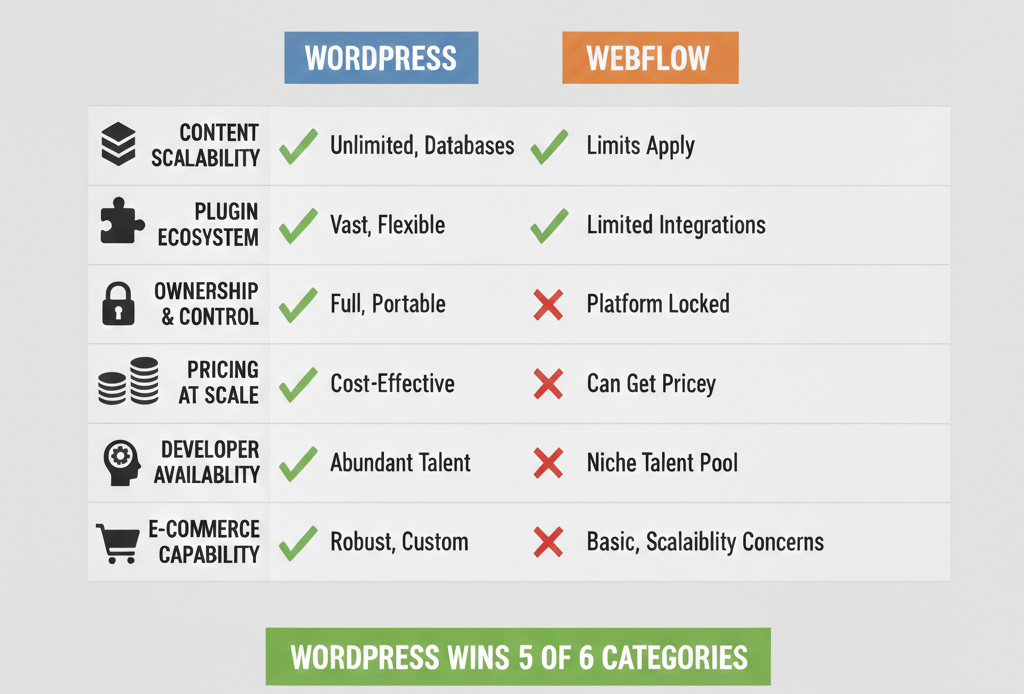
WordPress vs Webflow Comparison: Where Does Custom WordPress Fit?
The standard “WordPress vs. Webflow” comparison is frequently made, and it merits a clear response, particularly for companies in 2026 that will have to choose between the two platforms.
For certain use cases, Webflow is an extremely effective tool. It offers a decent visual editing experience with comparatively good performance right out of the box for landing pages created by design-focused teams, agency portfolios, and small marketing websites.
However, this is where the argument between WordPress and Webflow consistently favors WordPress for expanding businesses:
For small websites, the discussion between WordPress and Webflow is genuine. For anything with substantial content to manage, complex e-commerce needs, or expansion goals, custom WordPress development is the better long-term basis.
The Benefits of Hiring a WordPress Agency vs. Doing It Yourself on a Theme
A theme often feels like the manageable first step for many business owners. They want control. They don’t want to be reliant on an outside vendor. These are understandable instincts. It’s just that they usually make underperforming websites.
This is what you can truly expect when working with a professional team—the real-world advantages of hiring a WordPress agency:
1. Results-Driven Design for Your Company
It’s not about accepting a template from an agency and hoping it will work for you. They start with your user journey, content strategy, and user funnel and create an architecture that can support all three concepts from the first line of code. 2. Performance Engineering Right From the Start
Agencies adhere to best performance practices during development, rather than as an afterthought, by using a professional WordPress Speed Optimization Guide. It includes server-side caching, optimized database queries, essential CSS inlining, deferred JavaScript execution, self-hosted web fonts, and appropriately sized image formats (such as WebP/AVIF).
3. Hardening of Security
Another very advantageous aspect of working with a WordPress agency is security. Professionally designed WordPress websites don’t rely on plugins; instead, they block security headers like CSP, apply the proper file permissions to open-source code, and adhere to WP hardening guidelines, which are unfamiliar to most owners of mutable theme sites. 4. Scalability Without Rebuilding
A custom website can take care of things like doubling your traffic, adding a membership portal, integrating your CRM with your contact forms, and setting up email sequences. Frequently, a theme-based website cannot. You’ve already paid twice, and you still need to rebuild.
5. A Team That Understands Your Codebase
Knowing exactly which team created your website can make the difference between a twenty-minute fix and a four-hour nightmare when something breaks at two in the morning. One of the most overlooked benefits of working with a WordPress agency is their institutional knowledge of how your specific WordPress implementation operates.
Use Case Scenarios: When Should You Choose Each Path?
Not every business needs a fully custom build on day one. Here’s an honest breakdown:
Scenario A: Marcus—Local Service Business, First Website
Marcus runs a plumbing company in Austin. He needs a professional website with a contact form, service pages, and a basic blog. He doesn’t have e-commerce. His traffic expectations are modest.
Recommendation: A performance-optimized block theme (like Kadence or GeneratePress) with a minimal plugin stack and professional setup. Custom development would be over-engineered for his current needs. However, as his business grows and he wants to add online booking, a customer portal, or paid content, the rebuild conversation starts.
Scenario B: Priya—E-Commerce Brand Scaling Past $500K/Year
Priya’s skincare brand is on a rapid ascent. She requires a WooCommerce website with custom product filters, subscription support, loyalty program features, and wholesale site logins. She’s done $500K this year and is projecting to do $1.5M next year.
Recommendation: Full custom WordPress development. A feature build would result in a mounting pile of plugin conflicts, performance debt, and maintenance headaches faster than her business could handle. The calculation is very clear for her use case and WordPress. The custom build ROI is better in 18 months.
Scenario C: Derek — SaaS Company Marketing Site
Derek works for a project management software company. He needs a marketing site that has the capability to support blog content, case studies, landing pages, and webinar registrations—all with strong SEO.
Recommendation: Custom WordPress with headless in mind in the long term. The WordPress vs. Webflow comparison does apply here, but in terms of content scalability and developer pool, there is currently no competitor for WordPress. The advantages of using a WordPress agency in this case are the structured content models, API integrations, and SEO architecture that Webflow won’t be able to match at this kind of complexity.
The Security Argument Nobody Talks About Enough
Theme-based WordPress websites are one of the most widely exploited means for website compromises. Not that WordPress itself is insecure—it’s not. This is because themes rely on third-party stacks of plugins, which inevitably go unmaintained, out-of-date, and ultimately insecure.
A typical WordPress site built on themes has 15–25 active plugins. Each plugin is a new attack vector. Many premium themes ship with older versions of frameworks. There are page builders with reported vulnerabilities that go unpatched for weeks.
This is a structure that custom WordPress development can fix. When an agency only builds what is necessary, the attack surface is significantly smaller. When a vulnerability is discovered in a package you’re depending on, the team that built your site will know exactly where it’s being used and what to do.
disapprove of plugins and themes are the number one cause of hacked WordPress sites, according to Sucuri’s website threat report. This is a problem we can solve—and Building Lean is the answer.
How to Evaluate a WordPress Agency Before You Hire
You’ve made the choice that a custom build is the way to go, and now you need to consider how to select the right agency. The pros of hiring a WordPress agency There are many other benefits to hiring a professional WordPress design agency, if you recruit the right one. Here are the signs to watch for:
They inquire about your business objectives before they ask about your budget. A great agency knows that a website is not a design project; it’s a business tool. If the very first conversation is all about aesthetics, take heed.
Their portfolio shows genuine variety. If you can’t tell the difference, aside from different colors, between every site they list in their portfolio, then chances are what you found is a theme shop pretending to be a custom agency.
They have a workflow to back up their performance. Here’s a question that needs to be confronted directly: “What is your process (for speed in development) with your WordPress Website Cost Guide 2026?” If they can’t explain it, you’re not building for performance from the ground floor up.
They are straight with me about timelines and scope. Customization must be built and takes longer than the setup of a theme. Any agency guaranteeing a custom build with a bow on top in one week is completely cutting corners somewhere important.
They offer post-launch support. Putting up a site and vanishing is not a development service; it’s a transaction. Seek out agencies that offer ongoing retainer relationships with monitoring, updates, and iteration.
Summary: What the Data Tells Us
For any area of comparison, all signs point in the same direction for companies prioritizing growth:
The WordPress Website Cost Guide 2026 reveals theme-based builds don’t get any cheaper over time.
As for the WordPress vs. Webflow comparison, it comes out in favor of WordPress for large, sustainable business sites.
You can only fully implement a true WordPress Website Cost Guide 2026 in a custom codebase.
Hiring a WordPress agency only to benefit in the long run with improved performance, security, scalability, and institutional knowledge.
The theme is the shortcut. The custom build is where it begins.
If your website is truly central to how your business makes money, gets new clients, or establishes authority—it should be built with these goals from the very first line of code.
FAQs
The WordPress Website Cost Guide 2026 is a pricing breakdown that helps businesses understand the real cost of building on WordPress — covering themes, custom development, plugins, and long-term maintenance so you can make a smarter investment decision.
Absolutely. The WordPress Website Cost Guide 2026 shows that theme-based sites cost more over time once you factor in plugin fees, developer fixes, and lost conversions. Custom builds deliver better ROI within 18 months.
Based on the WordPress Website Cost Guide 2026, custom builds range from $4,000 to $25,000 depending on complexity. Simple service sites start lower, while e-commerce and membership platforms sit at the higher end.
For growing businesses, yes. The WordPress Website Cost Guide 2026 favors WordPress for scalability, ownership, and e-commerce depth. Webflow works for small sites but hits a ceiling fast as your business grows.
The WordPress Website Cost Guide 2026 recommends running your site through Google PageSpeed Insights first. Poor Core Web Vitals scores and low conversion rates are the clearest signs your current theme is actively costing you revenue.