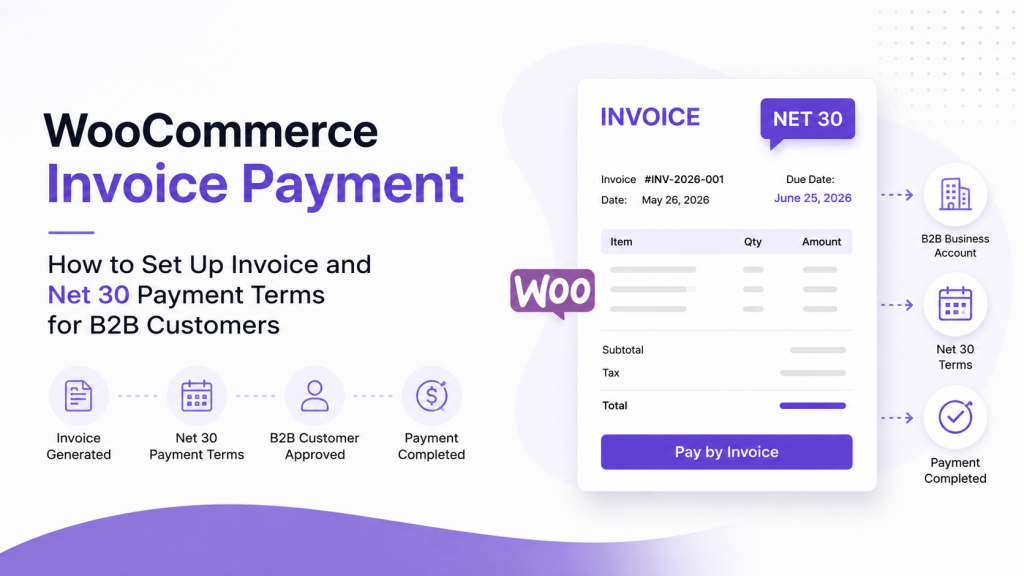
A standard WooCommerce install gives you a shop that works well for one shopper buying one item at a time. It does not give you wholesale pricing tiers, a registration and approval queue for new business accounts, role-based product visibility, bulk order forms, quote requests, invoice terms, or company accounts with multiple buyers. Those workflows are the backbone of a B2B operation, and none of them ship with core WooCommerce.
This is the gap that trips up a lot of merchants moving into wholesale. They assume that because WooCommerce can technically process an order from anyone, it can also run a wholesale channel. In practice, a business buyer expects to log in and see their own negotiated pricing, place a large order in a few clicks rather than one product at a time, and sometimes request a quote or pay on invoice terms instead of a card at checkout. Getting there means adding a WooCommerce wholesale plugin, or in some cases several plugins working together, to fill in the workflow that WooCommerce itself does not attempt to solve.
Picking the right plugin is not about finding the one with the longest changelog. A small store selling to a handful of repeat wholesale accounts has very different needs from a distributor managing hundreds of company accounts, custom pricing contracts, and ERP integrations. This guide breaks down what a WooCommerce wholesale plugin actually needs to do, compares ten established options, and helps you match a solution to your business model rather than to a marketing page.
Key Takeaways
- There is no single WooCommerce wholesale plugin that is objectively the best for every store. Fit depends on your registration process, pricing complexity, and order volume.
- Some tools are complete B2B suites, others are narrowly focused on one job, such as role-based pricing, and mixing them up leads to overpaying for features you will not use or underbuying for a workflow you actually need.
- A comparison table can only tell you so much. Reading the considerations and best-fit notes for each plugin matters more than scanning a feature checklist.
- Larger or more complex B2B operations sometimes need a plugin stack or custom development rather than a single all-in-one plugin.
- WooCommerce wholesale software should be evaluated against your actual customer journey, not against a list of buzzwords.
What Is a WooCommerce Wholesale Plugin?
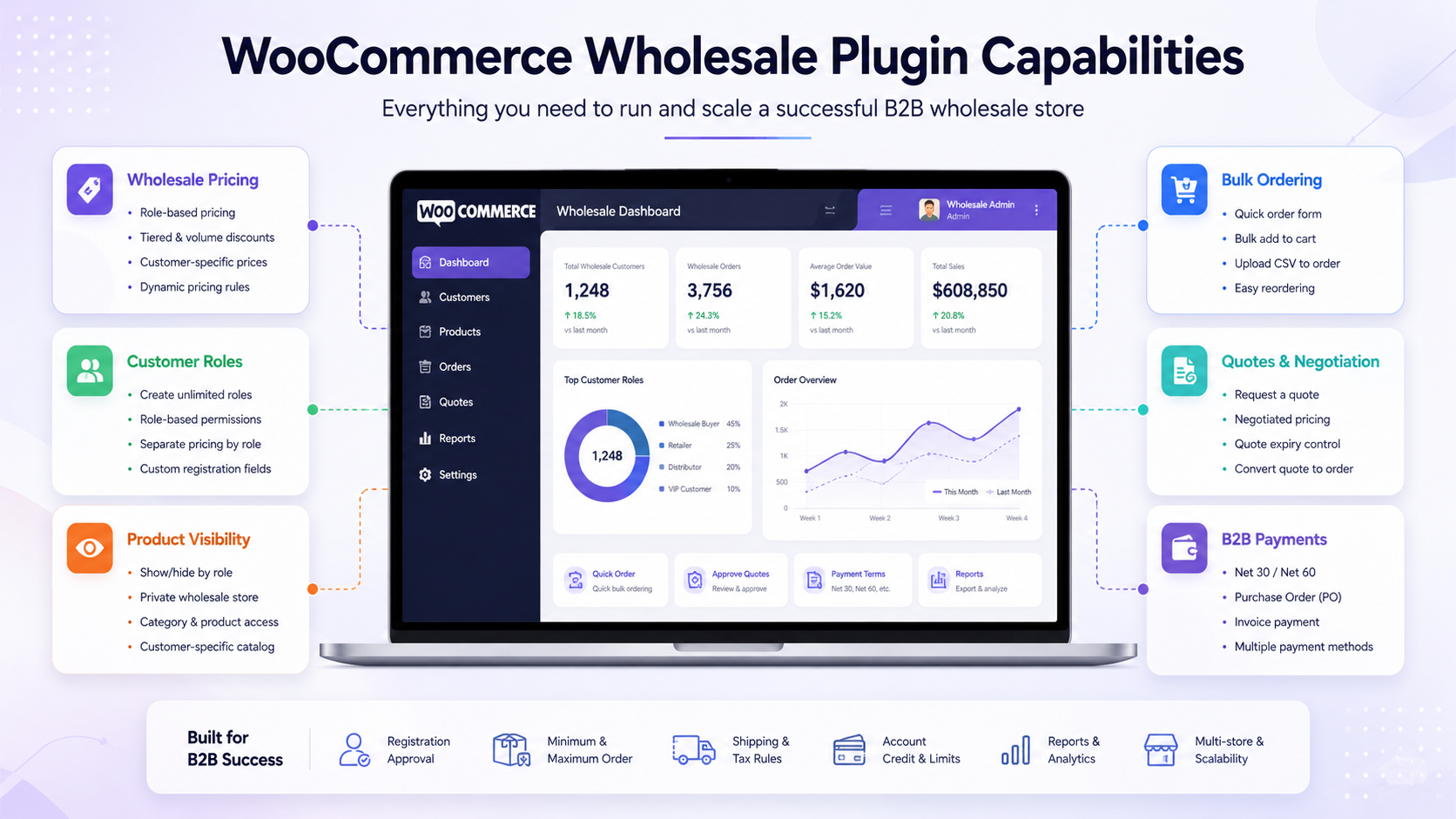
A WooCommerce wholesale plugin adds the business to the business workflow that WooCommerce does not include out of the box. Depending on the plugin, that can mean wholesale pricing rules, customer registration with manual approval, dedicated user roles, control over which products or prices are visible to which customers, bulk ordering tools, quote requests, and payment methods suited to B2B buyers such as invoicing or purchase orders.
WooCommerce was built as a general-purpose e-commerce platform, and its default checkout assumes a single price per product and a single type of customer. Wholesale selling breaks both of those assumptions. A wholesale buyer often needs a different price than a retail buyer for the same item, may need to see a completely different catalog, and may need to place an order for hundreds of units rather than one.
There is a meaningful difference between a basic wholesale pricing plugin and an all-in-one B2B platform. A pricing-focused plugin does one job well: it lets you assign different prices to different user roles or customer groups. It will not touch registration forms, quote workflows, or payment terms. An all-in-one B2B platform tries to cover the entire journey, from the moment a business applies for a wholesale account through pricing, ordering, and invoicing.
Whether you need one plugin or a combination depends on how much of the B2B workflow your store actually requires. A store that only needs different prices for a handful of trusted accounts might be well served by a pricing-only plugin combined with manually created user roles. A store running a public-facing wholesale application process, tiered account levels, quote negotiation, and invoice payment terms usually needs a broader solution or several specialized plugins working together.
What Features Should You Look For?
Before comparing specific plugins, it helps to understand the building blocks of a WooCommerce B2B wholesale setup. Not every store needs every feature below, but understanding what each one does will make the comparison table much easier to read.
Wholesale pricing
This is the foundation. It covers the ability to set different prices, discounts, or price tiers for different customer groups, whether that is a flat percentage off, a fixed price per product, or quantity-based tiered pricing. Without this, nothing else in the B2B workflow matters much.
Customer registration and approval
Wholesale buyers usually apply for an account rather than simply signing up. A registration and approval workflow lets you collect business details, verify a company before granting wholesale pricing, and reject applications that do not meet your criteria.
User roles and permissions
Roles are how a WooCommerce wholesale plugin assigns different pricing, visibility, and permissions to different customer types. A well-built plugin lets you create multiple wholesale roles, not just one blanket “wholesale customer” tier, so you can differentiate between, for example, a small reseller and a large distributor.
Product visibility
Some products, categories, or prices should only be visible to approved wholesale accounts, while others may need to stay hidden from retail shoppers entirely. Visibility controls let you run a private catalog, a hybrid catalog, or a fully public one depending on the buyer’s role.
Bulk ordering
A bulk order form or product table lets wholesale buyers add large quantities of multiple products to their cart quickly, instead of clicking through single product pages one at a time. This matters more as average order size grows.
Minimum order rules
Wholesale margins often depend on order size. Minimum order quantity or minimum cart value rules protect profitability by preventing wholesale pricing from applying to orders too small to be worthwhile.
Quote workflows
Some B2B purchases involve negotiation rather than a fixed price. A quote request feature lets a buyer ask for custom pricing on a product or order and lets the store respond with a tailored offer instead of a static price.
Payment methods and invoice terms
B2B buyers frequently expect to pay by invoice, purchase order, or bank transfer rather than a credit card at checkout. Support for these payment types, along with the ability to restrict payment methods by customer role, is often a hard requirement for larger accounts.
Company accounts and subaccounts
Larger business customers may need multiple employees to place orders under one company account, each with their own login but shared billing and pricing. This is a more advanced requirement that not every plugin supports.
Reordering
Repeat wholesale buyers benefit from saved order lists, order history they can reorder from, or quick reorder tools, since they are often purchasing the same set of products on a recurring basis.
Tax and shipping controls
B2B transactions sometimes require different tax handling, such as tax exemption for resellers, and different shipping method availability for wholesale accounts compared to retail customers.
Integrations
A wholesale plugin does not operate in isolation. Compatibility with your existing product table, checkout, membership, and multi-currency plugins avoids conflicts and duplicate functionality.
Support, updates, and compatibility
Since a wholesale plugin touches pricing logic, checkout, and sometimes payment flows, ongoing updates and active support matter more here than for a purely cosmetic plugin. A plugin that has gone quiet on updates is a liability in a part of your store that handles revenue.
10 Best WooCommerce Wholesale Plugins
| Plugin |
Best for |
Wholesale pricing |
Registration and approval |
Bulk ordering |
Quotes |
Payment or B2B controls |
Key consideration |
| B2BKing |
All-in-one B2B and hybrid stores |
Yes, tiered and role-based |
Yes. |
Yes. |
Yes. |
Invoice payment, tax exemptions |
A large feature set means a longer setup and learning curve. |
| Wholesale Suite |
Established modular wholesale ecosystem |
Yes, via Wholesale Prices Premium |
Yes, via Wholesale Lead Capture |
Yes, via the Wholesale Order Form. |
No native quote tool |
Payment or shipping restrictions by role |
Full functionality requires combining separate add-ons. |
| WholesaleX |
Modern all-in-one B2B and B2C hybrid |
Yes, dynamic rules |
Yes. |
Yes. |
Yes. |
Wallet, payment method discounts |
Newer plugin, still expanding its ecosystem |
| Wholesale for WooCommerce (WPExperts) |
Marketplace-based B2B solution |
Yes, tiered |
Yes. |
Yes. |
Yes. |
AI assistant for store operations |
Sold through the WooCommerce Marketplace with tiered licensing |
| B2B for WooCommerce (Addify) |
Hybrid B2B and B2C with modular controls |
Yes, role-based |
Yes. |
Yes, order options |
Yes. |
Purchase order and invoice options |
Built from several combined Addify extensions, worth checking for overlap |
| WooCommerce Wholesale Pro (Barn2) |
Focused, dedicated wholesale area |
Yes, global, category, or product level |
Yes, with moderation. |
Yes, with the Product Table add-on |
No native quote tool |
Payment and shipping restrictions by role |
Bulk order forms require pairing with Barn2’s product table plugin. |
| Wholes |
Simpler wholesale setup |
Yes, role-based |
Yes. |
Yes, in Pro |
Not a core focus |
Wallet payment option |
Some ordering and bulk features are Pro only. |
| ELEX Role-Based Pricing / Catalog Mode |
Role-based and customer-specific pricing |
Yes, role- and customer-specific. |
No dedicated workflow |
No native tool |
Yes, request a quote. |
Catalog mode with hidden add to cart |
Not a full B2B suite, focused on pricing and catalog control |
| WooCommerce B2B (Code4LifeItalia) |
Broad all-in-one B2B suite |
Yes, tiered and group-based |
Yes. |
Yes. |
Yes. |
Invoice, purchase order, quote payment |
Sold as a one-time license through CodeCanyon rather than a subscription |
| YITH Role-Based Prices |
Role-based and customer-specific pricing only |
Yes, role and per user |
No |
No |
No |
Works within the wider YITH plugin ecosystem |
Pricing tool only, not a complete B2B platform |
1. B2BKing
B2BKing is built as a full B2B and wholesale platform for WooCommerce rather than a single-purpose add-on. It bundles pricing rules, registration, ordering, and B2B-specific payment options into one plugin, which makes it a common choice for stores that want most of their B2B workflow handled without stitching together multiple tools.
Best for: Stores that want a single plugin to cover most of the wholesale journey, including hybrid stores serving both B2B and B2C customers.
Key capabilities:
- Tiered and role-based wholesale pricing
- Business registration with approval and custom fields
- Wholesale order form and bulk ordering tools
- Quote requests and negotiated offers
- Invoice payment gateway and tax exemption handling
- Multiple buyers per company account
Strengths: It covers a wide portion of the B2B workflow in one plugin, reducing the need to combine several tools. Its scope extends to less common requirements such as private membership-style stores and multilingual support. Development has been active over an extended period, which matters for a plugin this deeply integrated into pricing and checkout.
Considerations: Because it covers so much ground, the settings area is extensive, and stores that only need basic wholesale pricing may find the setup more involved than necessary. It also works alongside a separate marketplace plugin from the same developer for stores that want multi-vendor functionality, which is worth knowing if that is a future requirement.
Best fit: Stores planning to run a serious B2B or hybrid B2B and B2C operation that want one plugin handling pricing, registration, ordering, and payment terms together.
Learn more: B2BKing
2. Wholesale Suite
Wholesale Suite takes a different approach than a single bundled plugin. It is a set of separate, purpose-built tools—wholesale prices premium for pricing, wholesale order form for bulk ordering, and wholesale lead capture for registration—that share data when installed together.
Best for: Stores that prefer a modular setup with a long track record, where each component can be added only when it is actually needed.
Key capabilities:
- Role-based and tiered wholesale pricing, applied globally, by category, or by product
- Wholesale registration form with account approval
- A dedicated bulk order form for fast wholesale purchasing
- Restrictions on tax display, shipping methods, and payment gateways by role
- Minimum order rules to protect margins
Strengths: The modular structure means you are not paying for or configuring features you do not need. Its individual components, particularly the pricing plugin, have been in the market for a long time, and the ecosystem has grown into a full suite while keeping each piece usable on its own.
Considerations: Getting the complete wholesale journey, pricing, registration, and bulk ordering means installing and licensing more than one plugin. Stores wanting a single unified settings screen rather than three connected tools may find this less convenient than an all-in-one plugin.
Best fit: Stores that want an established, modular wholesale plugin for WooCommerce and are comfortable combining a small number of focused tools rather than one large plugin.
Learn more: Wholesale Suite
3. WholesaleX
WholesaleX positions itself as a modern, all-in-one B2B and wholesale plugin with a broad feature set covering pricing, registration, ordering, and account management from a single dashboard.
Best for: Stores wanting a contemporary interface with broad B2B functionality and a free entry point before upgrading.
Key capabilities:
- Dynamic pricing rules, including tiered, quantity, and cart-level discounts
- Multiple wholesale roles with individual permissions
- Built-in bulk order form
- Catalog and private store modes
- Quote requests and a wallet or store credit system
- Subaccounts for company-style buyer structures
Strengths: The interface is built with a more current design approach, and it offers a genuinely usable free version alongside its premium tiers. Its dynamic rules engine is flexible enough to cover a range of discount structures without custom coding.
Considerations: As a plugin that touches many parts of the store at once, from pricing through registration to checkout, there is more surface area for conflicts with other plugins performing similar jobs. It is also a newer entrant compared to some of the more established names on this list, which is worth weighing if long-term track record matters to you.
Best fit: Stores that want an all-in-one, modern WooCommerce B2B plugin and are comfortable adopting a newer product in exchange for a more current interface and pricing.
Learn more: WholesaleX
4. Wholesale for WooCommerce by WPExperts
This plugin is distributed through the official WooCommerce Marketplace and covers wholesale pricing, buyer roles, bulk ordering, registration, and quote requests from a single product.
Best for: Stores that specifically want a broad B2B solution sourced through the WooCommerce Marketplace rather than a third-party vendor site.
Key capabilities:
- Wholesale pricing and buyer role management
- Registration workflows for B2B accounts
- Bulk ordering support
- Quote request handling
- Cart level threshold discounts
Strengths: Being listed on the official WooCommerce Marketplace gives some buyers more confidence around compatibility and long-term support continuity. The feature set covers most of the core wholesale journey in one plugin.
Considerations: As with any actively developed plugin, features and licensing tiers change over time, so it is worth reviewing the current product page for the latest scope before committing, particularly around which capabilities are included at each pricing tier.
Best fit: Stores that specifically prefer sourcing B2B plugins through the official WooCommerce Marketplace and want broad functionality in one purchase.
Learn more: Wholesale for WooCommerce
5. B2B for WooCommerce by Addify
Addify’s B2B plugin was built by combining several of the company’s individual extensions, covering pricing, registration, visibility, and quote requests, into one bundled product for stores running B2B, B2C, or a hybrid of both.
Best for: Stores that want a broad set of B2B controls without necessarily needing a single fully unified suite and that may already be familiar with Addify’s individual plugins.
Key capabilities:
- Role-based pricing and tiered discounts
- Custom registration fields and manual approval
- Hide price or hide add to cart button by role, replaced with a request a quote option
- Restrict shipping and payment methods by role
- Quote to order conversion
Strengths: Because it draws on several mature standalone extensions, individual components such as registration and quote requests tend to be well developed on their own. It works cleanly alongside standard B2C shopping for stores that are not exclusively wholesale.
Considerations: Since the plugin is assembled from multiple previously separate tools, some settings areas can feel like distinct modules rather than one seamless interface. Stores already using individual Addify plugins should check for feature overlap before adding this bundle.
Best fit: Hybrid stores that want a broad set of B2B controls, particularly around registration, visibility, and quotes, without requiring the most extensive feature list on this list.
Learn more: B2B for WooCommerce
6. WooCommerce Wholesale Pro by Barn2
Barn2’s plugin takes a focused approach: it adds a dedicated wholesale area to an existing public store, with its own registration, roles, pricing, and visibility, without trying to be a complete B2B ecosystem on its own.
Best for: Stores that want a clean, dedicated wholesale section added to their existing retail store rather than a sprawling B2B suite.
Key capabilities:
- Unlimited wholesale roles, each with independent pricing
- Global, category, or per-product wholesale discounts
- Customizable wholesale registration form with moderation
- Product and category visibility control by role
- Restrict payment and shipping methods by wholesale role
Strengths: The plugin is deliberately scoped to core wholesale functionality, which keeps the settings area easier to learn than an all-in-one suite. It pairs with Barn2’s own product table plugin for stores that also want a fast bulk ordering interface, rather than baking that in by default.
Considerations: Bulk ordering is not native to the base plugin, so stores that need a dedicated bulk order form should plan on pairing it with the product table add-on. It also does not include a built-in quote request workflow.
Best fit: Stores wanting a focused wholesale plugin for WooCommerce that adds pricing, visibility, registration, and ordering functionality without the complexity of a full B2B suite.
Learn more: WooCommerce Wholesale Pro
7. Wholes
Whols is built for stores that want to add wholesale pricing and a basic B2B registration process to an existing WooCommerce store without a steep learning curve.
Best for: Simpler wholesale setups where the store mainly needs pricing, roles, visibility, and a straightforward ordering experience.
Key capabilities:
- Wholesale pricing by role, including fixed and percentage adjustments
- Custom wholesale registration form and fields
- Hide prices from non-wholesale customers
- Minimum order quantity enforcement
- Wallet payment option and bulk or quick edit tools in the Pro version
Strengths: The free version already covers a meaningful chunk of basic wholesale needs, which makes it approachable for stores testing whether wholesale selling makes sense for them before committing to a larger investment. Setup tends to be more straightforward than the larger all-in-one suites.
Considerations: More advanced functionality, such as bulk order forms and reorder lists, sits behind the Pro upgrade, and it is not designed to handle complex quote negotiation or company subaccount structures.
Best fit: Smaller or newer wholesale operations that want a simpler B2B plugin for WooCommerce covering the essentials without the depth, or the complexity, of a full B2B platform.
Learn more: Whols
8. ELEX WooCommerce Role-Based Pricing / Catalog Mode
ELEX’s plugin is narrowly focused on pricing by user role and catalog mode, rather than trying to cover the entire B2B journey. It is a strong option when pricing and visibility are the actual problem you are solving.
Best for: Stores whose core requirement is role-based or customer-specific pricing and catalog control, rather than a full registration and ordering workflow.
Key capabilities:
- Role-based and customer-specific pricing on simple, variable, and grouped products
- Category-level price adjustments
- Catalog mode with the option to hide prices or the add to cart button
- Request a quote button as an alternative to a fixed price
Strengths: It does one job, pricing and catalog visibility, and does it without the overhead of a full B2B suite. This makes it a good fit for stores layering wholesale pricing onto an existing setup that already has its own registration or ordering process handled elsewhere.
Considerations: It is explicitly not a complete B2B platform. There is no native bulk order form, no dedicated registration and approval workflow beyond basic role assignment, and no company subaccount system.
Best fit: Stores with a specific, narrow requirement around role-based pricing, customer-specific pricing, or catalog mode that already have other parts of their B2B workflow in place.
Learn more: ELEX WooCommerce Role-Based Pricing
9. WooCommerce B2B by Code4LifeItalia
This plugin bundles pricing, registration, visibility, quote requests, and invoice or purchase order payment options into a single, broad B2B suite, sold as a one-time purchase through CodeCanyon rather than a recurring subscription.
Best for: Stores that want a wide range of B2B controls in one plugin and prefer a one-time license model over an annual subscription.
Key capabilities:
- Tiered pricing and customer group-based pricing
- Extended registration forms with approval workflow
- Product, category, and price visibility control by group
- Request a quote, invoice payment, and purchase order payment options
- Automatic customer group changes based on purchase history
Strengths: The feature list covers most of the core wholesale journey, from registration through payment terms, in a single product. Its licensing model, a one-time payment with ongoing updates rather than an annual renewal, appeals to stores that prefer to avoid recurring plugin costs.
Considerations: Being sold through a marketplace rather than a dedicated WooCommerce extension store means support processes and documentation can feel less standardized than plugins sold directly by their developers. It is also part of a small family of related plugins from the same developer covering sales agents and warehouses, which may or may not be relevant depending on your needs.
Best fit: Stores wanting an all-in-one B2B and wholesale suite with a one-time licensing model rather than a recurring subscription.
Learn more: WooCommerce B2B by Code4LifeItalia
10. YITH WooCommerce Role-Based Prices
YITH’s plugin should be understood clearly for what it is: a role-based and customer-specific pricing tool, not a full B2B platform. It lets you assign different prices to different user roles or even to individual customers and integrates with other YITH plugins for stores already using that ecosystem.
Best for: Stores that specifically need role-based or per-customer pricing and are likely already using, or planning to use, other YITH plugins.
Key capabilities:
- Different prices by user role, including custom roles such as wholesale or reseller
- Ad hoc pricing for individual customers
- Hide prices and the add to cart button for guests or specific roles
- Integration with YITH Dynamic Pricing, Multi-Vendor, and Product Bundles
Strengths: It does its one job cleanly, and its tight integration with other YITH plugins is genuinely useful for stores already invested in that ecosystem for bundles, multi-vendor functionality, or dynamic pricing promotions.
Considerations: This is not a complete B2B suite. It has no registration and approval workflow, no bulk order form, and no quote request system. Positioning it as equivalent to the broader B2B platforms on this list would be inaccurate, and it should only be evaluated against other pure pricing plugins.
Best fit: Stores whose only real B2B requirement is role-based or customer-specific pricing, particularly if they are already using other YITH extensions.
Learn more: YITH WooCommerce Role-Based Prices
How to Choose the Right WooCommerce Wholesale Plugin
For a full B2B wholesale operation
If you need pricing, registration, ordering, and payment terms handled together, an all-in-one plugin such as B2BKing, WholesaleX, B2B for WooCommerce by Addify, or WooCommerce B2B by Code4LifeItalia is likely to save you time compared to assembling several narrower tools.
For a mixed B2B + B2C store
Look for a plugin explicitly designed to run both models from the same store without forcing a separate storefront. B2BKing, WholesaleX, and B2B for WooCommerce all support hybrid selling directly.
For role-based pricing
If pricing by customer type is your main problem and you already have other workflows handled, a focused pricing plugin such as YITH Role Based Prices or ELEX Role Based Pricing avoids the overhead of a larger suite.
For bulk ordering
Prioritize a plugin with a native bulk order form or product table, such as WholesaleX, B2BKing, or Wholesale Suite paired with its Wholesale Order Form component. If your chosen pricing plugin lacks this, plan to add a dedicated product table plugin.
For customer registration and approval
Look specifically at how a plugin’s registration workflow handles custom fields, manual moderation, and email notifications. Whols, Barn2’s Wholesale Pro, and Wholesale Suite’s Lead Capture component are all built around this specific step.
For quotes and negotiated purchasing
If negotiated pricing matters to your buyers, confirm a plugin has a genuine quote request and response workflow rather than just a contact form. B2BKing, WholesaleX, Addify’s B2B plugin, and Code4LifeItalia’s WooCommerce B2B all include this.
For stores that need a simpler setup
Wholesale or a standalone pricing plugin will get a basic wholesale channel running faster than a full B2B suite, at the cost of some depth in ordering and account management features.
For complex enterprise B2B requirements
Stores with company subaccounts, ERP integration, or highly specific approval logic should treat plugin selection as a starting point rather than a complete answer and expect to combine a plugin with custom development, covered in more detail below.
Related reading: B2B WooCommerce pricing challenges covers what happens when pricing rules get complex at scale, which is worth reviewing before locking in a plugin choice.
Should You Use One WooCommerce Wholesale Plugin or a Plugin Stack?
There are two broad architectural approaches to building a WooCommerce wholesale solution, and neither is universally correct.
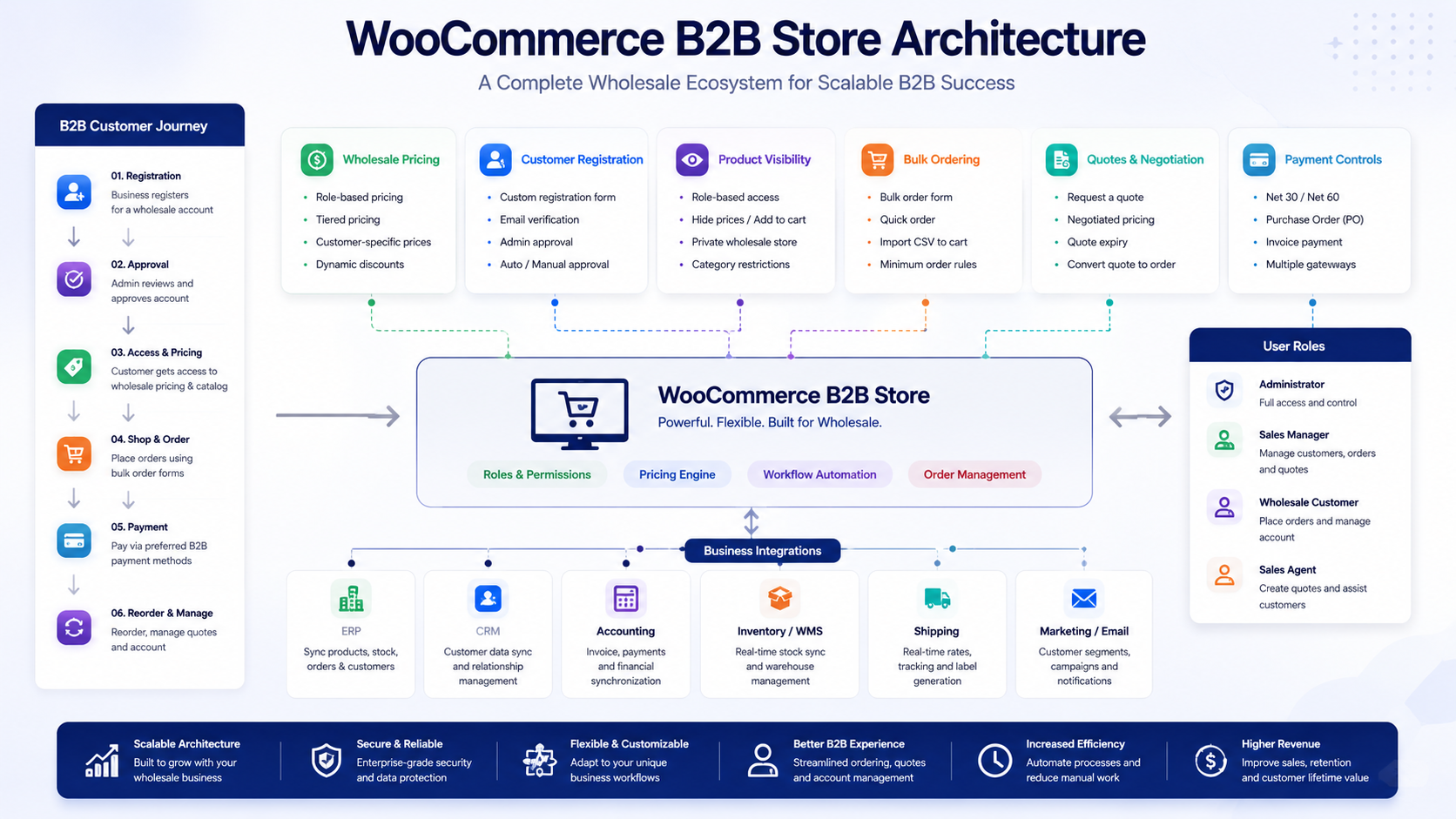
The all-in-one approach means choosing a single plugin, such as B2BKing or WholesaleX, that covers pricing, registration, ordering, and payment terms together. The advantage is a single settings interface, one vendor to support, and generally fewer compatibility questions since the plugin was built to handle these workflows as one system. The tradeoff is that you are relying on one plugin’s roadmap and update cadence for every part of your B2B workflow, and switching away from it later can mean rebuilding several workflows at once rather than one.
The modular approach means combining specialized plugins, for example, a pricing plugin, a separate registration and approval tool, and a separate bulk order form. Wholesale Suite is a good example of this model done deliberately, with each component sold and maintained as its own product that shares data with the others. The advantage is flexibility. You only pay for and configure what you actually need, and you can swap out one component later without touching the others. The tradeoff is more moving parts to keep updated and compatible with each other and with WooCommerce core over time.
Maintenance and compatibility considerations favor whichever approach has fewer total plugins actively touching pricing and checkout logic, since that is where conflicts are most likely to appear. Performance is rarely a major differentiator between well-built plugins in either category, though a plugin with an unusually large number of features running on every page load is worth testing on your own hosting before committing.
Cost comparisons need to include the whole picture: an all-in-one plugin’s price against the combined price of the individual plugins in a modular stack, plus the ongoing licensing for each. Long-term scalability depends less on which model you pick today and more on whether the plugin, or plugin stack, will still cover your needs as your registration process, pricing complexity, and order volume grow. A stack of narrowly focused plugins can be easier to extend one piece at a time, while an all-in-one suite can be easier to scale if it already includes headroom for features you have not needed yet.
The right architecture depends on your business requirements, your comfort managing multiple plugins, and how much your B2B workflow is likely to change over the next year or two.
When a WooCommerce Wholesale Plugin Is Not Enough
Plugins, even the most feature-rich ones, are built to solve common B2B requirements across many different stores. Some businesses have requirements specific enough that a plugin, or even a plugin stack, cannot fully cover them without custom development.
Common situations where custom work becomes necessary include complex ERP integration, where pricing, inventory, and order status need to sync in real time with a system like NetSuite or SAP rather than through a periodic import or export. Custom pricing engines are another example, particularly when pricing depends on variables a plugin’s rule builder was never designed to handle, such as contract-specific rates negotiated per account rather than per role.
Contract-specific business rules, such as different minimum order quantities, delivery schedules, or payment terms per individual customer rather than per role, often exceed what role-based plugins can express. Complex company account structures, where a single company has multiple departments each with their own budget, approval chain, and purchasing history, typically require custom logic layered on top of a plugin’s basic subaccount support, if that support exists at all.
Advanced approval workflows, such as multi-step internal sign-off before an order is confirmed, custom inventory logic tied to multiple warehouses or vendor-managed stock, and the need to connect several external systems, a CRM, an ERP, and a freight quoting tool, at once, all push past what an off-the-shelf plugin is designed to do. Enterprise procurement workflows, including punchout catalogs or purchase order validation against a buyer’s own procurement system, are a similarly specialized requirement.
Custom development is not automatically the better choice. It costs more up front, takes longer to build, and requires ongoing maintenance that a well-supported commercial plugin would otherwise handle for you. The right call depends on whether your specific requirement is common enough that a plugin already solves it well or specific enough that no plugin realistically will.
The DazzleBirds Approach to WooCommerce Wholesale Solutions
Choosing a WooCommerce wholesale plugin is one part of a larger project, and treating it as the whole project is a common way B2B builds go sideways. DazzleBirds approaches WooCommerce B2B work by starting with the business workflow itself before touching plugin settings.
That process generally covers the following stages:
- Business requirements discovery. Understanding how wholesale accounts are currently onboarded, priced, and served, whether that process exists on paper, in spreadsheets, or informally through email and phone.
- B2B customer journey analysis. Mapping how a business buyer actually moves from discovering the store to placing a repeat order, and identifying friction points along the way.
- Product catalog and visibility requirements. Deciding which products, categories, or prices should be visible to which customer types, and whether a hybrid or fully private wholesale catalog makes more sense.
- Pricing and customer segmentation. Defining how many pricing tiers or roles are actually needed, rather than defaulting to a single generic wholesale discount.
- Registration and approval workflows. Designing what information a business needs to provide and what internal review process should happen before an account is approved.
- Ordering and purchasing workflows. Determining whether bulk order forms, saved order lists, or reorder tools are needed based on how customers actually buy.
- Payment and invoicing requirements. Confirming whether invoice terms, purchase orders, or standard checkout payments fit the buyer base and how overdue accounts should be handled.
- ERP, CRM, and inventory integrations. Identifying which existing systems need to stay in sync with the WooCommerce store and how.
- Plugin evaluation. Matching the requirements gathered above against the actual capabilities of available plugins, rather than starting from a plugin and working backward.
- Custom development where necessary. Filling genuine gaps between what a plugin offers and what the business actually requires, scoped narrowly rather than rebuilt from scratch.
- Testing and validation. Confirming pricing, visibility, and ordering behave correctly across every relevant customer role before launch.
- Ongoing catalog and workflow governance. Recognizing that a B2B catalog and its rules tend to change as the business grows, and planning for that instead of treating launch as the finish line.
The plugin comes after the requirements, not before them. A store that picks a plugin first and tries to force its workflow to match the plugin’s defaults usually ends up fighting the tool later. Starting from the actual business process and then evaluating which plugin, or combination of plugins, fits it tends to produce a more durable result.
Related reading: WooCommerce bulk ordering best practices goes deeper into designing an ordering experience that matches how wholesale buyers actually purchase.

Supporting WooCommerce Plugins for Wholesale Operations
Not every plugin that matters to a wholesale operation is itself a wholesale plugin. Data management tools sit alongside the core B2B workflow and solve a different, but related, problem: keeping product, customer, and order data accurate and up to date as your catalog and account base grow.
WooImportExport is a data management tool for WooCommerce, not a wholesale pricing or B2B customer management plugin. It handles bulk import and export of products, orders, customers, and related data, typically through CSV, XML, or spreadsheet files. For a wholesale store, this becomes useful in a few specific situations: bulk updating product data across a large catalog, migrating customer records when moving to a new wholesale setup, exporting order data for reporting or accounting, keeping a catalog synced with a supplier feed, moving a store between environments during a rebuild, and scheduling recurring data operations so catalog updates do not require manual work every time.
It is worth being precise about what this kind of plugin does not do. It does not create wholesale pricing tiers, manage customer roles, or handle registration and approval. Its job is moving and maintaining data accurately, which is a real and recurring need for any growing wholesale catalog, but it is a supporting tool rather than a wholesale plugin in its own right.
Learn more: WooImportExport
Conclusion
There is no universal best WooCommerce wholesale plugin, and any article claiming otherwise is oversimplifying a decision that depends heavily on your business. A simple wholesale operation with a handful of trusted accounts may only need a focused pricing plugin. A larger B2B store with registration workflows, quote negotiation, and invoice terms is better served by an all-in-one suite or a deliberately assembled plugin stack. Enterprise operations with ERP integrations or custom procurement rules may need custom development layered on top of whichever plugin foundation they choose.
Whatever direction fits your store, weigh long-term scalability, plugin compatibility, the quality of ongoing support, and how closely a plugin’s workflow matches your actual business process, not just its feature list. A WooCommerce wholesale solution that fits your specific customer journey will outperform one chosen because it advertised the most features.
If you are planning or building out a WooCommerce B2B or wholesale store and want help mapping your requirements to the right plugin, plugin stack, or custom build, DazzleBirds can walk through your current workflow and help you figure out what actually fits.
FAQs
A WooCommerce wholesale plugin adds business-to-business functionality that WooCommerce does not include by default, such as wholesale pricing tiers, customer registration and approval, role-based product visibility, bulk ordering, and B2B-specific payment options like invoicing.
No. Core WooCommerce assumes a single price per product and a single type of customer. Wholesale pricing, business account approval, and bulk ordering all require a dedicated wholesale plugin or a combination of plugins.
There is no single best option for every store. The right choice depends on whether you need a full all-in-one B2B suite, a modular set of specialized tools, or a narrow pricing-only solution, which is why this guide assigns each plugin a specific use case rather than a single ranking.
Yes. This is typically done through user roles, where each role, such as wholesale tier one or reseller, has its own pricing rules, and some plugins, including YITH Role Based Prices and B2BKing, also support pricing assigned to individual customers.
It depends on your requirements. A single all in one plugin reduces the number of tools you need to manage, while a modular stack of specialized plugins offers more flexibility to add or swap individual pieces over time. Neither approach is inherently better, and the right one depends on how complex your B2B workflow is and how much it is likely to change.


 WooCommerce Solutions
 Solutions for WordPress