A WooCommerce store can look complete on the surface, with product pages built, checkout working, and payment gateways connected, and still be invisible on Google Shopping, Meta, or a marketplace like Amazon. That is because those channels do not read your website the way a shopper does. They need your product information delivered to them in a specific, structured format, updated on a schedule, with the right fields in the right places. That structured delivery is what a product feed does.
As a catalog grows past a few dozen items, manually keeping product titles, prices, stock levels, and images synchronized across Google Merchant Center, Meta Catalog, or a marketplace becomes impractical. A price change on one product can mean updating it in five different places, and a missed update means a customer sees a price on Google Shopping that no longer matches what your store actually charges. A product feed solves this by pulling structured data, title, description, price, availability, images, product URL, brand, SKU, GTIN or other identifiers, category, and other attributes directly from WooCommerce and formatting it the way each destination platform expects.
This guide covers what a WooCommerce product feed actually is, how it works, how to build and optimize one, common errors and disapprovals, and the additional considerations that come up once a catalog is large or includes B2B pricing that should not be shown publicly.
Key Takeaways
- A WooCommerce product feed is a structured export of product data built for external shopping, advertising, or marketplace platforms, not for moving data between systems for backup or migration purposes.
- Feed quality directly affects whether products are approved and how they appear, but a feed does not guarantee rankings, traffic, or sales.
- Manual feeds work for very small catalogs. Most stores need a feed plugin, and complex or enterprise catalogs sometimes need custom feed generation.
- Feed errors and disapprovals usually trace back to missing attributes, mismatched pricing or availability, or identifier problems, and most are fixable once you know where to look.
- B2B stores need to decide deliberately which products and prices are appropriate for a public feed, since wholesale or customer-specific pricing should not be exposed to the general public.
What Is a WooCommerce Product Feed?
A WooCommerce product feed is a structured file or data connection that sends product information from your store to external platforms such as Google Merchant Center, Meta, or marketplaces. It automatically formats and synchronizes product details such as titles, prices, images, availability, and URLs, helping platforms process and display accurate product data.
How Does a WooCommerce Product Feed Work?
The mechanics of a product feed follow a repeatable sequence, whether you are feeding Google Merchant Center, Meta, or a marketplace.
- Product information exists in WooCommerce. Titles, descriptions, prices, stock status, images, categories, and any custom attributes live in your WooCommerce database as the source of truth.
- The feed system collects the required attributes. Whether that is a plugin, a custom script, or a manual export, this step pulls the specific fields the destination platform needs, and typically nothing more.
- Data is structured according to the destination platform. Google Merchant Center, Meta, and various marketplaces each expect their own field names, formats, and required versus optional attributes. The same WooCommerce product might need to be represented slightly differently for each one.
- The feed is submitted or connected. This can mean uploading a file, providing a feed URL the platform fetches on its own schedule, or connecting through an API integration.
- The platform processes the feed. It validates the data against its own rules, checks for required fields, and applies its own policies.
- Errors or disapprovals are identified. Products with missing attributes, invalid values, or policy issues get flagged, usually inside the platform’s own diagnostics tools.
- Product information is updated on a schedule. Since prices, stock, and availability change, the feed needs to refresh regularly rather than being submitted once and forgotten.
Scheduled updates matter because a feed that only runs once a month will inevitably drift out of sync with your live store. A price increase that is not reflected in the feed can cause a price mismatch disapproval. A product that sells out but still shows as available on Google Shopping creates a bad customer experience and can affect account standing. New products need to appear in the feed to be discoverable on the destination platform, and discontinued products need to be removed so they stop showing up as purchasable when they are not. How frequently this needs to happen depends on how often your catalog actually changes, but for most active stores, daily updates are a reasonable baseline, with more frequent updates for fast-moving inventory or pricing.
What Information Goes Into a WooCommerce Product Feed?
Every feed is built from a set of core attributes, though which ones are strictly required, merely recommended, or entirely platform-dependent varies by destination.
Product title
The title is usually the single most influential field for both matching and shopper decision-making. It should clearly and accurately identify the product, generally including the brand, key distinguishing details such as size or color where relevant, and avoiding promotional language that platforms may flag or ignore.
Product description
Descriptions should be accurate, relevant, and consistent with what is on your actual product page. Platforms use this text for matching and relevance, so vague or duplicated descriptions across many products reduce how well the feed performs.
Product URL
This is the direct link to the product page a shopper lands on after clicking. It needs to be a working, accessible URL, not a redirect chain or a page requiring login for a product intended for public visibility.
Product image
Most platforms require at least one image URL per product and have specific requirements around minimum resolution, background, and prohibited overlays like watermarks or promotional badges. An image that violates these requirements is a common source of disapproval.
Price
The price in the feed must match the price a shopper actually sees on your product page at checkout. Platforms treat price mismatches seriously since they directly affect the buyer experience.
Availability
This tells the platform whether a product is in stock, out of stock, or available for preorder. It needs to reflect your real-time inventory status, not a status set once and left unchanged.
SKU
Your internal SKU or product identifier helps track and match products, especially useful for troubleshooting and for keeping your feed system’s internal mapping consistent with WooCommerce.
Brand
Brand is required by many platforms, particularly for identifying products that are eligible for certain shopping features, and it also supports matching for branded search queries.
GTIN and product identifiers
Global Trade Item Numbers, along with MPN (manufacturer part number) where applicable, help platforms match your listing to existing product data and are required for many product categories on Google Shopping specifically. Products without valid identifiers may be limited in how they can be shown or may need to be marked as identifier-exempt where the platform allows it.
Product category
Category mapping tells the platform what type of product it is, often using a standardized taxonomy such as Google’s product category system rather than your own WooCommerce category structure directly. Mismatched or overly generic categorization affects both compliance and matching accuracy.
Shipping information
Some platforms want shipping cost, shipping speed, or handling time included directly in the feed, particularly for shopping ads where shipping cost is shown to the shopper before they click through.
Additional attributes
Depending on the platform and product type, additional fields such as size, color, material, gender, age group, or custom labels for campaign segmentation may be required or simply useful for more precise targeting and organization.
Not every platform requires all of these fields, and requirements shift over time, so the current documentation from each destination is the authoritative source for what is mandatory versus optional for your specific product types.
WooCommerce Google Product Feed: How It Works
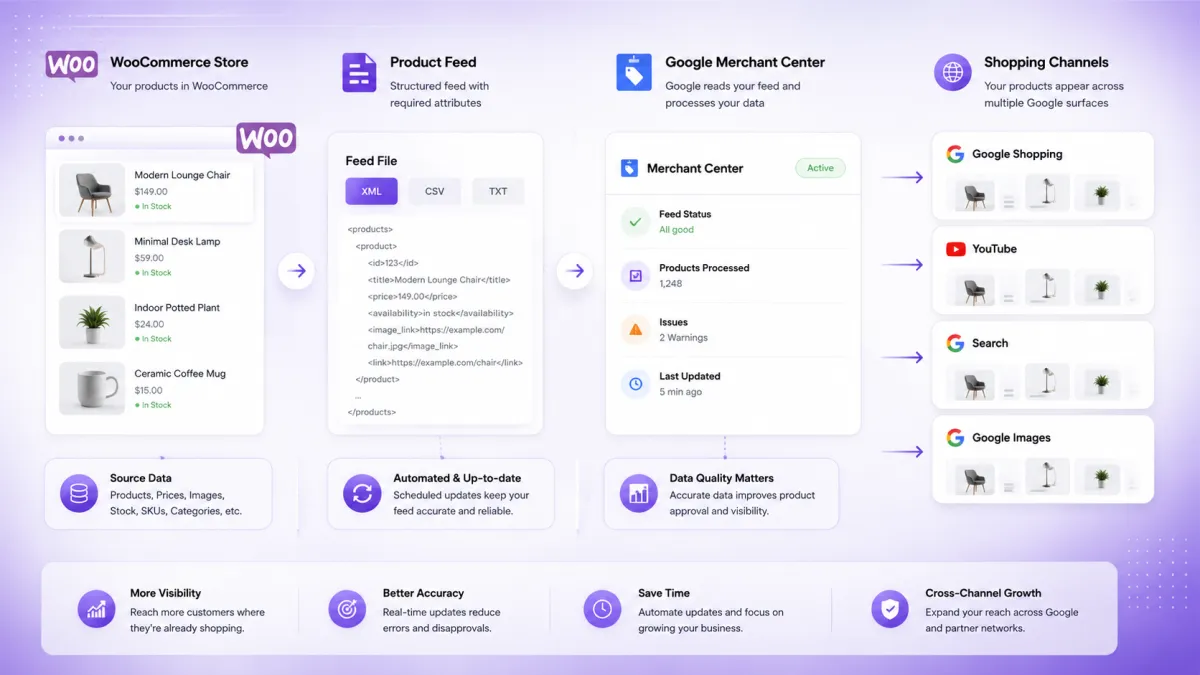
A WooCommerce Google product feed is the specific case of feeding your catalog into Google’s ecosystem, which follows this path: WooCommerce, product feed, Google Merchant Center, and Google Shopping.
Google Merchant Center is the intermediary system where your product feed is submitted and validated before any of your products can appear in Google Shopping results, Shopping ads, or certain other Google surfaces. Your WooCommerce product information does not go directly to Google Shopping. It goes to Merchant Center first, where Google reviews it against both technical requirements (are the required fields present and correctly formatted) and policy requirements (does the product and its listing comply with Google’s shopping policies?).
Accurate product attributes matter here because Google’s matching and eligibility systems rely on them. A product with an incorrect GTIN, a vague title, or a mismatched category is more likely to be limited in visibility or rejected outright. Price and availability specifically need to stay synchronized between your feed and your live WooCommerce store, since Google periodically checks live pages against feed data, and a persistent mismatch is treated as a policy violation rather than a minor inconsistency.
Product data quality affects eligibility and approval status, but it is worth being precise about what that does and does not mean. Being approved and eligible in Merchant Center means your product data meets Google’s requirements. It does not mean your product will appear prominently in Shopping results, and it is not the same thing as ranking well in Google’s organic search results. Shopping visibility depends on additional factors including bidding (for paid Shopping campaigns), competitiveness of your pricing and offer, and Google’s own relevance algorithms, none of which a feed alone controls.
Connecting a WooCommerce Product Feed to Google Merchant Center
The general workflow for getting a WooCommerce product feed into Merchant Center follows a consistent pattern, even as Google’s specific interface options change over time.
- Create or prepare the product feed. This is generated either manually, through a WooCommerce product feed plugin, or through a custom integration, formatted according to Google’s product data specification.
- Configure required attributes. Confirm that mandatory fields for your product types, such as GTIN, brand, and category, are present and correctly mapped from WooCommerce.
- Connect or submit the feed. This typically means either providing Merchant Center with a feed URL it can fetch on a schedule or uploading a feed file directly, depending on the method your setup supports.
- Review processing status. After submission, Merchant Center processes the feed and reports how many products were accepted and how many have warnings or errors.
- Resolve warnings and errors. Google’s diagnostics tools identify specific issues, missing attributes, disapproved products, or account-level policy concerns that need to be addressed before those products become eligible.
- Monitor product status. Ongoing monitoring inside Merchant Center’s diagnostics area shows whether products remain active, get flagged for new issues, or drop out of eligibility as your catalog changes.
- Maintain ongoing updates. Since Merchant Center relies on your feed staying current, scheduled refreshes need to continue indefinitely, not just at initial setup.
Google’s interface for feed management has changed over the years and will likely continue to change, so rather than following outdated step-by-step screenshots, it is more reliable to understand this conceptual flow and locate the current equivalent options inside Merchant Center when you set things up.
How to Create a WooCommerce Product Feed
There are three general approaches to building a WooCommerce product feed, and the right one depends on catalog size, complexity, and how many destinations you need to support.
1. Manual feed creation
For a very small catalog, it is technically possible to build a feed file by hand, exporting product data and formatting it to match a platform’s specification. This can work for a store with a handful of products that rarely change. It becomes unworkable quickly as catalog size or update frequency increases, since every price change, stock update, or new product requires manually editing and resubmitting the file, and human error in formatting is common.
2. Using a WooCommerce product feed plugin
A dedicated feed plugin automates the process described above: it reads your WooCommerce product data, applies attribute mapping and filtering rules you configure, generates the feed in the format each destination requires, and refreshes it on a schedule without manual intervention. This is the right fit for most stores because it removes repetitive manual work, reduces formatting errors, handles variable products and their variations more reliably than a manual export, and scales to larger catalogs without additional manual effort per product.
3. Custom feed generation
Custom development becomes worth considering when requirements go beyond what a general purpose plugin handles well. Common triggers include a complex catalog with business rules that do not map cleanly to a plugin’s built in filtering options, multiple data sources that need to be merged before the feed is generated, custom business logic around which products or prices to include, integration with an ERP or PIM system as the actual source of truth rather than WooCommerce alone, feeding multiple destinations with meaningfully different attribute requirements, custom attributes that a plugin’s mapping interface cannot express, or broader enterprise workflows involving approval steps or multi-team ownership of feed data.
None of these three approaches is universally correct. A manual feed is appropriate for a genuinely small, stable catalog. A plugin is the practical choice for the majority of active WooCommerce stores. Custom development makes sense once your requirements exceed what configuration alone can solve.
Related reading: WooCommerce product catalog management covers how catalog structure decisions upstream affect how cleanly a feed can be generated downstream.
How to Choose a WooCommerce Product Feed Plugin
Rather than recommending specific products, it is more useful to walk through the criteria that actually matter when evaluating a WooCommerce product feed plugin against your own catalog and destinations.
Supported channels. Confirm the plugin supports the specific platforms you need, Google Merchant Center, Meta Catalog, specific marketplaces, or comparison shopping engines, rather than assuming broad “multi-channel” support covers your exact destination.
Google Merchant Center compatibility. If Google Shopping is a priority, verify the plugin explicitly supports Google’s current feed specification and identifier requirements, since this is one of the most commonly used destinations and also one of the strictest on data quality.
Feed formats. Check whether the plugin generates XML, CSV, or other formats your destinations require, and whether it supports feed URLs for automatic fetching versus manual file uploads only.
Attribute mapping. Look for flexibility in mapping WooCommerce fields, including custom fields, to the specific attribute names each destination expects, since default mappings rarely cover every product type perfectly out of the box.
Product filtering. You need the ability to include or exclude specific products, categories, or product types from a given feed, since not everything in your catalog belongs in every channel.
Variable products and variations. Confirm the plugin handles WooCommerce’s variable product structure correctly, generating separate feed entries for variations with their own price, stock, and identifier data rather than collapsing them into a single generic listing.
Scheduled updates. Check what update frequencies are supported and whether the schedule is reliable enough for how often your pricing and stock actually change.
Stock and price synchronization. These two fields cause the most disapprovals and customer trust issues when stale, so confirm the plugin pulls live data rather than relying on infrequent full regenerations.
Category mapping. Look for tools that support mapping your WooCommerce categories to a platform’s standardized taxonomy, rather than requiring you to do this manually for every product.
Custom fields. If your business relies on custom attributes, confirm the plugin can read and map those fields into the feed.
Large catalog handling. For catalogs in the thousands of products, check whether the plugin is built to handle feed generation efficiently at that scale without excessive server load or processing time.
Error reporting and logging. A plugin that surfaces clear, specific error messages when a product fails to generate correctly saves significant troubleshooting time compared to one that fails silently.
Compatibility. Confirm the plugin works cleanly alongside your existing WooCommerce extensions, particularly other plugins that touch pricing, inventory, or product data.
Support and maintenance. Since feed specifications change over time as platforms update their requirements, an actively maintained plugin with responsive support is more reliable long-term than one that has gone quiet on updates.
This is not a ranking of specific tools. It is the checklist to run any candidate plugin against, based on your own catalog size, destinations, and data complexity.
How to Optimize a WooCommerce Product Feed
Getting a feed technically working is the first step. Optimizing it is what determines how well your products actually perform once they reach a destination platform.
Write accurate product titles.
Titles should clearly identify what the product is, including brand and distinguishing attributes like size, color, or model, in a natural order a shopper would recognize. Avoid stuffing titles with unrelated keywords or promotional phrases, since platforms may ignore or flag that content.
Keep product descriptions useful.
Descriptions in the feed should match what is actually on your product page and describe the product accurately and specifically. Generic, duplicated, or thin descriptions across many products reduce relevance matching and make it harder for a platform to understand what makes each listing distinct.
Use high-quality product images.
Images need to meet the destination platform’s technical requirements, have adequate resolution, have no promotional overlays or watermarks, and accurately represent the actual product, not a stock photo or a different variation than what is being sold.
Keep price and availability synchronized.
Stale price or stock data is one of the most common sources of disapproval and poor customer experience. The feed’s price and availability values must match what a shopper sees on your actual product page at the time of purchase, which means your update schedule needs to match how often those values actually change in your store.
Use correct product categories.
Map products to the most specific and accurate category available in the destination platform’s taxonomy, rather than defaulting to a broad catch-all category. This affects both policy compliance for certain restricted categories and how well the platform matches your products to relevant searches.
Maintain product identifiers.
Keep SKU, GTIN, and brand fields consistent and accurate across your catalog. Products missing valid identifiers, when identifiers are expected for that product type, are commonly limited in eligibility or flagged for review.
Filter unsuitable products.
Not every product in your WooCommerce catalog belongs in every feed. Products that are discontinued, restricted, wholesale only, or otherwise unsuited for public distribution should be explicitly filtered out rather than left to generate errors or, worse, appear publicly with incorrect information.
Handle variations correctly.
Variable products need variation-level data, individual pricing, stock, and identifiers, rather than a single generic entry representing the parent product. Getting this wrong is a common cause of mismatched pricing or availability at the variant level.
Keep the feed updated.
Set an update schedule that matches your actual rate of change. A slow-moving catalog with stable pricing can tolerate less frequent updates than a catalog with daily price changes or fast inventory turnover.
None of these steps guarantee higher rankings or more sales on their own. What they do is remove the friction, missing data, mismatches, poor quality images, that commonly prevents products from being eligible or well understood by the destination platform in the first place.
Common WooCommerce Product Feed Problems and How to Fix Them
Missing required attributes. This happens when a plugin’s default mapping does not cover every field a specific product type requires, or when a product was created without filling in fields like brand or GTIN. The fix is reviewing the platform’s requirements for your specific product categories and confirming your feed mapping actually populates each required field.
Incorrect price. Usually caused by caching, currency conversion issues, or a feed generation schedule that runs less frequently than your price changes. The fix is confirming the feed pulls live pricing data and adjusting update frequency to match how often prices actually change.
Incorrect availability. Often the result of stock status not syncing in real time, particularly with backorder settings or third-party inventory tools that update WooCommerce on a delay. The fix is verifying your feed reads current stock status rather than a cached or delayed value.
Invalid product identifiers. Typically caused by missing GTINs, incorrectly formatted SKUs, or reused identifiers across different products. The fix is auditing identifier fields for accuracy and, where a true GTIN does not exist for a product, using the platform’s identifier-exemption option if it applies to that product type.
Missing images. This occurs when a product has no featured image set or when the image URL in the feed is broken or inaccessible to the destination platform. The fix is ensuring every distributed product has a valid, accessible image URL that meets the platform’s resolution and content requirements.
Broken product URLs. Usually the result of URL structure changes, redirects, or products behind login walls being included in a public feed. The fix is confirming every URL in the feed resolves directly to a live, publicly accessible product page.
Incorrect categories. Often caused by mapping WooCommerce’s own category structure directly to a platform’s taxonomy without adjustment. The fix is reviewing category mappings against the platform’s official taxonomy rather than assuming a one-to-one match.
Variation problems. This happens when variable products are represented as a single generic entry instead of individual variant-level listings. The fix is confirming your feed tool generates separate entries per variation with accurate variant-specific data.
Unsupported values. Certain fields have restricted accepted values, such as specific availability statuses or condition labels, and using a value outside that list causes rejection. The fix is checking field-level documentation for accepted values rather than assuming free text is allowed.
Feed processing errors. These can result from malformed XML or CSV, encoding issues, or feed files exceeding size or product count limits. The fix is validating feed structure before submission and checking for platform-specific technical limits.
Stale product data. This is a scheduling problem rather than a data problem, where the feed itself is technically correct but has not run recently enough to reflect the current store state. The fix is increasing update frequency to match your actual rate of change.
Products being rejected or disapproved. This is often the cumulative result of one or more of the issues above, combined with policy-specific requirements from the destination platform. The fix is reviewing the platform’s own diagnostic messaging for the specific reason given, rather than guessing.
Why WooCommerce Products Can Be Disapproved in Shopping Feeds
Disapproval is not a single problem with a single fix. It typically results from one or more distinct categories of issues, and treating every disapproval as though it has the same cause leads to wasted troubleshooting time.
Missing information covers cases where a required attribute simply is not present in the feed for a given product. Incorrect information covers cases where a field is present but does not match reality, a wrong price, an inaccurate description, or a mismatched image. Policy requirements refer to a platform’s specific rules around what can and cannot be advertised or listed, which vary by product category and by platform, and which change over time as platforms update their policies.
Price mismatch and availability mismatch are specific, common disapproval categories where the feed and the live product page disagree, which platforms treat as a trust and accuracy issue rather than a minor technical error. Website or product page problems can trigger disapproval even when the feed data itself is correct, for example, if the destination platform’s crawler cannot access the product page or if the page fails basic requirements like having a working checkout process. Identifier issues cover missing, invalid, or mismatched GTINs, MPNs, or brand information that prevents the platform from correctly matching or categorizing a product.
Because the underlying cause varies this much, the most reliable path to resolving a disapproval is checking the destination platform’s own diagnostic information for that specific product, rather than assuming the same fix that resolved a previous disapproval will apply here as well.
Managing Product Feeds for Large WooCommerce Catalogs
Feed management for a catalog with a few dozen products and feed management for a catalog with several thousand products are meaningfully different problems.
At scale, feed generation needs to handle thousands of products, including variable products with many individual variations, without excessive processing time or server strain. Frequent inventory updates, multiple warehouses, fast moving stock, or high order volume, mean the gap between a scheduled feed run and real time accuracy becomes more consequential. Multiple product categories, especially when they map to different taxonomy requirements or different destination-specific rules, add configuration complexity that a simple, uniform mapping cannot always handle well.
Data consistency becomes harder to maintain manually as the number of products and attributes grows, which is where automation stops being a convenience and becomes closer to a requirement. Feed performance, meaning how long generation takes and how much server resource it consumes, matters more once a catalog is large enough that a poorly optimized feed process can slow down the rest of the site during generation. Monitoring becomes more important as well, since a single missed error on a ten product catalog is a minor issue, while the same error rate applied to a five thousand product catalog can mean hundreds of disapproved or misrepresented listings.
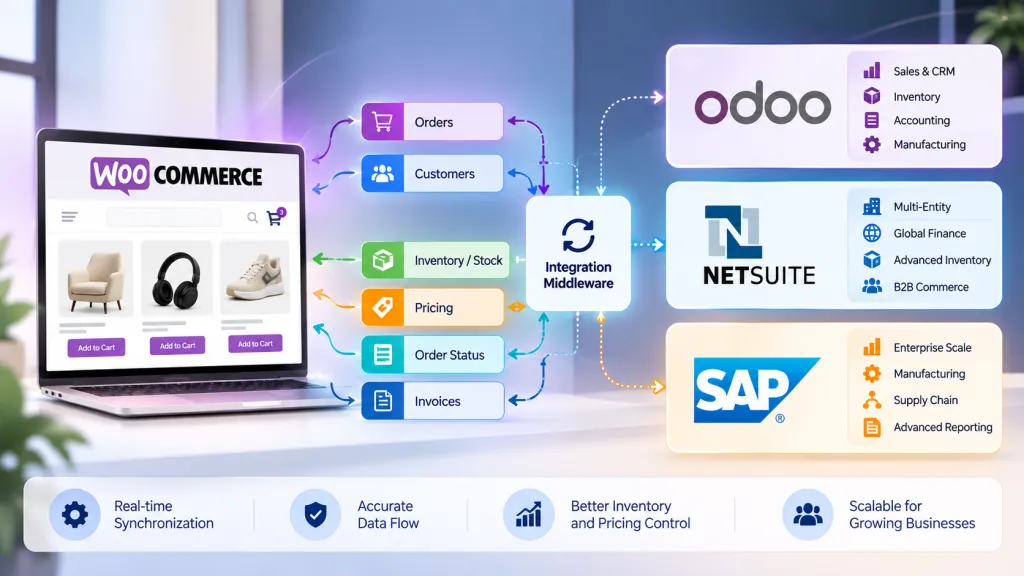
Automation, scheduled, reliable, and logged, is what makes feed management sustainable at this scale. For stores where WooCommerce is not the sole source of product truth, ERP or PIM integration becomes relevant, since pricing, inventory, and product content may originate in a separate system and need to flow into WooCommerce and from there into the feed in a coordinated way rather than being maintained twice.
Customer-specific catalog considerations also become more relevant at scale, particularly for stores with segmented pricing or restricted product visibility, which leads directly into the next section.
WooCommerce Product Feeds for B2B Stores
B2B WooCommerce stores need to think about product feeds differently than a standard retail catalog, because not everything in a B2B catalog is meant to be publicly visible, and not every price is meant to be shown to the general public.
Common B2B characteristics that complicate feed strategy include customer-specific pricing, where different accounts see different negotiated rates for the same product, restricted or wholesale-only products that should not be discoverable by the general public, login-required catalogs where pricing or product access depends on an approved account, different availability rules for different customer segments, contract pricing tied to specific agreements, and business-specific product access where certain SKUs are only available to certain account types.
Public shopping feeds are built around the assumption of a single public price and a single public availability status per product. That assumption breaks down for wholesale pricing, negotiated contracts, or products intended only for approved business accounts. Sending that kind of data into a public feed risks exposing pricing that was meant to be confidential to specific customers or advertising products to a general audience that should never have been able to purchase them at that price, or at all.
This means B2B stores need to make deliberate decisions before connecting any feed: which products should actually be exposed to a public shopping channel, which prices are appropriate to show publicly versus which are customer-specific and should stay behind an approved account, which customers or channels should receive which version of the data, and whether the feed being built reflects the public retail side of the catalog, the restricted B2B side, or requires separate feeds for each. Getting this wrong is not just a technical error, it is a business and confidentiality issue, and it deserves the same deliberate scoping as pricing and registration decisions elsewhere in a B2B setup.
Related reading: B2B WooCommerce pricing challenges covers how customer-specific pricing complexity plays out more broadly across a WooCommerce B2B store, which is directly relevant background before deciding what belongs in a public feed.

WooCommerce Product Feed vs. Import and Export
These three workflows get confused often, but they solve different problems and frequently use different tools.
A product feed moves data from WooCommerce to an external shopping, advertising, or marketplace channel, structured specifically for that destination’s requirements, and refreshed on an ongoing schedule to keep the destination platform current.
Import moves data from an external source into WooCommerce, for example bringing in a supplier’s product catalog, migrating from another platform, or bulk updating your store from a spreadsheet.
Export moves data out of WooCommerce into a file or another system, typically for backup, reporting, migration, or transferring data to a system that is not a shopping or advertising channel.
These are related in that they all involve structured product data leaving or entering WooCommerce, but they solve distinct problems and are often handled by different tools built for their specific purpose. A tool built for import and export is generally optimized for moving complete datasets between systems, while a feed tool is optimized for ongoing, scheduled, destination-specific formatting aimed at shopping and advertising platforms specifically.
Is a WooCommerce Product Feed the Same as Google Shopping?
No, and this distinction matters for setting realistic expectations. A product feed is the structured product data itself, generated from your WooCommerce store. Google Shopping is the destination, a channel where eligible product information from your feed may be shown to shoppers, subject to Google’s own eligibility and ranking systems.
Having a working, accurate feed makes your products eligible to appear in Google Shopping. It does not directly control how prominently they appear, how they compete against other advertisers, or how often they are shown. Those outcomes depend on additional factors handled entirely within Google’s own systems, separate from the feed itself.
Manual, Plugin-Based, or Custom Product Feed: Which Approach Is Right?
Revisiting the three approaches from earlier with a direct comparison helps clarify which fits a given store.
Manual feed creation is best suited to small or simple catalogs with infrequent changes, where the overhead of formatting and resubmitting a feed by hand remains manageable. It is not sustainable once product count or update frequency grows past a modest threshold.
A plugin-based approach fits most active WooCommerce stores that need ongoing automation, reliable scheduled updates, and support for variable products without custom development. This is the practical default for the majority of stores running product feeds today.
Custom feed generation makes sense for complex or enterprise requirements, multiple data sources, ERP or PIM integration, custom business rules, or feeding several destinations with meaningfully different requirements, where a general purpose plugin cannot express the necessary logic.
None of these is inherently superior. The right choice depends on catalog size, update frequency, number of destinations, and how much of your product logic is standard versus specific to your business.
The DazzleBirds Approach to WooCommerce Product Feed Architecture
Building a reliable product feed setup is rarely just a matter of installing a plugin and connecting it to Merchant Center. DazzleBirds approaches WooCommerce product feed projects by working through the underlying data and business requirements first.
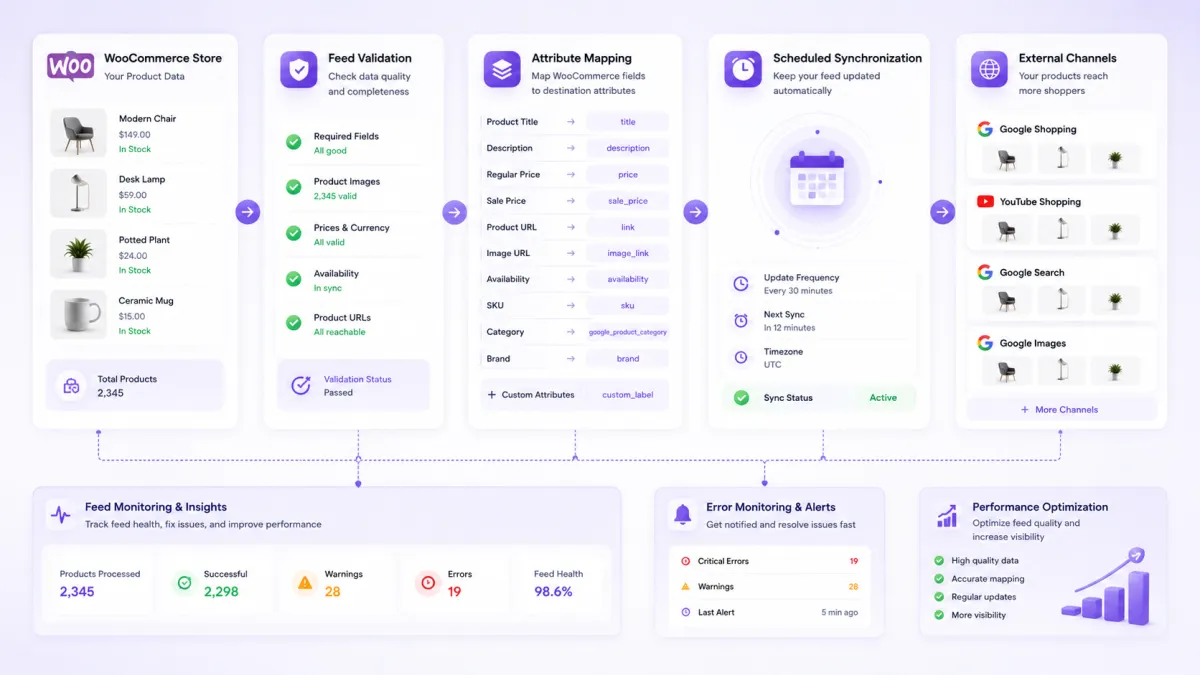
- Understand the product catalog. Reviewing how products, variations, categories, and custom attributes are currently structured in WooCommerce.
- Identify feed destinations. Determining which platforms, Google Merchant Center, Meta, and specific marketplaces, actually matter for the business.
- Define which products should be distributed. Deciding what belongs in a public feed versus what should stay restricted, particularly relevant for stores with any B2B or wholesale component.
- Identify required attributes. Mapping out what each destination platform requires for the specific product types in the catalog.
- Review product data quality. Auditing existing titles, descriptions, images, and identifiers for gaps before building the feed around them.
- Map WooCommerce fields. Connecting native and custom WooCommerce fields to the attribute names each destination expects.
- Configure feed rules. Setting up filtering logic for inclusion, exclusion, and any category-specific handling needed.
- Establish update schedules. Matching feed refresh frequency to how often pricing, stock, and catalog content actually change.
- Validate product data. Testing the feed against the destination platform’s requirements before full submission.
- Monitor errors and disapprovals. Setting up a process for reviewing diagnostics regularly rather than only after a problem is noticed.
- Connect ERP, PIM, or inventory systems where necessary. Ensuring the feed reflects the actual system of record when WooCommerce is not the sole source of product truth.
- Establish ongoing feed governance. Recognizing that a feed setup needs maintenance as the catalog, pricing model, and destination requirements evolve over time.
For enterprise stores, particularly those with large catalogs, multiple systems, or B2B pricing complexity, installing a feed plugin is often only the starting point. The requirements gathering, data quality review, and governance steps around it are usually what determine whether a feed setup remains reliable six months after launch rather than quietly drifting out of sync.
Conclusion
A WooCommerce product feed is the structured bridge between your store’s product data and the external platforms where shoppers actually discover and compare products. Accurate, well-maintained product data affects whether your products are approved and how clearly they are represented, though it does not by itself guarantee rankings, traffic, or sales. Manual feed creation can work for very small catalogs, a dedicated plugin covers the needs of most active WooCommerce stores, and custom feed development becomes worthwhile once catalog complexity or system integration requirements exceed what configuration alone can solve.
FAQs
A WooCommerce product feed is a structured export of your product data, titles, prices, images, availability, and other attributes, formatted for an external shopping, advertising, or marketplace platform such as Google Merchant Center or Meta Catalog.
You can create a feed manually for a very small catalog, use a WooCommerce product feed plugin to automate generation and scheduled updates for most stores, or build a custom feed generation process for complex or enterprise requirements that a general-purpose plugin cannot handle.
You generate a feed formatted to Google's product data specification, then connect or submit it to Google Merchant Center, where it is validated and, once approved, becomes eligible to appear in Google Shopping and related surfaces.
Rejections typically come from missing required attributes, incorrect or mismatched price and availability, invalid product identifiers, image issues, or policy violations specific to the destination platform. The exact cause varies by product and should be checked in the platform's own diagnostics.
Yes, but B2B catalogs require additional care around which products and prices are appropriate for a public feed, since customer-specific pricing, restricted products, and wholesale-only items should not be exposed publicly without deliberate filtering.


 WooCommerce Solutions
 Solutions for WordPress