Most e-commerce stores spend the majority of their marketing budget chasing a customer who buys once and never comes back. That is the real cost of a transactional store: every sale starts from zero. No forecast, no predictable cash flow, no relationship beyond a single checkout.
Recurring revenue changes that equation. A store with even a modest base of subscribers knows roughly what next month’s revenue will look like before the month starts. Suppliers and B2B buyers who order the same consumables every few weeks stop needing a sales call to reorder. Customers who trust a store enough to hand over their card details once tend to stay far longer than customers who have to check out manually every time.
WooCommerce Subscriptions is the extension that makes this possible on top of WooCommerce. It does not replace WooCommerce’s cart, checkout, or order system. It extends them so that a single purchase can generate ongoing, automated orders and payments over time. This guide walks through how it actually works, where it fits, where it does not, and what a scalable subscription implementation looks like once you move past a handful of test products.
What Are WooCommerce Subscriptions?
WooCommerce Subscriptions is an official WooCommerce extension that adds a recurring product type and subscription order type to a WooCommerce store. Instead of a customer placing one order for one payment, a subscription product creates a subscription record tied to the customer, the product, a billing schedule, and a payment method.
From that point forward, WooCommerce automatically generates renewal orders on the schedule you define and, when the connected payment gateway supports it, charges the customer’s stored payment method without them having to check out again.
It is worth being precise about what this is and is not. WooCommerce core does not include recurring billing. Subscriptions is a separate paid extension built on top of core WooCommerce order and product objects. Any subscription functionality you see in a WooCommerce store, whether it is trial periods, synchronized renewal dates, or automatic retries on failed payments, comes from this extension, from the payment gateway, or from custom development layered on top of both.
How WooCommerce Subscriptions Work
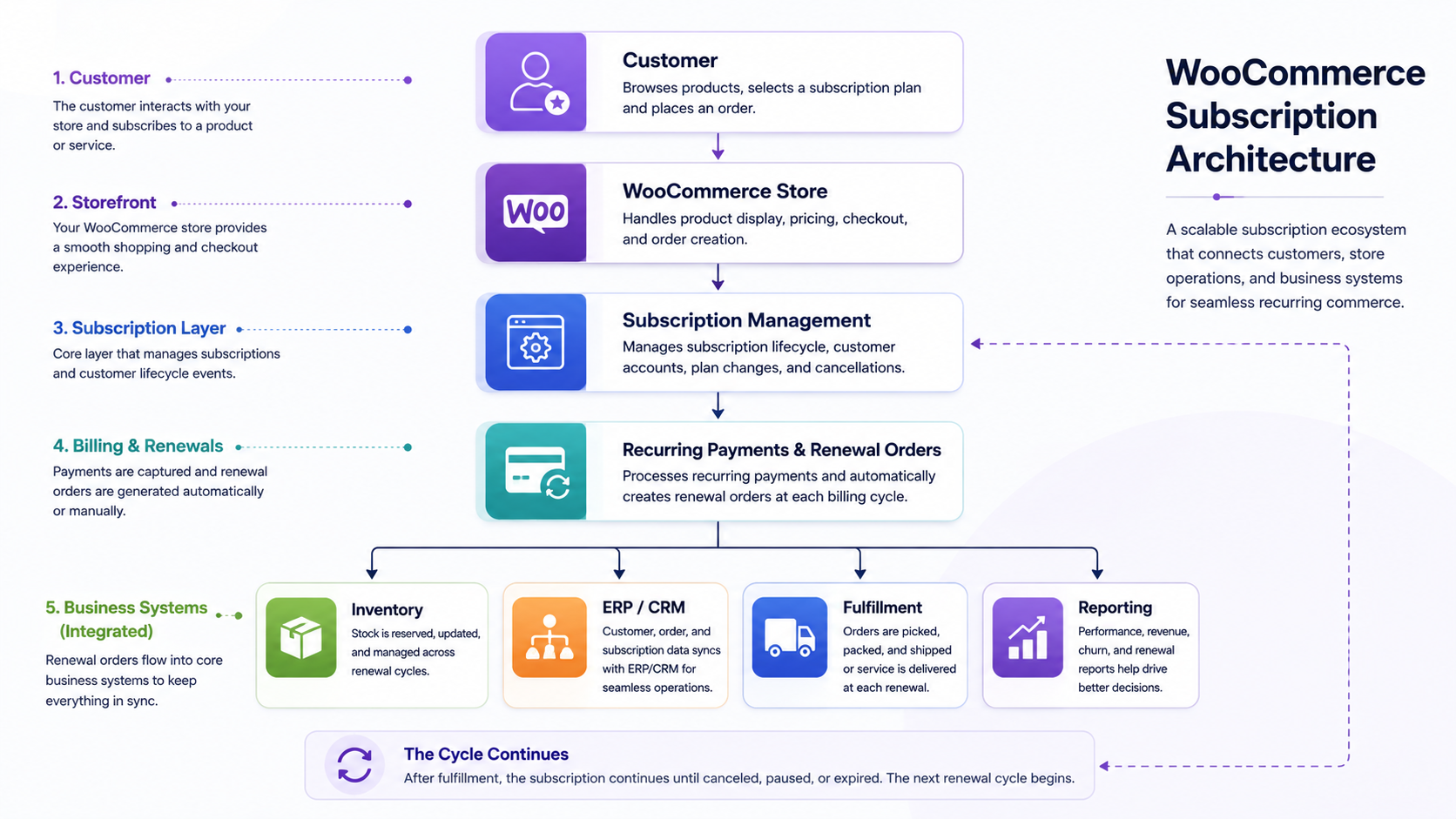
At a technical level, a subscription in WooCommerce is its own order type, separate from a regular order but built using the same underlying WooCommerce order data structure. When a customer purchases a subscription product, three things happen.
First, WooCommerce creates the initial order, which is processed like any other order. Second, it creates a subscription object that stores the billing schedule, the next payment date, the product, the quantity, and the customer’s saved payment token. Third, on each renewal date, WooCommerce Subscriptions generates a new renewal order and, if automatic payments are supported by the gateway, attempts to charge the stored payment method for that renewal order.
If the charge succeeds, the renewal order is marked complete and moves through the same order and fulfillment workflow as any other order in the store, which means renewal orders should be visible and manageable through your existing WooCommerce Order Management process rather than treated as a separate order type requiring its own workflow. If the charge fails, the subscription enters a different status, which we cover in detail in the payment failure section below.
This cycle repeats on the schedule the merchant configures, whether that is weekly, monthly, every 90 days, or annually, until the customer cancels, the subscription expires based on a defined length, or the account runs into an unresolved payment issue.

What Can You Sell With WooCommerce Subscriptions?
Subscription products are not limited to media or software. WooCommerce Subscriptions supports several practical categories.
Physical products work well for consumables that customers reorder on a predictable cycle, such as coffee, supplements, pet food, or skincare. Digital products fit software licenses, downloadable content libraries, or ongoing access to gated resources. Services can be billed on a subscription when paired with WooCommerce Bookings or custom logic, such as recurring maintenance visits or retainer-based work.
Memberships often use subscriptions as the payment backbone, with WooCommerce Memberships handling the access control while Subscriptions handles the billing. Recurring business supplies are a strong fit for B2B sellers, covering things like printer cartridges, cleaning supplies, or packaging materials that operations teams reorder without wanting to repeat a manual purchase order every time. B2B consumables in industries like manufacturing, healthcare, and food service frequently follow this exact pattern, where the same SKU gets reordered on a near-identical cycle for months or years.
The common thread across all of these is predictability. If a product or service gets purchased again and again on a roughly consistent interval, it is a subscription candidate. If purchase timing is unpredictable or one-off, forcing it into a subscription model usually creates more customer service friction than revenue benefit.
WooCommerce Subscription Pricing and Billing Models
WooCommerce Subscriptions supports several billing structures, and choosing the right one has a direct effect on conversion and retention.
Monthly billing is the most common default because it matches how customers budget for recurring expenses. Quarterly and annual billing intervals work well for lower-frequency consumables or B2B contracts, and annual plans are frequently discounted to improve upfront cash flow and reduce churn, since customers who prepay for a year rarely cancel mid-term.
Trial periods let customers try a product before the first charge, which can lift conversion for higher-priced subscriptions, though trials also increase the number of subscribers who cancel before ever generating revenue if the trial length is too generous. Signup fees allow a merchant to charge a one-time amount at the start of a subscription, separate from the recurring amount, which is common for setup costs, onboarding, or initial hardware paired with a service.
Recurring discounts, such as a reduced price for the first three billing cycles or a percentage off compared to one-time purchase price, are a standard lever for encouraging customers to commit to a subscription rather than buying once. Different billing intervals can also be mixed within the same store, so a single subscription product might offer both monthly and annual variants, letting the customer choose the commitment level that fits them.
Whatever combination you choose, keep the recurring price and billing interval visible before checkout. Ambiguous pricing on a subscription product is one of the fastest ways to generate refund requests and chargebacks.
Automatic vs Manual Subscription Renewals
WooCommerce Subscriptions supports two renewal models, and the difference matters both for cash flow and for the customer experience.
Automatic renewals charge the customer’s stored payment method on the renewal date without any action required from them. This depends entirely on the payment gateway supporting tokenized, off-session charges. Most modern gateways used with WooCommerce, including Stripe and PayPal’s subscription products, support this, but it is a gateway capability, not something WooCommerce Subscriptions can force on a gateway that does not support it.
Manual renewals require the customer to log in and pay for the renewal order themselves, typically triggered by an email reminder. This model is used when the connected payment gateway does not support automatic recurring charges, such as certain offline or manual payment methods, or when a merchant deliberately wants customer confirmation before every charge, which is sometimes preferred for high-value B2B orders.
Automatic renewals generally produce better retention because there is no action required from the customer, but they also mean payment failures need active management, since the customer is not proactively engaging with the store at renewal time. Manual renewals produce more friction and more missed renewals, but they give the customer more visibility and control, which some B2B buyers specifically prefer for approval and budgeting reasons.
Choosing a Payment Gateway for WooCommerce Subscriptions
Not every WooCommerce payment gateway supports recurring billing the same way, and this is one of the most common points of confusion for merchants setting up subscriptions for the first time.
The gateway needs to support tokenized payment methods, meaning it can securely store a reference to the customer’s card or bank account and charge it again later without the customer re-entering details. Gateways without tokenization support can only work with manual renewals.
Currency support matters if you sell subscriptions internationally, since not every gateway processes every currency, and currency mismatches between the store and gateway will block automatic charges. Failed payment handling varies by gateway too. Some gateways return detailed decline reasons that WooCommerce Subscriptions can use to decide whether to retry, while others return generic failure codes that make automated recovery harder to configure well.
Payment method updates are another important consideration. Customers need a straightforward way to update an expired card without canceling and re-subscribing, and this needs to work cleanly through the gateway’s customer vault. Refund handling on subscription orders can also behave differently than refunds on standard orders, particularly around whether a refund on a renewal order affects the subscription status.
This guide will not rank specific gateways, because gateway capabilities change and the right choice depends on the merchant’s country, industry, and existing payment stack. The key point is that recurring-payment compatibility should be confirmed before committing to a gateway, not discovered after subscription products go live.
What Happens When a WooCommerce Subscription Payment Fails?
Failed payments are one of the biggest silent revenue leaks in subscription commerce, and how a store handles them determines how much of that revenue actually gets recovered.
When an automatic renewal charge fails, WooCommerce Subscriptions marks the subscription status as “on hold” rather than immediately canceling it. Most payment gateways integrated with WooCommerce Subscriptions support automatic retry logic, attempting the charge again after a set number of days, since a meaningful share of failed payments are caused by temporary issues like insufficient funds at the time of billing rather than a genuinely expired or invalid payment method.
Customer notification is critical during this window. WooCommerce Subscriptions can trigger emails informing the customer that a payment failed and prompting them to update their payment method, and stores that customize these emails to be clear and low-friction recover meaningfully more failed payments than stores relying on default, easy-to-ignore notifications.
If the customer updates their payment method or the retry succeeds, the subscription returns to active status and continues on its normal schedule. If none of the retries succeed and the customer does not intervene, the subscription typically moves to a cancelled or expired status depending on how the merchant has configured the failure handling rules.
Payment recovery matters because in most subscription businesses, a meaningful percentage of monthly churn is not customers actively choosing to leave. It is failed payments that were never resolved. Treating payment recovery as an active process, rather than a passive default setting, is one of the highest-leverage things a subscription merchant can do.
Managing WooCommerce Subscription Changes
Subscriptions are rarely static once a customer signs up. WooCommerce Subscriptions supports several lifecycle actions that need to be available to the customer, the store admin, or both.
Upgrades and downgrades let a customer move between subscription tiers or plans, which usually requires proration logic to handle the partial billing period correctly. Quantity changes are common for consumable subscriptions, such as a customer increasing their monthly coffee order from one bag to two. Plan changes cover moving between billing intervals, such as switching from monthly to annual billing.
Payment method changes need to be simple and self-service wherever possible, since forcing a customer to contact support to update a card is a common cause of avoidable cancellations. Pausing a subscription, rather than canceling it outright, is increasingly expected by customers and can meaningfully reduce full cancellations when offered as an option, particularly for physical product subscriptions where a customer simply has too much stock on hand.
Cancellation needs to be genuinely accessible from the customer’s account, not buried behind a support request, both for customer trust and because forced friction on cancellation tends to generate chargebacks and negative reviews rather than actual retention. This is one of several reasons subscription-heavy stores tend to invest in WooCommerce Customer Portals at Scale, since giving customers direct control over pausing, changing, and cancelling their own subscriptions removes a steady stream of support tickets that would otherwise fall on your team. Resubscription, allowing a customer to easily restart a cancelled subscription, closes the loop and captures customers who cancelled prematurely or during a temporary pause in need.
WooCommerce Subscriptions and Inventory Management
Subscriptions change how demand behaves compared to one-time purchases, and that has direct implications for stock planning.
Recurring renewal orders create a predictable, recurring draw on inventory for subscribed SKUs, which makes demand forecasting more reliable than for one-time purchase products, assuming churn and payment failure rates are factored into the forecast. This predictability is useful for procurement planning, since a merchant with a known base of active monthly subscribers can estimate stock needs for the next billing cycle with reasonable accuracy.
Safety stock planning still matters, because subscription renewals tend to cluster around specific dates if signups are not staggered, which can create short-term demand spikes rather than a smooth daily draw. Fulfillment planning needs to account for this clustering, particularly for stores with a large base of subscribers who all signed up in the same promotional window.
This is a case where subscriptions intersect directly with broader stock and fulfillment operations, and getting that intersection right usually depends on the underlying inventory system rather than the subscription extension itself. For stores managing this at a meaningful scale, it is worth reviewing how stock levels, reorder points, and fulfillment queues are structured more broadly in WooCommerce Inventory Management, since a subscription renewal that cannot be fulfilled on time creates the same customer experience problem as any other backorder, just on a recurring basis.
WooCommerce Subscriptions for B2B Ecommerce
B2B buyers reorder consumables constantly, and much of that reordering happens through phone calls, email, or manual purchase orders that could be automated through subscriptions.
Realistic use cases include recurring supplies like packaging materials or raw components ordered on a fixed cycle, industrial consumables such as lubricants or filters replaced on a maintenance schedule, office supplies ordered monthly by facilities teams, maintenance products tied to service contracts, and replacement components for equipment under a service agreement.
B2B subscription implementations usually need more than the base extension provides out of the box. Customer-specific pricing is often required, since B2B buyers rarely pay list price, and subscription renewal orders need to respect whatever negotiated pricing tier applies to that account. Minimum quantities are common for wholesale and distributor relationships, and subscription products need to enforce these at both initial purchase and any quantity change.
Purchasing approvals matter for organizations where a single buyer cannot commit to a recurring spend without sign-off from a manager or procurement team, which typically requires custom workflow logic layered on top of core subscription functionality. Multiple users on a single account, common in B2B where a purchasing team shares one company account, need to be able to view and manage the same subscriptions, which again usually requires custom development or a dedicated B2B extension rather than default WooCommerce behavior.
ERP integration is often the most important piece for B2B subscription operations, since recurring renewal orders need to sync with inventory, accounting, and fulfillment systems the same way any other B2B order would. Fulfillment schedules for B2B subscriptions frequently do not match consumer expectations either, since a distributor might need renewal orders to align with existing delivery routes or warehouse pick schedules rather than a generic weekly or monthly cycle. Businesses running subscriptions alongside broader B2B operations typically find that WooCommerce ERP integration for B2B work becomes the deciding factor in whether subscription renewals actually flow cleanly into fulfillment, rather than the subscription extension itself.
Subscription Billing vs Fulfillment Frequency
One of the more overlooked design decisions in subscription commerce is that billing frequency and shipping frequency do not have to match.
A customer can be billed monthly while receiving a shipment every three months, with the subscription price representing one third of the quarterly shipment cost each month. This is common for products where shipping every month would be wasteful or where the product only needs replenishing every few months, such as a water filter subscription that bills monthly for cash flow predictability but only ships a new filter every 90 days.
The reverse pattern also exists. A customer might be billed annually as a single upfront payment while receiving a product shipment every month for the year, which is common for gift subscriptions and box subscriptions marketed as annual plans with monthly delivery.
Decoupling billing and fulfillment schedules requires deliberate configuration, since WooCommerce Subscriptions by default ties renewal orders directly to the billing schedule. Achieving a mismatched billing and shipping cadence typically means customizing how renewal orders trigger fulfillment, separate from how they trigger payment, which is a common but non-trivial customization for stores with this requirement.
DazzleBirds’ Approach to WooCommerce Subscriptions
Subscription commerce is not really a single feature to install. It is an operational workflow that touches nearly every part of a WooCommerce store, and treating it as just a plugin setup is where most subscription implementations start to break down once volume grows.
We think about a subscription implementation as a chain: Customer, Product or Plan, Checkout, Subscription, Payment, Renewal Order, Inventory, Fulfillment, ERP or CRM, and Reporting. Each link in that chain has its own failure modes, and a scalable implementation needs each one to be deliberately designed rather than left at default settings.
At the subscription lifecycle level, this means mapping out every status a subscription can enter—active, on hold, pending cancellation, expired—and defining exactly what happens at each transition, including which emails fire, which internal team gets notified, and how the customer’s account reflects the change. Recurring payments need to be evaluated against the specific gateway in use, since automatic retry behavior, decline reason handling, and tokenization support all vary by processor, and assuming uniform behavior across gateways is a common source of unexplained churn.
Renewal orders need to be treated as first-class orders in your fulfillment pipeline rather than an afterthought, particularly for B2B accounts where renewal orders may need custom pricing, purchase order references, or approval flags before fulfillment can proceed. Customer management for subscriptions works best when customers can see and control their subscriptions directly, since every self-service action a customer can take is one fewer support ticket for pause requests, quantity changes, and payment updates.
Inventory needs to account for the predictable but sometimes clustered demand that subscriptions generate, tying subscription renewal forecasts into procurement planning rather than treating subscription stock the same as one-time purchase stock. B2B pricing, where relevant, needs to flow correctly into renewal orders automatically, since manually adjusting recurring B2B pricing at each renewal does not scale past a handful of accounts.
ERP integration is often where the real complexity lives for established B2B sellers, since renewal orders, customer records, and inventory movements all need to sync with the systems the rest of the business already runs on. Payment failures need an active recovery process, not just a default retry setting, and reporting needs to surface subscription-specific metrics separately from one-time order metrics, since blending the two obscures what is actually driving revenue.
Automation ties these pieces together, whether that is automatically flagging failed payments for a support team, syncing renewal orders to fulfillment queues, or triggering ERP updates when a subscription status changes. This is the same underlying discipline behind WooCommerce Process Automation at Scale, applied specifically to the recurring, time-based triggers that subscriptions generate rather than the one-off triggers a standard order creates. Scalability is really the difference between a simple subscription store and a complex B2B subscription operation. A simple store might run entirely on WooCommerce Subscriptions defaults with one payment gateway and manual oversight. A complex B2B operation usually needs custom pricing logic, ERP synchronization, approval workflows, and dedicated reporting layered carefully on top of that same foundation, built to handle volume and account complexity that default settings were never designed for.
Common WooCommerce Subscription Mistakes
Treating the subscription extension as the entire solution. Installing WooCommerce Subscriptions handles billing logic, but inventory forecasting, ERP sync, and fulfillment planning still need to be designed around it, not assumed to work automatically.
Ignoring gateway compatibility before launch. Choosing a payment gateway after subscription products are already built often forces a rebuild when the gateway turns out not to support automatic recurring charges the way the merchant assumed.
Making cancellation difficult on purpose. Hiding the cancellation option to reduce churn numbers tends to backfire through chargebacks, refund disputes, and public reviews that damage trust more than the retained revenue is worth.
Underinvesting in failed payment recovery. Leaving retry and notification settings at default values without reviewing whether they actually recover failed charges leaves recoverable revenue on the table every billing cycle.
Not staggering renewal dates. Letting every subscriber from a launch promotion renew on the same date creates a fulfillment and support spike that a staggered renewal schedule would have avoided entirely.
Applying B2C subscription logic to B2B accounts. Assuming B2B buyers will accept the same self-service, no-approval subscription model as consumer buyers overlooks the purchasing approval and multi-user requirements that most B2B accounts actually need.
Not separating subscription reporting from general sales reporting. Blending subscription revenue into overall store revenue without isolating churn, renewal rate, and recovery rate hides the metrics that actually predict future revenue.
Assuming billing and fulfillment must match. Defaulting to identical billing and shipping frequency without considering whether a decoupled schedule would serve the product and customer better is a missed opportunity, particularly for lower-frequency consumables billed monthly for cash flow reasons.
How to Measure WooCommerce Subscription Performance
Subscriber growth tracks the number of new subscriptions started over a period, showing whether acquisition efforts are working, though it needs to be read alongside churn to understand net growth rather than gross signups.
Subscription conversion rate measures the percentage of store visitors or product page visitors who choose the subscription option versus a one-time purchase, indicating how well the subscription value proposition and pricing are communicated at the point of decision.
Churn rate measures the percentage of active subscribers who cancel over a given period, and is generally the single most important health metric for a subscription business, since even strong acquisition cannot outpace high churn indefinitely.
Renewal rate measures the percentage of renewal orders that complete successfully without failure or cancellation, which reflects both payment health and customer satisfaction with the ongoing subscription.
Failed payment rate isolates how often renewal charges fail at the payment level specifically, separate from voluntary cancellations, and points directly at whether gateway configuration and retry logic need attention.
Average revenue per subscriber shows how much recurring revenue a typical subscriber generates, useful for comparing pricing tiers or product lines against each other.
Customer lifetime value estimates the total revenue a subscriber generates over their entire relationship with the store, factoring in average subscription length and revenue per period, and is central to understanding acceptable acquisition costs.
Subscription to one-time purchase ratio shows what proportion of total store revenue comes from recurring versus one-time orders, useful for tracking how much of the business has shifted toward predictable revenue over time.
Payment recovery rate measures the percentage of failed payments that are eventually recovered through retries or customer action, directly reflecting how effective the store’s failed payment handling actually is in practice.
WooCommerce Subscriptions vs One-Time Purchases
| Factor |
Subscriptions |
One-Time Purchases |
| Payment |
Recurring, tokenized, automatic or manual |
Single payment at checkout |
| Customer relationship |
Ongoing, requires active management |
Ends at order completion |
| Revenue predictability |
High, forecastable recurring revenue |
Low, dependent on repeat marketing |
| Customer commitment |
Requires ongoing consent and payment method |
One-time decision only |
| Operational complexity |
Higher, involves renewal and lifecycle management |
Lower, standard order fulfillment |
| Payment management |
Requires failed payment handling and recovery |
Payment resolved at time of sale |
| Inventory planning |
Predictable but can cluster around renewal dates |
Driven by marketing and seasonal demand |
| Customer management |
Needs self-service account and subscription controls |
Standard account and order history |
When Should a Business Use WooCommerce Subscriptions?
Subscriptions make sense when a product or service genuinely gets reordered on a predictable cycle, when the margin supports the added operational overhead of managing renewals and payment recovery, and when customers actually want the convenience of not reordering manually.
They make less sense for products purchased infrequently or unpredictably, for low-margin products where payment processing and recovery overhead eats too much of the margin, or for stores not prepared to actively manage failed payments and cancellations as an ongoing operational task rather than a set-and-forget feature.
Not every ecommerce store benefits from subscriptions, and forcing a subscription model onto a product line that does not naturally fit a recurring purchase pattern usually creates more cancellations and support overhead than the recurring revenue is worth.
Final Thoughts
WooCommerce Subscriptions gives WooCommerce stores a genuine path to recurring revenue, but the extension itself is only the billing engine. The businesses that get real value from subscriptions are the ones that treat it as a full operational workflow, covering payment gateway selection, failed payment recovery, inventory forecasting, and for B2B sellers, pricing and ERP integration.
Getting the billing mechanics right is the easy part. Getting the surrounding operations right, so that renewal orders fulfill on time, failed payments get recovered, and B2B pricing flows through correctly, is where subscription implementations actually succeed or stall.
FAQs
WooCommerce Subscriptions is an official extension that adds recurring billing to WooCommerce, allowing merchants to sell products or services that renew and charge customers automatically on a defined schedule.
WooCommerce core does not handle recurring payments on its own. Recurring billing requires the WooCommerce Subscriptions extension paired with a payment gateway that supports tokenized, automatic charges.
Yes. WooCommerce Subscriptions supports multiple billing intervals on the same product, so a store can offer monthly, quarterly, and annual variants for a customer to choose between.
On the scheduled renewal date, WooCommerce Subscriptions automatically generates a renewal order and, if the gateway supports it, attempts to charge the customer's stored payment method to complete that order.
Support varies by gateway and depends on whether the gateway offers tokenized, off-session recurring charges. Merchants should confirm recurring payment compatibility with their specific gateway before building subscription products around it.


 WooCommerce Solutions
 Solutions for WordPress