That is the inventory visibility problem. And it gets harder the more your business grows.
Quick Answer: Why Does WooCommerce Inventory Management Become Difficult for B2B Businesses?
WooCommerce inventory management gets complicated fast when stock availability has to account for bulk orders, reserved inventory, available-to-promise quantities, backorders, partial fulfillment, warehouse location, customer priority tiers, and multi-channel stock sync all at once. What looks like a simple “in stock” status on a product page is often a much messier reality behind the scenes. For B2B buyers placing large, time-sensitive orders, that gap causes real problems.
Key Takeaways
- “In stock” does not mean “available to promise,” and in B2B, that distinction matters enormously
- A single bulk order can wipe out stock that multiple other customers were expecting
- Reserved inventory and offline sales commitments reduce your actual promiseable quantity, often without updating your storefront
- Multi-warehouse and multi-channel selling create different availability realities that do not always sync cleanly
- Better inventory visibility is not just an operations win. It directly affects buyer trust and repeat purchase confidence
What Does Inventory Visibility Actually Mean in B2B WooCommerce?
Let’s be clear on this before going further, because people use “inventory visibility” loosely, and it ends up meaning different things to different teams.
In a B2B context, inventory visibility is not just about whether a product shows “in stock” or “out of stock.” It is about whether buyers, sales teams, warehouse teams, and operations teams can all trust the same number at the same time before an order is placed and not after it has caused a problem.
That number has a lot of layers to it.
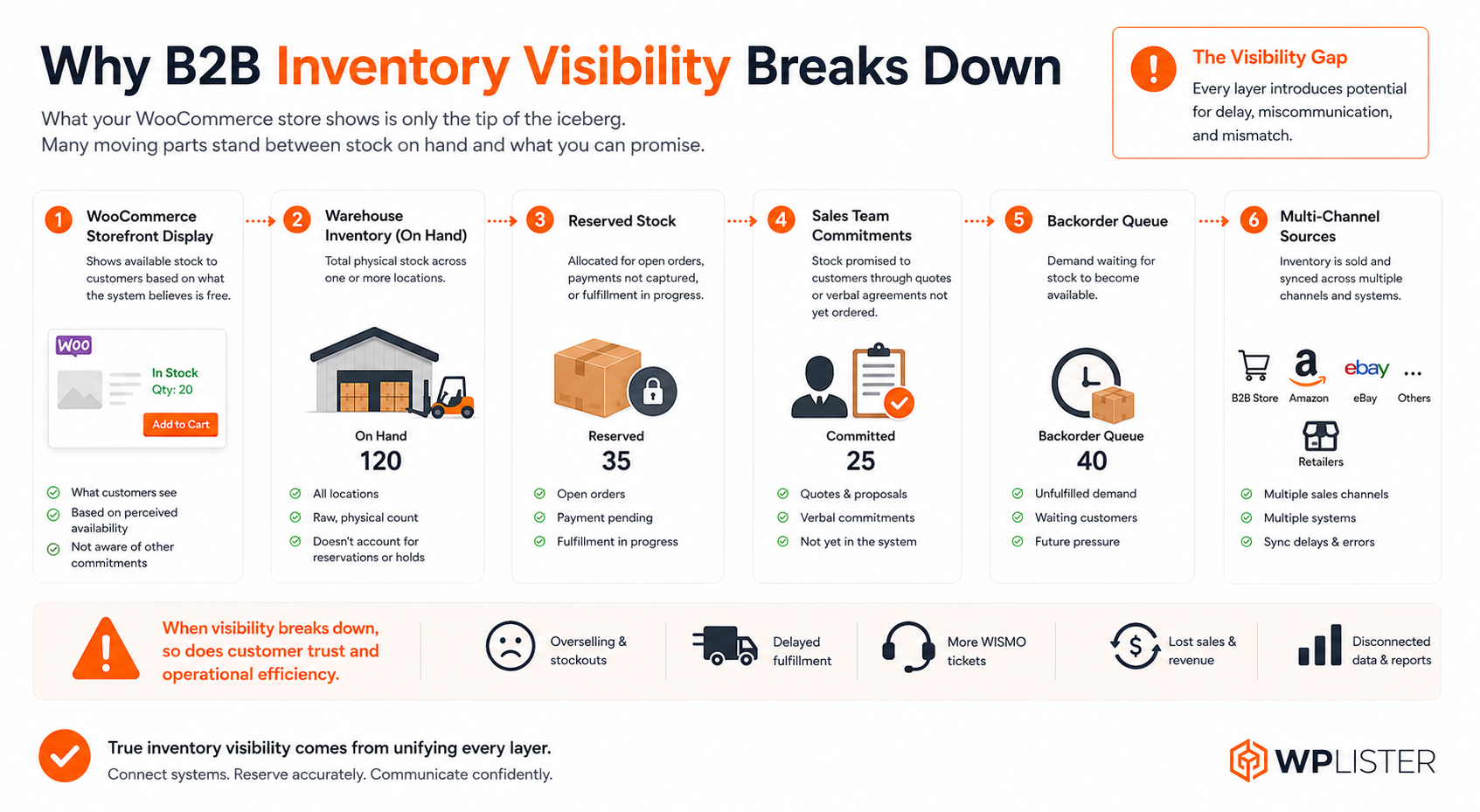
There is physical stock, which is what is actually sitting in your warehouse right now. Then there is available stock, which is physical stock minus anything already committed, reserved, or held. Then there is promiseable stock, which is what you can actually promise to a specific customer for a specific delivery window, accounting for their location, their account tier, and what else is already in the pipeline.
And then there is backordered stock, warehouse-specific stock, and customer-specific visibility, where a key distributor might see one availability picture while a general buyer sees something entirely different.
Most WooCommerce stores, even well-configured ones, handle the first layer reasonably well. It is the others where things start to fall apart, especially as the business scales.
Why WooCommerce Inventory Management Becomes More Complex in B2B
Standard consumer eCommerce has it comparatively easy. Someone orders one or two units of something. If it is out of stock, they get a notification or they cannot check out. The stock number goes down by one. Done.
B2B is a different environment entirely.
Orders come in bulk. 200 units here, 500 units there. This means a single transaction can dramatically change availability for everyone else almost instantly. Repeat customers have purchase histories and expectations. Distributors have contractual agreements. Key accounts have been promised certain stock levels. And sales teams are often working deals in parallel with what is happening on the storefront, committing inventory in phone calls and email threads before any of it hits the system.
Then there is multi-location fulfillment. Many growing B2B businesses do not run from one warehouse. They have stock spread across two, three, or more locations, and those locations serve different regions with different delivery timelines. Total stock across all sites might look healthy. Warehouse-specific availability for a particular customer’s delivery window might tell a completely different story.
And offline orders. This one is underrated in terms of how much chaos it causes. Sales reps take orders by phone, at trade shows, and over email. Those quantities come out of the same inventory pool as the WooCommerce storefront. But if they are not logged immediately, you have a dangerous lag window where the system is showing stock that has already been verbally committed somewhere else.
The result is that your WooCommerce inventory tracking is working off information that is always slightly behind reality. And for B2B buyers making purchase decisions based on that information, slightly behind is enough to cause real damage.
Why Bulk Orders Can Change Stock Availability Suddenly
Here is something that does not get talked about enough in B2B inventory conversations.
One order can break everything for everyone else.
A buyer places an order for 400 units on a Wednesday afternoon. Your WooCommerce stock levels were showing 600 units available. That order goes through, inventory drops to 200, and now three other customers who were planning orders based on the 600 unit availability are in trouble, even if they had not checked out yet.
Now multiply that across your catalog, across multiple buyers, across a busy trading period. The math starts going wrong fast.
This is a fulfillment planning problem as much as it is an inventory problem. If your WooCommerce order management process does not have clear rules about how bulk orders affect general availability and when to flag, hold, or communicate changes, then individual large orders create knock-on problems across your entire order queue.
Sales teams feel this too. A rep working on a quote for a long-term customer might spend an hour building a proposal, only to find that the stock they were quoting has been consumed by another order while they were working. So they call the warehouse. The warehouse checks. The rep waits. The customer waits.
It is not a technology failure exactly. It is a visibility failure.
Why Available Stock Is Not Always Promiseable Stock
This is the concept that most growing B2B businesses figure out the hard way.
Take a product showing 500 units available in your WooCommerce backend. On paper they are available. But work through what “available” actually means here:
200 units are reserved for a distributor agreement with contractual priority. 80 units were sold offline and just have not been entered into the system yet. 40 units are under inspection hold and cannot ship. 30 units are in a warehouse with a two-week backlog.
That leaves somewhere around 150 units that are actually promiseable to a new buyer today.
But the product page shows 500.
This is available-to-promise inventory. The actual usable stock quantity is whatever remains after reservations, commitments, holds, and allocation rules are applied. Most standard WooCommerce setups do not model this. They show total physical stock, or sometimes total available stock, but the layered logic of what is actually promiseable to which customer under what conditions is a much more complex calculation.
The risk of not having this logic is overselling. Embarrassing order corrections. Customers who were told “yes, it is available” and then told “actually, we cannot fulfill that” after they have already planned around it.
And the harder truth is that some stock genuinely should not be visible to all customers. Key account inventory, stock reserved for your best distributors or contract customers, showing up in the general pool is a relationship risk as much as it is a fulfillment risk. Your biggest accounts have been promised availability. Showing that stock to general buyers creates competition for inventory that was never really theirs to order.
Accurate WooCommerce catalog management matters here too. Availability messaging at the product level shapes the decisions buyers make before they even get to checkout.

Why Multi-Warehouse Stock Creates Different Availability Realities
Total stock is a misleading number for B2B businesses with multiple fulfillment locations. And yet it is often the number that gets surfaced most prominently.
Say you have 800 units of a product across your network. 600 are in your East Coast facility. 200 are on the West Coast. A buyer in California places an order for 250 units and needs delivery within two days.
You have 800 units. But do you have 250 units available for that customer? No. Not within their delivery window. The East Coast stock cannot reach them in two days. The West Coast stock is short by 50 units. You are looking at a partial fulfillment, a longer lead time, or a combination of both.
None of that is apparent from a WooCommerce stock level display that just shows 800 units available.
This is why WooCommerce multi-warehouse inventory handling is genuinely complex in B2B environments. It is not just about knowing how many units you have. It is about knowing which units are accessible to which buyer under which delivery conditions. And those conditions change based on the buyer’s location, the shipping method, carrier cutoffs for the day, and what else is already committed from each warehouse.
The WooCommerce shipping rules that govern which warehouse ships to which region are a big part of this. When those rules are not properly connected to your inventory availability logic, you end up with a storefront that promises delivery it cannot deliver. And that is a trust problem, not just an operations problem.
Why Backorders and Partial Fulfillment Need Clear Visibility
Backorders are not inherently bad. I want to say that clearly, because a lot of B2B businesses either block backorders entirely or allow them without any useful communication. Both extremes create problems.
A buyer who knows that 200 of their 300 units are available now, with the remaining 100 arriving in 10 days, can plan around that. They might accept it. They might request a partial shipment. They might adjust their order. The point is they can make an informed decision.
A buyer who orders 300 units, gets a confirmation, and then gets a call from your customer service team three days later explaining the situation. That is a different experience entirely. That is a broken trust moment. Especially if it happens more than once.
WooCommerce backorders can be enabled at the product level, but what most B2B buyers actually need is more than a checkbox. They need to know what quantity ships now, what quantity is delayed, when the delayed stock is expected to arrive, and whether a partial shipment is possible or whether the whole order waits.
That information rarely exists in a clean, visible form in standard WooCommerce setups. It is often sitting in an ERP, a warehouse system, or a spreadsheet that is completely disconnected from the buyer’s view.
Partial fulfillment matters to procurement teams. If a buyer is replenishing stock for their own retail operation, getting 200 units now and 100 units in two weeks might be totally fine. Or it might disrupt their entire procurement schedule. They cannot know without the information. And you cannot have the conversation without visibility into what the real picture actually is.

Why Inventory Data Becomes Hard to Trust Across Systems
Most growing B2B businesses are not running on one system. They have WooCommerce on the front end, an ERP handling purchasing and finance, one or more warehouse management systems, maybe a marketplace or two, and a sales team working through email, phone, and CRM tools.
Every one of those channels pulls from the same inventory pool. The problem is they do not always know what the others have done.
An offline sale closes on Friday afternoon. The ERP gets updated Monday morning. WooCommerce still shows the Friday inventory level. In the meantime, a buyer online places an order that should not have been possible. Somebody has to fix it. Customer service gets involved. Somebody calls the warehouse to manually verify. The warehouse team spends time on a check that should have been automated.
Sound familiar? Most people in B2B operations know exactly what this feels like.
WooCommerce inventory sync failures are often not catastrophic individually. It is the accumulation of small delays, a few hours here and a day there, across multiple systems and multiple channels, that erodes trust in the stock data. And once your sales team stops trusting the storefront number, they start calling the warehouse directly. Which adds workload. Which slows everything down.
This is where enterprise WooCommerce integrations become important. Not just to connect the systems, but to reduce the lag windows and manual checks that pile up when inventory data is not flowing cleanly between ERP, WMS, storefront, and offline channels.
And honestly, a lot of the manual checking that happens in B2B warehouses and customer service teams exists because nobody fully trusts the system. WooCommerce process automation can reduce some of that friction. But only if the underlying inventory data is reliable enough to automate from.
Why Inventory Visibility Becomes Customer-Specific
Not all of your buyers are the same. Which seems obvious. But the implications for inventory visibility are actually pretty significant.
A national distributor on a five-year agreement is a different customer than a regional wholesaler who places orders sporadically. A key account that represents 30% of your revenue is a different situation than a new buyer who found your WooCommerce store through a trade directory.
And yet most WooCommerce stores show every buyer the same availability picture.
Customer-specific inventory visibility means your priority distributors might see a reserved stock pool that is protected for them. Key accounts might access inventory before it opens to the general market. Smaller buyers might see only the general pool. Contract customers might have allocated quantities held specifically for their orders.
This is not just relationship management. It is a fulfillment strategy. And it requires both the rules to exist and the enforcement to work. The right customer sees the right stock, and the system actually respects those rules when orders come in.
The trade-off is real. The more specific your inventory visibility rules, the more complex your allocation logic becomes. Maintaining customer-specific stock pools requires discipline in how you categorize stock, how you log offline commitments, and how you handle edge cases where reserved stock is not ordered and general buyers could have used it. A B2B customer portal that gives logged-in buyers a personalized availability view is one way this gets operationalized. But the visibility rules still need to exist in your inventory logic before a portal can surface them meaningfully.
Why Multichannel Selling Makes Inventory Visibility Harder
Here is where things get particularly complicated for B2B businesses that are not selling through WooCommerce alone.
If you are also selling on a marketplace, through retail partners, or through a sales team working outside the storefront, every one of those channels is drawing from the same inventory. And they all need to be working from the same current number. In real time, or close enough to real time that the gap does not cause problems.
Multi-channel inventory visibility means a unit sold by a sales rep on the phone should immediately reduce what is available on the marketplace. A marketplace sale should reduce what is available in WooCommerce. A WooCommerce order should trigger a warehouse pick that does not conflict with an offline order logged five minutes earlier.
When those channels are not connected, or when the connections have meaningful lag, you get overselling. You get stocks promised in two places. You get fulfillment conflicts that somebody has to manually resolve.
The honest challenge here is that real-time inventory visibility across all channels is genuinely hard. It requires clean integrations, fast sync intervals, and fallback rules for what happens when the sync fails. It also requires deciding, explicitly, how to handle the windows where channels might be temporarily out of sync. Because those windows will happen.
Showing slightly conservative stock numbers to reduce overselling risk is one approach. But it can also reduce conversions. Showing real-time numbers increases accuracy but requires more robust infrastructure. These are real trade-offs that B2B businesses have to make deliberately, not accidentally.

How Poor Product Availability Damages Buyer Trust
This is the part that is easy to underestimate when you are focused on operations.
B2B buyers are not just buying a product. They are buying confidence. They are buying the ability to plan. When they place an order with your business, they are telling their own customers, their own production schedules, and their own procurement plans that this is sorted.
When it turns out not to be sorted, when an order is confirmed and then revised because the stock was not actually there, that is not just an inconvenience. It is a disruption to everything downstream of that purchase.
And it accumulates. One incident is a mistake. Two incidents become a conversation. Three incidents and a buyer starts questioning your stock status before they order or starts looking for an alternative supplier who is more reliable.
I have seen this happen with businesses that had genuinely good products and genuinely solid fulfillment operations. But because the storefront WooCommerce stock status did not reflect reality, buyers did not trust it. And a buyer who cannot trust your availability information stops using your self-service channel and either calls to verify every time, which adds cost, or leaves.
The irony is that often the actual fulfillment is fine. The stock is there. The delivery happens. But the order confirmation process creates enough anxiety, because of that initial gap between what was shown and what the real picture was, that buyers do not feel confident.
Stock confidence is a commercial asset. It affects repeat purchase rates. It affects whether buyers expand their account or keep your business as a secondary supplier. And it is built, almost entirely, on whether what you show buyers matches what you can actually deliver.
What Better Inventory Visibility Looks Like in B2B WooCommerce
Better inventory visibility is not one feature. It is a business outcome, and it comes from a few things working together.
It starts with Available to Promise logic that your storefront actually reflects. Not total physical stock. Not available stock without reservations. The actual quantity you can promise to a buyer, accounting for everything already committed.
It includes reserved inventory controls, rules that enforce which stock is visible to which customers, and which allocations are protected before general availability opens.
It requires warehouse-aware availability, so buyers are not seeing total network stock when what matters is warehouse-specific stock for their delivery region. And this connects directly to how your fulfillment location logic is structured.
It means backorder clarity. Not just whether backorders are allowed, but what partial quantities are available now, what is delayed, and when delayed stock is expected.
It needs reliable sync between WooCommerce, ERP, warehouse systems, and offline channels, with lag windows short enough that they do not regularly cause commercial problems.
And it means your sales team, warehouse team, operations team, and buyers are all working from the same stock view. Not calling each other to verify numbers. Not maintaining parallel spreadsheets. Not manually adjusting orders after they have been placed.
When those things are in place, the result is not just fewer stock errors. It is a fundamentally more confident buying experience for buyers, sales teams, and the operations teams who have to fulfill everything that gets ordered.


 WooCommerce Solutions
 Solutions for WordPress