Introduction
Running a B2B eCommerce business is a bit like herding several departments that sort of have to talk to each other nonstop. Your WooCommerce store takes care of customer orders. Then your ERP system manages inventory and finances—yes, that too. Your CRM keeps an eye on customer relationships, while your warehouse software takes care of shipping logistics. And of course your accounting software records each payment, which is always the part people forget until it is not working. The tricky part is that all these tools need to play together smoothly, passing data back and forth with no weird gaps or errors.
When your business is small, the connections might feel less demanding. You can sometimes patch problems manually, maybe by exporting a file or by “quickly” fixing things somewhere. But as your B2B business starts getting bigger, a strange thing happens. Those system links begin to weaken, almost silently. Data stops syncing as it should. Orders can end up misrouted or, worse, get swallowed in the workflow. Inventory counts don’t match what customers actually expect. Customers start complaining because they are seeing outdated prices or because their orders look like they are stuck in a black box.
This is the issue with B2B companies returning to and repeating on WooCommerce ERP integration. The problem is not that the systems cannot communicate. The true issue here is that they are not built to be sustainable as your business expands and you become more preoccupied.
In this article, we talk about the reason why this happens, what causes these problems, and more importantly, how to construct WooCommerce integration services that work at scale. Of course, if you are a B2B business running into integration headaches, just knowing how these problems occur might be the first step to working through them.

THE HIDDEN COMPLEXITY BEHIND YOUR INTEGRATIONS
Let’s be honest. Most B2B business owners look at their systems and think everything is working fine: orders come in, inventory moves, and customers get their products on time. From the surface, it looks good.
But here’s what’s actually happening under the hood. Your WooCommerce store is connected to five, six, or maybe ten different systems. Each of those connections is like a phone line between two people. When those people need to talk, they have to dial the right number, wait for the person to pick up, exchange information, and then hang up. But think about it: what if that line drops the call? Sometimes the person doesn’t pick up. Sometimes they’re busy and can’t talk, and sometimes they hang up before the conversation is finished.
Your enterprise WooCommerce solutions are dealing with this kind of problem, except it’s happening with data, not phone calls.
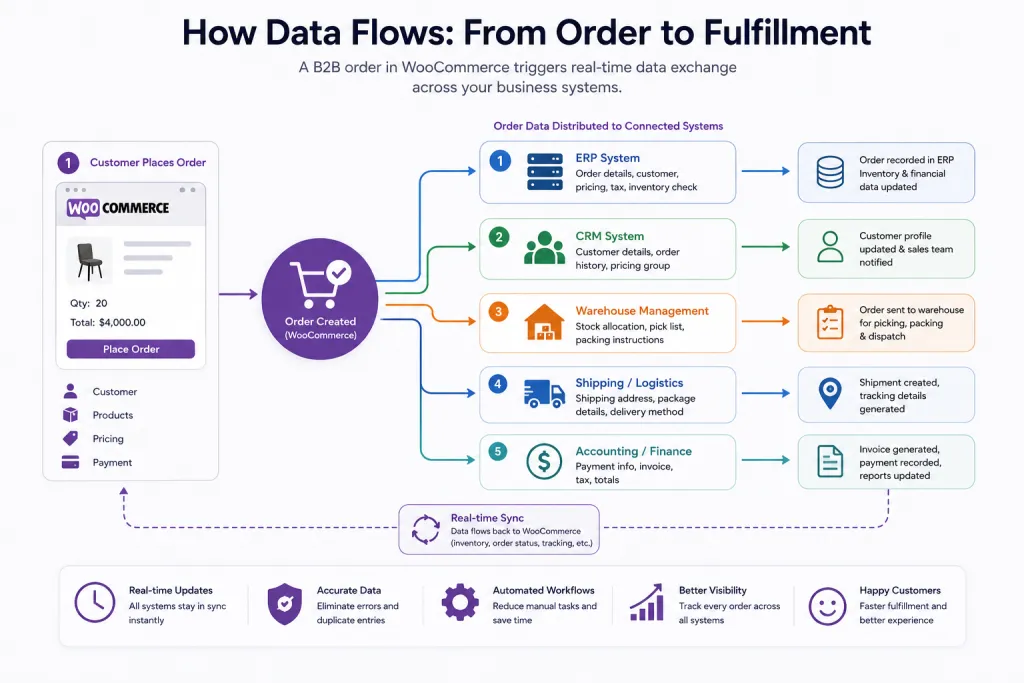
Think about a usual B2B order. The customer places the order in WooCommerce. Then that order needs to travel to your ERP system so your finance team knows what is going on. The system also has to do a quick inventory check. If you have stock, the data needs to be sent to your warehouse software so they can pick and pack the shipment. At the same time, the customer name and their address go to your shipping software. The payment part goes to your accounting system, and the customer details go into your CRM so the sales team can stay on top of things.
So, it’s not just one connection. It’s more like six or seven pathways running almost at the same time, but all for a single order. Now take that reality and multiply it by hundreds or thousands of orders each day. Then you start to understand why things fail, and not in some rare way, but consistently.
COMMON WOOCOMMERCE INTEGRATION PROBLEMS IN B2B E-COMMERCE
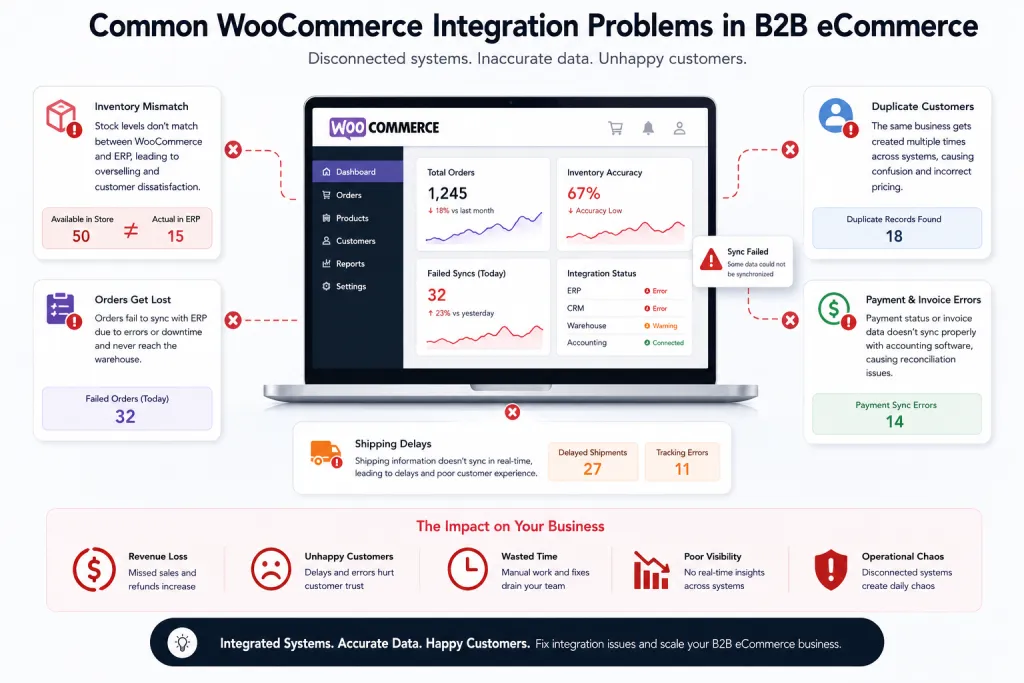
Let’s look at the real problems we see B2B businesses facing with WooCommerce inventory sync and other integration issues.
The Inventory Mismatch Problem
One of the most frequent headaches with WooCommerce integration services is when the inventory count doesn’t really agree between your store and your ERP. A customer looks at 50 units as “available” on your site. They place an order for 20. Meanwhile, in your ERP, you’re sitting on only 15 units. So then, yeah, you end up with a real mess. You told the customer they can get 20 units, but you can’t fulfill that promise. Your warehouse team is basically left puzzled and stressed. The customer is not, surprisingly, pretty upset.
And it’s not always immediate either. Sometimes the stock numbers drift slowly, day by day, or across a few weeks. You don’t catch it at first. Then, little by little, customer complaints start showing up. Some customers have ordered products, but you don’t actually have them in your system. After that point, your team ends up spending hours each day doing manual cleanups just to patch the situation, instead of working on the real stuff.
Orders That Get Lost in the System
Another big problem pops up when orders don’t really make it from WooCommerce into your ERP the right way. Sometimes an order gets placed at 2 AM while your ERP is under maintenance. The system then tries to pass the order along, but it simply fails. Here is the catch: if you don’t have a mechanism to retry that failed order, it just stays there. It’s invisible, so no one realizes. Your warehouse team never sees the order, not at all. The customer keeps waiting for their product, and nobody knows what went wrong.
Duplicate Customer Records
In B2B, one company can have a few different people who are placing orders with you. These people might use different shipping addresses, and yeah, sometimes different billing contacts too. There could also be special pricing discounts involved. But if your WooCommerce order management doesn’t actually talk right with your CRM, you end up creating the same business as a customer, like twice. One time with the special pricing… and one time without it. Then the customer doesn’t receive the discount; they notice pretty fast, and they complain.
Pricing That Changes At The Wrong Time
In the B2B world, you usually have contracts with customers tied to certain pricing. Customer A gets ten percent off everything. Customer B gets 15% off, but only if they order more than $5,000. Customer C pays one price in January, and then after that, in February onwards, it changes. So, when your pricing engine doesn’t sync right with WooCommerce, it turns into this messy situation where customers might see the wrong price right inside their cart. Then they click through toward checkout, and suddenly it is a different amount. Most of the time, they abandon the cart. Or even worse, they finalize the order at that incorrect price, and you end up losing money.
Warehouse Delays That Slow Everything Down
Your warehouse needs full info to operate successfully. They require the precise weight of your package. The exact dimensions. The exact shipping address. The precise products within the order. If WooCommerce order management does not send all this information, your warehouse team has to interrupt their workflow, calling one person after another until they find the right contact able to provide missing details and then resume packing. This delays everything. It is like an assembly line that has one machine constantly breaking, causing everything behind it to wait.
Timeouts and System Failures During Busy Times
B2B businesses exhibit certain patterns. At the end of the quarter, there is a surge in orders. Before holidays, this trend continues with increased ordering activity. Your systems function well on regular days. However, when a sudden spike in orders occurs, issues may arise. For instance, the checkout process might become sluggish. Orders may fail to sync properly. As a result, customers may find themselves unable to complete transactions. This could lead to lost sales and diminished customer trust.
WHY WOOCOMMERCE INTEGRATIONS BREAK AT SCALE
Now let’s talk about the real reasons these problems happen. It’s not magic. It’s not mysterious. It’s about how the integrations were built.
Direct Connections Without A Middle Person
So, imagine you’re in the middle of a conversation with two people who do not speak the same language. One person is speaking in English, while the other is speaking in Spanish, and you are trying to translate everything in real-time. Then if one person starts learning Portuguese to translate Portuguese, you also have to learn Portuguese, and if they alter the way they speak, you have to bend and readjust to Portuguese, too. readjust too.
That’s essentially what occurs when WooCommerce directly connects to your ERP system. your CRM, your inventory setup, and your warehouse software. There’s no “translator” sitting between them. No, each system is expected to fully grasp the other system’s language. And if one side changes how it communicates, the whole chain can start breaking because they’re all tied together with the same expectations.
Too Many Separate Tools Doing Different Jobs
A lot of B2B businesses employ several plugins for their integrations. One plugin moves orders. Another plugin moves inventory. A third plugin handles pricing. A fourth plugin handles customers. And they were individually developed by different companies. These things don’t necessarily play well with one another. One update to a plugin may cause an issue for another one of your plugins. Now your integration is broken and you have no idea which plugin broke it.
Trying To Do Everything At The Same Time
Some integrations are designed to handle everything in real-time. An order comes in. The system immediately attempts to push it to the ERP. The system immediately calls to check inventory. As soon as that happens, the system attempts to update prices. This works well, however, when you only have, say, a few orders per day. But when you have hundreds or thousands of orders, you’re asking your system to do too much at once. Cram it all into one person, the same way you can’t ask somebody to answer 100 phone taps at a time. Eventually, you have to hang up on somebody.
No System To Retry When Something Goes Wrong
Imagine you reach out, call someone, and they don’t pick up. So, in the real world, you call back, again and again, until something happens. But in a lot of WooCommerce integrations, if that call fails, there is no automatic callback. The request just… disappears. No one really retries it or keeps tapping the button until it works, not automatically. It’s simply gone, and that’s the whole point nobody wants to admit. Then, later on, after quite a while, someone finally notices that the whole thing did not go through, and only then do we find out it failed, long after.
Nobody Is Watching
A lot of integration problems happen kind of quietly. Nothing “really” crashes, and no error message pops up, so it all feels normal. Still, somewhere the data ends up being wrong. Like an order didn’t sync properly. Or an inventory ID number is one step off. Or a customer record got duplicated, which is simple but nasty. Then, while nobody is paying attention, these glitches stay hidden for days. And after that point, they already caused real damage, not just small inconveniences.
Data That Doesn’t Match The Rules
Sometimes data shows up in a way that just doesn’t match the normal pattern. Like maybe an order arrives, but the customer name is missing, or a product has no price on it, or the address is only partly filled out. When the system doesn’t watch out for these little issues, wrong data slips into the system. And then that wrong data causes wrong outputs downstream, in ways that are a bit hard to untangle later.
Systems That Can’t Handle Lots Of Data
When you are handling a few hundred orders a day, your system works most of the time. When you’re handling a few thousand, something breaks, and it’s not like you didn’t expect it. Your database gets slow, your server runs out of memory, and the integrations that once worked fine with small amounts of data suddenly can’t do the job anymore. In other words, one day everything seems okay, then BAM! You’re stuck with more volume than the setup was prepared for.
HOW TO STABILIZE WOOCOMMERCE INTEGRATIONS
So what’s the solution? How do you build enterprise WooCommerce solutions that actually work at scale?
Put a translator in the middle.
So rather than letting WooCommerce and everything else communicate with each other one at a time, we set this as the middle layer. Think of it as a translator. WooCommerce talks to the translator. Your ERP, CRM, inventory system, and warehouse software speak to the translator. The only thing that needs to change is the translator when your ERP changes its conversation style. WooCommerce doesn’t care. Everything stays stable.
This translator converts the data coming from WooCommerce to be readable by that ERP and sends it. The information comes back from the ERP, and then this translator converts it into a WooCommerce-understandable format. This separation is critical. This simply means that you can change one system without having the other systems affected.
Use a queue system to process orders in order.
We are not attempting to process everything right now; therefore, we have a queue. Imagine it similar to a waiting line at the restaurant. If there is work to be done, orders come in and get queued up. The first order is being processed by a worker. Once that’s done, they now proceed to order second. Like they don’t try to cater to everyone at once. They do people one at a time and as fast as they can.
This translates for a WooCommerce inventory sync situation to new orders flooding in, getting queued up one by one, and being processed through the ERP. If there is a large spike (500 orders in 1 min), they all get in line. As fast as the system can handle processing it. Nothing breaks. Nothing gets lost.
Automatically Try Again If Something Fails
If there is a connection failure, the system will retrain by default. Not straight away, because that could just go down the tubes again. However, after a few moments it does. If that still fails, it pauses longer to then try again. Perhaps the first attempt failed since then, and ERP was busy. The second one falls after the network is having a little trouble. Third time’s the charm; however, everything appears to be back in working order. The system tries more than once.
Watch Everything That Happens
We built monitoring tools that monitor every integration 24/7. If anything were to go wrong, an alert would be created from the system. Someone gets notified. The issue is resolved prior to impacting customers. Completely different from discovering a customer called three days later, complaining of the problem.
Check All Data Before It Goes Into The System
We check that data is correct before it even gets into the system. Customer name for the order? Does it get a delivery address? Is the address formatted correctly? Is the total for an order reasonable? When we are unsure, we raise this to a human for review rather than allowing bad data into the system.

Different B2B businesses use different systems. Understanding which systems need to connect with WooCommerce helps us build the right integrations.
ERP Systems
ERP systems are at the center of most B2B operations. They deal with inventory, bookkeeping, and processing orders. Popular ERP systems: SAP, Microsoft Dynamics, NetSuite, and Epicor. The bulk of business decisions take place in the ERP, so ensuring that WooCommerce-ERP integration works seamlessly is key.
CRM Systems
Customer relationship management (CRM) systems contain details about your clients. Who are they? What have they bought? What are their payment terms? Some commonly used CRMs are Salesforce, HubSpot, and Microsoft Dynamics CRM. If WooCommerce inventory sync and customer data remain in sync with your CRM system, then the sales team has real-time information always available.
Inventory and Warehouse Systems
They monitor the real-time physical position of products. They do picking, packing, and shipping. Fishbowl and HighJump are commonly used systems. If you can integrate these systems with WooCommerce Order Management, it enables your warehouse to begin filling the order from when it’s placed.
Accounting Systems
Your accounting software monitors funds going in and out of your business. Well-known systems include QuickBooks and Xero. For your financial records to be right, these require precise order and payment info from WooCommerce.
Shipping Software
Your shipping software can determine the cost of a shipment, print a label, and track your package. Common providers include UPS, FedEx, and DHL. These are required: the weight, measurements & location information, which are obtained from WooCommerce.
WHAT IMPROVES WHEN INTEGRATIONS WORK PROPERLY
True business improvements only come when you resolve your integration issues and develop enterprise WooCommerce solutions that work.
Less Manual Work
Your team spends less time responding to issues. Where they used to spend two hours a day manually reconciling inventory discrepancies, they now spend 20 minutes reviewing the handful of exceptions that cannot be automatically resolved. Those hours are freed up for you to do work that actually grows your business.
Better Inventory Numbers
Your inventory is correct whenever WooCommerce stock synchronization functions correctly. You do not oversell products you don’t have. Another thing is you simply don’t miss sales because your customers think something is out of stock when it actually isn’t. The numbers in your inventory report are correct: Your customers trust them.
Faster Order Processing
WooCommerce orders also flow more quickly from your warehouse to your shipping company. You are able to deliver products to customers faster. Customers notice this. They are satisfied when they get faster delivery than expected. Happy customers buy again.
Growing Without Growing Your Team
Most B2B businesses employ additional personnel for processing more orders. Stable enterprise WooCommerce solutions can allow you to take on more orders while hiring fewer people. Your current team now does 10 times the volume because nobody is doing repetitive tasks—all those integrations are knocking that out automatically.
Consistency Across Your Business
If you have multiple WooCommerce stores, integrations that are stable run the same across all these stores. You do not need to hire different individuals for all the outlets. A single person can take care of all of them as they work continuously.
Better Customer Relationships
When everything runs like clockwork, the customer has a pleasant experience. They see accurate prices. Orders arrive on time. Their questions get answered quickly. They buy more frequently. You tell other companies about your experience in a positive light.
Money Saved
And all of these improvements translate to money saved. You train less staff to resolve instances. You have higher sales because the customers can follow through on their orders. You have fewer costly mistakes. It enables you to ship faster so the customers are happy and purchase again early.
REAL CHALLENGES B2B BUSINESSES FACE
Let’s be exact regarding what the real issues are. You are not studying theoretical problems. These are the situations that we actually observe.
Complex Pricing Rules
Simple pricing is hardly the case for most B2B businesses. Customer A — 10% discount on everything For bulk orders, Customer B receives a 15% discount. Customer C uses contract pricing with an update each quarter. Then you add mileages for customer D (distributor), who receives 20% off plus free shipping on orders above $500. All of this needs to be managed by your WooCommerce order management, or pricing is simply wrong.
Multiple Locations and Warehouses
Suppose you have inventory across three warehouses. A customer on the East Coast books an order, and it goes via warehouse from the East. A customer (in the west) orders from the warehouse in the west. But let’s say the east warehouse is out of X, so you need to ship that from the central one. Your WooCommerce inventory sync has to be intelligent enough for that.
Customer Hierarchies
For B2B, one customer may just be 10 departments in the same organization. There is a billing contact for each department. Each department has different pricing. The latter also needs to merge orders from across departments into the main office. This is a complex system, and WooCommerce doesn’t automatically comprehend this.
Bulk Orders That Need Approval
B2B customers have rules that any orders, which may be big, need approval before being placed. The process can be executed instantly for order values less than 5k. Management is required for any order larger than 5,000—through the customer’s manager. These rules need to be enforced in the context of WooCommerce order management.
Partial Shipments and Backorders
There are instances when you can’t fulfill every order that a customer has placed. Perhaps half of their order is available, but the other half is on backorder. Ship what you have, backorder the rest, and ship it when available. The customer has to know it, and your accounting system needs to be aware of it.
So, you’re experiencing integration problems.
First, document everything. Take note of each and every issue you are having. How often does it happen? When does it happen? How does it affect your business?
Second, understand your current systems. What version of each system are you running? How are they currently connected? Who manages these connections? What’s working, and what’s not?
Third, talk to your team. Your warehouse team knows when orders are not coming in right. Your accounting team understands when financial data is inaccurate. Your support team receives complaints from customers. Gather this feedback.
Fourth, think about the future. As you grow, what problems do you think will get increasingly more difficult? Are your systems ready if you double your sales?
Lastly, hold onto partners who know what B2B is all about. People who know what it is to operate B2B and how that complexity presents not just in e-commerce but also with all WooCommerce integration services.

CONCLUSION
It is not simple to create enterprise WooCommerce solutions that operate at scale. They need to know eCommerce and B2B. They need architectural thinking, not simply plug-in stacking. They need monitoring and alerts, not set-and-forget.
But you do have to pay for it. A reliable WooCommerce ERP integration solves major operational problems. It allows your team to concentrate on scaling the business instead of problem-solving. This makes customers happier because everything goes seamlessly.
At Dazzlebirds, we have a deep expertise in creating enterprise-level WooCommerce solutions for B2B businesses. Experience working with WooCommerce inventory sync, WooCommerce ERP integration, and WooCommerce integration services to understand the intricacies of running a B2B operation involving WooCommerce order management and all other moving parts.
If your existing integrations are creating problems—inventory errors, lost orders, and hours every week spent fixing manual processes—that’s an indicator that you need to rethink the architecture of your integration.
You have run the play with dozens of B2B companies that face exactly those issues. We are working on integration solutions for WooCommerce ERP that actually work at scale. Feel free to talk about your situation; one of us will be happy to help you.
A proper integration architecture can change the way your B2B eCommerce business operates. It can eliminate issues you’ve been dealing with for months (or years). It can allow you to expand without increasing your personnel. It could enhance your customer relationships, as everything runs seamlessly.
And that is what an enterprise is. WooCommerce stable solutions do.
FAQs
WooCommerce ERP integration can fail because of plugin conflicts, inventory sync issues, real-time processing overload, poor system architecture, and unstable integrations between business systems.
WooCommerce inventory sync problems can be fixed using middleware systems, automated retry logic, real-time monitoring, queue processing, and stable ERP synchronization.
Common WooCommerce integration problems include lost orders, inventory mismatches, duplicate customer records, pricing errors, warehouse delays, and failed data synchronization.
Yes, WooCommerce can support large B2B eCommerce operations when combined with scalable ERP integration, warehouse automation, performance optimization, and custom workflows.
WooCommerce ERP integration improves inventory accuracy, order management, operational efficiency, customer experience, warehouse coordination, and business scalability.



 WooCommerce Solutions
 Solutions for WordPress