Ask any B2B business owner what keeps them up at night, and “outdated pricing in a printed catalog” is rarely far from the list. A buyer calls in and quotes a price from a brochure mailed three months ago, and the sales team has to explain that the number has changed twice since then. It’s an awkward conversation, and it happens more often than most companies admit.
Buyer expectations have shifted faster than most catalog production cycles can keep up with. Gartner’s research on B2B buying behavior found that buyers now lean on online self-service tools rather than sales reps when they’re doing general research or learning about a category, and a separate Gartner survey put the share of buyers who favor a rep-free purchasing experience at 67 percent. At the same time, printing costs keep climbing, distribution logistics keep getting more complicated, and product data keeps changing in real time while paper stays frozen the moment it leaves the press.
This is why a growing number of manufacturers, wholesalers, and distributors are rebuilding their catalogs on WooCommerce instead of reprinting them. It isn’t a cosmetic upgrade. It changes how fast a product update reaches the buyer, how personalized the pricing can be, and how much a business spends keeping information accurate. This article breaks down exactly how, with real numbers and a practical framework for deciding what’s right for your business.
Key Takeaways
- Digital catalogs update instantly; printed catalogs are outdated the day they leave the printer.
- Distribution and storage costs for printed catalogs often exceed the printing cost itself.
- WooCommerce digital catalogs support customer-specific pricing, role-based access, and ERP sync out of the box or with mature extensions.
- Most B2B buyers now prefer to research and self-serve online before ever speaking to a sales rep.
- Digital catalogs give you analytics that printed catalogs simply cannot provide.
What Are WooCommerce Digital Catalogs?
A WooCommerce digital catalog is a live, searchable, continuously updated version of your product line, built on top of WooCommerce and presented as a browsable online store, a customer portal, or a downloadable interactive PDF generated directly from your product data.
The mechanics are straightforward. Product information such as descriptions, pricing, specifications, images, and stock levels lives in one central WooCommerce database. When something changes, whether it’s a price adjustment, a new SKU, or an updated spec sheet, the update happens once and appears everywhere it’s referenced, including customer-facing pages, exported PDFs, and any connected sales channel.
That single point of truth is the fundamental difference from a printed catalog. A print run is a snapshot. The moment it’s approved for production, it starts becoming inaccurate, and it stays that way until the next edition, which might be months away.
Key features that make WooCommerce catalogs work well for B2B use cases include:
- Product variations for size, color, packaging, or configuration
- Category and attribute-based filtering
- Role-based visibility, so wholesale and retail customers see different catalogs
- Customer-specific pricing tiers
- Bulk ordering and quick-order forms
- Native or plugin-based ERP and inventory sync
- Exportable, brandable PDF versions for offline sharing
Businesses use this model because it collapses the gap between “what’s true about our inventory” and “what the customer sees.” That gap is where lost sales, pricing disputes, and returns tend to originate.
Actionable recommendation: Before migrating a catalog to WooCommerce, audit your current product data for gaps, duplicate SKUs, and missing attributes. A clean data foundation matters more than any plugin you install afterward.
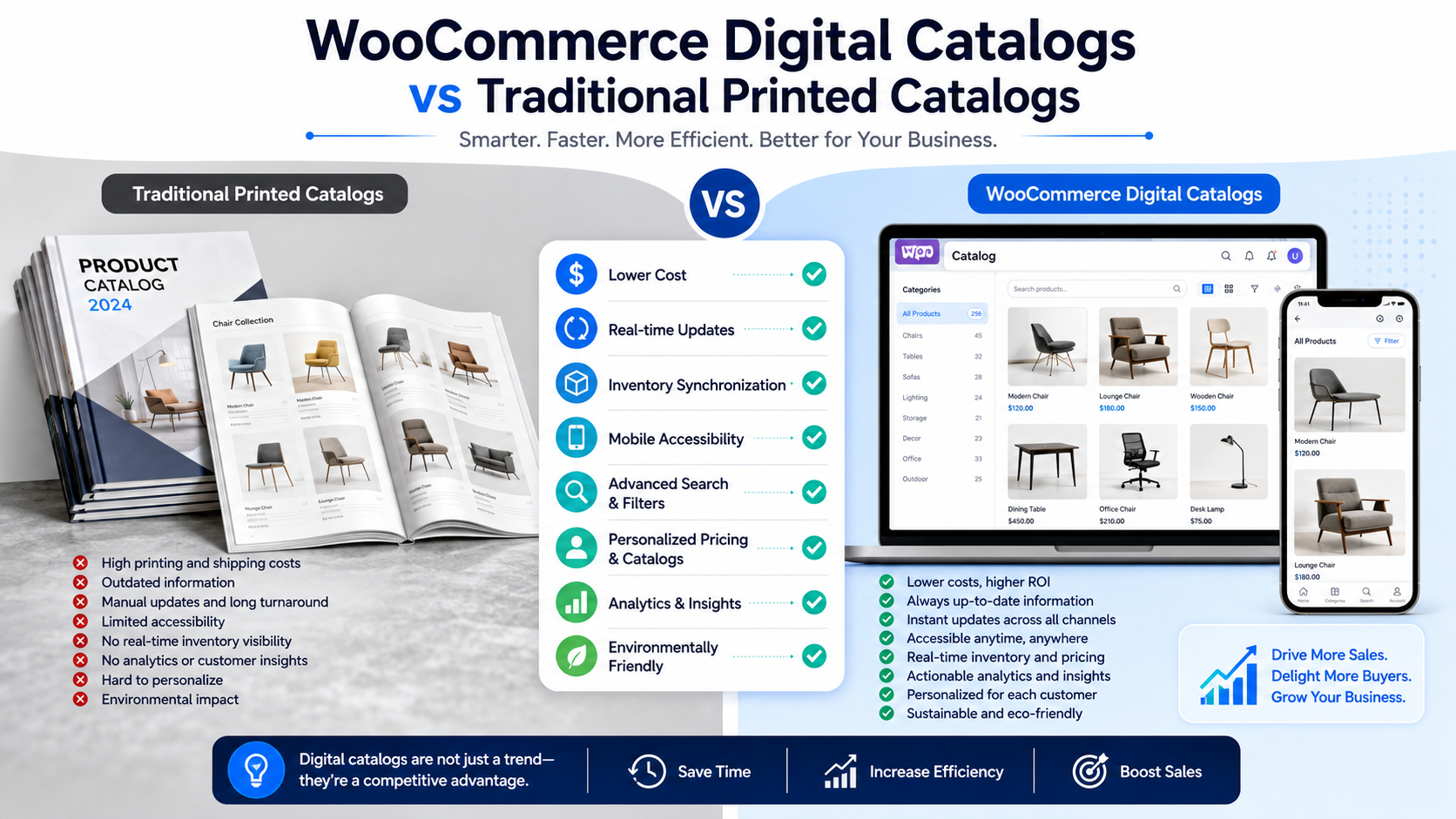
WooCommerce Digital Catalogs vs Traditional Printed Catalogs
The differences show up across nearly every operational dimension, not just the obvious ones like cost.
Cost. Printed catalogs carry ongoing design, print, and reprint costs every time something changes. Digital catalogs carry a build and maintenance cost but no reprint cost when prices or products change.
Product updates. A printed catalog is fixed until the next edition. A digital catalog updates the moment someone edits a product in WooCommerce.
Distribution. Print catalogs require mailing, freight, or hand delivery. Digital catalogs are distributed instantly through a URL, email, or customer login, with no shipping dependency.
Accessibility. A printed catalog needs to physically be with the buyer to be useful. A digital catalog is accessible from any device, anywhere, at any hour.
Customer experience. Printed catalogs offer a fixed browsing path. Digital catalogs offer search, filtering, and related-product suggestions that shorten the path to purchase.
Personalization. A print catalog is the same for every recipient. A WooCommerce catalog can show different pricing, products, or minimum order quantities depending on the logged-in customer’s account.
Search functionality. There’s no searching a paper catalog beyond flipping pages. A digital catalog supports keyword search, filters, and faceted navigation.
Inventory accuracy. Print catalogs frequently advertise items that are out of stock by the time the buyer calls. Digital catalogs can reflect live stock levels when synced with inventory systems.
Environmental impact. Print catalogs consume paper, ink, and fuel for distribution. Digital catalogs have a materially smaller physical footprint.
Analytics. There is no way to know which pages of a printed catalog a buyer actually looked at. Digital catalogs can track views, searches, and drop-off points.
Scalability. Adding a thousand new SKUs to a print catalog means a new print run. Adding them to a WooCommerce catalog means importing a spreadsheet.
Sales efficiency. Reps spend real time answering “Is this still in stock?” or “What’s the current price?” questions from a printed catalog. A digital catalog answers those questions before the rep is even looped in.
Actionable recommendation: If your sales team fields more than a handful of pricing or availability questions per week that a live catalog could answer automatically, that’s a strong signal the printed format is now working against your sales cycle rather than for it.
Why B2B Businesses Are Switching to Digital Catalogs
The shift isn’t a cosmetic preference; it’s driven by measurable business pressure.
Rising printing costs. Distribution, not printing, is often the bigger budget problem. Industry benchmarks show distribution costs typically make up 40 to 60 percent of a total catalog program’s spend, frequently outpacing the printing bill itself, and businesses running multiple print editions a year often carry an additional annual storage and warehousing cost in the range of a couple thousand dollars just to house unsold catalog inventory.
Faster product launches. A distributor adding a new product line can publish it in WooCommerce the same day it arrives in the warehouse, rather than waiting for the next print cycle.
Frequent pricing changes. Manufacturers dealing with volatile raw material costs need to adjust prices often. A digital catalog absorbs that without triggering a reprint.
Inventory synchronization. When WooCommerce is connected to an ERP or warehouse system, stock levels shown to the buyer match what’s actually on the shelf.
Self-service buying. Buyers increasingly want to research and order without a call. Recent B2B wholesale e-commerce research puts the share of buyers who prefer to self-serve their orders online at over 80 percent, a figure that keeps climbing year over year.
Mobile accessibility. Field sales reps and buyers checking specs from a job site or warehouse floor need a catalog that works on a phone, something a binder cannot do.
Better buyer experience. Buyers who grew up with consumer e-commerce expect the same filtering, search, and instant answers from B2B suppliers. McKinsey’s B2B Pulse research has found that the large majority of B2B buyers now expect an “Amazon-like” experience from their suppliers, complete with real-time inventory visibility and fast checkout.
Omnichannel selling. A WooCommerce catalog can feed a website, a wholesale portal, a marketplace listing, and a sales rep’s tablet from the same underlying product data.
Example: A regional industrial parts distributor we’ve seen in this space used to print a 200-page catalog twice a year at significant cost, only to have half the pricing outdated within ninety days due to supplier cost changes. After moving to a WooCommerce-based digital catalog with tiered wholesale pricing, the same business eliminated the reprint cycle entirely, cut order-processing calls tied to pricing questions, and gave field reps a live product reference they could pull up during customer visits.
Actionable recommendation: Map out how many pricing or product changes you make per quarter. If that number is higher than one, your printed catalog is already out of date more often than it’s accurate.
10 Benefits of WooCommerce Digital Catalogs
1. Lower Operating Costs
Definition: Eliminating recurring print, storage, and distribution expenses tied to physical catalogs.
Business value: Budget that previously went to print runs and warehousing can be redirected toward site performance, product photography, or sales enablement tools.
Example: A wholesaler that used to spend on quarterly reprints and pallet storage for unsold catalogs can reallocate that spend toward catalog maintenance and PDF generation tools instead.
2. Instant Product Updates
Definition: Changes to price, availability, or specifications go live the moment they’re saved.
Business value: Buyers never act on stale information, which reduces order errors and pricing disputes.
Example: A manufacturer adjusting prices due to a raw material cost increase updates once in WooCommerce, and every channel reflects it immediately.
3. Better Customer Experience
Definition: Buyers browse a catalog built around their needs rather than a fixed print layout.
Business value: Faster, more relevant browsing shortens the path from discovery to order.
Example: A buyer searching for a specific bolt size and finish filters directly to matching SKUs instead of scanning pages.
4. Advanced Product Search
Definition: Keyword, attribute, and filter-based search across the full catalog.
Business value: Buyers self-serve their way to the right product, reducing dependence on a rep to locate items.
Example: A distributor with thousands of SKUs lets buyers filter by material, size, and certification in seconds.
5. Mobile-Friendly Browsing
Definition: Catalogs that render cleanly on phones and tablets.
Business value: Field sales teams and on-site buyers can reference the catalog without carrying printed material.
Example: A contractor on a job site pulls up specs and current stock from a phone rather than calling the office.
6. Personalized Pricing
Definition: Different customer accounts see different prices, minimums, or product visibility.
Business value: Negotiated wholesale rates display correctly without manual quoting, which matters given that roughly two-thirds of B2B buyers expect this level of personalization, and about a third get frustrated when negotiated rates fail to display correctly.
Example: A distributor’s key account sees its contracted pricing automatically at login, no separate quote required.
7. Inventory Synchronization
Definition: Catalog stock data reflects real warehouse or ERP levels.
Business value: Buyers avoid ordering items that are actually out of stock, reducing backorders and frustration.
Example: A wholesaler connected to its ERP shows “3 left” instead of a generic “in stock” label.
8. Faster Sales Cycle
Definition: Buyers move from research to purchase without waiting on a rep for basic information.
Business value: Sales teams spend time on relationship-building and complex deals instead of answering routine questions.
Example: A buyer completes a reorder independently through a customer portal in minutes rather than emailing a rep.
9. Data-Driven Insights
Definition: Analytics on what buyers search, view, and abandon.
Business value: Merchandising and sales strategy get built on real behavior instead of guesswork.
Example: A business notices high search volume for a discontinued item and reintroduces it based on demand data.
10. Environmentally Friendly
Definition: Reduced paper, ink, and freight consumption compared to print runs.
Business value: Supports sustainability goals that increasingly show up in procurement scorecards and ESG reporting.
Example: A supplier promotes its shift away from bulk print mailings as part of its sustainability messaging to enterprise clients.
Did You Know? Product data quality is a widespread problem across B2B, not just a print-versus-digital issue. Recent B2B wholesale ecommerce research found that the large majority of companies admit their product data is outdated or incomplete. A centralized WooCommerce catalog doesn’t fix data discipline automatically, but it does make inconsistencies far easier to spot and correct in one place.
How WooCommerce Improves Catalog Management
WooCommerce’s core strength for catalog management is centralization. Every product, variation, category, and price rule lives in one system rather than being scattered across spreadsheets, print files, and email threads.
Centralized product management means one team edits one record, and every channel referencing that product reflects the change.
Category organization lets large catalogs stay navigable, which matters once a distributor passes a few hundred SKUs.
Product variations handle size, color, or configuration options without creating duplicate listings.
Bulk updates let a merchandiser adjust pricing or attributes across hundreds of products in one CSV import rather than editing each one manually.
Inventory synchronization connects WooCommerce to a warehouse or ERP system so stock counts stay accurate. Businesses looking to formalize this often start with a broader WooCommerce inventory management strategy before layering in a customer-facing catalog.
ERP integration ties order, pricing, and inventory data together so the catalog reflects the same numbers finance and operations are working from. This is usually one of the higher-value investments for growing B2B operations, covered in more depth in WooCommerce ERP integration.
Product import and export makes it practical to onboard large catalogs quickly or migrate from a legacy system.
Role-based catalogs let different customer types, such as retail versus wholesale, see different product sets or pricing.
Customer-specific pricing supports negotiated rates without manual quote generation.
Catalog permissions restrict certain products or price tiers to approved accounts only, which matters for businesses with tiered distributor agreements.
Together, these features remove the manual reconciliation work that print catalogs always required. Nobody has to cross-check a spreadsheet against last quarter’s print file, because there’s only one source of truth.
Actionable recommendation: Start with centralized product data and inventory sync before adding advanced personalization. A catalog built on messy data will just make the mess more visible, faster.
Common Challenges with Printed Catalogs
Expensive printing. Every edition carries design, paper, ink, and press costs that scale with volume. A WooCommerce catalog has a build cost once and no per-edition print bill afterward.
Outdated information. Prices and specs are frozen the day the catalog goes to press. A digital catalog reflects the current state of the business continuously.
Inventory mismatches. Print can’t reflect real-time stock. Digital catalogs connected to inventory systems can.
Long production cycles. Design, proofing, printing, and mailing a catalog can take weeks or months. Publishing a new product page in WooCommerce takes minutes.
Manual updates. Correcting an error in a printed catalog usually means waiting for the next edition or issuing a costly errata sheet. Digital corrections are immediate.
No analytics. There’s no way to know which products a buyer actually looked at in a printed catalog. Digital catalogs track this by default.
Limited personalization. Every recipient gets the same static content. Digital catalogs can show account-specific pricing and product sets.
Distribution costs. Mailing, freight, and handling add up fast, and as noted earlier, distribution can be the single largest line item in a print catalog budget. Digital distribution is essentially instant and free of shipping costs.
Waste. Unused print runs, outdated editions sitting in storage, and catalogs that get thrown away unread all represent sunk costs. Digital catalogs don’t generate physical waste.
Each of these challenges has the same underlying cause: a printed catalog is a fixed artifact trying to represent a business that changes constantly. WooCommerce solves this by making the catalog a live reflection of the business rather than a snapshot of it.
Best Practices for Building High-Performing WooCommerce Digital Catalogs
A digital catalog only outperforms print if it’s built well. A cluttered, slow, or poorly organized digital catalog can frustrate buyers just as much as an outdated print one.
- Organize products into clear, logical categories that mirror how buyers actually search, not how your warehouse is organized internally.
- Use high-quality, consistent product images, since buyers can’t physically handle the product before ordering.
- Write optimized product descriptions that include the specifications buyers actually search for, not just marketing copy.
- Implement robust filters so buyers can narrow large catalogs by size, material, price, or compatibility.
- Build strong on-site search with autocomplete and typo tolerance, since B2B buyers often search by part number.
- Offer downloadable PDF versions of catalogs or spec sheets for buyers who want something offline or shareable internally.
- Prioritize fast loading speed, especially for catalogs with thousands of SKUs and large images.
- Optimize for mobile, since field buyers frequently reference catalogs away from a desktop.
- Use structured product data so search engines and AI-driven search tools can surface accurate specifications directly.
- Build customer-specific catalogs for key accounts with negotiated pricing or restricted product sets.
- Set a schedule for regular data audits so pricing, stock, and specs stay accurate over time.
Expert Tip: Treat your digital catalog as a living system, not a one-time project. Assign clear ownership for keeping product data current, the same way you’d assign ownership for financial reporting. A catalog that isn’t maintained slowly drifts back into the same accuracy problems a printed one had.
A Simple Decision Framework: Printed or Digital?
Not every business needs to abandon print entirely, though most B2B operations benefit from making digital the primary system. Consider these questions:
- How often does your pricing or product line change? Frequent changes favor digital.
- How large is your product catalog? Larger catalogs benefit more from search and filtering than a printed format can offer.
- Do you sell to multiple customer tiers with different pricing? Personalization needs to favor digital.
- Do buyers need something physical for trade shows or in-person meetings? A hybrid approach, using WooCommerce as the source with exportable branded PDFs, often works best here.
- What’s your current spend on printing, storage, and distribution? If that number is significant, the ROI case for digital is usually clear within a year.
For most growing B2B businesses, the answer isn’t “print or digital” but “digital as the system of record, with print or PDF as an occasional output of it.”
ROI Benefits Checklist
- Reduced recurring print and distribution spend
- Fewer pricing-related order errors and disputes
- Shorter sales cycles from self-service buying
- Lower customer service load on routine questions
- Analytics that inform merchandising decisions
- Faster time-to-market for new products
- Reduced storage and warehousing costs
If your business is still evaluating what platform to build this on, it’s worth reviewing how to choose the right B2B ecommerce platform before committing to a build, and once the catalog is live, tracking outcomes against the metrics outlined in how to measure B2B ecommerce ROI will keep the investment accountable.
Conclusion
Printed catalogs made sense in an era when product lines changed twice a year and buyers expected to wait for information. That era is over. Pricing changes weekly in some industries, buyers research and self-serve before ever calling a rep, and printing and distribution costs keep climbing regardless of how efficient the print run is.
WooCommerce digital catalogs solve the core problem printed catalogs cannot: keeping product information accurate the moment it changes while giving buyers the search, personalization, and self-service experience they now expect from any supplier. The businesses making this shift aren’t chasing a trend. They’re removing a structural inefficiency that’s been quietly costing them money, time, and customer trust for years.
Getting there doesn’t require abandoning everything at once. Start with clean product data, a centralized WooCommerce catalog, and a maintenance process that keeps it current. From there, personalization, PDF exports, and ERP integration can layer in as the business grows. Companies that make this shift tend to find the same result: better data accuracy, shorter sales cycles, and a catalog that finally keeps pace with the business it represents.
FAQs
WooCommerce digital catalogs are online product catalogs that allow businesses to showcase products with real-time pricing, images, specifications, and inventory updates. Unlike printed catalogs, they are searchable, mobile-friendly, and easy to manage, making them ideal for B2B ecommerce businesses.
WooCommerce digital catalogs outperform printed catalogs by providing instant product updates, lower printing costs, real-time inventory synchronization, advanced search, personalized pricing, and improved accessibility across desktop and mobile devices.
Yes. WooCommerce digital catalogs help improve B2B sales by giving buyers quick access to accurate product information, customer-specific pricing, inventory availability, and self-service ordering. These features simplify purchasing and reduce the time required to complete orders.
A high-performing WooCommerce digital catalog should include product categories, advanced search and filters, high-quality images, downloadable product information, real-time inventory updates, customer-specific pricing, mobile optimization, and integration with ERP or CRM systems.
Businesses can transition by importing product data into WooCommerce, organizing products into clear categories, optimizing product content, integrating inventory and pricing systems, and testing the catalog before launch. This approach ensures a smooth migration while minimizing disruptions to customers.


 WooCommerce Solutions
 Solutions for WordPress