Making your website stand out on Google involves more than just quality content; it’s also about establishing a solid base. If you’re operating a WordPress site, you’re already at an advantage regarding visibility on this platform. With over ten years of experience working with WordPress, I’ve witnessed how effectively it can enhance a website’s search engine presence.
I’d like to share my insights on boosting WordPress website visibility and optimizing WordPress to benefit your Google rankings, explained in straightforward language without the complex terminology that tends to confuse most people.
Why WordPress Is Built for Search Engine Success
Whenever someone inquires about WordPress SEO advantages, I begin with, “WordPress wasn’t good at search optimization by accident—it was built for it.” One of the main things one of the co-founders of WordPress, Matt Mullenweg, has always talked about is that your site should be cleanly coded, which follows standards and guidelines search engines love.
Here’s what that looks like in practice: when you publish a page or blog post, WordPress automatically creates a URL structure that Google can read and understand. It’s putting down a letter with the proper headers and not just writing everything in one long paragraph. Google loves organization, and that directly affects how well your WordPress website ranks.
The platform creates clean URLs (the web address you see in your browser), automatically generates XML sitemaps (with a good plugin), and structures your content with proper HTML tags. This is all going on behind the scenes for you while you write, getting better visibility on the WordPress website easily.

How WordPress Helps SEO Right Out of the Box
Clean and Organized Content Structure
WordPress is hierarchical in structure when it comes to content. You have pages, you have your posts, and we have categories and tags. But this is not only convenient for your readers; it also helps Google to jot down connections between your content, and that is crucial for the visibility of a WordPress website.
You can think of it as organizing a library. The books are sorted according to subject, author, and title. This is also what WordPress does with your content, and it provides Google with an easier way to index your pages and recommend them to searchers.
Mobile-Responsive Themes
Google has made it crystal clear that if your site performs poorly on mobile phones, you will suffer in search. Today, most WordPress themes already come with a responsive design as standard; that is to say, they are designed to look great on phones, tablets, and desktops.
I’ve moved dozens of websites to WordPress from legacy platforms, and the increase in mobility alone improves visibility for a lot of WordPress websites within weeks.

Fast Loading Speeds (When Optimized Properly)
For your WordPress website visibility, speed is a matter of importance. Google has publicly acknowledged that page speed is a search ranking factor. WordPress websites can be extremely fast if configured properly. The secret is to use a good hosting provider and optimize your images while using caching plugins.
Sites I have seen go from page two to page one on Google just by increasing their load speed from 5 seconds to less than 2. This one little tweak would significantly increase their WordPress website exposure.
WordPress SEO Plugins: Your Secret Weapons for Better Visibility

This is where WordPress really excels for SEO and visibility of your WordPress website. The plug-in system allows you to access some serious SEO tools as a professional operator, all without needing any developer.
Yoast SEO: The All-in-One Solution
Yoast SEO is by far the most popular WordPress SEO plugin, and for a good reason. It’s like you’ve got an SEO consultant looking over your shoulder as you write. The plugin goes through your content and provides you with live feedback on:
- Keyword density and placement
- Meta descriptions and title tags
- Readability scores
- Internal linking suggestions
- Content structure and heading usage
I add Yoast on pretty much every single WordPress website that I build in order to increase the visibility of my WordPress website. It’s especially useful for non-SEO experts—the traffic light system (red, yellow, and green) is a clear indicator of whether you’re on the right track.
Rank Math: The Rising Star
Rank Math is also new but loaded with features to help 10X your WordPress SEO signal. It is preferred by many over Yoast since it provides more in the free version. It includes:
Built-in schema markup (helps Google understand your content type)
Local SEO features for businesses
Advanced analytics integration
Automatic image SEO optimization
Both the plugins are superb for enhancing visibility of a WordPress website. I generally suggest Yoast for beginners (it has a more user-friendly UI) and Rank Math for those wanting more advanced control.
Other Essential SEO Plugins
WP Rocket or W3 Total Cache: Any of these caching plugins would make your website load faster. A faster site results in more happy visitors and sharing of your WordPress website.
Smush (or) Imagify: They compress your images without losing the quality. Big images are a huge contributor to slow websites and poor WordPress website visibility.
Broken Link Checker: This detects and reports broken links on your site. It is a fact that when it comes to broken links, they are not good for the user as well as your WordPress site in terms of visibility too.
Increasing Website Traffic with WordPress: Practical Strategies
Content is Still King (But Structure is Queen)
And I’ve worked on hundreds of WordPress sites—the top performers all have one thing in common: quality and consistent content. Publishing becomes easy with WordPress, and people have a tendency to stick to it, hence improving your WordPress website visibility.
But here’s the catch: it’s not all about writing articles. It’s about structuring them properly. Break up your content with headings (H2, H3, H4). Use your keywords naturally in these headings. Write in short, easy-to-scan paragraphs.
WordPress’s block editor (Gutenberg) actually incentivizes being able to write in a structured way, which is excellent for the SEO of WordPress websites.
Internal Linking Strategy
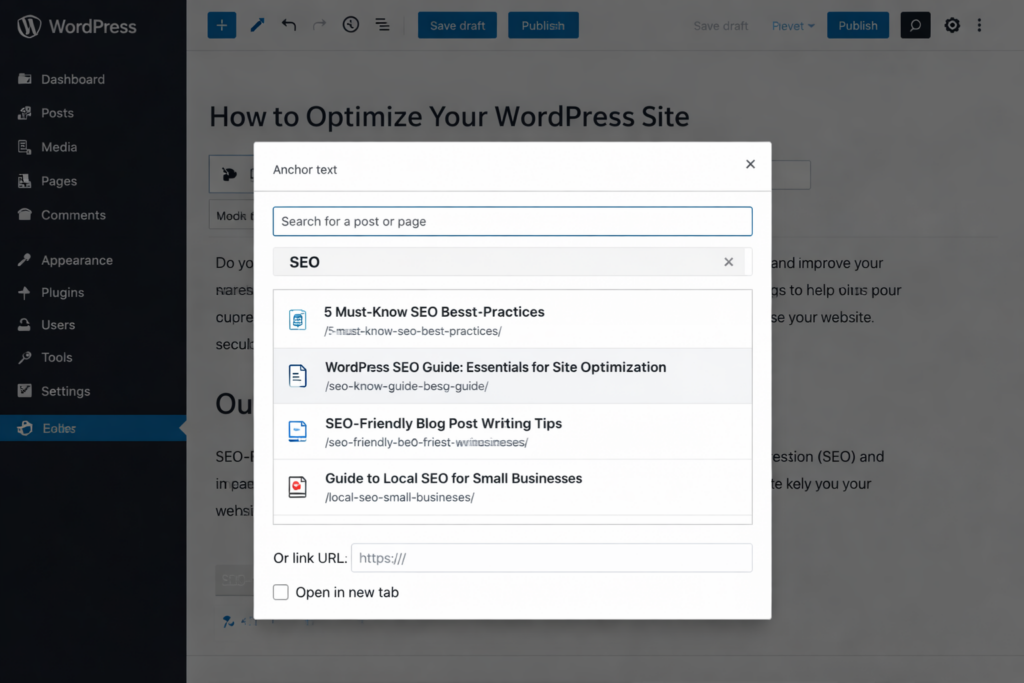
One of the most overlooked WordPress SEO benefits is increasing visibility of your WordPress website. And when you connect from one page on your site to another, you’re saying to Google, “These topics are associated. It also keeps visitors on your site longer, which Google sees as a quality signal.
It is also easy to do internal linking in WordPress, as you can search and add links to posts and pages directly from the editor. In the WPContentio review, I always use at least 2-3 internal links in every piece of content I publish to improve the visibility of the WordPress website.
Categories and Tags—Use Them Wisely
Taxonomy helps organize content, but it also adds extra pages that can rank in Google and skyrocket your WordPress website visibility. The key is not to overdo it.
I recommend:
- Using 5-10 main categories at most
- Being strategic with tags (don’t create a unique tag for every post)
- Writing descriptions for your category pages—these can rank too and enhance WordPress website visibility!
Regular Updates Keep Google Coming Back
Google loves new content, and that is good for your WordPress website visibility. Updating old posts is simple with WordPress and something many of us forget about. When you refresh an old post with new information, Google considers it current and fresh.
I often come back to my old blog posts, update the outdated information, add new sections, and improve the formatting. It’s quite frequent that such refreshed posts do rise in ranks and deliver better visibility for the WP website.
WordPress for Google Ranking: Technical SEO Made Simple
XML Sitemaps
An XML sitemap is sort of a roadmap for Google to find all the pages on your site. WordPress would not generate these automatically, but software, e.g., Yoast, Rank Math, etc., does this for you on the fly to help your WordPress website visibility.
After the sitemap is created, you submit this to Google Search Console, and it allows Google to crawl and index your website much better.
Robots.txt and Meta Robots
WordPress creates a basic robots.txt file that instructs search engines on which pages to crawl and not. SEO plugins allow you to easily manage this; there is no need to code or do anything that will damage your WordPress site’s visibility.
For instance, you likely don’t want Google crawling your “thank you” pages or when employees are inside the admin area. You can never do this with a click of the button in an SEO plugin.

Schema Markup for Rich Results
Schema markup is just a code that you put on your website to help search engines understand what kind of content they are crawling—be it a recipe, an article, or information about a business. This can actually help you get rich snippets in Google (those that have stars, images, or extra information), which further improve the visibility of your WordPress website.
Today, most WordPress SEO plugins have schema markup generators built in. You can include this markup without writing code.
SSL Certificates and HTTPS
Google has stated HTTPS as a ranking signal, offering only “a very lightweight signal at the moment. Pretty much all top WordPress hosting companies offer free SSL certificates, and WP itself makes sure it’s easy to use HTTPS everywhere on your site, which indirectly helps in better visibility of WordPress websites.
Creating an SEO-Friendly WordPress Website: Best Practices
Choose a Good Theme
WordPress themes aren’t universally good. Some are overloaded with unnecessary features that bog down your site. Yet others aren’t properly coded for SEO, limiting the visibility of your WordPress website.
When selecting a theme, I look for:
- Fast loading speeds
- Mobile responsiveness
- Clean code
- Regular updates from the developer
- Good reviews specifically mentioning SEO
Outhouse is a great alternative color theme if you’re using custom colors or images in your WordPress website design (Outhouse can also complement the popular theme frameworks GeneratePress, Astra, and Kadence).
Optimize Your Permalinks
Permalinks are your page URLs. WordPress lets you customize these, and it makes a big difference for WordPress website visibility. The default setting creates URLs like “yoursite.com/?p=123,” which tells Google nothing.
Instead, use the “Post name” setting to create URLs like “yoursite.com/wordpress-seo-tips,” which is much more descriptive and keyword-rich.
Image Optimization
Images are crucial for driving engagement, but they can slow down your site if you don’t optimize them, and that’s not good for the visibility of your WordPress website. For each image you add to WordPress, do the following:
- Resize it before you upload (or use a plugin to help automate this).
- Add descriptive alt text (this helps Google know what it is and makes your images more accessible).
- Give it descriptive file names (like ”wordpress-dashboard-screenshot.jpg,” not “IMG_1234.jpg”).
WordPress makes adding alt text easy—there’s a field for it right in the media library.
Use Breadcrumbs
Breadcrumbs are those small navigation lines you find on websites: Home > Blog > WordPress Tips > Article. They assist users in traveling and offer Google more information regarding your site structure, increasing indexing as well as the ranking of WordPress websites.
Nearly all WordPress SEO plugins offer breadcrumbs on your site with just a few clicks; however, it’s important that you use the best WordPress SEO plugins so that they are able to include these custom settings for you.
Within 6 months their organic traffic had soared by 340%, and they were in the top 3 of most local plumbing searches. The WordPress SEO plugins allow the owner to keep his/her visibility of the website in WordPress without having to pay a developer constantly.
E-commerce Growth
A handmade jewelry store upgraded from a simple eCommerce solution to WordPress with WooCommerce. They implemented the right product schema markup, optimized their product images, and started a blog (with styling tips) to witness an increase in YoY growth of approximately 210% organic traffic.
The real beauty of WordPress was that there was just one dashboard where they could control it all—products, blog posts, and SEO settings—helping that WordPress website visibility.
Content Publisher Transformation
A food blog that was finding it difficult to make its way onto the scene migrated to WordPress from another platform. With the help of Yoast SEO, optimizing every single recipe, appropriate schema markup for recipes, and working on site speed improvements with WordPress caching plugins, they were able to triple their search traffic in eight months.
Things started to change when the recipes were appearing in Google as rich results, which include featured snippets but also star ratings and other detailed information, such as cook times and images, right on the search results page. Their business took flight after this enormous increase in visibility for the WordPress website.
Common WordPress SEO Mistakes to Avoid

Installing Too Many Plugins
Sure, WordPress plugins are great, but you don’t want to clutter your site with dozens of plugins that will slow down your website and damage your visibility in search engines. I usually advise having under 20-25 plugins in total and always testing your site after each new addition.
Ignoring Updates
WordPress, themes, and plugins all get regularly updated for security and performance. It’s very important to keep everything current for your website visibility in WordPress—a hacked or broken site will not rank well.
Duplicate Content
Sometimes, WordPress adds categories and tags within the category page, which can cause duplicate content. This is where SEO plugins can offer a helping hand—they enable you to manage what pages end up being indexed and what do not, and thereby protect the visibility of your WordPress site.
Forgetting Mobile Users
Test your content on mobile before you publish. What looks fine on your desktop may be unreadable on a phone. Because most Google searches now take place on mobile, this is an essential factor for WordPress website visibility.
Measuring Your WordPress Website Visibility Success
Google Search Console
Every WP site should be connected with Google’s free tool right here. It shows you:
- Which keywords you’re ranking for
- How many clicks you’re getting from Google
- Any technical issues Google finds
- How your pages appear in search results
With most WordPress SEO plugins, it is an easy setup to connect with Search Console for tracking the visibility of your WordPress website.
Monitor Your Rankings
Use tools like Google Search Console, Ubersuggest, or SEMrush to track how your keywords rank over time. WordPress makes it easy to make adjustments based on what you learn about your WordPress website visibility.
The Long-Term Advantage of WordPress for SEO
Here’s what I tell each client: SEO is not a sprint; it’s a marathon. WordPress provides you with what you need to compete in that marathon without having to hire a full-time developer or a dedicated SEO professional just to manage website visibility within WordPress.
And with its good mix of easy-to-use and robust SEO options, you can:
- Publish and optimize content regularly without technical barriers
- Stay on top of SEO best practices as they evolve
- Scale your efforts as your business grows
- Make quick changes when Google’s algorithms update
Having built and optimized websites for nearly a decade, I’ve spent a lot of time optimizing WordPress websites to rank in Google’s SERPs. What was a custom development job five years ago can now be handled via free plugins. What was complicated is now plain.
Final Thoughts: Your WordPress SEO Action Plan
If you’re serious about improving your WordPress website visibility on Google, start with these steps:
- Use an SEO plugin (Yoast or Rank Math) and optimize it efficiently for the best WordPress website visibility.
- Speed up your site with a caching plugin and compress images.
- Build a calendar of content and post thoughtful, valuable information on a regular basis.
- Install Google Search Console and Analytics to monitor your WordPress website’s visibility growth.
- Monitor obsolete content and keep it up to date.
- Internal links between related posts and pages in the site (recommend between 5 & 50 links)
- Ensure that your site is mobile-friendly, and regularly test it for functionality.
High rankings are not something that WordPress just automatically gives you. But it provides you with the base and tools to keep your WordPress website good and updated. Together with great content and intelligent optimization, you can make WordPress improve the presence of your website on Google massively.
The question isn’t if WordPress can boost your website’s visibility; rather, it is how soon you will implement these tactics on your site to start seeing results. Get going now, commit to the long term, and you will see your search traffic grow.
FAQs
Absolutely! WordPress is built with clean code that Google loves. You get powerful SEO plugins like Yoast and Rank Math that make optimization simple. The platform handles technical stuff like mobile responsiveness automatically. Many top-ranking websites use WordPress because it makes SEO accessible without needing a developer.
Most people see initial results within 3-6 months. Quick fixes like improving site speed might show results in a few weeks. Building strong visibility through content takes longer—think 6-12 months for competitive topics. The key is staying consistent. I've seen clients hit page one in 8 weeks with the right strategy.
Not at all! WordPress plugins handle everything for you. Tools like Yoast SEO use simple traffic lights and checkboxes—no coding required. If you can write a blog post and click buttons, you can manage WordPress SEO. I work with complete beginners who successfully optimize their own sites.
Quality content, hands down. Google wants helpful information that answers people's questions. You can perfect all the technical stuff, but without good content, you won't rank. WordPress makes publishing easy, so focus on creating valuable posts regularly. Combine that with basic optimization, and you'll grow steadily.
Free plugins work great for most websites. Yoast SEO and Rank Math offer powerful features without paying a cent. I've helped many clients reach page one using only free tools. Premium versions add extras, but they're not necessary for success. Start free, master the basics, then upgrade only if you need specific advanced features.


 WooCommerce Solutions
 Solutions for WordPress