A B2B buyer places a reorder at 11 p.m. on a Friday. No sales rep is awake to key in the order. No warehouse manager is checking email. Yet by Monday morning, the order has been confirmed, the correct negotiated price has been applied, inventory has been reserved across two warehouses, an invoice has been generated, and the customer has received a shipping estimate. Nobody touched it.
That is what B2B ecommerce automation looks like when it is built correctly. It is not a single tool or a single plugin. It is the connective tissue between your storefront, your ERP, your warehouse, your accounting system, and your customer, working together without a human re-typing the same data three or four times.
This guide covers what B2B ecommerce automation actually means, which processes are worth automating first, how WooCommerce fits into an enterprise automation strategy, and how to avoid the mistakes that turn a promising automation project into a support ticket queue.
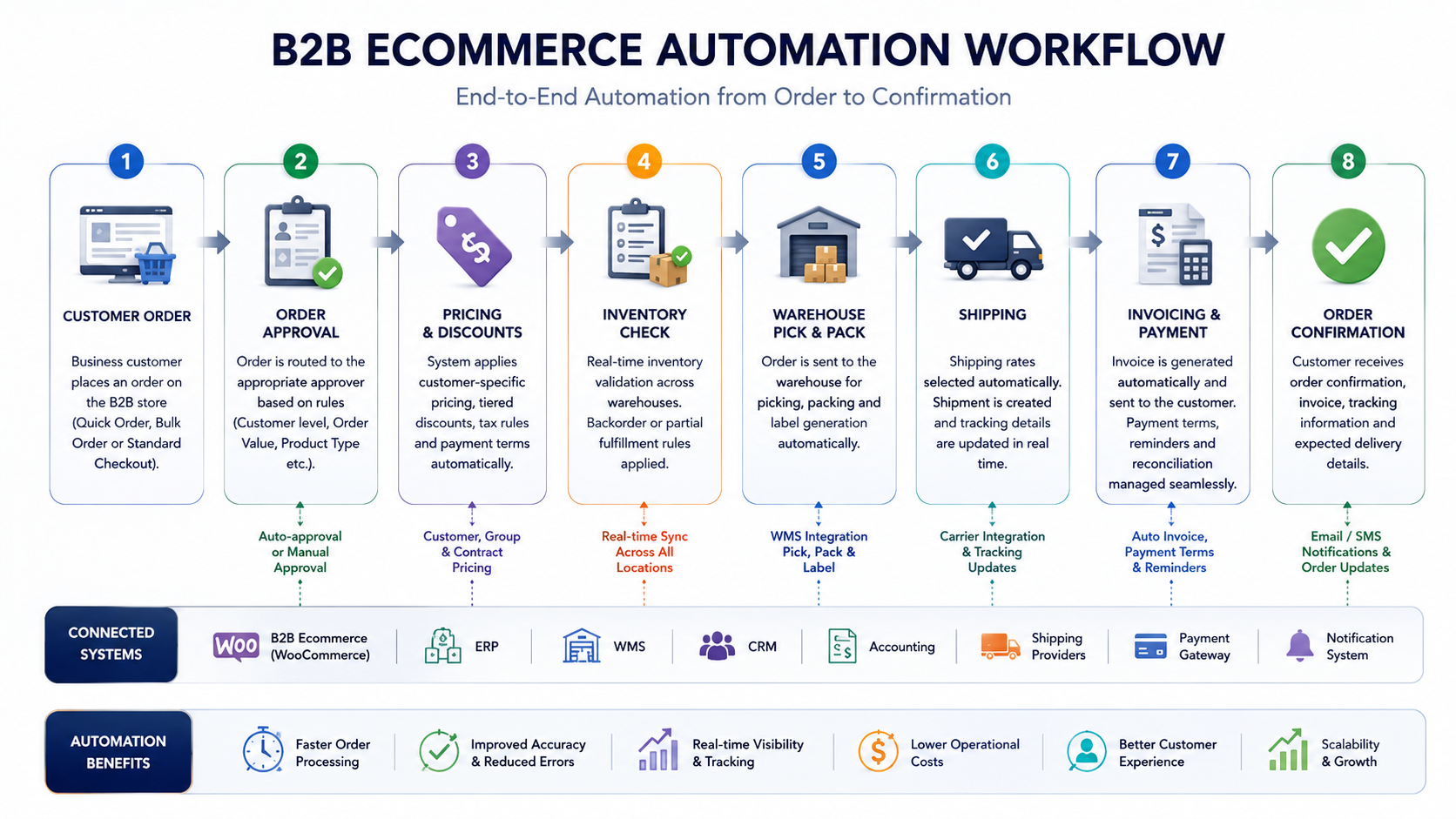
What Is B2B Ecommerce Automation?
B2B ecommerce automation is the use of software, integrations, and rules-based workflows to carry out repetitive commerce tasks, such as order processing, pricing, invoicing, inventory updates, and customer communication, without manual data entry.
In practice, automation replaces the manual bridge many B2B companies still rely on: someone exports a spreadsheet from the website, emails it to someone else, who re-enters it into the accounting system, who then calls the warehouse. Automation removes each manual handoff and replaces it with a direct, rules-based connection between systems.
It helps to separate two terms that often get used interchangeably. Ecommerce automation refers to task-level automation, such as auto-confirming an order or auto-sending a shipping notice. E-commerce integration refers to system-level connections, such as WooCommerce talking to an ERP or a warehouse management system. True B2B automation needs both. Task automation without integration just moves the manual work elsewhere. Integration without task automation gives you connected data but still needs someone to act on it.
Why Automation Matters in 2026
B2B buying behavior has closed the gap with consumer e-commerce faster than most operations teams have adapted their back-end processes. Buyers now expect self-service ordering, instant pricing visibility, and real-time order status, the same expectations they carry over from purchasing on consumer platforms in their personal lives.
At the same time, labor costs for manual order processing, invoice matching, and customer service have not gotten cheaper, and businesses still running these processes by hand are absorbing that cost quietly, order after order.
A few forces make 2026 a genuine turning point. AI-assisted tools have made workflow automation far cheaper to build and maintain than a few years ago. ERP and CRM vendors have opened up APIs that once required expensive custom middleware. Buyer behavior research from Gartner and McKinsey consistently shows B2B buyers researching and comparing suppliers online before ever speaking to a sales rep, meaning your storefront experience is now part of your credibility, not just your checkout. And distributors competing on price alone are getting squeezed, making operational efficiency a genuine differentiator.
Benefits of Automation
The benefits extend well beyond saving time, though that is usually the benefit that gets a project approved.
Automation reduces manual errors by removing re-entry points where typos and mispriced orders creep in. It shortens the order-to-cash cycle, since automated invoicing and confirmation speed up payment collection. It creates a consistent customer experience, since confirmations and updates go out on the same timeline regardless of how busy the team is. It scales without proportional headcount growth, since automated workflows handle rising order volume far more gracefully than manual ones. It improves the quality of reporting since data reflects reality in near real time rather than whatever was last updated by hand. And it frees up staff who used to spend their day re-keying orders, so they can focus on account management and other work that requires judgment.
Business Processes That Can Be Automated
Not every process should be automated on day one. The most common candidates include order processing, inventory management, warehouse operations, customer onboarding, customer approval workflows, role-based pricing, quote automation, purchase orders, invoice automation, tax automation, shipping automation, returns automation, and customer communication.
Order processing covers everything from order submission to fulfillment routing. In a well-automated WooCommerce environment, an order triggers inventory checks, applies the correct customer pricing tier, validates payment terms, and pushes confirmed order data into the ERP without anyone touching it. Businesses that try to automate order processing before fixing pricing and catalog data underneath it usually end up automating the chaos faster. Dazzlebird’s guide on B2B ecommerce mistakes that hurt online sales covers this exact failure pattern in more depth, including how pricing architecture and catalog structure need to be solved before automation, not after.
Inventory management keeps stock synchronized across every warehouse and channel in real time. Without it, businesses either oversell or hold excess safety stock. A mature setup includes automatic reorder alerts and real-time stock deduction the moment an order is placed.
Warehouse operations connect order data directly to picking, packing, and shipping instructions, typically through a WMS that receives order data and generates optimized pick paths.
Customer onboarding and approval workflows let new business customers submit tax and credit documentation online and get routed automatically for approval, rather than waiting a week for email back-and-forth.
Role-based pricing automatically applies the correct price to the correct customer type at checkout, eliminating the manual discount codes and after-the-fact adjustments that cause billing disputes.
Quote and purchase order automation allow customers to request quotes with volume pricing calculated automatically and capture PO numbers at checkout that route directly into accounting without manual matching.
Invoice and tax automation generate invoices the moment an order is confirmed, apply the correct multi-jurisdiction tax treatment, and sync everything to the accounting system without duplicate entry.
Shipping and returns automation connects the store to carrier APIs for live rates and labels and allows customers to initiate returns through a self-service portal that updates inventory and refund status automatically.
Customer communication automation covers order confirmations, shipping updates, and reorder reminders, timed to actual fulfillment events rather than sent manually or not at all.
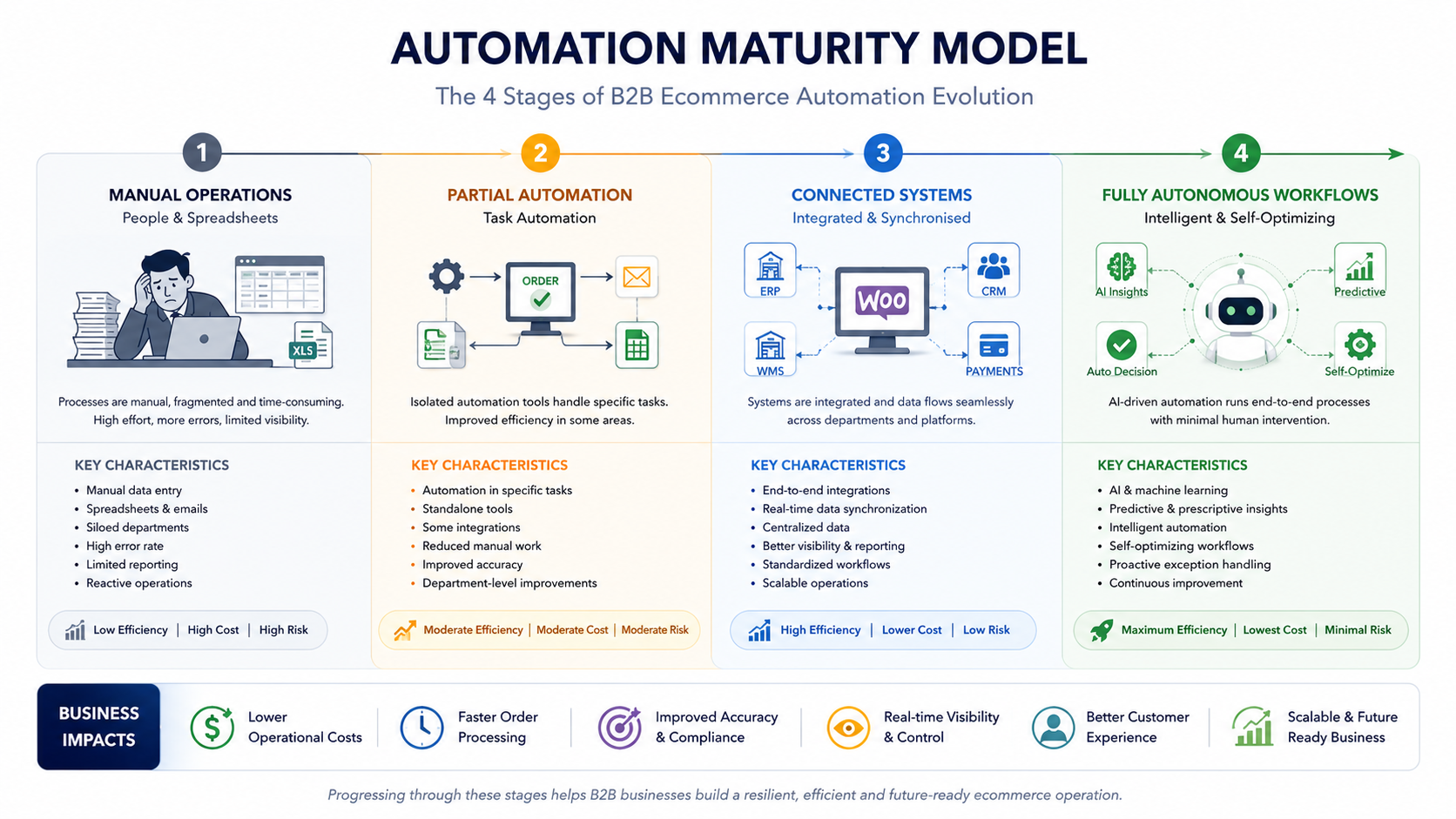
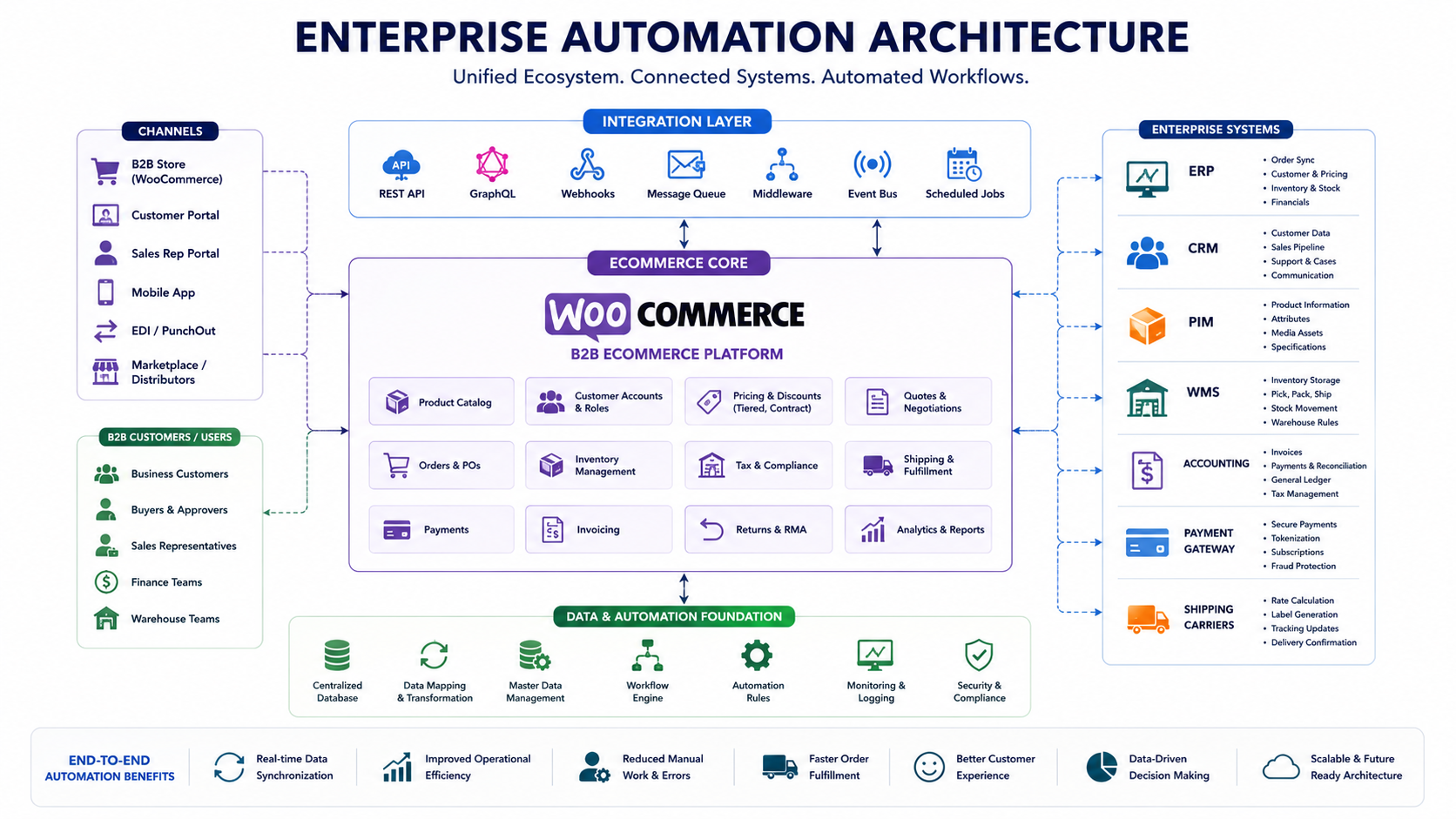
How WooCommerce Supports Automation
WooCommerce is not, by default, an automation platform. What makes it valuable for B2B automation is its extensibility. Because it is built on WordPress and exposes a REST API, it can connect to virtually any external system, ERP, CRM, PIM, tax engine, or shipping carrier through native hooks, official extensions, or custom middleware. This differs from closed enterprise platforms like Adobe Commerce, Oracle, or SAP Commerce, where deep customization often requires vendor-specific development resources and long timelines.
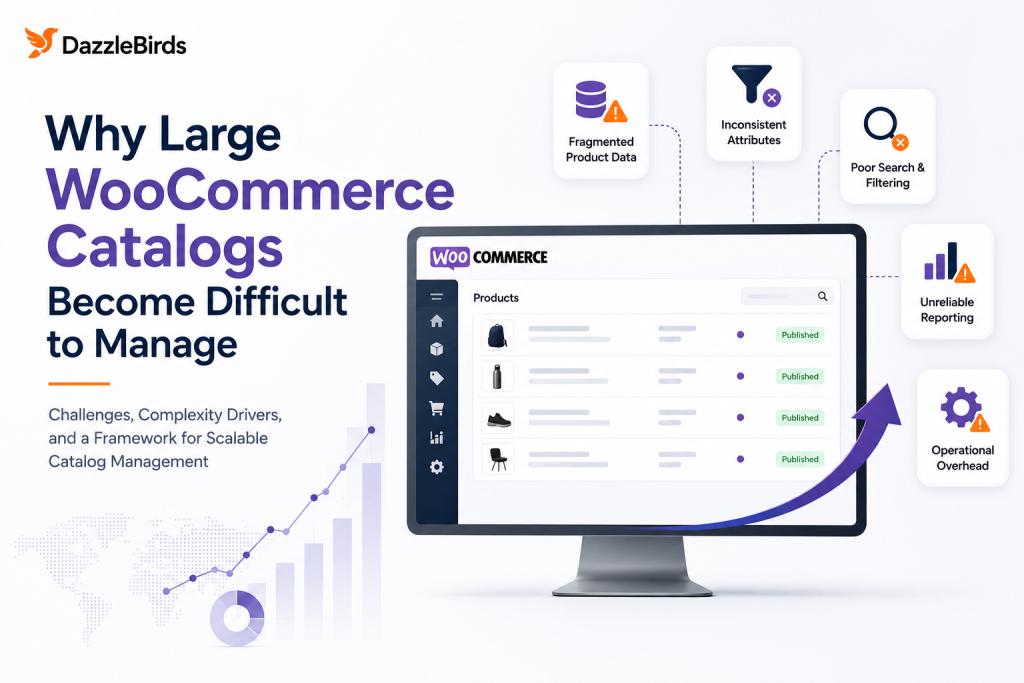
That flexibility comes with a tradeoff: WooCommerce does not enforce a correct way to structure automation. A store with a poorly planned integration layer can accumulate exactly the kind of technical debt described in WooCommerce catalog management at scale, where operational discipline, not the platform itself, determines whether the system holds up as order volume grows.
For stores approaching six or seven figures in order volume, infrastructure decisions start to matter as much as the automation logic itself. WooCommerce database optimization for large stores is a useful next step if your automation plans depend on fast order queries and reporting at scale.
Where ERP, CRM, PIM, OMS, WMS, Accounting, Payments, and Shipping Fit
A recurring point of confusion for growing B2B businesses is understanding which system is responsible for which part of the automation stack. The ERP is usually the source of truth for stock, pricing, and fulfillment status. The CRM manages account history, approvals, and sales follow-up. A PIM centralizes and syncs product data to the storefront. An OMS coordinates order routing across multiple fulfillment locations. A WMS directs the physical picking and packing inside the warehouse. Accounting software receives synced invoice and payment data. The payment gateway authorizes and captures payment, often with terms-based options for B2B buyers. And the shipping provider calculates rates and generates labels automatically.
If you are still deciding whether your business needs an ERP, a CRM, an OMS, or some combination of the three, Dazzlebirds’ detailed comparison, ERP vs CRM vs OMS: What’s the Difference? A Complete Guide for B2B eCommerce, walks through exactly how these systems differ and where the boundaries between them typically sit. A common mistake is trying to make one system do a job it was not designed for, for example, using a CRM as an inventory source of truth, usually because it was the first system the company implemented and everything else got bolted on afterward.
How Companies Should Implement Automation
Automation implementation should never start with buying software. It should start with mapping the current manual process, end to end, and identifying where the actual bottleneck sits.
A practical roadmap looks like this: map the current process in full detail, including every email and spreadsheet involved. Identify the step causing the most delay or errors, which is usually where automation should start. Fix the underlying data foundation first, since automation amplifies whatever data quality already exists rather than correcting it. Choose an integration approach, whether a native plugin, a middleware platform, or custom API development, based on system complexity. Pilot on a single workflow and get it fully automated before expanding. Run the automated workflow in parallel with the manual process before fully cutting over. Assign someone to own exception handling, since automation covers the standard path, but every business has orders that fall outside it. And expand workflow by workflow rather than automating everything at once.
Before starting, confirm the basics are in place: clean and consistent product and pricing data, clearly defined customer account rules, accessible APIs on your core systems, a named internal owner for the project, and success metrics defined in advance.
Real-World Automation Workflow Example
Consider a mid-size industrial parts distributor selling through WooCommerce to both wholesale accounts and direct business customers. A registered wholesale customer logs in and reorders 200 units of a part they have ordered before. The moment the order is submitted, WooCommerce applies their negotiated wholesale price automatically. An inventory check runs against real-time stock synced from the ERP across two warehouses. Because the primary warehouse only has 120 units, the system splits the order, allocating 120 from the primary warehouse and 80 from the secondary one. The order is pushed into the ERP as a confirmed sales order with no manual re-entry. Each warehouse’s WMS generates its own pick list, and once both shipments are packed, the shipping layer requests live rates and generates labels and tracking automatically. The customer receives two shipping notifications, and an invoice is generated and synced to accounting reflecting the correct wholesale pricing and split shipment.
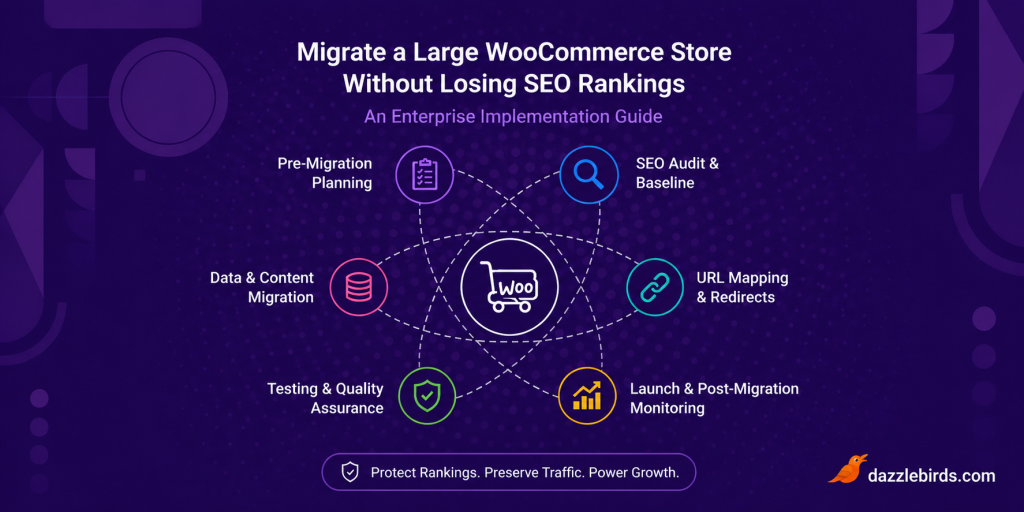
No one on the distributor’s team touched this order from submission to invoicing. The only human involvement is exception handling; for example, if the secondary warehouse’s stock had also been insufficient, in which case the order would be flagged for manual review rather than silently failing. This kind of split-fulfillment logic is also exactly where a poorly planned deployment process can cause real damage; Dazzlebirds’ guide on Enterprise WooCommerce Deployment Strategies: How to Launch Updates Without Downtime is directly relevant if you are planning to roll out automation changes to a live, high-order-volume store.
Common Mistakes
The most common mistake is automating a broken process, which just makes existing inconsistencies happen faster and at greater scale. Close behind is skipping the data cleanup step, since automation depends entirely on clean product, pricing, and customer data, and this is the single most common cause of automation projects failing in the first 90 days. Trying to automate everything at once almost always underestimates the exception-handling work required and produces a fragile system. Choosing tools before mapping the process often results in paying for capabilities you do not need while missing the ones you do. Having no owner for exception handling means orders that fall outside the standard path get stuck or mishandled. And ignoring existing technical debt tends to surface performance problems that were previously hidden once automation adds more load to the system. If your store already shows early warning signs, Dazzlebirds’ guide on the 12 signs your B2B WooCommerce store has technical debt is worth reviewing before adding automation on top.
Security and Performance Considerations
Automation increases the number of systems that can access sensitive business and customer data, so security needs to scale alongside it. All API connections should use authenticated, encrypted connections, with credentials stored securely and rotated on a schedule. Role-based access controls should apply to anyone with admin access to automation tools. Payment data handling should follow PCI DSS requirements, with card data never stored directly in WooCommerce. Third-party integrations should only receive the data they actually need, and automated workflows should include logging so unusual transactions can be traced.
On performance, database queries tied to order and inventory sync should be properly indexed rather than running as unoptimized full-table scans. Webhook and API call volume should be monitored so order spikes do not overwhelm connected systems. Caching should be configured so automation never serves stale pricing or inventory data, and non-time-critical tasks should run through background job queues rather than synchronously during checkout.
Manual vs Automated Ecommerce
| Factor |
Manual Process |
Automated Process |
| Order processing time |
Hours to days |
Minutes |
| Error rate |
Higher, dependent on individual attention |
Lower, consistent rule application |
| Scalability |
Requires proportional headcount growth |
Scales with minimal added headcount |
| Customer experience |
Inconsistent response and confirmation times |
Predictable, near-instant confirmations |
| Staff focus |
Time spent on repetitive data entry |
Time freed for account management and strategy |
KPIs to Measure Success
Automation should be measured against clear, business-level metrics rather than just confirming an integration is technically live. Track order processing time, the number of manual touchpoints per order, the order error rate, invoice-to-payment cycle time, inventory accuracy, order-related support ticket volume, and the exception rate, meaning the percentage of orders that fall outside standard automated handling.
AI-Powered Ecommerce Automation
AI is increasingly layered on top of the core automation stack rather than replacing it. In practical B2B terms, this shows up in demand forecasting, where models analyze historical order data to predict reorder timing more accurately than static reorder points. It shows up in pricing support, where AI flags pricing anomalies, though final pricing decisions in B2B typically still require human approval given the relationship-based nature of B2B pricing. It shows up in customer service, where AI-assisted tools handle order status inquiries and escalate to a human when a request falls outside standard patterns. And it shows up in product data enrichment, helping standardize titles and attributes across large or messy catalogs. AI works well as a layer on top of clean, well-structured automation, but it does not fix underlying data or process problems on its own.
Future Trends
Composable and headless architectures are becoming more common for B2B stores that need the storefront experience to evolve independently of backend systems. Real-time inventory visibility across the entire supply chain, not just within a single warehouse, is moving from a competitive advantage to a baseline buyer expectation. Self-service account and pricing management is expanding, with more buyers expecting to manage their own users and view negotiated pricing without contacting a sales rep. And standardized API ecosystems between ERP, e-commerce, and accounting vendors are reducing the custom development burden that once made enterprise automation expensive, a trend that benefits WooCommerce stores in particular given the platform’s API-first design.
Final Takeaways and Next Steps
B2B ecommerce automation is not a single project with a fixed end date. It is an ongoing operational discipline, in the same way inventory accuracy or financial reporting is ongoing.
If you are starting from a largely manual process today, the most reliable path forward is to map your current order-to-cash process in full; clean up product, pricing, and customer data before automating anything on top of it; choose one high-friction workflow, most often order processing, and automate it completely before expanding; define your success metrics up front; build in a clear owner for exceptions; and expand workflow by workflow rather than launching a single sprawling initiative.
Businesses that follow this sequence tend to end up with automation that actually holds up under real order volume. Businesses that skip straight to buying software usually end up automating the same problems they started with, just faster. If your WooCommerce store is approaching the point where manual order processing is becoming a genuine operational risk, reviewing your current catalog structure, pricing logic, and system integrations before adding automation on top is time well spent.
FAQs
It is the use of software and system integrations to carry out repetitive commerce tasks, such as order processing, pricing, and invoicing, without manual data entry between systems.
It reduces manual errors, speeds up the order-to-cash cycle, and allows businesses to scale order volume without proportionally scaling headcount, while meeting rising buyer expectations for fast, self-service ordering.
Order processing and inventory management are typically the highest-impact starting points, since they touch nearly every downstream process, including invoicing and shipping.
Through its open REST API and extensible plugin architecture, which allows it to connect to ERP, CRM, PIM, and shipping systems without requiring a closed, vendor-locked platform.Through its open REST API and extensible plugin architecture, which allows it to connect to ERP, CRM, PIM, and shipping systems without requiring a closed, vendor-locked platform.
Through concrete KPIs such as order processing time, manual touchpoints per order, error rate, and inventory accuracy, rather than simply confirming an integration is technically live.


 WooCommerce Solutions
 Solutions for WordPress