Last year a VP of operations at a mid-market manufacturing distributor had tried for six months to plan out their WooCommerce data migration. They had the timeline, money, and a plan they thought was bulletproof. By the third week of their standard migration plugin attempts, customer account hierarchies were corrupted, historical margin data was missing, and orphaned invoices broke their accounts receivable reconciliation. They contacted us in the face of what was threatening to become a six-month operational disaster.
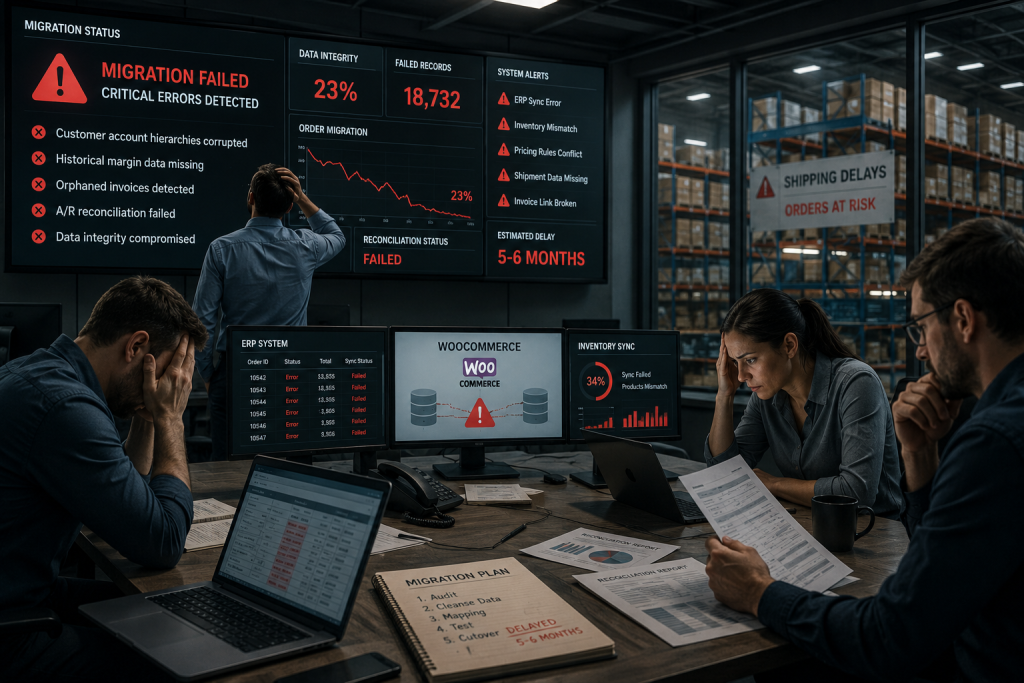
The project itself informs our thinking about enterprise WooCommerce data migration. You are not having the same problem as smaller retailers. Enterprise B2B migrations, on the other hand: Imports of data that fail lead to broken supply chains, lost order history, and weeks/months of manual reconciliation. The key issue with migrating WooCommerce data at scale is that you’re not duplicating database tables. You are repurposing business logic; you are reshaping customer connections and reforming pricing structures that have existed for decades in legacy platforms.
The difference between standard migration and B2B reality
This is why for a majority, migration simply means moving tables, products, customers, and orders. Plugins can technically do that. They are not capable of grasping business context that is buried in your data, though.
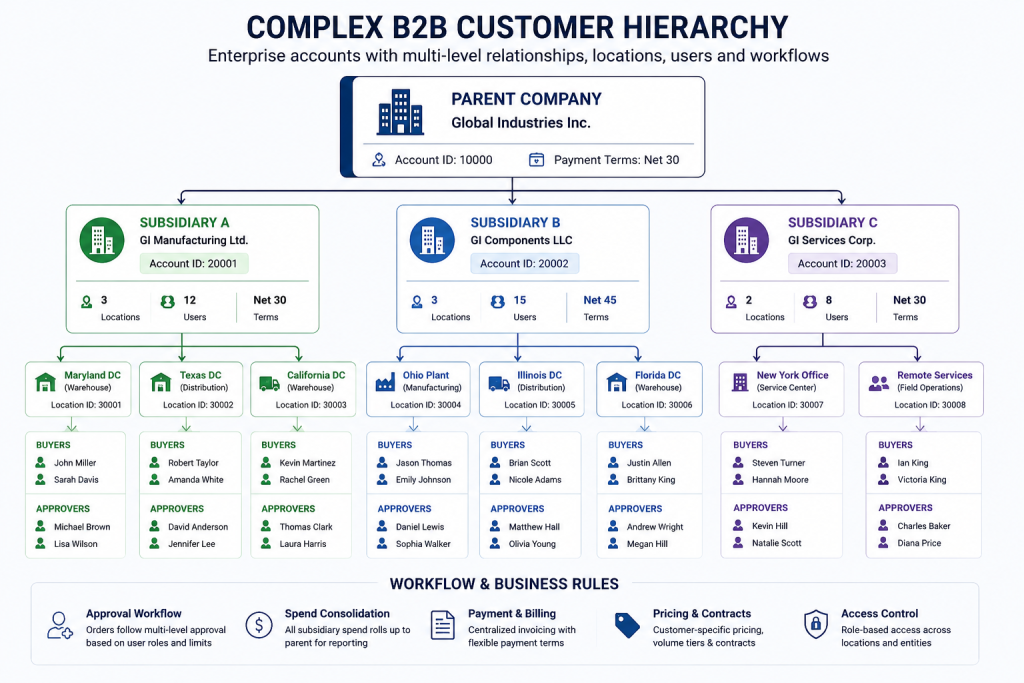
In B2B, a “customer” is not one person with an email. Contain a multifaceted corporate structure with multiple licensed merchants, shipping locations, billing hierarchies, and approval workflows. If your legacy system was storing parent companies with subsidiary relationships, and WooCommerce uses a flat model, that mapping is not available by default. You have to design how exactly the structure translates and then test that out with connected purchases from subsidiary accounts, checking bill flows into parents and aggregating order history correctly.
Enterprise B2B is based on contract-based pricing, volume tiers, and margins based on the customer. WooCommerce cannot fathom “This customer gets 15 percent off category X only if their order total is over $10,000 and also between January and March.” These building blocks need to be reverse engineered from legacy systems, converted into WooCommerce’s data model via custom fields and code, and then verified through test cases.
You are tagged as a B2B company with 15 years of history and millions of order records (headers, line items, custom attributes, shipment tracking, invoicing data, and RMA). A data cutoff during historical migration occurs when running live orders. There should not be any transaction during migration; everything after the cutoff must remain in the new system, and historical/pre-cutoff data needs to go to the background. Get this wrong, and you either get duplicates or records go missing.
For enterprise B2B operations, WooCommerce is connected to ERP systems for fulfillment, CRM (for tracking and pushing customer data), and I/O plugins like inventory management software or payment gateways + shipping software. All exchange data continuously. Migration of WooCommerce data does not just mean that you transfer the DB tables into WooCommerce. Whether it is making sure all your integrations are intact or dealing with manual work-arounds while stabilizing a new platform.
Hidden problems in real projects
The first shock is data inconsistency. They have been around long enough that they collect cruft: products without descriptions in custom fields, customers who are duplicates due to acquisitions, orders with no SKUs or missing line items because the SKU was discontinued, and prices that don’t add up.
In that same company, we found more than two thousand products without cost information. For years, the operations team manually dealt with that via Excel spreadsheets (that were unlinked). In the course of our audit, we learned about the process, sourced missing information, and tagged products as unmigrated. That would slip discovery by two weeks, but at least we weren’t shipping products with no margins.
An old e-commerce system for a distributor had custom pricing logic built-in that went undocumented. Zeroing in on that—the original developer left, and so it was saved as something that made sense to those who maintained it but couldn’t put it into words. In one week, we ran test scenarios to deconstruct the pricing engine. That revealed situations where customers got specific exceptions that were never followed up on.
Imagine your WooCommerce inventory sync breaking halfway through a migration: one moment, you’re importing all the products and data you need to run your business. Products that are unavailable to customers appear as available. This necessitates scaling back temporarily or doing inventory management manually on a small scale.
Data corruption can occur because the migration logic is wrong in their internal workings. Now images falter silently from the download. Your catalog will initially seem complete, and then your customers will tell you that they are seeing broken images.
Large catalogs amplify everything. A 95 percent accurate pricing algorithm equates to ten thousand products priced with the wrong margins. Even a customer hierarchy logic that works for 98 percent of accounts still leaves some five hundred broken relationships.
Our methodology for enterprise WooCommerce data migration
Our approach evolved from real damage we’ve seen. The audit phase is slower than companies expect, but intentionally so.
Audit Phase
- Testing data, not just cataloging it
- Running samples through proposed migration logic and comparing output to expectations
- Identifying data quality issues and deciding whether to clean, transform, or exclude records
- Documenting business logic that created data so we can recreate it in the new platform
Data Flow Mapping
- Mapping how data flows today with your operations team
- Understanding where data originates and how it transforms between systems
- Identifying what integrations touch it and in what order
- Documenting the complete ecosystem because enterprise WooCommerce data migration isn’t just about WooCommerce
- Fitting WooCommerce into existing operational flow
Target Architecture Design
- Determining how customer hierarchies become WooCommerce structure
- Translating contract-based prices into tiered pricing
- Identifying custom fields that preserve data WooCommerce doesn’t natively support
- Planning how to handle products and customers without clean mappings
Integration Architecture Mapping
- Mapping exactly how WooCommerce will connect to ERP, CRM, and payment processors
- Identifying where risks exist in the integration ecosystem
- Designing redundancy and monitoring around critical integrations
Phased Migration Strategy
- Starting with product data using smaller batches
- Validating each batch before moving to the next
- Moving customer data by segment and verifying each segment before continuing
- Placing historical orders last in the migration sequence
Staging Environment Testing
- Running the entire migration in an isolated copy of your systems
- Validating every step of the migration process
- Running test orders and verifying ERP syncs
- Checking pricing accuracy for different customer types
- Building production confidence once staging works cleanly
Integration complexity and validation
Your ERP doesn’t know WooCommerce. Your legacy system contains business logic that WooCommerce does not. That gap is where actual complexity resides.
Transferring inventory data from an ERP to WooCommerce is a literal transmutation of how our virtual real estate fragments itself with respect to current geospatial position. If your ERP tracks using warehouse location and WooCommerce only the total stock, you either aggregate across all locations or build up custom code mapping movements on WooCommerce back to specific buckets. You will need translation layers that keep both in sync if your ERP is managed by SKU while WooCommerce also manages by product ID.
Your ERP knows about corporate relationships, customer types and territories, and credit limits. WooCommerce NEEDS all customer data but has no idea about your hierarchy. That understanding gets translated as compulsory data points into fully custom fields, customer groups, and metadata structures to ensure WooCommerce operates for your specific operations.
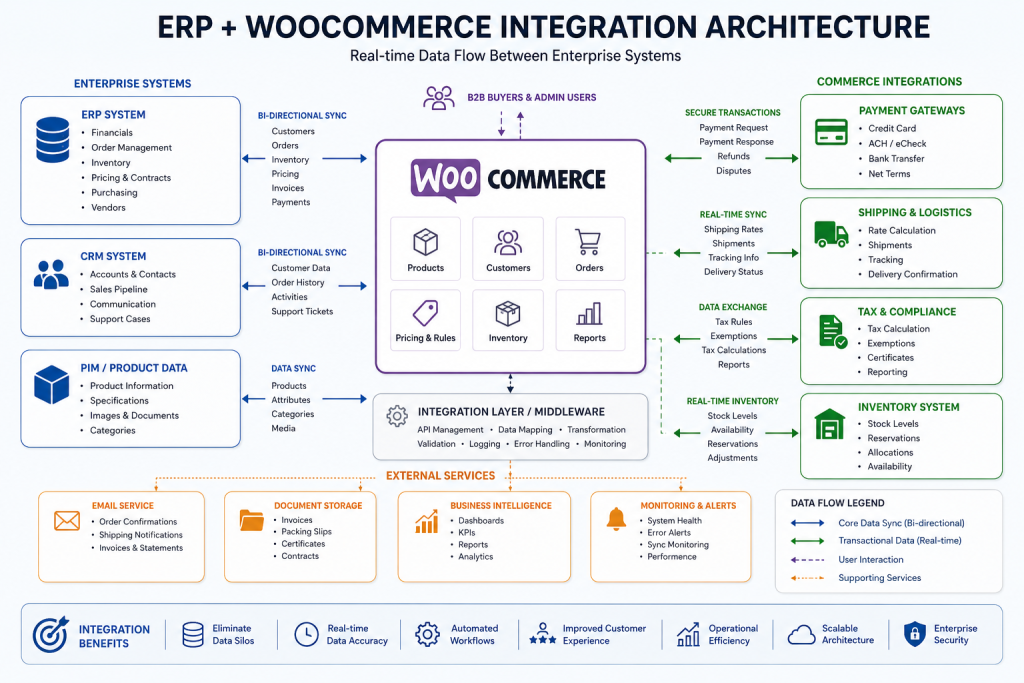
After your migration is completed, they run daily. Inventory syncs from the ERP so customers see stock available. Your orders also get synced to ERP for my fulfillment. Customer information remains uniform across application layers. And this is where the most post-migration issues will show up, around that synchronization.
Validation happens through multiple lenses. Automated checks verify data quality. Verify order flow and ERP sync in test transactions. Business logic validation checks the accuracy of customers getting correct pricing, and orders are aggregated properly. We validate with your team (operations checks against order data, finance confirms we are recording revenue correctly, and customer service does spot-checking of rich client information).
Validation includes formal rollback testing. We bring your environment to a pre-cutover state and fire off an entire rollback like the world ended. Does your ERP patch cleanly to the legacy system? Are you even able to run your business pre-migration? By identifying these critical problems before they have the opportunity to occur under pressure, when failure of rollback is no longer an option.
Continuity and why standard tools fail
In manufacturing and distribution, downtime is not an option. Parallel running handles this. Both systems will need to operate for a period of time before cutover. We wrote code that allows new orders to go into the old system but also immediately sends them into WooCommerce for confirming. For the purpose of validating that data is processed correctly by the new system, this dual operation lasts for about one to two weeks.
Cutover becomes smaller. You are trimming overorders and customers already validated in the new system instead of doing huge, hours-long imports. You turn the switch, incoming customer traffic goes to WooCommerce, and the old system is set to read-only. Immediate failures allow fast failover since the old system is still hot.
You can import five hundred products directly with standard tools, but when scaled up, they fail miserably. They carry data in no different formats than before. They either bypass it if your data doesn’t map to that structure or try and force it into the wrong structure. Custom fields don’t translate. Data needing transformation goes unhandled.
Just importing fifty thousand products via normal means takes eight hours. If an error occurs half-way through, you roll everything back. Then you move that data in one hour with properly built scripts and checkpoints so you only rerun failures.
Plugins do not manage two-way ERP synchronization or ongoing post-migration syncing. You have to jump between tools, which mutes the coordination.
Plugins inform you of the number of records moved and errors observed. These do not help you to verify if the data migrated is actually correct for your business. Until the reconciliation fails next month, you won’t even know about 100 customers who migrated with incorrect billing addresses.
Business outcomes and enterprise readiness
WooCommerce — For enterprise B2B operations at scale. Stripped of bells and whistles, large-scale migrations are business transformation projects instead of technical events. That means spending the time needed up front discovering requirements, setting realistic timelines and budgets for projects, and factoring in integration complexity and data quality work.
Migrating (at which you struggle): Apply this same strategy as simple platform upgrades. They expect plugins to transfer data and for everything to work. It has omitted the fact that business logic needs to be rebuilt, not copied.
Scalability improves. Legacy monoliths’ changes were tough and costly. WooCommerce is modular. You can add new customer integrations, payment flows, or pricing models without having to rebuild the whole thing around it.
Performance typically improves. Older systems accumulate technical debt. Bloated databases degrade query performance. That same load is handled faster on modern infrastructure, using WooCommerce. Customers enjoy faster browsing and checkout options.
tions, leading to fewer carts being abandoned.
In B2C, operational stability is mostly irrelevant. Legacy systems that required a lot of manual intervention have been replaced with standardized WooCommerce work. The issues you face are generally the ones that many other users have faced. Documentation and solutions exist.
But the long-term win is evolutionary ability. Modern platforms allow you to build capabilities stepwise. Without recreating infrastructure, you enter new markets with new products in your product category and customer segments. You are no longer battling legacy systems. You are operating on platforms that the wider market builds tooling for.
Final thoughts on enterprise readiness
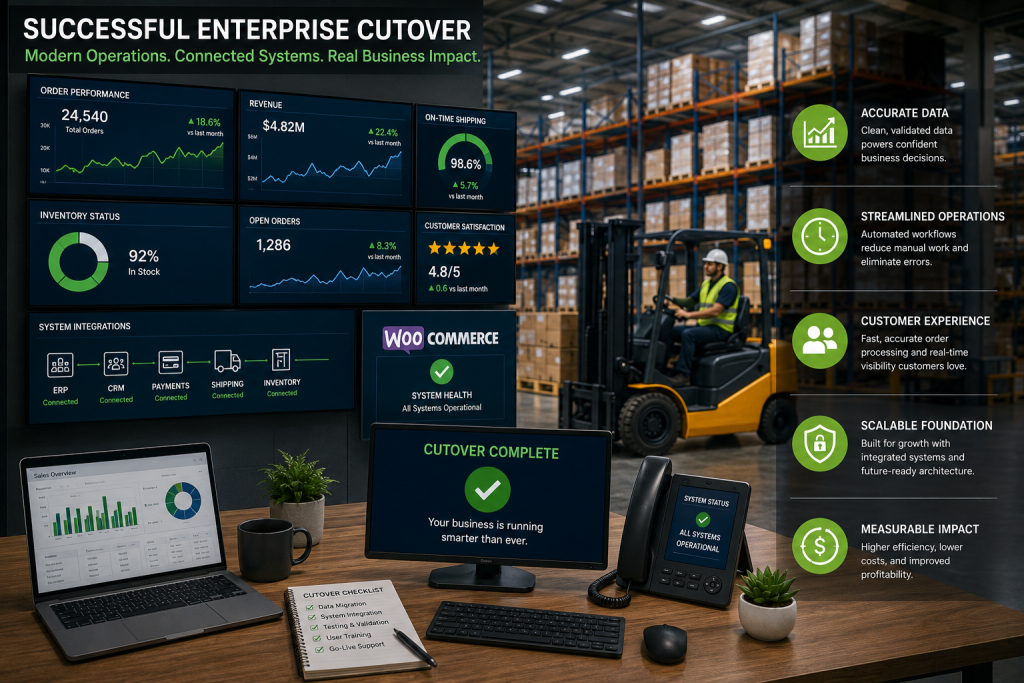
Enterprise WooCommerce data migration is more than just migrating data from one place to another. Business continuity is the real challenge at scale. The vital question, though, is if all the data migrates as intended or if one must wait to conduct business normally until after migration.
For example, in manufacturing and distribution, complexity is often disguised by the evolution of business. This does not live solely in product catalogs or databases but in the application of accumulated business logic. Pricing rules that were originally added as exceptions later become the standard; customer hierarchies created through M&A activity and inventory requirements associated with legacy ERP systems all bubble up during migration.
This is where the assumptions generally come to fail. If a team decides to use WooCommerce for all its commerce flow, many simply treat it as another data destination where imported product and order entities go. The truth is that enterprise migration should include business logic rebuild, not only record transfers. You have to properly redefine customer structures, pricing rules, and ERP & CRM system integrations if your business is going to continue functioning correctly after cutover.
This complexity is accepted early as part of enterprise readiness. Successful teams care less about how that data is stored and more about how it moves between systems. They do not just validate structure; they validate behavior. That’s not sufficient to have orders in your WooCommerce. It should flow properly into ERP, reconcile in financial systems, and present the correct pricing under actual conditions.
At the end of the day, WooCommerce migration is about operational maturity. Used correctly, it does much more than modernize systems. It builds a resilient, infinitely scalable baseline where business processes, data & integrations run in concert reliably at scale.
FAQs
WooCommerce data migration becomes more complex in B2B environments because customer hierarchies, ERP integrations, pricing rules, and large order histories must continue functioning without disrupting operations.
The biggest WooCommerce data migration risks include broken integrations, missing order records, incorrect pricing structures, inventory synchronization issues, and operational downtime during platform transition.
WooCommerce data migration projects usually uncover legacy data issues, undocumented workflows, and integration dependencies that require additional validation, testing, and restructuring before migration can proceed safely.
ERP systems add complexity to enterprise eCommerce migration because inventory, pricing, fulfillment, and customer data must remain synchronized correctly across multiple connected business systems.
Standard plugins can move records, but large WooCommerce data migration projects often require custom logic, validation processes, integration handling, and rollback planning beyond basic migration tools.


 WooCommerce Solutions
 Solutions for WordPress