Most WooCommerce stores end up with a product catalog that grew one item at a time. A new SKU shows up, someone creates a fresh product page for it, and six months later the store has forty near-identical listings for what is really one family of related items. Customers land on a single product page when they actually wanted to compare five, and the back end becomes a maze of near-duplicate entries nobody wants to clean up.
WooCommerce grouped products exist to solve exactly this problem, but they are frequently misapplied. Store owners either avoid them entirely and keep everything as separate products, or they reach for grouped products in situations that actually call for a bundle or a variable product. This guide walks through what WooCommerce grouped products are, when they genuinely improve the shopping experience, and when separate products, bundles, or variations are the better structural choice.
What Are WooCommerce Grouped Products?
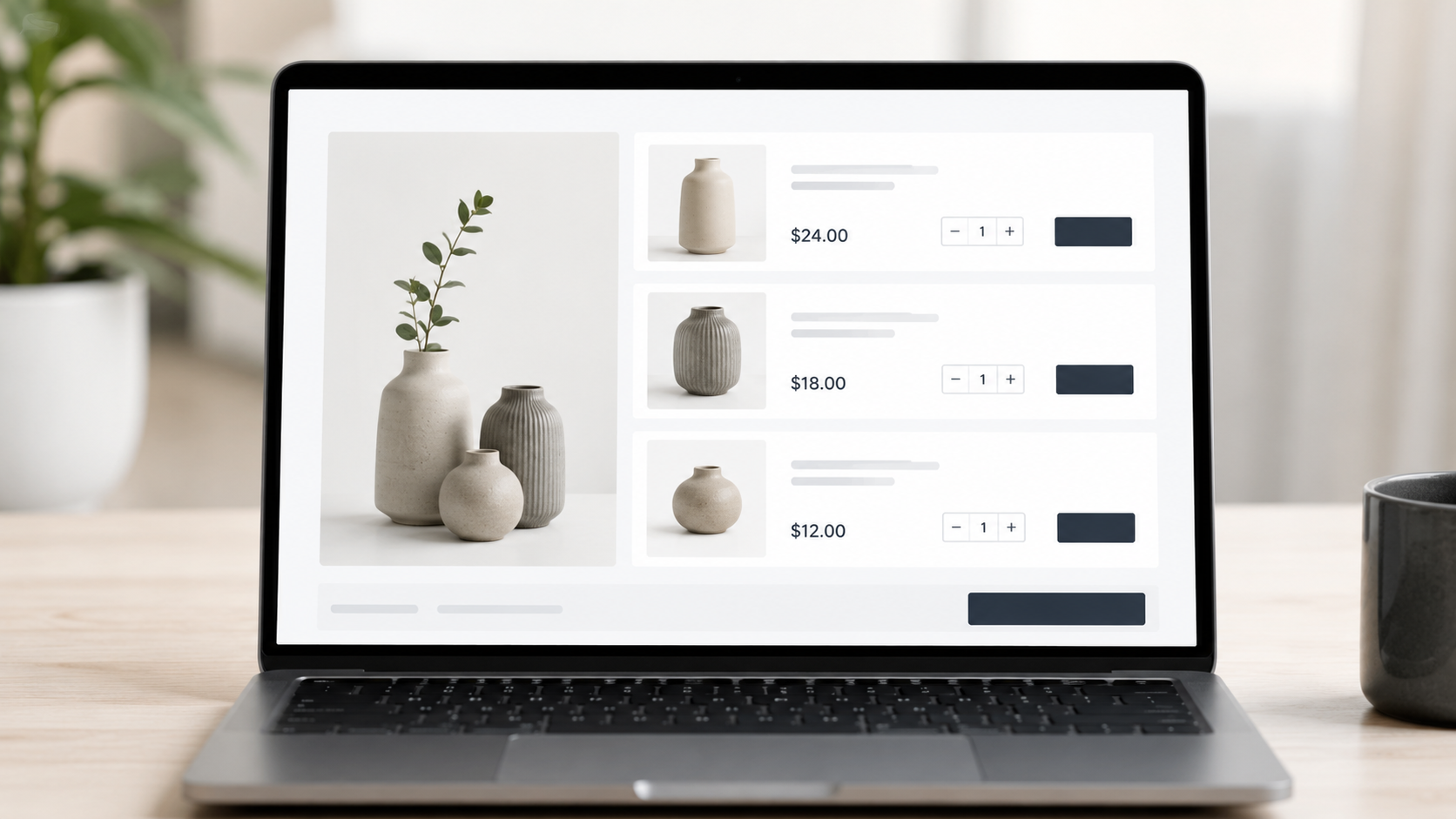
A grouped product in WooCommerce is a parent listing that displays a collection of separate, independently purchasable child products on a single page. Each child product keeps its own price, its own inventory count, and its own individual product page. The parent product does not have a price or stock level of its own; it simply acts as a container that presents related items together.
The distinction that trips people up is this: a grouped product is not one product with options. It is several independent products displayed as a set, with a checkbox or quantity field next to each one so a shopper can add whichever combination they want to the cart.
Consider a kitchenware store that sells a chef’s knife, a paring knife, and a bread knife. Each knife is already a fully independent product with its own SKU, price, and stock count. Rather than making customers hunt through three separate category pages, the store creates a “Kitchen Knife Collection” grouped product. That parent page lists all three knives with quantity selectors, so a customer can buy one, two, or all three in a single add-to-cart action, while each knife still sells perfectly well on its own individual page too.
How WooCommerce Grouped Products Work
Understanding the mechanics matters before deciding whether WooCommerce grouped products fit a given catalog.
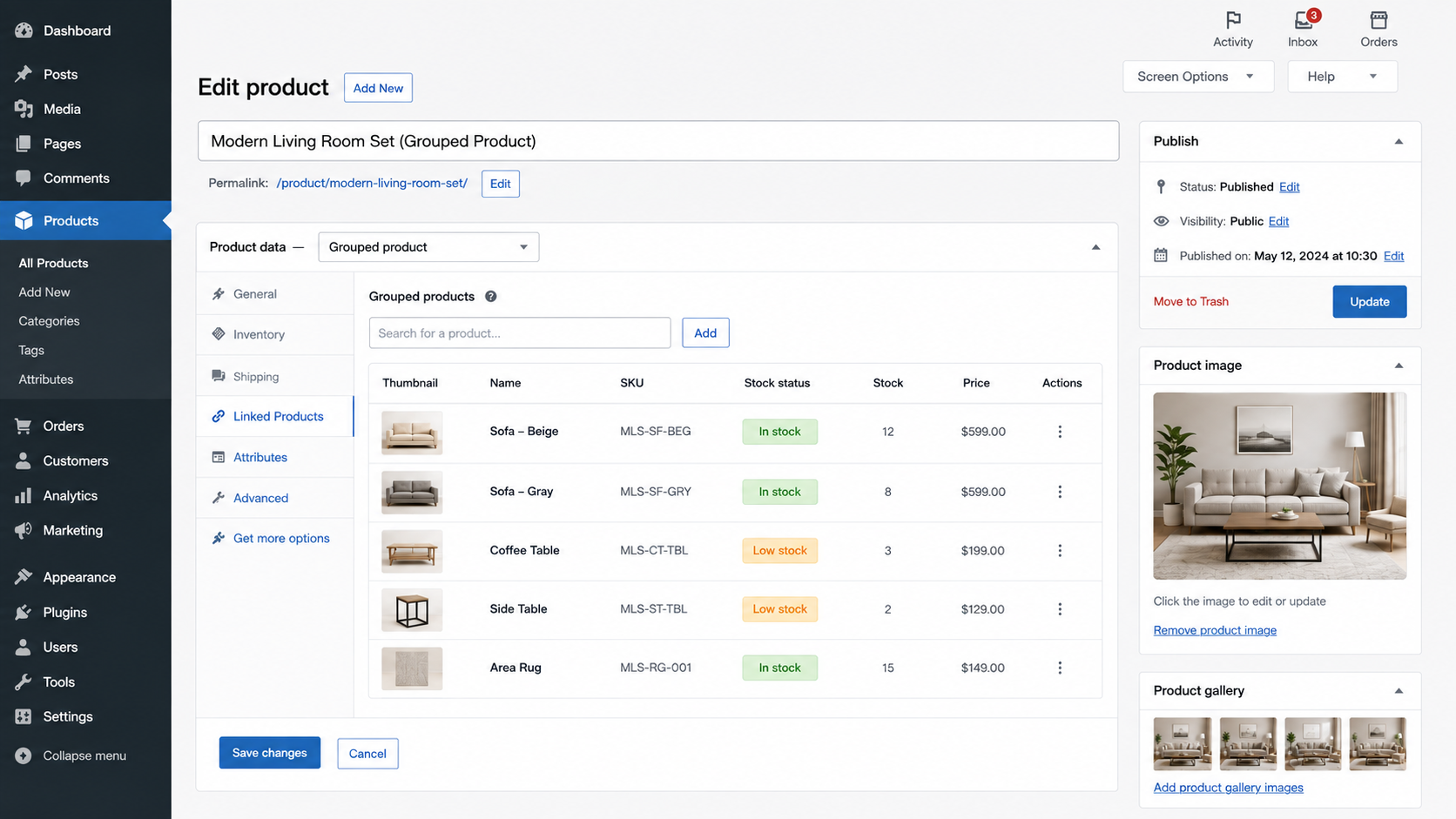
The parent grouped product is the product type selected in the WooCommerce Product Data dropdown. It carries a title, description, and category, but no price field and no stock field of its own. The child products are standard simple products already living in the catalog, linked to the parent through the “Grouped products” field, and each one keeps functioning as a normal product everywhere else on the site.
On the front end, the parent page renders each child product as a row with its own quantity input, so shoppers can select quantities for one item, several, or all of them before adding to cart. Every child product displays and charges its own price, since there is no combined “package price” unless one is built separately. Stock is tracked per child product exactly as it would be for any standalone item, so if one child sells out, WooCommerce simply marks that row unavailable while the rest of the grouped listing stays live. Because of this row-based layout, grouped products work best for genuinely comparable items rather than a mix of unrelated things.
WooCommerce Grouped Products vs Separate Products
Grouped products keep every item independently purchasable and priced, while pure separate products give each item full stand-alone visibility with no shared parent page at all. The choice comes down to whether related items benefit from being seen together.
Separate products give more control when each item needs its own SEO landing page and its own marketing story. A brand launching a flagship item wants that page to stand entirely on its own, with a dedicated meta description, its own backlink profile, and no competing calls to action. Grouped products, by contrast, give more control when related items belong together in the buyer’s mind but should never lose their individual pricing or stock tracking. A parts catalog, a matching outfit, or a furniture set all benefit from being seen as a family rather than as isolated listings a shopper has to piece together manually.
The SEO trade-off is worth sitting with for a moment. A grouped parent page can rank for broader, collection-style search terms (“kitchen knife set,” “matching bedroom furniture”) while every child page keeps ranking for its own specific-item keyword. Splitting everything into separate products loses that collection-level ranking opportunity; folding everything into one grouped page without keeping strong individual child pages loses the specific-item ranking opportunity. WooCommerce grouped products, done correctly, let a store capture both.
When Should You Use WooCommerce Grouped Products?
The clearest signal that a set of items belongs in a WooCommerce grouped product is independence plus habit: the items are independently sellable, individually priced, and customers naturally buy them together.
Matching clothing items, like a shirt, tie, and pocket square sold as a coordinated set, are a strong fit. Each piece has its own size, price, and stock, but shoppers benefit from seeing the full set on one page before deciding what to add to cart.
Furniture collections work the same way. A sofa, loveseat, and ottoman in the same fabric line are each independently priced and stocked, yet buyers usually want to see the whole collection before deciding how many pieces to order.
Replacement parts for a piece of equipment are a near-perfect use case, since parts are independently stocked and priced, and customers usually need to compare all compatible options in one place rather than search for each part number separately.
Frequently purchased related products, such as a printer and its ink cartridges, benefit from grouped products because the items stay independently priced while making cross-purchasing dramatically easier.
Grouped products are the wrong tool, however, for products requiring mandatory combinations, like a mattress that must ship with a specific base. Grouped products cannot force items to be purchased together, so a bundle is the better structure there. The same is true for products with different variations, such as a t-shirt in five sizes and six colors; that is a single product with options and calls for a variable product, not a grouped one. And for products that should only ever be sold as a fixed package, like a gift set with one set price, a bundle, or a single packaged product fits far better, since the components should not be independently sellable within that page at all.
When Should You Keep Products Separate?
Grouped products are not the default answer for every related-item scenario. Keeping products fully separate is usually the right call when products need their own SEO landing pages, since folding a strong keyword target into a parent listing can dilute the exact page a store wants to rank. It is also the right call when products serve significantly different audiences. A commercial-grade version and a consumer version of similar equipment often need different messaging entirely, and a shared grouped page can confuse both audiences at once.
Products with complex variations of their own are another signal to keep things separate, or at least to resolve the variation question with a variable product before touching the grouped product decision. Items that need independent promotions, whether a discount, a flash sale, or a coupon-restricted offer, are also simpler to manage when they are not visually tied to a group of others. Finally, when the purchasing journeys genuinely differ, one item being an impulse buy while another requires research and comparison, forcing them into the same page structure works against both journeys. Grouping items together purely because they share a category label, without a real relationship a shopper would recognize, tends to create a confusing page rather than a useful one.
WooCommerce Grouped Products vs Product Bundles vs Variable Products
These three structures get confused constantly, and picking the wrong one creates real problems later, from broken checkout flows to inventory numbers that no longer make sense.
|
Grouped Products |
Product Bundles |
Variable Products |
| Connection |
Parent page linking to independent child products |
Container product packaging multiple items, sometimes at one fixed price |
Single product with selectable attributes (size, color, material) |
| Individual purchase |
Yes, every child product is independently purchasable. |
Not always; some bundles are packaged as one purchase only. |
No, you’re buying the parent product with a chosen variation |
| Pricing |
Independent per-child product |
Combined price, discount, or sum of components |
One base price that can shift slightly by variation |
| Inventory |
Tracked separately per child product |
Depends on the plugin, component-level or bundle-level |
Tracked per variation, not per parent |
| Best for |
Related but independently sellable items shown together |
Items that make sense as one packaged offer |
The same core product is available in different options. |
Bundles and grouped products are especially easy to mix up because both involve multiple products appearing together. The difference comes down to independence: grouped products preserve full independent purchasing and pricing for every child item, while bundles are built to package components into a more unified offer, often with combined pricing logic. Stores that regularly assemble kits or starter packages should review their own WooCommerce product bundle strategy before choosing between the two structures, since bundle configuration carries its own set of pitfalls around pricing and stock deduction.
How Grouped Products Affect Inventory Management
Because WooCommerce grouped products are just parent pages linking to independently stocked child products, inventory behaves exactly as it would for any standalone item, with a few catalog-level implications worth planning for.
Stock tracking stays entirely per-child, so nothing about grouped products changes how WooCommerce counts inventory. A shopper can still see, in real time, which items in the group are in stock and which are not, since each row reflects its own child product’s stock status. When a child product sells out, it does not take down the whole grouped listing; it simply shows as unavailable while the rest of the group remains purchasable, which is a meaningful advantage over bundling everything into a single SKU with a single stock count.
Because grouped products don’t introduce a new inventory concept, stores avoid the reconciliation headaches that come with bundle-style stock deduction, where selling one bundle has to correctly decrement multiple component quantities behind the scenes. The real complexity at scale isn’t the grouped product mechanism itself; it’s making sure the underlying child products have consistent SKUs, accurate stock counts, and clean attribute data as the catalog grows. Solid WooCommerce inventory management practices, particularly around multi-warehouse synchronization, matter just as much for grouped listings as they do for any other product type.
How Grouped Products Affect Product Catalog Management
Grouped products can meaningfully reduce the navigational complexity of a catalog without reducing the underlying number of products a team has to manage. A well-built grouped product acts as a curated entry point into a family of related items, helping shoppers find what they need without browsing a long, flat product list. It also makes an implicit relationship, that these items belong together, explicit in the storefront, which is particularly useful for B2B catalogs where buyers are used to shopping by product family rather than by isolated SKU.
In a catalog with thousands of SKUs, grouped products give teams a way to surface related items together without duplicating content or creating redundant category pages for every small variation of a family. They don’t eliminate the need for individual child pages, but they do reduce the temptation to build a separate “collection” landing page manually for every related set, since the grouped product page already serves that purpose. Buyers who know they want a full set can go straight to the grouped page, while buyers who know exactly which single item they want can still land directly on that item’s own page through search or category browsing.
For B2B stores in particular, where procurement teams often need to review an entire product family before placing a purchase order, grouped products can shorten the research phase considerably. This is closely tied to broader WooCommerce product catalog management practices, since a grouped product is only as useful as the attribute and naming consistency behind it.
Grouped Products vs Product Variations
Grouped products and product variations solve genuinely different problems, even though both involve “more than one version of a product” appearing on a page. Different sizes or colors of the same item are variations. A blue medium t-shirt and a red large t-shirt are the same underlying product with different attribute values; they share one product identity and belong on one variable product page. Independent products with their own identity belong in a grouped product instead. A tripod and a camera bag are not the same product with different options; they are two entirely different items that happen to be sold together often.
Shared product identity is the defining trait of a variation, since buyers think of it as one product with several options. Independent inventory paired with a shared listing page is the defining trait of a grouped product, since buyers think of it as several products sharing one page.
Getting this wrong in either direction creates problems. Turning genuine variations into a grouped product means recreating near-duplicate listings for every size and color, which fragments SEO value and multiplies maintenance work. Turning genuinely separate products into variations of a single parent forces unrelated items to share one price field and one product page, which breaks the buying experience.
Common Mistakes When Using WooCommerce Grouped Products
The single most common mistake is grouping products that aren’t actually related, just because they share a category label. The fix is simple: keep unrelated products as separate listings and rely on category pages or cross-sells to connect them instead.
A close second is using a grouped product when the business really needs a fixed-price package. If components should be sold as one unit, a proper bundle plugin that supports combined pricing and component-level stock deduction is the better tool. Related to that, some stores use a grouped product to represent size or color options of the same item when what they actually need is a variable product with proper attributes.
On the execution side, the recurring failure is building a confusing parent page with inconsistent naming across child products, which the fix for is simple: standardize child product names and descriptions before linking them to the parent. Many stores also never test how an out-of-stock child product will actually display on the parent page, so a row that quietly breaks the layout goes unnoticed until a customer reports it. Adding too many child products to a single grouped listing is another frequent issue; capping the group at a manageable number and splitting large families into logical subgroups keeps the page usable. And perhaps the most avoidable mistake of all is never walking through the actual purchasing workflow, selecting quantities and checking out, the way a real shopper would before publishing.
How to Decide Whether to Use Grouped Products
A short set of questions settles most of these decisions quickly. Are the products independently purchasable? If not, grouped products are the wrong structure, and a bundle deserves a look instead. Do they have separate prices? If not, a bundle with combined pricing fits better. Do they have independent inventory? If stock is tracked as one combined pool, a bundle or a single packaged product makes more sense than a grouped listing.
Are customers likely to purchase the items together? If so, and the items are independent, WooCommerce grouped products are a strong fit. Are the items actually variations of the same product? If so, a variable product replaces the need for a grouped product entirely. Must the items be purchased as a single package? Grouped products can’t enforce that, so a bundle or a single SKU is the right call. And finally: does grouping genuinely improve the customer experience? If the honest answer is no, that’s usually a sign the items should stay as fully separate listings.
If the answers land on independently purchasable, independently priced, independently stocked, and commonly bought together, WooCommerce grouped products are almost always the right call.
Best Practices for Managing WooCommerce Grouped Products at Scale
Consistency is the backbone of every well-run grouped product catalog. Decide on clear rules for what qualifies a set of items to be grouped together, and apply those rules the same way across the store. Parent product titles should describe the collection itself, not just repeat one child product’s name, and every item chosen for a group should make sense to a first-time visitor without needing an explanation.
Because stock is tracked per child product, periodic inventory audits help catch mismatched or stale stock data before it ever reaches the storefront. Grouped products should also remain fully discoverable through normal search and category filters, not just through the parent page itself. As child products get discontinued or replaced, grouped listings need active maintenance rather than being left pointing at products that no longer exist, and the add-to-cart and checkout flow deserves a re-check whenever child products change price, stock status, or availability. If a grouped product needs constant explanation to make sense to a customer, that’s usually a sign the structure doesn’t fit the products at all.
These practices matter even more for growing B2B catalogs, where scaling a WooCommerce store often depends on getting product relationships right long before the SKU count reaches the thousands.
Conclusion
WooCommerce grouped products are useful when multiple related products should be displayed together while remaining independently purchasable, individually priced, and separately tracked in inventory. They shine for matching sets, collections, replacement parts, and frequently co-purchased items, particularly in B2B catalogs where buyers already think in terms of product families.
They are not, however, a universal replacement for separate products, product variations, or bundles. Variations belong to a single product with different options. Bundles belong to items that need to be packaged and sometimes priced as one unit. Separate products belong to items with no real relationship or with distinct SEO and marketing needs of their own.
The practical takeaway: before creating a grouped product, confirm that the items are independently sellable, individually priced, and commonly purchased together. If all three are true, WooCommerce grouped products will almost certainly improve both catalog organization and the shopping experience. If any of them is false, one of the other structures is the better long-term choice.
FAQs
A WooCommerce grouped product is a parent listing that displays a set of independently purchasable, independently priced, and independently stocked child products on one page, allowing customers to select quantities across several related items at once.
Grouped products keep every child product independently priced and independently purchasable. Bundles package multiple items into a single, often combined-price offer, and some bundle configurations don't allow the components to be bought separately from that page.
Yes. Every child product in a grouped product keeps its own price, set on that child product itself. The parent-grouped product does not have a price field of its own.
Yes. Stock is tracked per child product, exactly as it would be for a standalone simple product, so one child selling out does not affect the availability of the others in the group.
Avoid grouped products when items must be purchased together as a mandatory package, when items are actually variations of a single product, or when the items being grouped have no natural relationship a shopper would recognize.


 WooCommerce Solutions
 Solutions for WordPress