An industrial tool manufacturer sells the same product in five different sizes, four colors, and three material grades. Initially, managing a few combinations is straightforward. But as product options multiply, the complexity compounds rapidly. Before long, the business faces a practical problem: how to structure, name, price, and track inventory across dozens or hundreds of variation combinations without creating operational chaos.
This is not simply a question of how to add variations inside WooCommerce. The real challenge is understanding how product structure, attributes, variation combinations, SKU management, pricing, and inventory data all connect together as a business scales.
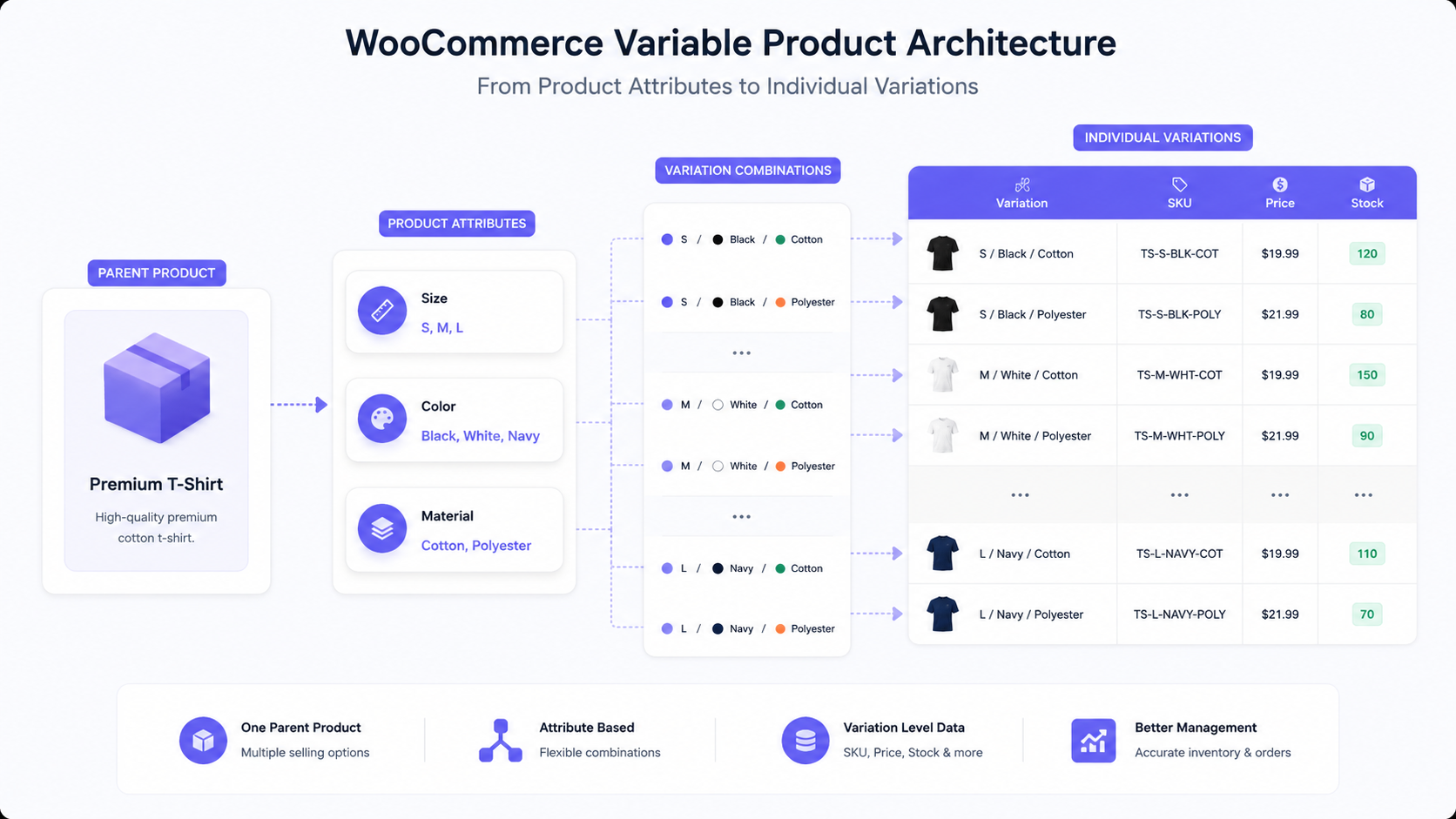
A WooCommerce variable product allows a single parent product to contain multiple purchasable variations, each based on selected attribute combinations. Each variation can have its own SKU, price, stock level, and other product-specific data. The customer selects attribute values, which determines which variation they are purchasing and which unique product data applies to their order.
How a WooCommerce Variable Product Is Structured
Every variable product follows the same hierarchy. A parent product sits at the top and contains one or more attributes. Attributes define the customer-facing options, such as size, color, or material. Each attribute has values, such as “small,” “medium,” or “large” for size. Variation combinations are created from these attribute values, and each combination becomes an individual purchasable variation with its own data.
Here is a concrete example:
Product: Industrial Work Jacket
Attributes: Size, Color
Size values: Small, Medium, Large
Color values: Black, Blue
When these attributes are combined, the system creates individual variations for each matching pair. A customer selecting Small and Black receives a specific variation with its own SKU, inventory record, and pricing, distinct from Medium and Black or Small and Blue.
Product Attributes and Variations Are Not the Same Thing
Understanding the distinction between attributes and variations prevents significant product data problems. This confusion is one of the most common mistakes store owners make.
Attributes are the available options presented to the customer. They describe what choices exist for a product, such as size, color, material, or configuration. Attributes are defined at the store level and can be reused across many different products. They form the foundation of variation combinations but do not themselves directly affect SKU, price, or stock.
Variations are specific purchasable combinations of those attribute values. A variation represents an actual product the customer can buy. If a product has size and color as attributes, each size-and-color combination becomes a separate variation. Each variation has its own SKU, price, and stock level. Variations are what customers actually add to their cart and what gets recorded in orders.
Confusing these two concepts leads to product data problems. For instance, a store owner might create attributes without planning which combinations should actually become variations. This results in orphaned attribute values or unnecessary variations that nobody purchases. Alternatively, a store might not realize that variation-level SKU management requires attention, leading to inventory tracking errors.
When Should You Use a Variation Instead of a Separate Product?
This decision shapes how a product catalog scales. There is no universal rule, but certain factors help guide the choice.
Use variations when a core product fundamentally stays the same but appears in different options. Examples include:
- A shirt in multiple sizes and colors
- A tool in different sizes or gauges
- An industrial component in various materials or grades
- A container in different capacities
- A configuration with swappable components
Use separate products when the items are meaningfully different, such as
- Significantly different product descriptions required
- Different customer search intent (people searching for them differently)
- Different shipping requirements or weights that affect fulfillment
- Very large numbers of combinations, making variations unmanageable
- Distinct pricing strategies that do not follow a logical variation pattern
| Product Structure |
Best suited for |
Complexity |
Main advantage |
Potential limitation |
| Simple Product |
One standard product, no options |
Low |
Easiest to manage |
Limited customer customization |
| Variable Product |
Same core product, multiple options |
Medium |
Centralized management, single listing |
Combination count can grow quickly |
| Separate Products |
Fundamentally different products |
High |
Maximum flexibility per product |
Harder to cross-link related items |
| Advanced Configuration |
Highly customized products |
Very High |
Handles deep complexity |
Requires custom development |
A manufacturer selling industrial fasteners might reasonably create variations for diameter, material, and finish because the core product is identical. But if the business also sells completely different types of fasteners (bolts versus rivets versus screws), those should be separate products despite the temptation to group them.
Managing SKUs Across Product Variations
SKU management becomes increasingly critical as variation counts grow. Each variation should have its own unique SKU for accurate inventory tracking, order fulfillment, and reporting.
Without proper SKU management at the variation level, problems emerge quickly. An order comes in for a product without a proper variation SKU recorded. The warehouse worker cannot easily identify which exact variant to ship. Inventory records become unreliable because multiple variations might be tracked under the same SKU or with missing SKUs altogether. Reconciliation between the store and external systems like an ERP platform becomes difficult.
A realistic example: A distributor sells angle iron in two materials (steel and aluminum) and four lengths (10 ft, 15 ft, 20 ft, and 25 ft). That creates eight variations. If every variation uses the parent product SKU instead of unique variation SKUs, the warehouse has no way to distinguish which angle iron should be picked for a given order.
Common SKU mistakes include:
- Duplicate SKUs across multiple variations, causing inventory confusion
- Missing variation SKUs altogether, forcing manual identification during fulfillment
- Inconsistent SKU formatting across product types, making SKUs harder to parse
- Relying only on the parent product SKU and assuming variation data lives elsewhere
SKU structure should be predictable and systematic. Many businesses append a suffix to the parent SKU to create unique variation SKUs, such as ANGLE-STEEL-10FT and ANGLE-ALUM-10FT. Others use complete standalone SKUs. Either approach works as long as the system is consistent and every variation has a unique identifier.
Pricing and Stock at the Variation Level
Different variations of the same product often require different pricing and stock quantities. Assuming every variation behaves identically is a common oversight that creates operational friction.
A furniture manufacturer might sell a desk in three sizes. The small version costs less to produce and retail than the large version. Each variation needs its own price record. The small version might be held in inventory at higher quantities since it has broader market appeal, while the large version might be made to order with lower stock levels. These differences should be reflected in variation-level data.
Similarly, availability differs by variation. One size might be in stock while another is on backorder. A color might be discontinued while others remain active. If availability is managed only at the parent product level, customers cannot accurately understand which specific variants are currently purchasable. For businesses with special shipping requirements per variation (such as different weights, hazard classifications, or carrier restrictions), B2B shipping setup becomes more complex when variation data must flow to fulfillment systems.
Where complexity increases further is when a business connects WooCommerce with an ERP system or uses warehouse management systems for fulfillment. Those systems expect accurate variation-level data for inventory, pricing, and fulfillment rules to work correctly. A mismatch between WooCommerce variation data and the connected systems creates synchronization errors that delay orders. Accurate variation data is particularly critical for B2B e-commerce operations, where inventory synchronization directly affects order fulfillment and customer trust.
Variation-level data should be reviewed and updated regularly, especially as catalogs grow and products pass through different lifecycle phases. WooCommerce process automation can reduce the manual burden of maintaining pricing and inventory across hundreds of variations.
The Hidden Problem: Too Many Variation Combinations
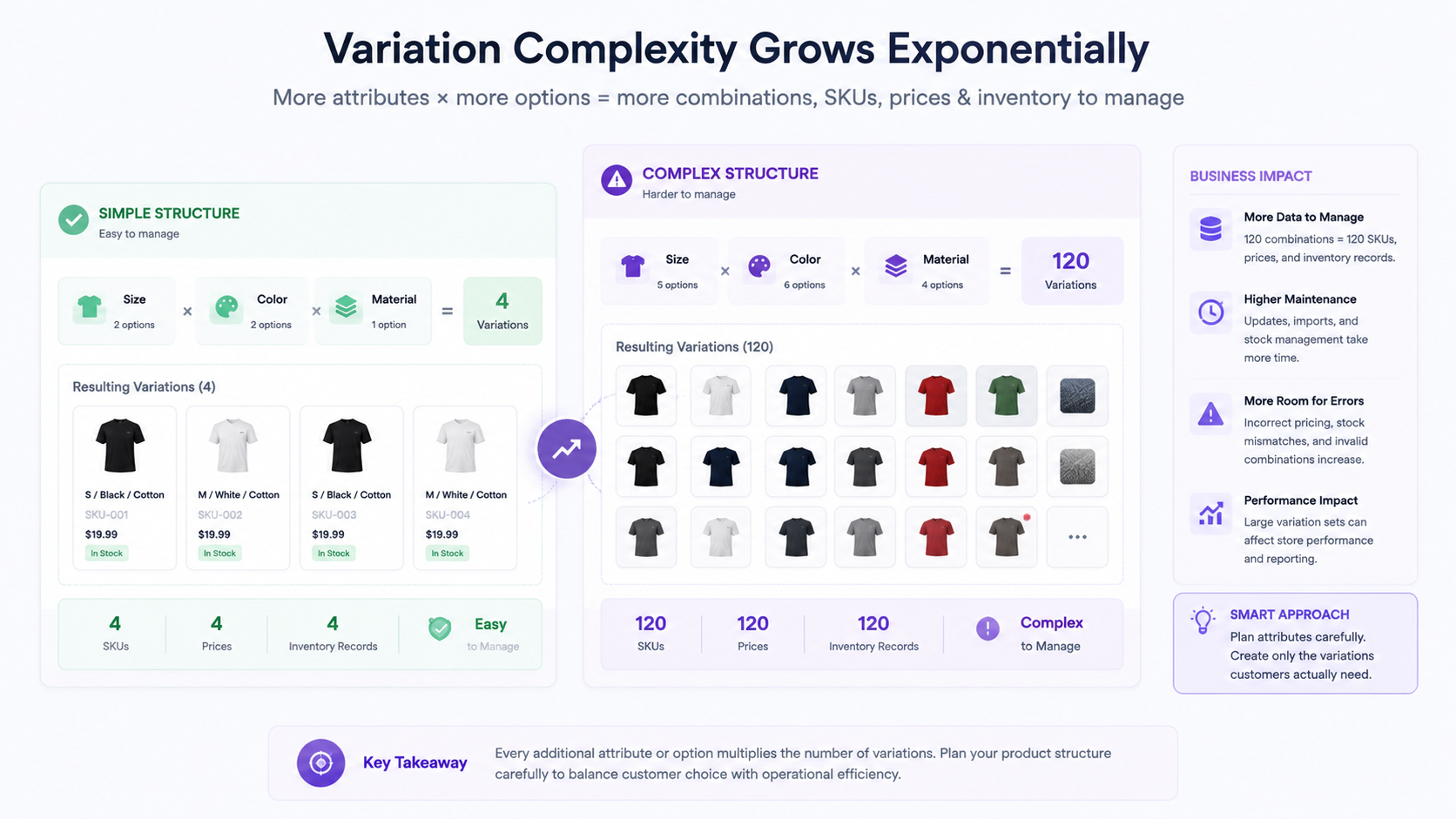
This section addresses one of the most underestimated operational challenges. As attributes increase, the number of possible combinations multiplies exponentially, not linearly.
A product with 3 sizes and 4 colors creates 12 variations. Add 5 material options, and the combination count jumps to 60 variations for the same core product. Add a fourth attribute (say, 3 finish options), and the total reaches 180 variations. Create five such products, and the catalog now contains 900 variation records to manage. At these scales, WooCommerce database optimization becomes necessary to ensure variation queries and product filtering remain performant.
This is not a theoretical problem. Real product catalogs experience this exact scenario:
- A product category with 3 size options, 6 colors, 4 materials, and 2 finish types: 144 combinations
- A clothing manufacturer with multiple categories, each with 4 sizes and 8 colors: 32 variations per category
- An industrial supplier with 10 product lines, each with 3-5 size options and 4-6 material grades: potentially hundreds of variations
The operational consequences are real:
- More product records to maintain in the database
- More SKU management overhead
- More pricing records to keep consistent
- More inventory records to track
- Greater risk of creating variations nobody actually orders or wants
- More complexity during bulk updates or catalog changes
- Harder to identify which variations are actually selling versus which are dead weight
Not every theoretical combination needs to exist. A store selling clothing does not need every size in every color if market data shows certain combinations never sell. A manufacturer does not need to offer every material-finish combination if customers rarely request them. Evaluating actual demand before creating variations prevents bloat.
Careful attribute design helps. Instead of creating one attribute with 20 values, a business might separate them into multiple attributes with fewer values each. Instead of a single “Configuration” attribute with 50 possible values, separate “Size,” “Material,” and “Finish” attributes provide more granular control and reduce unnecessary combinations.
Sometimes the right answer is to use separate products instead. If a business sells versions that are fundamentally different enough to merit different descriptions, search keywords, and marketing, those should be distinct products rather than variations. In cases where standard variations do not address the complexity, WooCommerce custom development can build specialized product configurators that handle dynamic pricing, nested options, or real-time calculations.
Common WooCommerce Variation Management Mistakes
Operational problems in variation management usually follow predictable patterns.
Creating every possible combination without evaluating demand. The temptation to be complete is strong, but it creates waste. A store creates every size-color combination thinking customers might want it, even when historical data shows certain combinations never sell. The result is inventory of slow-moving variants and database bloat.
Using inconsistent variation names. Some variations are named “Small-Blue,” while others are “S/Blue” or “Size-Small, Color-Blue.” Inconsistency makes sorting and searching difficult and introduces human error into fulfillment.
Forgetting variation-specific SKUs. As covered above, missing or duplicate SKUs create inventory chaos. This is particularly painful when orders are processed manually or when a warehouse system expects unique SKUs.
Managing price data inconsistently. A store updates the base product price but forgets to apply matching variation-level price changes. Customers see one price on the product page but another in their cart because variation prices were not updated.
Treating all variations as having identical inventory requirements. One variation is popular and needs high stock levels. Another is niche and should be ordered only when requested. Inventory planning that ignores these differences leads to either stockouts of popular items or excess inventory of slow movers.
Creating separate products when variations would be more appropriate. A store creates 30 separate product listings for what should be a single product with variations. This fragments customer reviews, complicates cross-selling, and inflates the catalog with duplicate content.
Creating excessive variations when separate products would be easier. The inverse mistake: forcing a complex product with hundreds of combinations into the variation model when separate products would be cleaner and easier to manage.
For each mistake, the better approach is to plan the product structure before creation, maintain consistent naming and data standards, ensure every variation has a unique SKU, update variation data during regular catalog maintenance cycles, and honestly evaluate whether the product should be structured as variations or separate products.
How Variation Data Connects to the Customer Order
The journey from product selection to order processing depends entirely on accurate variation data. Understanding this connection clarifies why attention to variation-level data matters.
A customer browses the store and finds a product. If it is a variable product, they see attribute selectors such as dropdowns for size and color. The customer selects their choices, which points to a specific variation. That variation’s data (its SKU, price, stock status, and weight if applicable) becomes part of what is added to the cart.
When the cart displays, the customer sees the variation data they selected. The order confirmation shows the same data. When the order moves to fulfillment, the warehouse picks and ships based on the variation SKU and description. Inventory is decremented from the variation’s stock count, not the parent product’s count.
At every step, the accuracy of variation data directly affects the customer experience:
- If variation prices are wrong, the customer sees incorrect totals.
- If variation SKUs are missing or duplicate, the warehouse ships the wrong item.
- If stock data is inaccurate, customers might order items that are actually unavailable.
- If variation descriptions are unclear, the customer receives something different from what they expected.
For stores connected to ERP or inventory management systems, accurate variation data is even more critical. The external system expects precise variation identifiers, pricing, and stock levels. Mismatches between WooCommerce variation data and the connected system create synchronization failures that delay orders or trigger inventory corrections.
Managing Complex Variations Across Larger Product Catalogs
The challenges of variation management scale with catalog size. What works for 50 products with 10 variations each becomes unmanageable for 500 products with multiple variations per product.
As catalogs grow, operational considerations become more pressing:
- Consistent attribute naming across hundreds of products prevents confusion when categories change.
- Standardized SKU structures make bulk reporting and updates easier
- Data governance becomes necessary: clear rules about which attributes are allowed, which combinations are valid, who can create new variations
- Controlled variation creation replaces ad hoc addition: before creating a new variation, confirm it has a market basis
- Regular reviews identify unused or slow-moving variations that should be discontinued
- Bulk update planning becomes essential: changing a large group of variation prices or descriptions requires coordination to avoid errors
In practical terms, a business managing 2,000+ products with variations benefits from treating variation management as a formal operational process, not a casual feature within WooCommerce. This might involve a product data team, regular audits, documented standards, and integration checkpoints with external systems. The broader challenge of managing WooCommerce catalog growth at scale shares many of these same governance and operational requirements.
The underlying principle is the same regardless of catalog size: variation structure should reflect actual business needs and customer demand, not theoretical completeness.
The DazzleBirds Approach to Complex WooCommerce Product Variations
Managing variations at scale requires more than configuring them inside WooCommerce. It requires understanding the product structure and designing it to support operational workflows.
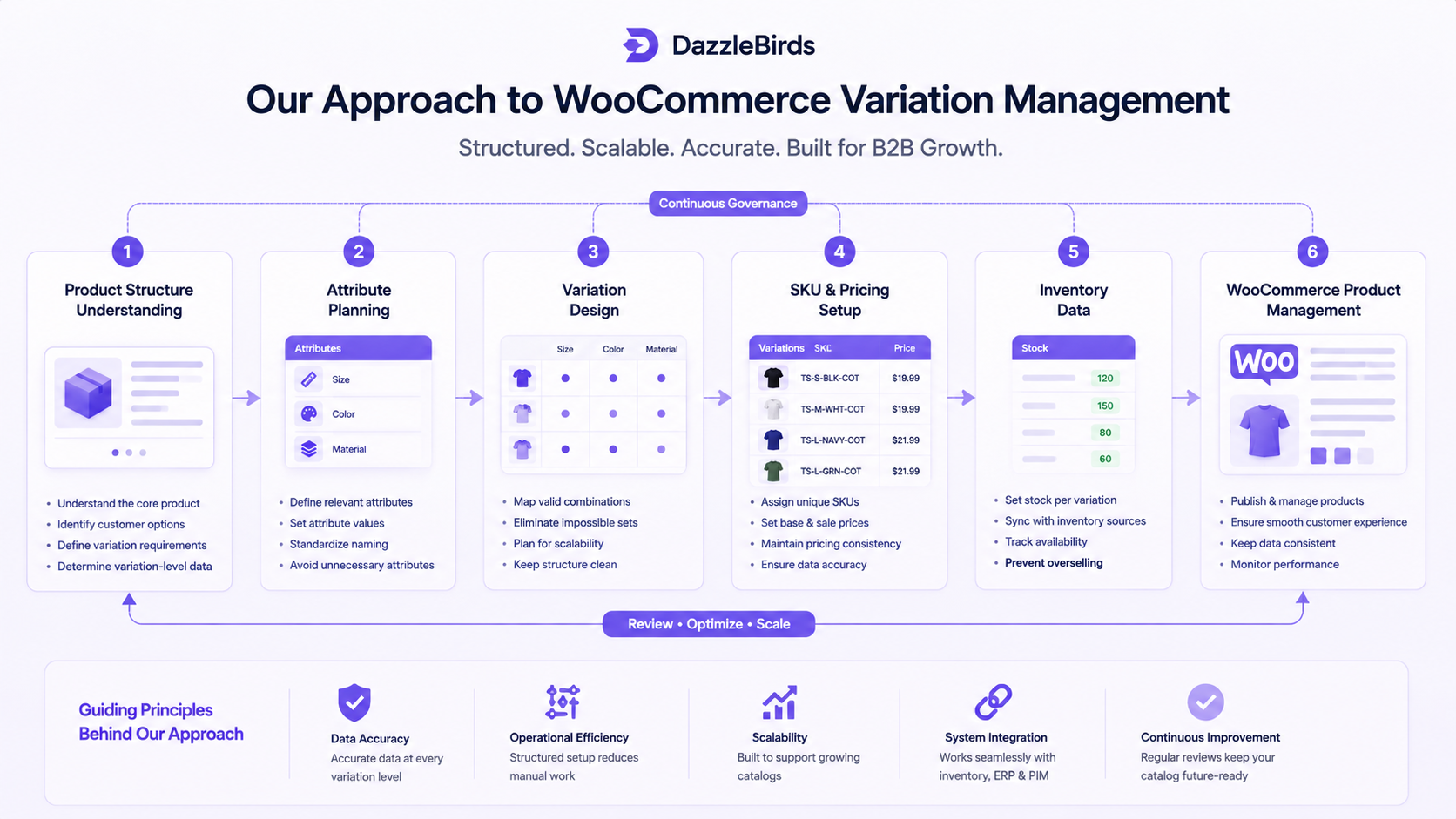
Understanding the product structure. We begin by identifying the core product and which options are truly customer-facing choices. Some attributes are options customers make. Others are internal variants that should be separate products. This conversation surfaces which data belongs to the parent product versus individual variations.
Mapping variation-level data. Once the structure is clear, we determine what information lives where. SKU, price, stock, and availability all live at the variation level. Some data, such as general product description or images, might live at the parent level. This mapping ensures data consistency and makes updates more predictable.
Preventing unnecessary combinations. Not every theoretical combination needs to exist. We evaluate which combinations are actually ordered or have market demand. This prevents bloat and keeps the catalog focused on real customer needs.
Designing for operational management. How will variation data be updated? How does it connect with your inventory system or ERP? How are new variations added as the catalog grows? These questions shape how the product structure is built and what tools or processes are needed to maintain it.
Reviewing complexity as the catalog grows. A structure that works for 10 variations per product might not work for 100. Periodic reviews ensure the variation model continues to serve the business as the catalog evolves.
This approach does not produce a one-size-fits-all solution. Instead, it produces a variation structure that matches how the business actually operates and scales with the business as it grows.
Choosing the Right Product Structure Before Complexity Grows
The decision about how to structure a product should be made deliberately, not by default. The right structure depends on actual product characteristics and business needs.
| Product Structure |
Best suited for |
Product Complexity |
Main advantage |
Potential limitation |
| Simple Product |
Single product with no options |
Low |
Easiest to manage and understand |
No customer choice or customization |
| Variable Product |
Same core product, multiple customer-facing options |
Medium |
Single listing, centralized management, grouped reviews |
Combination count can grow unwieldy. |
| Separate Products |
Products that are meaningfully different |
High |
Each product is optimized independently, with maximum SEO flexibility. |
Harder to cross-link, fragmented customer reviews |
| Highly Custom Configuration |
Products requiring deep customization or configurators |
Very High |
Handles extreme complexity, real-time pricing calculation |
Requires custom development, higher technical complexity |
A manufacturer of industrial fasteners with 100 SKUs in three diameter ranges and five material types might reasonably create variations within diameter-material combinations, yielding maybe 200-300 variations across the product family. But if the business also sells completely different types of fasteners that are searched and purchased separately, those belong as distinct product listings.
Similarly, a fashion retailer with a shirt available in 8 sizes and 10 colors (80 variations) is managing complexity within reason. If the shirt is available in 20 colors and 10 sizes with different material types adding another layer (400 combinations), the business should evaluate whether some of those “options” should instead be separate products or if some combinations should be discontinued.
Product Variation Management Should Start With Structure
Managing product variations effectively is not only about adding options inside WooCommerce. A good structure determines how product data, SKUs, pricing, stock, and customer selection work together.
The best approach for a business depends on the number of true customer options, the amount of variation-level data, and the operational complexity that different variations introduce. A small store with straightforward products might use variations simply. An enterprise catalog with hundreds of products and complex attributes requires a more deliberate, governed approach.
The common thread across all successful variation implementations is deliberate planning. Identify the product structure before creating variations. Maintain consistent data standards across all variations. Review the structure periodically to ensure it still serves actual business needs. Connect variation data accurately to order fulfillment, inventory management, and any external systems the business relies on.
Structure is the foundation. Everything else follows from getting that right.
FAQs
A variable product allows a single parent product to contain multiple purchasable variations based on selected attributes. Each variation can have its own SKU, price, and inventory level. Customers select attribute values such as size or color, which determines which specific variation they purchase.
Attributes are the customer-facing options available for a product, such as size or color. Variations are the specific purchasable combinations of those attribute values. A product might have "size" and "color" as attributes, with size values like "small" and "large" and color values like "black" and "blue." Each size-color combination becomes an individual variation.
Technically, WooCommerce can handle hundreds or even thousands of variations per product, but operational and performance considerations matter. Most businesses find that 50-100 variations per product is manageable, while 300+ variations start creating complexity in database performance, variation management, and customer experience. The right number depends on your specific setup and catalog size.
Yes, and this is a fundamental feature. Every variation should have its own unique SKU for proper inventory tracking and fulfillment. Each variation can also have its own price, sale price, cost, and stock quantity. This allows for complete flexibility in managing product data at the variation level.
Use separate products when items are meaningfully different, such as different product types, distinct descriptions required, different shipping requirements, or very large numbers of combinations that become unmanageable as variations. Use variations for the same core product presented in different customer-facing options like size or color.


 WooCommerce Solutions
 Solutions for WordPress