Every WooCommerce store starts small. A handful of products, a modest customer list, maybe one or two plugins. The database hums along without anyone thinking twice about it.
Then the store grows.
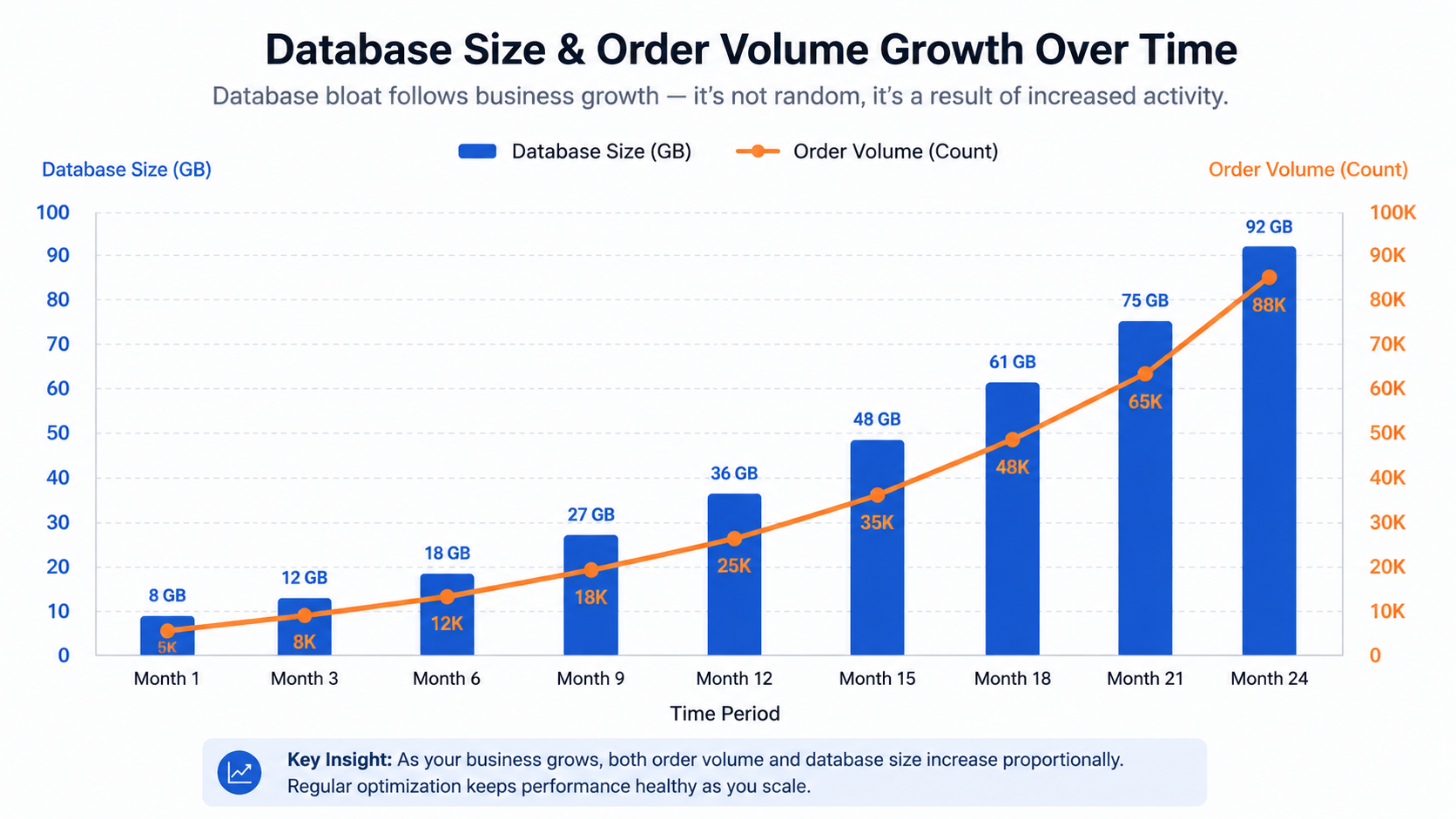
Product catalogs expand into the thousands, sometimes hundreds of thousands, of SKUs. Order volume climbs from a few dozen a day to hundreds or thousands. Customer accounts pile up. Marketing, shipping, tax, and inventory plugins get added one after another, each writing its own data into the database.
At some point, almost invisibly, the database stops being a background utility and becomes the bottleneck that determines how fast (or how slow) the entire store runs.
This is the pattern we see repeatedly when working with enterprise WooCommerce stores. The frontend looks fine. The hosting looks fine on paper. Yet admin pages crawl, checkout hesitates under load, and reports that used to take seconds now take minutes.
In this guide, we will walk through how experienced technical teams actually approach WooCommerce database optimization for large stores, not as a one-time cleanup task but as a structured, ongoing discipline. You will learn how to assess your current database health, identify the specific bottlenecks slowing your store down, plan an optimization strategy that does not break anything, and build the long-term maintenance habits that keep performance stable as you continue to scale.
This is not a plugin recommendation list. It is a methodology.
What is WooCommerce Database Optimization?
WooCommerce database optimization is the process of improving the structure, indexing, and content of the underlying WordPress and WooCommerce database tables so that queries execute faster, storage stays efficient, and the store remains stable and responsive as data volume grows. It includes cleaning up unnecessary data, correcting indexing strategy, managing background processes like Action Scheduler, and, for many stores, adopting modern architecture such as High Performance Order Storage (HPOS).
Database optimization is often confused with general website optimization. They are related, but they are not the same thing.
Website optimization typically focuses on things like caching, image compression, CDN configuration, and frontend asset delivery. These improve how quickly pages load once the server has already retrieved the data it needs.
Database optimization focuses on the retrieval itself. It asks a more fundamental question: how efficiently can the server find, read, and write the data that powers your store in the first place? A perfectly cached homepage will not help if a single admin query is scanning a 40 million row table with no usable index.
The business impact is direct. Slow databases translate into slow admin work for staff, slower checkout for customers, unreliable imports and exports, and in serious cases, timeouts that cause failed orders. For a store processing meaningful revenue, this is not a cosmetic issue. It is an operational one.
Understanding the Store and the Database
Optimization work should never start with a plugin or a set of generic best practices. It starts with understanding how the specific business actually operates.
Two stores with the same product count can have completely different database profiles. One might have 50,000 simple products and low order volume. Another might have 5,000 highly variable products, each with dozens of variations and custom meta fields, and a much higher order volume. The optimization priorities for these two stores are not the same.
Before touching anything, an experienced team gathers information across several dimensions:
- Product catalog size, including variations and custom attributes
- Order volume, historical and current, and how orders are typically queried
- Customer account volume and how account data is used (marketing segmentation, loyalty programs, subscriptions)
- Active plugins, particularly ones known to write heavy metadata (page builders, SEO plugins, marketing automation tools)
- Third-party integrations such as ERPs, PIMs, or accounting systems that sync data on a schedule
- Existing, documented performance issues, ideally with timestamps and specifics rather than vague complaints
Discovery Checklist
- Total product count and variation count
- Total order count and average orders per day
- Total customer account count
- List of all active plugins with notes on which write custom database tables or meta
- Any third party sync jobs and their frequency
- Known slow areas (admin screens, search, checkout, reports)
- Current database size and growth rate over the last 6 to 12 months
- Hosting environment details (database engine version, available memory, server specs)
Skipping this discovery phase is one of the most common reasons optimization efforts fail to deliver lasting results. Cleaning up transients in a store where the real problem is unindexed meta queries will feel productive, but it will not fix the underlying issue.
Key Takeaway: Optimization decisions should be based on how your specific store actually behaves, not on generic checklists applied without context. This discovery phase is closely related to what we cover in a full enterprise WooCommerce technical audit guide, where the broader store health assessment goes beyond the database alone.
Analyzing the Database Structure
Once the business context is understood, the next step is a structural review of the database itself.
WooCommerce adds a set of tables on top of WordPress core, and both sets need to be evaluated together. Core WordPress tables like wp_postmeta these wp_options are frequently where the real bloat accumulates, even though they are not WooCommerce-specific.
| Table |
Purpose |
Common Issues |
Optimization Focus |
| wp_posts |
Stores products, orders (legacy), pages |
Bloated with revisions, drafts, auto drafts |
Cleanup of unused post types, revision limits |
| wp_postmeta |
Stores product and order metadata |
Extremely large row counts, poor indexing for custom meta keys |
Index review, removal of orphaned meta |
| wp_woocommerce_order_items |
Order line items |
Grows linearly with order volume |
Archiving strategy for old orders |
| wp_woocommerce_order_itemmeta |
Metadata for order items |
Very high row count on high-volume stores |
Index checks, cleanup of unused meta keys |
| wp_options |
Site-wide settings, including autoloaded data |
Autoloaded data grows unchecked |
Reducing autoloaded payload size |
| wp_actionscheduler_actions |
Background task queue |
Can accumulate tens of thousands of stale rows |
Regular purging, monitoring failed actions |
| wp_wc_orders (HPOS) |
High-performance order storage |
New structure, but still needs monitoring |
Confirming correct migration and indexing |
Table size alone is not the full story. A large table with proper indexing can still perform well. A comparatively small table with poor indexing can be the source of major slowdowns. This is why analysis has to include actual query performance, not just row counts.
Experienced teams will typically review slow query logs where available, check existing indexes against how the store’s queries actually filter and sort data, and look for signs that indexes are missing entirely on frequently queried meta keys.
Key Takeaway: Table size and query performance are related but distinct problems. Both need to be assessed before deciding where to focus optimization effort.
Identifying Performance Bottlenecks
With the structural picture in place, the next step is pinpointing the specific bottlenecks affecting the store.
| Issue |
Why It Happens |
Symptoms |
Business Impact |
Priority |
| Large order tables |
High order volume over years without archiving |
Slow reports, slow order search in admin |
Staff productivity loss |
High |
| Product metadata bloat |
Page builders and plugins storing excessive meta |
Slow product edit screens |
Content team friction |
Medium |
| Autoloaded options bloat |
Plugins setting autoload to yes unnecessarily |
Slow page loads across the entire site |
Site-wide slowdown |
High |
| Expired transients |
Transients not cleared on schedule |
wp_options table growth |
Gradual performance decay |
Medium |
| Action Scheduler backlog |
Failed or stuck scheduled tasks accumulating |
Slow admin, delayed emails or sync jobs |
Missed automations |
High |
| Orphaned records |
Deleted products or orders leaving behind meta |
Data inconsistency, wasted storage |
Reporting inaccuracy |
Medium |
| Slow search queries |
Poor indexing on searchable fields |
Slow storefront search, slow admin search |
Customer experience impact |
High |
For each issue, the priority is not fixed. A store with modest order volume but heavy autoloaded data bloat should prioritize differently than a high-volume store with clean plugin usage but ten years of unarchived orders. This is why the discovery phase matters so much.
Illustrative Example: A store with roughly 2 million orders accumulated over eight years may find that its order-related tables account for the majority of database size, while a newer store with 50,000 orders but 40 active plugins may find that autoloaded options and orphaned meta are the dominant issue instead.
Signs Your Database Needs Optimization
Some symptoms are visible to everyone in the business, not just the technical team.
Checklist: Warning Signs
- WooCommerce admin screens (orders, products) take several seconds or longer to load
- Checkout occasionally hangs or times out under normal load
- Product or order search returns results slowly
- Import or export jobs take unusually long or fail partway through
- Database-related timeouts appear in server logs
- CPU usage spikes noticeably during normal business hours, not just during sales events
- Memory usage climbs steadily and requires periodic server restarts
If even two or three of these are present consistently, it is a reasonable signal that a structured database review is due, rather than another round of caching plugin adjustments.
Optimization Strategy

Once bottlenecks are identified, optimization needs to be planned rather than executed ad hoc. A scattershot approach, where a team runs a plugin’s “clean database” button and hopes for the best, is how stores end up with data loss or broken order history.
A sound strategy typically includes:
Database cleanup. Removing genuinely unnecessary data such as expired transients, orphaned postmeta from deleted products or orders, spam or trashed comments, and old post revisions beyond a reasonable retention window.
Index optimization. Reviewing which columns are actually filtered or sorted on in real queries, and adding or adjusting indexes accordingly. This is more technical than cleanup and should be tested carefully, since poorly chosen indexes can slow down write operations even while speeding up reads.
Query optimization. Identifying specific slow queries, often from plugins with inefficient custom queries, and either fixing them at the plugin level or working with the plugin vendor.
Managing Action Scheduler. Clearing stuck or failed actions, adjusting batch sizes, and monitoring the queue so it does not silently grow unbounded.
Reducing autoloaded data. Auditing wp_options for rows set to auto-load that do not need to be loaded on every single page request and correcting this at the plugin configuration level where possible.
Archiving historical records. For stores with years of order history, moving older orders into an archived state or separate storage strategy so that active tables stay leaner without deleting data the business still needs for accounting or compliance.
Workflow Description (suggested diagram for designer): A horizontal flow showing five stages: Discovery, Structural Analysis, Bottleneck Identification, Staged Optimization (with a branch showing “staging environment” before “production”), and Validation, looping back into “ongoing monitoring.” This visually reinforces that optimization is a cycle, not a single event.
Every one of these steps should be validated afterward. It is not enough to assume that removing 500,000 orphaned rows helped. Query times, page load times, and admin responsiveness should be measured before and after each change so the team knows what actually worked. This connects closely to the kind of structured technical review outlined in our WooCommerce Technical Debt: Signs Your Store Needs Refactoring guide, where database bloat is often one symptom among several signs of accumulated technical debt.
Key Takeaway: Optimization is a sequence of measured, validated steps, not a single cleanup action. Skipping validation makes it impossible to know what is actually working.
WooCommerce HPOS and Modern Database Architecture
One of the most significant architectural shifts in recent WooCommerce history is High Performance Order Storage, commonly referred to as HPOS.
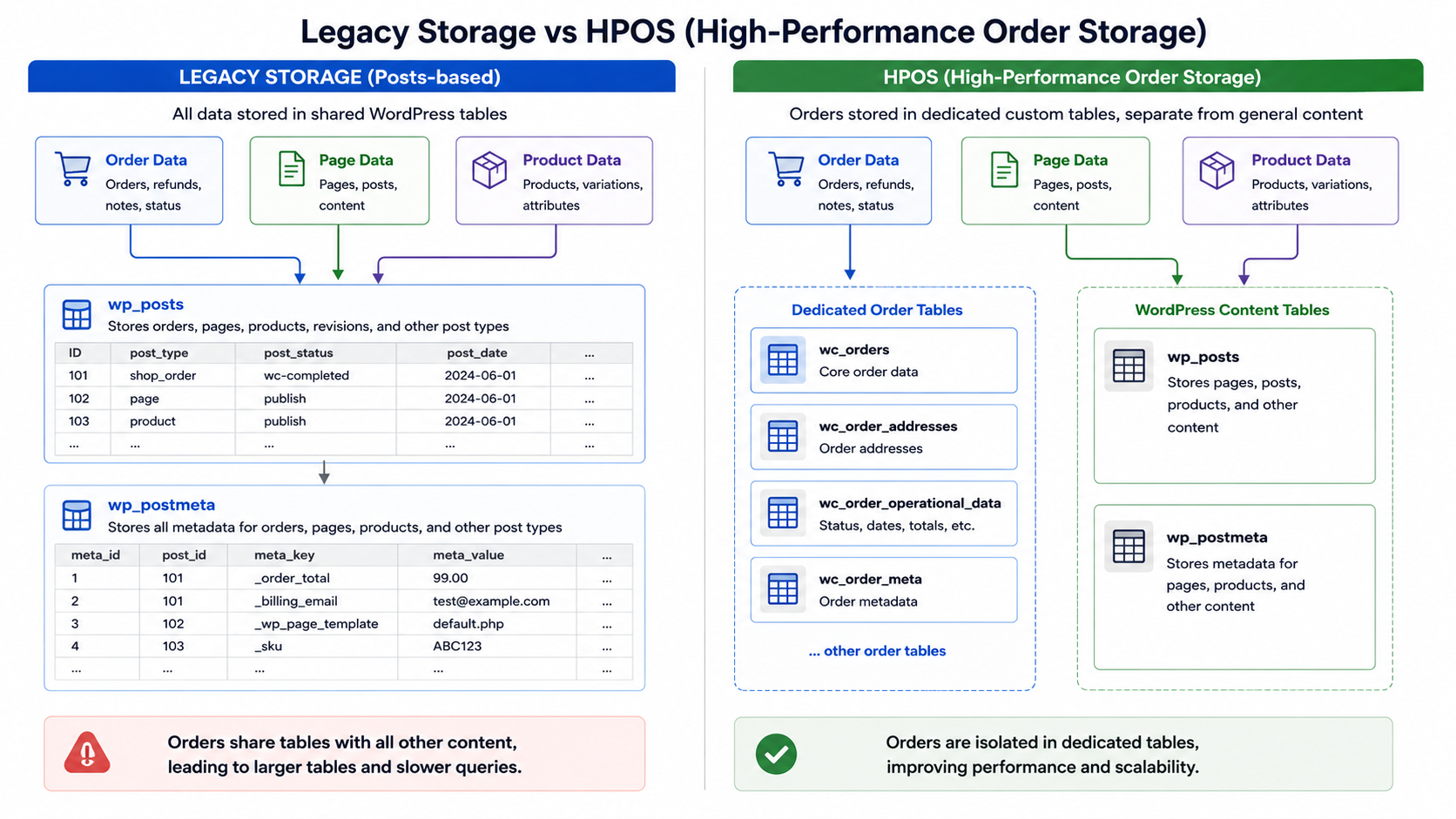
Historically, WooCommerce stored order data using the standard WordPress posts and postmeta tables, the same structure used for pages and products. This worked, but it was never designed specifically for the way order data is queried and grows over time.
HPOS introduces dedicated tables built specifically for order data, separate from the general-purpose posts and postmeta structure.
| Aspect |
Legacy Storage (Posts and Postmeta) |
HPOS (Custom Order Tables) |
| Table structure |
Shared with pages, products, and other post types |
Dedicated tables purpose-built for orders |
| Query performance at scale |
Degrades as post volume grows across the site |
Designed to remain efficient with high order volume |
| Meta storage |
Uses generic postmeta, less efficient for structured order fields |
Structured columns for common order fields |
| Compatibility |
Universally supported by older plugins |
Requires plugin compatibility, improving over time |
| Migration effort |
Not applicable |
Requires a planned migration and testing phase |
For large stores, HPOS generally offers meaningful long-term benefits, particularly for order search, reporting, and admin responsiveness. It is not, however, a step to take casually. Migration should be planned, tested thoroughly in a staging environment, and checked carefully against every plugin that touches order data, since older or poorly maintained plugins may not yet be fully compatible.
Best practices for HPOS adoption:
- Confirm plugin compatibility before migrating, particularly for payment gateways, shipping integrations, and custom order workflows
- Run the migration in a staging environment first, with a full backup in place
- Use WooCommerce’s built-in compatibility mode during transition where available
- Monitor order-related functionality closely for a period after migration, not just immediately afterward
Scalability and Long-Term Maintenance
A common mistake is treating database optimization as a one-time project. For a large, actively growing store, it needs to be an ongoing discipline.
Maintenance Schedule Table
| Task |
Recommended Frequency |
| Review Action Scheduler queue for stuck or failed jobs |
Weekly |
| Check autoloaded options size |
Monthly |
| Review slow query logs |
Monthly |
| Clean expired transients and orphaned metadata. |
Monthly |
| Full database structural review |
Quarterly |
| Capacity planning review (growth trend vs. hosting resources) |
Quarterly |
| Full backup and recovery test |
Quarterly |
Monitoring growth trends matters as much as the cleanup itself. A store that reviews its database size and query performance quarterly will catch emerging problems early, while a store that only looks at the database when something breaks will consistently be optimizing under pressure rather than proactively.
Key Takeaway: Long-term database health depends on scheduled monitoring and maintenance, not reactive fixes after something has already gone wrong.
Testing and Validation
Every optimization change should be tested before and after, ideally in a staging environment that mirrors production closely.
Areas to validate include:
- Raw database query performance (measured, not assumed)
- WooCommerce admin responsiveness, particularly order and product list screens
- Storefront page speed, especially on category and search pages
- Checkout completion time under realistic load
- Order processing reliability, including any background sync jobs
- Overall site stability over a sustained period, not just immediately after the change
Staging environments are essential here. Running structural changes, index adjustments, or bulk cleanup directly on a live production database without prior testing introduces unnecessary risk, particularly for stores where downtime has a direct revenue cost.
Common Database Optimization Mistakes
Even well-intentioned optimization work can go wrong. The most common mistakes we see include:
- Optimizing without a full backup in place beforehand
- Ignoring indexing strategy entirely and focusing only on deleting data
- Deleting data blindly based on generic advice, without understanding what that data is used for
- Skipping a staging environment and testing changes directly in production
- Allowing plugin overload to continue unaddressed, treating the database as the only problem
- Ignoring Action Scheduler until it becomes a visible bottleneck
- Failing to monitor performance after changes, so no one actually knows if the optimization worked
Each of these mistakes shares a common thread: treating optimization as a quick fix rather than a careful, measured process.
Enterprise Best Practices
For stores operating at real scale, a few practices consistently separate stable, well-performing databases from ones that degrade over time:
- Treat database health as an ongoing operational metric, not a one-time project
- Involve developers in plugin selection, since poorly coded plugins are a frequent source of database strain
- Maintain a staging environment that closely mirrors production for safe testing
- Document every optimization change and its measured impact, so future work builds on real data rather than assumptions
- Plan for HPOS adoption deliberately, rather than delaying indefinitely or migrating without preparation
- Build capacity planning into regular business reviews, not just technical ones
Expected Outcome
Done properly, database optimization should lead to measurable improvements in day-to-day performance: faster admin screens, more reliable checkout under load, quicker reporting, and fewer unexplained slowdowns during peak periods.
It is worth being honest about limits here. Optimization improves efficiency within the current architecture and hosting environment. It does not substitute for adequate hosting resources, and it will not resolve every performance issue if the underlying infrastructure is genuinely undersized for the store’s volume. The goal is a stable, scalable foundation, not a guaranteed fixed percentage improvement, since every store’s starting point is different.
Conclusion
WooCommerce database optimization is not a one-time task you complete and forget about. For large, growing stores, it is a continuous discipline that starts with genuinely understanding how the business operates, moves through careful structural analysis and targeted cleanup, and continues with regular monitoring long after the initial work is done.
Stores that treat this as an ongoing practice, rather than a reaction to a slowdown, tend to scale far more smoothly. If your team is noticing any of the warning signs covered above, particularly slow admin screens, hesitant checkout, or unreliable imports, it is worth starting with an honest discovery phase before jumping to a fix. This is exactly where a proper enterprise WooCommerce technical audit guide or WooCommerce performance optimization engagement typically begins, with understanding the store before touching the database.
FAQs
It is the process of improving database structure, indexing, and data hygiene so that WooCommerce runs efficiently as product, order, and customer data grows.
Common causes include bloated postmeta tables, missing indexes on frequently queried fields, excessive autoloaded options, and an unmanaged Action Scheduler queue.
For most large stores, yes, particularly for order search, reporting, and admin responsiveness, though the benefit depends on proper migration and plugin compatibility.
Ongoing maintenance tasks should happen weekly or monthly, with a full structural review at least quarterly for actively growing stores.
For basic cleanup tasks, not necessarily. For indexing changes, HPOS migration, and query level fixes, experienced development involvement is strongly recommended to avoid data integrity issues.


 WooCommerce Solutions
 Solutions for WordPress