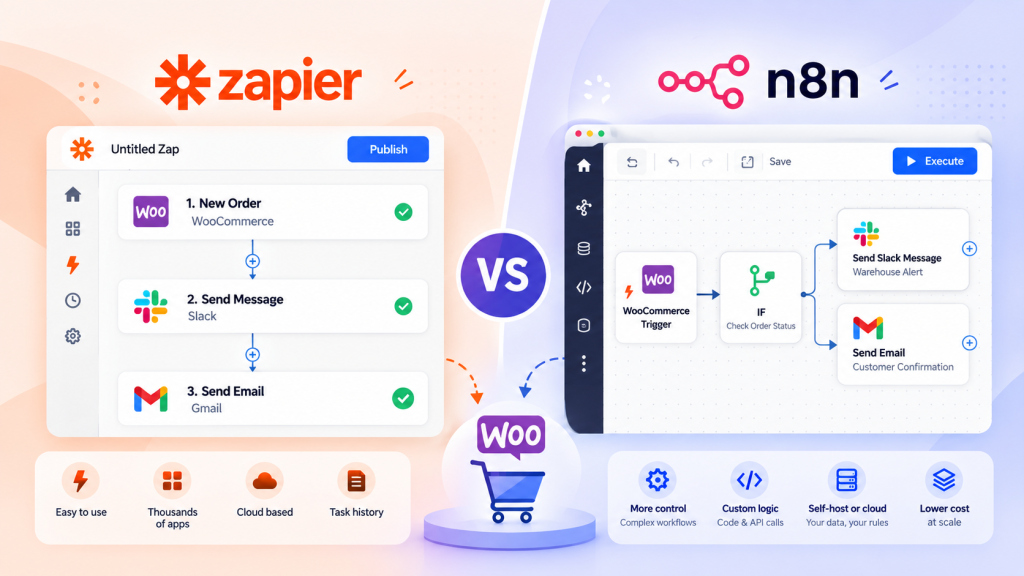
An enterprise WooCommerce technical audit is a structured review of a store’s infrastructure, code, database, security, and performance to identify risks before they turn into revenue loss. Most enterprise teams only think about this after something breaks: a checkout failure during a flash sale, a slow product page losing rankings, or a plugin conflict that takes the site down at 2am.
I have sat through enough postmortems to know the pattern. A store grows past a few thousand SKUs, adds a handful of integrations for ERP or fulfillment, and suddenly the same WordPress setup that worked fine at launch starts showing cracks. Query times creep up. Support tickets about slow checkout pile in. Nobody owns the problem because it is not one single failure; it is accumulated technical debt.
This guide walks through what a proper audit covers, how often it should happen, and what to actually do with the findings once you have them.
What Is an Enterprise WooCommerce Technical Audit?
At its core, this is a systematic evaluation of every layer that affects a store’s stability, speed, and conversion rate. That includes the server stack, the WordPress and WooCommerce configuration, the database, third-party plugins, custom code, and the checkout flow itself.
The purpose is not just to find bugs. It is to understand risk exposure. A missing index on a database table might not matter at 500 orders a month, but at 50000 orders a month it can quietly add seconds to every product query.
Scope-wise, an enterprise audit usually spans server and hosting environment, database health, plugin and theme dependency mapping, custom code review, security posture, checkout and payment reliability, and technical SEO foundations.
The difference between an enterprise audit and a standard small store audit comes down to scale and complexity. A small store with 200 products and one payment gateway rarely has database bloat issues or plugin conflict cascades. An enterprise store running multiple warehouses, B2B pricing rules, ERP sync, and regional tax logic has far more moving parts, and each one is a potential failure point. Enterprise audits also need to account for traffic spikes, multi-region CDN behavior, and compliance requirements that smaller stores simply do not face.
Summary: An enterprise WooCommerce technical audit is a full-stack review of infrastructure, code, and configuration, scoped to the added complexity and traffic that larger stores carry.
When Should You Perform a Technical Audit?
Timing matters as much as thoroughness. Running an audit at the wrong moment, or skipping one before a high-risk event, is how avoidable outages happen.
Audits should happen before major sales events like Black Friday or regional shopping festivals, ideally six to eight weeks ahead so there is time to fix what you find. They should also happen before any migration, whether that is a new host, a new theme, or a full replatform, and before a redesign since new templates often introduce render-blocking scripts or unoptimized image handling. After any bulk plugin update, particularly ones touching the checkout or payment layer, is another natural checkpoint, along with any period where performance issues start appearing, such as a rising bounce rate on product pages or a slow admin dashboard load.
Beyond these triggers, a recurring cadence matters too. A small enterprise store doing a few thousand orders a month can usually get by on a review every six months. A mid-size store doing five to twenty thousand orders should move to quarterly. Once volume passes twenty thousand orders a month, monthly to quarterly reviews with added load testing become worthwhile, and past one hundred thousand orders a month, monthly audits paired with continuous monitoring are what actually catch problems before customers do.
The recurring audit is the one teams skip most often, usually because nothing appears broken. But issues like database table bloat or gradual query slowdown build up silently over months. By the time someone notices, the fix takes longer and costs more.
Enterprise WooCommerce Technical Audit Checklist
Infrastructure Audit
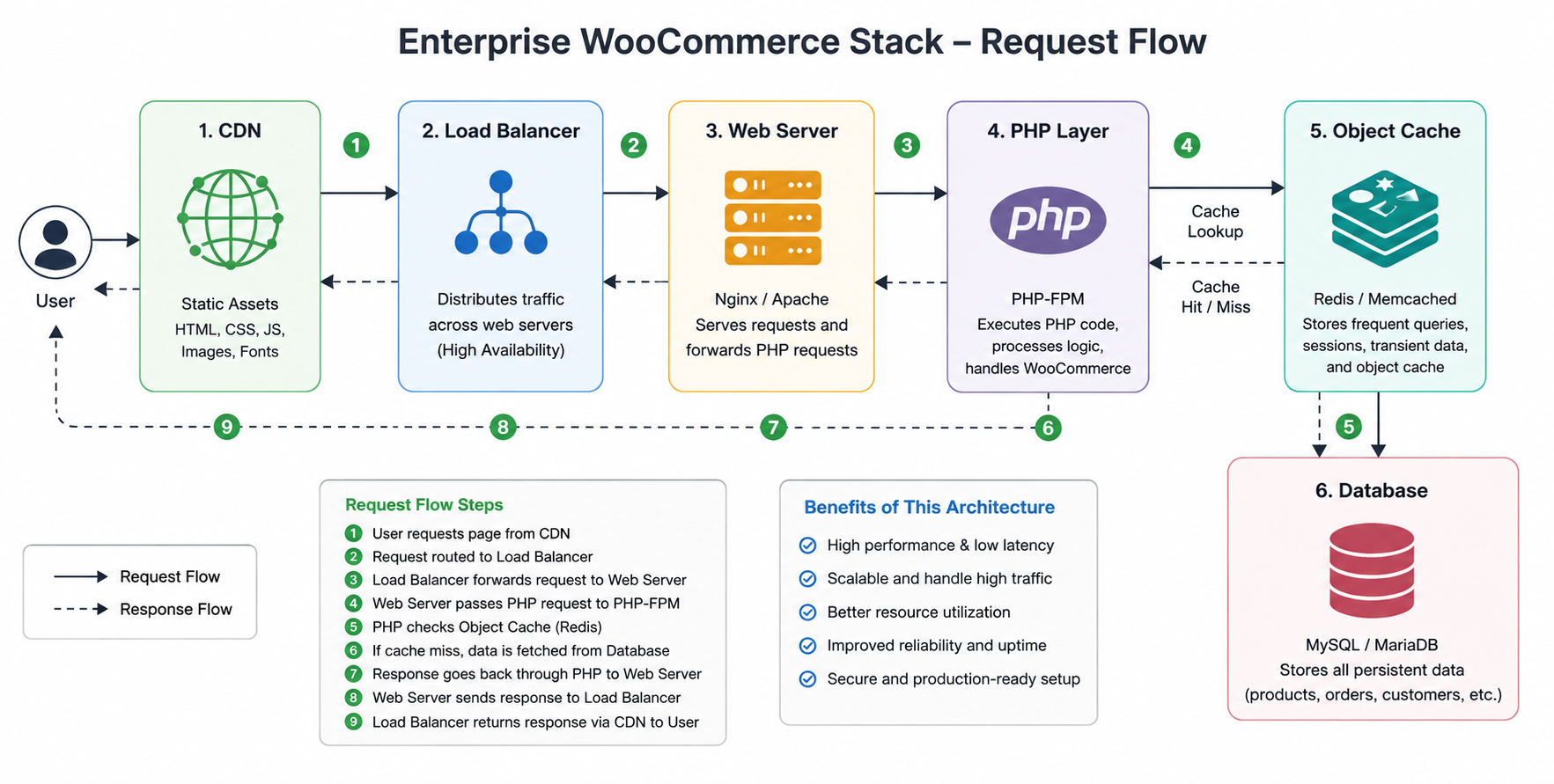
Review the hosting environment itself: PHP version, memory limits, web server configuration, and whether the environment supports object caching through Redis or Memcached.
Why it matters: an underpowered server configuration is the root cause of a large share of performance complaints, yet teams often blame WooCommerce or the theme first.
Common issues include outdated PHP versions that no longer receive security patches, insufficient PHP memory limits causing white screen errors during peak traffic, and shared hosting environments that cannot isolate resource spikes.
Best practice is to run on PHP 8.1 or newer, use a hosting environment built for WooCommerce, and confirm object caching is active rather than assumed.
Performance Audit
This covers page load behavior, Core Web Vitals, and how well the store handles concurrent users.
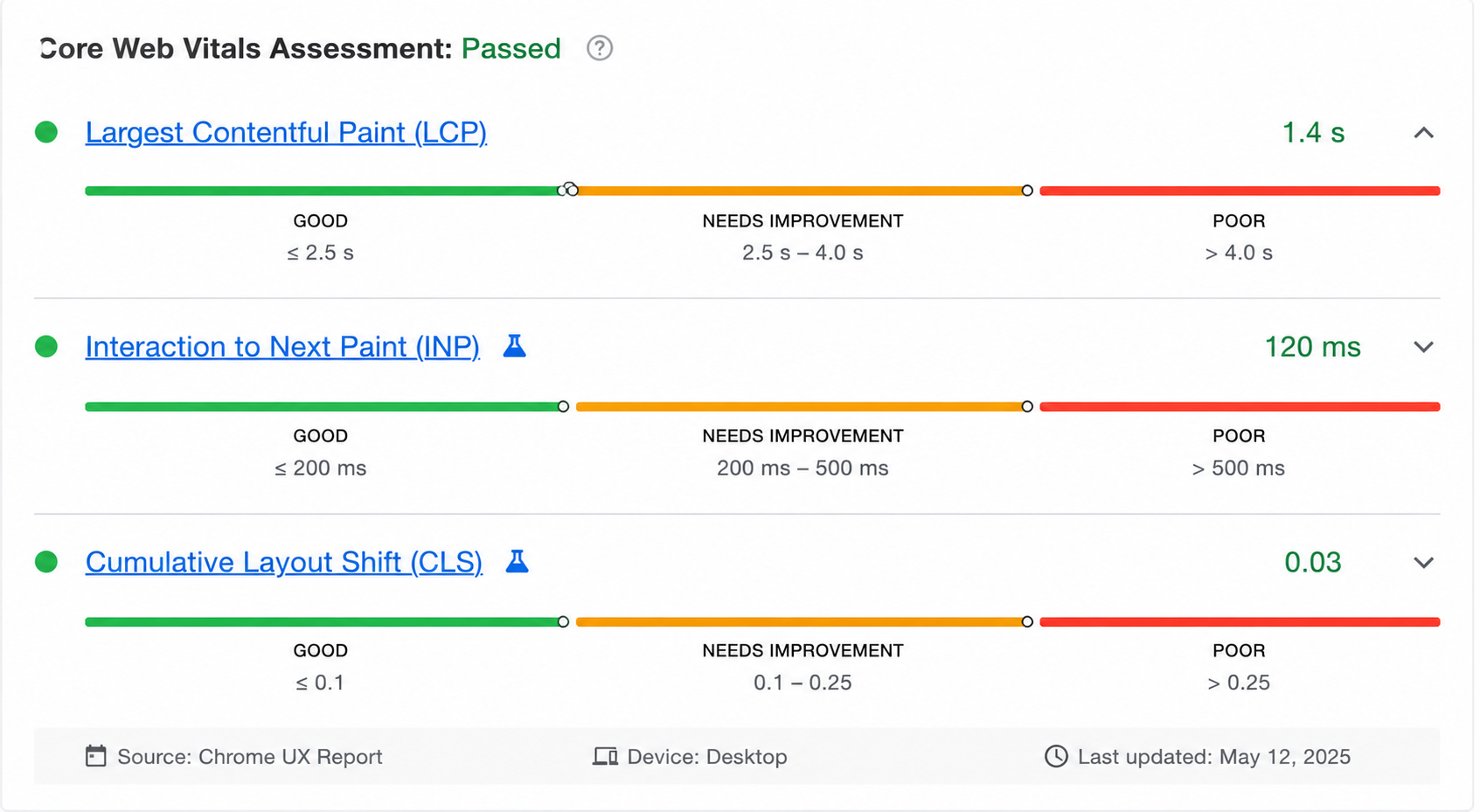
Three metrics matter most here. LCP, or Largest Contentful Paint, measures how long the main content takes to render and should stay under 2.5 seconds. INP, or Interaction to Next Paint, measures how responsive the page feels to clicks and taps, targeting under 200 milliseconds. CLS, or Cumulative Layout Shift, measures how much the layout jumps around while loading and should stay under 0.1.
Common issues include unoptimized product images, render blocking JavaScript from marketing plugins, and lack of a proper CDN setup for global traffic.
Best practices include lazy loading below-the-fold images, deferring noncritical scripts, and serving static assets through a CDN close to the customer’s location. This connects directly to broader WooCommerce performance optimization work, since many of the fixes here overlap with general speed tuning.
Database Audit
WooCommerce stores order, customer, and product metadata in ways that can bloat quickly if not managed. Post meta tables in particular tend to grow far larger than expected once you factor in plugin data, session logs, and revision history.
Why it matters: a bloated database slows every query, including admin dashboard loads and checkout processing.
Common issues include unindexed custom fields used in filtering, excessive post revisions never cleaned up, and expired transients left sitting in the options table.
Best practices include scheduling regular cleanup of transients and revisions, reviewing custom indexes for frequently queried meta keys, and monitoring table growth month over month rather than reacting after it becomes a problem.
Plugin Audit
Every plugin adds a dependency, and enterprise stores often accumulate forty or more active plugins over time.
Why it matters: plugin conflicts are one of the most common causes of unexpected downtime, and many go unnoticed until an update breaks something downstream.
Common issues include multiple plugins hooking into the same action with conflicting priorities, abandoned plugins no longer receiving updates, and duplicate functionality across two or more tools.
Best practices include mapping plugin dependencies before any update, testing updates in staging first, and periodically auditing which plugins are actually still needed.
Theme Audit
The theme controls rendering behavior and often introduces its own performance and compatibility issues, especially with page builders.
Common issues include theme functions files bloated with custom logic that should live in a plugin instead and outdated child themes not updated alongside the parent theme.
Best practices include keeping custom functionality in a dedicated plugin rather than the theme and testing theme updates against custom templates before deploying.
Custom Code Audit
Custom code, whether in a must-use plugin or a child theme, needs the same scrutiny as third-party plugins.
Why it matters: undocumented custom code is one of the biggest risks during team turnover, since new developers often have no context for why something was built a certain way.
Common issues include direct core file modifications that get wiped on updates, hardcoded values that should be configurable, and missing error handling around API calls.
Best practices include documenting every custom hook and filter, using version control for all custom code, and avoiding direct edits to WooCommerce or WordPress core files under any circumstance.
Security Audit
Security reviews should cover user roles, login protection, and HTTP security headers.
Why it matters: Enterprise stores are higher-value targets, and a breach affecting customer payment data carries both financial and reputational costs.
Common issues include overly broad admin role assignments, missing two-factor authentication for admin accounts, and absent or misconfigured security headers like Content Security Policy.
Best practices include enforcing least privilege access, requiring two-factor authentication for all administrator accounts, and configuring headers such as Strict Transport Security and X Content Type Options. This overlaps with general WooCommerce Security Tips guidance, though enterprise environments need stricter role segmentation given the number of people with backend access.
Checkout Audit
Checkout is the highest-stakes part of the store, since every failure here directly costs revenue.
Common issues include payment gateway timeouts under load, tax calculation errors for specific regions, and JavaScript conflicts between checkout fields and third-party scripts.
Best practices include load testing checkout under simulated peak traffic, monitoring checkout success rate as a standing KPI, and testing every payment gateway path, not just the default one.
SEO Technical Audit
Technical SEO for enterprise stores includes structured data accuracy, crawl budget management, and canonical tag consistency across faceted navigation.
Why it matters: Enterprise catalogs with filters and variations can generate thousands of near-duplicate URLs if canonicalization is not handled properly, wasting crawl budget.
Common issues include missing or incorrect product schema, duplicate content from filter parameters, and broken canonical chains after migrations.
Best practices include validating structured data with Google’s Rich Results Test, using canonical tags consistently across variation and filter URLs, and reviewing crawl stats in Search Console regularly. This connects to a broader WooCommerce SEO Optimization Guide for teams building out full technical SEO coverage.
Monitoring and Logging
Without proper monitoring, most issues are discovered by customers before they are discovered by the team.
Common issues include disabled or rotated logs with insufficient retention, no alerting on error rate spikes, and no visibility into checkout-specific errors.
Best practices include centralizing logs outside the server itself, setting alerts on error rate thresholds, and reviewing WooCommerce email logs as part of routine monitoring to catch failed order notifications early.
Scalability Assessment
This looks at whether the current architecture can handle two times or five times current traffic without falling over.
Why it matters: many enterprise outages happen during traffic spikes that were entirely predictable, like a planned promotional campaign.
Common issues include database read replicas not being configured, autoscaling not being tested under real load, and CDN cache rules not accounting for logged-in user sessions.
Best practices include running load tests ahead of known high-traffic periods, confirming autoscaling actually triggers correctly, and reviewing architecture against WooCommerce Scalability for Multiple Stores guidance if the business runs more than one storefront.
The DazzleBirds Audit Methodology: From Discovery to Roadmap
Understanding the Business and Technical Landscape
The first thing we would do is understand how the WooCommerce store operates and what business-critical processes it supports.
We would identify:
- Store size and order volume
- Product catalog complexity
- Customer types (B2C/B2B)
- Third-party integrations
- Hosting and infrastructure
- Current performance concerns
This discovery phase helps prioritize the areas that have the greatest impact on performance, scalability, and business continuity.
Reviewing the Existing Architecture
Once the business requirements are understood, we would evaluate the technical foundation of the WooCommerce store.
We would review:
- WordPress and WooCommerce configuration
- Theme architecture
- Plugin ecosystem
- Custom code quality
- Database structure
- Server environment
The goal here is to identify technical debt, unnecessary complexity, and architectural limitations before they become larger operational issues.
Auditing Performance and Scalability
Enterprise stores must continue to perform under increasing traffic and order volumes.
We would analyze:
- Page load performance
- Database queries
- Object and page caching
- WooCommerce performance
- Search and filtering
- Background processes and scheduled tasks
Understanding these areas helps identify bottlenecks that affect both customer experience and administrative efficiency.
Reviewing Security and Reliability
A technical audit should also ensure the platform is secure and resilient.
We would review:
- User roles and permissions
- Security configurations
- Update management
- Backup strategy
- Error logging
- Disaster recovery planning
This helps reduce operational risk while ensuring the platform remains secure and maintainable.
Evaluating Integrations and Business Workflows
Enterprise WooCommerce stores typically depend on multiple connected systems.
We would assess:
- ERP integrations
- CRM synchronization
- Payment gateways
- Shipping and fulfillment systems
- Marketing automation
- API performance and reliability
This ensures data flows efficiently across the entire business ecosystem without creating operational bottlenecks.
Testing and Validation
Once the audit is complete, we would validate the following:
- Website performance.
- WooCommerce functionality.
- Database health.
- Integration reliability.
- Security and scalability readiness.
This provides confidence that the platform is operating efficiently and highlights any areas requiring immediate or long-term improvements.
Expected Outcome
The end result would be a comprehensive technical audit that identifies performance bottlenecks, security risks, scalability limitations, and architectural improvements, providing a clear roadmap for optimizing an enterprise WooCommerce store for reliability, growth, and long-term maintainability.
Enterprise Audit Priority Matrix
| Priority |
Business Impact |
Recommended Response Time |
Example Issues |
| Critical |
Revenue stops or data at risk |
Immediate, within hours |
Checkout failure, payment gateway down, security breach |
| High |
Significant degradation |
Within 48 hours |
Slow page load during peak traffic, plugin conflict causing errors |
| Medium |
Noticeable but not urgent |
Within 2 weeks |
Database bloat, outdated plugin versions, minor SEO issues |
| Low |
Minor or cosmetic |
Next scheduled maintenance |
Unused plugin cleanup, documentation gaps |
Common Technical Audit Mistakes
A lot of audits fail not because the team lacks knowledge, but because of how the process is run.
Auditing only page speed is one of the most common mistakes. Speed matters, but it is one symptom among many. A store can pass every speed test and still have a database growing out of control or a security gap waiting to be exploited.
Ignoring server logs is another frequent gap. Logs contain the evidence needed to actually diagnose recurring issues, yet many teams only check them after something has already gone wrong.
Updating everything at once, rather than testing changes incrementally, makes it nearly impossible to identify which update caused a new issue if something breaks. Skipping staging entirely and testing changes directly on production is a habit that eventually causes a costly outage, usually at the worst possible time.
Ignoring database health until performance visibly degrades means the fix takes longer and often requires more invasive intervention than if it had been caught early, and ignoring plugin dependencies before an update can cause cascading failures, especially when multiple plugins interact with the same WooCommerce hooks. Finally, having no monitoring after implementing fixes means teams often do not know whether their changes actually worked or if a new issue quietly appeared afterward.
Best Practices After Completing an Audit
Once the audit is done, the real work is in how findings get handled.
Start by prioritizing fixes using something like the priority matrix above, so the team is not treating every issue as equally urgent. Validate every change in a staging environment before pushing to production, even fixes that seem minor. Monitor key metrics like error rate, cache hit ratio, and checkout success rate for at least a few weeks after implementing fixes, since some issues only reveal themselves under real traffic patterns. Aim to keep TTFB under 600 milliseconds and cache hit ratio above 85 percent as ongoing baselines, not just audit-day snapshots.
Document every change made, including why it was made and what alternative approaches were considered. This becomes invaluable when a new team member joins or when revisiting the same area months later. Schedule the next recurring audit before closing out the current one. Teams that treat audits as a one-time event tend to fall back into the same patterns within a year.
Conclusion
A technical audit is not a single event; it is an ongoing discipline. Enterprise WooCommerce stores carry enough complexity that small issues compound quickly if left unchecked, whether that is a slowly growing database table or a plugin update that quietly breaks checkout for one payment method.
The teams that avoid costly outages are usually not the ones with the most sophisticated tech stack. They are the ones that audit consistently, prioritize findings honestly, and treat monitoring as part of the process rather than an afterthought. Building that habit into your operations is what actually protects revenue over the long run.
FAQs
An enterprise WooCommerce technical audit is a comprehensive evaluation of a store's infrastructure, performance, security, database, integrations, and technical SEO. It helps identify issues that affect scalability, user experience, and operational reliability before they impact revenue.
Most enterprise WooCommerce stores should undergo a technical audit every quarter, before major sales events, after significant updates, or whenever performance, security, or integration issues arise. Regular audits help maintain stability and support long-term growth.
A WooCommerce technical audit should review hosting infrastructure, Core Web Vitals, database health, plugin and theme compatibility, custom code quality, security settings, checkout performance, API integrations, monitoring, and technical SEO.
Yes. A technical audit can identify bottlenecks such as slow database queries, inefficient plugins, outdated PHP versions, poor caching, oversized assets, and server configuration issues. Addressing these findings often improves page speed, checkout performance, and overall user experience.
Common tools include Google PageSpeed Insights, Lighthouse, GTmetrix, Query Monitor, Redis monitoring tools, PHP error logs, MySQL performance monitoring, uptime monitoring platforms, and Google Search Console for technical SEO analysis.


 WooCommerce Solutions
 Solutions for WordPress