Introduction
It was a regular everyday morning.
A WooCommerce store owner signed on to review past orders from overnight and came across something that brought them to an immediate halt. The admin dashboard was unresponsive. Customer data was gone. It was sending customers to a gambling site on the checkout page. An attacker they never saw coming had quietly dismantled three years of work, thousands of loyal customers, and a six-figure revenue stream overnight.
This scenario is not a hypothetical. Every day, stories like this unfold across WooCommerce stores of all shapes and sizes.
Here is the truth that most store suppliers only learn Most store suppliers only discover the harm after it has occurred. Over 8 million online stores worldwide use WooCommerce, making it one of the most targeted platforms on the internet. The larger the platform, the more automated bots will pester it 24/7, looking for even a paper-thin gap to squeeze through.
And those gaps are more frequent than you might expect. The year 2024 witnessed a staggering 8,000 security vulnerabilities in WooCommerce—each of those attacks could have been easily avoided with basic security measures in place. Not advanced zero-day exploits that require top-level hackers. Never fixing fundamental, avoidable vulnerabilities is a common practice.
The financial consequences are brutal. The average cost of a data breach is around $3.3 million for small and medium-sized e-commerce businesses, and that figure doesn’t account for the customer trust you lose forever when they discover their data was stolen from your store.
Cyberattacks target more than 60 percent of small businesses, leading to their closure within six months.
That statistic does not come from large corporations with complex infrastructure. About stores just like yours.
Fortunately, you can implement the best WooCommerce security tips without complexity, high costs, or relying on tech-savvy programmers. And many of them could go into effect this week. This guide makes every one of them transparent and actionable in a way that ensures your store isn’t the cautionary tale for someone else.
Why WooCommerce Security Cannot Be Ignored in 2026
The threat landscape has changed dramatically. As of 2025 and now through 2026, attackers can exploit susceptible WooCommerce stores without having authentication or even a verified user account. Even just a few outdated plugins or themes are enough to create an entire store vulnerable to automated exploitation.
What’s particularly alarming is how quickly attacks unfold. Automated scanners are finding susceptible WooCommerce sites by the thousands and exploiting them seconds after they have been found. Since these attacks take advantage of legitimate plugin functionality, malicious requests get obscured and often go undetected by traditional security controls.
And the issue is getting worse. According to a report by Juniper Research, global eCommerce losses will have jumped from $44 billion in 2024 to an astounding $107 billion in 2029—a whopping increase of 141 percent. AI-driven cybercrime is speeding up that timetable.
Now is the time to prioritize security. Now, every WooCommerce store dealing with real customer data requires a tiered & proactive defense strategy.
The Top WooCommerce Security Tips to Implement Right Now
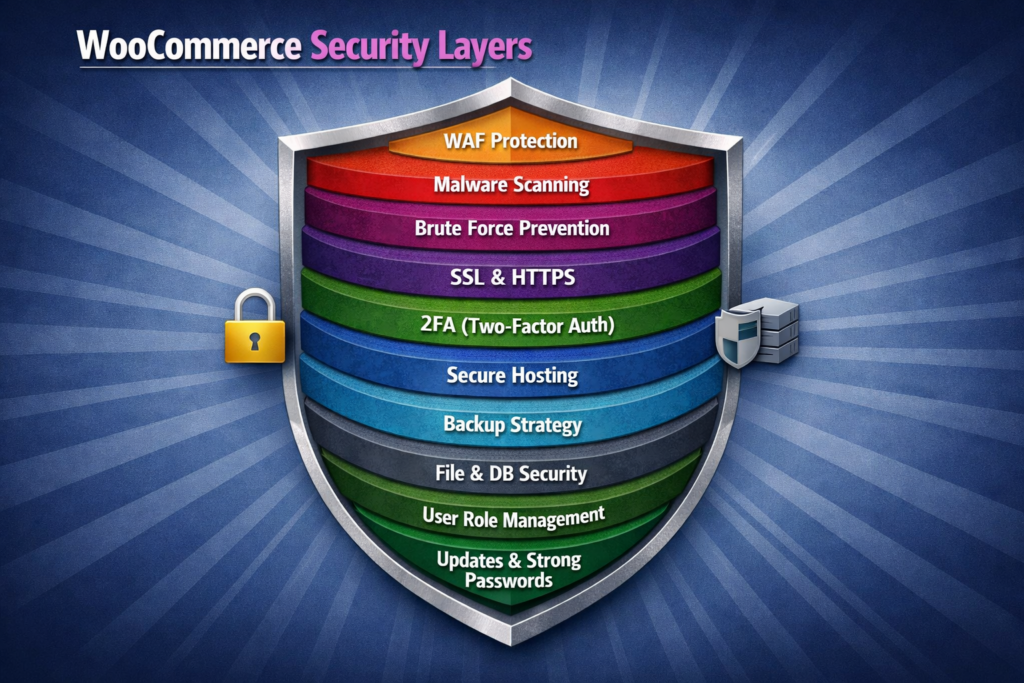
1. Keep WordPress, WooCommerce, and All Plugins Updated
This is quite simply the most effective of all these WooCommerce security tips on this list and also a point that is most often disregarded by store owners, who presume that updates are discretionary.
They are not optional. They are your primary defense.
Every update patches known vulnerabilities. Every day you put off an update is another day that attackers can take advantage of the gap your update was supposed to fix. Set minor releases to auto-update while scheduling regular major release reviews. Test significant updates on a staging environment before you go live.
Fully delete any plugins and themes you are no longer using. Deactivating them is not enough. Well, old code sitting on your server is still exploitable.
2. Use Strong Passwords and Enforce Them Everywhere
Exploited or reused keys and passwords are one of the most important reasons why a hacker broke into a WooCommerce store. So, as long as your admin password is something someone who knows you would ever try to guess or has been used on another site, your store is at risk no matter what you do in other security angles.
Use a password manager such as 1Password or Bitwarden to create and save complicated login information. But more importantly, for your shop, make sure that every user account (customers, editors, and shop managers) is also enforced with strong passwords.
This is one of those WooCommerce tips that require no expenditure and only takes a few minutes to eliminate an entire category of risk.
3. Enable Two-Factor Authentication on Every Admin Account
A good password is a good first layer. In fact, two-factor authentication (2FA) is the second layer of protection that keeps your store safe even if passwords are compromised in phishing attacks, data leaks, or brute force attacks.
When 2FA is enabled, access to your WooCommerce admin requires not only a correct password but also a time-sensitive verification code generated from an authenticator app. And even if an attacker has your credentials, they cannot gain access without that second factor.
2FA should be enabled on every admin account, no exceptions. Plugins like Wordfence Login Security or Google Authenticator for WordPress simplify the process. And one more — do it for all staff accounts, not just the primary administrator.
4. Install and Configure a Reputable Security Plugin
WooCommerce security plugins are the automated defense line that works in the background while you pay attention to your business. They look for malware, block suspicious traffic, and monitor files, alerting you to potential threats before you incur real damage.
These are the 2026 best trusted WooCommerce security plugins:
Wordfence Security—A complete web application firewall, real-time malware scanning preset for your website, brute force protection, and highly detailed live traffic monitoring all integrated into a single dashboard.
Sucuri Security, which provides DNS-level firewall protection; in other words, threats are filtered from ever hitting your hosting server. Particularly strong for high-traffic stores.
MalCare Security, which uses intelligent malware detection and one-click removal to help catch threats that signature-based scanners often overlook.
iThemes Security, which emphasizes hardening against common WordPress vulnerabilities, requiring strong credentials and monitoring folder changes for unauthorized files.
5. Change Your Default WordPress Login URL
By default, all WooCommerce stores share the same login URL. It’s the kind of thing every attacker and every automated bot on the internet knows exactly where it is.
Other plugins offer similar functionality that changes your login URL to something custom, which eliminates a huge volume of brute force attempts immediately. This feature is built into most WooCommerce security plugins. A lightweight option is to use a dedicated plugin like WPS Hide Login.
This one WooCommerce security tip slashes the traffic from automated login attacks overnight and takes less than five minutes to implement.
6. Limit Login Attempts Across the Board
Even with a hidden login URL, limiting logins is another critical layer of protection. In the absence of this control, automated tools can hammer away at your login page, testing thousands of combinations per minute without any resistance.
Configuring a lockout after three to five failed attempts kills brute-force attacks dead. This feature is included natively in most good-quality WooCommerce security plugins. Turn it on, establish sensible thresholds, and allow it to run all the time in the background.
7. Force HTTPS Across Your Entire Store
In 2026, it will be a problem that one of the pages on your WooCommerce store still loads over HTTP!
An SSL certificate protects all the data flowing between your store and your customers, be it their payment details, login credentials, or personal information. Otherwise, the data is transmitted as plain text, which can be intercepted by anyone on the same network.
In addition to that, Google Chrome also marks HTTP pages as “Not Secure” in the address bar of the browser. For an eCommerce site that tells customers to just enter their card details, that message is a conversion killer that destroys trust.
If you’re using most good hosting providers, you already get free SSL via Let’s Encrypt. Once you have that installed, enforce HTTPS throughout your entire site via your WordPress settings or an htaccess redirect so nothing loads over an unencrypted connection.
8. Schedule Automated Backups and Store Them Offsite
Backups are your emergency recovery plan when everything else has gone wrong. And during the course of any store’s lifetime, something is going to break.
Plan for automated daily backups of both your WooCommerce database and site files. The critical detail that most store owners do not appreciate is that backups stored on the same server as your store are worthless if that server gets compromised.
Offsite storage — such as BlogVault, UpdraftPlus with a Google Drive or Amazon S3 combination, and BackupBuddy with cloud space On a staging environment, from time to time, check your backup restoration process and make sure that your backups are actually working when you need them the most.
9. Set Correct File Permissions
Having incorrect file permissions is one of the less obvious yet serious vulnerabilities on WooCommerce stores. This certainly means that anybody with even a small amount of access to your server can read, modify, or delete core files.
Recommended permissions are 644 for files and 755 for directories. Your wp-config.php . php file that holds your database credentials and security keys should be set to 440 or 400 for the most restricted possible access.
This is configured correctly by a specialist WooCommerce development company during the initial store build. If your store has been live for a while without undergoing a professional security review, checking file permissions through the hosting file manager or FTP client is something you should prioritize immediately.
10. Deploy a Web Application Firewall
A Web Application Firewall (WAF) is positioned between your WooCommerce store and the incoming traffic, filtering out malicious requests before they reach your server. It filters known attack types—such as SQL injection, cross-site scripting attempts, and brute force traffic—in real time.
This is one of the most potent WooCommerce security tips in this list since it acts preemptively. Instead of waiting for an attack to be detected after damage is done, a WAF stops the malicious request from being delivered in the first place.
The Wordfence and Sucuri plugins provide WAF-level functionality. Sucuri’s DNS-level firewall or Cloudflare’s enterprise WAF has filtering at the edge if you’re a store with high daily transaction volume before traffic ever hits your hosting infrastructure.
WooCommerce Security Plugins Worth Trusting in 2026
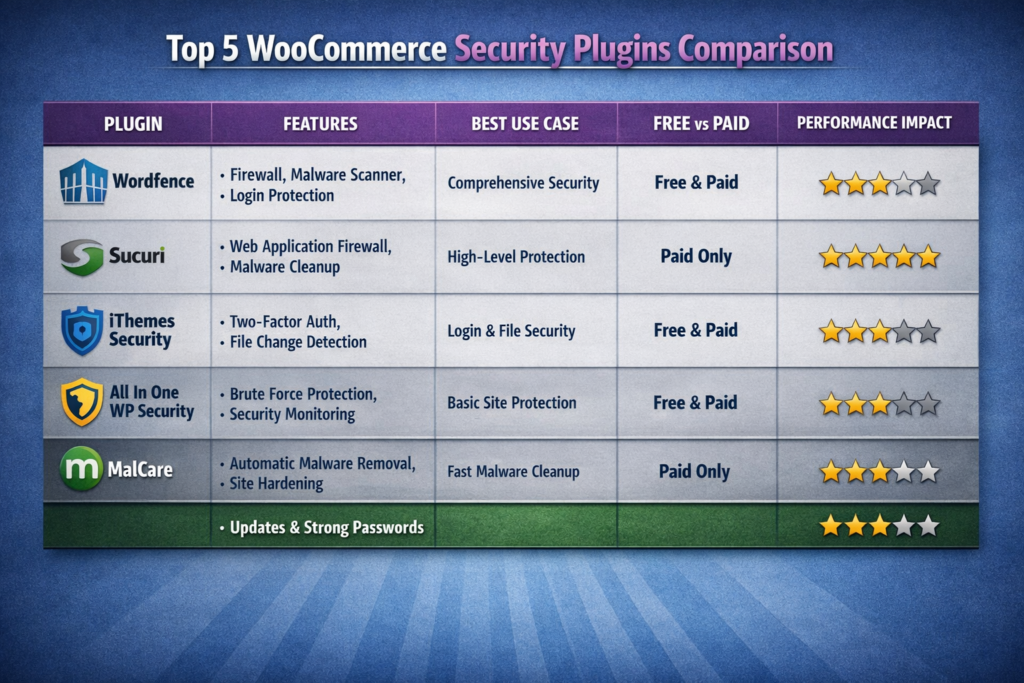
One of the best WooCommerce security plugin practices you can apply is choosing the right WooCommerce security plugins. Below is a straightforward breakdown of the top options, along with what each one does best.
Wordfence Security is the most popular security plugin in the entire WordPress ecosystem. It features firewall protection, malware scanning, and login security in a single dashboard. The free version is up to speed for most small-to-medium stores; premium features add the flavor of real-time threat intelligence.
Sucuri Security is preferred by stores that want DNS-level protection via firewall. Its cloud-based architecture means that threats are eliminated before they even reach your hosting environment. Especially useful for more mature stores with stable traffic.
MalCare Security is powered by smart malware detection. It employs pattern-based scanning to capture threats that signature-matching tools always overlook, and its one-click malware removal feature saves considerable cleanup time after an incident.
WP Cerber Security is a good alternative for stores that feel the weight of Wordfence. It provides strong anti-spam, login protection, and malware scanning with a small footprint on server resources.
Jetpack Security is a good choice for store owners who’d like to have a more comprehensive set of services—covering backups, downtime monitoring, and security scanning—all in one subscription instead of managing multiple plugins.
Most experienced WooCommerce developers would recommend using a combination of such a firewall plugin along with an independent backup solution instead of placing all your eggs in one basket. Layered security: having several barriers between your store and a threat.
WooCommerce Security Best Practices Checklist
Run through this checklist to benchmark where your store stands right now on WooCommerce security tips best practices:
- WordPress, WooCommerce, and all plugins on latest versions
- Strong unique passwords enforced for all user accounts
- Two-factor authentication active on every admin account
- Reputable WooCommerce security plugin installed and actively configured
- WordPress default login URL changed to a custom address
- Login attempt limits set with lockout thresholds active
- SSL certificate installed with HTTPS forced across the entire site
- Automated daily backups running with verified offsite storage
- File permissions set correctly across the WordPress installation
- Web application firewall active and monitoring incoming traffic
- User roles reviewed with minimum necessary permissions assigned
- Unused plugins and themes deleted entirely from the server
- Security audit logs reviewed on a regular schedule
- Staging environment in place for testing updates before going live
Consistency in adopting these WooCommerce security best practices is what keeps stores recovering fast after unexpected incidents from stores that don’t recover at all. Without exception, review this list every quarter.
Common Security Mistakes WooCommerce Store Owners Make

Keeping Deactivated Plugins on the Server
Deactivated but not deleted plugins—those you turned on and off but didn’t delete from your server—are still leftover files. Even if inactive, they can be scanned to check for vulnerabilities and exploited. And if you’re not using it, delete it all the way. No exceptions.
Running a Store on Shared Hosting Without Isolation
Budget shared hosting puts your store on the same server hardware as perhaps hundreds of other websites. If any one of them is ever compromised, attackers can occasionally move laterally to neighboring accounts. In 2026, the minimum proper standard for such a store handling customer payment data would be managed WordPress hosting (with proper account isolation).
Never Reviewing Security Logs
Having a security plugin and never reviewing its activity logs is as useful as having a security camera system and never watching the footage. Unusual login activity, unexpected file changes, and unknown IP addresses connecting to an administration area are all early indicators that can be seen in logs long before they escalate into a serious incident. Review logs on a weekly basis.
Giving Everyone Administrator Access
Not every team member needs to have full admin permissions. “If a copywriter is updating product descriptions, they don’t need the same access as the store owner. Give each person the least permissive role they need to perform their job. If a limited account is ever hacked, the damage is contained rather than catastrophic.
Skipping Security Reviews After Major Changes
Whenever you install new plugins, change themes, switch hosting providers, or add into your team, perform a focused security review. Any change that affects the store configuration can also lead to new attack vectors or will invalidate already implemented security measures. Use every major shift as a reason to check again on defensive gaps and fortify them before someone else exploits them.
Why Dazzlebirds for WooCommerce Security

Knowing these WooCommerce Security Tips is one thing. Now, doing so properly across an active store conducting real transactions is a whole different story.
Never a sort-of-out-of-the-box for a security configuration in WooCommerce. There are so many different factors in play, too, from how your hosting environment, plugin stack, and payment gateway interact with each other to WooCommerce itself and the nature of any specific customization. A configuration that works great in one store configuration can cause contention, performance problems, or hidden holes in another.
Dazzlebirds is a specialist WooCommerce development company and can help you configure your store’s security architecture properly from the ground up. Our dedicated WooCommerce developers do not apply security templates and call it a job done. They audit your individual shop, recognize the real vulnerabilities in your specific arrangement, and execute security that fits consummately.
Whether you require a thorough security audit of an existing store, or a new WooCommerce custom project that has security ingrained in each and every layer from the start, or maintenance that ensures your defenses have evolved to match the threats that emerge through 2026 and beyond, touting with it all of the care and attention it deserves—Dazzlebirds does it.
Five years from now, the stores that will still be open and doing well are the ones that are putting money into the right security systems now. Dazzlebirds helps WooCommerce store owners at every stage to make sure their business stays safe as it grows.
Conclusion and Call to Action
Your WooCommerce store is a real investment and real customer trust. You took on the responsibility for every order processed, every account created, and every payment detail submitted the day you unlocked your store to the public.
The WooCommerce security tips in this post aren’t theoretical. They are the actionable steps that separate stores that stay secure and grow from stores who turn into breach statistics and never truly recover.
Update consistently. Enforce strong authentication. Use quality WooCommerce security plugins and configure them. Do daily backups to offsite storage. Make sure to follow the WooCommerce security tips best practice checklist every quarter without fail.
Security in 2026 is not a project you run at the end of October and then forget about. It’s a daily discipline that safeguards everything else you’re creating. And the price of establishing that habit is a small fraction of what it would cost to recover from even one successful attack.
If you need a team of professionals to manage your store security right while you concentrate wholly on expanding your enterprise, Dazzlebirds is standing by.
Reach out to Dazzlebirds today for a free WooCommerce security audit. The team will conduct a comprehensive audit of your store to uncover your current exposure/risk and provide you with an actionable plan to protect your WooCommerce store from the ground up.
Today, book your free WooCommerce security audit with Dazzlebirds.
The stores that take security seriously before something goes wrong are the ones that never have to tell their customers about a breach.
FAQs
Start with updating plugins, enabling two-factor authentication, installing a security plugin, and forcing HTTPS. These basics block the majority of common attacks immediately.
Run a full audit every quarter and after every major store change. Consistent reviews catch vulnerabilities early before attackers do.
Wordfence and Sucuri are the top choices. The right one depends on your store size, traffic volume, and hosting environment.
Absolutely. Professional WooCommerce Development Services ensure your store is configured, hardened, and maintained correctly from the ground up, reducing security risks significantly.
Restore from a clean backup immediately, identify the vulnerability, remove malware, and reset all credentials. Prevention through proper security setup always costs less than recovery.


 WooCommerce Solutions
 Solutions for WordPress