All enterprise WooCommerce migrations begin with confidence. There are fewer moving parts, the architecture is more clever, and the commercial case stacks up. Then three weeks after going live, organic traffic decreases 40%. Tracking also shows pages ranking on page one for product queries have fallen off. The customers search but cannot find the store.
This isn’t a hypothetical. This is a common occurrence, and in the context of larger enterprises, it worries me to a best-practice level.
However, if your WooCommerce store is a large one, e.g., managing 10k+ SKUs, multi-warehouse inventory, and ERP integrations with $10M+/year in annual revenue—then the migration cannot be seen as just a technical upgrade. This is a significant infrastructure event for the enterprise. Whenever you change a URL, map your database differently, or even just modify the permalink patterns in WordPress, you’re changing every single signal Google has developed about your store over months and years.
The risk isn’t just downtime. It is quietly and irreversibly losing domain authority, organic keyword positions, structured data integrity, and internal link equity all at the same time if done incorrectly.
This guide is meant for CTOs, heads of e-commerce, or solution architects who are looking to migrate a WooCommerce store, talking about how the migration process can go wrong. Below is a streamlined, engineering-first framework that walks through pre-migration audit and URL and data mapping to redirect strategy staging and validation steps to post-launch SEO recovery with just enough technical detail sprinkled in along the way.
Key Takeaways
A WooCommerce SEO migration is an architectural endeavor, not a change of hosting or design. Approach it with the same fervor as a platform rearchitecture.
The two most effective shields against SEO fallout during any migration are URL structure preservation and a comprehensive 301 redirect map.
Enterprise migrations must audit their SEO equity beforehand — not after. Retroactive Repairs Are Costly and Inadequate
Data inconsistencies on both the CMS and user experience levels, due to integration failures (ERP-CRM-PIM systems) at the time of migration, cause crawlability issues.
Staging validation is non-negotiable. Doing a go-live without having fully tested the staging environment is the same as a controlled demolition of your organic rankings.
Phased rollout strategies mitigate risk exposure and enable you to roll back a deployment without affecting full traffic.
Why WooCommerce Migrations Fail at Enterprise Scale
If you read most migration guides, you’re migrating a store of 200 products from one shared host to another. However, enterprise WooCommerce does not work like that, and the failure points are also different.
Revealing the Technical Complexity Behind Your Back
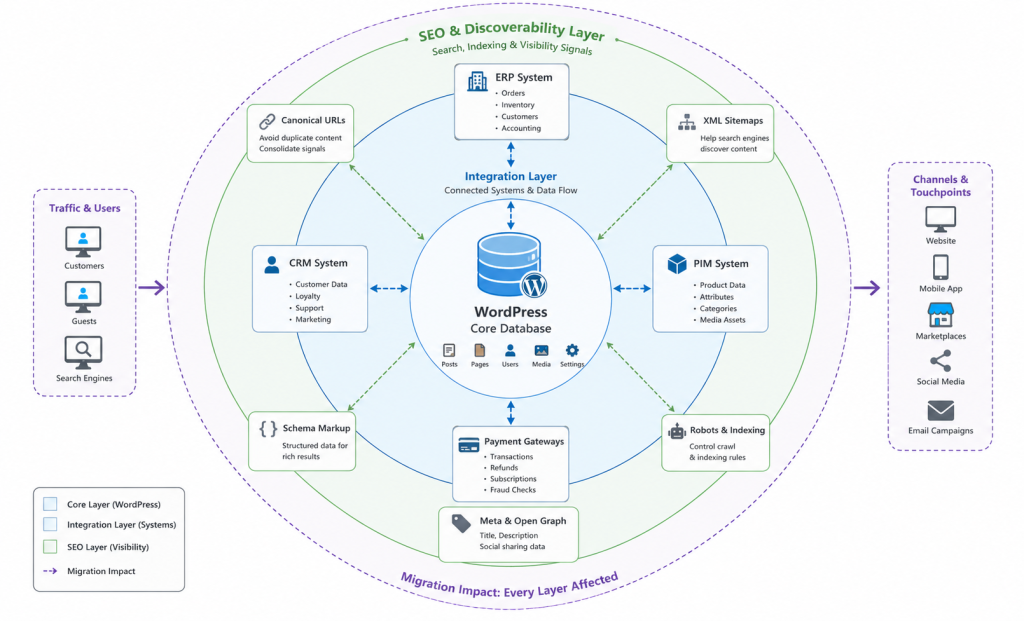
A well-developed enterprise-ready WooCommerce store is much more than simply WordPress + plugin. It has a system—often composed of custom post types, product taxonomies, variable product configurations (for all you pro shoppers out there), multisite, and integration with third-party systems that have been stitched together throughout the years. You are not migrating the files when you migrate. You’re migrating an ecosystem.
On its own, the database tells a different story. A typical WooCommerce installation can consist of millions of rows from not just wp_posts but also lp_postmeta and even many custom tables added by plugins. Product attributes within wp_term_relationships, order metadata scattered throughout wp_woocommerce_order_items, and customizing pricing rules stuck in a serialized option value, and none of this is going to just move cleanly without forethought.
SEO Risks That Accumulate Silently
There is no single failure in the SEO exposure of a WooCommerce migration. The failure, which leads to rankings crashing down in some way, is an iterative process of failures. The usual suspects: URL structure changes that were not redirected, canonical tags wrong for the new domain, XML sitemaps left over post-migration, and robots.txt files blocking indexation on the new server due to misconfiguration
These are not edge cases at scale. These are predictable failure paths, and they occur when people consider migrations technical tasks rather than SEO events.
Data and Catalog Integrity Issues
Data migration is its own discipline in stores with a large product catalog. All product images, attribute mappings, variant configurations, and custom fields (postmeta data for SEO metadata stored in Yoast or RankMath) must be migrated with 100% accuracy. One serialization issue in the database export can corrupt hundreds of product records—and if Googlebot were indexing content that would break (instead), those pages would render broken.
System Layer Integration Failures
Enterprise stores run integrations. ERP systems (SAP, NetSuite, and Dynamics); CRM platforms (Salesforce and HubSpot); PIM tools; as well as inventory management system integration WooCommerce approaches are ones that people rarely document properly. An ignorant migration that simply ignores API endpoint changes, webhook configuration, or authentication token resets will sabotage all such integrations—often resulting in a cascade of breakages, including halted order processing, stock mismatches, and data syncing issues, which can take weeks to troubleshoot.
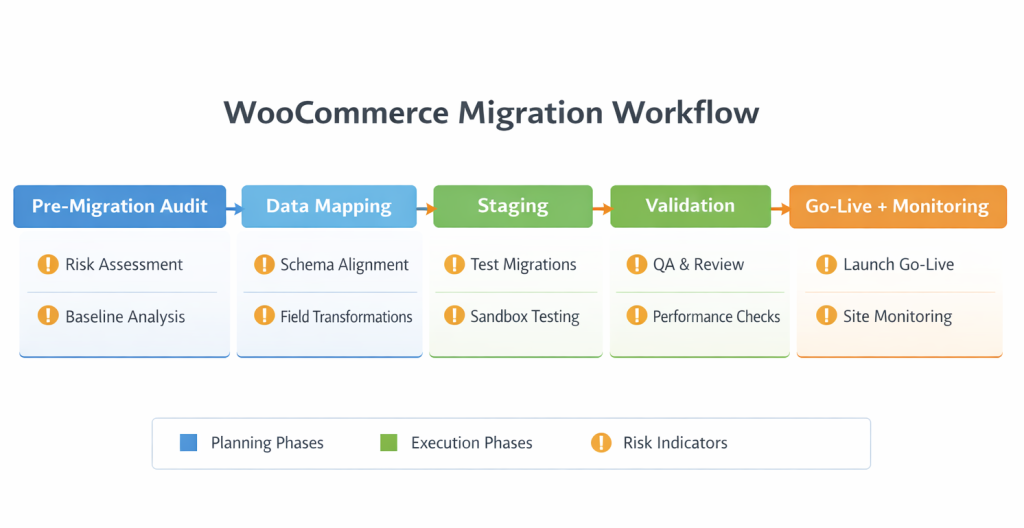
Enterprise Migration Framework: A Step-by-Step Process
Stage 1 — SEO and technical audit before migration
You need the complete picture of what you’re protecting before a single file moves. The audit falls into two pieces: an SEO equity audit and a technical inventory.
Feed the top 500 organic landing pages by traffic to GraphQL (copy stats from Google Search Console & GA together) that can be configured as a distribution on your site. SEO Equity Audit: Map how many high-value product pages, category pages, and blog/content pages generate organic revenue. These are your safe bets—every URL on this list needs to be preserved or has a verified 301 redirect already in place.
Run Screaming Frog or Sitebulb to get the current version of your site crawled. Record URL structure, link architecture, canonical tags, structured data schema (especially Product and BreadcrumbList), and hreflang if needed and meta title/description patterns on an automated basis.
Technical inventory: List down every plugin, custom integration with the website (if any), API connection/webhook, and cron job running on the existing installation. This inventory, therefore, serves as your migration requirements document—not just a nice-to-have, but a firm checklist that dictates exactly what needs to be rebuilt or configured within the new environment.
Phase 2 — URL Structure Planning and Redirect Mapping
Most enterprise migrations succeed or fail here. The URL structure of the new installation will mean you carry your existing SEO equity or start from zero.
The simplest recommendation is to retain the current structures of your URLs exactly. At the moment, if your product URLs look like /product/product-name/ and you have a migration for categories that is mapped to files in which they would be found at (for example) /product-category/category-name/, then recreate this same structure on the new environment. Any deviation requires a redirect.
If a URL restructure cannot be avoided (and it can sometimes — due to architectural or taxonomy reasons), then create your redirect map before the migration starts, not after. Your redirect map needs to be complete: every product, category URL, tag page (all paginated archives), and post type.
This map typically runs into thousands of rows for enterprise stores. Use a spreadsheet with columns for old URL, new URL, HTTP status code (301 = permanent), and validated or not validated! You want your team to version control those and review them from both the technical side and with an SEO hat on before they set out on any migration work.
Phase 3 — Data and Catalog Migration
Using native WooCommerce CSV export and direct database queries for complex data (custom fields, attributes, and serialized metadata) Export your product data from WooCommerce. Do not trust the migration with plugin-based tools for larger catalogs—they have limits, so row timeout issues and handling serialization occur at scale.
Migrate product images separately. Batch import and only validate image URLs after migration before exposing your site to the world. The lack of product images is not only a UX issue; it also impacts Google Shopping feeds and structured data validation as well as crawl efficiency.
Postmeta requisite for SEO metadata: Many of you have been using Yoast SEO (or even Rank Math) plugins—so you’ll need to add necessary post meta fields (_yoast_wpseo_title, yoastwpseo_metadesc, yoastwpseo_focuskw, and their Rank Math equivalents). Something frequently overlooked and leading to hundreds of product pages instead reverting back post-launch, with auto-generated titles and empty meta descriptions.
Phase 4 — Staging Environment Build and Validation
You must construct the entire migration process in a staging environment before you start implementing any modifications to production systems. The staging environment should replicate production systems by using an identical server setup and PHP version and WordPress version and plugin collection. A migration validated on a shared-hosting staging environment and deployed to a dedicated cloud server will behave differently.
Run the overall crawl validation workflow on staging.
Crawl with Screaming Frog and compare URL counts, status codes, and metadata pre-migration crawl baselines.
Check that all 301 resolve properly and do not create chains.
Test structured data (in bulk) across a statistically significant number of product pages using the Rich Results Test from Google.
Ensure the XML sitemap is correct and has been submitted.
Check robots. Trace log.txt does not block the critical paths.
Test all the integration endpoints (ERP sync along with payment gateway, CRM webhooks, etc.).
Core Web Vitals benchmarks to corroborate page speed metrics—don’t just defend performance, but seize the migration as a chance to improve it.
Phase 5 — Go-Live and Rollback Strategy
The go-live process serves as the start of the validation period that follows. The B2B stores require their go-live schedule to take place during their least busy hours, which occur from late Tuesday until early Wednesday. The organization must maintain the old server operational and reachable for users during the 72 hours following the system migration.
Execute a real-time monitoring protocol from the moment DNS propagates:
Monitor Google Search Console crawl errors in real time
Track 404 error rates via server logs
Watch Core Web Vitals in PageSpeed Insights
Monitor organic traffic via GA4 with hourly segmentation
Confirm integration systems are processing orders correctly
The project requires developers to establish rollback criteria, which need to be defined before the system goes live. The system will execute the rollback plan when 404 error rates reach their defined limit during the first 24 hours. The process should need only a DNS revert because the organization must maintain operation of the previous server.
Technical Deep Dive: SEO Preservation at Scale
Canonical Tag Management
The canonical tag errors occur frequently in large WooCommerce stores. The use of product filters through faceted navigation, which allows users to select products by color, size, and brand, creates hundreds of parameterized URLs. The system requires proper canonical management to prevent both crawl budget waste and duplicate content problems. Your organization needs to establish a new canonical strategy for the new system while preserving the correct implementation of category page pagination, which should use rel=”canonical” on the first page and not on individual pages.
Schema Markup and Structured Data
Product schema, including the offer, aggregateRating, and brand properties, should be on your WooCommerce product pages. For Yoast or custom implementation, run a validation after migration to check if your structured data are rendered correctly. This is how Google can show rich results for your products, and ultimately, these rich results definitely affect CTR in organic search.
Internal Link Equity
Internal links for large e-commerce sites have a lot of SEO effort. Breadcrumbs, cross-sells, related product blocks, and links to products on pages of editorial content all pass equity. However, your equity can stop flowing if you change the structure of your URL with only partial redirect coverage. Conduct an internal link audit after migration to ensure that there are no internal links going towards 301/404 URLs because they should always, ALWAYS point at the final canonical URL.
Database Performance and Crawl Efficiency
A slow database affects more than the user experience in WooCommerce. Googlebot will crawl fewer pages per session, and on a slow server, this means it will take longer for an enterprise-scale site to be fully re-indexed after any migration, as important pages are given less attention. Optimize wp_options (drop non- or less important autoloaded transients), activate object cache (Redis or Memcached), and configure proper database indexes on the new hosting environment before OOM.
Common Mistakes in Enterprise WooCommerce Migrations
1. Building the redirect map after go-live. This is the deadliest of all mistakes. When you become aware that URLs return 404, Googlebot has crawled and reported them. The redirection map has to be ready prior to going live.
2. Treating the migration as a developer-only task. This means the SEO team has to start being embedded into the migration process from Phase 1. Yet some architecture decisions, like changing permalink structures to align with a new category taxonomy (swapping from days or month based on time), have consequences whose effects aren’t felt for weeks when the traffic data comes in.
3. Not testing integration endpoints on staging. ERP and CRM integrations are not consistently included in all staging validation, particularly because they require special configuration on test environments. And then they break on go-live, resulting in order failures and data synchronization issues that need to be fixed immediately.
4. Ignoring crawl budget on large catalogs. If you have over 50,000 product pages in your store, crawl budget is a genuine limitation. If the new URL structure creates more paginated URLs, parameter URLs, or identical-category paths, you are basically limiting how much Googlebot will crawl on your domain.
5. Skipping post-migration SEO monitoring. Some teams stop the migration project right after the site is live. SEO validation post-go-live doesn’t stop there and should be monitored during the first 30-90 days (rank tracking, crawl error analysis, and Core Web Vitals benchmarking).
Best Practices for Enterprise-Grade WooCommerce Migration
Every WooCommerce migration should be treated as a phased project with defined gates. Each phase does not start until the former is verified and approved.
Use version-controlled configuration management. Any environment change—server config, htaccess rule, or WordPress setting—identifies an action to track.
Create a dedicated migration team with WordPress development expertise, DevOps, SEO, and QA. One-off migrations at enterprise scale fail, always!
Use feature flags or phased rollout for catalog segments if migrating the full store is too risky. Monitor your product categories in batches with pauses between the migrations.
Document everything. The migration runbook needs to be so detailed that any qualified engineer can perform it without the original author at hand.
Immediately post-go-live, submit the new XML sitemap to Google Search Console and ask for re-indexing of your most important pages (using the URL inspection tool).
Conclusion
A WooCommerce store migration is not a technology refresh. The process functions as an engineering framework that impacts revenue for enterprise e-commerce organizations. The organizations that execute it well treat it as such — with dedicated resources, defined phases, rigorous validation, and an SEO-first mindset from day one.
The stores that lost the most ranking after migration always made a similar cluster of decisions: they moved fast and skipped audits, had their redirect map built too late (1–2 weeks before), and waited for go-live with engaging SEO. These are not resource constraints; these are prioritization failures.
What is presented here is not a theoretical framework. It mirrors the strategy of decisions that safeguard SEO equity, uphold data integrity, and enable enterprise WooCommerce stores to migrate without relinquishing their organic rankings to rivals.
Correctly migrating is search-engine-invisible. Now, it can be seen for months—with traffic graphs that tilt toward the ground if done wrong.
Treat it like what is effectively an infrastructure event, and roll with it. Before the new environment, you build a plan. Validate before you launch. Monitor after you go live. That sequence of water-falling repeatedly is what separates migrations that actually strengthen a business from the ones that only hold it back.
If your organization is looking to undertake a large WooCommerce migration and requires a structured, risk-managed approach that covers common activities starting from pre-migration versus post-launch, connect with the Dazzlebirds team. With deep expertise in enterprise WooCommerce architecture and SEO preservation, Dazzlebirds brings the technical rigor your migration deserves.
FAQs
The primary risk is losing organic search rankings. WooCommerce migration changes URLs and database structures, altering Google's historical signals. Without proper 301 redirects and SEO planning, enterprise stores typically experience 40% traffic drops within three weeks of launch.
Enterprise WooCommerce migrations typically require 12-16 weeks for stores with 10k+ SKUs. The timeline includes a pre-migration audit (2-3 weeks), redirect mapping (1-2 weeks), data migration (2-3 weeks), staging testing (2-4 weeks), and post-launch monitoring (30-90 days).
Yes, absolutely. 301 redirects are critical for WooCommerce migration success. They preserve SEO equity and guide users to new URLs. Without comprehensive redirect maps created before go-live, you'll face 404 errors, crawl budget waste, and ranking loss that's extremely difficult to recover from later.
Critical pre-launch tests for WooCommerce migration include: crawling with Screaming Frog to verify URL structure, validating all 301 redirects, testing structured data with Rich Results Test, confirming XML sitemaps, checking robots.txt, and testing all integration endpoints (ERP, CRM, payment gateways).
Recovery from failed WooCommerce migration is expensive and time-consuming. Use DNS reversion to restore the old server within 72 hours, then identify failures (404 errors, integration breaks, redirect chains). Build comprehensive redirect maps, fix data inconsistencies, and resubmit sitemaps to Google Search Console.


 WooCommerce Solutions
 WordPress Solutions
 CMS to WordPress Migration Solutions
 WooCommerce Product Catalog Management
 WooCommerce Order Automation Solution
 Centralized Inventory Management