Introduction
Most WordPress websites do not break overnight. They wear down slowly. A theme that once felt fast, flexible, and easy to manage starts feeling heavier with every update. Small changes that used to take an hour now take a full day. Plugins start conflicting with each other. Layouts shift on mobile after a routine update. Nobody on the team wants to touch the theme files anymore because nobody is fully sure what will break next.
This is the point where most business owners start asking the same question. Should we fix what we have, add on to it, or start fresh? Having worked on live business websites across different industries, we have seen this exact pattern repeat itself often enough to know that WordPress theme customization is not a single decision. It is three different paths, and choosing the wrong one either wastes money on a rebuild you did not need or delays a rebuild you actually needed months ago.
This article breaks down how to tell the difference, using the same evaluation process a development team would use before recommending a direction to a client.
Quick Answer: Should You Customize, Extend, or Rebuild Your WordPress Theme?
Customize if the theme is healthy and changes are minor. Extend if the theme is mostly good but needs structured functionality or layout upgrades. Rebuild if the theme is outdated, bloated, unstable, slow, or actively blocking business growth and scalability.

What Does WordPress Theme Customization Actually Mean?
“WordPress theme customization” gets used as a catch-all term, but in practice it covers a wide range of work depending on what a business actually needs. It can include:
- Layout changes across specific pages or sections
- Template level changes for services, products, or landing pages
- Styling and branding updates to match visual identity
- Header and footer restructuring
- WooCommerce template adjustments for product and category pages
- Mobile responsiveness improvements
- Child theme development for safe, update-proof changes
- Custom content sections built for specific business needs
- Performance-conscious design improvements that do not slow the site down further
What it should never mean is opening theme files and making changes without a plan simply because something looks off. That approach is how small websites end up with layers of patchwork code that nobody, including the original developer, can fully explain a year later. Good theme customization starts with understanding how the theme is built, what depends on what, and what the change will actually touch before a single line of code is edited.
When Is Editing the Existing Theme Enough?
Editing is the right call when the theme itself is not the problem. If the code base is clean, the layout structure is stable, plugins are working well together, and performance is reasonably strong, then most requests can be handled as direct, contained edits.
Editing tends to be enough for situations such as the following:
- Updating a homepage section or hero layout
- Improving a call to action area that is not converting well
- Adjusting a service page layout for clarity
- Refining the header or footer design
- Fixing spacing issues across pages
- Correcting how a page behaves on mobile screens
- Making small copy or image layout adjustments
The common thread across all of these is scope. The change affects a specific area, does not require new functionality, and does not depend on restructuring how the theme works underneath. If a request can be described in one sentence and does not involve new custom features, it usually belongs here.
When Should You Extend a WordPress Theme?
Extending sits between customization and rebuilding. It applies when the current theme is still usable and reasonably solid, but the business has outgrown what simple edits can support.
This is where extending typically makes sense:
- Building a proper child theme so structural improvements do not risk being lost during updates
- Creating reusable templates for repeated page types, such as service pages or location pages
- Setting up custom post types for products, team members, case studies, or resources
- Improving WooCommerce layouts beyond what the default templates allow
- Adding custom functionality that integrates cleanly with the existing theme structure
- Building better content sections that support future scaling without extra rework
Extending is almost always a better decision than trying to force everything through page builder shortcuts or adding plugin after plugin to patch small gaps. That pattern feels fast in the short term but adds weight to the site that shows up later as slower load times and harder maintenance. If your site is already relying heavily on page builders and stacked plugins to get by, it is worth reading how custom web development compares to pre-built templates before adding yet another layer on top of what already exists.
When Is a Full Theme Rebuild the Better Option?
A rebuild becomes the right decision when the theme itself, not just individual pages, is the actual problem. This is usually the most difficult decision for business owners to make because a rebuild feels like starting over, even though in most cases it is closer to finally fixing the actual issue instead of managing around it.
Rebuilding tends to be the smarter option when:
- The theme is outdated and has not kept pace with current WordPress standards
- The code has become difficult to work with after years of accumulated changes
- The site stays slow no matter how much it gets optimized
- The mobile experience never quite feels right despite repeated fixes
- The site depends heavily on plugins just to keep basic functionality working
- Routine WordPress or plugin updates keep breaking layouts
- SEO structure is weak at the template level and hard to correct
- WooCommerce product and category pages are difficult to manage properly
- The business needs a design system that can genuinely scale as the site grows
This is the point where the conversation shifts from small fixes to custom WordPress theme development, because the existing foundation can no longer support what the business needs without constant workarounds. In our experience, businesses that delay this decision usually spend more money on temporary fixes over eighteen months than they would have spent on a proper rebuild upfront.
Signs Your Current Theme Is Holding Your Website Back
Some of these signs are obvious. Others build up quietly until the team stops noticing them as problems and starts treating them as normal.
- Every small change requires far more work than it should
- Page speed keeps getting worse even after basic optimization attempts
- Mobile layouts break frequently after theme or plugin updates
- The site relies heavily on shortcodes or page builder blocks stacked on top of each other
- Plugin updates regularly cause layout or styling issues
- WooCommerce pages feel slow, clunky, or difficult to adjust
- Developers hesitate before touching the theme because they are not confident what it will affect
- Implementing SEO recommendations is harder than it should be at the template level
- The design looks inconsistent from one page to another
- Adding a new section or page type feels risky rather than routine
If two or three of these sound familiar, the theme is likely still workable. If most of the list applies, that is a strong signal the theme is limiting the business more than it is supporting it.
Theme Customization vs Custom Theme Development
- Purpose. Theme customization improves and adjusts what already exists. Custom theme development builds a new foundation designed specifically around the business.
- Cost. Customization is generally lower cost since it works within the current structure. Custom development involves a higher upfront investment but reduces long-term patchwork costs.
- Timeline. Customization is faster since changes are targeted. Custom development takes longer because it involves planning, building, and testing a full structure.
- Flexibility. Customization is limited by what the original theme allows. Custom development offers full control over structure and functionality.
- Performance. Customization improves performance only within the limits of the existing code. Custom development allows performance to be built in from the start.
- Scalability. Customization works well for current needs but can hit limits as the business grows. Custom development is built with future growth in mind.
- Best use case. Customization suits businesses with a healthy theme that simply needs refinement. Custom development suits businesses whose current theme can no longer support their goals.
If you want a deeper breakdown of how these two paths compare beyond theme-level work, this comparison of custom WordPress development vs. theme development covers it in more detail.

What Businesses Often Get Wrong About Theme Customization
Most theme problems are not caused by one bad decision. They build up from several smaller ones made without a clear plan. Based on the recurring issues we run into during theme audits, the most common mistakes are:
- Editing parent theme files directly instead of working through a child theme, which means every future update risks wiping out those changes
- Adding a new plugin for every small design need instead of solving it properly at the template level
- Relying entirely on page builders for structural decisions rather than clean, purpose-built templates
- Ignoring mobile responsiveness until it becomes an obvious problem instead of testing changes across devices from the start
- Making changes without checking their impact on page speed, then wondering later why the site feels slower
- Skipping proper testing on WooCommerce templates, which often causes issues that only surface during checkout
- Treating SEO as an afterthought rather than something considered during template structure decisions
- Choosing the cheapest available fix without asking whether it solves the actual problem or simply delays it
- Making changes directly on the live site instead of testing them in a safe environment first
None of these mistakes are unusual. They are common precisely because they feel efficient in the moment. The real cost usually shows up later, not immediately, which is exactly why so many businesses do not connect the slow decline in site performance to decisions made months earlier.
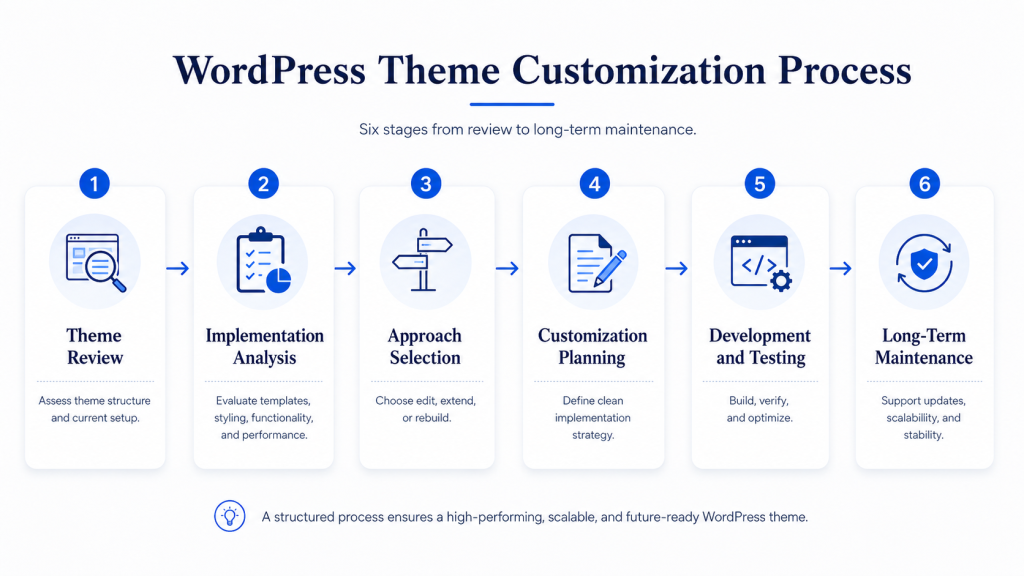
Our Technical Approach to WordPress Theme Customization
Understanding the Current Theme
The first thing we would do is evaluate the existing WordPress theme to understand how it has been built and whether it can support the required changes.
We would review:
- Theme architecture and code quality
- Existing customizations
- Compatibility with plugins
- Performance and responsiveness
- Update and maintenance history
- Business and design requirements
This discovery phase helps determine whether the current theme should be customized, extended, or replaced entirely.
Analyzing the Existing Implementation
Once the theme has been assessed, we would evaluate how it currently handles:
- Layouts and templates
- Custom functionality
- Styling and branding
- Performance optimization
- WooCommerce compatibility, if applicable
- Mobile responsiveness
The goal here is to identify technical limitations and determine the most efficient path forward.
Choosing the Right Approach
Based on our findings, we would recommend the most appropriate solution.
This may include:
- Editing the existing theme for minor changes
- Extending the theme through a child theme or custom functionality
- Refactoring outdated components
- Rebuilding the theme to support new business requirements
The decision would be based on long-term maintainability, performance, scalability, and the overall cost of ownership rather than simply making the quickest changes.
Planning the Customization Strategy
Before development begins, we would define how the customization should be implemented while following WordPress best practices.
We would consider:
- Reusable templates and components
- Clean and maintainable code
- Future updates and compatibility
- Performance optimization
- SEO considerations
- Accessibility standards
This approach ensures the solution remains easy to maintain as the website evolves.
Development and Testing
Once the implementation strategy is approved, we will:
- Develop the required theme customizations
- Test all templates and functionality
- Validate responsiveness across devices
- Verify compatibility with plugins and integrations
- Optimize performance and user experience
Testing throughout development helps ensure changes do not introduce regressions or compatibility issues.
Long-Term Maintenance
Following implementation, we would ensure the customized theme remains sustainable by reviewing:
- Update compatibility
- Code maintainability
- Performance over time
- Scalability for future features
- Documentation for future development
This helps reduce technical debt and simplifies future enhancements.
Expected Outcome
The end result would be a WordPress theme that aligns with the business requirements, delivers a strong user experience, remains easy to maintain, and provides a scalable foundation for future enhancements without unnecessary technical debt.
How to Decide Between Theme Edit, Extension, and Rebuild
Choose editing when:
- The theme is technically sound and well coded
- The requested changes are small and contained
- There is no need for new functionality or structural changes
- Performance and plugin compatibility are already stable
Choose extending when:
- The theme foundation is still solid overall
- The business needs more structure, such as custom post types or reusable templates
- WooCommerce needs layout improvements beyond default templates
- You want to avoid relying further on page builders or extra plugins
Choose rebuilding when:
- The theme is outdated, unstable, or poorly coded
- The site stays slow despite optimization attempts
- Updates repeatedly break layouts or functionality
- The business needs a scalable design system for future growth
If you are unsure which category applies, it often helps to look at how the site is structured overall. Understanding WordPress website structure can make it much easier to see whether the problem is isolated to a few pages or systemic across the entire site.
Why Quick Theme Fixes Can Become Expensive Later
Quick fixes are not inherently bad. The problem is treating every fix as quick regardless of what it actually requires. Over time, repeated shortcuts tend to create the following pattern:
- Technical debt builds up as more workarounds get layered on top of each other
- Performance quietly declines as the site carries more unnecessary weight
- Maintainability drops because fewer people fully understand how the site is put together
- Plugin conflicts become more frequent as more tools get added to compensate for them limitations
- Updates become riskier instead of routine
- Design starts to feel inconsistent across different sections of the site
- The business becomes dependent on specific developers who know where the fragile parts are
- The eventual cost of a proper rebuild ends up higher than it would have been if handled earlier
None of this means every quick fix leads to disaster. It means quick fixes should be a deliberate choice for genuinely small problems, not a default response applied to every issue regardless of size or long-term impact.
When Should You Hire a WordPress Theme Developer?
Bringing in a developer makes sense once the stakes go beyond simple content updates. This is especially true when
- Changes affect templates or core theme code
- The website is business critical and downtime is not an option
- WooCommerce is involved and checkout reliability matters
- Performance is already a known weak point
- The theme has a history of breaking during updates
- The business needs genuinely custom functionality
- Whatever gets built needs to support growth over the next few years, not just the current moment
This is usually where professional WordPress theme customization services make the most sense, since the goal shifts from making a change to making the right change in a way that holds up over time. If performance is part of the concern, it is also worth looking into WordPress performance optimization services alongside any theme decisions, since the two are often connected more closely than they appear on the surface.
For businesses evaluating a full rebuild, working with a team offering custom WordPress development services ensures the new foundation is built around actual business requirements rather than a generic template approach that gets adjusted after the fact.
Final Thoughts
The right decision for your WordPress theme is rarely the fastest one. It is the one that actually matches where your business is and where it is heading. A small edit might genuinely be enough. A structured extension might solve exactly what you need without unnecessary cost. Or the theme itself might simply have reached its limit, in which case a proper rebuild is the more sensible long-term investment rather than another temporary patch.
Good WordPress theme customization decisions balance current needs against performance, maintainability, SEO, and future scalability, rather than defaulting to whatever feels easiest today. This is the same evaluation process our team walks through with every client before recommending a direction, because the right answer is different for almost every website we look at.
If you are trying to work out which path fits your website, the Dazzlebirds team is glad to take a closer look and offer a clear, honest recommendation based on how your site is actually built, not just how it appears on the surface.
FAQs
It refers to modifying an existing WordPress theme to change its layout, design, functionality, or structure without necessarily building an entirely new theme from scratch.
When the theme is technically healthy and well-maintained and the changes needed are limited to layout, styling, or content adjustments rather than structural or performance issues.
Yes, in most cases. A child theme allows changes to be made safely without editing the parent theme directly, which protects those changes during future updates.
When the theme is outdated, poorly coded, consistently slow, dependent on excessive plugins, or unable to support the functionality and scalability the business now requires.
It can, but only if the underlying theme is reasonably well built. If the theme itself is the source of the performance issue, customization alone will not fully resolve it.
For minor content level changes, an experienced in house team may be enough. For template level changes, WooCommerce work, or business critical functionality, working with an experienced developer reduces risk and avoids costly mistakes.


 WooCommerce Solutions
 Solutions for WordPress