Intro
Most businesses start building a WordPress website by choosing a theme, a color palette, or a layout they saw on a competitor’s site. That feels like progress. It rarely is.
The real foundation of a successful website is structure. Not design. Structure.
A clear WordPress website structure helps users understand what your business does within seconds of landing on your site. It helps Google understand the purpose and relevance of each page. And it helps the website do what it actually needs to do: generate inquiries, drive bookings, build trust, and support business growth.
If the structure is unclear, the design does not save it. You end up with a website that looks reasonable but performs poorly. This article covers 15 things to plan before a single page is built or a single design decision is made.
Quick Answer Box
What is WordPress website structure?
WordPress website structure refers to how the pages, navigation, content, and internal links of a website are organized and connected. A well-planned structure helps users find what they need, helps search engines understand each page, and creates a clear path from visitor to inquiry or sale.
What Is WordPress Website Structure?
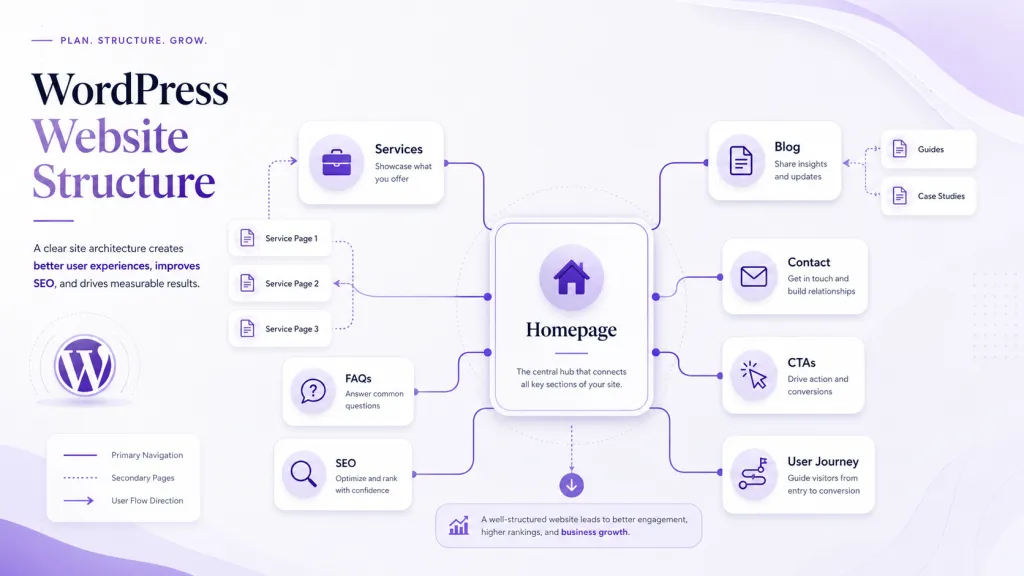
WordPress website structure is the logic behind how your website is organized. It covers which pages exist, how they connect to each other, what each page communicates, how users move between pages, and how search engines read and rank the content.
It includes the page hierarchy, which means which pages sit under which categories in your navigation. It includes the internal linking strategy, which connects blogs, service pages, case studies, and FAQs to each other. It includes the content flow on each page, from the headline to the proof to the CTA. And it includes the user journey, which maps how a first-time visitor becomes a warm inquiry.
Structure is not about how a website looks. It is about how it works.
Why Website Structure Should Come Before Design
Design makes a website feel good. Structure makes it perform.
A website can have a beautiful homepage, premium fonts, and a strong color palette and still fail to convert visitors because the service pages are vague, the navigation is confusing, or the CTAs are missing.
When design comes before structure, teams end up designing pages that do not have a clear purpose, building menus that prioritize aesthetics over user decisions, and writing content that fills space rather than guides action.
Structure should come first because it answers the important questions. What does each page need to achieve? What does a visitor need to know before they take the next step? Where does a blog post send someone after they finish reading? Which service pages need to exist independently and why?
Once those questions are answered, design becomes the tool that supports the structure, not the strategy itself.
15 Things to Plan in Your WordPress Website Structure
1. Define the Main Business Goal
Before any page is planned, the primary goal of the website must be clear. Is the website there to generate inquiries, drive bookings, support product sales, build authority through content, or introduce the brand to new markets?
This goal shapes every decision that follows, from which pages to build to where CTAs appear to what the homepage says in its first sentence.
A website without a clear goal becomes a collection of pages rather than a business tool.
2. Identify the Primary Audience
Who the website is for determines how every page is written and structured. A B2B software company and a local service business may both need a WordPress site, but the language, page depth, objection handling, and CTA style will be very different.
Audience clarity affects messaging, page order, content length, the level of technical detail used, and which trust signals matter most to the reader.
3. Plan the Main Navigation
Navigation is often treated as a design element. It is actually a decision tool.
Your main menu should reflect the decisions your visitors need to make, not the internal structure of your business. Keep it simple. Limit main menu items. Avoid dropdowns that bury important pages. Make sure the most important conversion pages, typically services and contact, are always visible.
A menu that is too long or too clever delays the user and increases bounce rates.
4. Decide the Core Pages
Most business websites need a homepage, an about page, individual service pages, a case studies or portfolio section, a blog, an FAQs page, and a contact page. Depending on the business, location pages may also be needed.
The mistake most businesses make is treating this as a checklist rather than a system. Each page should have a defined purpose and a clear role in the user journey.
5. Create Separate Service Pages
One general services page is almost never enough. If your business offers three or more services, each should have its own dedicated page.
Separate service pages allow you to target specific keywords for each offering, write content that speaks directly to the audience for that service, and give each service the space it needs to address objections, show proof, and include a focused CTA.
This is essential for both WordPress SEO structure and conversion performance. If you need help planning individual service pages, WordPress development services from a team that builds them with SEO and conversion in mind makes a real difference.
6. Plan the Homepage Message
The homepage is not a summary of everything the website contains. It is the first impression, and it has a specific job.
Within the first few seconds, a visitor should understand what the business does, who it serves, and what they should do next. After that, the homepage should guide visitors toward the most relevant service page, show proof that the business delivers results, and provide a clear path to contact.
7. Build the User Journey
The user journey is the path a visitor takes from their first page to a conversion point. Most visitors do not land on a homepage and immediately fill in a contact form. They move through the site in stages.
A typical journey looks like this: homepage to service page to case study or testimonials to the contact page. Each stage has a job. The homepage creates relevance. The service page builds interest and explains the offer. The proof section removes doubt. The contact page closes the path.
Planning this journey before content is written or pages are designed means every section has a role to play.

8. Plan SEO Keywords Before Content
Keywords should guide the structure of the website, not be added to content after it is written.
Before content is created, identify which pages target which search terms. Each service page, each blog category, and each location page should be built around a specific search intent. This is the foundation of a strong WordPress SEO structure.
If you work with a team that offers WordPress SEO services, this keyword mapping should happen before the sitemap is finalized, not after.
9. Create a Content Structure for Each Page
Each page needs an internal content plan before it is written or designed. That plan should include the headline, the core message, the benefits, the process or methodology, the proof points, the FAQs relevant to that page, and the CTA.
This is what a WordPress website content structure actually means in practice. It is not enough to know that a service page exists. The team needs to know what order the sections appear in and why.
10. Plan Internal Linking
Internal linking is one of the most underused structural elements in WordPress websites. When done well, it keeps users on the site longer, distributes SEO value across pages, and guides visitors toward conversion.
Blogs should link to relevant service pages. Service pages should link to case studies. FAQs should link to relevant service pages or contacts. Landing pages should sit within a clear page hierarchy.
Good WordPress internal linking is planned before content is written, not added as an afterthought.
11. Add Trust Signals in the Right Places
Trust signals include client testimonials, case studies, reviews, client logos, certifications, team credentials, process explanations, and portfolio work. These are not decorations. They are part of the conversion structure.
Every important service page should include at least one form of social proof near the CTA. Trust signals placed at the bottom of a page where visitors rarely scroll do not perform.
12. Plan CTAs for Every Important Page
Every important page should have a clear, intentional call to action. The CTA should match the intent of the page. A top-of-funnel blog post may need a softer CTA such as a guide download or newsletter signup. A service page needs a direct CTA such as a consultation request or project inquiry.
Websites that use the same generic CTA across every page miss the opportunity to match the call to action with where the visitor is in their decision process.
13. Think About Mobile Structure
Mobile layout, button size, scrolling behavior, form length, and navigation style all need to be planned before design begins.
A mobile structure is not just a responsive version of a desktop layout. It needs to prioritize differently. Long text sections that work on desktop may lose mobile users before they reach the CTA. Sticky navigation and tap-friendly buttons matter. Forms that are too long will be abandoned on mobile.
14. Plan Features and Integrations Carefully
Not every feature requires a plugin. Not every integration adds value.
Before development begins, list the specific features the website needs. CRM integration, contact forms, booking systems, payment gateways, live chat, analytics, email marketing tools, and custom functionality all need to be identified and scoped before the build. Adding them as afterthoughts increases development time, site complexity, and risk of performance issues.
If your website needs custom functionality, WordPress plugin development services allow you to build what you actually need rather than bending an off-the-shelf plugin to fit.
15. Keep Room for Future Growth
The website structure you plan today needs to support what the business will need in 12 to 18 months.
That might mean new service pages, additional location pages, a growing blog library, campaign landing pages, or new integrations. A rigid site structure that cannot accommodate growth without a redesign is a business liability.
Plan for new pages from the beginning. Leave room in the navigation structure. Build the blog and case study sections as systems, not as one-off additions.
Common WordPress Website Structure Mistakes
These are the mistakes that cause well-designed websites to underperform from day one.
- Starting with a theme before planning which pages are needed
- Copying a competitor’s structure without understanding whether it works for them either
- Using one services page to cover every offering instead of building individual pages
- Hiding important pages like case studies or testimonials deep in the navigation
- Weak or missing internal linking across blogs, service pages, and FAQs
- Adding too many plugins without considering the performance impact
- Ignoring mobile users during the planning phase and retrofitting mobile design later
- Writing content after design is locked, which forces content to fit the layout rather than serve the user
- Forgetting CTAs or using the same generic CTA on every page
- Building a website with no room for new pages, campaigns, or services after launch
Our Approach: Build the Website Before You Design the Website
A good WordPress website is not planned by choosing a theme, a color palette, or a homepage layout first. Those choices matter. But they should come after the business logic is clear.
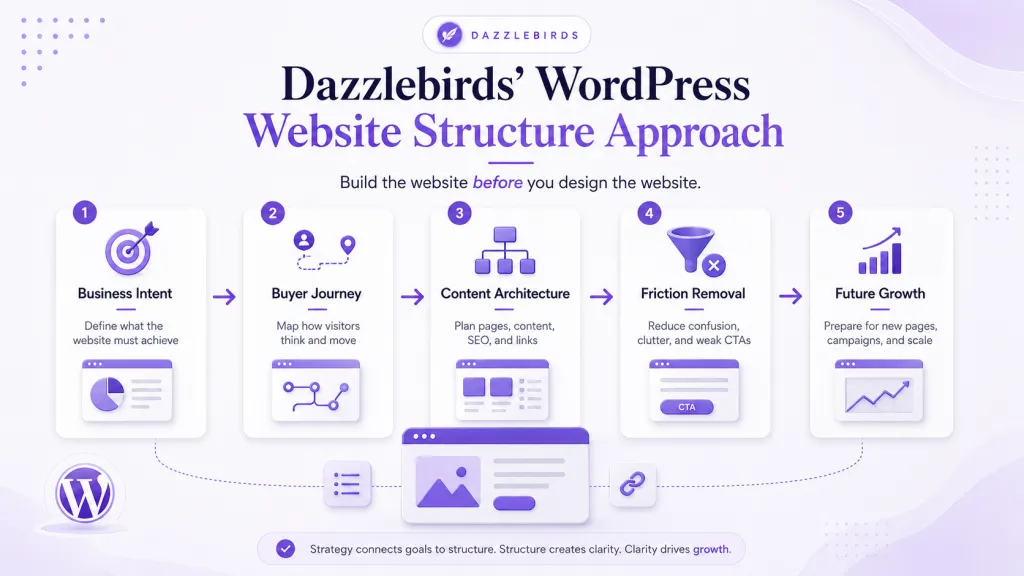
Understanding the Business Goals
The first thing we do is understand the purpose of the website and what the business wants to achieve.
We identify:
- Target audience
- Primary business objectives
- Key conversion goals
- Required functionality
- Future growth plans
This discovery phase ensures the website structure supports both the business objectives and the user experience from the outset.
Planning the Site Architecture
Before development begins, we define the overall website structure, including:
- Main navigation
- Page hierarchy
- URL structure
- Categories and taxonomies
- Internal linking strategy
A well-planned architecture makes the website easier to navigate, maintain, and expand over time.
Defining Content Requirements
We review the content that needs to be included throughout the website, such as the following:
- Core pages
- Landing pages
- Blog structure
- Product or service pages
- Resource or knowledge base sections
Planning content early helps avoid structural changes later in the project.
Planning Functionality
Every website has different functional requirements.
We identify features such as the following:
- Contact and enquiry forms
- User accounts
- E-commerce functionality
- Booking systems
- Search and filtering
- Third-party integrations
Understanding these requirements early allows the website structure to support them efficiently.
SEO and Performance Planning
Website structure plays an important role in both SEO and performance.
We review:
- URL structure
- Metadata strategy
- Internal linking
- Image optimisation
- Page speed considerations
- Schema and indexing requirements
Building these into the planning stage helps create a stronger technical foundation.
Scalability and Maintenance
We ensure the website structure is designed to support future growth by considering:
- Additional pages and sections
- New product or service offerings
- Multilingual requirements
- User permission management
- Plugin and feature expansion
A scalable structure reduces the need for major restructuring as the business evolves.
Development Roadmap
Once the planning phase is complete, we create a roadmap that includes:
- Information architecture
- Content organisation
- Feature implementation
- Integration planning
- Testing and validation
This provides a clear framework for development and helps minimize costly changes during the build.
Expected Outcome
The end result is a well-structured WordPress website that is intuitive for users, optimized for search engines, easy to manage, and flexible enough to accommodate future business growth without requiring significant architectural changes.
Simple WordPress Website Structure Example for a Business Site
Here is a clean and effective structure for a professional services or agency website.
- Homepage
- About
- Services
- Service Page 1
- Service Page 2
- Service Page 3
- Case Studies
- Blog
- FAQs
- Contact
This structure works because every page has a clear purpose. The homepage creates relevance and routes visitors. Individual service pages target specific keywords and audiences. Case studies provide proof. The blog builds authority and attracts organic traffic. FAQs handle common objections. The contact page closes the path to inquiry.
Putting everything on one page or a single long scrolling homepage removes the ability to rank for specific search terms, address specific audiences, and guide visitors through a logical decision process.
Final WordPress Website Structure Checklist
| Planning Area |
What to Decide |
Why It Matters |
| Business goal |
What must the website achieve |
Shapes every page and CTA |
| Target audience |
Who is the website for |
Determines language, content, and design |
| Core pages |
Which pages are needed |
Ensures no gaps in the user journey |
| Navigation |
What appears in the menu |
Guides users to the right pages quickly |
| Service pages |
Does each service have its own page |
Essential for SEO and conversion |
| Content structure |
What sections appear on each page |
Ensures every page is complete and focused |
| SEO keywords |
Which terms target which pages |
Builds search visibility from the start |
| CTAs |
What action does each page drive |
Converts visitors into inquiries. |
| Trust signals |
Where do testimonials and case studies appear |
Removes doubt at key decision points |
| Mobile structure |
How does the site work on smaller screens |
Covers the majority of web traffic |
| Speed and performance |
What affects load time |
Impacts SEO rankings and user experience |
| Integrations |
Which tools need to connect |
Prevents development surprises |
| Internal linking |
How do pages connect to each other |
Supports SEO and keeps users engaged |
| Tracking |
What analytics and goals are set up |
Measures performance from day one |
| Future growth |
How will the site expand over time |
Avoids a costly redesign within a year |
Final Thoughts
A strong WordPress website structure is the difference between a website that works and one that looks like it works. When the structure is clear, design becomes easier, development becomes faster, content becomes more focused, and the website becomes a genuine business tool rather than a digital brochure.
Getting the structure right before the build begins means fewer revisions, better search performance, and a website that can grow with the business.
If you are planning a new WordPress website or redesigning an existing one, Dazzlebirds can help plan the structure, user journey, SEO foundation, performance requirements, and development approach before the build begins. Start with structure. Everything else follows. contact Dazzlebirds
FAQs
WordPress website structure is the way pages, navigation, content, and internal links are organized across a website. It defines which pages exist, how they connect, what each page communicates, and how users move from one page to the next. A strong structure supports both user experience and search engine visibility.
Without a clear structure, a website struggles to rank for the right search terms, guide visitors toward conversion, or communicate the business offer clearly. Structure determines how Google reads the site and how users experience it. A poorly structured website can look good and still fail to generate inquiries or sales.
Start by defining the business goal, identifying the target audience, and planning the core pages. Create individual service pages for each offering, plan the user journey from homepage to contact, map SEO keywords to specific pages, and build internal linking between blogs, service pages, and case studies before any content is written or design begins.
Most business websites need a homepage, an about page, individual service pages, a case studies or portfolio section, a blog, an FAQs page, and a contact page. Depending on the business, location pages or industry-specific landing pages may also be needed. Each page should have a defined purpose and role in the user journey.
Website structure is the logic behind how pages are organised, connected, and experienced. Website design is how the site looks visually. Structure includes navigation, page hierarchy, content flow, internal links, and CTAs. Design includes layout, typography, colour, and imagery. Structure should be planned first because design should support the structure, not replace it.


 WooCommerce Solutions
 Solutions for WordPress