Introduction
Most WordPress websites begin the same way. A handful of pages for the core business information and a blog for posts. That setup works fine in the early days. But as a business grows, so does its content. Services multiply. Case studies pile up. New team members join. Testimonials arrive faster than anyone can format them. Locations, industries, resources, and events all start competing for space inside pages that were never designed to hold them.
This is usually the point where teams start noticing the cracks. Pages start looking duplicated. The admin area becomes a maze of similarly named entries. Marketing teams ask developers to make small changes because nothing feels flexible enough to manage on their own. At this stage, the real issue is rarely the design of the website. It is the structure underneath it. This is exactly where WordPress custom post types come in, giving growing websites a way to organize different types of content properly instead of forcing everything into generic pages or blog posts.
Quick Answer: When Does a Website Need Custom Post Types?
A website needs custom post types when it has content that repeats in a pattern. If you find yourself creating page after page that looks almost identical, just with different names, images, or details, that is a strong signal.
You likely need custom post types if your content:
- Repeats in structure, such as multiple services, team profiles, or case studies
- Needs its own fields, like project duration, client industry, or event date
- Should have a dedicated template that stays consistent across entries
- Needs to be filtered, searched, or displayed in dynamic listings
- Should be grouped using categories or taxonomies
- Is expected to grow steadily over time rather than stay static
If most of these apply to your content, a normal page is no longer the right tool. A structured content type is.
What Are Custom Post Types in WordPress?
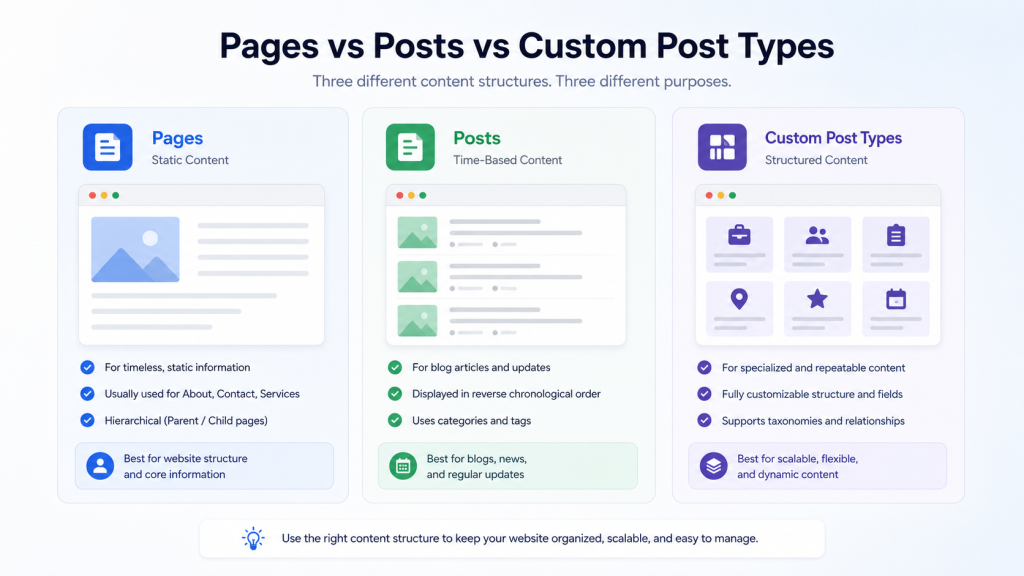
In simple terms, a custom post type is a content structure that behaves like posts and pages but is built specifically for a particular kind of content. Instead of forcing “Services” or “Case Studies” into the default Pages section, you create a dedicated section built around that content type.
The difference is not just cosmetic. Pages are meant for standalone, mostly static content, like an About page or a Contact page. Posts are meant for time-based content, typically blog articles. Neither was designed to handle repeatable business content that needs consistent formatting across dozens or hundreds of entries.
Custom post types solve this by giving each content type its own home in the admin dashboard, its own listing page, and often its own dedicated template on the front end. When paired with custom fields, they allow you to store specific structured information for each entry, such as pricing, duration, industry, or results. When paired with taxonomy, they allow you to group and filter that content in a way that actually makes sense for your business, rather than relying on default categories that were built for blog content.
This is also where a deeper understanding of WordPress website structure becomes valuable, since the way content is organized behind the scenes directly affects how manageable and scalable a website becomes.
Why Pages and Posts Are Not Always Enough
Pages and posts work well for simple websites. But once a business starts publishing structured, repeatable content, several problems tend to appear.
- Too many similar pages that all follow the same pattern with different details swapped in
- Duplicated layouts that require manual rebuilding every time new content is added
- Inconsistent formatting that creeps in over months of edits by different team members
- Difficult filtering, since blog categories were built for articles, not services or locations
- Messy navigation as more pages get added without a clear underlying system
- Poor admin workflow, especially for non-technical team members managing fifty or more pages
- Hard to scale content sections that work fine at ten pages but break down at fifty
- Limited content relationships between services, case studies, and related resources
- A weak long-term structure that eventually forces a costly website rebuild
Common Custom Post Type Examples for Business Websites
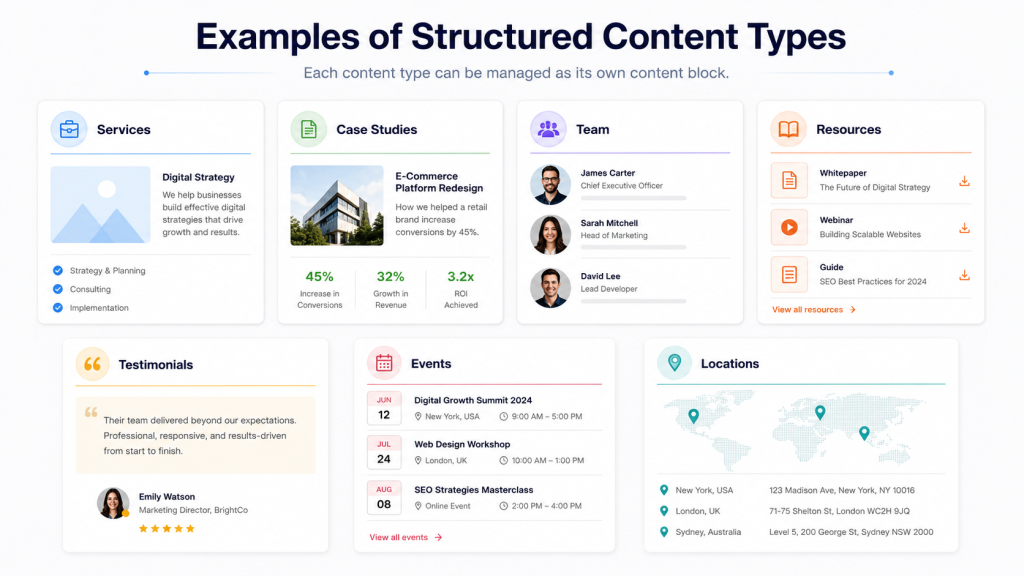
Some of the most common and genuinely useful custom post type examples we see on business websites include the following.
- Services. When a business offers multiple services, each with its own description, pricing, and process, a Services custom post type keeps everything consistent and easy to filter by category or industry.
- Case Studies. Case studies often include specific structured details like client industry, challenge, solution, and results. A dedicated content type keeps this format consistent across every entry.
- Portfolio Items. Agencies and creative businesses benefit from a portfolio type that allows filtering by project type, industry, or year.
- Team Members. Instead of manually building a page for every employee, a team custom post type allows structured profiles with photos, roles, and bios that update automatically wherever they are displayed.
- Testimonials. A dedicated testimonials type allows testimonials to be reused across multiple pages without duplicating content.
- Events. Events often need dates, locations, and registration details. A custom post type with dedicated fields handles this far better than a static page.
- Resources. Guides, downloads, or knowledge base articles benefit from their own structure, separate from regular blog posts.
- Locations. Multi-location businesses often need a location type to manage addresses, service areas, and local information consistently.
- Industries. SaaS and B2B companies serving multiple industries can use a custom post type to showcase industry-specific messaging without duplicating page templates.
- FAQs. A structured FAQ type allows reuse across multiple pages and supports better search visibility.
- Products or Solutions. Especially useful for SaaS or B2B companies that are not using WooCommerce but still need structured product or solution pages.
- Job Listings. Growing companies benefit from a Careers section that allows job postings to be added and removed without manual page editing.
When Should You Use Custom Post Types?
Custom post types make sense when the content in question is genuinely repeatable and structured.
- The content is repeatable, such as services, case studies, or team members published again and again
- The content needs its own fields that differ from a standard blog post or page
- The content needs a dedicated template that stays consistent across every entry
- The content should be searchable or filterable for visitors browsing the site
- The content needs categories or taxonomies to stay organized as it grows
- The website needs dynamic listings, such as filterable services or case studies by industry
- The business expects the content to grow steadily over the next few years
When Should You Not Use Custom Post Types?
Custom post types are useful, but they are not always necessary. Overusing them is one of the most common mistakes we see on WordPress websites.
- The content is only one or two simple pages, such as an About page or a basic Contact page
- The structure does not need to scale beyond what already exists
- There is no repeated content format that would benefit from a dedicated template
- A normal page is easier and cleaner for this specific piece of content
- The business does not need filtering, archive pages, or custom fields for this content
A good rule to remember is that custom post types solve a structural problem. If there is no structural problem to solve, they are not the right tool.
Custom Post Types vs Pages vs Posts
| Aspect |
Pages |
Posts |
Custom Post Types |
| Best Use Case |
Static, standalone content like About or Contact |
Time-based content like blog articles |
Repeatable, structured content like services or case studies |
| Structure |
Hierarchical, mostly individual |
Chronological, category-based |
Fully customizable with dedicated fields and taxonomy |
| Scalability |
Poor for repeated content |
Good for articles only |
Built specifically to scale |
| Templates |
Usually one general template |
Shared blog template |
Dedicated templates per content type |
| SEO Use |
Good for core pages |
Good for blog visibility |
Strong when paired with clean URLs and archive pages |
| Admin Management |
Simple but messy at scale |
Simple for blog content |
Organized, dedicated dashboard sections |
| Examples |
About, Contact, Home |
Blog articles, news updates |
Services, Case Studies, Team, Events, Testimonials |
How Custom Post Types Improve Website Management
Once implemented properly, custom post types noticeably change how a website feels to manage day-to-day.
- A cleaner admin experience, since each content type has its own dedicated section instead of everything sitting inside Pages
- Easier content updates, since every entry follows the same structured template
- Reusable templates that make adding a new service or case study take minutes rather than hours
- Better content consistency across every entry, regardless of who is updating it
- Less duplication, since layouts do not need to be rebuilt manually each time
- Structured content workflows that keep the admin dashboard organized as it grows
- Easier future expansion without needing to redesign the entire content section
- Better control for non-technical teams, who can update content confidently without breaking the design
How Custom Post Types Support SEO and User Experience
Custom post types can support SEO in a realistic, sustainable way, though they are not a shortcut to instant rankings.
- Clean URLs that are easier for both users and search engines to understand
- Archive pages that group related content, such as all services or all case studies, in one place
- Internal linking that becomes more logical when content types are properly connected
- Related content sections that feel genuinely relevant rather than random
- Filtered listings that help visitors find what they need faster
- Topic-based organization that supports clearer site architecture
- Schema opportunities, since structured content types make markup easier to apply accurately
- Better navigation that guides visitors naturally between related sections
- Improved content discoverability for both users and AI-powered search tools
None of this guarantees rankings, but it builds a stronger, more logical foundation that search engines can understand more easily.
What Businesses Often Get Wrong About Custom Post Types
We have seen the same mistakes repeat across many WordPress projects.
- Creating too many unnecessary custom post types for content that never needed one
- Using custom post types when a simple page would have been enough
- Ignoring taxonomies, which quickly turns a content type into an unfilterable list
- Not planning custom fields properly, leading to inconsistent data across entries
- Creating poor URL structures that confuse both visitors and search engines
- Forgetting archive pages, resulting in duplicate or unclear page paths
- Making the admin area more confusing instead of simpler
- Not planning templates in advance, leading to inconsistent front-end display
- Not considering future scalability, which forces a rebuild later
- Adding plugins without understanding their long-term impact on performance or maintainability
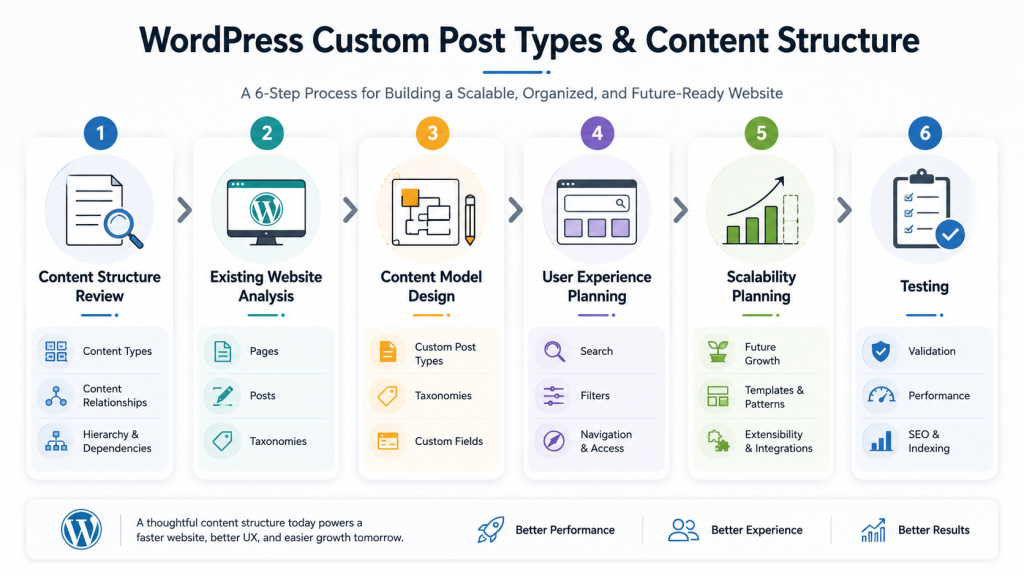
Our Technical Approach to Custom Post Types
Understanding the Content Structure
The first thing we would do is understand how the business organizes and manages its content, as standard WordPress pages and posts are not always sufficient for growing websites.
We would identify:
- The different types of content being managed
- How content is displayed across the website
- Relationships between different content types
- Filtering and search requirements
- Future content and scalability needs
This discovery phase helps determine whether Custom Post Types are the right solution and how they should be structured.
Analyzing the Existing Website
Once the content requirements are understood, we would evaluate how the current website manages its data.
We would review:
- Existing pages and posts
- Categories and taxonomies
- Custom fields
- Content duplication
- Navigation and templates
- Administrative workflows
The goal here is to identify areas where the current structure becomes difficult to manage or scale.
Designing the Content Model
We would then define a content architecture that supports the business requirements.
This may include:
- Custom Post Types
- Custom taxonomies
- Custom fields
- Content relationships
- Archive pages
- Dynamic templates
A well-designed content model makes the website easier to manage while reducing duplicated content and improving consistency.
Planning the User Experience
Beyond the backend structure, we would ensure the new content model supports a better user experience.
We would consider:
- Search and filtering
- Content organization
- Navigation
- Dynamic listings
- Related content
- SEO-friendly URLs
This ensures visitors can easily find and interact with the content they need.
Scalability and Maintainability
As the website grows, the content structure should remain easy to manage.
We would design the solution to support:
- Future content types
- Additional taxonomies
- Flexible templates
- Simple content management
- Easy expansion without major redevelopment
This provides a scalable foundation that can evolve alongside the business.
Testing and Validation
Once the content structure is implemented, we would validate the following:
- Content management workflows
- Front end display and templates
- Search and filtering functionality
- Performance and scalability
- SEO and URL structure
This ensures the new architecture works efficiently for both administrators and website visitors.
Expected Outcome
The end result would be a flexible and scalable WordPress content structure that goes beyond standard pages and posts, making it easier to manage complex content, improve user experience, and support future website growth.
How to Decide If Your Website Needs Custom Post Types
Use normal pages when your content is standalone, unlikely to repeat, and does not need filtering or its own fields, such as an About page, a Contact page, or a single Privacy Policy page.
Use blog posts when your content is time-based and editorial in nature, such as news updates, industry insights, or general articles meant to be read chronologically.
Use custom post types when your content repeats in structure, needs its own fields, benefits from a dedicated template, should be filterable or searchable, and is expected to grow steadily as the business expands.
Custom Post Types and Custom Fields: What Is the Difference?
This is one of the most common points of confusion for business owners, so it is worth explaining clearly.
A custom post type defines the type of content itself, such as Case Study, Service, or Team Member. Custom fields define the specific pieces of information stored inside that content type.
For example, a case study custom post type might include custom fields such as
- Industry
- Client type
- Project duration
- Services used
- Results achieved
- Client testimonial
The custom post type creates the container. The custom fields fill it with structured, specific details.
Custom Post Types and Taxonomies: Why Both Matter
Taxonomies work alongside custom post types to organize and filter content properly. Without taxonomy, a custom post type is just a list. With taxonomy, it becomes a filterable, searchable, and genuinely useful content library.
For example, a services custom post type might use taxonomies such as the following:
- Industry
- Technology
- Business type
- Solution category
This allows visitors to filter services based on what is actually relevant to them, rather than scrolling through an unorganized list. Used together, WordPress custom fields and taxonomy give businesses full control over how structured content is displayed, filtered, and connected across the website.
When Should You Hire a WordPress Developer?
Not every custom post type setup requires deep technical work, but certain situations genuinely call for professional involvement. Hiring a developer makes sense when:
- The structure will affect the overall website architecture
- Custom templates are needed for a polished front-end experience
- Filtering or search functionality must work reliably at scale
- SEO-friendly URLs must be planned properly from the start
- WooCommerce or third-party integrations are involved
- The admin workflow needs to remain simple for non-technical staff
- The content model must scale long-term without requiring a rebuild
If the content model needs to scale over several years, working with a team that understands custom WordPress development helps avoid costly structural mistakes later. This is also where comparing custom WordPress development vs. theme development becomes useful, since the right approach depends heavily on how complex the content structure actually is.
For businesses running online stores, structured content also connects closely with WooCommerce development services, especially when products or solutions need custom fields beyond what standard WooCommerce offers.
Final Thoughts
A clean content structure is not just a technical detail. It directly affects how easily a business can manage, scale, and improve its website over time. WordPress custom post types are not simply a developer feature tucked away in the backend. They represent a real website architecture decision that shapes how content grows, how teams manage it, and how visitors experience it.
Businesses that plan this structure early tend to avoid the messy rebuilds, confusing admin panels, and inconsistent pages that come from forcing everything into standard pages and posts. If your website has reached the point where services, case studies, testimonials, or resources feel harder to manage than they should, it may be time to rethink the structure behind it.
At Dazzlebirds, we have worked directly with growing businesses to plan and build WordPress structures that hold up over time, not just for launch day. If you are exploring custom WordPress development services or want to understand our WordPress development process in more detail, we are happy to talk through what your website actually needs.
FAQs
WordPress custom post types are content structures separate from default pages and posts, built specifically for repeatable content such as services, case studies, team members, or events. They allow structured fields, dedicated templates, and organized taxonomy.
You should use them when content repeats in structure, needs its own fields, requires a dedicated template, or needs to be filtered, searched, or displayed in dynamic listings across the website.
Pages are for standalone static content. Posts are for time-based blog content. Custom post types are for structured, repeatable content that needs its own fields, templates, and organization.
Custom post types can support SEO through clean URLs, organized archive pages, and stronger internal linking, but they do not guarantee rankings on their own. They work best as part of a properly planned content strategy.
Not always, but most business use cases benefit from them. Custom fields allow each entry within a custom post type to store specific structured information, such as project details, pricing, or event dates.


 WooCommerce Solutions
 Solutions for WordPress