Introduction
Most WordPress websites do not turn messy overnight. It happens slowly. A service page gets copied and edited by hand. A case study gets written slightly differently than the last one. A team member’s profile is added without following the same format as everyone else. A CTA block gets tweaked on one page and forgotten on the rest.
None of these individual changes seem like a problem at the time. But after a year or two of growth, the website starts showing cracks. Pages look inconsistent. Updating one detail means hunting through ten different pages. Small edits start breaking layouts that used to work fine.
This is usually the point where a business realizes that normal WordPress fields, the title, the editor, the featured image, were never designed to hold repeatable, structured information. That is where WordPress custom fields come in. They give a website a proper place to store information that repeats across pages, so content stays consistent and easier to manage as the site grows.
Quick Answer: What Are WordPress Custom Fields?
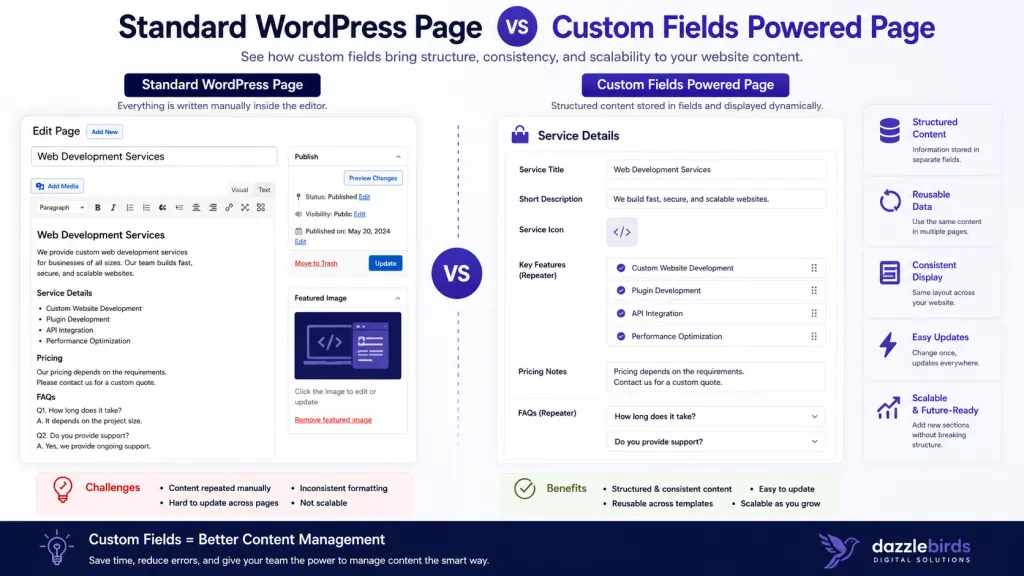
Custom fields let a WordPress website store specific pieces of information separately from the main content editor. Instead of typing a client’s industry, project duration, or results directly into a paragraph, that information lives in its own field and can be pulled into a template wherever it is needed.
Think of it this way. The content editor is where you tell the story. Custom fields are where you store the facts. When the facts live in their own structure, they can be reused, displayed consistently, and updated without touching the layout.
Why Normal WordPress Fields Become Limiting as a Website Grows
A brand new WordPress website rarely has this problem. A handful of pages, a blog, maybe a couple of service pages. Editing directly inside the content area works fine because there is nothing to compare against.
The trouble starts once a business scales its content. A marketing team publishing its tenth case study realizes the format has drifted from the first one. Results are listed differently. The industry tag is sometimes bold, sometimes not. One agency page lists a project duration in months, another in weeks.
Service pages run into a similar issue. Pricing notes, FAQs, icons, and CTA blocks end up being formatted slightly differently on each page because every one of them was built by editing the previous page and changing the text. Small formatting choices pile up until the site feels inconsistent even though every page was technically edited correctly.
Team pages, event pages, and location pages have the same pattern. Role, department, and social links get typed in manually. Event dates and venues are added inside a paragraph rather than a structured field. Address, phone number, and opening hours for a location page get formatted differently depending on who updated it last.
None of this is a mistake by the content team. It is simply what happens when structured information is stored inside free-form content areas. WordPress custom fields solve this by giving each piece of repeatable information its own dedicated place, separate from the layout.
What Can You Manage with Custom Fields?
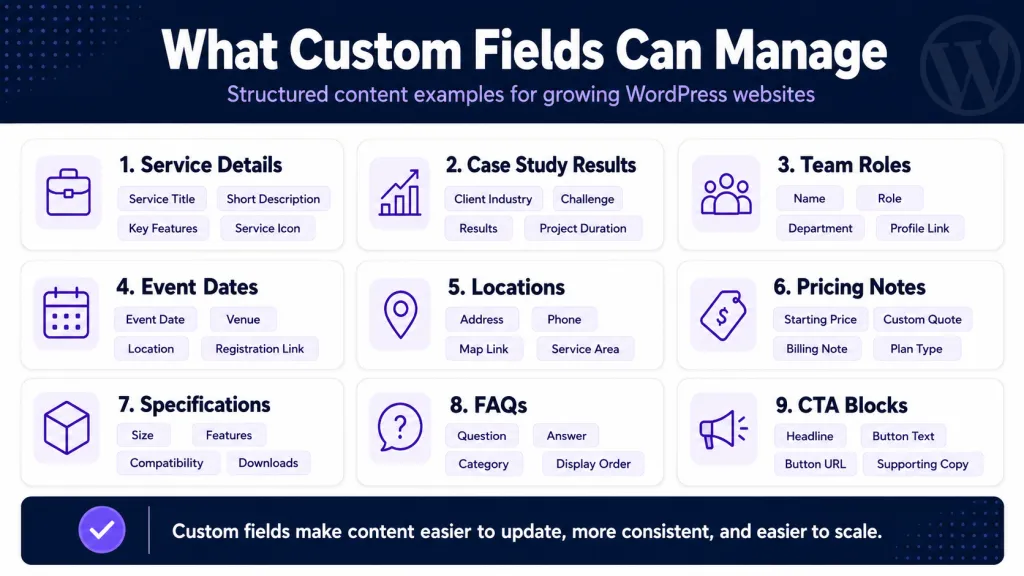
Here is where custom fields actually earn their place on a growing website and why storing this information as a field beats typing it into every page by hand.
Service highlights. Instead of writing bullet points directly into page content, service highlights can be stored as repeatable fields and displayed the same way across every service page.
Case study results. Numbers, outcomes, and metrics are easy to compare and update when they live in their own fields rather than buried inside a paragraph.
Client industry. Storing industry as a field allows it to be filtered, tagged, or displayed consistently across a case study archive.
Project duration. A simple field prevents formatting drift between “3 months” on one page and “12 weeks” on another.
Team member role. Role, department, and bio fields keep every profile on a team page looking and behaving the same way, no matter who adds the next one.
Event date and location. Structured date and venue fields prevent inconsistent formatting and make it possible to sort or filter events automatically.
Testimonial author details. Name, company, and photo fields keep testimonials looking uniform, even when new ones are added regularly.
Product specifications. Technical details stay organized and comparable when they are not written as unstructured paragraphs.
Location details. Address, map link, phone number, and hours stay accurate and consistent across every location page.
Pricing notes. A dedicated field avoids pricing information being buried inside marketing copy where it is easy to miss or forget to update.
FAQs. Repeater fields allow FAQs to be added or removed without touching the page layout at all.
CTA blocks. A reusable CTA field means the same call to action can be updated once and reflected everywhere it appears.
Resource details. Guides, PDFs, categories, and download links stay organized in a resource library instead of scattered across unrelated pages.
WordPress Custom Fields vs Normal Page Content
| Aspect |
Normal Page Content |
Custom Fields |
| Purpose |
Flexible storytelling and narrative |
Repeatable, structured information |
| Editing experience |
Free form, easy to format inconsistently |
Guided, structured input |
| Consistency |
Depends on the editor’s memory |
Built into the field structure |
| Scalability |
Gets harder to manage at volume |
Designed for growth |
| Template control |
Limited, tied to how it was typed |
Strong, content pulls into templates |
| Risk of mistakes |
Higher with manual formatting |
Lower with structured input |
| Best use case |
Blog posts, long-form pages, storytelling |
Case studies, service pages, team pages, events, locations |
| Examples |
About page narrative, blog articles |
Pricing notes, FAQs, testimonials, specs |
Normal page content is still the right choice for storytelling, opinion pieces, and anything that benefits from a flexible, narrative structure. Custom fields take over where information needs to repeat accurately across many pages.
How Custom Fields Improve Content Management for Business Teams
For marketing managers and content teams, the biggest benefit is speed without sacrificing consistency. Updates to a pricing note or a phone number happen in one field, not across a dozen pages.
Admin screens also become cleaner. Instead of scrolling through a long page builder layout trying to find the right text block, editors see clearly labeled fields for exactly what needs updating.
This reduces manual formatting mistakes significantly. Because templates control how the content is displayed, editors cannot accidentally break a layout by pasting in the wrong font size or spacing.
It also simplifies handoff between developers and content teams. A well-structured set of custom fields means a developer builds the template once, and from that point forward, the content team can manage updates independently, without needing a developer for every small change.
Custom Fields and Custom Post Types: How They Work Together
Custom post types and custom fields solve two different problems, and they work best together. A custom post type defines what kind of content something is. Custom fields define the specific information stored inside that content type.
For example, a “Case Study” custom post type might use fields for client industry, challenge, solution, results, project duration, services used, and testimonial. The post type gives the content its own section in the admin area. The fields give it structure.
If your team is exploring how content types are organized on a growing site, our earlier piece on WordPress custom post types covers that side of the architecture in more depth.
Custom Fields and Dynamic Content
Once information lives in structured fields, it can be displayed anywhere the template calls for it. The same field can show up on a single page, inside an archive listing, and inside a related content section, without retyping anything.
This is how service cards, case study cards, team cards, event cards, and location cards stay visually consistent even as new entries are added. The design does not change from card to card because the template controls the layout, and the fields control the content inside it.
For business teams, this means front-end pages stay stable and on-brand even when non-technical staff are the ones adding new entries. It also reduces the amount of manual page design work required for every new piece of content.
Advanced Custom Fields WordPress: Where ACF Fits In
Advanced Custom Fields Advanced Custom Fields (ACF), commonly shortened to ACF WordPress, is one of the most widely used plugins for building custom fields without writing custom database code for every field type. It supports text fields, image fields, repeater fields, flexible content fields, relationship fields, conditional fields, and grouped fields.
ACF makes it easier to build structured content models quickly. But it is worth being clear about something we see often on client projects. Poorly planned ACF setups can make the admin area harder to use, not easier. Fields added without a clear content model tend to pile up over time, confusing editors rather than helping them. Careful setup, done with the actual content model in mind, is what makes ACF genuinely useful long-term.
When Should You Use Custom Fields?
Custom fields make sense when the same type of information appears repeatedly, when content needs a consistent structure, when editors need a simpler workflow, when templates should pull data dynamically, when content needs to scale, when the business wants fewer layout mistakes, when different content types need different fields, or when the same information needs to appear in more than one place.
When Should You Not Use Custom Fields?
Not every piece of content needs a custom field. Skip them when content is only needed once, when normal page editing is simpler for the task, when the website does not need structured content at all, when adding fields would create unnecessary admin complexity, when there is no clear content model yet, when the field will never be reused, or when a simple page section already does the job well.
Adding structure where it is not needed creates its own kind of technical debt. The goal is a clean content model, not fields for the sake of fields.
What Businesses Often Get Wrong About Custom Fields
We have seen this pattern repeat across projects. Fields get added one at a time, whenever a new need comes up, without any planning behind them. Over time, this creates confusing admin screens where editors are not sure which field controls what.
Other common mistakes include designing fields before the templates are planned, using repeater fields everywhere without thinking about performance or ease of use, mixing page builder content with structured fields in a way that creates conflicts, and building flexible content sections without a clear plan for how they will be used.
Mobile layout impact is often overlooked too. A field structure that looks fine on desktop can break badly on smaller screens if it was not tested properly. SEO visibility is another blind spot. Some field setups hide important content from search engines because it is rendered in a way crawlers cannot read easily.
We also see plugins configured without long-term maintainability in mind, fields that are too technical for the people who actually use them daily, and editing workflows that were never tested before launch. Every one of these issues is avoidable with proper planning before fields are built.
Our Technical Approach to WordPress Custom Fields
Understanding the Content Requirements
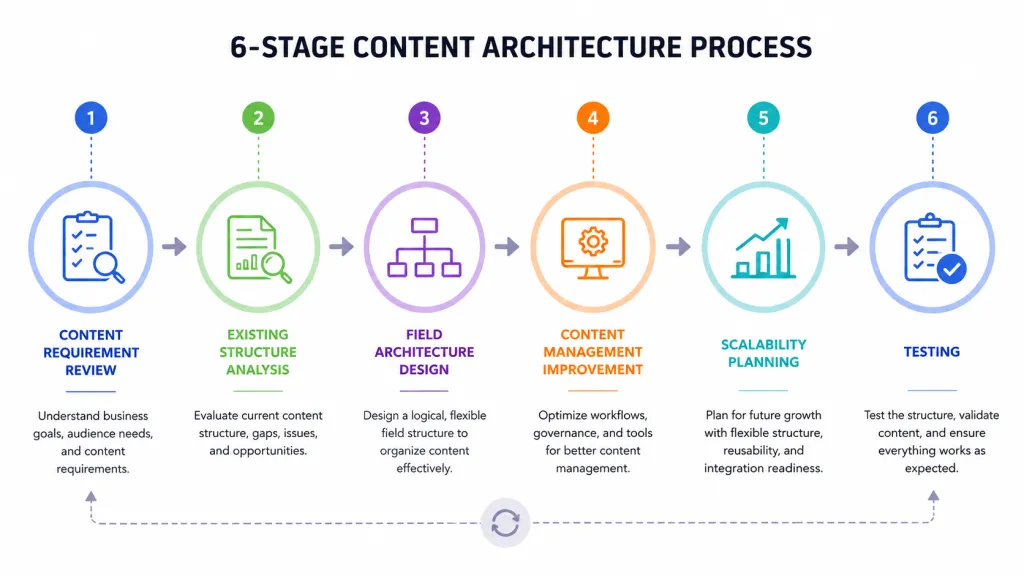
The first thing we would do is understand how the business manages its content and identify where standard WordPress fields are no longer sufficient.
We would identify:
- The types of content being managed
- Repetitive content structures
- Information that requires structured data
- Content editing workflows
- Future content requirements
This discovery phase helps determine where custom fields can simplify content management and improve consistency.
Analyzing the Existing Content Structure
Once the requirements are understood, we would evaluate how the current website stores and manages its content.
We would review:
- Pages and posts
- Existing custom fields
- Content duplication
- Page templates
- Data relationships
- Administrative workflows
The goal here is to identify opportunities to replace manual editing with structured, reusable content fields.
Designing the Custom Field Structure
Based on the findings, we would define a custom field architecture that supports the website’s requirements.
This may include:
- Text and media fields
- Repeater fields
- Flexible content sections
- Relationship fields
- Conditional fields
- Grouped content fields
A well-designed field structure makes content easier to manage while reducing editing errors and inconsistencies.
Improving the Content Management Experience
Custom fields should simplify the editing experience for website administrators.
We would focus on:
- User-friendly editing interfaces
- Consistent content layouts
- Reduced manual formatting
- Reusable content structures
- Better content organization
- Simplified ongoing maintenance
This allows content to be updated quickly without requiring technical knowledge.
Scalability and Flexibility
As the website grows, the content model should remain flexible.
We would ensure the custom field structure can support:
- New page templates
- Additional content types
- Future functionality
- Dynamic content displays
- Third-party integrations
This creates a scalable content management system that can evolve with the business.
Testing and Validation
Once the custom fields are implemented, we would validate the following:
- Content editing workflows
- Front-end content display
- Template compatibility
- Performance and scalability
- Ease of use for administrators
This ensures the new structure improves both the editing experience and the overall website functionality.
Expected Outcome
The end result would be a structured and intuitive content management system that makes website updates faster, reduces manual effort, improves consistency, and provides a scalable foundation for managing content as the website continues to grow.
How to Decide If Your Website Needs Custom Fields
Use normal page content when the page tells a story, when the layout is flexible, and when the content will not be reused elsewhere.
Use custom fields when information repeats across multiple pages, when consistency matters, and when non-technical editors need a simpler way to update specific details.
Use custom post types with custom fields when an entire category of content, like case studies, team members, events, or locations, needs both its own section in the admin area and a consistent internal structure.
Do Custom Fields Help SEO?
Custom fields do not automatically improve search rankings. That is worth saying clearly, because it is a common misconception.
What they do support is the foundation good SEO depends on. Cleaner templates, structured content, reusable page sections, better internal linking, consistent metadata handling, and a smoother user experience all benefit from a well-built custom field structure. Search engines reward pages that are well organized, load cleanly, and give users what they are looking for quickly. Custom fields help build that kind of page. They are not a shortcut to rankings on their own.
Good structure also tends to improve content discoverability, since organized data is easier to connect across related pages, archives, and internal links, which supports a stronger overall WordPress structured content strategy. If you want to understand how this connects to the bigger picture of a site’s architecture, our article on WordPress website structure covers that in detail.
When Should You Hire a WordPress Developer?
Hiring a developer makes sense once custom fields start affecting templates, once fields need to display dynamically across the site, once the website uses custom post types, once ACF or a similar tool needs proper setup, once SEO structure is part of the conversation, once WooCommerce or third-party integrations are involved, once the site needs a scalable content management approach, or once non-technical teams need a genuinely clean editing workflow.
At this stage, the work moves beyond simple field creation into proper custom WordPress development, where templates, data structure, and long-term maintainability all need to work together. If you are weighing your options here, it is also worth understanding the difference between custom WordPress development vs. theme development before committing to a direction.
Final Thoughts
WordPress custom fields are not just a technical feature buried in the admin area. They are a content management decision that affects how a business updates its website every single day. When planned properly, they help teams manage structured information faster, reduce repeated manual work, keep pages consistent, and build a site that stays manageable as it grows, rather than one that becomes harder to maintain with every new page.
If your website has reached the point where updates feel repetitive, inconsistent, or slower than they should be, it may be time to look at how the content is structured behind the scenes. Our team at Dazzlebirds has worked through this exact problem on real business websites, and we are happy to talk through what a cleaner content model could look like for yours. You can also explore our professional WordPress web development services or learn more about our WordPress development process if you want to see how we approach projects like this from the ground up. For teams ready to move forward, our custom WordPress development services page is a good next step.
FAQs
WordPress custom fields are a way to store specific pieces of information, like pricing, dates, or specifications, separately from the main content editor, so that information can be reused and displayed consistently across templates.
They are used to manage repeatable information such as service details, case study results, team member roles, event dates, location details, testimonials, and pricing notes, without editing that content manually on every page.
A custom post type defines a category of content, such as case studies or team members. Custom fields define the specific pieces of information stored inside that content type, such as results, role, or bio.
Custom fields do not directly improve rankings on their own. They support SEO indirectly by enabling cleaner templates, structured content, and a better user experience, all of which search engines reward over time.
Advanced Custom Fields, or ACF, is a widely used plugin that makes it easier to build and manage custom fields, including text, image, repeater, and relationship fields, without writing custom code for every field type.


 WooCommerce Solutions
 Solutions for WordPress