Introduction
Most WordPress websites start simple. A handful of blog posts, a few categories, some tags thrown in almost as an afterthought. That setup works fine in the early stages. But once a business website grows, once there are dozens of services, case studies, resources, locations, or products to manage, that basic system starts to break down.
We have seen this pattern repeat across service businesses, SaaS teams, e-commerce stores, and agencies. Categories get reused for things they were never meant to organize. Tags turn into a messy list of random keywords. Content that should be easy to find becomes buried three clicks deep, or worse, duplicated across pages because there was no clean way to group it.
This is where WordPress taxonomies come in. Not as a technical add-on, but as the actual structure that decides whether visitors can find what they came for and whether your team can manage the site without dreading every content update. When users cannot find information and admins cannot manage content confidently, organization stops being a nice-to-have. It becomes a business problem.
Quick Answer: What Are WordPress Taxonomies?
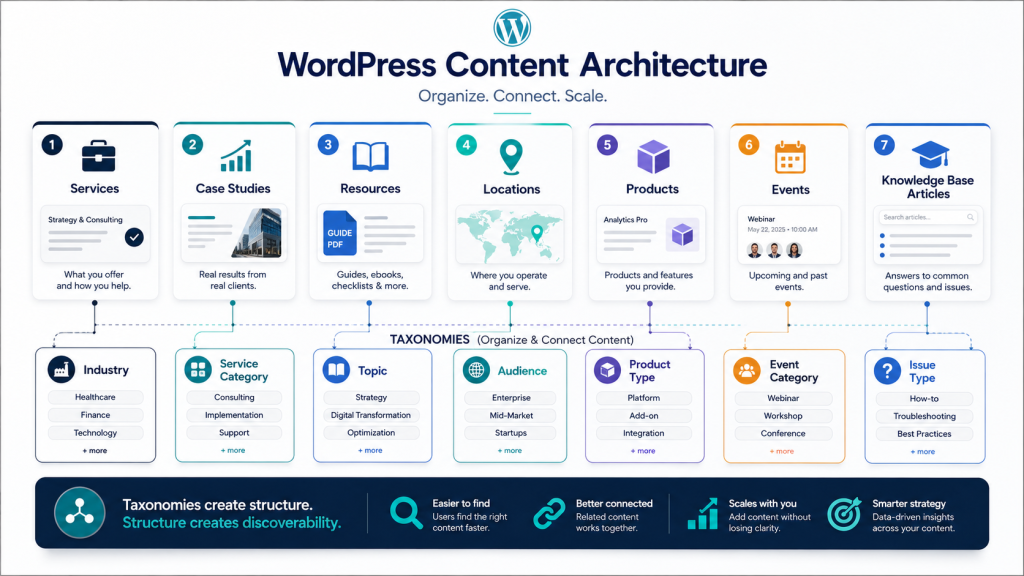
Taxonomies are the system WordPress uses to group and classify content so it can be filtered, browsed, and connected in meaningful ways. Categories and tags are the two taxonomies WordPress ships with by default, but they were built for blog content, not for organizing services, case studies, resources, product lines, or locations.
Once a website grows past basic blogging, most businesses need custom taxonomies, purpose-built groupings such as industry, service type, location, resource format, or project category, that match how their content actually works and how their visitors actually search for it.
Why Categories and Tags Are Not Always Enough
Categories and tags were designed for a simple blog structure. They hold up fine when a website only has posts to sort. They start to fall apart the moment a business site grows in a few directions at once.
Real website problems start showing up when:
- Content grows beyond blog posts into services, case studies, resources, or products
- Service pages need better grouping by industry, solution, or business type
- Case studies need filtering by multiple dimensions such as industry, service type, or result achieved
- Resources need topic, format, or audience filters that a single category list cannot handle
- Locations need city, region, or service area grouping without creating a flat, unusable list
- Users need multiple browsing paths to find what they need, not just one category structure
- Admins spend time managing overlapping categories because the same grouping means different things in different contexts
- Archive pages become messy, duplicated, or so thin they serve no real purpose
- SEO structure becomes unclear because category pages lack distinct content focus
A service business might try to use categories to group services by industry, then also try to use the same categories to separate blog topics. The result is a category list that means something different depending on which page you are looking at.
A case study library often runs into the same wall. If a business wants to filter projects by industry, by service delivered, and by result achieved, a single flat category list cannot handle three different filtering dimensions at the same time.
In each case, the underlying issue is the same. As content grows, archive pages built on default categories and tags start overlapping, duplicating, or thinning out, and the site loses a clear structure for both SEO and user browsing.
What Can You Organize with Custom Taxonomies?
This is where custom taxonomies in WordPress earn their place. A few examples we have worked with directly:
Services grouped by industry. Instead of one long services list, visitors can filter by the industry they belong to, which shortens their path to the right service page. A manufacturing business can show different services than a healthcare provider, even if both use the same core service offering.
Case studies grouped by service, result, or technology. A prospective client browsing case studies usually wants proof relevant to their situation, not a random scroll through every project the company has done. Multiple taxonomy filters let them narrow by what they need proof of.
Resources grouped by topic, format, or audience. A resource center becomes genuinely useful when a visitor can filter by what they need to learn and how they prefer to learn it, rather than scrolling an unsorted blog feed. Topic, format (guide, video, podcast), and audience level (beginner, intermediate, advanced) all matter equally.
Locations grouped by region or city. For multi-location businesses, this creates clean, purpose-built location pages instead of one category dumping everything together. It also makes filtering by service area or region far more intuitive.
Products grouped by type, feature, or use case. WooCommerce stores benefit heavily here, since shoppers browse by what a product does, not by an internal naming convention.
Team members grouped by department. Useful for larger organizations where an about page needs to be filterable rather than one long list.
Events grouped by category or location. Helps visitors self-select the events relevant to them instead of scanning an entire calendar.
Knowledge base articles grouped by issue type. Support content becomes searchable and scannable rather than a flat list of articles in no particular order.
Solutions grouped by business need. Common on SaaS sites where the same product solves different problems for different buyer types.
Portfolios grouped by project type. Lets visitors self-filter into the kind of work most relevant to their own project.
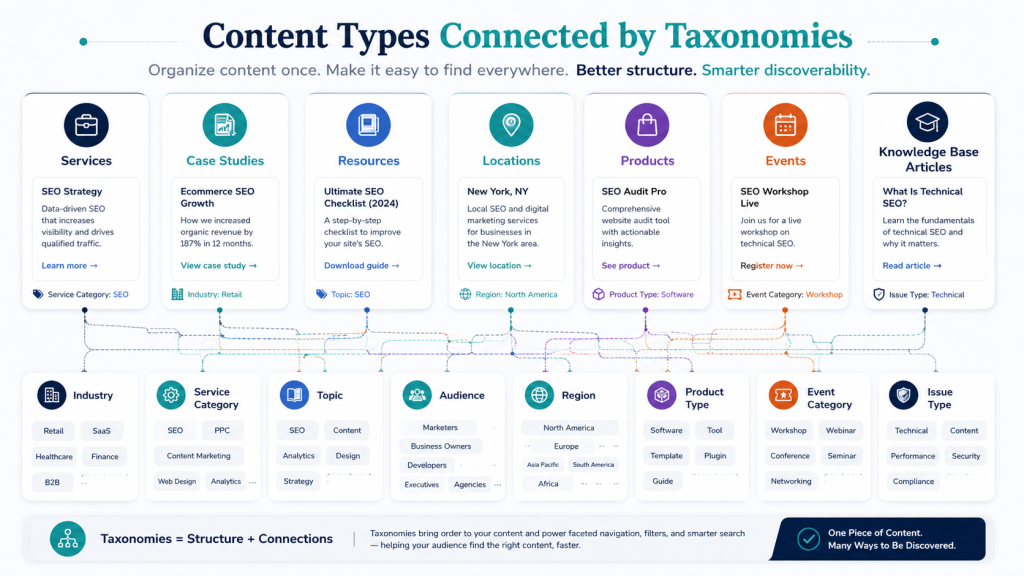
In every one of these examples, a custom taxonomy does something a manually built page or a generic category cannot. It creates a reusable, filterable, scalable relationship between content, rather than a one-off link that needs to be manually maintained every time new content is added.
WordPress Taxonomies vs Categories vs Tags
Categories and tags are technically both taxonomies. The difference is that custom taxonomies give growing websites far more control over how content is grouped, filtered, and discovered. Here is how they compare across the areas that actually matter for a business site:
| Aspect |
Categories |
Tags |
Custom Taxonomies |
| Purpose |
Organize broad topics |
Describe specific details |
Classify by business logic (industry, location, type) |
| Structure |
Can be hierarchical |
Flat, no hierarchy |
Can be hierarchical or flat |
| Best use case |
Blog sections |
Loosely related keywords |
Services, case studies, resources, products |
| Hierarchy |
Yes, parent and child |
No hierarchy |
Yes or no, built to match content |
| Filtering value |
Basic filtering |
Very limited |
Strong, purposeful filtering |
| SEO value |
Useful if planned well |
Often create thin pages |
Can support clean archive pages |
| Examples |
News, Guides |
WordPress, SEO |
Industry, Service Type, Location, Format |
How Taxonomies Improve Website Navigation and Filtering
A well-planned taxonomy structure changes how visitors move through a site. Instead of relying on a single navigation menu, visitors get:
- Filtered case study libraries where prospects can find relevant projects
- Resource hubs organized by topic and format so learners find what they need faster
- Location finders that show services available in their specific area
- Service group pages that connect logically to related offerings
- Related content sections powered by taxonomy connections
- Topic-based archives that feel purposeful, not like a random collection
- Industry-specific paths through the site that shorten decision journeys
This matters most in the moments where a visitor is trying to narrow down their options. A buyer comparing case studies wants to filter by their industry. A reader in a resource center wants to filter by their experience level. A shopper in a WooCommerce store wants to filter by product type or use case. Taxonomies are what make that filtering possible without hand-building a separate page for every combination.
They also keep visitors engaged longer and reduce the number of dead ends they hit while searching for information.
How Taxonomies Support SEO and Internal Linking
It needs to be said clearly. WordPress taxonomies do not automatically improve rankings just by existing. What they can do, when planned with intent, is support a stronger overall site architecture.
Taxonomy archive pages can support SEO by:
- Creating useful, topic-focused landing pages
- Producing cleaner URL paths and site structure
- Supporting stronger topical grouping and content relationships
- Enabling better internal linking between related pieces of content
- Improving how easily both users and search engines discover related material
- Creating a clear content hierarchy that search engines can understand
The caution here matters just as much as the benefit. Do not create taxonomy archive pages unless they serve a real user and SEO purpose. Empty, thin, duplicate, or poorly planned archive pages can actively weaken a site rather than help it. Before building out a taxonomy, it is worth reviewing your overall WordPress website structure to see whether new archive pages will genuinely add value or simply add clutter.
Custom Post Types, Custom Fields, and Taxonomies: How They Work Together
These three pieces of WordPress content architecture work as a set, not in isolation.
- Custom post types define what kind of content the website manages (such as services, case studies, or team members)
- Custom fields define the specific details inside each piece of content (such as client industry, project duration, or services used)
- Taxonomies define how that content is grouped, filtered, and discovered across the site
A practical example makes this clear. A case study custom post type might use custom fields to store client industry, project duration, services used, and results achieved. That same custom post type might use taxonomies for industry, service category, technology used, or project type, allowing visitors to filter the entire case study library by any of those dimensions.
This is the same logic we cover in our detailed guides on WordPress custom post types and WordPress custom fields. Taxonomies are the missing third piece that turns individual pieces of content into a genuinely browsable, filterable library. Understanding how these three systems work together is foundational to building content that scales.
When Should You Use Custom Taxonomies?
Custom taxonomies earn their place when:
- The same groupings apply across many content items
- Users clearly need filters or browsing paths to find what they need
- Content needs dedicated archive pages
- The site already uses custom post types that need structured classification
- Categories and tags have become messy or overloaded
- Content naturally groups by industry, location, service, product type, or audience
- The business expects meaningful content growth in the near future
- Internal linking needs a clearer, more purposeful structure to support discovery
If you recognize several of these signals on your site, custom taxonomies are probably worth building properly rather than continuing to stretch the default category and tag system beyond what it was designed for.
When Should You Not Use Custom Taxonomies?
Just as important is knowing when to leave taxonomies alone:
- There are only a handful of content items
- Normal categories handle the grouping well enough
- A grouping will not be reused across multiple pieces of content
- No archive page or filtering functionality is planned
- The team has no clear content model in place yet
- The taxonomy would add complexity without adding user value
- It would create thin or duplicate archive pages
- Admin confusion would increase rather than decrease
We have also seen teams build taxonomies before they had a clear content model in place. That almost always leads to admin confusion, thin or duplicate archive pages, and a structure that needs to be rebuilt later anyway. It is usually better to wait until the content model is settled than to force a taxonomy onto content that is still changing shape.
What Businesses Often Get Wrong About Taxonomies
A few patterns show up repeatedly on live business websites:
- Creating too many categories and tags without a clear system behind them
- Mixing blog categories with business content groups, confusing both visitors and admins
- Using tags like a random list of keywords instead of a structured classification
- Building taxonomy archive pages with little or no useful content behind them
- Skipping URL planning before implementation, then struggling to reorganize later
- Never connecting taxonomies back to actual user journeys and search behavior
- Building filters without testing them against real content and real user scenarios
- Making admin workflows more confusing instead of simpler
- Missing internal linking opportunities between related content
- Overlooking redirects entirely when a site is restructured, quietly damaging SEO
- Assuming a taxonomy will improve search rankings without actually designing archive pages for real search intent
Our Technical Approach to WordPress Taxonomies
Understanding the Content Organization
The first thing we would do is understand how the website’s content is currently organized and whether categories and tags are sufficient for the business requirements.
We would identify:
- Different types of content currently on the site
- How users browse and search for information
- Existing categories and tags and how they are being used
- Relationships between different pieces of content
- Future content growth plans and expansion direction
This discovery phase helps determine where custom taxonomies can improve organization and navigation.
Analyzing the Existing Structure
Once the content requirements are understood, we would evaluate how the current website manages its content.
We would review:
- Current categories and tags in use
- Custom Post Types already implemented
- Navigation structure and how visitors move through the site
- Search and filtering functionality
- Existing archive pages and their performance
- Internal linking patterns and opportunities
The goal here is to identify areas where the current structure becomes difficult to manage or scale.
Designing the Taxonomy Structure
Based on the findings, we would define a taxonomy strategy that supports both administrators and website visitors.
This may include:
- Custom taxonomies matched to business logic
- Hierarchical content organization where it makes sense
- Product or content classifications that match user behavior
- Industry or location groupings that reflect how visitors search
- Content relationships and cross-linking possibilities
- SEO-friendly archive structures built for real search intent
A well-planned taxonomy system makes content easier to organize, maintain, and discover.
Improving User Experience
A structured taxonomy benefits more than just content management.
We would ensure it supports:
- Better navigation and clearer browsing paths
- Advanced search and filtering capabilities
- Related content sections that connect logically
- Clear content hierarchy that users can understand
- Improved user journeys from discovery to decision
- Easier content discovery without dead ends or frustration
This helps visitors find relevant information more quickly while improving the overall browsing experience.
Scalability and Maintainability
As the website grows, the content organization should remain flexible and manageable.
We would design the taxonomy structure to support:
- Additional content types added in the future
- New classifications as the business evolves
- Expanding product or content libraries
- Future integrations with tools and platforms
- Simplified content management for your team
This creates a scalable framework that can evolve without requiring major structural changes.
Testing and Validation
Once the taxonomy structure is implemented, we would validate the following:
- Content organization makes sense to actual users
- Navigation and filtering work as intended
- Archive page functionality is clean and useful
- SEO and URL structure support search visibility
- Administrative workflows are simpler, not more complex
This ensures the taxonomy system is intuitive for both users and content managers.
Expected Outcome
The end result would be a well-organized WordPress content structure that goes beyond standard categories and tags, making content easier to manage, improving navigation and search, and providing a scalable foundation as the website continues to grow.

How to Decide If Your Website Needs Custom Taxonomies?
Use normal categories when:
- Content fits neatly into a small number of broad, stable topics
- Categories rarely need cross filtering or multiple browsing dimensions
- A simple blog structure is all the site requires
Use tags when:
- You need to describe loosely related details within content
- Tags do not need dedicated archive pages or filtering functionality
- Content is supplementary rather than core to the user journey
Use custom taxonomies when:
- Content needs to be filtered across multiple dimensions
- The same grouping logic applies to many items
- Archive pages and filtering are core to the user experience
- The website is expected to keep growing in scope and volume
When Should You Hire a WordPress Developer?
Some taxonomy decisions are simple enough to handle internally. Others affect the entire site architecture and are worth bringing in outside expertise for.
It is worth hiring a developer when:
- The taxonomy structure affects broader site architecture
- Custom post types are involved in the content model
- Archive pages need proper SEO planning rather than default settings
- Filtering or search functionality needs custom development
- URL changes will require proper redirect setup
- WooCommerce or other third-party integrations are involved
- You need to keep admin workflows simple while supporting scalable growth
Keeping admin workflows simple while still supporting scalable content organization is exactly the kind of balance that experienced custom WordPress development helps get right the first time, rather than needing a rebuild later. If your team is planning a larger restructure, it is also worth reviewing your overall WordPress development process so taxonomy changes are handled alongside proper staging, backups, and testing, not as an isolated, last-minute change.
Final Thoughts
Taxonomies are not just labels sitting in the background of a WordPress site. They are part of the actual content architecture, quietly deciding whether visitors find what they are looking for and whether your team can manage growing content without constant friction.
When they are planned with real content and real user behavior in mind, WordPress taxonomies help visitors move through a site faster, help admins manage content with far less confusion, and give the website room to grow without turning into a tangled mess of categories and tags.
If your WordPress site has outgrown its current organization system, it is worth taking a proper look at the structure before adding more content on top of it. Our team at Dazzlebirds works through this kind of content architecture planning regularly. If you would like a second opinion on your current setup or need help planning a taxonomy restructure, our custom WordPress development services can help you build a content organization system that actually scales with your business.
FAQs
WordPress custom fields are a way to store specific pieces of information, like pricing, dates, or specifications, separately from the main content editor, so that information can be reused and displayed consistently across templates.
They are used to manage repeatable information such as service details, case study results, team member roles, event dates, location details, testimonials, and pricing notes, without editing that content manually on every page.
A custom post type defines a category of content, such as case studies or team members. Custom fields define the specific pieces of information stored inside that content type, such as results, role, or bio.
Custom fields do not directly improve rankings on their own. They support SEO indirectly by enabling cleaner templates, structured content, and a better user experience, all of which search engines reward over time.
If the fields need to connect to templates, display dynamically, work with custom post types, or support long term scalability, working with a developer helps avoid a messy setup that becomes difficult to maintain later.


 WooCommerce Solutions
 Solutions for WordPress