A buyer lands on a B2B storefront, finds the products they need, and adds them to the cart. Then the checkout button stops being useful. Maybe the order is large enough that the listed price isn’t the real price. Maybe availability needs to be confirmed before anyone commits to a number. Maybe the buyer has a contract with negotiated terms, a delivery window that doesn’t match standard shipping, or a purchasing department that won’t sign off on anything without a formal document to review first.
This is the point where a lot of B2B stores quietly fail their buyers. The catalog works, the cart works, but the moment a purchase needs a conversation instead of a transaction, there’s no clear next step.
That’s the real question behind this article: when should a buyer complete a purchase through standard checkout, and when should the process start with a quote instead? Getting this decision right, and building a WooCommerce request a quote workflow that supports it, is what separates a “Request a Quote” button that looks good on a page from one that actually moves revenue.
A WooCommerce request a quote workflow is a structured process that lets a buyer submit product and quantity details for pricing review instead of paying a fixed listed price at checkout. The store validates the customer, reviews pricing and availability, issues a formal quote, and converts it into a WooCommerce order once the buyer accepts the terms.
Checkout or Quote? Choosing the Right Buying Path
Not every B2B transaction should go through the same door. A store that forces every buyer into a quote request, even for small, standard, in-stock purchases, adds friction that has no business being there. A store that forces every buyer through standard checkout, even for high-volume or negotiated purchases, ends up with mispriced orders, angry account managers, and a support inbox full of “this isn’t what we agreed on.”
The decision usually comes down to whether the price and terms are fixed or whether they depend on who is buying, how much they’re buying, and what else is attached to the order.
| Buying Situation |
Recommended Path |
Why |
| Standard product, fixed catalog price |
Standard checkout |
No pricing decision is needed. Adding a quote step here only slows the buyer down. |
| Large quantity with negotiated pricing |
WooCommerce requests a quote |
The listed price doesn’t apply. Someone needs to review volume and set final pricing. |
| Customer-specific or contract pricing |
Account-based pricing, or a quote workflow if terms vary by order |
If pricing is stable per account, tiered pricing rules may be enough. If it varies by order specifics, a quote is safer. |
| Complex product or project-based requirements |
Sales-assisted quote |
Configuration, specifications, or delivery logistics need a human to confirm feasibility before a price can be quoted. |
| Repeat order from an existing account at agreed terms |
Standard checkout with account pricing applied |
The negotiation already happened. Re-quoting the same terms every time adds unnecessary steps. |
The mistake we see most often isn’t picking the wrong path in theory. It’s applying one path to an entire catalog. A distributor selling both small accessory parts and large custom equipment usually needs checkout and quote paths active at the same time, with clear rules for which products or order sizes trigger which one.
What Happens After a Customer Requests a Quote?
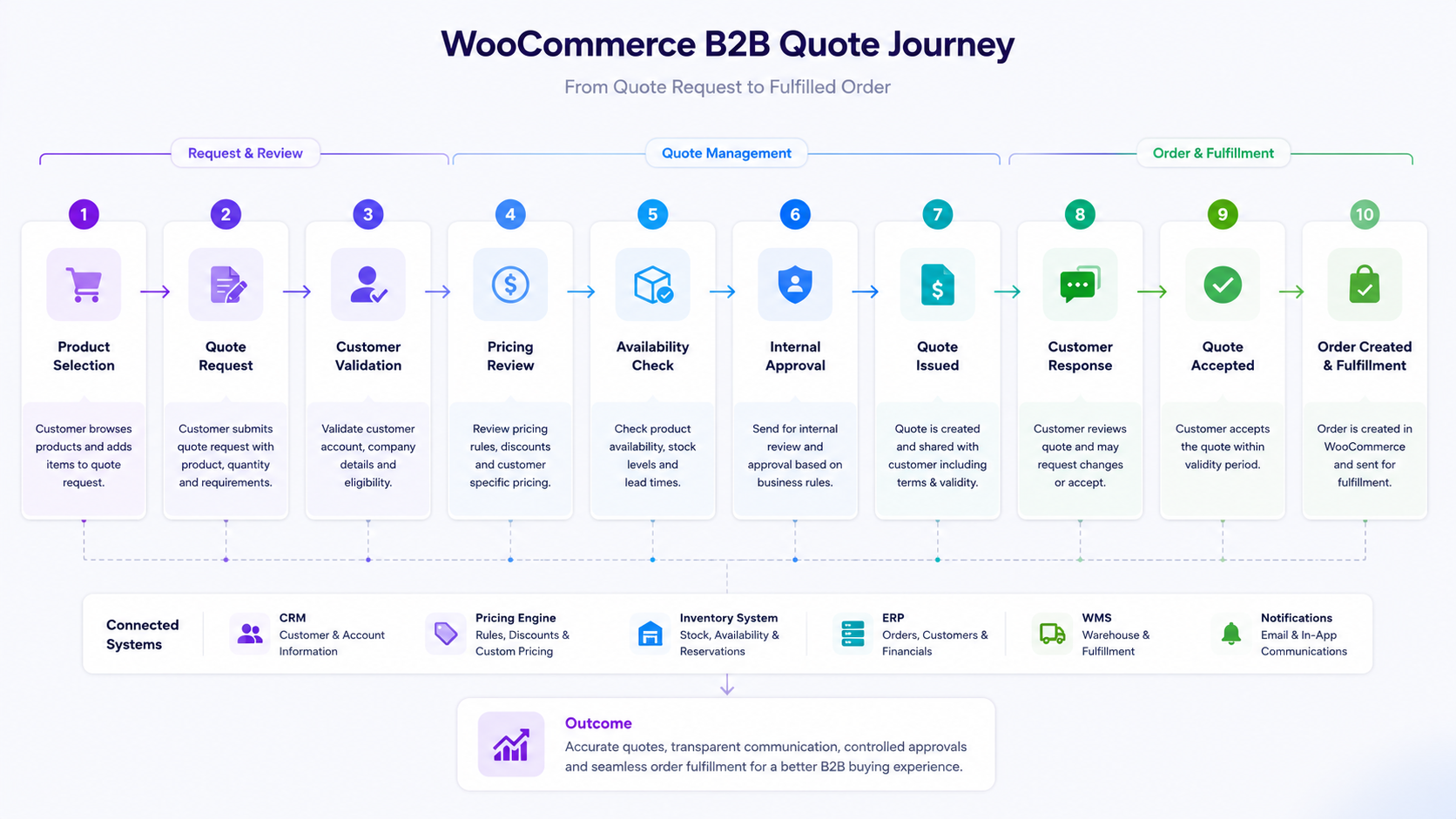
Installing a form is the easy part. What happens after submission is where the actual business logic lives, and where a WooCommerce request a quote workflow either works smoothly or creates more manual work than it saves. Here’s the typical lifecycle, from the buyer’s initial action to a completed order:
The buyer selects products. ↓ Quote request submitted ↓ Customer or account validation ↓ Pricing review ↓ Availability validation ↓ Sales or internal review ↓ Quote created and issued ↓ Customer revision, negotiation, or acceptance ↓ Quote validated ↓ WooCommerce order created
Quote request submitted. The buyer selects the products they need, enters quantities, and sends the request instead of proceeding to checkout. At this point, the store has intent but no confirmed price.
Customer or account validation. Before anyone quotes a price, the business needs to know who is asking. Is this an existing wholesale account with negotiated terms, a new business inquiry, or a retail customer who landed on a B2B page by mistake? This step determines what pricing rules even apply. Skip it, and new customers can end up receiving contract pricing meant for a different account.
Pricing review. Someone, or some system, needs to determine the actual price. For simple cases, this might be an automated tier based on quantity or customer group. For complex cases, it involves checking cost, margin targets, and whether the requested volume qualifies for a discount that isn’t published anywhere on the site. Many stores rely on manual review here because pricing logic is too specific to automate fully, and that’s a legitimate choice as long as the manual step is fast and consistent.
Availability validation. A price is meaningless if the product can’t be delivered in the timeframe the buyer needs. This step checks current stock, incoming inventory, or production lead times. Stores that skip it are the ones that issue a quote, get it accepted, and then discover there isn’t enough stock to fulfill it.
Sales or internal review. For larger or more complex requests, someone on the sales or operations side needs to look at the full picture before a quote goes out: whether the requested terms fit company policy, whether an exception needs approval, or whether more than one department needs to weigh in.
Quote created and issued. The finalized quote, with pricing, quantities, and terms, is sent to the buyer. This is the formal document the buyer will use internally to get their own purchase approved.
Customer revision, negotiation, or acceptance. The buyer might accept as-is, ask for adjustments, or negotiate further. This stage can loop back to pricing review if terms change materially.
Quote validated. Before conversion, the business confirms the quote is still accurate: prices haven’t changed, stock is still available, and the terms match what was actually agreed. This matters more than it sounds like it should, because time passes between issuing a quote and getting it accepted, and conditions can shift in that window.
WooCommerce order created. Once validated, the quote becomes an actual order in the system, ready for payment terms, fulfillment, and everything downstream.
Businesses managing this manually often run into the same friction points covered in our piece on why WooCommerce order approval workflows slow down growing B2B businesses, where approval steps that work fine at low volume start creating bottlenecks as order counts grow.
What Information Should a WooCommerce Quote Request Collect?
A quote request form has one job: collect enough information for someone to produce an accurate, deliverable price without turning the form into an obstacle. Too little information means the team receiving the request has to chase down details by email before they can even start pricing. Too much information, especially fields that don’t apply to most requests, causes buyers to abandon the form.
At minimum, a well-built quote request should capture:
- Customer or company details. Name, company, and contact information, along with an indication of whether this is an existing account.
- Products or SKUs. Exactly which items are being requested, ideally pulled directly from the product page or cart rather than typed freehand.
- Quantities. Volume drives pricing in almost every B2B scenario, so this needs to be precise, not approximate.
- Required delivery date. Especially relevant when lead times vary by product or when the buyer has a hard deadline tied to their own operations.
- Delivery location. Needed when shipping cost, regional availability, or fulfillment source depends on destination.
- Project or specification requirements. For configurable or custom products, this is where the buyer describes what they actually need beyond a standard SKU.
- Existing account information. A reference number, account ID, or purchase order number if the buyer already has a relationship with the business.
- Additional notes. An open field for anything that doesn’t fit the structured fields, which often surfaces the real reason a standard checkout wouldn’t have worked.
A simple quote form is enough when the business sells a relatively contained catalog, pricing logic isn’t too complex, and one or two people handle review manually. Once a business has multiple pricing tiers, several product categories with different rules, or a need to route requests to different teams, the form alone isn’t sufficient. At that point, account validation logic and routing rules need to sit behind the form, deciding who sees the request and what pricing context they see it with.
A Quote Is More Than a Discounted Price
It’s easy to think of a quote as just “the price before it becomes official.” In practice, a B2B quote is a small contract, and treating it as anything less is how businesses end up with disputes after the fact.
A complete quote typically defines:
- Product quantities, confirmed and locked at the point of issuance.
- Customer-specific pricing, reflecting whatever tier, contract, or negotiated rate applies to that account.
- Volume discounts, if the quantity crosses a threshold that changes the unit price.
- Shipping arrangements, including who is responsible for freight and which method applies.
- Delivery commitments, meaning a realistic date based on current stock or production, not a generic estimate.
- Payment terms, whether that’s net 30, a deposit requirement, or standard prepayment.
- Quote validity periods, so both sides know how long the pricing is guaranteed to hold.
- Approved product substitutions, where relevant, in case the exact item requested becomes unavailable before acceptance.
This matters operationally because all of these details need to travel with the quote into the eventual order. If the quote says net 30 and the order defaults to standard payment collection, or the quote includes a substitution the order doesn’t reflect, the business ends up delivering something different from what was promised. Keeping these terms attached to the record, rather than living in a separate email thread or spreadsheet, is what makes the transition from quote to order reliable instead of a reconciliation exercise.
Where WooCommerce Quote Workflows Commonly Break
None of this is theoretical. These are the failure points that show up repeatedly once a quote process has enough volume moving through it.
1. A customer accepts an outdated quote after prices have changed. The buyer sits on a quote for two weeks, prices shift, and they accept at the old number. The business either honors a price it can no longer afford or has to go back and explain why the accepted quote isn’t valid, which damages trust. The control that helps is a defined validity period on every quote, with automatic expiration or a required re-validation step before conversion.
2. Product availability changes after the quote is issued. Stock that was available at quoting time is gone by the time the buyer accepts. A confirmed sale can’t actually be fulfilled on schedule, which is worse for the relationship than a delay disclosed upfront. Checking availability again at the validation step, not just at the original quoting step, is what catches this.
3. Sales teams manually recreate the order after quote acceptance. Someone retypes the quote details into a new WooCommerce order by hand, which invites transcription errors, mismatched quantities, or missed line items on larger multi-product quotes. A defined conversion process that carries quote data directly into the order removes the need for manual re-entry.
4. The accepted quote price conflicts with the standard WooCommerce product price. The quoted price and the store’s listed price disagree, and whichever system processes payment defaults to the wrong one, so the customer gets charged incorrectly. Making sure the order creation step explicitly references the quoted price, rather than pulling from the standard product price field, prevents this.
5. Multiple people need to approve the purchase. The buyer’s organization requires sign-off from a manager or finance contact, but the workflow only accounts for a single acceptance action, so quotes stall indefinitely or get accepted by someone without the authority to commit. Building in an approval step on the buyer’s side, whether a formal multi-approver flow or simply a named authorized contact, addresses this.
6. The customer requests a change after the quote has already been reviewed. A revision comes in after pricing and availability were already confirmed, but the change doesn’t automatically trigger a fresh review, so the business ends up honoring terms that no longer reflect accurate pricing or stock. Treating any material change as a new pricing and availability check, rather than an edit to the existing quote, closes this gap.
None of these problems disappear entirely, no matter how good the workflow is. What changes is how often they happen and how much manual cleanup they create. Businesses that run into mismatched pricing between systems often trace it back to the same root cause covered in our article on B2B WooCommerce pricing and customer rules, where pricing logic living in more than one place is usually the underlying issue.
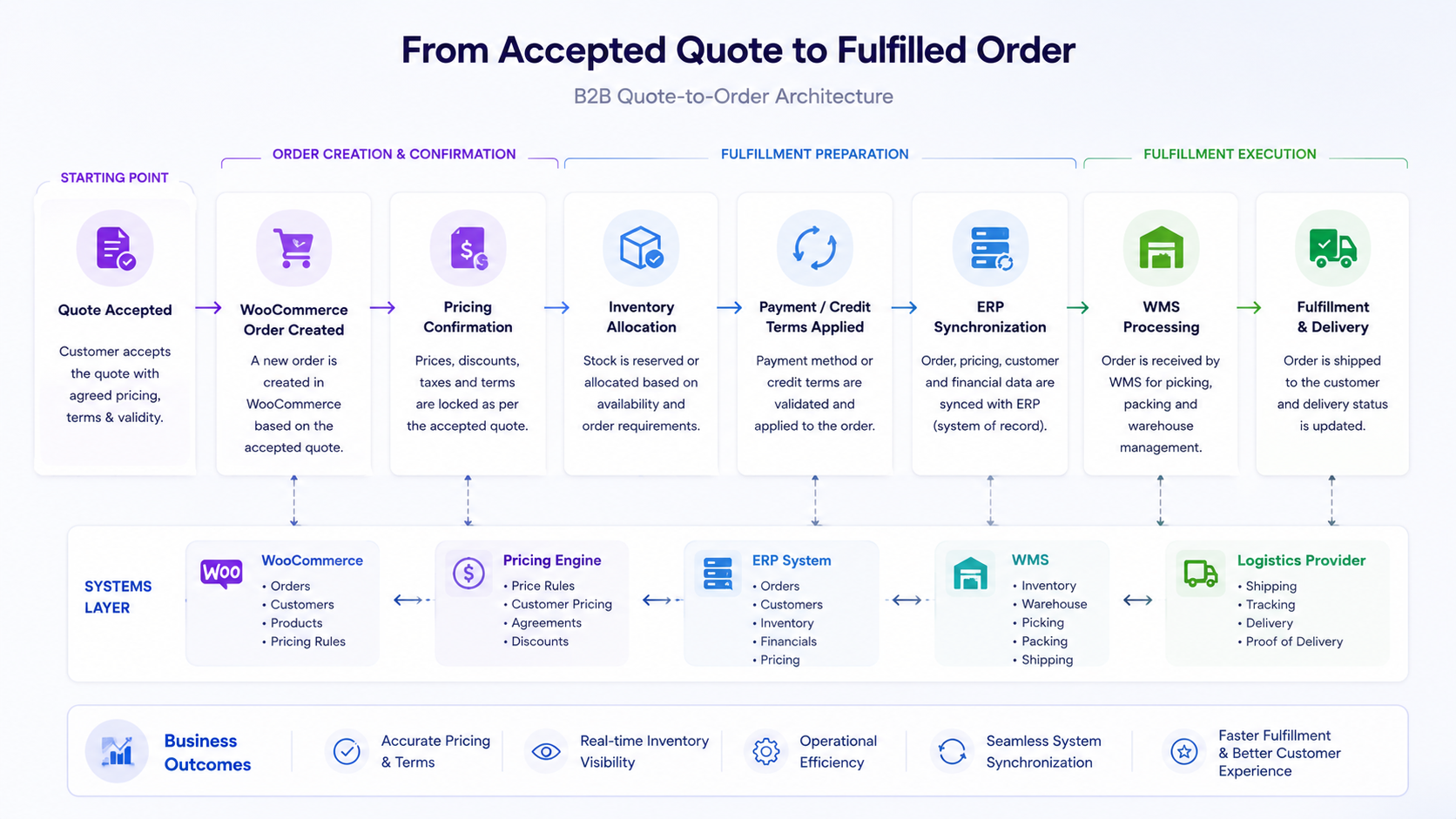
From an Accepted Quote to a WooCommerce Order
Acceptance isn’t the finish line. It’s the handoff point where a negotiated agreement needs to become an actual, fulfillable order in the system.
Quote accepted ↓ Quote validated ↓ Price and terms confirmed ↓ WooCommerce order created ↓ Payment or credit terms applied ↓ Inventory allocated ↓ Fulfillment begins
The validation step deserves more attention than it usually gets. Between issuance and acceptance, time has passed. Prices might have changed. Stock levels might have moved. The buyer might have modified quantities in their reply without realizing it changes the total. Validating the quote right before conversion, rather than assuming nothing has shifted, is what prevents the order from carrying forward outdated information.
Recreating the order without this step, whether manually or through an automated process that skips validation, is where pricing, quantity, and data consistency problems tend to originate. A quote converted automatically without a final check can create an order that doesn’t match current inventory. A quote recreated manually can introduce human error at exactly the point where accuracy matters most.
The right level of automation depends heavily on the business. A store processing a handful of quotes a week can often manage this with a defined manual checklist. A store processing dozens or hundreds of quotes, across multiple sales reps, usually needs the conversion step to be systemized so quote data flows into the order without relying on someone remembering every field to check.
How a Quote Workflow Connects With ERP, CRM, and Fulfillment Systems
WooCommerce → Quote workflow → Pricing data → Sales or CRM processes → Approval controls → ERP → Inventory or WMS → Fulfillment
A quote workflow doesn’t operate in isolation. Depending on how a business is structured, several other systems have a stake in the process, and understanding which system owns which piece of information is what keeps everything in sync.
Pricing data might live entirely in WooCommerce for simpler operations, or it might be pulled from an ERP that holds the master pricing rules, with WooCommerce acting as a display layer rather than the source of truth. Customer data follows a similar pattern: a CRM might hold the full account history and negotiated terms, while WooCommerce handles the transactional side of turning that agreement into an order.
Approval controls sit between the quote and the order, and they often need to check information that doesn’t live in WooCommerce at all, like credit limits or account standing managed in an ERP or accounting system. Once an order is created, inventory allocation depends on whether WooCommerce’s stock numbers are accurate in real time or whether a warehouse management system is the actual authority on what’s available to ship.
This isn’t a full integration guide, and the right architecture depends on what a specific business already has in place. What matters for the quote workflow specifically is that whatever system is authoritative for pricing, inventory, and customer data needs to be checked at the right points in the process, not assumed to be current by default. Businesses running WooCommerce alongside a separate ERP often deal with this exact question, and our guide on WooCommerce ERP integration goes deeper into how that data typically needs to flow.
Inventory accuracy in particular has a direct effect on how reliable a quote can be. If stock visibility inside WooCommerce doesn’t reflect what’s actually available, as discussed in our piece on why WooCommerce inventory visibility becomes difficult for B2B businesses, the availability validation step in the quote lifecycle is only as good as the data behind it.
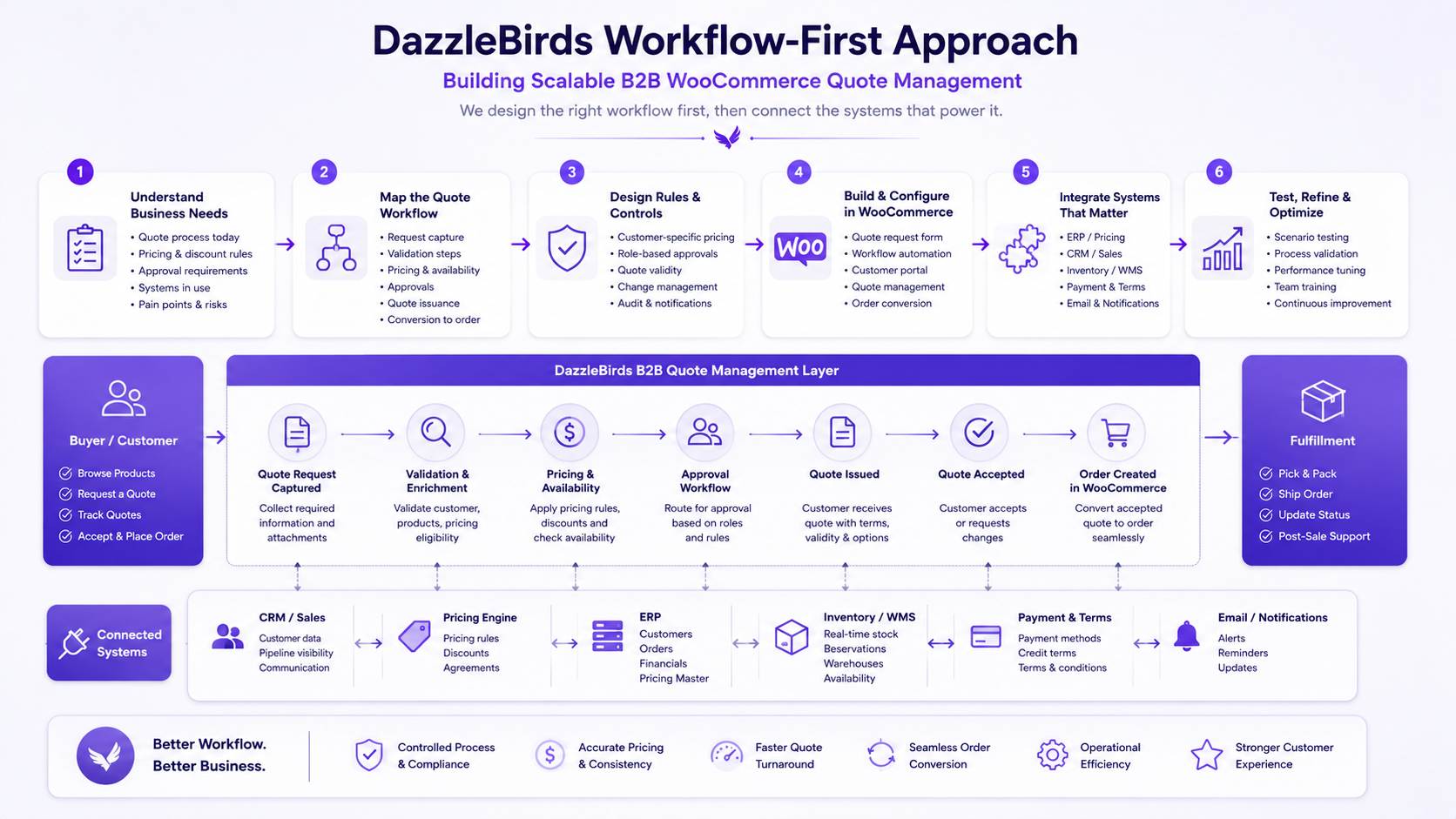
The DazzleBirds Approach to Designing a B2B Quote Workflow
When we look at how a business currently handles quote requests, we’re not starting from a plugin feature list. We start by understanding how the process actually works today, because the answer is rarely as clean as “a form submits and someone replies.”
1. Understanding how quote requests are currently handled. We ask who reviews each request, where the pricing numbers actually come from, and at what point inventory gets checked, if at all, before a quote goes out. We also want to know whether customers can negotiate, who has the authority to approve exceptions to standard pricing, and what actually happens once a customer says yes. In a lot of businesses, the honest answer to that last question is “someone builds the order by hand.”
2. Identifying manual processes and operational risks. This is usually where the real cost of the current process becomes visible: pricing decisions living in a shared spreadsheet that isn’t always up to date, approvals happening over email with no audit trail, orders recreated manually with no consistent check against what was actually agreed, and different teams, sales, fulfillment, and finance working from different versions of the same information because nothing forces them to stay in sync.
3. Mapping the complete quote-to-order process.
Request → Validation → Pricing → Approval → Customer acceptance → Order creation → Fulfillment
We map this specifically for the business in question, because the number of steps and who’s involved at each one vary significantly depending on product complexity, customer base, and how pricing decisions actually get made internally.
4. Reviewing the systems that need to connect. Depending on the business, this might involve WooCommerce alone or WooCommerce alongside an ERP, a CRM, an inventory system, a WMS, or dedicated customer-specific pricing tools. We look at which system should be the source of truth for each type of data, rather than assuming WooCommerce needs to own everything.
5. Testing the workflow against realistic business scenarios. A workflow that looks correct on paper needs to be checked against situations that actually happen: prices changing mid-negotiation, stock running short after a quote is issued, quotes expiring before acceptance, quantities revised partway through, more than one approver needing to sign off, and orders that end up partially fulfilled instead of shipped complete. If it handles these cleanly, it’s ready for real volume. If not, that’s where the design needs another pass.
The goal isn’t to force every business into the same template. It’s to make sure the workflow reflects how the business actually operates and where automation genuinely reduces risk versus where a manual step is still the right call for now.
Simple Quote Tool, Custom Workflow, or Full System Integration?
There isn’t a single correct setup. The right level of complexity depends on catalog size, order volume, how pricing decisions are made, and how many systems already need to talk to each other.
| Approach |
Suitable For |
| Simple quote solution |
Relatively straightforward products, lower quote volume, and pricing that’s reviewed manually by one or two people without complex approval chains. |
| Custom quote workflow |
Customer-specific pricing, formal approval requirements, configurable or complex products, or a sales team actively negotiating terms before a quote is finalized. |
| Integrated quote-to-order workflow |
Businesses where an ERP holds the authoritative pricing or inventory data, multiple systems need to stay synchronized, or order volume is high enough that manual conversion isn’t sustainable. |
A store just starting to offer WooCommerce request a quote functionality usually doesn’t need the third option on day one. A business already managing hundreds of B2B accounts with contract pricing and ERP-driven inventory usually can’t function safely on the first option. Recognizing which situation actually applies, rather than defaulting to whatever’s easiest to install, is the decision that matters most here. Businesses evaluating how much manual work their current setup requires often find useful parallels in our piece on why WooCommerce order automation matters for growing B2B stores, since the same volume thresholds that push a business toward automated ordering tend to push quote workflows toward more structure as well.
The Quote Request Is the Beginning of the Workflow
A “Request a Quote” button is easy to add to a WooCommerce store. What happens after someone clicks it is where the actual work lives and where most of the value or the risk gets created.
A WooCommerce request for a quote setup that only handles form submission, without a clear plan for validation, pricing review, availability checks, approval, and conversion into an order, works fine for the first few requests and then starts generating exactly the kind of manual cleanup this article has walked through. The businesses that get this right treat the quote request as the start of a process, not a self-contained feature.
If your store is managing multiple approval layers on top of the quote process itself, it’s worth reading our breakdown of how order approval workflows affect growing B2B businesses alongside this guide, since the two workflows often need to work together rather than as separate systems bolted onto the same store.
FAQs
A WooCommerce request a quote workflow allows B2B buyers to submit products, quantities, and purchasing requirements for review instead of completing a standard checkout. The request can then move through pricing, availability checks, approvals, customer acceptance, and WooCommerce order creation.
A B2B store should use a quote workflow when pricing depends on quantity, customer agreements, product specifications, availability, delivery requirements, or negotiated commercial terms. Standard checkout is generally better for products with fixed pricing and straightforward purchasing requirements.
Yes. An accepted quote can be converted into a WooCommerce order, depending on how the quote workflow is implemented. Before conversion, businesses may validate quote pricing, availability, payment or credit terms, and other conditions to ensure the order reflects the approved agreement.
A WooCommerce quote workflow can integrate with ERP, CRM, inventory, or WMS systems to synchronize relevant customer, pricing, product, inventory, and order data. The exact integration depends on which system acts as the source of truth for each type of information.
A B2B quote request should collect the information needed to accurately review and fulfill the purchase. This may include customer or company details, products or SKUs, quantities, delivery requirements, project specifications, account information, and additional purchasing notes.


 WooCommerce Solutions
 Solutions for WordPress