Your WordPress site looks great. The design is beautiful. The content is solid. But visitors are bouncing like a rubber ball, and your Google rankings are in the basement.
Do you want to know what is actually happening? Mostly, your website does not pass WordPress Core Web Vitals.
This isn’t about vanity metrics. Core Web Vitals Are Official Ranking Factors Google Announced in 2021 So this means a very slow, unresponsive site is not going to rank no matter how great your content! Chances are, if you’re losing traffic and rankings, your Core Web Vitals are screaming for help.
The good news? Fixing this isn’t rocket science. And here’s how this guide is going to help you figure out where your problems are and what real solutions look like. At the end, you will learn exactly how to optimize your site effectively and get to those Google rankings.
WHAT ARE CORE WEB VITALS IN WORDPRESS?
Let’s start with the basics. Core Web Vitals are three specific measurements. Google uses to quantify a user’s experiences. Consider them the performance report card of your site.
Here are the three metrics:
Largest Contentful Paint (LCP): A metric that tells how quickly your page’s main content hits the viewport. Essentially, it’s the time taken for visitors to view your headline image and main text. Google recommends that LCP should be 2.5 seconds or less.
Interaction to Next Paint (INP): INP is how quickly your page responds when a user clicks on a button, types in the form, or interacts with anything going through it interactively. It’s about responsiveness. According to Google, INP should be equal or less than 200 milliseconds.
Cumulative Layout Shift (CLS): The unexpected “jiggling” of elements around your page. You are reading an article, and without warning a banner ad forces everything down. That’s CLS. Google wants it below 0.1.
Now, why should you care about these three metrics? Because Google does. For instance, if you run a Google search today, the WordPress Core Web Vitals elements are also being considered for ranking. Even with great content, a site that is awarded poor Core Web Vitals will find ranking difficult.
WHY CORE WEB VITALS MATTER FOR SEO
Reality Check: SEO is no longer just about keywords and backlinks.
In 2020, Google dropped the hint that Page Experience would be a ranking factor. Then, two years later, Core Web Vitals became a fundamental piece of that update. This isn’t a minor tweak. This is a fundamental change in how Google displays and ranks the websites.
Users Hate Slow Sites
Bounce back rates increase drastically when a page loads in more than 3 seconds. Research indicates that, on the mobile platform alone, 53 percent will bounce if a site does not load in under 3 seconds. Which means you’re not only giving a terrible user experience—you are losing revenue. Each second delay costs sales if you run an e-commerce store.
Google Rewards Speed
To which Google has continuously been saying they are concerned about the user experience. Core Web Vitals is how they measure it. Rankings for Sites that Improve Core Web Vitals of WordPress performance It’s not huge, but it’s real. And when you’re competing for the top spots, even tiny gains can be decisive.
Mobile Traffic Is Everything
More than 60 percent of website visitors are from mobile devices. Mobile networks are also slower and less stable than desktop connectivity. Your WordPress site is missing the opportunity for mobile optimization that leaves dollars on the table. The increased load times and smoother interactions especially benefit mobile users when Core Web Vitals WordPress metrics are improved.
Conversion Rates Improve
This is the part that should give you all the goosebumps. When you fix Core Web Vitals WordPress problems, it’s like a magic wand is waved, and your conversion rates start increasing. They last longer, they read more, and they’re more likely to click your call-to-action. Faster sites convert better.
Competitive Advantage
The reality is, these current WordPress sites are poorly optimized. Much more detail into how to front-load your web vitals. After all, just implementing core web vitals for WordPress best practices could help you at least do better than half of the competition. By the time your competitors are still neglecting Core Web Vitals, you’ll take over their traffic and outrank them in Google.
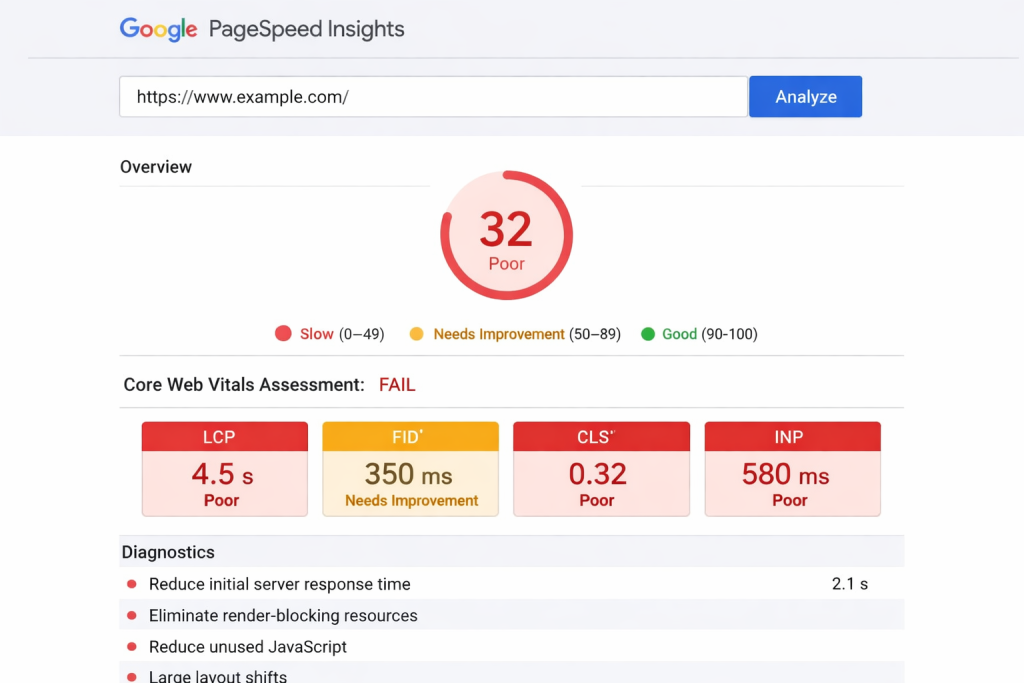
Go to pagespeed.web.dev, type in your domain on WordPress, and press enter. Google PageSpeed Insights will run a test on your site and provide scores for all three of the Core Web Vitals metrics.
You will see two scores, for mobile and desktop. A desktop typically does better because those connections are faster. But Google cares mostly for mobile, so pay attention to that first.
Here, you’ll see your scores for LCP, INP, and CLS highlighted in green (good), yellow (needs improvement), or red (failing). It also has a cascade of suggestions.
Google Search Console
If you have Google Search Console configured, check the Core Web Vitals report in Enhancements. This represents real-time data coming from users that actually hit your site. Unlike simulated tests, it’s based on actual traffic instead of synthetic ones, which makes it more accurate than PageSpeed Insights!
Search Console explains which pages are passing and what is failing: This helps you prioritize. So perhaps your homepage is alright, but product pages are failing badly.
Chrome User Experience Report
Core Web Vitals (CrUX) data from Google gives you real user statistics. You get it through PageSpeed Insights or by using tools like CrUX Dashboard. This is actual user experience data across millions of users in Chrome.
It is important that you use different tools and really spot the bottlenecks. Set aside the visibility of one metric—consider the holistic experience.
COMMON REASONS WORDPRESS SITES FAIL CORE WEB VITALS
So, what is the problem with so many WordPress sites? The point of commonality is usually down to a few key offenders:
Bloated Themes and Plugins
Heavy themes that load dozens of styles, scripts, and fonts on most WordPress sites. Add 15-20 plugins, and then all of a sudden your site is loading over 300 HTTP requests. Each one adds latency.
Often, the biggest offender is the theme. Free or very cheap WordPress themes are known for their terrible performance. They, quite literally, load every feature in the entire world whether you use it or not.
Unoptimized Images
Any image is generally the largest element of all files on any web page. If you upload movies in full resolution without any compression and also use modern formats such as WebP, then you will create performance problems.
One unoptimized image is enough to slow down the speed of your load by 1–2 seconds. Lose Your Site Performance If You Have 10 Images
Slow Hosting and No Caching
Your hosting provider is foundational. Cheap shared hosting results in slow servers. Your WordPress speed optimization measures will get you only up to a certain point when your hosting cannot handle traffic.
Render-Blocking JavaScript and Third-Party Scripts
JavaScript files that load in the head section prevent browser rendering of the page interval. The visitor sees a white screen while the browser downloads scripts.
External services, such as analytics tracking pixels and ad widgets, slow down the site. Even an external script is a network request to another server that you do not have control over.
HOW TO IMPROVE LARGEST CONTENTFUL PAINT (LCP)
LCP is usually to be blamed the most if WordPress sites do fail Core Web Vitals. This is also one of the easiest bugs to correct.
Optimize Your Server Response Time
It all starts with TTFB (Time to First Byte). It is the time that it takes for a server to respond to a request. Please keep it < 600 ms; slow hosting == everything else is slow.
Maybe it’s time to upgrade if you’re still being hosted on shared hosting. If you are on managed WordPress hosting, then your TTFB should be good to go already.
Implement a Content Delivery Network (CDN)
A CDN stores your content on servers across the globe. For instance, when someone from Japan visits, they get their content via a Japanese server instead of waiting for information to be fetched from your US-based servers. This can thus give you 500-1000ms off your load time.
Cloudflare is the best-known solution, and for most sites their free plan does an excellent job.
Lazy Load Images and Optimize
Don’t load every image immediately. Load them lazily — images load only when the visitors are about to scroll within proximity. This makes the initial page load a lot faster.
Use new formats like WebP, which are 25–35 percent smaller than JPEG. Compress ruthlessly. This can be done automatically using a plugin like ShortPixel.
Your LCP image deserves special treatment. Usually it’s your hero image or primary product photo. Optimize that particular image first for optimization.
Minify and Prioritize Code
CSS & JavaScript Minimize Unnecessary Characters Most of the caching plugins do this for you automatically. Use code minification and critical resources by preloading key images.
HOW TO FIX INTERACTION TO NEXT PAINT (INP)
INP measures responsiveness. The time between a user clicking something and seeing the response. Low INP often signals JavaScript slowing the main thread for too long.
Reduce JavaScript Execution Time
The browser can do one thing at a time on the main thread in JavaScript, which can do long pieces of work (example: if the script is running a piece for some time, then the UI interaction will be queued to dequeue). Larger blocks of JavaScript take too long to load; that is why you need to chunk it up smaller.
Defer JavaScript that is non-critical and remove unused JavaScript code.
Best practice—Load JavaScript files in the footer, not the header. Load only what you need on the first page. Now the delay is only experienced due to scripts on your page; every script you include slows down INP. Follow this: If a plugin adds JavaScript that you are not using, disable it.
Choose Lightweight Plugins
Some plugins are just performance killers because they add a ton of JavaScript. Evaluate every plugin. Ask: Do I really need this?
HOW TO REDUCE CUMULATIVE LAYOUT SHIFT (CLS)
CLS is the disturbance problem. It’s typically the easiest to repair since it concerns HTML structure and CSS rather than performance.
Set Image and Video Dimensions
Using width and height for images/videos—You should always use these attributes. This reserves space for them prior to loading, which can prevent layout shifts happening on the page.
No content should be placed above the fold.
Avoid loading ads, pop-ups that push down content. If you have to use ads, reserve some space so when they load there is no jumping.
Use CSS transforms for animations.
Layout recalculations are not triggered by transitions occurring only in transform and opacity. Animating width or margin does. Use transforms whenever possible.
Font Loading Strategy
Web fonts can also cause layout shifts if you load them. Use font-display swap, which means fallback fonts are displayed right away and can then be swapped with the web font as soon as it is ready.
BEST PLUGINS TO IMPROVE WORDPRESS CORE WEB VITALS
There is no need for a developer to optimize core web vitals for WordPress. While you can do most of it manually, good plugins take care of most of it.
Deep WP Rocket is the golden standard. The plugin caches pages, minifies code, and lazy loads images with dozens of optimization settings. WP Rocket is an incredible caching plugin, and most sites experience dramatic improvements in performance immediately after it’s installed.
If you want the free alternative that does code minification and aggregation, check out Autoptimize. It’s a bit more lightweight but does require additional configuration to get set up.
Imagify handles image optimization automatically. Once you upload an image, we compress it and convert to modern formats. ShortPixel is like that but allows much more control.
Cloudflare – The Powerful Free CDN. You configure it as your nameserver, and boom, you’re faster all around the world.
BEST HOSTING FOR FASTER CORE WEB VITALS
Your hosting is the foundation. No host performs well, even with perfect optimization.
Opt for a managed WordPress host, i.e., Kinsta, WP Engine, or Pressable. Focus on companies on WordPress performance. By default, server response times are quick.
Your server must be located within the same geographical region as most of your traffic. Hosting Reviews and the Time to First Byte For TTFB, you should see values under 600 ms for the most quality hosts.
Sites hosted on LiteSpeed servers usually have more punch than those using Apache or Nginx. Avoid cheap shared hosting. Three dollars a month for shared hosting is tempting, and your site will fail Core Web Vitals.
WORDPRESS CORE WEB VITALS OPTIMIZATION CHECKLIST
Here’s your step-by-step action plan:
Install Google PageSpeed Insights and check your scores as they are now.
Prepare Google Search Console and check the Core Web Vitals report.
Select an optimization plugin such as WP Rocket or Autoptimize.
Install an image optimization plugin.
Cloudflare Free Tier (Install a CDN)
Leave the image’s width and height attributes.
Enable lazy loading for images
Minify CSS and JavaScript
Enable GZIP compression
Server-side and browser caching configuration
Remove unused plugins and themes.
Update WordPress, plugins, and themes.
Audit and avoid slow third-party scripts.
Compress your LCP image as much as possible and convert it into WebP.
TTFB (time to first byte) Test Your Server Response Time
Poor hosting solutions if TTFB is slow
Lower the usage of JavaScript in the footer and defer a few non-critical scripts.
Ensure web fonts use font-display swap.
Test Core Web Vitals again.
Monthly retest and continuous improvement
FINAL THOUGHTS
Your WordPress site does NOT have to fail Core Web Vitals. It’s not complicated. All it takes is some intent and the right tools.
Truth: Optimizing core web vitals for WordPress is one of your best investments when it comes to neurotic performance gathering. So better performance equals better ranking, a great user experience, and, of course, conversion.
Start today. Select an action from the checklist. Install one plugin. Optimize one image. Then test your scores again in Google PageSpeed Insights.
See that improvement? That’s momentum. Keep going.
The WP performance optimization is not a one-time fix but rather an ongoing process. However, the earlier you start, the sooner results will step in.
That is what the WordPress SEO services professionals are for if you find and need assistance. However, if we are truthful, most site owners will be able to take this themselves by making use of the tools and guidance within this guide.
Longer sessions and more conversions will be on the menu for you thanks to your visitors. Google will reward you with better rankings. And you’ll rest easy knowing your site is fast and friendly.
Now get out there and fix those Core Web Vitals in your WordPress. And please, your future self will always thank you for it.
FAQs
WordPress Core Web Vitals are Google performance metrics that measure loading speed, responsiveness, and visual stability to improve user experience, SEO rankings, and overall website performance.
WordPress Core Web Vitals directly affect Google rankings because faster, stable, and responsive websites provide better user experiences, lower bounce rates, and higher engagement across mobile and desktop devices.
You can improve WordPress Core Web Vitals by optimizing images, enabling caching, using a CDN, minimizing JavaScript, choosing lightweight plugins, and upgrading to faster WordPress hosting services.
Popular plugins for improving WordPress Core Web Vitals include WP Rocket, Autoptimize, Imagify, and ShortPixel because they optimize caching, code, images, and overall website performance effectively.
You can check WordPress Core Web Vitals scores using Google PageSpeed Insights, Google Search Console, and Chrome User Experience Report to identify performance issues affecting SEO and user experience.