A manufacturing client places a $12,000 order on a Tuesday. They need the materials shipped by Friday, but their accounts payable department only cuts checks on a 30-day cycle after receiving a formal invoice. A standard WooCommerce checkout expects payment before the order is even confirmed, which puts the store owner in an awkward position: either turn away a reliable customer or process the order manually outside the platform and hope the paperwork gets sorted later.
This is a common friction point for B2B WooCommerce stores. Business buyers rarely pay the way consumers do. They work through purchase orders, internal approval chains, and agreed credit terms that were negotiated long before any cart is filled. Setting up a proper WooCommerce invoice payment workflow, along with Net 30 or Net 60 payment terms, lets a store accommodate that reality without abandoning the platform for spreadsheets and email chains.
This article walks through what WooCommerce invoice payment actually means, how Net 30 and Net 60 terms function in practice, and how to structure the eligibility, approval, and tracking systems needed to run it safely.
Key Takeaways
- WooCommerce invoice payment separates order placement from payment collection, letting approved B2B customers pay after delivery according to agreed terms.
- Net 30 and Net 60 refer to the number of days a customer has to pay an invoice after it is issued, not after the order ships.
- Deferred payment access should be limited to reviewed and approved accounts, not opened to every customer by default.
- Invoice workflows work best when they are connected to clear order approval, invoice generation, and payment tracking processes.
- Pricing and payment terms solve different problems. Pricing determines what a customer owes; payment terms determine when they owe it.
What Is a WooCommerce Invoice Payment?
A WooCommerce invoice payment is a checkout method where a customer places an order without paying immediately, then receives an invoice and settles the balance later according to agreed terms. Instead of entering card details at checkout, the order is confirmed, an invoice is generated, and payment is collected afterward, either through a bank transfer, a check, or a payment link sent separately.
This is fundamentally different from a standard card or online payment, where funds are captured the moment the order is placed. With WooCommerce invoice payment, the transaction and the payment event are decoupled. The store commits to fulfilling the order first, based on trust in the customer relationship or a formal credit arrangement, and payment follows on a separate timeline.
Consider a simple example. A regional distributor with an existing account places a recurring order for packaging supplies. Rather than paying by card at checkout, the order triggers an invoice addressed to their accounts payable team. The distributor pays within the agreed window, often 30 or 60 days, through their normal payables process. The store still has a complete order record in WooCommerce, but the payment step happens outside the usual immediate checkout flow.
This pattern only makes sense for approved, ongoing business relationships. Extending it to first-time or unverified customers introduces real financial risk, which is a point worth returning to later in this article.
How Do Net 30 and Net 60 Payment Terms Work?
Net 30 means a customer has 30 days from the invoice date to pay the full amount. Net 60 works the same way but gives the customer 60 days. These terms describe a payment deadline, not a discount or a pricing adjustment.
The clock typically starts when the invoice is issued, not when the order is placed or shipped. If an order ships on the 1st but the invoice is not generated until the 5th, the Net 30 deadline usually runs from the 5th. This distinction matters because delays in invoice generation can quietly extend how long a store waits to get paid, which is one reason invoice timing needs to be built into the workflow deliberately rather than left to chance.
A practical example: a wholesale buyer places an order for $8,400 worth of inventory on March 3rd. The invoice is generated and sent on March 4th under Net 30 terms. Payment is due by April 3rd. If the same buyer had negotiated Net 60 terms, payment would not be due until June 2nd.
Not every customer should automatically receive these terms. Net 30 and Net 60 are typically reserved for accounts that have gone through some form of credit review or have an established purchasing history. A brand new account with no prior orders is a very different risk profile than a distributor who has paid on time for two years. This is why payment terms are usually tied to customer eligibility rather than applied store-wide.
Why B2B WooCommerce Stores Need Invoice Payment Options
Business buyers operate under constraints that consumer checkout flows were never designed for.
Corporate procurement departments frequently require a formal invoice before they will process any payment, regardless of how the order was placed. Purchase order workflows are common in manufacturing, distribution, and institutional purchasing, where a PO number has to be issued and matched against an invoice before accounting will release funds. A checkout that demands a card number upfront simply does not fit into that process.
Established customer relationships also change the calculus. A buyer who has ordered from a store for three years and always pays on time represents a lower risk than a first-time visitor. Offering that buyer invoice terms is often a reasonable extension of trust that was earned over time, and it can make repeat ordering easier since the buyer is not blocked by a payment step every time they need materials.
Larger orders introduce their own pressure. A $15,000 order is a bigger commitment for a buyer’s finance team to approve on the spot, and internal approval processes at the buyer’s company can take days or weeks. Invoice terms let the order move forward operationally while the buyer’s own internal sign-off catches up.
Finally, accounting requirements on both sides tend to favor invoice-based transactions. Formal invoices are easier to reconcile against purchase orders, easier to file for tax and audit purposes, and easier to match against a buyer’s own payables system than a card transaction that shows up as a lump sum on a statement.
Standard Checkout vs WooCommerce Invoice Payment Workflows
| Aspect |
Standard Checkout |
Invoice Payment Workflow |
| Payment timing |
Collected immediately at checkout |
Collected after the invoice is issued, per agreed terms |
| Customer eligibility |
Open to any customer |
Limited to approved or vetted accounts |
| Order approval |
Not typically required |
Often includes a review or approval step |
| Invoice generation |
Receipt generated automatically |
Formal invoice generated and sent separately |
| Payment deadline |
None, payment is instant. |
Defined by terms such as “Net 30” or “Net 60” |
| Credit considerations |
Not applicable |
Requires some level of credit or risk assessment |
| Best use cases |
First-time buyers, consumer purchases, small orders |
Repeat B2B customers, large orders, procurement-driven purchasing |
How to Set Up WooCommerce Invoice Payment for B2B Customers
Building this workflow correctly means addressing customer eligibility, term configuration, order connectivity, and internal controls as separate but linked pieces.
Define Which Customers Can Use Invoice Payments
Not every buyer should see an invoice payment option at checkout. This access is usually tied to a business account or a specific customer role, created either through native WooCommerce customer roles or a B2B-focused extension that supports role-based permissions.
Eligibility is often decided through a short credit approval process. This can be as simple as reviewing a new business’s trade references and order history or as formal as pulling a credit report for larger accounts. The goal is to separate customers the store has reason to trust from anonymous or first-time buyers who have not yet demonstrated payment reliability.
Once approved, a customer account is flagged for invoice payment eligibility, which then determines whether they see that option at checkout at all. Customers without this flag continue through the standard payment flow.
Configure Payment Terms
Payment terms need to be configurable at the account or group level, not hardcoded store-wide. Some approved customers may qualify for Net 30, while others, based on order volume or contract negotiations, may be given Net 60.
Due date rules should be defined clearly and applied consistently, ideally counting from invoice issuance rather than order date, to avoid ambiguity later when a payment is late and the store needs to reference exactly when the clock started.

Connect Orders to Invoice Workflows
An order placed under invoice terms needs a clear path from placement to payment. Typically this looks like this: the order is placed and enters a pending or processing status, it may pass through an internal approval step, an invoice is generated and issued to the customer, and the order status is updated once payment is confirmed.
Order status should reflect where the order actually sits in this process. A store that leaves every invoiced order marked simply as “processing” loses visibility into which orders are awaiting approval, which have an invoice outstanding, and which are overdue. This is where many stores start relying on a spreadsheet on the side, which tends to fall out of sync with what is actually happening in WooCommerce.
Establish Internal Approval Controls
Credit approval should not be a one-time decision made when an account is created. New customers requesting invoice access deserve a real review before being granted terms, and even approved accounts benefit from periodic reassessment, particularly if order sizes grow substantially or payment behavior changes.
Order limits are a practical safeguard. A customer approved for Net 30 terms up to $5,000 per order should not be able to place a $40,000 invoiced order without a separate review. High-value orders, regardless of the customer’s history, often warrant a manual check before the invoice goes out.
Risk management here is not about distrust of customers generally. It is about recognizing that deferred payment is effectively extending short-term credit, and credit decisions deserve the same discipline a bank would apply, scaled appropriately to the size of the business.
How to Manage Customer-Specific WooCommerce Payment Terms
Different customers often need different terms, and a workflow that treats every account the same tends to either underserve trusted long-term buyers or overexpose the store to risk from newer ones.
One approved account might receive Net 30 terms based on a strong payment history. Another, perhaps a larger distributor with a formal contract, might be given Net 60. A brand new account, even one that eventually plans to order in volume, typically starts on immediate payment until a track record is established. This is not a punishment. It is a reasonable way to extend more favorable terms as trust builds.
Role or account-based access controls make this manageable at scale. Rather than manually adjusting settings order by order, terms can be attached to a customer role, a specific account, or a contract record, so the correct payment options simply appear when that customer logs in and checks out.
Contract-based agreements sometimes formalize this further, particularly for larger B2B relationships where terms were negotiated outside the website entirely, during a sales conversation or a signed agreement. In these cases, the WooCommerce configuration should reflect what was actually agreed, not a generic default.
It’s worth being precise about what this section covers and what it does not. Payment terms decide when and how a customer pays. They are separate from how much a customer pays, which is a pricing question. Stores that are working through tiered or negotiated pricing structures alongside payment terms may find it useful to also review the related B2B WooCommerce pricing challenges that come up when managing both at once, since the two systems need to work together without becoming tangled.
Common Challenges With WooCommerce Invoice Payments
Several practical problems tend to surface once a store starts running invoice payments at any real volume.
Giving invoice access to unapproved customers is the most common and most costly mistake. It usually happens by accident, a role gets misconfigured, or a default setting is left too permissive, and suddenly a customer with no history is placing large orders on 30 day terms. Regular audits of who actually has invoice access help catch this before it becomes a real loss.
Missing payment deadlines is close behind. Without a clear tracking system, overdue invoices can slip through unnoticed for weeks. A defined process for flagging invoices as they approach and pass their due date, even something as basic as a recurring internal report, makes a significant difference.
Incorrect payment terms applied to an account, such as a customer accidentally left on Net 60 when they were only approved for Net 30, tend to happen when terms are set manually rather than tied to a consistent account-level configuration.
Manual invoice processing is a scaling problem more than an accuracy problem. A store handling five invoiced orders a month can manage manually without much trouble. A store handling two hundred cannot, and the operational burden of manually generating and sending each invoice becomes its own bottleneck.
Order status confusion, where invoiced orders are not clearly distinguished from paid ones inside WooCommerce, often forces staff to cross-reference an external spreadsheet just to answer a simple question like “Has this customer paid yet?” Tracking unpaid invoices without a centralized view is closely related, and stores that rely on memory or scattered notes tend to lose track of aging balances until a customer flags it themselves, which is not a good position to be in.
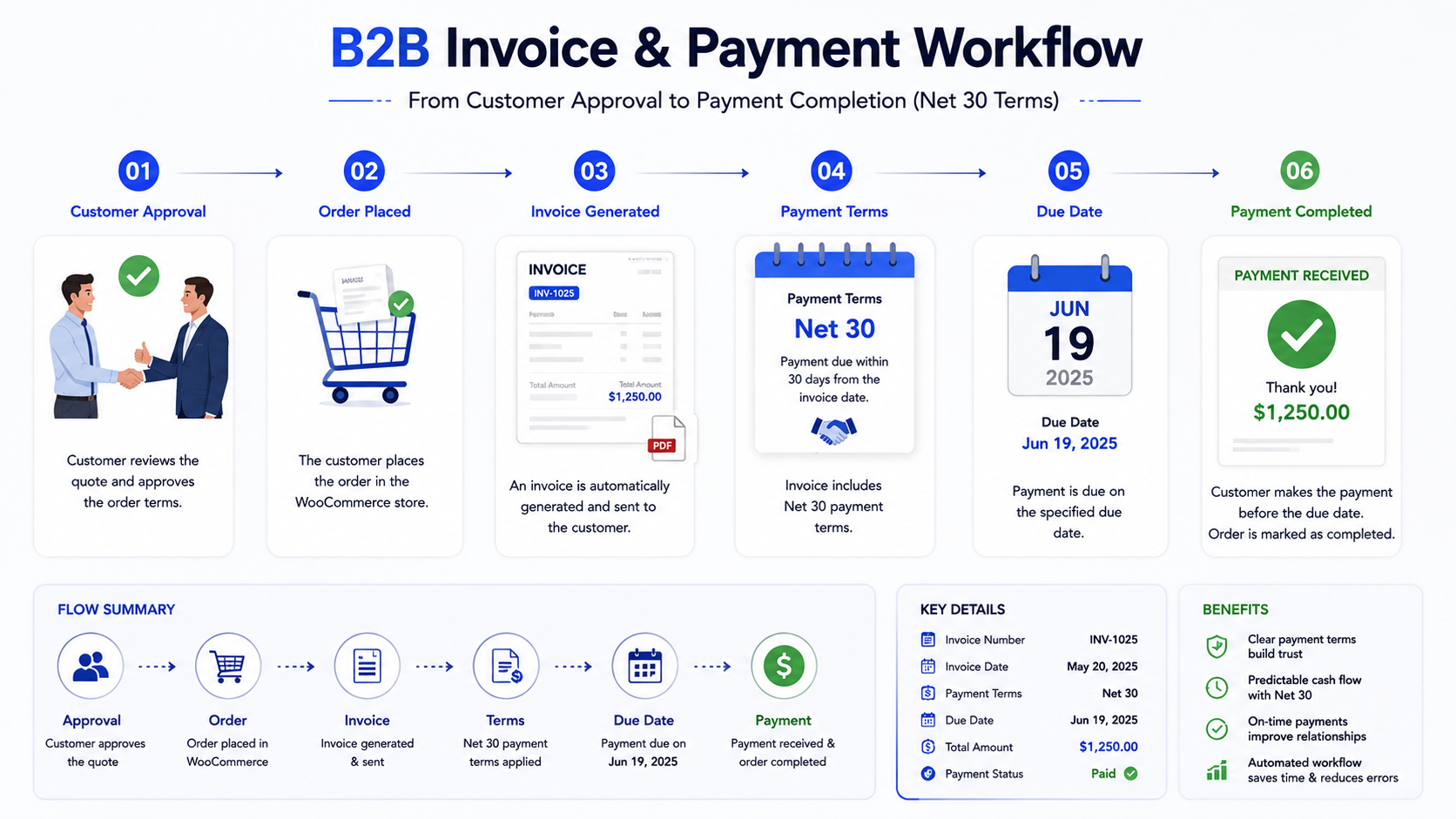
Solving these issues generally comes down to the same principle: connect order status, invoice status, and payment status into one visible system rather than three disconnected ones. Stores dealing with a high volume of orders may also run into broader operational strain around this, which is covered in more depth in this piece on WooCommerce order management challenges.
Invoice Payments and Purchase Order Workflows in B2B WooCommerce
Purchase orders and invoice payments frequently operate together in B2B purchasing, and understanding how they connect helps avoid confusion between the two.
The typical sequence starts with the customer submitting a purchase order, either through a form on the site or through a request sent directly to the sales team. The business then reviews or approves that request, confirming pricing, availability, and that the customer is eligible for the terms being requested. Once approved, a corresponding WooCommerce order is created, reflecting what was agreed. From there, an invoice is generated based on that order, and the customer pays according to the terms tied to their account, whether that is Net 30, Net 60, or another arrangement.
This connection between requesting a quote or purchase order and eventually reaching an invoiced order is worth understanding as a full path rather than isolated steps. Many B2B buyers start the relationship with a quote request before any order is placed, and stores that support this properly tend to have a smoother handoff into invoicing later. This is covered more directly in the WooCommerce request a quote workflow article, which focuses specifically on that earlier stage of the process.
Best Practices for Managing WooCommerce Invoice Payment Workflows
Restrict deferred payment access to reviewed accounts. This matters because invoice terms are effectively short-term credit, and extending credit without any review process exposes the store to losses that are difficult to recover once goods have shipped.
Clearly define payment terms for every eligible account, in writing, tied to the account record rather than communicated informally. Ambiguity about whether a customer has Net 30 or Net 60 terms tends to surface exactly when it matters most, during a dispute over a late payment.
Automate invoice communication where the volume justifies it. Manually emailing every invoice works at low volume, but as order counts grow, automated invoice generation and delivery reduce delays and remove a dependency on someone remembering to send it.
Track outstanding payments in a single, visible place. Whether that is a dashboard, a report, or a dedicated view inside WooCommerce, the point is to know at any moment which invoices are current, which are approaching their due date, and which are overdue.
Review customer eligibility regularly rather than treating an initial approval as permanent. Payment behavior, order volume, and business circumstances change, and terms that made sense a year ago may not reflect the current relationship.
When Should a WooCommerce Store Offer Net 30 or Invoice Payments?
This workflow is not a fit for every WooCommerce store, and it is worth being honest about when it makes sense.
Wholesale businesses, distributors, and manufacturers dealing primarily with other businesses are natural candidates, since their buyers typically expect and often require invoice-based purchasing as a condition of doing business at all. Repeat B2B customers with an established order history represent lower risk and are usually the first group to receive these terms. Corporate procurement relationships, where the buyer’s internal process mandates a formal invoice regardless of the seller’s preference, effectively require this workflow if the store wants that business at all. Large orders and long-term business relationships also tend to justify the additional operational overhead of managing invoice terms, since the order size or relationship value outweighs the administrative cost.
On the other hand, immediate payment remains more appropriate for first-time or unverified customers, low-value orders where the operational cost of invoicing exceeds any benefit, and consumer-facing transactions where invoice terms were never part of the buyer’s expectation in the first place. Stores that primarily sell in bulk to unfamiliar buyers should also weigh this carefully alongside their broader ordering process, which is discussed further in WooCommerce bulk ordering best practices.
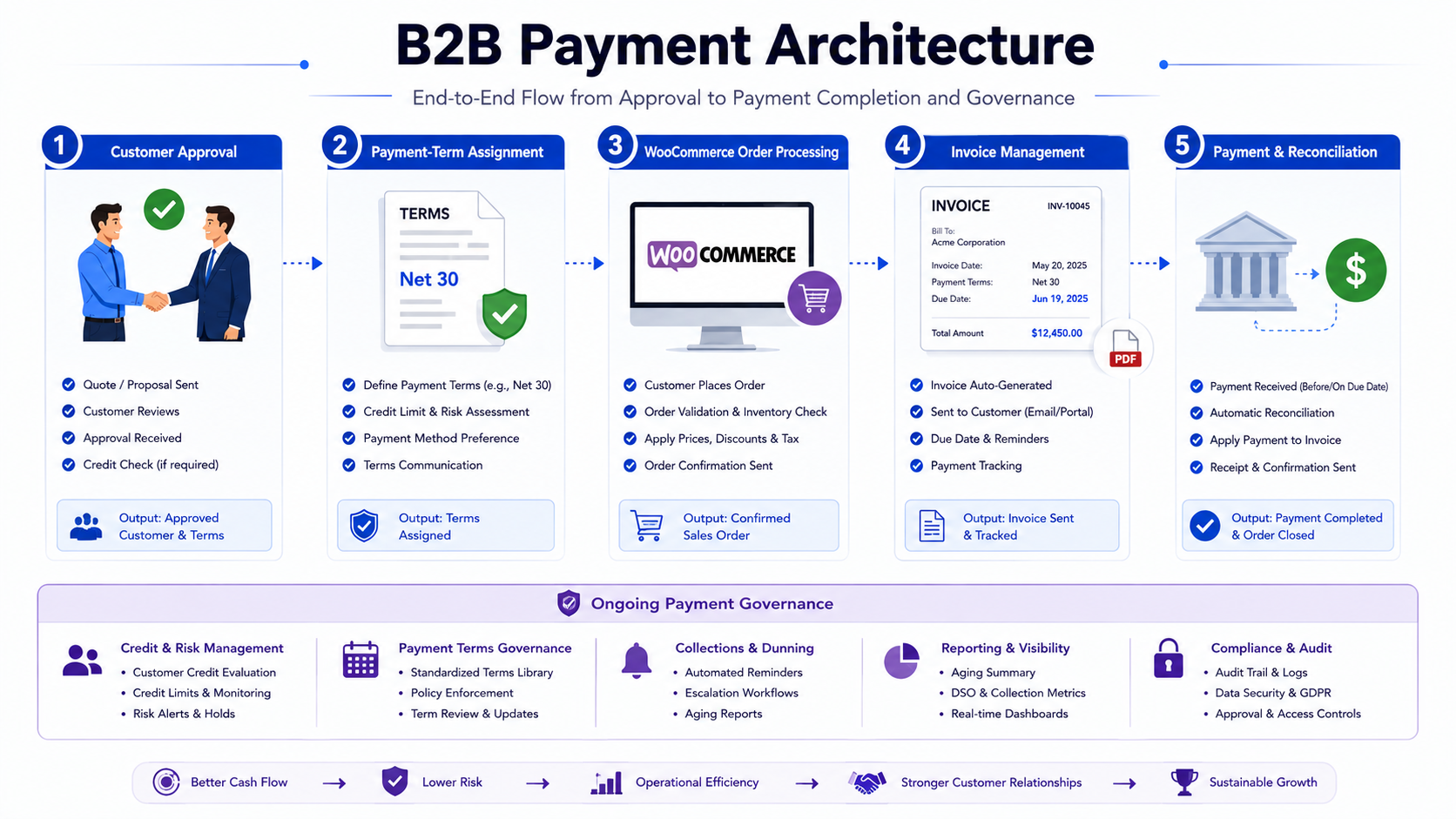
Platform capability also plays a role in this decision. Some B2B teams evaluating their ecommerce stack weigh how flexible different platforms are when it comes to supporting these kinds of payment workflows, a comparison covered in more detail in WooCommerce vs BigCommerce for B2B wholesale.
The DazzleBirds Approach to WooCommerce B2B Payment Workflows
Setting up WooCommerce invoice payment is rarely just a matter of installing a plugin and toggling a setting. The workflow needs to reflect how a specific business actually operates, which starts with understanding customer and business requirements before any configuration begins. Who are the buyers, how do they currently purchase, and what does their internal approval process actually require from an invoice?
From there, payment-term eligibility needs to be mapped out deliberately, deciding which accounts qualify for deferred terms and under what conditions, rather than defaulting to an all-or-nothing setup. Order and approval workflows need to be built around this, connecting order placement to any necessary review step and to invoice generation in a way that does not create bottlenecks for staff or customers.
Invoice and payment tracking has to be visible and reliable, since a workflow that technically works but leaves the finance team unable to see outstanding balances clearly has not actually solved the underlying problem. Integration requirements matter too, particularly when invoice payments need to connect with accounting software or an existing ERP system rather than existing as an isolated process inside WooCommerce.
Testing and workflow validation before launch catches the edge cases that are easy to miss on paper, such as what happens when an invoice is generated but the order is later modified, or how a partial payment against an invoice is recorded. Ongoing operational management is just as important as the initial build, since customer eligibility, term structures, and approval thresholds all need periodic review as the business changes.
This is the kind of work that benefits from designing the workflow around actual business processes first and only then deciding which tools or plugins support that process, rather than starting from a plugin’s default settings and forcing the business to adapt to them.
Conclusion
Invoice payments and Net 30 or Net 60 terms give B2B WooCommerce stores a way to support established customer relationships and procurement-driven purchasing without forcing every buyer through an immediate checkout designed for consumer transactions. The workflow only holds up, though, when it is backed by real customer eligibility review, a clear approval process, and consistent tracking of what has been invoiced and what has actually been paid.
If your store is evaluating whether an invoice-based payment workflow fits how your B2B customers actually buy, it’s worth mapping out the current process end to end before choosing tools or plugins. A structured approach here tends to save significant rework later, and DazzleBirds can help think through what that setup should look like for your specific business.
FAQs
Yes. WooCommerce can support invoice-based payment through a combination of customer role configuration, order workflow adjustments, and typically a dedicated B2B or invoicing extension, since this is not part of WooCommerce's default checkout behavior.
Net 30 terms are set up by defining a payment term at the account or customer group level, tying it to eligible customers, and configuring invoice generation so the 30-day due date is calculated from the invoice date. This typically requires an extension built for B2B payment terms rather than native WooCommerce settings alone.
Yes. Payment terms can be assigned individually or by customer group, so one account might have Net 30 terms while another has Net 60, and newer accounts can remain on immediate payment until they qualify for deferred terms.
Invoice payment refers to the customer paying an invoice after the order is placed, typically within a defined term like Net 30. Purchase order payment refers to the process where a customer submits a PO that is reviewed and approved before an order is created, which often then leads into an invoice payment once the order is confirmed.
Yes, though international invoicing often introduces additional considerations such as currency handling and cross-border payment timing. Stores serving international B2B buyers alongside invoice terms should also review their approach to currency, covered in the WooCommerce B2B multi-currency setup.


 WooCommerce Solutions
 Solutions for WordPress