A customer lands on a WooCommerce store carrying hundreds, or thousands, of products. They know roughly what they need—a stainless steel bracket in a specific size, a jacket in a particular material, and a component compatible with a certain machine—but they do not know the exact product name or SKU. They start clicking through categories, opening product after product, and comparing specifications by hand. Within a few minutes, most of these customers give up, not because the store lacks the right product, but because there was no efficient way to find it.
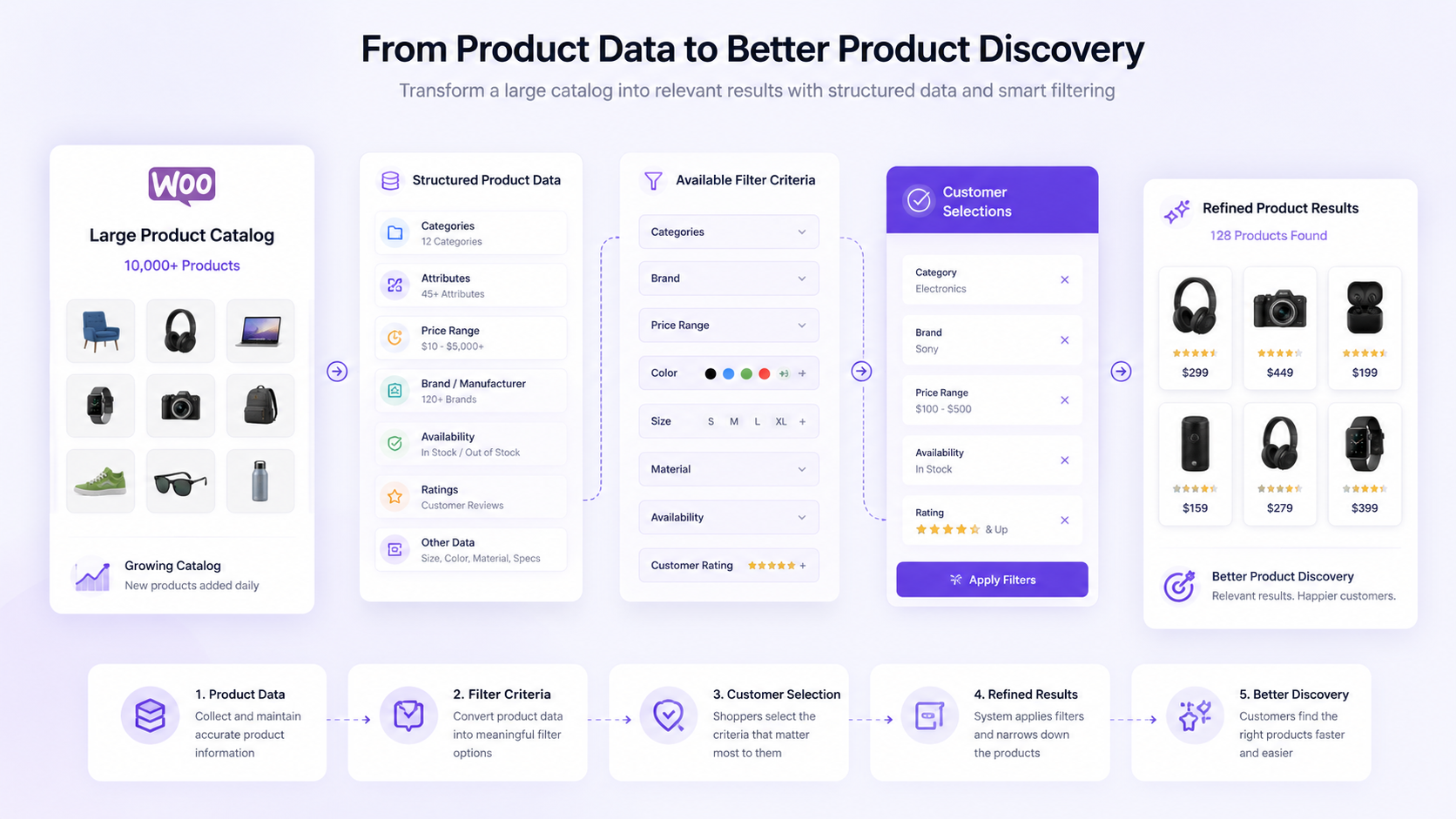
This is the problem a WooCommerce product filter is meant to solve. The basic flow looks simple on paper: product data flows into filter criteria, customers make selections, results get refined, and product discovery improves. In practice, getting to that outcome depends on far more than turning on a filter plugin.
Effective filtering is not simply about adding filter controls to a storefront. It depends on how products are categorized, how product attributes are structured, how consistently product information is maintained, and whether the filter options actually reflect how customers evaluate products in the first place. A WooCommerce product filter built on messy, inconsistent, or incomplete product data will frustrate customers just as much as having no filter at all. This article looks at what makes filtering work, how it depends on product architecture, and how businesses can keep it working as their catalogs grow.
What Is a WooCommerce Product Filter?
A WooCommerce product filter is a storefront feature that lets customers narrow a list of products by selecting specific criteria, such as category, price, size, or brand, instead of browsing every item individually. As catalogs grow past a few dozen products, filtering becomes the primary way customers manage the volume of choice in front of them.
The most common filter criteria include category, size, color, material, brand, price range, availability, and technical specifications. A furniture retailer might filter by wood type and dimensions. An electronics store might filter by compatibility and wattage. A B2B supplier might filter by model family or certification. In every case, the filter options exist to help a customer eliminate products that do not match their needs, rather than requiring them to inspect each one.
What separates a genuinely useful WooCommerce product filter from a decorative one is how closely the filter criteria map to actual purchase decisions. A filter option nobody uses to decide between products adds friction rather than removing it.
Key Points
- Product filters depend on structured and consistent product data. Filtering can only be as accurate as the categories, attributes, and values behind it.
- Categories, attributes, pricing, availability, and other product characteristics all influence which filters are worth offering and how reliably they perform.
- Too many irrelevant filters can make product discovery more difficult instead of easier, burying the criteria that actually matter under ones that do not.
- Large product catalogs require ongoing governance to keep filters accurate as products are added, changed, or discontinued.
How WooCommerce Product Filters Work
Behind every filter click sits a chain of dependencies that starts long before a customer ever visits the storefront: product data, categories and attributes, filter criteria, customer selection, query refinement, and finally, filtered product results.
Product Data Provides the Filter Foundation
Every filter option a customer sees traces back to a field in the underlying product data. If a product’s material is not recorded anywhere, it cannot become a filter option, no matter how useful that filter might be to a shopper. This is why filter design is really a product data question first and a storefront design question second.
Attributes and Categories Define Filter Options
Categories establish the broad groupings customers browse within, while attributes capture the finer distinctions inside those groupings. A “Power Tools” category might use attributes like voltage, cordless or corded, and included accessories to let customers narrow further. The attribute values available in the system directly determine which filter choices appear on the frontend.
Customer Selections Refine Product Results
Once a customer selects one or more filter criteria, WooCommerce needs to translate that selection into a database query that returns only matching products. Selecting multiple filters at once, say, a category, a price range, and a size, requires the underlying logic to combine those conditions correctly rather than treating them as separate, unrelated searches.
Storefront Logic Determines How Results Are Displayed
The final step is presentation: how results update, whether the page reloads or refreshes dynamically, how the count of matching products is shown, and what happens when a combination of filters returns no results. A technically correct WooCommerce product filter can still feel broken if this layer is slow, confusing, or inconsistent with customer expectations.
Which Product Data Should Be Used for Filtering?
Not every field in a product record makes a good filter. Choosing the right ones starts with understanding what each type of data is good for.
Categories
Categories are usually the first filter a customer interacts with, since they narrow the broadest possible product set into something manageable. A clothing retailer separating “Men’s,” “Women’s,” and “Kids'” before anything else is using category as the first layer of discovery. Categories work best when they reflect how customers naturally think about the catalog, not just how the business organizes it internally.
Product Attributes
Attributes capture the specific characteristics that distinguish similar products from one another: size, material, dimensions, compatibility, or technical specifications. These are often the attributes that matter most during comparison, once a customer has already narrowed things down by category. A hardware store’s bolt diameter attribute or a mattress retailer’s firmness attribute are both examples of data that exists specifically to support a purchase decision.
Price and Availability
Price range filters are useful almost everywhere, since budget constraints apply to nearly every purchase decision. Availability filters, showing only in-stock items or excluding backordered products, matter most for customers who need something quickly rather than customers who are still exploring options.
Brand and Technical Specifications
For larger catalogs and B2B stores in particular, brand and technical specification filters carry real weight. A buyer sourcing replacement parts often cares more about manufacturer compatibility than about browsing by general category. Industrial and wholesale catalogs frequently rely on these filters more heavily than consumer-facing stores do, since technical fit is often the deciding factor rather than aesthetic preference.
Not every piece of product data should become a filter. A useful filter should help a customer make a meaningful product-selection decision. Data that exists purely for internal tracking, like a supplier code or a warehouse location, rarely belongs on the storefront at all.
WooCommerce Product Filters vs Product Search
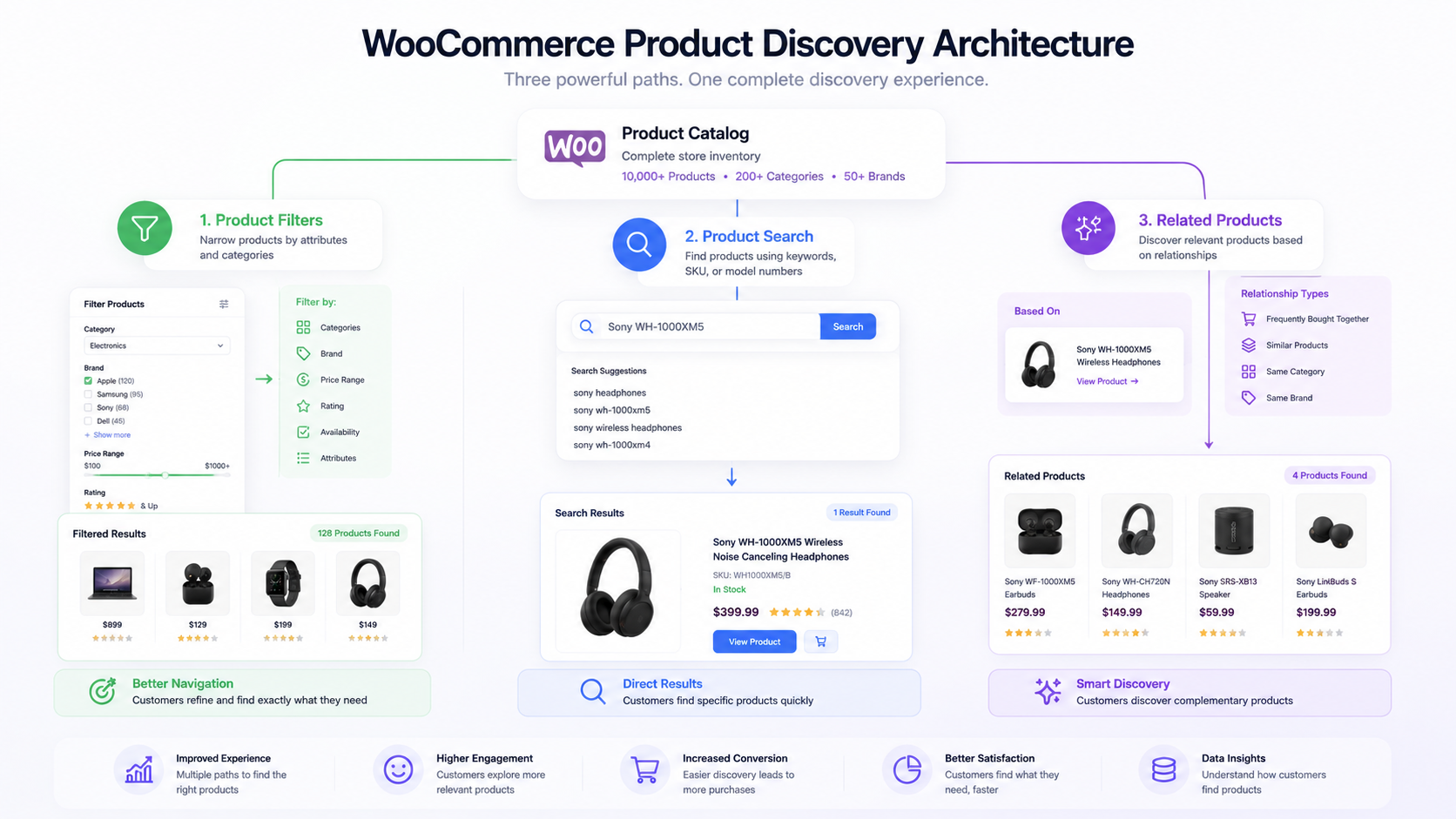
Product filters and product search solve related but distinct problems, and confusing the two often leads to a storefront that handles neither well.
Product search is useful when a customer already has something specific in mind: a keyword, a product name, a SKU, or a model number. They know what they are looking for and simply need to locate it quickly. Product filtering, by contrast, is useful when a customer is browsing a group of products and wants to narrow the available options based on specific characteristics, without necessarily knowing the exact product they want going in.
| Factor |
Product Search |
Product Filters |
| Starting point |
Search query |
Product listing |
| The customer knows the exact product. |
Often |
Not always |
| Main action |
Enter a query. |
Select criteria. |
| Best for |
SKU, name, or model |
Browsing and narrowing options |
Stores that rely entirely on filtering without a strong search function frustrate customers who already know exactly what they want. Stores that rely entirely on search without filtering frustrate customers who are still exploring their options. Businesses that invest in both features, rather than treating one as a substitute for the other, typically see the two reinforce each other instead of competing for the same role.
How Product Attributes Affect WooCommerce Product Filtering
The quality of a WooCommerce product filter is only as good as the attribute data feeding it, and attribute data has a tendency to degrade over time without active management.
Consistent attribute naming matters more than it might seem. If one product lists its color as “Navy Blue” and another nearly identical product lists the same shade as “Navy,” the storefront may present these as two separate filter options instead of one, splitting what should be a single meaningful choice into confusing fragments. Standardized values, where every product pulls from the same predefined list rather than free-text entry, prevent this kind of drift before it starts.
Duplicate attribute values are a frequent symptom of catalogs built from multiple sources. A product feed from one supplier might use “Steel,” while another uses “Stainless Steel” for functionally similar materials, and without a review process, both end up as separate filter options that neither accurately represents the full range of matching products.
Inconsistent naming and missing product information compound each other. A product missing its material attribute entirely will not show up when a customer filters by that material, even if it is a perfect match, effectively hiding it from a segment of interested buyers. Supplier data issues, where incoming spreadsheets do not map cleanly to existing attribute structures, are one of the most common sources of this kind of gap.
The relationship works in a clear sequence: a product attribute becomes a structured value, which becomes an available filter option, which a customer selects, which produces refined product results. Break any link in that chain through inconsistent naming, missing data, or unstructured free text, and the filter stops reliably representing the catalog.
Understanding how WooCommerce product attributes and variations are structured is a prerequisite for getting this right, since variable products in particular depend on attribute consistency across every variation to filter correctly.
Choosing the Right Filters for Your WooCommerce Catalog
The right filter setup depends heavily on catalog size and the type of buyer a store serves. What works for a boutique shop with sixty products will not scale to an enterprise catalog with sixty thousand, and B2B buyers evaluate products differently than retail consumers do. Part of this groundwork involves choosing the right product structure for your catalog, since how products are organized underneath the storefront directly shapes which filter criteria are even possible to offer.
Filters for Small Catalogs
Smaller catalogs generally do best with a light touch: categories, price, and perhaps one or two important product characteristics that genuinely separate one item from another. Adding a dozen filter fields to a two-hundred-product store usually creates more clutter than clarity, since most combinations will return only a handful of results anyway.
Filters for Large Ecommerce Catalogs
As catalogs grow into the thousands of SKUs, filtering by brand, technical specifications, compatibility, availability, materials, and dimensions becomes far more valuable, since browsing through categories alone stops being practical. Customers at this scale expect to narrow results the way they would on a large marketplace, layering several criteria at once until only a manageable set remains.
Filters for B2B Catalogs
B2B catalogs tend to revolve around a different set of decision factors: model families, technical specifications, compatibility, industry requirements, manufacturer, and availability. A procurement buyer sourcing parts for existing equipment cares less about general browsing and more about confirming exact compatibility, so filters built around specification matching tend to outperform ones built around general merchandising categories.
Adding more filters does not automatically improve product discovery. Every additional filter option competes for the customer’s attention, and a wall of filter checkboxes can be just as paralyzing as an unfiltered product grid. The filter structure should help customers make decisions, not overwhelm them with every field the database happens to contain.
Common WooCommerce Product Filter Problems
Even well-designed filter systems run into predictable problems as catalogs evolve.
Too Many Filter Options
Uncontrolled product data, where anyone with catalog access can enter a new attribute value, tends to produce filter lists that balloon over time. Standardizing entry, either through predefined attribute term lists or a review step before new values go live, keeps the filter list usable.
Duplicate Attribute Values
Inconsistent naming across suppliers, staff, or import batches creates near-duplicate filter options that split what should be a single, clear choice. A periodic attribute audit, merging equivalent values into one standardized term, prevents this from accumulating unnoticed.
Empty Filter Results
Incorrect product assignments or incompatible filter combinations can lead a customer to select several criteria and land on a page with nothing to show. This is often a signal that either the underlying product data is incomplete or that certain filter combinations simply do not exist in the catalog and should be handled gracefully rather than left as a dead end.
Missing Important Filters
Incomplete or poorly structured product data can quietly prevent a genuinely useful filter from ever being built, because the underlying field either does not exist or is not populated consistently enough to support it. This usually surfaces only when reviewing what customers are searching for versus what they can actually filter by.
Outdated Filter Values
Discontinued products, changing specifications, and outdated catalog data all leave traces in the filter system long after they stop being relevant. A filter option for a product line that was discontinued last year still clutters the interface and can mislead customers into thinking that option is currently available.
How to Design a WooCommerce Product Filter Strategy
Building a filter system that holds up over time benefits from a structured approach rather than an ad hoc one.
Step 1: Analyze How Customers Find Products
Understanding whether customers arrive knowing exactly what they want or browsing more openly shapes how much weight filtering versus search should carry on the storefront.
Step 2: Identify Meaningful Product Characteristics
Not every field in the product database deserves to be a filter. This step involves identifying which characteristics customers actually use to distinguish between products when making a decision.
Step 3: Audit Existing Product Data
Before building filter logic, it is worth confirming that the underlying categories and attributes are complete, consistent, and free of the kind of duplication that undermines filter accuracy.
Step 4: Define the Filter Structure
This is where the audited data gets mapped to an actual filter layout: which criteria appear, in what order, and how they group together on the storefront.
Step 5: Configure the Storefront Experience
Implementation covers how filters behave visually and functionally, including how results update, how selected filters are displayed, and how the interface handles mobile screens.
Step 6: Test Real Customer Paths
Testing common filter combinations, including edge cases that might return no results, catches problems before customers encounter them in a live environment.
Step 7: Maintain Filters as the Catalog Changes
Filtering is not a one-time setup. New products, changing specifications, and discontinued items all require the filter structure to be revisited periodically rather than left untouched indefinitely.
Taken together, this reflects a consistent pattern: the customer journey defines the product discovery requirements, which drive a product data audit, which informs the filter architecture, which gets implemented, tested, and then maintained on an ongoing basis.
Product Filters and Product Catalog Management
Filtering does not exist independently of the broader catalog. It sits downstream of catalog structure, in the sense that consistent product data produces usable attributes and categories, which in turn support accurate filters and, ultimately, better product discovery.
Catalog standardization, meaning consistent naming conventions and structured fields across every product, is what makes filtering reliable in the first place. Product classification, sorting items correctly into categories and subcategories, determines how customers navigate before they ever touch a filter control. Product data governance, the ongoing practice of maintaining accuracy across a growing catalog, is what keeps filters trustworthy rather than gradually drifting out of sync with reality.
New product onboarding needs to include filter-relevant fields from the start, rather than treating attributes as an afterthought added later. Discontinued products need a clear process for removal or archiving so they stop appearing in filter results. Changing product attributes, whether due to a supplier update or a specification revision, need to propagate through the filter system rather than leaving stale values behind.
Managing a large WooCommerce product catalog well is, in many respects, the real work behind a filter system that looks simple to the end customer.
Managing Product Filters Across Large WooCommerce Catalogs
Scale introduces challenges that smaller stores rarely encounter. Thousands of SKUs, supplier data arriving from multiple sources, several product managers touching the same catalog, and specifications that change without much warning all put pressure on filter accuracy.
Discontinued products need a defined removal process, or their filter values linger indefinitely. Duplicate attribute values multiply faster in large catalogs, since more people and more data sources are contributing to the same attribute fields. Multi-store catalogs, where the same base products appear across several storefronts with slightly different configurations, add another layer of complexity to keeping filter data synchronized.
The underlying workflow generally looks the same regardless of scale: supplier or source data moves through validation, gets standardized into consistent attributes, follows defined filter rules, lands in the WooCommerce catalog, and ultimately supports customer discovery. At scale, though, each of these steps needs to run with far less manual intervention, since no team can hand-check tens of thousands of SKUs on a recurring basis.
This is where bulk WooCommerce product data management becomes essential rather than optional. Manually reviewing every attribute value across a catalog of that size is not a realistic long-term strategy, and stores that try to manage filter data one product at a time eventually fall behind as the catalog outgrows manual review.

Product Filters and Inventory Availability
Filtering by in-stock products, out-of-stock products, or backorder availability directly shapes what a customer sees during their search, and it can be one of the more consequential filters on the entire storefront. A customer who needs a product urgently benefits enormously from being able to exclude anything unavailable right away, rather than discovering an out-of-stock item only after clicking into the product page.
The accuracy of availability filters depends entirely on the accuracy of the underlying inventory data. If stock counts lag behind actual warehouse levels, an availability filter will confidently show products that are not really in stock or hide products that actually are, undermining the customer’s trust in the filter system as a whole. This is one of the clearer examples of how a filter’s usefulness is really a reflection of data quality elsewhere in the system.
Maintaining accurate WooCommerce inventory data is what keeps availability filtering meaningful rather than misleading, and it becomes more important, not less, as order volume and SKU count grow.
Product Filters vs. Related Products
Filters and related products both help customers discover items, but they operate at different points in the shopping journey and serve different intentions.
Product filters help customers actively narrow a group of available products based on criteria they consciously choose. The customer is in control, selecting the characteristics that matter to them and watching the result set shrink accordingly. Related products, by contrast, help present potentially relevant products based on product relationships defined elsewhere in the system, such as items frequently purchased together or products sharing a category or attribute.
Product filters are primarily part of the browsing and discovery process, active tools a customer reaches for when they know roughly what they want and need to eliminate everything else. Related products are generally presented as recommendations during the product exploration journey, a more passive suggestion layered on top of whatever the customer is already looking at.
Understanding how product categories and related products influence discovery clarifies why the two features are not interchangeable. A store missing filters cannot compensate with related product recommendations alone, and a store relying only on filters misses the passive discovery opportunities that related products provide on individual product pages.
How DazzleBirds Approaches WooCommerce Product Filter Architecture
Effective product filtering is not simply about adding filter controls to a WooCommerce storefront. The quality of the filtering experience depends on how products are structured, how consistently product data is maintained, and whether the available filter options reflect the way customers actually evaluate products.
1. Understand Product Discovery Requirements
The approach begins by understanding how customers actually browse products within a given catalog: which characteristics tend to influence purchasing decisions, whether customers typically search broadly and narrow step by step or arrive with a specific product already in mind, and which criteria matter most during the evaluation stage rather than the initial browse.
2. Audit the Existing Product Data
Before any filter logic is designed, the existing product data gets reviewed for whether categories are consistent across the catalog, whether attributes are complete for every relevant product, whether product specifications follow a standardized format, and whether the information on hand is actually suitable to become a filter in the first place.
3. Map Product Data to Meaningful Filter Criteria
This step follows a clear sequence: product data connects to relevant customer criteria, which then informs the filter structure itself. Not every available product field should automatically become a filter simply because the data exists. The mapping process is deliberately selective, favoring the fields that genuinely influence a purchase decision over ones that merely happen to be present in the database.
4. Design for Catalog Scale
A filter architecture that only works at the current catalog size is a short-term fix. The approach considers how the structure will continue working when new products are added, when supplier data changes format, when product specifications get revised, when categories expand to cover new product lines, and when the catalog grows from a few hundred SKUs into the thousands.
5. Validate the Storefront Experience
Before anything ships, filter combinations get checked for consistency, empty result scenarios get identified and addressed, product relevance within filtered results gets reviewed, mobile usability gets tested directly on smaller screens, and typical customer navigation paths get walked through end to end.
6. Establish Ongoing Catalog Governance
Filtering is not a one-time configuration. As products and product data change over time, filter structures need to remain aligned with current product information, accurate inventory availability, the evolving structure of the catalog, and the discovery requirements customers actually bring to the store.
The goal is to treat product filtering as part of the broader WooCommerce product architecture rather than as an isolated storefront feature. By connecting customer discovery requirements with structured product data, scalable catalog processes, and ongoing validation, the approach supports a product discovery experience that can remain manageable as the catalog grows.
Best Practices for Scalable WooCommerce Product Filtering
Start With Customer Decisions, Not Available Data
Build filters around what customers actually use to distinguish between products, rather than exposing every field the database happens to store.
Standardize Attribute Names and Values
Consistent naming across every product, supplier, and import batch prevents the filter list from splitting into confusing near-duplicates over time.
Avoid Creating Filters for Every Product Field
Restraint matters. A filter that exists but rarely gets used adds clutter without adding value, and it competes for attention against the filters that genuinely help.
Remove or Review Outdated Filter Values
Discontinued products, retired specifications, and stale attribute values should be cleaned out on a regular schedule rather than accumulating indefinitely.
Test Important Filter Combinations
Regularly checking how common filter combinations behave, including whether any of them return an unexpectedly empty result set, catches problems before customers do.
Treat Product Data as an Ongoing Process
A WooCommerce product filter is only as reliable as the data behind it on any given day. Treating catalog maintenance as a continuous process, rather than a one-time setup task, is what keeps filtering accurate as the store evolves.
Conclusion
A WooCommerce product filter looks like a simple storefront feature from the customer’s side: select a few criteria, and see fewer, more relevant products. Behind that simplicity sits a chain of dependencies that starts with product data, flows into a structured filter architecture, supports customer discovery, and requires ongoing governance to keep working as the catalog changes.
Effective product filtering starts well before the storefront. It depends on how products are classified in the first place, how consistently product data is maintained over time, how attributes are structured across suppliers and product lines, and whether the filters offered actually reflect the way customers evaluate products rather than simply mirroring whatever fields happen to exist in the database. Stores that treat filtering as an ongoing part of catalog management, rather than a one-time plugin setup, are the ones whose product discovery experience continues to hold up as their catalog keeps growing.
FAQs
A WooCommerce product filter is a storefront feature that lets customers narrow a product listing by selecting specific criteria, such as category, price, size, brand, or availability. Rather than browsing every product individually, customers select the characteristics relevant to their needs, and the storefront returns only matching results. Filters become increasingly valuable as catalogs grow, since manual browsing stops being practical once a store carries hundreds or thousands of items.
WooCommerce product filters work by drawing on structured product data, categories, attributes, price, and availability to generate the available filter options a customer sees on the storefront. When a customer selects one or more criteria, that selection is translated into a database query that returns only products matching the chosen conditions. The accuracy of the results depends directly on how complete and consistent the underlying product data is.
Product search is built for customers who already know what they are looking for, such as a product name, SKU, or model number, and simply need to locate it quickly. Product filters are built for customers browsing a group of products who want to narrow the options based on specific characteristics without necessarily knowing the exact item in advance. The two features complement each other rather than replacing one another on a well-designed storefront.
The best filter candidates are attributes that customers actually use to distinguish between products during a purchase decision, such as size, material, compatibility, or technical specifications. Not every attribute in the database deserves to become a filter. Fields used mainly for internal tracking, like supplier codes, rarely add value on the customer-facing storefront and are better left out of the filter structure entirely.
Yes, WooCommerce product filters become significantly more valuable as catalogs grow past a few hundred products, since manual category browsing stops being a practical way for customers to find what they need. For large catalogs, filters built around brand, technical specifications, compatibility, and availability help customers narrow thousands of products down to a manageable, relevant set without requiring them to inspect each item individually.


 WooCommerce Solutions
 Solutions for WordPress