A customer places an order, receives a payment confirmation, waits for order updates, and eventually receives a completion notification. These emails are not simply system messages. They are part of the customer experience and often represent some of the most direct communication a business has with its customers.
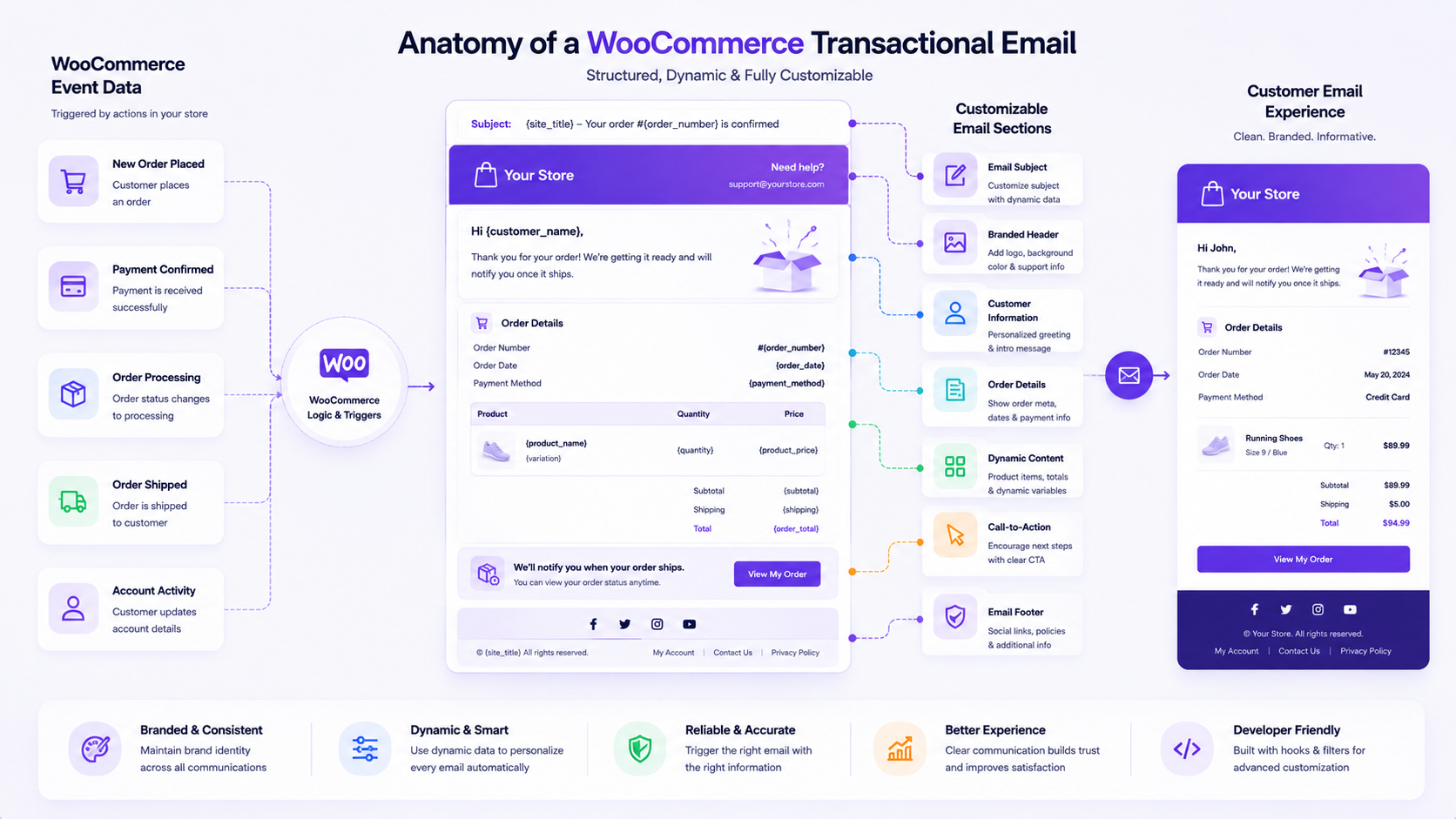
Each message follows a simple chain: a customer action triggers a WooCommerce event, which generates a transactional email, which carries specific customer information, which shapes the ongoing customer experience. When that chain works well, customers stay informed without needing to ask questions. When it breaks down, even a small formatting issue or unclear subject line can create confusion at a moment when clarity matters most.
This is where WooCommerce email templates become relevant. They control how order confirmations, account notifications, and other automated messages look and read. Getting them right involves more than changing a logo. It means thinking about clarity, accurate information, consistent branding, useful content, and a level of customization that can be maintained over time rather than one that breaks with the next store update.
This guide walks through how WooCommerce transactional emails work, the types of emails a typical store sends, what makes a template effective, how to customize content responsibly, and how to test and maintain those customizations as a business grows.
What Are WooCommerce Email Templates?
WooCommerce email templates are the structured files and settings that determine how transactional emails look and what information they contain when a store event occurs. They connect specific triggers, such as a new order or a password reset, to a formatted message sent to a customer or administrator. Customizing WooCommerce email templates allows a business to adjust content, branding, and presentation without changing the underlying purpose of the notification.
Key Points
- WooCommerce transactional emails communicate important order, account, payment, and customer information after specific store events.
- Email templates can be customized to improve clarity, branding, and relevance without changing the purpose of the transactional message.
- More advanced customization may require careful template management and testing to prevent important information from being removed or displayed incorrectly.
- Customized email templates should be reviewed after WooCommerce updates and as business workflows change.

How WooCommerce Transactional Emails Work
The flow behind every transactional email is consistent: a customer or store event occurs, WooCommerce recognizes a matching trigger, an email notification is generated, template content determines how that notification is presented, and the message reaches a customer or administrator. Understanding this sequence makes it easier to know where content lives, where design lives, and where customization should happen.
Store Events That Trigger Emails
WooCommerce emails are tied to specific events rather than sent on a fixed schedule. A new order being placed, a payment being confirmed, an order status changing, an account being created, or a password reset being requested are all examples of events WooCommerce recognizes and responds to automatically.
Customer and Administrator Notifications
Not every transactional email is meant for the customer. New order notifications, for example, are intended for store administrators so they can begin processing an order. Others, such as order completed or reset password emails, are directed at the customer. Recognizing which audience a given email serves helps determine what content and tone are appropriate.
How Email Content Is Generated
When a triggering event occurs, WooCommerce pulls relevant data, such as order details, customer information, and product data, and inserts it into the corresponding template. This is why accurate underlying store data matters just as much as template design. A well-designed template with incorrect or missing data will still produce a confusing email.
Why Template Structure Matters
The event determines that an email should be sent. The template determines how it is structured and presented. Two stores can trigger the exact same event, such as an order being completed, and send very different emails depending on how their templates are structured. This distinction is central to understanding why customization efforts are almost always focused on the template layer rather than the trigger itself.
Common WooCommerce Transactional Email Types
WooCommerce includes a set of default transactional emails that cover most order and account activity out of the box. Each one is tied to a specific event and serves a distinct purpose, whether that is informing the customer, notifying store staff, or supporting account security.
| Email Type |
When It Is Sent |
Primary Purpose |
| New Order |
After a customer places an order |
Notify store administrators. |
| Processing Order |
After payment is received |
Confirm that the order is being processed. |
| Completed Order |
When an order is completed |
Confirm completion to the customer. |
| Cancelled Order |
When an order is cancelled |
Notify relevant parties. |
| Refunded Order |
When a refund is processed |
Confirm refund information. |
| New Account |
After account registration |
Confirm account creation. |
| Reset Password |
When a password reset is requested |
Support secure account access. |
These email types share a common structure but do not require the same level of customization. A new order notification sent to internal staff may only need to be clear and functional, while a completed order email sent to a customer may benefit from more attention to branding and tone. The right level of customization depends on customer needs, internal business workflows, order types, account activity, and internal notification requirements. Treating every email type identically often leads to either over-designed internal notifications or under-developed customer-facing ones.
What Makes a Good Transactional Email Template?
A good transactional email template supports the message it is meant to deliver rather than competing with it. The goal is not visual complexity, but making sure the recipient understands what happened and what, if anything, they need to do next.
Clear and Relevant Information
The most important content, such as order number, order status, and next steps, should be easy to find without requiring the reader to search through unrelated text.
Consistent Branding
Logos, colors, and typography should align with the rest of the store’s customer experience. This does not require elaborate design work, but a transactional email that looks disconnected from the brand can feel less trustworthy, especially for new customers.
Easy-to-Understand Email Structure
A predictable structure, such as a header, a summary of what happened, relevant order details, and a closing section, helps customers scan the email quickly and makes the overall communication experience feel coherent.
Useful Next Steps
Many transactional emails benefit from a clear indication of what happens next, whether that is tracking information, a link to view an order, or return guidance, without distracting from the core message.
Accurate Order and Customer Information
No amount of design polish compensates for incorrect or missing order details. Verifying that dynamic fields, such as customer name, shipping address, and product details, populate correctly is a foundational part of template quality, not an afterthought.
Design should support the purpose of the transactional message rather than distract from it. Every visual decision in a template should be evaluated against whether it helps the recipient understand the message faster and more clearly.
How to Customize WooCommerce Email Content
Customizing WooCommerce email templates can range from simple text adjustments to more involved structural changes. Understanding the difference helps businesses choose an appropriate level of effort.
Customizing Email Subjects
Subject lines are often the first, and sometimes only, part of an email a customer sees before deciding whether to open it. Adjusting subject lines to be specific and relevant, rather than generic, improves how clearly a message communicates its purpose before it is even opened.
Updating Email Headings
The heading inside an email sets expectations for what follows. A heading that clearly reflects the email’s purpose reinforces the message rather than leaving the reader to interpret it from surrounding text.
Editing Customer-Facing Content
Adjusting greetings, explanatory text, and closing messages is one of the more accessible forms of email customization, typically refining tone and clarity without altering the underlying data structure.
Adding Branding Elements
Incorporating brand colors, logos, and consistent styling helps transactional emails feel like a natural extension of the store rather than a generic system notification. These elements should be applied consistently across all email types, not only customer-facing ones.
Adjusting Email Layout and Presentation
More advanced customization may involve restructuring how information is arranged, such as reorganizing order details or adjusting spacing and visual hierarchy. This level of change typically requires more careful testing than simple content edits.
Simple content changes are generally straightforward and low risk. More advanced template-level customization, such as restructuring layout or modifying how dynamic data is displayed, carries more responsibility for maintaining accuracy and compatibility. Businesses pursuing this kind of customization should be clear about which category a given change falls into before making it.
Understanding WooCommerce Email Template Overrides
A template override occurs when a business replaces WooCommerce’s default email template files with customized versions, rather than relying solely on built-in email settings. This offers more control over structure and presentation but also introduces responsibility for keeping those customizations compatible with WooCommerce over time.
When Standard Email Settings Are Enough
For many stores, the built-in email settings, which allow adjustments to sender information, subject lines, and basic branding, are sufficient. If the primary goal is refining tone or adjusting subject lines, standard settings often accomplish this without the added complexity of a full override.
When Template-Level Customization May Be Needed
Template overrides become relevant when a business needs to restructure how information is displayed, add custom sections, or create a layout that differs significantly from the default design. This is common among businesses with specific branding requirements or more complex order and account workflows.
Risks of Poorly Managed Template Overrides
When a template is overridden without careful planning, important order or customer information can be accidentally removed, displayed incorrectly, or rendered inconsistently across devices. Overrides that are not kept aligned with the store’s current data structure can also cause dynamic fields to display incorrectly.
Why Updates and Compatibility Reviews Matter
Because overrides replace default template files, they are not automatically updated when WooCommerce releases new versions. A template that worked well at one point may need adjustment after an update changes email structure or available data. Reviewing customized templates after updates helps confirm they still function as intended.
Template overrides are legitimate and often necessary for businesses with specific branding or structural needs, but they should be treated as an ongoing responsibility rather than a one-time project. It is also worth distinguishing two related but separate concerns. Customizing how an email looks and reads is different from monitoring and troubleshooting WooCommerce email activity, which focuses on whether emails are actually being delivered. Template customization determines what a message says and how it is presented, not whether it reaches the recipient’s inbox.
How to Test Customized WooCommerce Emails
Testing should happen before a business relies on a customized email experience for real customers. A template that looks correct in one scenario may behave differently under slightly different conditions, so validating multiple cases helps catch issues early.
Review Content and Formatting
Read through the email as a customer would, checking for clarity, correct spelling, appropriate tone, and logical flow from start to finish.
Test Different Order Scenarios
Generate test emails for different order types, such as single-item orders, multi-item orders, and orders with discounts or partial refunds, to confirm the template handles variation correctly.
Check Dynamic Customer and Order Information
Confirm that dynamic fields, including customer name, shipping address, order number, and product details, populate accurately across different test cases rather than only the first one checked.
Review Mobile and Desktop Presentation
Since customers may open transactional emails on a range of devices, reviewing how the template renders on both mobile and desktop helps confirm that spacing, image sizing, and text remain readable in both formats.
Confirm Important Information Is Still Visible
After any customization, verify that essential details, such as order totals and next steps, remain clearly visible and have not been pushed below less important content.
This testing process focuses specifically on template accuracy and presentation, not delivery mechanics. Confirming that an email arrives in an inbox falls outside the scope of template testing and belongs to email delivery monitoring instead.
Email Templates as Part of the Customer Experience
Transactional emails are not isolated notifications. They are part of a broader customer journey that begins when an order is placed and continues through processing, completion, and any post-purchase interactions. An order confirmation reassures a customer that their purchase was successful. Processing updates keeps them informed while they wait. Completed order notifications signal that the transaction has concluded. Account-related emails support ongoing access to the store, and post-purchase communication, when relevant, can reinforce the relationship between the customer and the business.
Consistency between the in-store experience and the email experience contributes to a clearer overall journey. When branding, tone, and information presentation align across a website and its transactional emails, customers encounter a more coherent experience rather than one that feels disjointed at the point of communication. This does not require claiming specific improvements in retention or conversion, since those outcomes depend on many factors beyond email design. What can be said with confidence is that clear, accurate, and consistent transactional emails remove friction from an otherwise routine part of the customer relationship.
Managing Email Templates for Growing WooCommerce Stores
As a WooCommerce store grows, email template management tends to become more complex. More order workflows, more customer types, and more communication requirements can all place additional demands on a template system that may have started out fairly simple.
Keep Template Customizations Documented
Recording what was changed, why it was changed, and where override files are located helps future team members or developers understand the setup without reverse-engineering it.
Avoid Unnecessary Template Changes
Not every email needs extensive customization. Making changes only where they add clarity or meet a specific business requirement keeps the overall template system easier to maintain.
Review Templates After Major Updates
Periodically reviewing customized templates, especially after major WooCommerce updates, helps confirm that customizations still work as intended.
Maintain Consistency Across Customer Communications
As more email types are customized over time, keeping a consistent structure and branding approach across all of them helps avoid a fragmented communication experience.
Growth often introduces complexity beyond template design alone. Different customer types, including business accounts with distinct permissions, may require attention to WooCommerce user roles and customer access requirements, since account-related communication can depend on how those roles are configured.
Transactional Emails and Order Management Workflows
The relationship between order management and email communication follows a consistent pattern: an order event leads to an order status, which triggers a transactional notification containing relevant customer information. Email templates should accurately reflect this workflow, presenting the right information at the right stage of the order lifecycle rather than relying on generic messaging for every status change.
It is worth keeping email design and order management as distinct areas of responsibility. Email templates control how information is communicated, while order management concerns how orders are actually processed and fulfilled. As order volume increases, this distinction becomes more important, since scaling WooCommerce order management often involves more complex fulfillment processes and status changes, all of which need to be reflected accurately in the corresponding emails without those emails becoming the mechanism for solving operational challenges themselves.
Using Customer and Order Data in Email Communication
Transactional emails are only as reliable as the data behind them. Customer names, order information, product details, addresses, and account data all populate template fields automatically, which means any inaccuracies in that underlying data will appear directly in the email a customer receives.
This is particularly relevant for stores managing large product catalogs, high order volumes, or frequent customer data updates. Maintaining accurate, well-structured store data is a prerequisite for reliable transactional email content, not a separate consideration. For stores dealing with significant volumes of customer or product information, managing WooCommerce customer and store data at scale becomes directly relevant to email reliability, since inconsistent or outdated data can lead to emails that display incorrect or incomplete information regardless of how well the template itself is designed.
B2B and Enterprise Email Template Requirements
Larger B2B e-commerce operations often have communication needs that go beyond what default WooCommerce transactional emails are designed to handle. Account-specific communication, more complex purchasing processes, and organization-specific requirements are all common in B2B contexts.
Typical additional requirements can include communication tailored to specific accounts or purchasing agreements, notifications that account for multiple stakeholders in a purchase decision, updates related to more structured purchase workflows, and messaging that reflects organization-specific terms. These requirements are not necessarily included in default WooCommerce functionality and often call for more deliberate template planning. Businesses operating in this space frequently need to support more complex WooCommerce order workflows, where a single transaction may involve multiple approval steps, stakeholders, or account-level rules that standard transactional emails were not originally designed to communicate.
Common WooCommerce Email Template Mistakes
Treating Transactional Emails as an Afterthought
Because these emails are automated, it is easy to leave them at their default state indefinitely, resulting in generic, unbranded communication that feels disconnected from the rest of the customer experience.
Adding Too Much Unnecessary Content
Overloading a transactional email with promotional content, excessive visuals, or unrelated messaging can obscure the core purpose of the notification and make important information harder to find.
Removing Important Order Information
In an effort to simplify or restyle an email, businesses sometimes remove details customers actually need, such as order numbers, itemized totals, or shipping information.
Creating Inconsistent Branding
When only some email types are updated with current branding while others remain in a default or outdated state, the overall communication experience feels inconsistent.
Forgetting to Test Template Changes
Publishing template changes without testing across different order scenarios and devices increases the risk that formatting issues or missing data reach real customers.
Ignoring Template Maintenance After Updates
Assuming a customized template will continue to work indefinitely without review can lead to compatibility issues that go unnoticed until a customer reports a problem.
How DazzleBirds Approaches WooCommerce Email Template Management
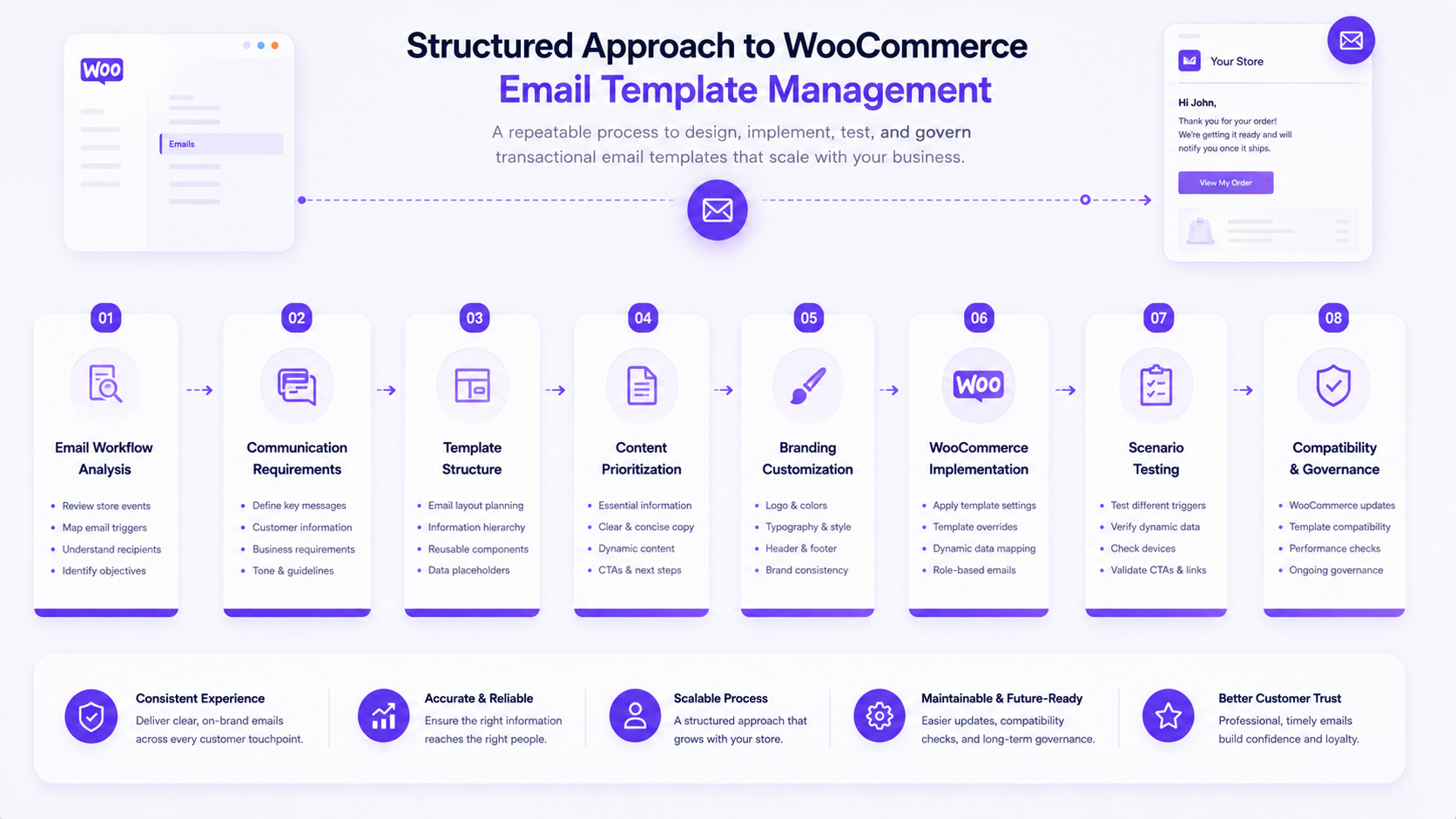
A transactional email should not be treated as an isolated message. Its structure depends on the store event that triggered it, the information the recipient needs, the underlying WooCommerce data, and the broader customer experience. Approaching this work with a connected view in mind shapes how the process is structured from start to finish.
1. Review the Email Workflow
The process starts with understanding the store events, order statuses, and customer actions that trigger each transactional email, along with which notifications are meant for customers versus administrators. This establishes a clear picture of existing communication requirements before any changes are made.
2. Identify Required Information
Each email type is reviewed to determine what it actually needs to communicate, including order information, customer details, relevant next steps, account information, and any business-specific requirements that may apply.
3. Define the Template Structure
Once requirements are clear, attention turns to organizing the template itself, including subject lines, headings, branded elements, dynamic order information, content hierarchy, and footer information, so information is presented logically and consistently.
4. Customize Only Where It Adds Value
Customization decisions are evaluated against whether they improve clarity or meet a specific business requirement, rather than being applied simply because a change is possible.
5. Validate Different Email Scenarios
Before customized templates are relied upon, they are checked across different order statuses, varying customer information, different product scenarios, and both mobile and desktop presentations to confirm dynamic data displays accurately.
6. Maintain Template Compatibility
Customizations are reviewed when WooCommerce is updated, when email workflows change, when new order processes are introduced, or when business communication requirements evolve, so templates remain functional rather than becoming outdated in place.
The goal is to treat email customization as part of a connected customer communication system. By aligning store events, customer information, template structure, testing, and ongoing maintenance, businesses can create transactional emails that remain clear and manageable as e-commerce operations evolve.
Best Practices for Maintainable WooCommerce Email Templates
Keep Important Information Easy to Find
Order numbers, statuses, and next steps should remain prominent regardless of how much a template is customized.
Maintain Consistent Branding
Apply the same visual identity across every transactional email type, not only the most visible ones.
Customize Templates Carefully
Make changes deliberately, with a clear reason for each adjustment, rather than customizing for its own sake.
Test Before Publishing Changes
Validate template changes across multiple scenarios and devices before they reach real customers.
Review Templates After WooCommerce Updates
Check that customized templates still function correctly whenever WooCommerce releases a new version.
Keep Email Workflows Aligned With Store Operations
As order processes or account structures change, revisit templates to confirm they still reflect current business operations.
Conclusion
Every transactional email begins with a store event and ends with a piece of communication that shapes the customer’s experience with a business. That relationship, from store event to transactional email to clear customer information to consistent communication to an ongoing customer experience, is the foundation that WooCommerce email templates are built to support.
Getting this right involves more than adjusting colors or adding a logo. It depends on accurate store data feeding into each message, clear and relevant content within the email itself, useful next steps for the recipient, branding that feels consistent with the rest of the business, and customization decisions that are made carefully rather than applied indiscriminately. It also depends on testing templates across realistic scenarios before relying on them and on maintaining those customizations as WooCommerce evolves and business workflows change.
Treated this way, transactional email customization becomes a reliable and manageable part of the customer communication system rather than a one-time design project. As a store grows and its order and account workflows become more complex, that same foundation, built on accurate data, clear structure, and ongoing maintenance, is what keeps customer notifications functioning as intended.
FAQs
WooCommerce email templates are the files and settings that control how transactional emails, such as order confirmations and account notifications, are structured and presented. They connect specific store events to formatted messages containing relevant customer and order information. Customizing these templates allows businesses to adjust branding, content, and layout without changing what triggers each email or its core purpose.
Yes. WooCommerce allows customization at two levels: basic settings, such as sender name, subject lines, and color options available in the dashboard, and more advanced template overrides that modify the underlying template files directly. Basic settings suit simple branding and text adjustments, while template overrides support more significant structural changes to layout and content presentation.
Email settings are built-in options within WooCommerce that allow adjustments to elements like subject lines, sender details, and basic colors without editing files. Template overrides replace the default template files entirely, offering more control over structure and design. Overrides require more careful maintenance since they are not automatically updated alongside WooCommerce and need review after major updates.
Testing customized emails involves reviewing content and formatting, sending test emails for different order scenarios, verifying that dynamic customer and order information displays accurately, and checking presentation on both mobile and desktop devices. The goal is to confirm important information remains visible and accurate before the template is used for real customer communication.
Yes. Because template overrides are not automatically updated by WooCommerce, they should be reviewed after major WooCommerce updates to confirm continued compatibility. Changes to email structure, available data, or default formatting introduced in an update can affect how a customized template renders, so periodic review helps prevent outdated or broken templates from reaching customers.


 WooCommerce Solutions
 Solutions for WordPress