Managing five websites is manageable. Managing fifty is a different problem entirely. When every branch, franchise, or regional office runs its own WordPress install with its own plugins, themes, updates, and content decisions, things break down fast. SEO becomes inconsistent. Security gets patchy. Brand standards slip. And your team spends more time firefighting than growing.
This guide is not a tutorial on WordPress Multisite vs. separate WordPress sites. It is a decision framework for business owners, marketing heads, franchise operators, and technical decision-makers who need to choose the right website architecture before development begins. The wrong choice here costs months of rework and real SEO damage.
Quick Answer: WordPress Multisite or Separate Sites — Which Is Better?
WordPress Multisite is the stronger choice when your business needs centralized control, shared branding, consistent design, and efficient management across many locations. Separate WordPress sites are better when each location operates independently, has different ownership, needs different functionality, or requires separate hosting. Neither option is universally superior. The right answer depends on how your business is actually structured, how your teams work, and what your SEO goals look like across locations.
What Is WordPress Multisite?
WordPress Multisite is a single WordPress installation that powers multiple websites from one central dashboard. All sites in the network share the same core files, and the network administrator controls which themes and plugins are available across the entire setup.
Each location still gets its own website with its own content, URL, and local editor access. But the parent organization controls the framework. Think of it as one engine running multiple storefronts.
This setup works well for franchises, multi-location clinics, school networks, dealership groups, real estate agencies with regional branches, hotel chains, and any service business with a consistent brand operating across multiple cities or regions.
The appeal is obvious. You update one theme, and it rolls out everywhere. You patch a plugin; every site is protected. When you add a new location, it inherits the entire architecture in hours instead of weeks.
What Are Separate WordPress Sites?
Separate WordPress sites means every location gets its own independent WordPress installation. Its own hosting. Its own database. Its own plugins, themes, user accounts, backups, and update schedule.
There is no shared infrastructure. One site going down does not affect another. One site getting hacked does not automatically compromise the others. And each location has complete freedom to build and manage its website however it wants.
That freedom is the selling point. It is also the source of every major problem that comes with this approach at scale.
When you have three or four sites, the overhead is manageable. When you have twenty or fifty, you are essentially running twenty or fifty separate maintenance contracts. Updates get missed. Plugins conflict. Security gaps appear. SEO quality becomes wildly inconsistent from one location to the next. And pulling a brand refresh across fifty independent installs is a months-long project instead of a single deployment.
WordPress Multisite vs Separate WordPress Sites: Quick Comparison
| Factor |
WordPress Multisite |
Separate WordPress Sites |
| Central control |
Strong, managed from one admin |
None, each site is independent |
| Local flexibility |
Limited by network settings |
Full flexibility per site |
| Brand consistency |
Enforced centrally |
Depends on each team |
| SEO management |
Planned once, applied network-wide |
Must be managed site by site |
| Plugin management |
Centrally controlled |
Independent per site |
| Theme control |
Shared themes, network-wide |
Each site chooses its own |
| Security |
One patch covers all |
Each site patched separately |
| Hosting requirements |
Requires robust managed hosting |
Standard hosting per site |
| Maintenance effort |
Lower at scale |
Multiplies with each new site |
| User roles |
The network admin sets limits |
Full admin per install |
| Cost over time |
Higher upfront, lower at scale |
Lower upfront, higher at scale |
| Best use case |
Franchises, chains, regional branches |
Independent locations, different owners |

When WordPress Multisite Makes Sense
Multisite earns its place when the business has clear central authority over its digital presence. If head office sets the brand standards, controls the design, and expects every location to follow the same website structure, Multisite removes the friction from enforcing that.
It works particularly well in these situations.
Your locations share the same brand and the same service structure. A franchise network selling the same product under the same name with the same visual identity does not need fifty different design decisions. Multisite lets you make design and functionality decisions once and propagate them everywhere.
You plan to keep adding locations. Launching a new location website inside a Multisite network is significantly faster than spinning up a fresh WordPress install, configuring hosting, reinstalling plugins, rebuilding the theme, and training a new user. If your growth plan involves adding ten or twenty locations over the next two years, Multisite scales far more efficiently.
Local teams only need limited editing access. Branch managers and regional marketing coordinators typically need to update hours, staff pages, local promotions, and location-specific content. They do not need to change your global navigation, install new plugins, or modify your theme. Multisite keeps those controls exactly where they belong.
You want consistent SEO structure. When location pages follow the same URL pattern, the same internal linking logic, and the same metadata framework, SEO becomes something you plan once and execute across the network rather than auditing separately for each site.
Real estate groups with regional offices, multi-location physiotherapy clinics, hotel groups, automotive dealer networks, school systems, and restaurant chains are common examples where Multisite consistently outperforms the alternative.
When Separate WordPress Sites Are Better
Separate installs are the right call when the locations are genuinely independent in ways that matter.
Different branding is the clearest signal. If each location operates under a different name, uses a different visual identity, and speaks to a different audience, forcing them into one multisite network creates more problems than it solves. The shared theme becomes a constraint, not an asset.
Different ownership is another firm boundary. If each location is a separate legal entity with its own business owner who controls their own digital presence, separate sites respect that structure. One business owner should not have their website availability tied to another owner’s server behavior.
Different functionality requirements also matter. If one location runs a full e-commerce store, another needs a booking engine, and a third is a simple brochure site with a contact form, the plugin and structural differences make Multisite significantly more complex to manage. At that point, separation is usually the cleaner path.
And when legal or operational isolation is required, such as in regulated industries or franchise agreements that specify independent digital operations, separate installs provide clean boundaries that Multisite cannot.
The honest summary is this. Separate sites are not a lesser choice. They are the right choice for a specific type of business structure. The mistake is defaulting to separate installs simply because it feels simpler at the start, without accounting for what that decision costs at scale.
SEO Risks in Multi-Location Website Architecture
This is where most multi-location website projects go wrong, regardless of whether the business chose multisite or separate installs.
The most common and damaging problem is duplicate content across location pages. Businesses create one service page, then copy it twenty times with only the city name changed. Google sees thin, near-identical pages with no genuine local relevance and assigns them low authority or filters them out of results entirely.
Poor URL structure compounds this. When location pages are buried under unclear paths, or when the URL structure changes between locations, crawlability suffers and link equity does not flow properly through the site.
Missing local schema is another consistent gap. Location pages without LocalBusiness structured data miss the signals that help Google connect your pages to specific geographic queries.
Weak internal linking is equally damaging. If the main site does not link meaningfully to location pages, and location pages do not link back to relevant service content, the network loses the SEO equity it could be building.
Inconsistent metadata is a maintenance failure. When fifty location pages have the same title tag template and nobody has adapted it for local relevance, rankings across those locations will underperform their potential.
Google Business Profile misalignment creates another layer of confusion. If the business name, address, and phone number on the website do not match the GBP listing precisely, local ranking signals are diluted.
The architecture you choose, multisite or separate, does not automatically solve these problems. SEO success in multi-location contexts requires deliberate planning of content uniqueness, URL structure, internal linking, schema, and local relevance before a single page is built.

WordPress Multisite SEO Setup Checklist
Use this before launching any location in a multisite network.
Content
Write genuinely unique content for every location page. Not a template with a city name swapped in. Actual local content covering local teams, local service details, local context, and local relevance.
Include location-specific FAQs that reflect what people in that area actually search for.
Add unique images for each location wherever possible. Avoid using the same stock photo across twenty city pages.
Include local testimonials or case studies that belong to that specific location.
Technical SEO
Plan your URL structure before development. Subdomains, subdirectories, or separate domains each have different SEO implications and need to be decided at the architecture stage.
Add a LocalBusiness schema to every location page. Ensure name, address, and phone number data is accurate and consistent with Google Business Profile listings.
Map your service and location keyword combinations before writing content. Each page should target a specific combination that is not duplicated elsewhere in the network.
Build internal links from your main site to each location and from location pages back to relevant service content.
Configure XML sitemaps for each site in the network and submit them individually in Google Search Console.
Handle canonical tags correctly across the network. Ensure no location page is accidentally pointing canonical to another location or the main site.
Run indexing and crawl checks before launch. Use Search Console and a crawl tool to verify every location page is indexable, properly structured, and free of errors.
Align every page with its corresponding Google Business Profile listing for name, address, hours, and service categories.
Cost: WordPress Multisite vs Separate WordPress Sites
No two projects cost the same, but the cost trajectory between these two approaches is predictable.
WordPress Multisite costs more to plan and build correctly. Architecture decisions, user role frameworks, SEO structure, hosting configuration, staging setup, and performance optimization all need to be addressed before the first location goes live. That upfront investment is real.
But at scale, the cost curve inverts. Adding a twentieth location to a well-built multisite network costs a fraction of what launching a twentieth independent WordPress site would cost. Updates, security patches, plugin management, and backups are handled once rather than multiplied across every install.
Separate WordPress sites feel cheaper at the start. Individual installs are straightforward to set up. But every new location adds another maintenance contract, another hosting account, another security exposure, another SEO audit to run, and another set of plugins to keep updated. By the time a business has ten or fifteen sites, the ongoing management cost of the separate installs often exceeds what a well-planned multisite network would have cost over the same period.
The honest cost comparison is not about launch day. It is about what the infrastructure costs to maintain and grow over two, three, or five years.
Factors to account for in any multi-location website budget include architecture and planning time, theme development, plugin licensing, hosting quality and scalability, security tooling, backup systems, SEO setup per location, user training, staging environment setup, performance optimization, and future location rollout costs.
Common Mistakes Businesses Make
Choosing Multisite because it sounds like it will be easier is the most frequent mistake. Multisite, done well, requires more planning, not less. Businesses that treat it as a shortcut end up with a poorly structured network that is harder to manage than separate installs would have been.
Underestimating hosting requirements causes real problems. Multisite on shared hosting or underpowered servers degrades performance across the entire network simultaneously. A slow network means every location site is slow.
Giving too many users network administrator access creates governance failures. Local editors should have editing permissions for their site only. Network admin access should be tightly controlled.
Installing too many shared plugins on the network creates conflicts and bloat across every site. Plugin decisions at the network level require more discipline than single-site decisions.
Copying service content across location pages is an SEO mistake that is easy to make and difficult to recover from. Each location page needs to earn its ranking through genuine local relevance, not volume.
Skipping staging environments before pushing updates is a risk that affects every site in the network at once. An untested plugin update on a multisite network can break dozens of sites simultaneously.
Mixing unrelated brands into one multisite network creates SEO confusion, shared failure risk, and governance complications. Multisite works for one brand across many locations, not for many unrelated brands on one installation.
Not defining content governance before launch, meaning who can edit what, who approves changes, who manages SEO, and who controls plugin decisions, results in brand drift and inconsistent quality over time.
How DazzleBirds Approaches Multi-Location WordPress Architecture
The architecture decision is never made in isolation. It comes at the end of a structured discovery process, not at the beginning of a sales conversation.
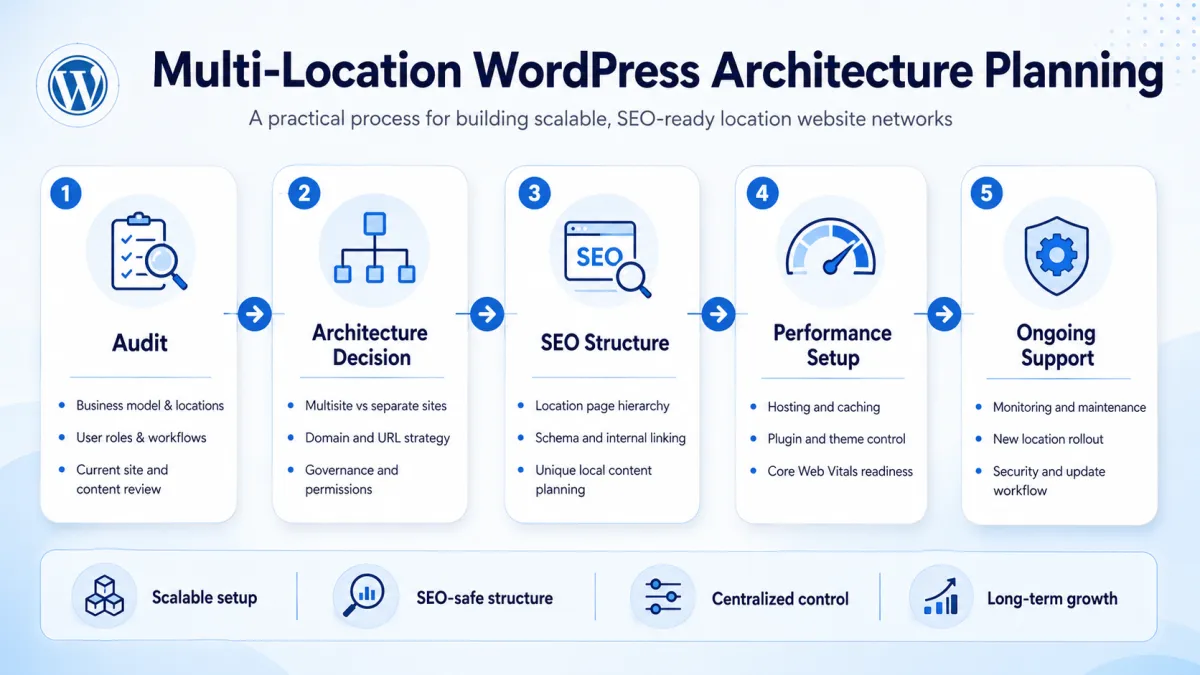
Business and location audit
Before recommending Multisite or separate installs, DazzleBirds maps the actual business structure. How many locations exist now and how many are planned. Who owns each location? Who controls content? What the SEO goals are for each market. What the internal team’s technical capability looks like. What the content workflow is between head office and local teams. These questions change the architecture recommendation significantly.
Architecture planning
Once the business structure is understood, the right architecture becomes clearer. Some businesses need pure Multisite. Some need fully separate installs. Some need a hybrid approach where a multisite network handles branded locations while a separate install handles a different brand or business unit entirely. The decision is driven by business logic, not by tool preference.
SEO-safe structure
URL structure, location page templates, content uniqueness requirements, internal linking maps, schema frameworks, sitemap architecture, and redirect plans are all defined before development begins. This is the stage where most agencies skip steps and most SEO problems originate. Getting this right before a single page is built prevents months of remediation work later.
Performance-first setup
Hosting selection, caching configuration, database optimization, image handling, Core Web Vitals targets, and load testing are treated as architecture requirements, not post-launch fixes. A multisite network that performs well across all locations requires deliberate infrastructure decisions from day one. DazzleBirds’ approach to WordPress performance optimization applies these principles at the network level, not just per site.
Security and governance
User role mapping, plugin permission frameworks, update approval processes, staging environment configuration, backup schedules, and recovery plans are documented and implemented as part of the build. DazzleBirds’ WordPress security services extend this to ongoing monitoring and vulnerability response across the network.
Long-term support
Multi-location WordPress networks are not set-and-forget infrastructure. Locations are added. Plugins are updated. Performance benchmarks shift. SEO targets evolve. DazzleBirds supports the network through its growth cycle with structured maintenance, monitoring, speed reviews, security audits, and location rollout support as the business scales.
Final Verdict: Which Setup Should Multi-Location Businesses Choose?
Choose WordPress Multisite when your business needs centralized control, consistent branding, shared infrastructure, faster location rollout, and lower long-term management overhead. It is the right architecture for franchise networks, multi-location service businesses, clinic groups, school systems, and any organization where one brand operates across many locations under a single governing structure.
Choose separate WordPress sites when each location has genuine independence, different ownership, different branding, or different functionality requirements or when operational and legal separation is required. Separate installs respect real business boundaries and provide isolation that Multisite cannot.
The architecture decision should always come after a clear understanding of business structure, SEO goals, content governance, hosting requirements, team capability, and long-term growth plans. Choosing the wrong setup at the start creates compounding problems that become expensive and disruptive to fix.
If your business is planning or restructuring a multi-location WordPress setup, DazzleBirds can help you audit your current situation, choose the right architecture, build it with SEO and performance built in from the start, and support it as your location network grows.
FAQs
Yes, in the right circumstances. WordPress Multisite works well for multi-location businesses that share a brand, need centralized control, and want consistent design and functionality across all locations. It reduces maintenance overhead significantly at scale. However, it requires proper planning around hosting, SEO structure, user roles, and content governance to deliver those benefits reliably.
It depends on the business structure. Multisite is more efficient when locations share a brand and need centralized management. Separate sites are better when locations have different owners, different brands, or different functionality needs. Neither is universally superior. The right choice depends on governance, SEO goals, team structure, and long-term growth plans.
WordPress Multisite itself does not harm SEO. But poor implementation of Multisite absolutely does. Duplicate content across location pages, weak URL structure, missing local schema, inconsistent metadata, and poor internal linking are the real SEO risks. These problems can occur on multisite networks and on separate installs alike. Good SEO on a multisite network requires deliberate planning before development begins.
Avoid multisite when locations have different owners or brands, when sites need fundamentally different functionality, when legal separation between locations is required, or when your hosting environment cannot support a shared network infrastructure. Also avoid it when your team lacks the technical capacity to manage a network correctly, as a poorly managed multisite can create systemic problems that affect every location simultaneously.
There is no single price. Costs depend on the number of locations, complexity of the design and functionality, hosting requirements, SEO setup, user role configuration, and ongoing maintenance. Multisite typically costs more to plan and build correctly than a single WordPress site. However, the long-term cost per location decreases significantly as the network grows, making it more cost-efficient than managing an equivalent number of separate installs over a two- to five-year horizon.


 WooCommerce Solutions
 Solutions for WordPress