Introduction
Search behavior has changed. People still search constantly, but many of those searches never lead to a click. Google now answers questions directly inside the search results page through featured snippets, AI Overviews, People Also Ask boxes, and knowledge panels. This shift is called “zero-click search,” and it is reshaping how WordPress websites need to be built, structured, and optimized.
For business owners and marketing teams, this can feel unsettling. Fewer clicks can look like fewer opportunities. But zero-click search is not simply a traffic problem. It is a visibility problem, a trust problem, and a brand recall problem. The websites that adapt are not disappearing from search results. They are becoming the source that Google, AI Overviews, and answer engines quote, summarize, and recommend.
This guide explains what zero-click search actually means, why it matters for WordPress websites specifically, and seven practical ways to win visibility even when users never click through. It also covers the technical foundation, content structure, and measurement approach that make zero-click optimization sustainable rather than a one-time fix.
Key Takeaways
- Zero-click search means users get their answer directly on the search results page without visiting a website.
- WordPress websites can still win visibility by becoming the trusted source that search engines choose to feature.
- Structured content, clear answers, and strong internal linking all improve zero-click SEO.
- Schema markup helps Google and AI systems understand and trust page content.
- Zero-click optimization works alongside traditional SEO rather than replacing it.
- Measuring success requires looking beyond clicks to impressions, brand visibility, and assisted conversions.
What Is Zero Click Search?
Zero-click search happens when a search engine answers a user’s question directly within the search results page, so the user finds what they need without clicking any website link.
This includes featured snippets, AI Overviews, People Also Ask expansions, knowledge panels, and direct answer boxes. For WordPress site owners, this means a page can rank well, appear prominently, and still receive no visit. The value shifts from the click itself to being recognized as the trusted answer source.
Understanding this distinction is the starting point for any real zero-click SEO strategy. A page that never gets clicked can still build brand trust, reinforce topical authority, and influence a buying decision later.
Why Zero Click Search Matters for WordPress Websites
WordPress powers a large share of business websites, service pages, and blogs, which means the platform’s flexibility with content, schema, and internal linking gives it a real advantage in zero-click visibility if it is configured correctly.
Many WordPress sites are built for readability but not for extraction. Search engines and AI systems need clean structure, clear entities, and direct answers to summarize content accurately. Without that structure, a WordPress page might rank, but it will rarely be chosen as the source for an AI overview or a featured snippet.
This matters because zero click placements often appear above every organic result. A brand that consistently earns that space builds recognition even among users who never click, which supports long-term demand and search trust.
Zero Click Search Is Not the End of SEO
It is easy to assume zero-click search signals the decline of organic SEO. In practice, it signals a shift in what SEO needs to accomplish. Rankings still matter. Traffic still matters. But visibility, trust, and being the recommended source now carry equal weight.
WordPress SEO services that focus only on keyword rankings without addressing structure, clarity, and entity recognition will struggle to compete for these placements. Zero-click SEO does not replace traditional SEO. It extends it, requiring content that is accurate, well organized, and easy for both humans and machines to interpret.
Where Zero Click Visibility Happens
Zero click visibility is not limited to one search feature. It shows up across several formats, and a strong WordPress strategy accounts for all of them.
- Featured snippets, which pull a short direct answer from a page and display it above standard results.
- Google AI Overviews, which summarize information from multiple trusted sources into a single generated answer.
- People Also Ask boxes, which expand related questions and answers directly on the results page.
- Knowledge panels, which display entity-based information about a brand, person, or organization.
- Voice assistant answers, which read a single summarized answer aloud without showing a list of links.
Each of these formats rewards content that is clear, well structured, and confidently accurate, which is why AI search optimization and answer engine optimization now sit alongside traditional keyword optimization.

How WordPress Websites Can Win Zero Click Search
Winning zero click visibility on WordPress comes down to seven practical actions.
- Answer the question immediately. Every important page or blog post should include a direct answer near the top, ideally within the first forty to sixty words after the heading. This gives Google and AI Overviews a clean, quotable summary.
- Structure content around real questions. Use headings that match how people actually search, then answer that exact question directly beneath it. This is the foundation of both featured snippet targeting and People Also Ask visibility.
- Build topic clusters, not isolated posts. A single blog rarely earns lasting authority. Interconnected content, organized through clear WordPress taxonomies and pillar pages, signals topical depth to search engines.
- Use structured data intentionally. WordPress schema, including Article, FAQPage, Service, Organization, and BreadcrumbList markup, helps search engines confirm what a page is actually about.
- Strengthen internal linking with purpose. Internal linking should guide both users and search engines from informational content toward service pages, using descriptive anchor text rather than generic phrases like click here.
- Optimize for extraction, not just readability. Short, well formed paragraphs, clear definitions, and organized lists are easier for AI systems to summarize accurately than long, unstructured paragraphs.
- Maintain technical health continuously. Crawlability, page speed, mobile usability, and clean metadata all affect whether a page is even considered for zero click placement in the first place.
WordPress Content Structure for Zero Click Search
What content structure works best for zero-click SEO?
Content structured for zero-click SEO should lead with a direct answer, followed by supporting detail, examples, and context. Clear headings, short paragraphs, definition-style sentences, and organized lists help Google, AI Overviews, and answer engines extract accurate, quotable information from WordPress pages.
Here is a simple comparison of structure choices and their effect on zero-click visibility.
- Weak Structure: Long introductory paragraph before any answer appears
- Zero Click Impact: Search engines struggle to identify a clear, quotable answer
- Weak Structure: Answer buried inside a long paragraph
- Zero Click Impact: Lower chance of featured snippet or AI Overview selection
- Weak Structure: Vague headings without a clear question
- Zero Click Impact: Missed People Also Ask opportunities
- Strong Structure: Direct answer within the first sentences under a heading
- Zero-Click Impact: Higher chance of snippet and AI Overview selection
- Strong Structure: Clear, specific question-based headings
- Zero Click Impact: Stronger alignment with People Also Ask patterns
- Strong Structure: Organized lists, tables, and short paragraphs
- Zero Click Impact: Easier extraction and summarization by AI systems
WordPress custom fields can support this structure by allowing teams to build consistent, reusable answer blocks across service pages and blog posts, rather than rebuilding formatting manually each time.
For businesses managing large content libraries, this kind of consistency becomes especially important, which is part of why an enterprise WordPress strategy often includes standardized content templates for exactly this purpose.

Technical Foundation for Zero Click SEO
Content structure alone is not enough. Search engines and AI systems also need to trust that a WordPress site is technically sound before they will feature its content.
Key technical priorities include:
- Fast, stable page performance, since slow or unstable pages are less likely to be trusted for prominent placements.
- Clean indexing and crawlability, so search engines can access and understand every important page.
- Accurate metadata, canonical tags, and sitemaps, which reduce confusion about which page should rank.
- Mobile usability and accessibility, since a large share of zero-click interactions happen on mobile devices.
- Correct schema implementation, validated rather than assumed.
Reviewing and improving these factors is often best handled through WordPress performance optimization services since Core Web Vitals and site speed directly influence whether a page is even eligible for zero-click features.
Common Mistakes That Reduce Zero Click Visibility
Several recurring issues quietly limit zero-click performance on WordPress websites.
- Burying the answer beneath long, unfocused introductions instead of leading with clarity.
- Using clever or vague headings instead of direct, question-based ones.
- Publishing thin or generic content that does not add real depth to a topic.
- Ignoring schema markup, or implementing it inaccurately.
- Leaving pages orphaned, with no internal links connecting them to related content.
- Treating zero-click optimization as a one-time project instead of an ongoing process.
Avoiding these mistakes is often less about adding more content and more about organizing and clarifying what already exists.
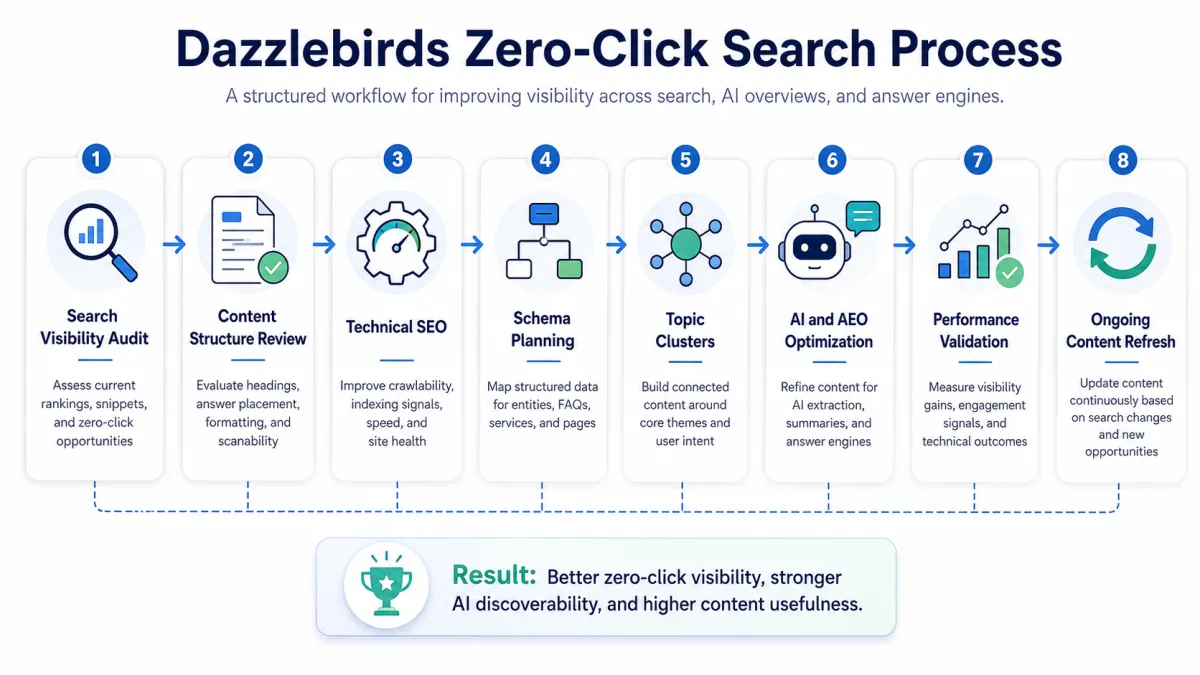
Dazzlebird’s Approach to Zero Click Search
Search Visibility Audit
- Review current organic impressions, clicks, rankings, and high potential pages
- Identify pages appearing in search but not earning enough visibility or engagement
- Check featured snippet, People Also Ask, and AI Overview opportunities
- Review branded and non-branded search presence
- Identify service pages, blogs, and topic clusters that need stronger answer structure
Content Structure Review
- Review headings, introductions, summaries, and answer blocks
- Improve question-based sections for AEO and GEO visibility
- Add concise definitions, comparisons, checklists, and direct answers where useful
- Remove thin, generic, or unclear content
- Strengthen content depth without adding filler
Technical SEO Review
- Check crawlability and indexability
- Review Core Web Vitals and page performance
- Validate mobile usability and accessibility
- Review canonical tags, sitemaps, redirects, and metadata
- Ensure important pages are technically easy for search engines to process
Schema and Structured Data Planning
- Identify suitable schema types such as Article, FAQPage, Service, Organization, BreadcrumbList, and LocalBusiness where relevant
- Add structured data only where it accurately represents the page content
- Validate schema implementation
- Avoid fake ratings, reviews, prices, or claims
- Use schema to clarify meaning, not manipulate search results
Topic Cluster and Internal Linking Improvement
- Build pillar pages and supporting blog clusters
- Connect related blogs, service pages, and conversion pages naturally
- Use descriptive anchor text
- Reduce orphan pages
- Help Google and AI systems understand the relationship between topics
AI and AEO Answer Optimization
- Add answer first sections
- Improve entity clarity
- Structure content for snippets, AI Overviews, and answer engines
- Make service explanations easier to summarize
- Use clear language that supports accurate extraction
Performance and UX Validation
- Test page speed, mobile experience, layout stability, and readability
- Confirm CTAs are visible but not disruptive
- Check page structure for real users, not only search engines
- Improve navigation paths from informational content to service pages
- Validate that the content supports both discovery and conversion
Ongoing Content Refresh
- Monitor search impressions, ranking changes, and engagement
- Update outdated blogs and service pages
- Add new answer sections based on search behavior
- Improve internal links as new content is published
- Keep high-value pages fresh, accurate, and useful
Expected Outcome
A WordPress website that can earn visibility even when users do not click immediately by giving Google, AI Overviews, featured snippets, People Also Ask, and answer engines clear, trustworthy, structured, and useful information to extract, summarize, and recommend.
This full process is typically supported through combined WordPress SEO services and custom WordPress development services, since structural changes often require both strategic and technical execution working together.
How to Measure Zero Click Search Success
How do you measure success if users are not clicking?
Zero click success is measured through search impressions, average position, brand search volume, featured snippet ownership, and assisted conversions. Since users may not click immediately, tracking visibility and brand recall over time is more accurate than relying on click-through rate alone.
Practical metrics to track include:
- Impressions and average position in Google Search Console, even when clicks stay flat.
- Featured snippet and AI overview appearances, tracked manually or through SEO tools.
- Branded search growth, which often increases after repeated zero-click exposure.
- Assisted conversions, where a user later returns directly or through another channel after first seeing the brand in a zero-click result.
- Engagement on pages that do receive clicks, since stronger structure tends to improve time on page and reduce bounce rates as well.
Consistent monitoring, paired with a WordPress website maintenance checklist, helps ensure that high-performing pages stay accurate and continue earning visibility over time.
Conclusion
Zero-click search is not a threat to be avoided. It is a shift that rewards WordPress websites willing to structure their content clearly, support it with accurate schema, and organize it through strong topic clusters and internal linking. Businesses that adapt are not losing visibility. They are becoming the trusted source that Google, AI Overviews, and answer engines choose to feature, summarize, and recommend, which builds brand recall and trust long before a click ever happens.
The websites that will struggle are the ones that keep optimizing only for clicks while ignoring how they are actually being read, extracted, and represented across modern search experiences.
FAQs
Zero-click search happens when users get the information they need directly from Google, AI Overviews, featured snippets, or answer engines without visiting a website. WordPress content can still gain visibility by providing clear answers, structured headings, schema markup, concise summaries, and trustworthy information that search and AI systems can easily extract.
A WordPress website can improve zero-click visibility by placing direct answers near the top of each page, using question-based headings, adding relevant schema, creating topic clusters, improving technical SEO, and keeping paragraphs short. Content should clearly answer user intent while remaining accurate, useful, and easy for search engines and AI platforms to understand.
Zero-click search can reduce clicks for simple informational queries, but it can also increase brand visibility, authority, and discovery across Google and AI platforms. The goal is not only to earn clicks. It is also to make the brand a trusted source that users recognize and return to when they need deeper information, services, or expert support.
Schema markup helps search engines and AI systems understand the meaning, structure, and relationships within website content. A relevant schema can clarify services, organizations, articles, FAQs, authors, and other entities. It does not guarantee visibility, but it improves machine readability and supports stronger eligibility for rich results and answer-based search experiences.
Zero-click content should be reviewed regularly and refreshed whenever search intent, industry information, rankings, competitors, or AI-generated results change. High-priority pages may need quarterly reviews, while evergreen content can be checked every six to twelve months. Updates should improve accuracy, answer quality, structure, internal links, schema, and overall usefulness.


 WooCommerce Solutions
 Solutions for WordPress