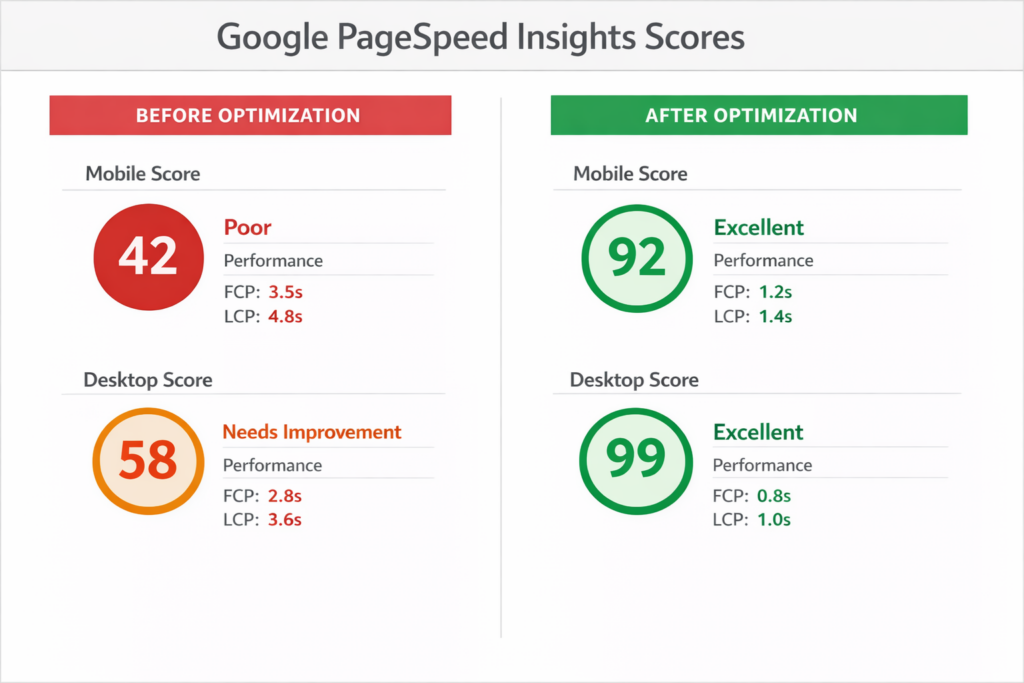
If your WooCommerce store takes more than three seconds to load, you are already losing customers without even realizing it.
Website speed is not a technical challenge anymore in today’s eCommerce world. It has an immediate impact on your search engine rankings, your conversion rates, and what customers think of your brand. A slow store makes the statement, “We don’t value your time.” And in a world where competition is one tab away, that’s an expensive message to convey.
WooCommerce performance optimization is the practice of tuning up your store — making it load faster, perform better, and scale without breaking a sweat. So whether you run a smaller boutique or high-volume shop, WooCommerce speed optimization is one of the highest-ROI investments you can make.
Choosing the appropriate woocommerce development company as your development partner will help you avoid months of future problems. Your live store needs improvements, which this guide will show you how to make.
Why WooCommerce Performance Optimization Matters
Let’s be real: performance isn’t something that most store owners think about until it’s broken. A surge in traffic takes the site down. A Google ranking drops. Cart abandonment rates climb. A bit too late, as the damage is done.
Why this matters: Staying ahead of performance issues can make a big difference.
It affects your SEO rankings directly. Page Speed: Confirmed by Google as a ranking factor, particularly on mobile. A sluggish WooCommerce store isn’t simply an irritant for users. It tells search engines that your site isn’t providing a quality experience. That translates into poorer visibility, reduced organic traffic, and fewer leads to convert. So, when you boost WooCommerce performance, you’re really also making an investment in your long-term SEO health.
It impacts your earnings more than you would think. Study after study shows a one-second increase in page load time can decrease conversions by as much as 7%. For a store generating $10,000 a month, that’s $700 wasted every single month out the door due to one second of slowness. Traffic delivers potential customers to your store’s technology wheelhouse, but it only ends up being revenue if the WooCommerce site speed is above board. It’s a revenue metric.
It influences the way customers see your brand. In milliseconds, people make opinions about the website. A quick-to-respond store conveys professionalism and trustworthiness. A slow one raises doubts. Shoppers begin to question whether the checkout will be buggy, whether their payment will go through properly, or even if this business is real.
Taking WooCommerce loading speed seriously, you aren’t just running down technical road markers. You’re creating a stronger experience and rewarding customers who come back to buy and refer more business to you.
Key Factors That Affect WooCommerce Performance
Before starting the process of fixing your store problems, you need to identify the specific reasons that exist. WooCommerce performance issues rarely have a single cause. The problem develops through several different factors that gradually accumulate until they reach a critical point.
Hosting and Server
The very foundation of it all is your hosting environment. While a shared hosting plan might be OK for a blog, WooCommerce stores have things like dynamic content and database queries in the background as well, which means that they don’t tend to play nicely; they need more resources. All of that demands resources.
No amount of optimization elsewhere will make up for an overpowered or underpowered server. Managed WooCommerce hosting from the providers we talk about in this article (e.g., Kinsta, WP Engine, or Cloudways) provides you with/manages several discrete components that give you the infrastructure to truly improve WooCommerce performance at scale.
Theme and Design
Not every WordPress theme is built equally. Some are overstuffed with unnecessary scripts, fancy animations, and design features you’ll never use—they will load your visitors’ browsers with everything.
A theme that looks stunning in the demo can silently ruin your production site speed on WooCommerce. You should always select themes that are designed for performance rather than just at the aesthetic level.
Plugins and Extensions
One of WooCommerce’s biggest advantages is Plugins also one of its worst performance liabilities: The code to run your site increases with each plugin you install. Some plugins are well optimized. Many are not.
The more plugins you pile on, the bigger the burden. Some plugins even create conflicts with one another that result in unexpected slowdowns. Over time, the performance of a WooCommerce website can be enhanced by regularly auditing your plugin stack.
Database Performance
The amount of database activity that WooCommerce stores generate is staggering: orders, customers, product data, sessions, and logs. This data builds up over time, slowing down queries.
An unoptimized database is one of the most underrated reasons for bad WooCommerce loading speed, especially among older stores that generate thousands of orders.
Images and Media
One of the prime offenders for slow stores using WooCommerce is large, uncompressed images. One product image that’s 4MB instead of 100KB may not sound so bad until you consider a catalog containing hundreds of products.
Only with proper image optimization and the correct delivery strategy can you significantly increase WooCommerce website performance without any noticeable loss of quality.
Proven WooCommerce Performance Optimization Tips
This is where the real work happens. The following strategies are field-tested, practical, and genuinely move the needle on performance.
1. Choose Fast Hosting
Start here. Always. Slow on the server, and everything else is a band-aid.
Choose hosting that is a min. 8+ PHP, has server-side caches, SSD drives, and designed infrastructure for WordPress & WooCommerce. Managed hosting is more expensive than budget shared plans, but the increase in performance you achieve and the hassle reduced make it well worth it.
2. Use a Lightweight Theme
Your theme needs to be a platform, not an anchor. Frameworks such as Kadence, GeneratePress, or Blocksy are designed with speed and flexibility in mind. They load only what they need and leave space for developers to customize without creating bloat.
If you’re working with a WooCommerce development agency for a custom build, ensure that performance is baked into the design decisions from day one rather than being left as an afterthought.
3. Optimize Images
Every image on your store should be:
Compressed without visible quality loss (tools like ShortPixel or Smush handle this automatically)
Resized to the actual display dimensions and not 2000px wide when the slot is 400px
Served in modern formats like WebP, which is significantly smaller than JPEG or PNG
Lazy loaded, so images below the fold don’t load until the user scrolls to them
This one area alone can cut your page size by 30 to 50 percent in many cases.
4. Enable Caching and CDN
Caching saves a static version of your pages; the server does not need to rebuild every time you visit. This is easy to set up with plugins like WP Rocket, W3 Total Cache, or LiteSpeed Cache.
A CDN (Content Delivery Network) goes one step further by distributing your static assets—images, CSS, and JavaScript—across servers all over the world. When a user loads your store, files are served from the nearest server to them, significantly speeding up latency.
Caching and CDNs, together, are the fastest way to improve visitor-side WooCommerce performance regardless of geography.
5. Minify CSS and JavaScript
All of the stylesheet and script files on your site contain whitespace, comments, and formatting that are useful for developers but entirely useless to browsers. Minification removes all of that, condensing file sizes and speeding up load times.
Minification can be found in most caching plugins. Just be sure to test thoroughly afterward for it because, what with aggressive minification and the like, they can break scripts if configured correctly.
6. Reduce and Audit Your Plugins
Review each plugin on your site and ask yourself, “Is this actively adding value or just hanging around? ”Be ruthless.
Turn off and remove everything you don’t actually need. For plugins that you do retain, ensure they are frequently updated and well-reviewed. Badly coded plugins really slow down the speed of a WooCommerce site and can even add security vulnerabilities for good measure.
Follow the rule of less is more and solve problems with fewer, better plugins.
7. Database Optimization
Over time, WooCommerce databases gather junk: the likes of post revisions, orphaned metadata, expired transients, and old sessions. Regularly cleaning this up makes query execution faster and the server load smaller.
WP-Optimize and Advanced Database Cleaners are good tools for automating this process. For high-traffic stores, weekly maintenance may be a good schedule.
8. Implement Lazy Loading
Lazy loading postpones the loading of an image or video until a user is scrolling closer to it than they actually need it. By dramatically reducing initial page weight and improving perceived load times, even if total page size remains the same.
Lazy loading is natively supported by modern browsers and has been enabled in WordPress by default since version 5.5. Ensure none of your theme or plugins are overriding this.
9. Enable GZIP Compression
Gzip compression minimizes the size of files sent from your server to your visitors’ web browsers: 60 to 80 percent in many cases. And it’s one of the easiest performance wins on offer, so this should be enabled on every WooCommerce store.
You can activate it in your hosting control panel, through your word.htaccess, or via most caching plugins. Use such testing tools like GTmetrix or Google PageSpeed Insights and see if they are activated.
10. Use Performance Monitoring Tools
You can’t optimize what you don’t measure. Make performance monitoring a regular habit, not a one-time panic when things get slow.
Tools to use regularly:
Google PageSpeed Insights — gives Core Web Vitals scores and specific recommendations
GTmetrix — detailed waterfall analysis of what’s loading and how long each element takes
New Relic or Query Monitor — for deeper server-side and database diagnostics
Pingdom — good for ongoing uptime and speed tracking
The best WooCommerce developers treat performance as a continuous process, not a one-time project.
Advanced Optimization Techniques for Scaling Stores
Directing the essentials, there’s a second tier of optimization tactics that become additionally essential as your store scales.
One of the most powerful approaches available today is headless WooCommerce. Working with a modern JavaScript framework like Next.js or Nuxt to take care of rendering, you will see a massive improvement in load times on mobile. The backend portion of WooCommerce is responsible for managing commerce logic and data, while the front end serves content at lightning speed. It’s not the right architecture for all stores, but it’s revolutionary for high-traffic operations.
API optimization is crucial when your store works with non-native systems like ERPs, CRMs, shipping carriers, and payment gateways. Badly executed API calls can silently bring your checkout and order processing to a crawl. Wherever possible, cache API responses and make calls asynchronously to keep wheels turning even if external services are slow to respond.
Background processing takes such heavy tasks as sending emails, syncing inventory, or generating reports out of the user’s request cycle. Rather than make a customer wait while your server performs some complex task in the background, you queue that work up and perform it separately. Fortunately, WooCommerce comes with a built-in Action Scheduler that is specifically designed for this purpose.
Optimizing woocommerce speed with advanced server-side caching technologies like Redis or Memcached goes beyond the capabilities of standard page caching plugins. In-memory caching systems reduce database load by magnitude, so they are extremely useful for stores with heavy usage or complex filtering needs.
You want to ensure that a skilled WooCommerce development company analyzes which of these techniques are relevant to your unique circumstance and then can apply them without interfering with your active store.
Why Dazzlebirds’ Approach to WooCommerce Optimization Works
At Dazzlebirds, performance isn’t a feature we add at the end of a project. It’s built into how we think about every line of code we write and every decision we make.
WooCommerce developers that consider SEO first in each project. That means we’re not only considering whether the store looks nice or if it works well. We are considering how it might perform for actual users on real devices and what search engines will look at. Core Web Vitals, Time to First Byte, Largest Contentful Paint — these are not just abstract metrics to us. They’re signals that inform us if we’ve done our job correctly.
From day one we build on a performance-driven architecture. That means choosing an appropriate hosting environment, selecting lightweight themes, laying out a database schema that will serve you well long-term, and coding up custom code in ways that don’t add bloat. We have only one rule of thumb for WooCommerce customization, and that is to add only what you need.
When clients seek our help with existing stores, and they struggle with speed, we have a very thorough diagnostic process. We analyze the hosting, server response times, and plugin conflicts and test database health as well as image delivery and front-end asset loading. Finally, we prioritize impact and deliver real improvements quickly.
As an expert WooCommerce development company, we have partnered with businesses across retail, wholesale, digital products, and subscriptions to take stores that were losing revenues on account of slow load times and converted them into high-performing revenue-generating machines.
We don’t want to just speed your store up today. It’s to create the foundation that grows with your business for years ahead.” And that is the difference between strategic woocommerce customization and a band-aid.
Common Mistakes That Slow Down WooCommerce Stores
Even experienced store owners fall into these traps. If your woocommerce loading speed is suffering, chances are one or more of these are contributing.
Installing too many plugins. Adding a plugin for each minor feature seems innocuous. But each that you add takes up space—be it extra scripts, queries, or possible conflicts. A store running with 40 or more active plugins is generally overloaded.
Staying on cheap shared hosting. Budget hosting can only take you so far and limits what your store can do. This is not the case with shared hosting because when server neighbors experience a lot of traffic, your store also slows down due to sharing resources. It’s a cost that hides in lost sales.”
Using bloated themes. Marketplace multipurpose themes often include page builders, shortcodes, sliders, and dozens of other scripts on each single page, whether you are using those features or not. They are easy to demo, but they can destroy your site speed in WooCommerce.
Uploading unoptimized images. Uploading product photos directly from a camera or phone without resizing and compressing them is one of the most common and costly mistakes. One unoptimized image can be bigger than your whole optimized page should be.
Skipping caching entirely. An uncached WooCommerce store is generating every page, at every single request, independently. That’s a considerable server load for a store with decent traffic, and visitors pay the price in slower loading times. Caching is low effort, high reward.
These aren’t obscure issues. They’re everyday habits that inhibit performance and sap stores of revenue, sometimes turning star retailers into everyday stores when they could be so much better.
Conclusion and Call to Action
WooCommerce performance optimizing isn’t a one-off activity. It’s a continuous commitment to your customers and the growth of your business.
The fastest stores don’t become that way by chance. They’re designed for! The right hosting, clean code, optimized assets, smart cache, and regular maintenance. Every single tweak you do to WooCommerce loading speed compounds in better rankings, more sales, and happier customers, on and on over time.
So, if you’re really looking to take your WooCommerce site up and stop lost revenue on the table, Dazzlebirds is here to help. Whether launching a new store or fixing an existing WooCommerce setup, our developers have the skills to audit, optimize, and scale your store. As a WooCommerce development company that’s everything service, we help with one-of-a-kind technical perceptiveness and a great degree of critical thinking to devise plans that employ results to help your business progress.
Don’t allow a slow store to hold you back. Reach out to Dazzlebirds now, and help us build something quick, dependable, and scalable. Our team is primed to apply the correct WooCommerce modification and performance approach to your shop—today.
FAQs
If your store takes more than 3 seconds to load, has a low Google PageSpeed score, or you're noticing high bounce rates and drop-offs at checkout, those are clear signs you need to optimize your WooCommerce website. Tools like GTmetrix and Google PageSpeed Insights can give you a detailed picture of your WooCommerce site speed and exactly where things need attention.
There's no magic number, but anything above 20 to 25 active plugins warrants a serious audit. The real issue isn't quantity alone—it's poorly coded or unused plugins quietly hurting your WooCommerce loading speed in the background. Every plugin should earn its place by serving a clear purpose. This is one of the most overlooked woocommerce performance tips that can make an immediate difference.
Absolutely. Hosting is the single biggest factor most store owners underestimate when trying to improve WooCommerce performance. A well-optimized store on bad hosting will still be slow. Managed WooCommerce hosting with proper server resources, PHP 8+, and built-in caching can speed up your WooCommerce website dramatically without changing a single line of code.
It's ongoing. Your store grows, plugins get updated, traffic patterns change, and databases accumulate clutter over time. WooCommerce speed optimization is not a set-it-and-forget-it task. Treating WooCommerce performance optimization as a regular maintenance habit rather than a one-time project is what separates consistently fast stores from stores that gradually slow down without anyone noticing.
Yes, and that's actually one of the most common scenarios. Experienced WooCommerce developers will start with a full performance audit covering hosting, plugins, database, images, and front-end assets, then work through fixes in order of impact. A good WooCommerce development company brings both the technical depth and the strategic thinking needed to improve WooCommerce performance without disrupting your live store. You don't need to rebuild everything to see significant, lasting results