When you move off an enterprise CMS, migrate your content model and URL inventory first. Then move the pages that bring in the most traffic and leads, followed by the integrations those pages depend on (CRM, forms, DAM, SSO). Personalization rules, unused components, and low-value archives go last or get retired.
Most teams leaving Sitecore or Adobe Experience Manager (AEM) usually know where they are going. Where they get stuck is the order of the work. The license renewal date is fixed, the site has thousands of pages, and every department thinks its section should go first. A written enterprise CMS migration plan settles that argument before it starts.
This guide covers what to migrate first, how to group the work into CMS migration phases, and what you can safely leave behind. If you are still weighing whether an enterprise platform is worth keeping, our complete guide to enterprise CMS features and use cases explains what these systems do well. Here, the decision to move is already made.
Get a Free Migration Scoping Call
Why Migration Order Decides How the Project Ends
Enterprise migrations rarely go wrong because of WordPress. They go wrong because the team moved things in the wrong order.
A familiar pattern: the design team rebuilds the homepage and a dozen campaign templates first. The content team starts copying pages by hand. Three months later someone notices that 4,000 resource URLs have no redirect plan, the Salesforce form handler still posts to the old CMS, and DAM asset paths are hardcoded into page bodies.
Rankings depend on URLs and content carrying over intact, so those need a plan before any template work. Lead flow depends on forms and CRM connections, so those cannot wait until launch week. Get those two right, and the rest of the schedule has room to flex.
Phase 0: Audit Everything Before You Move Anything
Every enterprise CMS migration plan starts with an inventory. You cannot rank pages by value until you know what exists, who owns it, and what it earns.
Build a full content and URL inventory.
Crawl the live site with a tool like Screaming Frog, then export the CMS content tree. Compare the two lists. You will find pages in the CMS that no crawler can reach, URLs that only exist through wildcard items or vanity URLs, and PDFs in the DAM that pages link to directly.
For every URL, record the template it uses, 12 months of traffic from GA4, conversions, referring domains, the business owner, and the last edit date. This spreadsheet becomes the source of truth for every later decision.
Sort content into keep, merge, and retire.
Most enterprise sites carry years of expired campaign pages, old press releases, and duplicate regional copies. A page with no traffic, no backlinks, and no owner is a candidate to retire with a 301 redirect instead of migrating. Merging thin pages that cover the same topic also cuts the workload and usually helps rankings.
List every integration.
Write down each system the CMS talks to: CRM (Salesforce, HubSpot, Dynamics), marketing automation (Marketo, Eloqua), SSO or identity providers, site search (Coveo, Solr), DAM, analytics tags, translation connectors, and any commerce engine. Next to each, note which pages and templates depend on it. That dependency list tells you which integrations must be live before which pages can launch.
What to Migrate First: The Content Model
The technical answer to what to migrate first in a CMS migration is the content model. Before a single page moves, you need to know how Sitecore templates or AEM components will map to WordPress.
Neither platform maps one to one. Sitecore stores content as items built on templates, with renderings and datasources placed on layouts. AEM stores pages as nodes in the Java Content Repository (JCR), assembled from components, experience fragments, and content fragments. In WordPress, the same content usually becomes custom post types, custom fields, taxonomies, and Gutenberg block patterns.
A product page in AEM might be built from 14 separate components. In WordPress it might become a single “Product” post type with structured fields and one block template. That simplification is where much of the long-term editing time is saved.
Work through the model in this order:
- List every template or component and count how many live pages use each one.
- Collapse duplicates. Enterprise sites often have three or four hero components that do the same job.
- Define post types, fields, and taxonomies for the components that survive.
- Decide the multilingual approach (WPML, Polylang, or WordPress Multisite) if the site runs in several languages.
- Keep the URL structure as close to the current one as possible, so fewer redirects are needed.
The output is a mapping document: old template, old field, new post type, and new field. Your migration scripts are written directly from it, so time spent here pays off in every later phase.
Phase 2: Migrate High-Value Pages and Templates
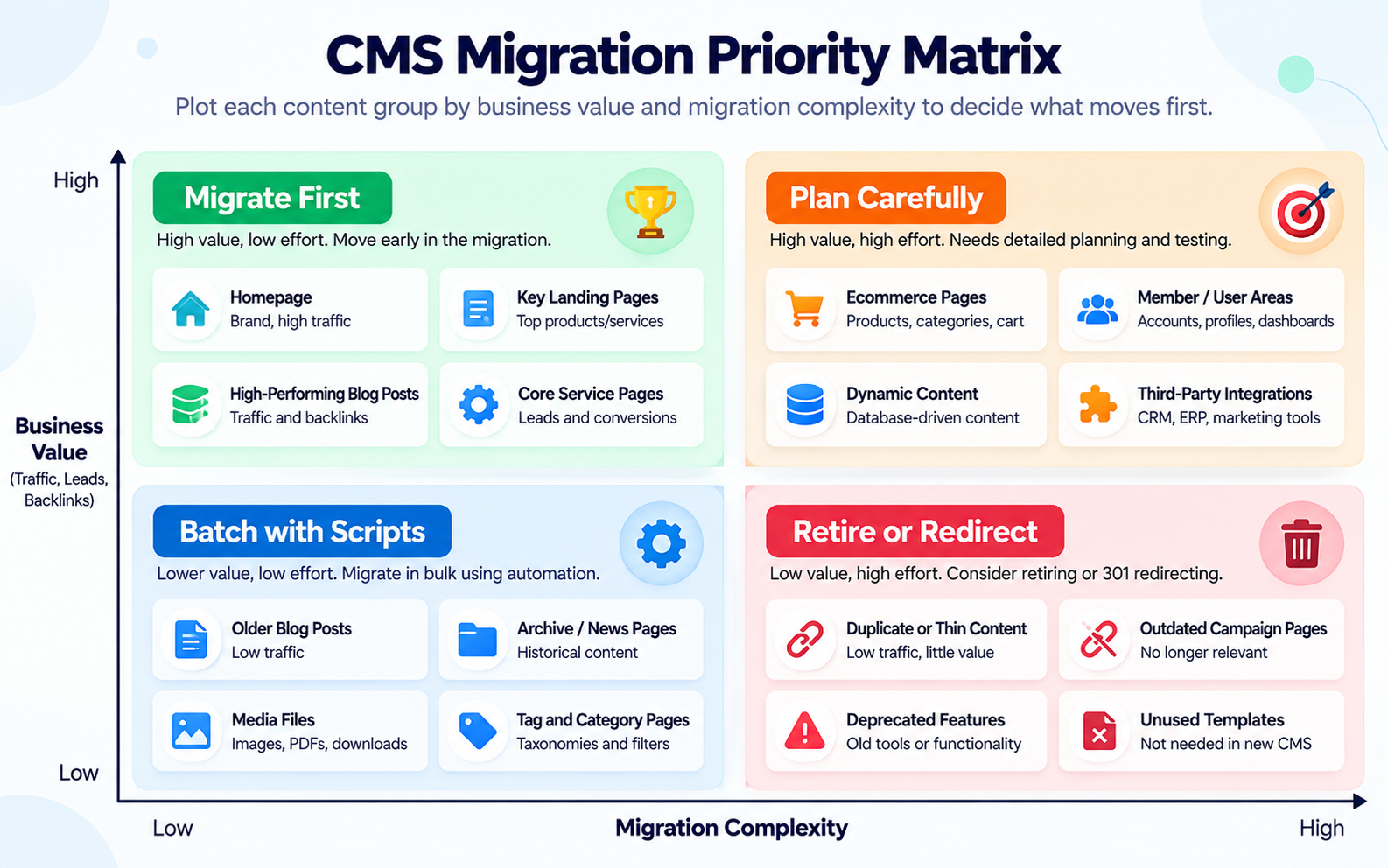
With the inventory scored, rank pages by a mix of traffic, conversions, and backlinks. The pages at the top of that list move first, and so do the templates they use.
For most B2B sites the first wave includes the homepage, core product or service pages, top landing pages, pricing and contact pages, and the resources that pull in the most organic traffic. Build the WordPress templates for these first, then load real content into them, not placeholder text.
Move content with scripts instead of copy and paste. A typical pipeline exports Sitecore items through Sitecore PowerShell Extensions or its item APIs, or AEM content through JSON exports or Content Fragment APIs. A transform step cleans the markup and maps fields. The import runs through WP-CLI or the WordPress REST API. Scripts can be rerun, which matters when content changes during the project.
Build the redirect map for these pages now, not in launch week. Check that each migrated page keeps its title tag, meta description, canonical tag, hreflang tags, and structured data.
Forms come first in this phase because lead loss shows up immediately. Map each enterprise form to its WordPress equivalent (Gravity Forms, HubSpot or Marketo embeds, or a custom handler). Test hidden fields, UTM capture, consent checkboxes, and CRM routing rules with real submissions.
After forms, reconnect SSO for gated content, site search, the DAM connection, and your tag manager container. Run GA4 events on staging and compare them against production before launch. Our staging site checklist covers the pre-launch checks in more detail.
If your current stack is Sitecore, our Sitecore to WordPress migration team handles item exports, datasource resolution, and xDB form data. For Adobe shops, our AEM to WordPress migration services cover JCR exports, DAM asset moves, and component mapping.
Map My Migration Phases
Phase 4: Bulk Content, Media, and Archives
Once templates and integrations are stable, the long tail of content can move in batches. Blog posts, news items, case studies, and documentation pages usually share a few templates, which makes them a good fit for scripted imports.
Treat media the same way. Migrate only the DAM assets that kept pages actually referenced and rewrite in-body links and image paths during the transform step. Pages marked “retire” in Phase 0 get a 301 redirect to the closest relevant page instead of a copy.
Plan a content freeze window before cutover. Editors keep publishing on the old CMS until the freeze, and a final delta import picks up anything created or changed since the last full run.
What to Leave for Last, or Leave Behind
Some parts of an enterprise CMS cost far more to port than they return. Push these to the end of the schedule, or drop them:
- Personalization rules. Sitecore XP personalization and AEM experiences driven by Adobe Target rarely carry over as they are. Check how many rules actually ran in the last year and showed measurable lift. Rebuild the few that did, after launch.
- Unused components. If a component appears on fewer than a handful of pages, rebuild those pages with standard blocks.
- Complex approval workflows. Enterprise workflow engines often have more states than the team uses. A simpler editorial flow with WordPress user roles is usually enough.
- Old campaign microsites. Archive them as static pages or redirect them to a current page.
The phase order above applies to both platforms, but each one stores content differently. Plan your export scripts around these details when you migrate from Sitecore or AEM to WordPress.
Sitecore
Sitecore keeps page content and presentation details separate. A page item holds some fields, while its renderings pull other content from datasource items that several pages may share. Your export has to resolve those data sources, or the WordPress page will be missing half its content. Language versions live on each item, and form submissions may sit in xDB or Experience Forms storage. Our Sitecore to WordPress migration guide walks through these steps in more depth.
AEM
AEM stores pages under /content and assets under /content/dam in the JCR. Experience Fragments and Content Fragments are reused across pages, so map them to reusable blocks or a dedicated post type. Multi-region sites often use Multi Site Manager (MSM) live copies, which need a clear rule for which version becomes the WordPress source. If you are still comparing the two platforms, read our WordPress vs AEM comparison.
Migration Priority at a Glance
| What to migrate |
When |
Why it goes there |
| URL inventory and redirect map |
Phase 0 |
Protects rankings and backlinks |
| Content model mapping |
Phase 1 |
Every script and template depends on it |
| Highest-traffic and highest-converting pages |
Phase 2 |
Revenue and search visibility |
| Forms, CRM, SSO, search, analytics |
Phase 3 |
Lead flow and reporting on day one |
| Long-tail content and DAM assets |
Phase 4 |
High volume, easy to script |
| Personalization rules and archives |
Last, or retire |
Low return when ported as they are |
A Sample Timeline for a Mid-Size Enterprise Site
For a site with a few thousand pages, two or three languages and five or six integrations, a 16-week schedule is realistic. Larger multi-region sites with heavy personalization take longer.
| Weeks |
Work |
| 1 to 3 |
Content audit, URL inventory, integration list |
| 4 to 6 |
Content model mapping, theme foundation, migration scripts |
| 7 to 10 |
Priority templates and pages, redirect map |
| 11 to 13 |
Forms, CRM, SSO, search, analytics, staging QA |
| 14 to 15 |
Bulk content and media import, redirect testing, editor training |
| 16 |
Content freeze, delta import, DNS cutover, post-launch monitoring |

Mistakes That Push Enterprise Migrations Off Schedule
Starting with design is the most common one. A new look is easy to approve and easy to show, but it hides the work on content structure that the rest of the project depends on.
Moving content by hand is the second. It looks faster for the first hundred pages and becomes the bottleneck at page two thousand, especially when content changes mid-project and has to be copied again.
Teams also leave the redirect map to the final week, try to port every component the old site ever used, and train editors only after launch. Each of these shows up as missed traffic, missed leads or frustrated editors in the first month after go-live.
A good enterprise CMS migration plan answers one question before any code is written: what moves first, and why. Inventory and content model come first. Revenue pages and the integrations behind them come next. Everything else follows in batches, and the parts that no longer earn their keep stay behind.
DazzleBirds plans and runs migrations off Sitecore, AEM and other enterprise platforms for US B2B companies. Our CMS to WordPress migration solutions start with a scoped audit, so you see the phase plan, redirect volume and integration list before the build begins.
Book Your Migration Assessment
FAQs
Start with a full URL inventory and the content model, meaning how old templates and components map to WordPress post types, fields, and blocks. After that, move the pages with the most traffic, leads, and backlinks, then the forms and integrations those pages need.
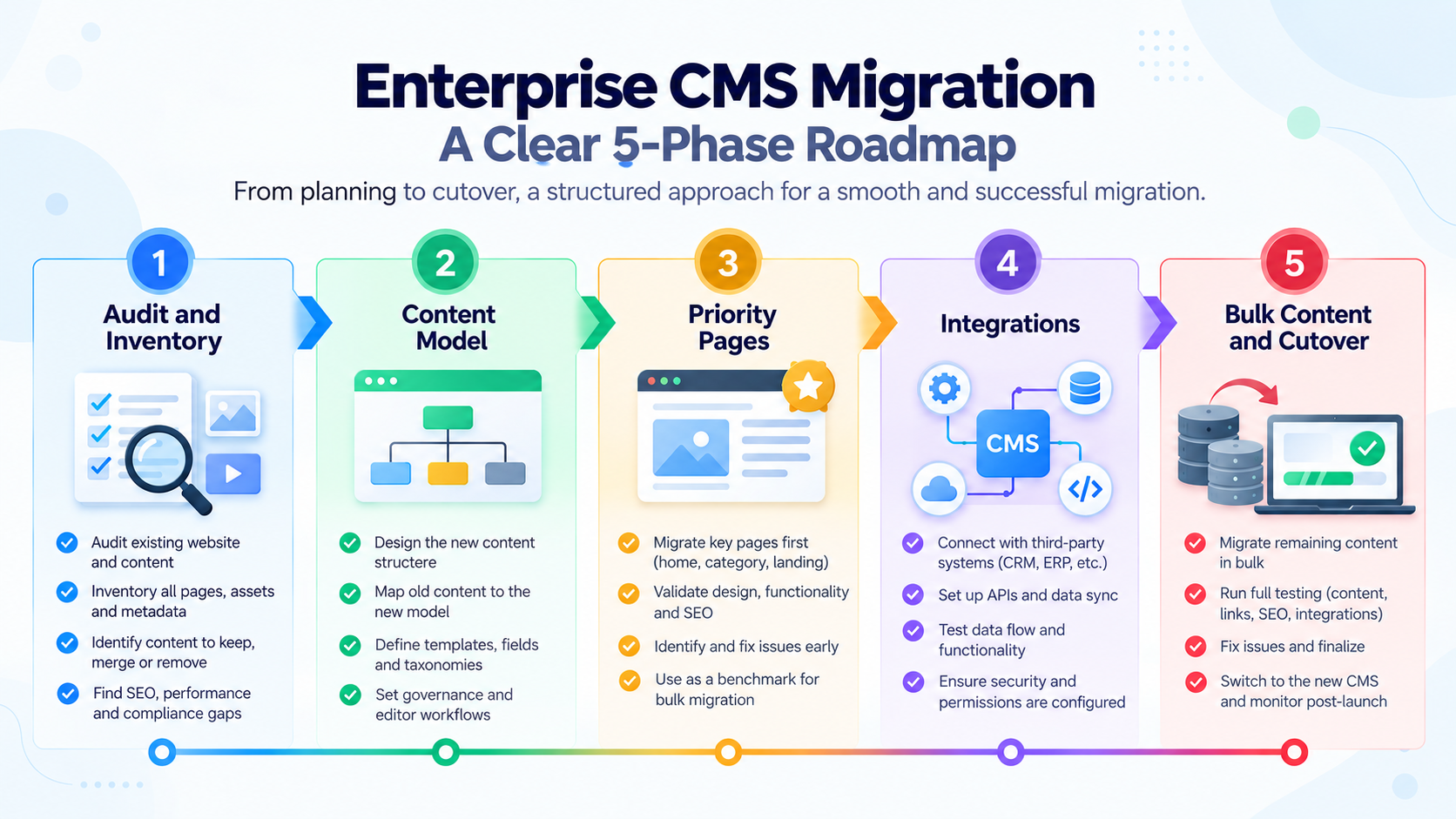
Most projects run in five phases: audit and inventory, content model mapping, priority pages and templates, integrations and forms, and then bulk content with cutover. Personalization and archives are handled last or retired.
A solid plan includes a URL and content inventory scored by traffic and conversions, a template-to-post-type mapping document, an integration dependency list, a redirect map, a content freeze date, and a cutover checklist. Each phase should have an owner and a finish date.
It can if URLs change without redirects or if metadata is lost. Keeping the URL structure where possible, mapping every changed URL to a 301 redirect, and carrying over titles, canonicals, hreflang, and schema keeps the risk low. Watch Search Console and 404 logs closely for the first few weeks.
Only the ones that proved their value. Review which rules actually ran and improved conversions, rebuild those after launch, and drop the rest. Porting every rule as it stands adds cost with little return.
Yes. With a structured content model, managed enterprise hosting, object caching and a CDN, WordPress runs sites with tens of thousands of pages and several languages. Multisite or a multilingual plugin covers regional sites.


 WooCommerce Solutions
 Solutions for WordPress