WooCommerce Customer-Specific Pricing means a specific buyer, or a specific account, is shown a price built from their own contract terms, volume commitments, or negotiated agreement, instead of a price that applies to an entire role or quantity tier. That distinction matters more than it sounds. Most WooCommerce pricing plugins are built around roles and tiers, and stretching them to handle true one-to-one pricing is where a lot of enterprise projects start to strain.
This guide is written from the other side of that strain: the implementation work that happens after the plugin is installed and the first fifty customer price lists reveal what the architecture was never designed to handle. The sections below cover the decisions that actually determine whether a customer-specific pricing project succeeds.
What Customer-Specific Pricing Actually Means for a B2B Store
Customer-specific pricing assigns a price to a product for one individual customer account, based on a negotiated agreement rather than a shared rule. It differs from role-based pricing, which applies one price to everyone in a group, such as “wholesale” or “distributor,” and from quantity tiering, which changes price based on how many units are in the cart.
The practical difference shows up the first time two customers in the same role need different prices for the same product. A distributor buying under a three-year agreement and a distributor buying month to month may both carry the “Distributor” role, but the WooCommerce data model needs a way to say this price applies to this customer ID, on this product ID, and nothing else. That requirement is what separates customer-specific pricing from the tiered and role-based systems that most WooCommerce pricing tutorials describe.
Customer-Specific Pricing vs Contract Pricing vs Tiered Pricing
These three models get used interchangeably in sales conversations, and clearing up that confusion is usually the first thing worth doing before development starts.
| Pricing Model |
Applies To |
Typical Data Structure |
Best Fit |
Main Limitation |
| Tiered / Quantity Pricing |
Cart quantity thresholds |
Rule table keyed by product and quantity break |
Retail-to-wholesale stores with predictable volume discounts |
Cannot reflect a negotiated rate that ignores quantity |
| Role-Based Pricing |
User role or customer group |
Percentage or fixed adjustment per role |
Stores with a small number of distinct buyer categories |
Breaks down once two accounts in the same role need different terms |
| Customer-Specific / Contract Pricing |
Individual customer account |
Price list mapped to customer ID and product ID, often with effective dates |
Enterprise accounts, distributors, and negotiated B2B contracts |
Requires a dedicated data layer and governance process to stay accurate |
Contract pricing and customer-specific pricing are close enough that the terms often describe the same thing, but contract pricing usually implies a formal agreement with start and end dates, minimum commitments, and renewal terms. Customer-specific pricing can be as informal as a sales rep entering a one-off discount. Systems built only for the informal version tend to fail the moment finance asks for an expiration date or a renewal audit trail.
When to Implement Customer-Specific Pricing, and When Not To
Customer-specific pricing earns its complexity when a meaningful share of revenue comes from negotiated accounts whose prices cannot be expressed as a role or a quantity break. If only a handful of accounts need custom terms, a manual order note or a coupon scoped to that customer is often faster to build and easier to maintain than a full pricing engine.
The signal to move forward is usually operational rather than strategic. Sales teams already emailing quotes, finance already tracking special terms in a separate spreadsheet, and support already fielding “why was I charged the wrong price” tickets are all signs the manual process has outgrown itself. The signal to hold off is when the business cannot yet say who owns a price change, because customer-specific pricing without ownership turns into customer-specific chaos within two or three quarters.
Why Most Customer-Specific Pricing Projects Fail
Most failures are not caused by the WooCommerce plugin. They are caused by treating pricing as a feature to install rather than a system to govern.
The common failure pattern looks like this: a plugin is configured to apply discounts by customer, the discounts work correctly in testing, and within a few months the store has hundreds of overlapping rules with no record of who created them or why. When a customer disputes a price, nobody can confirm whether the price shown was correct, because there is no single source of truth for what that customer’s agreement actually says. At that point, the technical fix is usually smaller than the process fix, and rebuilding the pricing architecture so it works correctly at checkout rather than as a manual override after the fact is one of the more common corrective projects we see in B2B WooCommerce stores. It is almost always cheaper to design that architecture correctly the first time than to retrofit it once the rule count gets out of hand.
Pricing Architecture Before Technology
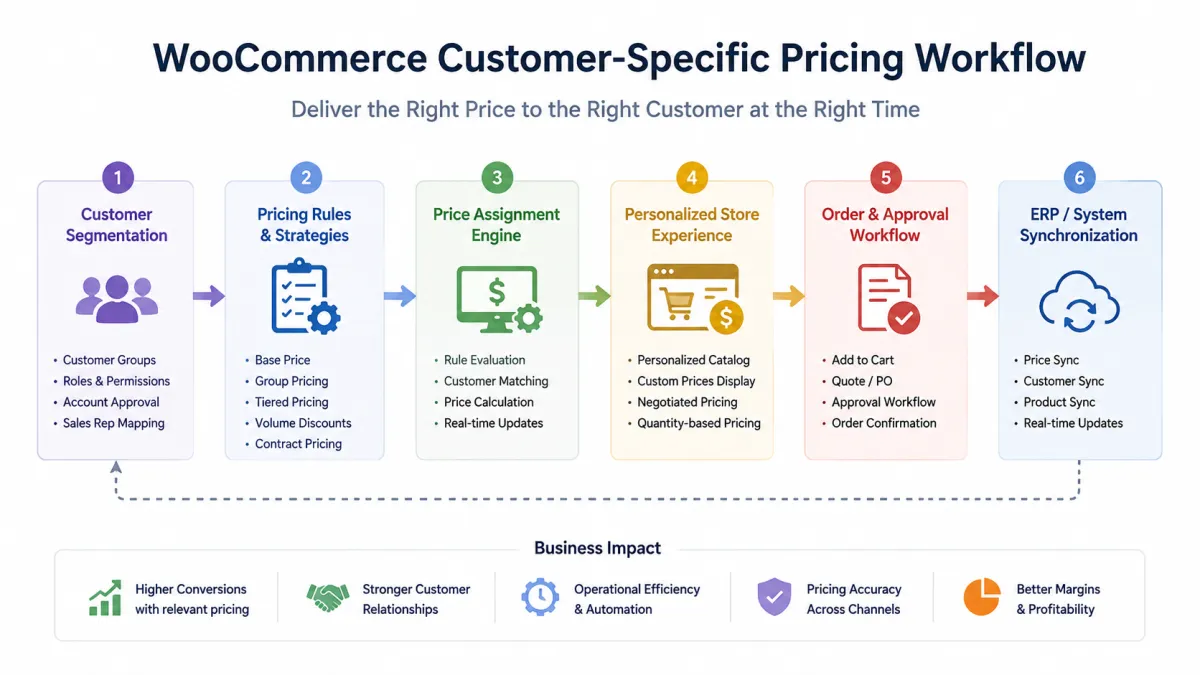
The plugin choice should come after the architecture decision, not before it. Before selecting a tool, a business needs to decide where the authoritative price lives: in WooCommerce, in the ERP, or split across both, with WooCommerce holding a synchronized copy.
Most enterprise implementations land on the ERP or a dedicated pricing engine as the source of truth, with WooCommerce holding a cached, synchronized version used only for display and cart calculation. This keeps the storefront fast and avoids duplicate logic, but it also means every price change has to travel through a sync process before a customer sees it. Deciding this early prevents a common and expensive mistake: building pricing logic directly into WooCommerce hooks, then discovering eighteen months later that the ERP needs to be the system of record and the two systems now disagree with each other.
The Hidden Cost of Poor Pricing Governance
Pricing governance is the set of rules that determine who can create a customer-specific price, how long it lasts, and how it gets reviewed. Without it, the cost shows up quietly, in finance reconciliation time, in support tickets, and in margin leakage that nobody notices until a quarterly audit.
A distributor account that received a temporary promotional discount eighteen months ago, with no expiration date attached, is often still receiving that discount today simply because nobody built a review cycle into the rule. Multiply that across a few hundred accounts, and the margin impact becomes real money, even though no single rule looks like a problem on its own. This is the same category of issue we cover in our guide to the signs your B2B WooCommerce store has technical debt, where pricing rules without expiration or ownership behave exactly like undocumented code nobody wants to touch.
How Sales Teams and Ecommerce Teams Conflict Over Pricing
Sales teams want the ability to offer a custom price during a negotiation without waiting on a development ticket. Ecommerce and IT teams want pricing changes to go through a controlled process so the storefront, tax calculation, and reporting all stay accurate.
Both positions are reasonable, and the conflict usually gets resolved by separating the request from the execution. A practical pattern is a request workflow where a sales rep submits a proposed price and term length through a simple internal form or CRM field, and an automated or lightly reviewed process pushes that request into the pricing system with an expiration date already attached. This removes the friction sales teams complain about while keeping a record that finance and e-commerce teams can audit later.
Designing Pricing Rules That Scale Beyond a Large Catalog
A pricing rule structure that works cleanly for a few thousand SKUs often collapses once a catalog crosses into the tens or hundreds of thousands of products, because the number of possible customer and product combinations grows multiplicatively rather than linearly. The fix is rarely more rules. It is usually a better default hierarchy, where a customer’s price falls back through contract price, then category-level agreement, then role, then list price, so most products never need an explicit customer-specific row at all.
Catalogs with inconsistent attributes and category structures make this fallback logic far harder to build correctly, since category-based pricing depends on products actually being categorized the way the business assumes. This is one of the reasons pricing projects often surface catalog problems that were sitting there unnoticed, and it is worth reviewing our approach to WooCommerce product catalog management before building a pricing hierarchy on top of a structure that was never designed to support it.
Pricing and ERP Synchronization: Where Projects Actually Break
ERP synchronization is usually the single largest source of pricing bugs in enterprise WooCommerce stores, because pricing data has to move in one direction reliably, on a schedule the business can trust, without silently overwriting manual exceptions created on the WooCommerce side.
A common design mistake is a bidirectional sync that lets both systems write pricing data, which sounds flexible but creates race conditions where a price update from the ERP overwrites a legitimate manual exception created five minutes earlier in WooCommerce, or the reverse. Implementations that hold up over time almost always settle on one system as the writer and the other as the reader for any given field, even if that means building a small exception queue for genuine manual overrides. Anyone still working out which system should own pricing versus inventory versus customer records will find that decision easier after reading our ERP vs CRM vs OMS comparison.
How Customer-Specific Pricing Affects Database and Site Performance
Customer-specific pricing changes how WooCommerce calculates and caches prices, and that has a direct, measurable effect on page load and checkout speed. Standard WooCommerce price caching assumes a product has one price that applies to everyone, so introducing per-customer pricing without adjusting the caching strategy means either every page becomes uncacheable or customers start seeing the wrong price served from a stale cache.
The workable pattern is to keep product pages served from a shared cache showing a general or starting price and calculate the true customer-specific price only in the cart and checkout, where personalization is expected and traffic volume is lower. Storing pricing rules in a dedicated, indexed database table rather than in postmeta or usermeta matters more than it seems at first, since postmeta lookups do not stay fast once a store has thousands of customer-specific rows layered on top of an already large products table. Our guide to WooCommerce database optimization for large stores covers this in more depth, since pricing tables are frequently the missing piece in an otherwise optimized database.
Operational Edge Cases: Imports, Multi-Warehouse, and Account Changes
Product imports are one of the most common ways customer-specific pricing quietly breaks, because a bulk import that changes product IDs, SKUs, or variations can silently orphan pricing rules that were mapped to the old identifiers. A pricing system built for the long term maps rules to a stable identifier such as SKU rather than the internal post ID and validates that mapping automatically after every import instead of trusting it by default.
Multiple warehouses add a second layer of complexity when pricing is meant to vary by fulfillment location, since a contract price negotiated against one warehouse’s cost structure may not make sense once an order routes through a different one. Customer mergers and account changes create a third edge case that is easy to overlook during initial design. When two accounts combine after an acquisition, or a distributor changes its legal entity, pricing rules tied to the old account ID need a defined migration path rather than a manual spreadsheet fix under deadline pressure. Rolling out fixes for these edge cases without breaking checkout during business hours is its own discipline, and our article on enterprise WooCommerce deployment strategies covers the release patterns that keep pricing updates from interrupting live orders while they roll out.
Procurement, Approval Workflows, and the Buyer Experience
Customer-specific pricing only delivers value if the buyer actually sees the correct price without friction, which means it needs to connect cleanly to whatever approval and procurement process the account already uses. A buyer working from a purchase order number, or requiring manager approval above a spending threshold, expects their negotiated price to appear automatically instead of requiring a manual quote request for every order.
This is where pricing and order workflow design overlap directly, since the same account-based logic that determines a customer’s price often needs to trigger the correct approval path once the order is placed. Stores handling both pricing rules and multi-step approval logic benefit from treating them as one connected system rather than two separate plugins competing for the same checkout event, an approach covered in more depth in our guide to WooCommerce order automation.
Enterprise Pricing Decision Framework
Before committing to a customer-specific pricing build, it helps to work through a short set of questions that determine scope and architecture.
- Who owns the authoritative price record: the ERP, a dedicated pricing engine, or WooCommerce itself
- How many active price exceptions exist today, and is that number stable or growing
- Does every custom price have an expiration date and a named owner
- Can the current catalog structure support a category-based pricing fallback, or does it need cleanup first
- What is the expected combination count of customers times products at eighteen months of growth
- How will pricing rules survive a bulk product import without breaking
A store that cannot answer most of these confidently is not yet ready for a full customer-specific pricing build and would benefit more from a structured technical review first. Our enterprise WooCommerce technical audit guide walks through the same kind of assessment used before scoping a pricing project, covering the infrastructure and data questions that need answers before any pricing rule gets written.
How Dazzlebirds Approaches Customer-Specific Pricing
Every customer-specific pricing engagement starts with discovery focused on the business process, not the plugin ecosystem. That means mapping how prices are negotiated today, who currently has authority to change one, and where the existing exceptions live, whether that is a spreadsheet, an ERP field, or a sales rep’s memory.
From there, the technical evaluation looks at what already exists in the stack: whether an ERP or PIM already holds pricing data, what the current catalog and customer data structure look like, and whether existing plugins can be extended or need to be replaced. Architecture planning follows, deciding the source of truth, the sync direction, the caching strategy, and the fallback hierarchy for products without an explicit customer rule.
Scalability planning happens before a single line of pricing logic gets written, using realistic projections for customer count, SKU count, and order volume rather than current-day numbers, since pricing systems built for today’s scale are usually the ones that need rebuilding within two years. Performance testing simulates the actual combination load, not just a handful of test accounts, to confirm checkout speed holds up at real volume.
Security review covers who can view and edit pricing data, since pricing information is often more sensitive than the product catalog itself. Implementation proceeds in stages tied to customer segments rather than a single cutover, which limits the impact if a rule behaves unexpectedly. Quality assurance specifically tests edge cases such as merged accounts, expired contracts, and bulk imports, since these are the situations most likely to surface a defect after launch. Long-term maintenance includes a scheduled governance review, so pricing rules get audited on a cadence instead of being discovered as a problem during finance reconciliation.
Key Takeaways and Next Steps for WooCommerce Customer-Specific Pricing
Customer-specific pricing works well in WooCommerce when it is treated as a governed system with a clear source of truth, not a plugin feature turned on and left alone.
The businesses that get the most value from it are the ones with a defined ownership process for every price exception, a fallback hierarchy that keeps most products out of the customer-specific layer entirely, and a synchronization design that avoids letting two systems fight over the same field.
The practical next step is an honest audit of where pricing exceptions currently live, how many exist, and who can explain why each one is there. That single exercise tends to reveal whether a business is ready to build a scalable pricing architecture or still needs to clean up the process feeding into it. Either way, the decisions covered here, source of truth, fallback hierarchy, caching strategy, and governance ownership matter more to long-term success than any individual plugin choice.
FAQs
WooCommerce customer-specific pricing lets businesses assign personalized prices to individual customers or customer groups, helping B2B stores deliver negotiated pricing, improve buyer relationships, and streamline purchasing.
WooCommerce customer-specific pricing helps B2B businesses offer contract pricing, customer-specific discounts, and personalized catalogs, improving purchasing efficiency, customer retention, and long-term business relationships.
WooCommerce customer-specific pricing works by applying pricing rules based on customer accounts, user roles, purchase history, or negotiated agreements, ensuring each buyer sees accurate and personalized product prices.
Yes, WooCommerce customer-specific pricing can integrate with ERP systems to synchronize pricing rules, customer accounts, and product data, reducing manual updates and improving pricing accuracy across business operations.
The best WooCommerce customer-specific pricing strategy includes centralized pricing rules, ERP synchronization, role-based access, regular pricing audits, and scalable workflows that maintain performance as your B2B business grows.



 WooCommerce Solutions
 Solutions for WordPress