WooCommerce B2B is a WooCommerce store set up to sell to businesses. Core WooCommerce handles carts and checkout. For B2B you add custom price lists, buyer roles, quote requests, approvals, credit terms, and ERP sync. These extras turn a retail shop into a wholesale ecommerce website.
Many wholesalers, distributors, and manufacturers start with a plain store. Then buyers ask for their own prices, bulk orders, and invoice terms. The shop cannot keep up.
This guide shows what to add, which plugins to buy, what it costs, and how to set it up. Use it to plan your build before you spend a dollar.

Why Choose WooCommerce B2B for Wholesale?
WooCommerce is open source. You own your store, your data, and your code. You pay no per-order platform fee.
It also runs on WordPress. That gives you a strong CMS, SEO tools, and thousands of extensions. Your team can edit content without a developer.
Here is why wholesale teams pick it:
- Control. You shape every step of the buyer journey.
- Flexibility. You can add rules for pricing, tax, and shipping.
- Lower running cost. You skip monthly seat fees on most setups.
- Easy links to other tools. ERP, CRM, and shipping tools connect through APIs.
Buyers also gain. They log in, see their own prices, and reorder in a few clicks. That saves them phone calls and email chains. A WooCommerce B2B wholesale store also grows with you. You can start with a few trade accounts and add thousands later. You do not need to switch platforms as orders rise.
What Core WooCommerce Does Not Do for Business Buyers
Core WooCommerce is built for retail. It sells one price to every shopper. B2B buyers need more.
Here are the gaps you will hit first:
- No price lists for each customer or group
- No quote flow for large or custom orders
- No credit limits or net payment terms
- No approval steps for buyers with many users
- No way to hide prices from the public
- No built-in link to your ERP or EDI partners
You can fill each gap with a plugin or custom code. The sections below show how. If your site already shows strain, read why B2B WooCommerce stores break at scale.
B2B vs B2C: What Changes in Your Store
A retail shop sells to many people who buy once. A B2B shop sells to fewer buyers who order often. That one fact changes the whole build.
Here is how the two compare:
- Price. B2C shows one public price. B2B shows a price for each buyer or group.
- Order size. B2C orders are small. B2B orders are large and repeat.
- Payment. B2C buyers pay by card at once. B2B buyers often pay by invoice on terms.
- Buying team. B2C has one shopper. B2B has buyers, managers, and finance staff.
- Sales help. B2C is self-serve. B2B often mixes self-serve with a rep.
Design for the buyer you have. A clean retail checkout will not win a trade account. A fast reorder page will.
Key WooCommerce B2B Features to Plan
Start with the features your buyers ask for most. Do not build all of them at once. Pick the three that remove the most friction.
Customer-Specific Pricing
Every buyer may pay a different price. Contract rates, tier discounts, and volume breaks are common. Set them by customer, role, or product.
Good pricing rules save your sales team hours. They also stop price errors. See our guide to WooCommerce customer-specific pricing for setup options.
User Roles and Permissions
Roles decide who sees what. A buyer may place orders. A manager may approve them. An accountant may view invoices only.
Set these roles early. They shape pricing, approvals, and the portal. Learn how in our post on WooCommerce user roles.
Hide Prices Until Login
Many wholesalers do not want public prices. You can hide prices and show a login or “Request access” button. This keeps rivals out and protects your margins.
It also helps you vet new buyers. Follow our steps to hide prices until login in WooCommerce.
Request a Quote
Large orders rarely follow a price tag. Buyers want to ask first. A quote form lets them list items and send one request.
Your team replies with a price. The buyer accepts and pays. Read how to add WooCommerce request a quote.
Credit Limits and Payment Terms
Many B2B buyers pay on terms, such as net 30. You need to set a credit limit for each account. The store should block orders that pass the limit.
This protects your cash flow. Our guide to WooCommerce credit limit shows how it works.
Order Approval Workflows
Large buyers often need a manager to sign off. An approval flow holds the order until the right person agrees. This cuts costly mistakes.
See how to build WooCommerce order approval workflows.
Wholesale Plugins: Buy or Build?
You have two paths. You can buy a plugin. Or you can pay a developer to build custom code. Most stores do both.
Buy a plugin when:
- Your rules are standard, such as role-based discounts
- You want to launch fast
- Your budget is tight
Build custom when:
- Your pricing has complex rules
- You need a deep ERP link
- Plugins slow your site or clash with each other
Check each plugin before you buy. Look at update dates, support quality, and speed impact. Test on a staging site first. Never install five plugins that do the same job.
For a full comparison, read our list of the best WooCommerce wholesale plugins.
A good rule: buy for the basics, build for what makes you different.
Build a WooCommerce B2B Portal for Repeat Buyers
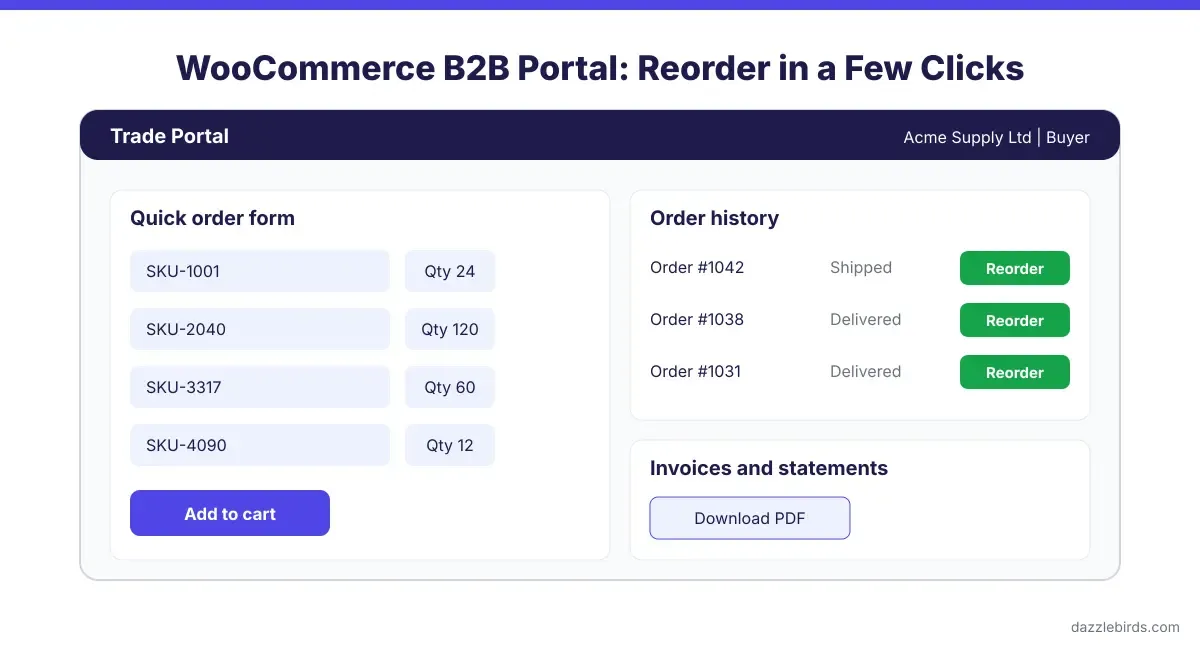
A WooCommerce B2B portal is a private area for your trade customers. Buyers log in to reorder, track shipments, download invoices, and manage users. It cuts support calls and speeds up repeat sales.
Most B2B revenue comes from reorders. So the portal matters more than the homepage.
Add these portal tools first:
- Quick order form. Buyers enter SKUs and quantities in one screen.
- Order history and reorder. One click repeats a past order.
- Invoices and statements. Buyers download what they need.
- Team accounts. Staff share one company account with set roles.
Plan for growth from day one. A portal that works for 20 buyers can fail at 2,000. Read how to keep a B2B customer portal fast as you scale.
Connect ERP and EDI to Your Wholesale Ecommerce Website
Manual order entry costs time and creates errors. A link to your ERP fixes that. Orders, stock, prices, and invoices move on their own.
Common data flows include:
- Orders from the store to the ERP
- Stock levels from the ERP to the store
- Customer price lists from the ERP to the store
- Invoice and shipment status back to the buyer
Some large retail and distribution buyers send orders by EDI. If you serve them, you will need an EDI link too.
Both jobs need careful planning. Map your data first. Then test with real orders. Our guides cover WooCommerce ERP integration for B2B and WooCommerce EDI integration.
Speed, Hosting, and Security for B2B Stores
B2B stores carry heavy data. Price lists, large catalogs, and many user roles all add load. A slow store loses repeat buyers fast.
Protect speed from the start:
- Pick strong hosting built for WooCommerce
- Cache pages and use an object cache for logged-in buyers
- Keep plugins few and well made
- Test large price lists with real data
- Run updates on a staging site first
Security matters too. Trade buyers share company and payment data. Use HTTPS, strong passwords, and role limits. Back up the store each day. Keep every plugin up to date.
How Much Does WooCommerce B2B Wholesale Cost?
Cost depends on scope. A small store with a few plugins costs far less than a custom portal with ERP sync. There is no single price.
These factors drive the price most:
- Number of B2B features. Pricing rules, quotes, and approvals each add work.
- Plugin licenses. Most charge a yearly fee.
- Custom development. Special rules and portal screens cost more.
- Integrations. ERP and EDI links are often the biggest line item.
- Design and migration. A move from another platform adds time.
- Hosting and support. Busy B2B stores need strong hosting and ongoing care.
Ask every agency for a fixed scope and a written quote. Get plugin fees and hosting costs listed apart. For deeper numbers, read our WooCommerce website development cost guide.
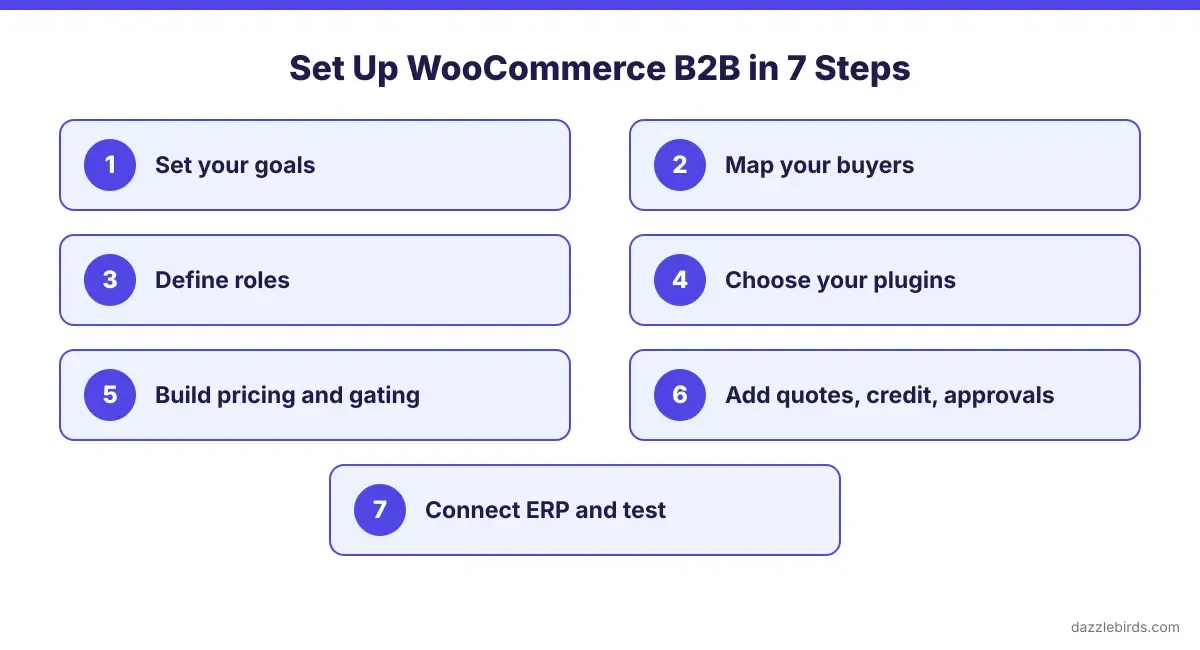
How to Set Up WooCommerce B2B in 7 Steps
Follow this order. It keeps the build simple and cuts rework.
- Set your goals. Decide what you want to fix. Is it fewer calls, faster orders, or larger baskets?
- Map your buyers. List buyer types, price tiers, and payment terms.
- Define roles. Set who can view, order, and approve.
- Choose your plugins. Buy for standard needs. Plan custom work for the rest.
- Build pricing and gating. Add price lists, hide prices, and set login rules.
- Add quotes, credits, and approvals. Set limits and sign-off rules.
- Connect your ERP and test. Run real orders on a staging site before launch.
Launch to a small group of trusted buyers first. Collect feedback. Then open the store to everyone. Train your sales team on the new flow. Show buyers where to find prices, quotes, and past orders. A simple welcome email helps them place their first order with ease.
Common Mistakes to Avoid
Most B2B builds fail for the same few reasons. Avoid these:
- Too many plugins. They slow the site and clash.
- No staging site. Updates break live stores.
- Weak roles. Buyers see the wrong prices.
- Skipping speed tests. Large price lists can crush page load.
- No plan for ERP. Late integration costs more.
A good agency spots these risks early. Plan for them before you write one line of code.
Ready to Build Your B2B Store?
You now know the features, plugins, costs, and steps. The next move is to scope your project. Share your pricing rules, buyer types, and systems. We will map the build and give you a clear quote.
Get a WooCommerce B2B Quote
FAQs
It is a WooCommerce store built to sell to businesses. It adds custom prices, buyer roles, quotes, credit terms, and ERP links to core WooCommerce. The result is a store that fits wholesale buying.
Yes. Wholesale stores on WooCommerce run well with the right plugins and custom code. You can set tier prices, minimum orders, tax rules, and trade-only access. Heavy stores need good hosting and clean code.
Start with user roles and login rules. Then add a quick order form, order history, and invoice access. Link it to your ERP when you are ready. Test on a staging site first.
The price depends on features, plugins, custom work, and integrations. A basic store costs less than a custom portal with ERP sync. Ask for a written quote with a fixed scope.
It depends on your needs. WooCommerce gives you full control and lower platform fees. SaaS platforms launch fast but limit custom rules. Choose WooCommerce if you need deep pricing logic or ERP links.



 WooCommerce Solutions
 Solutions for WordPress