A large distributor sends purchase orders through its procurement platform, not through a checkout page. If a WooCommerce seller has no way to receive that order automatically, someone on staff has to open an email, read a PDF, and key the order into WooCommerce by hand. The same happens in reverse: order confirmations, shipping updates, and invoices often have to be typed back into the buyer’s system. This manual loop is slow, error-prone, and does not scale once a business is working with more than a handful of enterprise accounts. WooCommerce EDI integration addresses this problem directly by letting structured business documents move between a buyer’s system and WooCommerce without manual re-entry.
What Is WooCommerce EDI Integration?
WooCommerce EDI integration is the process of connecting a WooCommerce store to trading partners using Electronic Data Interchange, a standardized format for exchanging business documents such as purchase orders, invoices, and shipping notices. WooCommerce handles product, customer, and order data on the storefront side, while an EDI provider or mapping layer translates documents between the buyer’s format and WooCommerce’s data structure. The result is automated, machine-to-machine exchange of B2B transactions instead of manual entry.
What Is EDI in B2B Ecommerce?
Electronic data interchange is a method for exchanging structured business documents in a standardized, machine-readable format so that two different computer systems can process the same transaction without a person retyping it. EDI is not simply an email with a PDF invoice attached. A PDF is designed for a human to read; an EDI document is designed for software to parse, validate, and act on automatically.
In practice, EDI relies on agreed-upon document formats so that a purchase order sent by a buyer’s procurement system arrives in a structure the receiving system already knows how to interpret. Common standards include ANSI X12 in North America and EDIFACT in international trade, though the specific standard used depends on the trading partner and industry.
A simple example: instead of a buyer emailing a spreadsheet of line items, their system transmits a structured purchase order document. That document is translated and mapped into a WooCommerce order, with SKUs, quantities, and pricing populated automatically, and no manual keying required.
Why Do B2B Businesses Use EDI With WooCommerce?
B2B sellers adopt EDI for reasons that mostly trace back to volume and consistency:
- High order volume. Once a seller processes dozens or hundreds of orders per day from repeat B2B accounts, manual entry becomes a bottleneck.
- Large enterprise customers. Many enterprise buyers require suppliers to support EDI as a condition of doing business; it is often a compliance requirement, not just a convenience.
- Procurement automation. Buyers want purchase orders to flow directly from their procurement platform into a supplier’s order system.
- Fewer transcription errors. Manual re-entry of SKUs, quantities, and addresses introduces mistakes that structured document exchange avoids.
- Faster order processing. Orders can move from the buyer’s system into WooCommerce and onward to fulfillment without waiting on a person to notice and enter them.
- Automated invoicing and shipping updates. Invoices and advance shipping notices can be generated and transmitted without manual document creation.
- Consistent transaction formats. Every order arrives in the same structure, which simplifies downstream processing in WooCommerce and connected systems.
None of this means every B2B WooCommerce seller needs EDI. It becomes worthwhile once trading-partner requirements or transaction volume make manual handling impractical, especially for sellers already investing in WooCommerce B2B ecommerce.
How Does EDI Work With WooCommerce?
At a practical level, a typical flow looks like this:
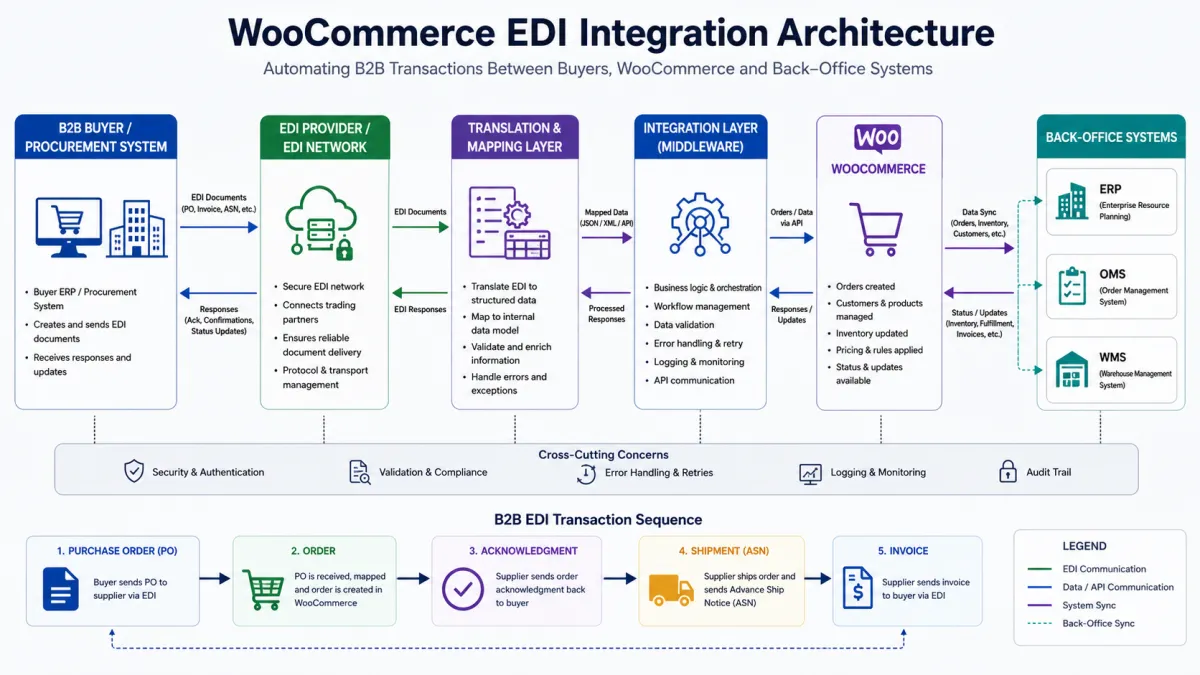
The customer procurement system generates an EDI document, which is picked up by an EDI network or provider, passed through a translation and mapping step, handled by an integration layer, and delivered into WooCommerce, with relevant data continuing on to an ERP, OMS, or WMS.
The exact architecture varies by company. Some sellers use an EDI provider that also performs the mapping and delivers finished order data directly into WooCommerce through its API. Others use a separate middleware platform that sits between the EDI provider and WooCommerce, handling transformation and business logic independently. The right shape depends on transaction volume, the number of trading partners, and how much logic needs to live outside WooCommerce itself.
WooCommerce EDI Integration Architecture
A resilient WooCommerce EDI integration is built from a small number of distinct components, each with a specific job. Treating them as interchangeable is a common source of confusion, so it helps to separate them clearly.
1. WooCommerce
WooCommerce holds product, customer, order, and transaction data on the storefront side. It is the system of record for what was ordered and from whom, but it is not designed to parse raw EDI files on its own.
2. Integration Layer
This layer is responsible for routing documents, transforming data between formats, validating incoming transactions, handling authentication, and managing errors. It is the connective tissue between the EDI provider and WooCommerce, and it is often where business rules such as customer matching or price validation live.
3. EDI Provider or Network
The EDI provider or network handles the actual communication and exchange of EDI transactions with trading partners, including the technical protocols for sending and receiving documents.
4. ERP, OMS, or WMS
Back-office systems handle inventory, fulfillment, accounting, and warehouse operations. Order data originating from EDI transactions often needs to reach these systems, not just WooCommerce. For a deeper look at that connection on its own, see WooCommerce ERP integration.
5. PIM
A product information management system may supply catalog data, such as descriptions and specifications, that feeds into WooCommerce or into outbound EDI product documents, where that relationship exists.
Which EDI Documents Can WooCommerce Exchange?
The specific documents supported in any given WooCommerce EDI integration depend on the EDI provider, the trading partner’s requirements, and the standards in use. Not every implementation supports every transaction type. The table below covers concepts that commonly appear.
| EDI Transaction |
Common Code |
Purpose |
| Purchase Order |
850 |
The buyer sends an order to the supplier |
| Order Acknowledgment |
855 |
The supplier confirms, rejects, or adjusts the order. |
| Advance Ship Notice |
856 |
Communicates shipment contents and timing |
| Invoice |
810 |
Sends billing information to the buyer |
| Product or Item Data |
Varies |
Shares product information relevant to the trading relationship |
| Functional Acknowledgment |
997 |
Confirms that a document was received and processed |
These codes reflect widely used ANSI X12 conventions, but actual document sets vary by trading partner, industry, and EDI standard.
How EDI Purchase Orders Reach WooCommerce
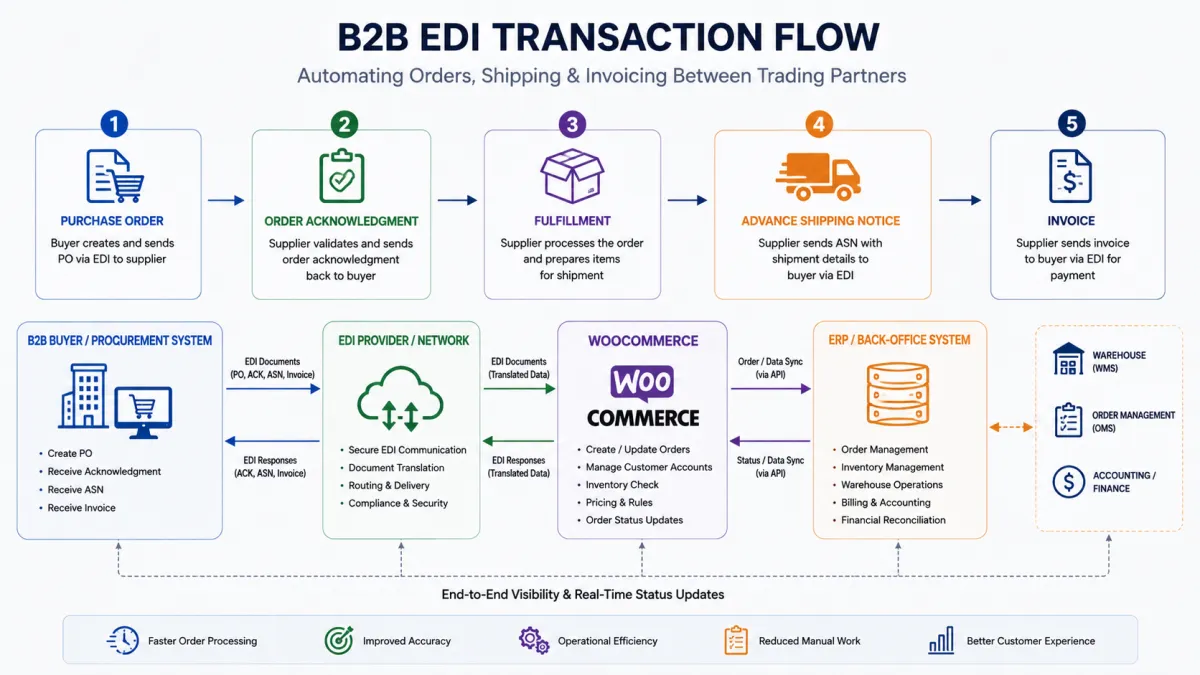
A purchase order moving through a WooCommerce EDI integration typically follows a sequence like this:
- The buyer creates a purchase order in their procurement system.
- An EDI document is generated in the agreed format.
- The EDI provider receives the transmitted document.
- The document is translated into a common data structure.
- Data is validated against expected fields and formats.
- Product and customer identifiers are matched against WooCommerce records.
- WooCommerce receives the order data and creates the order.
- Relevant order information is passed to the ERP or OMS.
- A confirmation or acknowledgment is generated where the trading relationship requires one.
- The acknowledgment is transmitted back to the buyer.
The technical focus here is the transaction flow itself, not general purchase order management inside WooCommerce; readers looking for that broader topic can refer to WooCommerce purchase order management.
How EDI Order Acknowledgments Work
An order acknowledgment tells the buyer what actually happened to their purchase order, which is important because a submitted order is not automatically a guaranteed order. An acknowledgment can indicate that an order was accepted in full, rejected, partially accepted, or affected by backordered items or quantity changes.
Once WooCommerce or the integration layer determines the outcome for an order, that outcome needs to be translated back into an EDI acknowledgment document and transmitted to the buyer through the same channel the purchase order arrived on. The specific rules for what counts as an acceptable acknowledgment, and how quickly it must be sent, are typically defined by the trading partner rather than by WooCommerce. This process connects closely with general WooCommerce order automation, though the acknowledgment itself is an EDI-specific document.
EDI Shipping Notices and Invoices With WooCommerce
Two document types generally follow order fulfillment.
Advance Shipping Notice
An advance shipping notice communicates what has shipped, how it was packed, and when it is expected to arrive, before the buyer physically receives the goods. This lets the buyer’s warehouse or receiving team plan ahead rather than reacting when a shipment arrives unannounced.
Invoice
An EDI invoice transmits billing information in a structured format the buyer’s accounts payable system can process automatically, rather than requiring a person to key in amounts from a PDF.
The relationship between these documents generally follows: order, then fulfillment, then shipment, then invoice. Each stage can generate its own EDI transaction, and each one depends on accurate data from the stage before it.
Can EDI Synchronize Product and Customer Data?
EDI can be used to exchange various kinds of data depending on the trading relationship, including SKUs, customer and vendor identifiers, product descriptions, units of measure, pricing where applicable, availability where supported, addresses, and account information.
It is worth distinguishing between EDI transaction documents, which move discrete business events like a specific order or invoice, and master-data synchronization, which keeps reference data like product catalogs or customer records aligned across systems on an ongoing basis. EDI is not necessarily the best tool for every master-data use case; some trading relationships handle catalog and pricing synchronization through other mechanisms entirely, such as those covered in WooCommerce product import and export, and EDI is reserved for transactional documents.
EDI vs API: What’s the Difference?
EDI and APIs solve related but distinct problems, and understanding the difference helps clarify where each fits in a WooCommerce integration.
| Factor |
EDI |
API |
| Purpose |
Structured B2B transactions |
System-to-system integration |
| Typical use |
Trading partners |
Application integrations |
| Data exchange |
Document-based |
Request and response, or event-based |
| Standards |
EDI standards such as X12 or EDIFACT |
API formats and protocols such as REST |
| Partner onboarding |
Often formal, with testing cycles |
Often developer-led |
| Real-time capability |
Depends on implementation |
Often real-time |
EDI and APIs are not necessarily competing technologies. A WooCommerce EDI integration often uses the WooCommerce REST API internally to create orders or update statuses, while EDI handles the exchange of documents with the external trading partner. The two layers work together rather than replacing one another; for a closer look at that API layer on its own, see WooCommerce API integration.
EDI vs cXML for B2B WooCommerce
Traditional EDI exchanges discrete documents such as purchase orders and invoices between systems, often through batch or scheduled transmission. cXML is a different protocol frequently used by procurement systems, particularly in PunchOut scenarios where a buyer’s employee browses a supplier’s catalog from inside their own procurement platform and returns a cart to that platform for approval.
Whether EDI or cXML is relevant depends on how a given trading partner’s procurement system is built. Some buyers require traditional EDI for order and invoice exchange. Others expect a PunchOut catalog experience built on cXML. Some enterprise relationships use both, with cXML handling catalog browsing and EDI handling the underlying transaction documents. This comparison is intentionally kept brief here, since the mechanics of PunchOut deserve their own dedicated treatment.
EDI Data Mapping for WooCommerce
Data mapping is where a WooCommerce EDI integration either works reliably or breaks down under real-world data. The general pattern is an external EDI field goes through a transformation rule, and the result populates a WooCommerce field.
Typical mappings include:
- Buyer PO number to WooCommerce order metadata
- Buyer SKU to WooCommerce SKU, often through a cross-reference table rather than a direct match
- Quantity to order line quantity
- Customer ID to a customer or account record in WooCommerce
- Ship-to address to the WooCommerce shipping address
- Requested delivery date to order metadata
Behind these examples sit several technical concerns that determine whether mapping holds up in production: field-level mapping definitions for every document type, transformation logic for values that do not match format between systems, validation rules that catch malformed data before it reaches WooCommerce, default values for optional fields the buyer’s system does not send, clear rules for which fields are required versus optional, unit-of-measure conversion where the buyer and seller use different units, and a defined process for handling identifier mismatches when a buyer’s SKU does not have an obvious WooCommerce counterpart.
How to Secure WooCommerce EDI Integrations
Security in a WooCommerce EDI integration is less about a single setting and more about a set of consistent principles applied across every connection point:
- Strong authentication for every system involved in the exchange, including the EDI provider, the integration layer, and WooCommerce’s API
- Secure handling of API credentials, with no credentials embedded directly in code or exposed in logs
- Use of certificates where the EDI provider or trading partner requires them
- HTTPS and TLS for all data in transit
- IP restrictions where appropriate for the systems involved
- Clearly defined access controls limiting who and what can read or write transaction data
- Proper secrets management rather than storing credentials in plain configuration files
- Encryption of sensitive data, both in transit and at rest where applicable
- Audit logs that record what happened to each transaction and when
- Least-privilege access, so each system component has only the permissions it actually needs
- Transaction traceability, so a specific order or invoice can be traced back through every step it passed through
These are principles rather than a specific implementation, since the exact security configuration depends on the EDI provider and the sensitivity of the data involved.
How Should WooCommerce EDI Errors Be Handled?
Errors are a normal part of any B2B integration, not a sign that something was built incorrectly. What matters is how they are detected and resolved. Common failure points include an invalid or unrecognized SKU, an unknown customer identifier, a missing required field, a duplicate order transmission, an invalid quantity, an invalid or incomplete address, a mapping failure between the EDI document and WooCommerce fields, a communication failure with the EDI provider, a failure calling the WooCommerce API, and a failure synchronizing data onward to the ERP.
A workable error-handling approach follows a consistent sequence: detect the failure, log it with enough detail to diagnose the cause, retry where the failure might be transient, alert the appropriate team when retries are exhausted or the failure is not transient, resolve the underlying issue, and reprocess the transaction once it is fixed.
Idempotency deserves specific attention here. Because EDI documents can be retransmitted, whether due to a network issue or a trading partner resending a document, the integration layer needs a reliable way to recognize that a given purchase order or invoice has already been processed, so the same transaction does not create a duplicate order in WooCommerce.
Real-Time vs Scheduled EDI Processing
Real-time or event-driven processing delivers documents as soon as they arrive, which suits trading partners who expect fast order acknowledgment or need immediate visibility into order status. The tradeoff is that real-time systems generally require more robust error handling, since there is less room to batch and review transactions before they take effect.
Scheduled or batch processing groups transactions and processes them at defined intervals. This can simplify monitoring and make it easier to review a batch before it affects downstream systems, but it introduces delay between when a document arrives and when it is actually reflected in WooCommerce or the ERP.
The right approach depends on trading partner requirements, transaction volume, how time-sensitive the business process is, what the EDI provider actually supports, how the ERP is architected, and how much delay is tolerable if something fails and needs to be reprocessed. EDI is not inherently real-time; that capability depends entirely on how the specific integration is built.
How to Scale EDI for Enterprise WooCommerce
As the number of trading partners and transaction volume grows, a WooCommerce EDI integration needs infrastructure that goes beyond handling one order at a time. Relevant considerations include queue-based processing to absorb spikes in transaction volume, retry mechanisms for transient failures, monitoring and logging across every stage of the flow, awareness of rate limits on the WooCommerce API and the EDI provider, horizontal scaling of processing components where the platform supports it, batch processing for high-volume, less time-sensitive transactions, consistent transaction identifiers to support traceability, idempotency to prevent duplicate processing, dead-letter or error queues to isolate transactions that repeatedly fail, alerting when failure rates or backlogs exceed expected thresholds, and observability into the health of the pipeline as a whole.
A direct, point-to-point integration built for a single trading partner can work well at a small scale, but it tends to become difficult to maintain as more partners are added, since each one may have slightly different document formats, mapping rules, and operational requirements. These scaling concerns overlap with the broader question of WooCommerce scalability as transaction volume grows.
Ways to Implement EDI With WooCommerce
There are several structural approaches to building a WooCommerce EDI integration, each with tradeoffs.
EDI plugin or extension. Can be a reasonable starting point for simpler transaction sets and lower volume, though plugins vary widely in which document types and trading-partner requirements they actually support.
EDI provider. Many EDI providers offer trading-partner onboarding, translation, and delivery as a service, reducing the amount of custom code needed, though the integration layer connecting the provider’s output to WooCommerce still needs to be built or configured.
Middleware or integration platform. A dedicated middleware layer can centralize mapping, validation, and routing logic across multiple trading partners and systems, which tends to pay off once the number of partners or transaction types grows.
Custom integration. Building the mapping and integration logic directly offers the most control but requires ongoing engineering investment to maintain as trading-partner requirements change.
Hybrid architecture. Many enterprise implementations combine an EDI provider for network connectivity with custom or middleware logic for mapping and business rules, which allows a business to change providers or add partners without rebuilding the entire integration.
The right choice depends on transaction volume, the number of trading partners, in-house technical capacity, and how much control the business needs over mapping and error handling.
Example: Manufacturer Connecting WooCommerce to Enterprise Buyers
The following is a hypothetical scenario, not a description of an actual DazzleBirds client, used to illustrate how the pieces fit together.
A manufacturer sells through WooCommerce to several enterprise buyers, each with their own procurement system. One buyer’s system generates a purchase order, which is transmitted to the manufacturer’s EDI provider. The EDI provider delivers the document to the integration layer, which validates the data, maps buyer SKUs to WooCommerce SKUs, and matches the buyer’s account to the correct WooCommerce customer record. WooCommerce creates the order, and relevant order data is passed to the ERP for inventory allocation and fulfillment planning.
Once the order ships, the ERP or fulfillment system generates shipment details, which flow back through the integration layer as an advance shipping notice sent to the buyer. After the shipment is confirmed, an invoice document is generated and transmitted through the same EDI channel, completing the transaction cycle from purchase order through to billing.
Common WooCommerce EDI Integration Mistakes
- Poor data mapping. Loose or undocumented mapping rules lead to orders with missing or incorrect data.
- No duplicate-order protection. Retransmitted documents create duplicate WooCommerce orders without idempotency checks.
- No error queue. Failed transactions get lost instead of being isolated for review.
- No transaction monitoring. Failures go unnoticed until a trading partner complains.
- Hard-coded trading-partner rules. Logic specific to one buyer becomes tangled with general integration logic, making changes risky.
- No validation. Malformed or incomplete documents are processed as if they were valid.
- Ignoring SKU mismatches. Buyer SKUs that do not match WooCommerce records are allowed through without a resolution process.
- Weak authentication. Credentials are reused across systems or stored insecurely.
- No retry strategy. Transient failures, such as a brief network interruption, are treated as permanent failures.
- No audit trail. There is no way to trace what happened to a specific transaction after the fact.
- Treating every trading partner the same. Different buyers often have different document formats and requirements that a one-size-fits-all approach cannot handle.
- Building a fragile point-to-point architecture. An integration built for one partner becomes difficult to extend as more partners are added.
WooCommerce EDI Integration Best Practices
A reliable WooCommerce EDI integration tends to share a common set of practices regardless of which implementation approach is used:
- Define a canonical data model that WooCommerce and the integration layer both work against
- Maintain explicit, documented mappings for every trading partner and document type
- Validate incoming transactions before they reach WooCommerce
- Use idempotent processing to prevent duplicate orders from retransmitted documents
- Log every transaction, including successes, not only failures
- Monitor for failures actively rather than relying on trading partners to report them
- Build retry mechanisms for transient errors
- Protect credentials through proper secrets management
- Separate integration logic from storefront logic so changes to one do not risk breaking the other
- Document trading-partner requirements, including which document types and fields each partner uses
- Test with realistic transaction scenarios, not just clean, ideal-case documents
- Monitor transaction latency to catch slowdowns before they become failures
- Plan for scaling from the start, even if current volume is modest
- Maintain clear ownership of the integration so issues have a defined owner rather than falling through the cracks
Implementation Checklist
Business requirements
- Trading partners identified
- Transaction types identified
- SLA requirements documented
Technical requirements
- WooCommerce data model reviewed
- ERP, OMS, and WMS mappings documented
- Integration architecture selected
- Authentication defined
Operational requirements
- Monitoring in place
- Error handling defined
- Retry strategy defined
- Audit trail established
- Support ownership assigned
Testing
- Purchase order testing
- Acknowledgment testing
- Shipment testing
- Invoice testing
- Failure scenario testing
- Duplicate transaction testing

SEO, AEO, and GEO Considerations
For search visibility, the article uses descriptive headings, explains EDI terminology in context, links to related integration content, and avoids keyword stuffing.
For answer-engine optimization, questions are answered directly throughout, including what WooCommerce EDI integration is, how EDI works with WooCommerce, whether WooCommerce can receive EDI purchase orders, which EDI documents WooCommerce can support, whether EDI is better than an API, whether EDI can connect WooCommerce to an ERP, how EDI errors are handled, and whether EDI integrations can scale.
For generative-engine optimization, the article states entity relationships explicitly: buyer to EDI to integration layer to WooCommerce to ERP, and purchase order to acknowledgment to shipment to invoice, so the relationships are easy for answer engines to extract.
Conclusion
For B2B sellers working with enterprise buyers, manual order entry becomes a real constraint once volume or trading-partner requirements grow past a certain point. WooCommerce EDI integration solves this by automating the exchange of purchase orders, acknowledgments, shipping notices, and invoices between a buyer’s procurement system and WooCommerce, with an ERP, OMS, or WMS typically involved on the back end. Getting this right depends less on any single tool and more on disciplined data mapping, validation, and error handling, along with security practices that protect credentials and transaction data at every step. Monitoring and scaling considerations matter just as much once more than one or two trading partners are involved. Not every B2B WooCommerce business needs EDI on day one, but for sellers serving enterprise buyers with compliance requirements or high order volume, it is worth evaluating as a core part of the integration architecture.
FAQs
It is the connection between a WooCommerce store and trading partners using Electronic Data Interchange, allowing structured documents like purchase orders and invoices to move automatically between systems instead of being entered by hand.
Yes, through an EDI provider and integration layer that translates the incoming document and maps it to a WooCommerce order. WooCommerce itself does not parse raw EDI files natively, so a translation step is required.
A typical approach detects the failure, logs details, retries transient errors, alerts the responsible team when needed, resolves the cause, and reprocesses the transaction, with idempotency used to avoid duplicate orders.
Timelines vary based on the number of trading partners, transaction types, and implementation approach chosen, and typically include a testing phase covering normal transactions as well as failure and duplicate scenarios.
It becomes worth considering when order volume from repeat B2B accounts makes manual entry impractical, or when enterprise buyers require EDI compliance as a condition of the trading relationship.



 WooCommerce Solutions
 Solutions for WordPress